Card Quick Start
Author one damage card end to end: identity fields in the Workbench, behavior in the FlowGraph, a deck slot, and a live test.
For your first authored card. Start from the structure of a shipped demo card rather than a blank canvas.The goal of this page is one card that enters the hand, spends energy, and drops an enemy's HP. That path touches every layer of GCS authoring once, which makes it the best possible first exercise.
Start from existing working content. The fastest route is to duplicate a simple demo attack inside an active card database, then adapt the duplicate to your design. A blank card in an empty database gives you errors before it gives you useful feedback.
Step 1: Open Card mode
Open the Workbench and switch to the Card tab:
Tools/TinyGiants/GCS/Game Card Editor
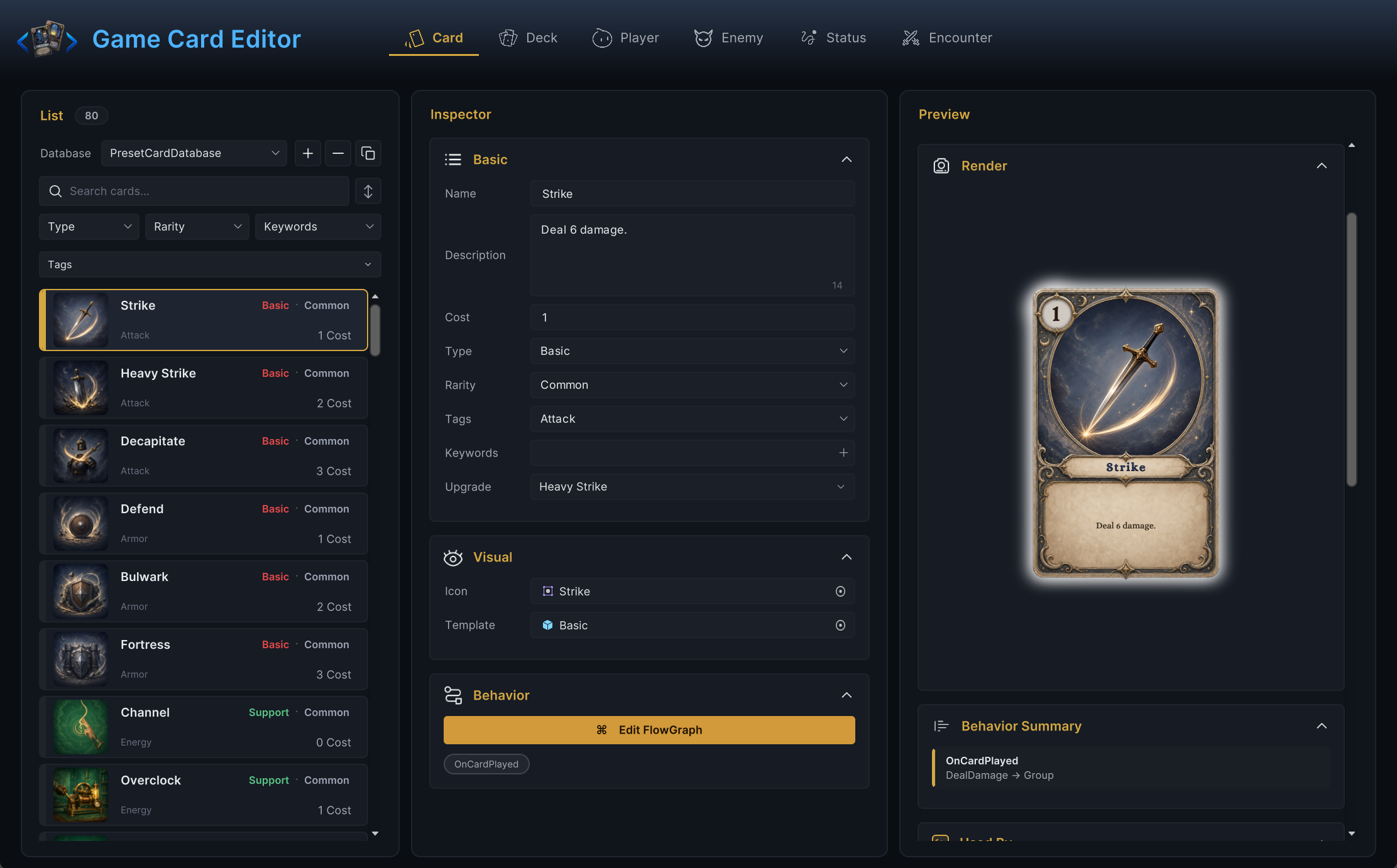
The list shows the cards of the active card databases registered on the scene's GameCardManager. If it comes up empty, go back to the System Dashboard, initialize the scene, and confirm a card database is active.
With the preset databases active, you should see the 80 demo cards in the list, the inspector in the middle, and a live card preview on the right:
Step 2: Duplicate a demo attack
The list toolbar has two creation buttons: + makes a blank card, ⧉ duplicates the selected one. Select Poison Arrow (search finds it instantly) and press ⧉, then rename the copy in the inspector.
Duplicating gives you two things a blank card lacks. The duplicate includes a proven behavior graph you can trim instead of building from scratch, and it keeps Poison Arrow's single-target aiming, so playing it still asks you to pick an enemy.
A card created with + never asks for a target when played; only its graph decides who is affected. That is fine for self buffs and whole-board effects, but for a "hit that enemy" card, duplicate a single-target attack and keep its aiming.
You should see your copy appear in the list next to the original, and the preview column render it exactly like Poison Arrow until you start editing.
Step 3: Fill the identity fields
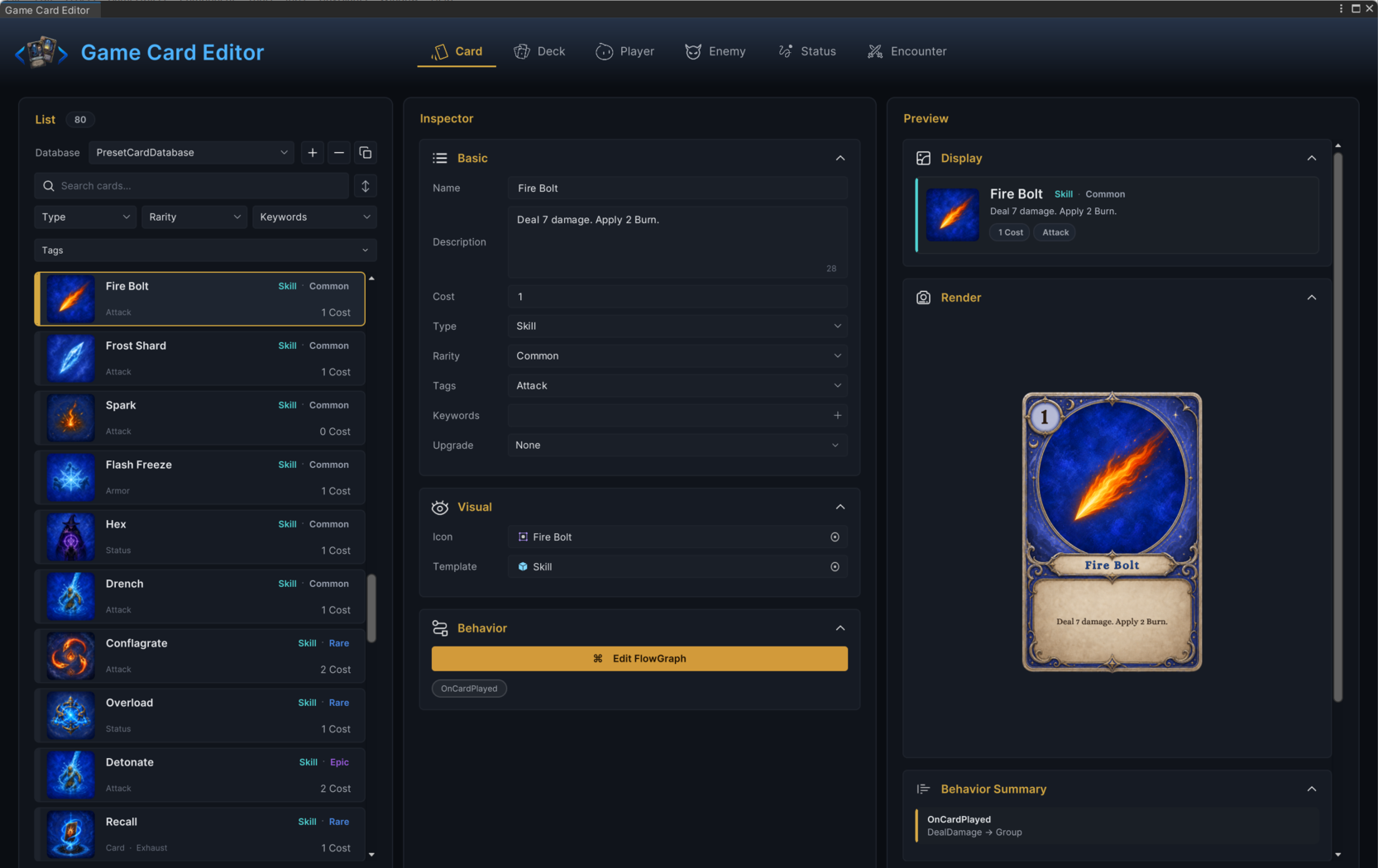
The card inspector groups its fields into Basic, Visual, and Behavior foldouts. For a first card, the Basic foldout decides whether the card can be played at all:
| Field | First-card guidance |
|---|---|
| Name | Short and readable. It renames the asset too, so search finds it later. |
| Description | Player language, matched to the graph. If the card deals 3 damage, the text says 3. |
| Cost | Energy to play. Start at 1 so the card is affordable on turn one. |
| Type | A category label used for coloring and filtering. The demo uses Basic, Skill, Burst, Support, and Curse; pick one from the dropdown or type your own. |
| Rarity | Common for now. |
| Tags | Free labels for your own filtering and synergies, with no built-in behavior. Skip them until search or rewards need them. |
| Keywords | Engine rules with built-in behavior, such as Exhaust, Retain, or Unplayable. Leave empty unless you are deliberately testing one. |
| Upgrade | The card this one becomes when upgraded. None is fine today. |
In the Visual foldout, Icon is the artwork sprite and Template is the prefab rendered as the card face. The demo assets that came along with the duplicate are fine; art can arrive last.
When the fields are in, the preview column should already read like a finished card: your name on the demo frame, cost 1 in the corner, and your rules text below the art.
The demo's Fire Bolt shows that target state, every Basic field filled and the preview reading like a real card:
Step 4: Wire the behavior
Press Edit FlowGraph in the Behavior foldout. For the first version, trim the copied graph down to two nodes:
On Card Played → Deal Damage
On the Deal Damage node, set Amount to 3 and leave Target on Opponent. For a card the player aims, Opponent means the enemy picked when the card was played.
Keep the graph linear. Branches, loops, random picks, and status hooks all work, but none of them should enter the picture before the two-node version hits for 3.
For a shipped example of the same shape, open the original Poison Arrow: an On Card Played entry, a Deal Damage node, effect nodes for presentation, and a Change Status node that adds Poison.
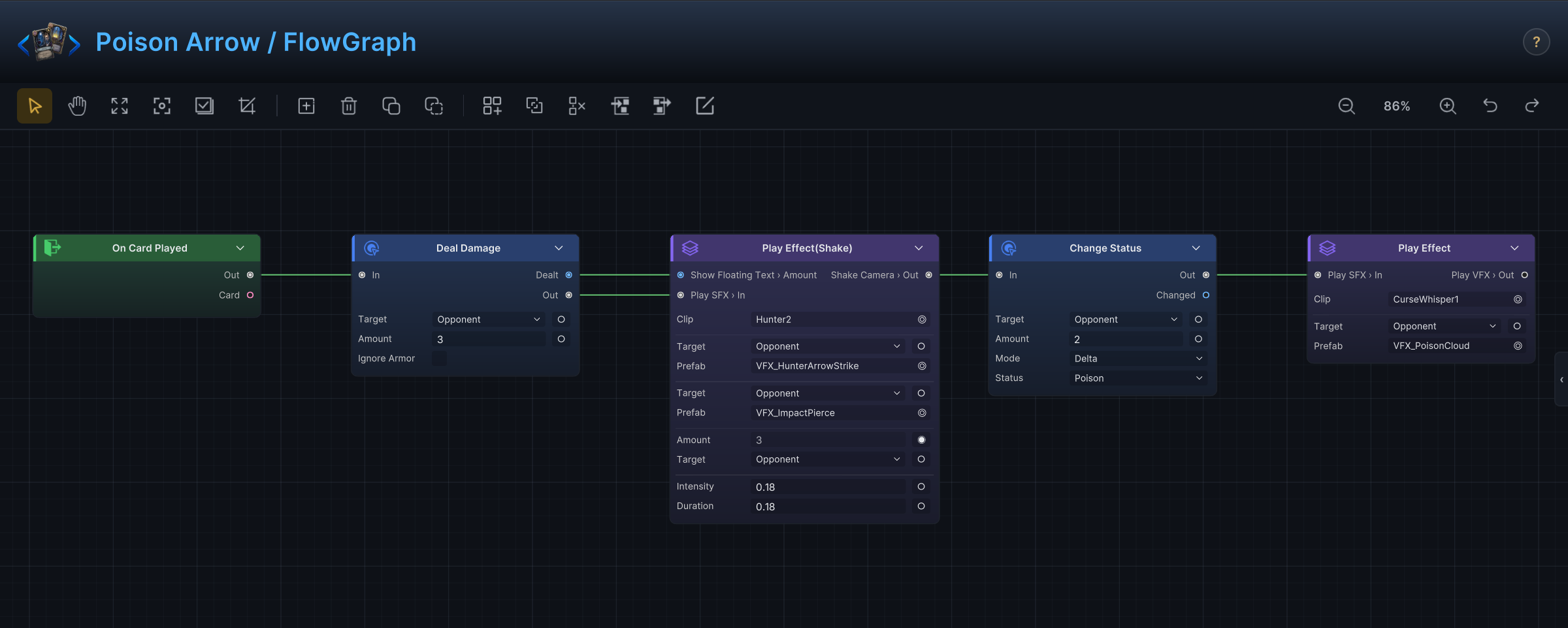
The question that picks a node is never "which C# type does this use?" It is "when I play this card, what should happen to the selected enemy?" Choose nodes by the answer.
Close the graph. Back in the Workbench, the Behavior foldout should now show a chip for the graph's entry under the Edit FlowGraph button. That chip is your proof the card owns live behavior.
Step 5: Put the card in a deck
A card does not appear in battle merely because it exists in a database. The runtime only reaches it through this chain:
Two links must hold:
| Link | Must be true |
|---|---|
| Deck entry | A deck contains your card with at least one copy. |
| Player unit | The test player's assigned deck (the Deck section in Player mode) is that same deck. |
Switch to Deck mode and add the card to the deck your test player draws from. In the demo's first Hunter scene, Fenmoss Hollow, that player is Scout and the deck is First Hunt. For a fast test, add several copies or shrink the deck so your card shows up in the opening hand.
You should see the deck's card count rise in the Cards section header, which reads like 7 cards · 17 copies.
Step 6: Test it in battle
Start an encounter that uses your test player, then check each claim in order:
- The card appears in hand with the expected cost and text.
- Playing it asks you to pick a living enemy.
- The play spends 1 energy and the target's HP drops by 3.
- The card leaves the hand according to its rules.
- The Console stays clean through the whole resolution.
When all five hold, your first card is done, and every card after it follows the same path with fewer surprises.
Common mistakes
| Symptom | Likely cause |
|---|---|
| Card never appears | Not in the player's deck, the deck not assigned to the player, or the card database is not active. |
| Card visible but greyed out | Energy below the cost, not the player phase, or a status hook blocks the play. |
| Playing never asks for a target | The card was created blank with +. New cards start untargeted; duplicate a single-target demo attack such as Poison Arrow to keep the pick-an-enemy step. |
| Card plays but nothing happens | The graph has no connected path from its entry, or the Deal Damage node's Target resolves to someone else. |
| Text and behavior disagree | Fix one of them now. Players trust the card text; a lying card reads as a bug. |