Encounter Quick Start
Assemble a player unit, an enemy lineup, a reward deck, and battle rules into one encounter asset and start it in Play Mode.
For developers whose player, deck, card, and enemy each work on their own and now need the battle that ties them together.The encounter is the asset the runtime actually starts. Everything you have authored so far (cards, statuses, decks, units) only becomes playable once an encounter references it. This page builds one encounter and verifies it end to end.
Step 1: Open Encounter mode
Open the Workbench and switch to the Encounter tab:
Tools/TinyGiants/GCS/Game Card Editor
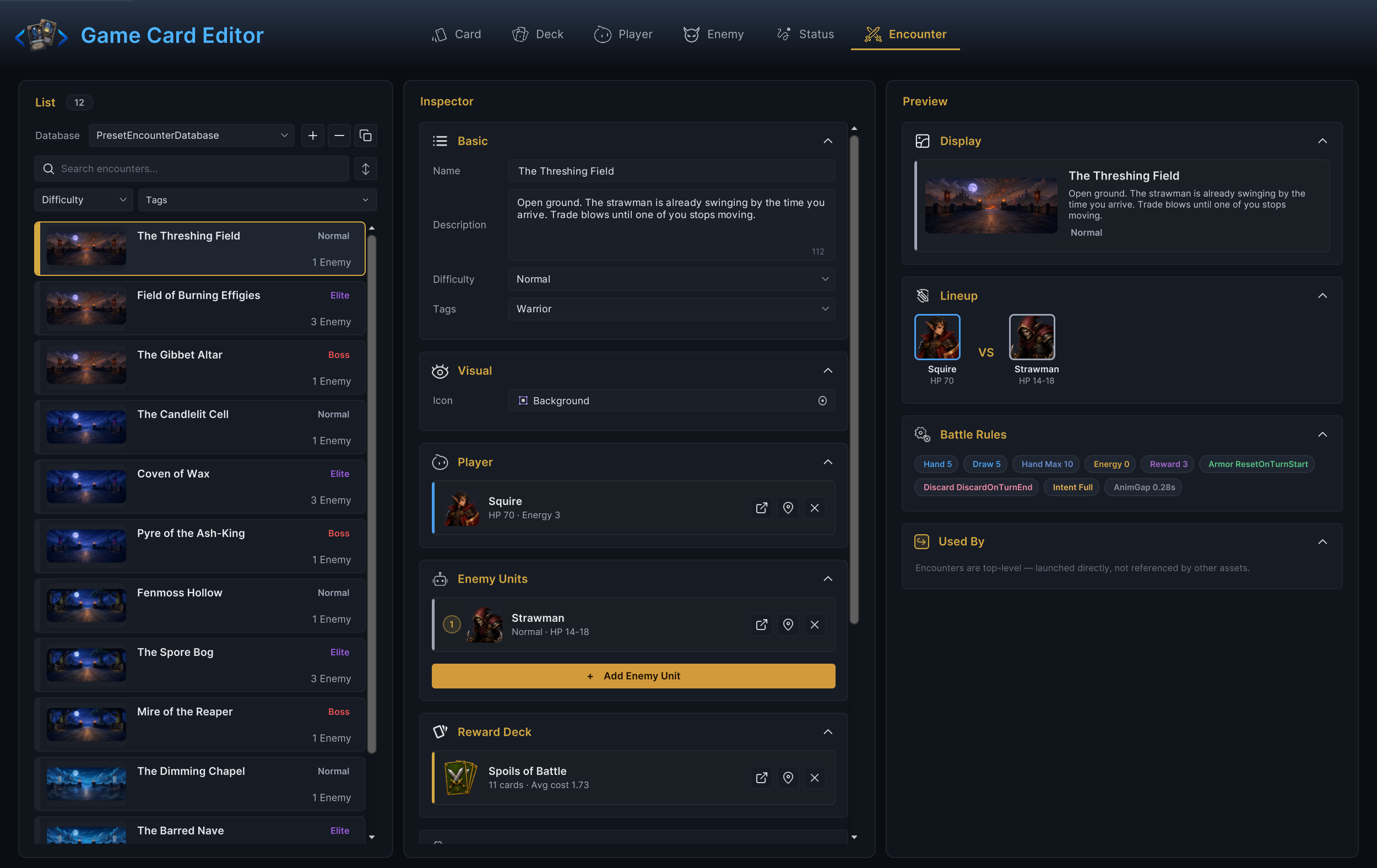
The left column lists encounters from the encounter databases registered on the scene's GameCardManager. If the list is empty, activate an encounter database on the manager first.
With the preset databases active, you should see the 12 demo encounters, each tagged Normal, Elite, or Boss. Selecting one fills the inspector with the sections you are about to work through:
Step 2: Create the encounter and name it
Create a new encounter with +, or duplicate a demo encounter that already starts correctly with ⧉ and rework the copy. Then fill the Basic and Visual sections:
| Field | Guidance |
|---|---|
| Name | Shown in editor lists, and in your own UI if you build an encounter picker. |
| Description | A short flavor blurb or authoring note. |
| Difficulty | A free label. The demo uses Normal, Elite, and Boss; pick one or type your own. |
| Tags | Optional labels for filtering or progression logic. |
| Icon | Optional battle banner or preview image. |
Difficulty is a display and grouping label, nothing more. Hand size, draw count, energy, and rewards all come from the Battle Rules section below, not from this string.
At this point the inspector should show your name and difficulty at the top, with the Player section below still flagging that a player unit is required.
Step 3: Pick the player
In the Player section, choose a player unit that already has its HP, energy, deck, and prefab configured (those live in Player mode as Base HP, Base Energy, the Deck section, and Template). The deck matters most here. If the unit points at the wrong deck, your new cards never show up, even though the battle starts fine.
Once picked, the Player section should show the unit's card with its summary, like HP 70 · Energy 3 for the demo Hunter Scout, and the "Player Unit is required" hint should disappear.
Step 4: Add enemy units
Press Add Enemy Unit and pick at least one enemy. Start with exactly one; bring in more only after the single-enemy battle starts, telegraphs intent, and resolves turns.
The list is ordered: each entry gets a numbered slot, you can drag rows to reorder them, and the demo board fills its enemy positions in slot order. Arrange the list deliberately once you go multi-enemy.
You should see the enemy sitting in slot 1 with its tier and HP range, like Normal · HP 14-18 for the demo's Plague Stalker.
Step 5: Pick a reward deck
Reward Deck is where victory card rewards come from. On a win, the reward screen offers cards rolled from this deck: entries with more copies are more likely to be offered, and no card is offered twice in the same roll. Reuse a demo reward deck for the first test; the Hunter scenes use Wild Harvest.
An encounter without a reward deck still ends cleanly. The victory screen has no cards to offer.
Step 6: Set the battle rules
The Battle Rules section holds the per-encounter gameplay rules. The defaults below are the code defaults, and the demo battles ship with the same values, so you can leave them untouched for a first run.
| Rule | Default | Meaning |
|---|---|---|
| Starting Hand Size | 5 | Cards drawn when the battle starts. |
| Draw Per Turn | 5 | Cards drawn at the start of every turn after the first. |
| Max Hand Size | 10 | Hard cap on the hand. Draws past the cap are discarded. |
| Starting Energy | 0 | 0 means the player unit's Base Energy is the per-turn energy. Any value above 0 replaces it for this encounter. |
| Card Reward Count | 3 | How many cards the victory screen offers from the reward deck. With a reward deck set, the runtime offers at least 1. |
| Armor Decay | ResetOnTurnStart | Whether armor clears at turn start or persists between turns. |
| Hand Discard | DiscardOnTurnEnd | Whether the hand is discarded at turn end or carries over. |
| Enemy Intent Display | Full | Full shows the intent with its value, IconOnly shows only the icon, Hidden shows nothing. |
| Animation Gap | 0.28 | Seconds of pause between resolution steps. |
These rules are player-visible gameplay decisions. When a rule already exists here, set it here; do not bury the same behavior in code where designers cannot see it.
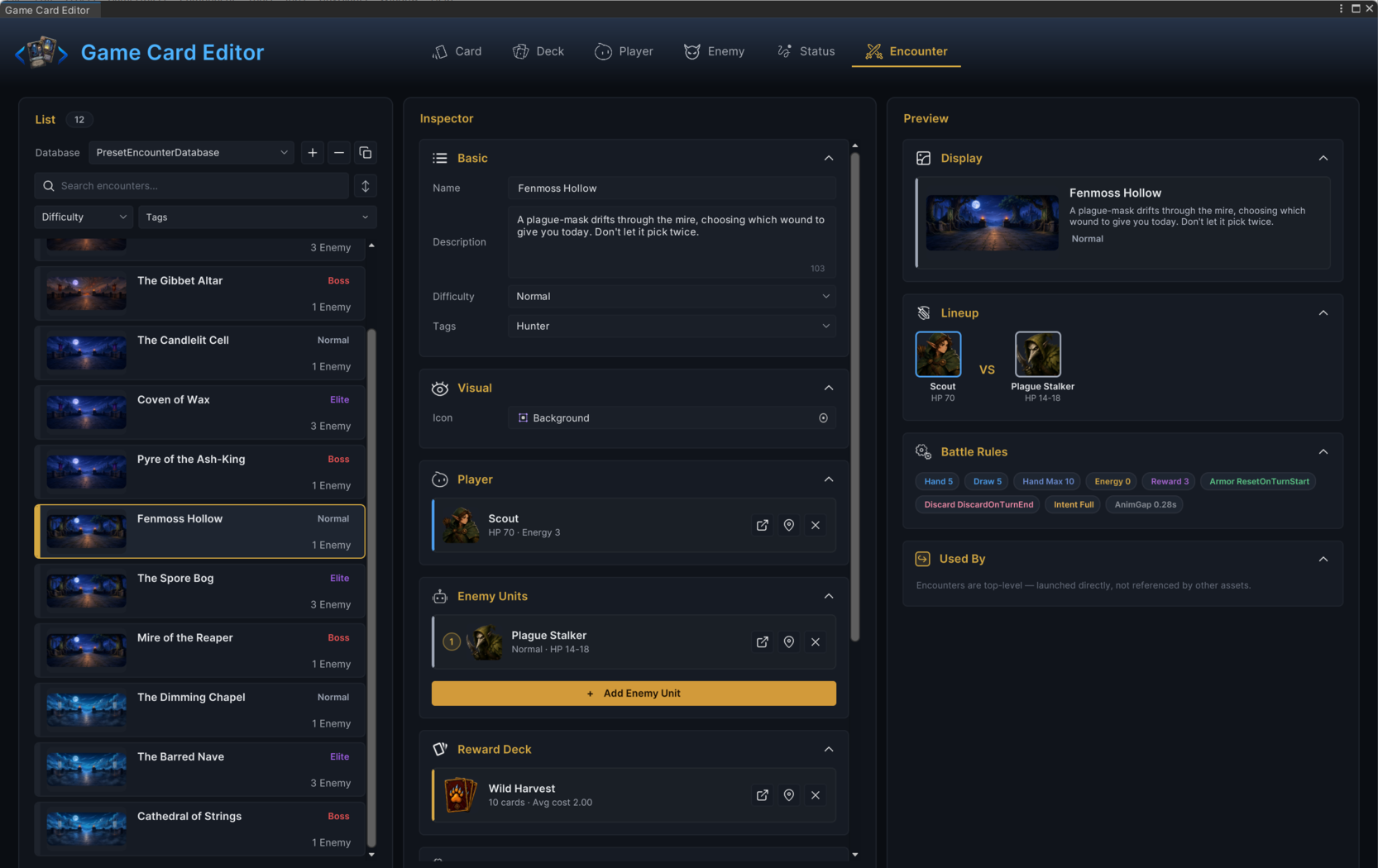
With all sections filled, the inspector should read top to bottom like a battle spec: identity, player, lineup, rewards, rules.
Fenmoss Hollow, the demo's first Hunter fight, reads exactly that way:
Step 7: Start the encounter
- Bootstrap component
- C# API
For a code-free start, use GameCardEncounterBootstrap. It sits on the same GameObject as GameCardManager and starts a battle the moment Play Mode begins.
| Field | Value for a first test |
|---|---|
| Default Encounter | The encounter created in this walkthrough. |
| Auto Start On Play | Enabled. This is the default. |
If Default Encounter is empty while Auto Start On Play is enabled, the bootstrap logs a warning and does nothing. Check this field first when Play Mode starts but no battle appears.
If your game controls battle flow itself, start the encounter through the API:
using UnityEngine;
using TinyGiants.GCS.Runtime;

public sealed class EncounterStarter : MonoBehaviour
{
    [SerializeField] private GameEncounter encounter;

    private void Start()
    {
        GCSApi.StartBattle(encounter);
    }
}
Both paths end in the same battle start; pick whichever fits your project.
Press Play. You should see the board build itself: the player spawns, enemies fill their slots, and the opening hand fans out.
Step 8: Verify the battle
The encounter works when all of these hold:
- The chosen player appears with the expected deck and HP.
- Every listed enemy spawns with HP inside its configured range.
- The opening hand matches Starting Hand Size.
- Energy matches Starting Energy, or the player's Base Energy when the rule is
0. - Intent icons appear when the display rule allows them.
- Ending the turn runs the enemy actions.
- Victory shows the reward screen, with card choices whenever a reward deck is set.
- The Console stays free of missing-database, missing-prefab, and null-encounter errors.
Common mistakes
| Symptom | Likely cause |
|---|---|
| Play Mode starts but no battle appears | Default Encounter is empty on the bootstrap, or Auto Start On Play is off. |
| Battle starts with the wrong player | The encounter points at a copied or outdated player unit. |
| New cards never appear | The player unit's deck is not the deck you edited. |
| No enemies appear | The Enemy Units list is empty or its slots reference deleted enemy assets. |
| Victory offers no cards | Reward Deck is missing or has no entries. |
| First-turn draw looks wrong | Starting Hand Size, Draw Per Turn, and Max Hand Size are fighting each other; draws past the cap are discarded. |