Built-In Node Library
GCS ships 140+ built-in FlowGraph nodes in nine Add Node menu groups. This page maps all of them, so you can find the right node by the job you want done.
For content authors who know what a card, status, or enemy should do and want the right node name fast.Use this page as the index of the built-in node set. The group table tells you which family owns your problem, and each detail page lists a node's inputs, outputs, common pairings, and the boundary where a different node becomes the honest choice.
Every name here is an Add Node menu name, spelled exactly as the FlowGraph window shows it. A real graph mixes families freely. The demo card Poison Arrow starts from an Entry, does its gameplay work with two Action nodes, and wraps each state change in effect blocks built from FX nodes:
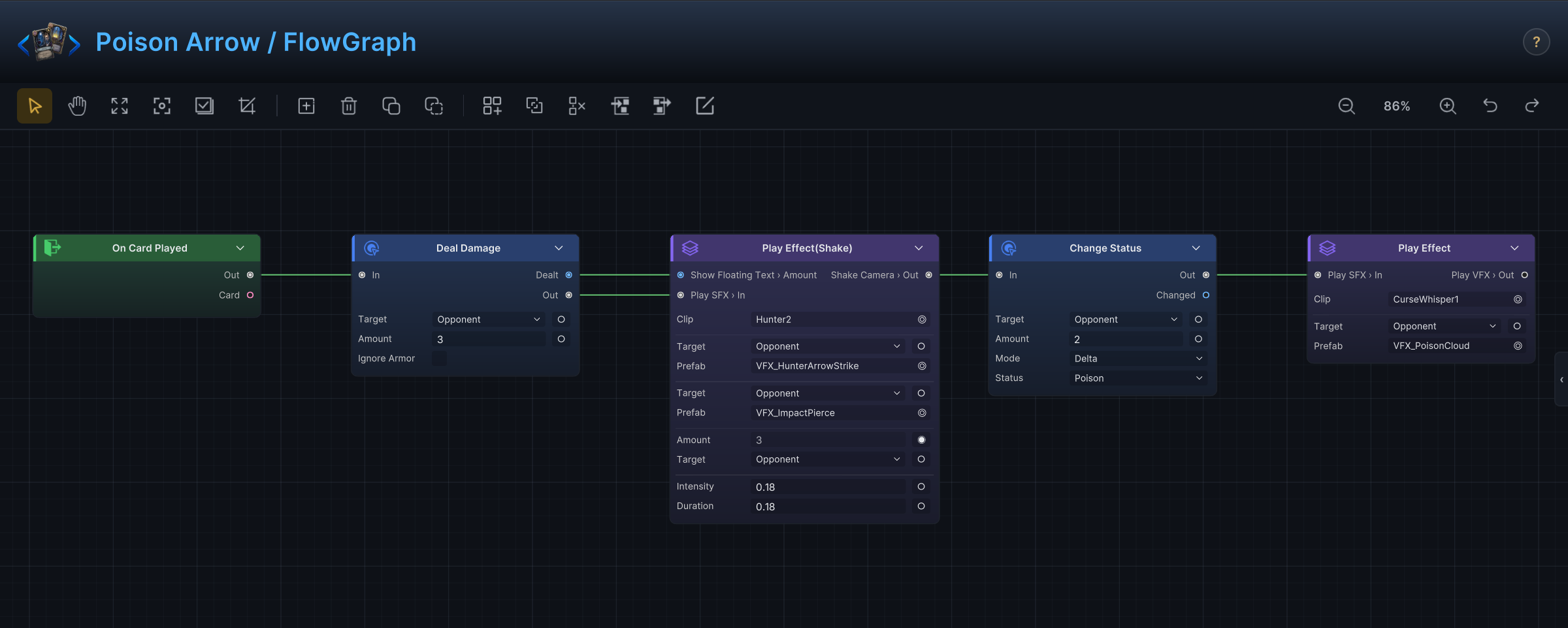
Extension base classes such as MutatorNode, SourceNode, and SelectorNode only matter when you write custom nodes in C#. That side of the API lives in Custom nodes.
The nine menu groups
| Group | Detail page | Reach for it when you want to... |
|---|---|---|
| Entry | Entries and hooks | Start a graph after a battle, turn, card, unit, status, energy, or event moment. |
| Hook | Entries and hooks | Intercept a value and change or cancel it before GCS commits it. |
| Action | Action nodes | Change battle state: damage, HP, armor, energy, cards, statuses, variables, turns, units. |
| Get | Get nodes | Read battle state: units, cards, statuses, piles, variables, event arguments. |
| Operator | Flow, operator, intent, and event nodes | Calculate, compare, filter, sort, pick, and convert values. |
| Flow | Flow, operator, intent, and event nodes | Shape execution with branches, loops, sequences, choices, waits, and switches. |
| FX | FX and presentation nodes | Request VFX, SFX, animation, floating text, unit motion, and camera feedback. |
| Intent | Flow, operator, intent, and event nodes | Build enemy intent preview and behavior patterns. |
| Event | Flow, operator, intent, and event nodes | Raise internal GCS events or GES events. |
Group is the one built-in node you do not add from this menu. Select two or more nodes and press Ctrl+G to wrap them in a single collapsible Group; it is covered with the flow nodes.
The four detail pages share one table format. Each row gives the menu name, the gameplay job, the inputs and settings you normally touch, the outputs the node feeds forward, common partner nodes, and an "avoid when" boundary that keeps graphs from lying about what they do.
Every built-in node, by group
Action (27)
Add Cards, Cancel Hook, Change Armor, Change Energy, Change HP, Change Status, Deal Damage, Despawn Unit, Draw Cards, End Turn, Extra Turn, Kill Unit, Modify Card Cost, Move Cards, Play Card, Reapply Status, Remove Cards, Remove Statuses, Replay Card, Revive Unit, Set Variable, Shuffle Draw Pile, Skip Next Turn, Spawn Unit, Transform Card, Upgrade Cards, Write Hook.
Entry (33)
On Armor Gained, On Armor Lost, On Attack Taken, On Battle End, On Battle Start, On Card Added To Deck, On Card Added To Hand, On Card Discarded, On Card Drawn, On Card Exhausted, On Card Played, On Card Retained, On Damage Dealt, On Damage Taken, On Discard Phase, On Draw Phase, On Draw Pile Shuffled, On Enemy Behavior Start, On Energy Gained, On Energy Spent, On GES Event, On HP Gained, On HP Lost, On Internal Event, On Status Expired, On Status Inflicted, On Status Received, On Status Removed, On Status Stacks Changed, On Turn End, On Turn Start, On Unit Died, On Unit Spawned.
Hook (18)
Armor Gain Hook, Armor Loss Hook, Armor Reset Hook, Attack Taken Hook, Card Cost Hook, Card Playable Hook, Damage Dealt Hook, Damage Taken Hook, Draw Count Hook, Energy Gain Hook, Energy Per Turn Hook, Energy Spend Hook, Hand Size Hook, HP Gain Hook, HP Loss Hook, Inflict Status Hook, Receive Status Hook, Status Damage Hook.
Get (19)
Active Team, Active Turn, Active Unit, All Enemies, All Units, Card Info, Card Piles, Cards Drawn This Turn, Cards Played This Turn, Deck Cards, Event Arg, Opponent Unit, Player Energy, Self Unit, Status Info, This Card, Unit Info, Unit Status Stacks, Variable.
Operator (22)
Clamp, Condition, Constant, Contains, Convert, Count, Exclude, Filter, Is Empty, Logic, Make Collection, Math Binary, Math Unary, Merge Collections, Pick Element, Random, Random Elements, Ref Equal, Select, Shuffle, Sort, Take.
Flow (10)
Branch, Choice, Delayed Trigger, Foreach, Gate, Loop, Sequence, Switch, Wait, While.
FX (7)
Flash Unit, Play Animation, Play SFX, Play VFX, Shake Camera, Show Floating Text, Slide Unit.
Intent (6)
Every N Turns, HP Threshold Pattern, Leaf Intent, Once Per Battle, Sequence Pattern, Weighted Random Pattern.
Event (2)
Raise GES Event, Raise Internal Event.
Group (1)
Group. Created by selecting nodes and pressing Ctrl+G, not from the Add Node menu.
Pick the node that says what you mean
Prefer the node that describes the player-facing behavior directly. Two nodes can produce the same number on screen while meaning very different things to the rules engine:
| Goal | Start with | Do not start with |
|---|---|---|
| Deal damage. | Deal Damage | Change HP, unless the design explicitly ignores damage rules. |
| Heal a unit. | Change HP with a positive amount. | Deal Damage with a negative amount. |
| Add or remove status stacks. | Change Status | Direct variable changes. |
| Change card cost dynamically. | Card Cost Hook plus Write Hook | Modify Card Cost, unless you want a timed modifier. |
| React after a value changes. | An Entry node. | A Hook node that never writes. |
| Change a value before it commits. | A Hook node plus Write Hook. | An Entry node that fires after the fact. |
The difference matters because hooks, armor, and statuses only get a say when the right pipeline runs. Deal Damage invites all of them; Change HP deliberately walks past them.
Custom nodes join the same menu
Custom nodes appear beside the built-in ones in the same Add Node menu. A custom node subclasses one of the authoring bases, declares [Serializable], and carries [FlowNode(category, displayName)]. Reuse an existing category when the node behaves like an existing family; invent a new category only when it represents a genuinely new authoring concept.
Name custom ports with the same vocabulary the built-in nodes use: Target, Amount, Cards, Status, Duration, Result, Body, Done. A port name that leaks serialization details or runtime class names forces every future author to think in C# instead of card design. The full authoring contract is in Custom nodes.