Action Nodes
Action nodes are the nodes that change battle state. The 27 built-ins cover damage, HP, armor, energy, cards, statuses, units, turns, variables, and hook writes.
For graph authors deciding which state change a card, status, or enemy behavior actually needs.Action nodes sit on the main control path, usually right after an Entry, Branch, Loop, or Choice. Everything else in a graph exists to serve them: Get nodes feed them targets and values, FX nodes show what they did.
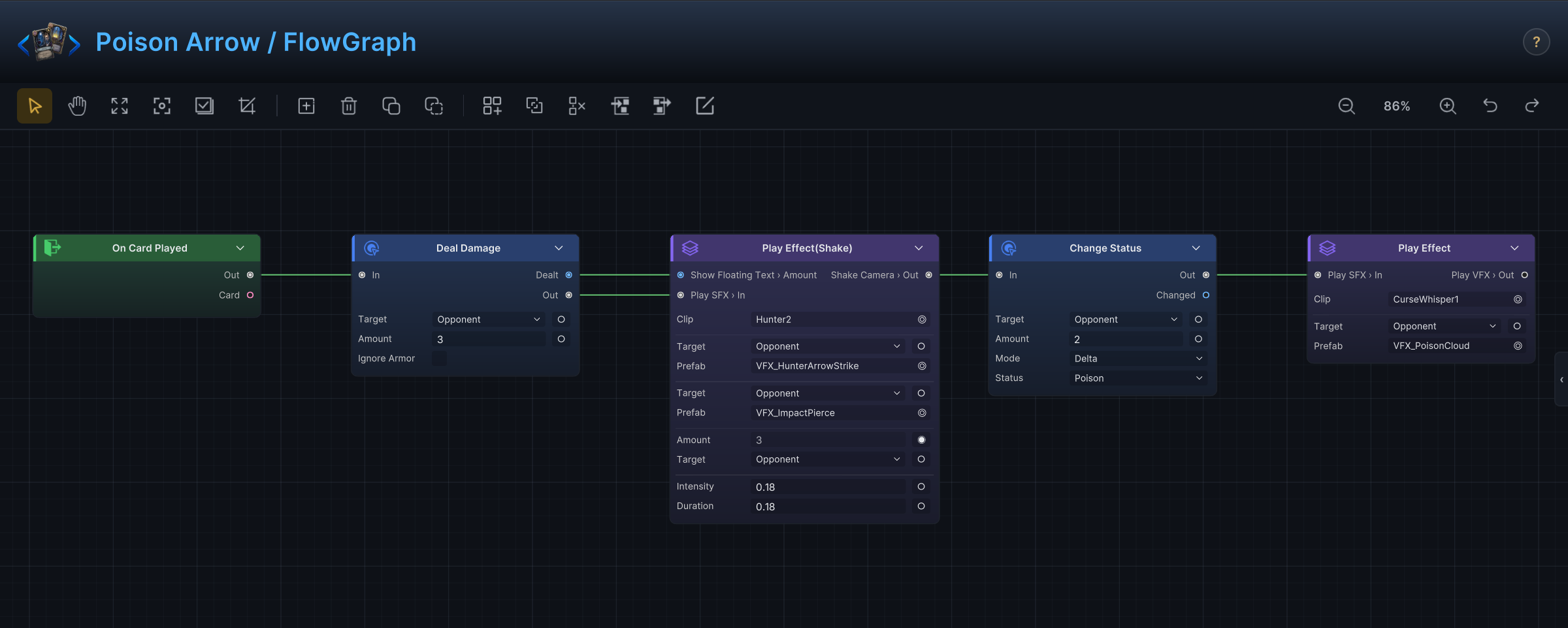
Poison Arrow is the pattern at its smallest. Two Action nodes carry the whole design: Deal Damage applies 3 to the opponent, then Change Status adds 2 Poison. The entry starts the graph and the effect blocks make the result visible; neither touches state.
These nodes live under Action in the Add Node menu. MutatorNode, the extension base class behind them, only appears when you write custom nodes in C#.
Damage, HP, armor, energy, and status
| Node | Purpose | Inputs and settings | Outputs | Use with | Avoid when |
|---|---|---|---|---|---|
| Deal Damage | Apply damage through the damage pipeline. | Target, TargetSource, Amount, IgnoreArmor. | Dealt. | Opponent Unit, All Enemies, Damage Dealt Hook, Show Floating Text. | The design is healing or a direct HP change; use Change HP. |
| Change HP | Heal, or directly change current or max HP. | Target, TargetSource, Affect Current or Max, Mode Delta or Set, Amount. | Changed. | Unit Info, HP Gain Hook, HP Loss Hook, heal floating text. | The change should count as damage; use Deal Damage. |
| Change Armor | Add, remove, or set armor. | Target, TargetSource, Mode, Amount. | Changed. | Armor Gain Hook, Armor Loss Hook, Show Floating Text. | The value is a card cost or status stacks. |
| Change Energy | Add, spend, or set player energy. | Mode, Amount. | Changed. | Player Energy, Energy Gain Hook, Energy Spend Hook. | Card cost should change instead; use Modify Card Cost or Card Cost Hook. |
| Change Status | Add, remove, or set stacks of a status. | Target, TargetSource, Status, Mode, Amount. | Changed. | All Enemies, Unit Status Stacks, status hooks. | You need to remove a collection of specific status instances; use Remove Statuses. |
| Remove Statuses | Remove status instances from one or more units. | Target, Statuses, TargetSource. | None. | Filter, Status Info, cleanse effects. | You only need to decrease stacks; use Change Status. |
| Reapply Status | Re-run the application behavior of an existing status. | Status. | None. | Status lifecycle graphs. | You are creating stacks from scratch; use Change Status. |
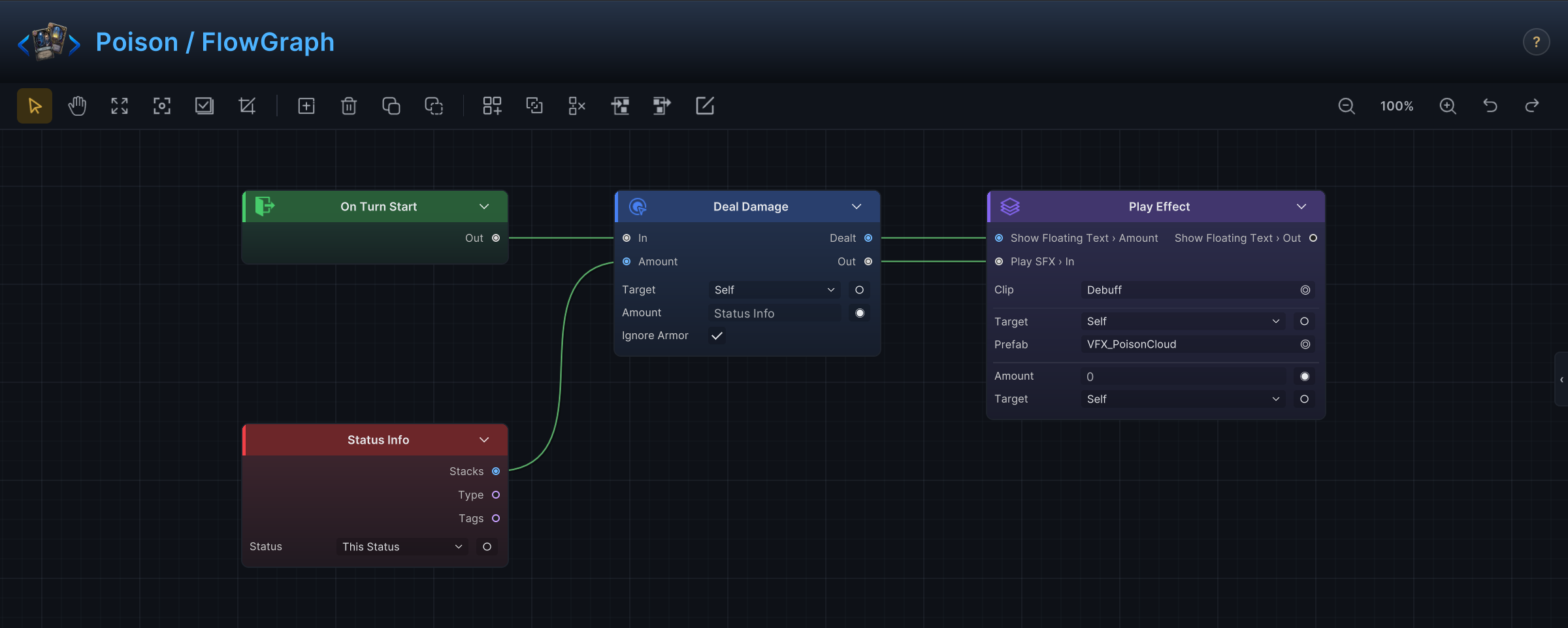
The demo status Poison shows this table working inside a status graph as well as on cards. On Turn Start, Deal Damage targets Self, pulls its Amount from Status Info.Stacks, and has IgnoreArmor checked so the tick bypasses armor. The effect block afterwards reads Dealt for its floating number:
Cards and piles
| Node | Purpose | Inputs and settings | Outputs | Use with | Avoid when |
|---|---|---|---|---|---|
| Draw Cards | Draw by count, or up to the hand limit. | Mode Count or ToHandLimit, Count. | Drawn. | Draw Count Hook, Cards Drawn This Turn, draw presentation. | You are creating cards; use Add Cards. |
| Add Cards | Add a card asset to a pile. | CardId, Pile, Position. | Added. | Upgrade Cards, Move Cards, generated-card recipes. | You are moving an existing card instance; use Move Cards. |
| Move Cards | Move existing cards to a pile. | Cards, CardsSource, Pile, Position. | None. | Card Piles, Filter, Take, discard and exhaust effects. | You are creating a new card instance. |
| Play Card | Play a card instance through the normal card play behavior. | Card, Target, CardSource, TargetSource. | None. | Pick Element, Card Piles, replay-style effects. | You only want the card's behavior without normal play handling; use Replay Card. |
| Replay Card | Run a card's behavior again. | Card, CardSource. | None. | This Card, combo effects. | The card should be paid for and moved like a normal play. |
| Transform Card | Turn a card instance into another card. | Card, CardSource, NewCard. | None. | This Card, Card Piles, upgrade trees. | You want a temporary cost or stat modifier. |
| Upgrade Cards | Upgrade existing cards. | Cards, CardsSource. | None. | Card Piles, Filter, reward effects. | You are adding a new, already-upgraded card. |
| Remove Cards | Remove existing card instances. | Cards, CardsSource. | None. | Filter, Take, exhaust or purge mechanics. | The cards should go to exhaust or discard; use Move Cards. |
| Modify Card Cost | Add a timed cost modifier to cards. | Cards, CardsSource, Mode, Amount, Duration, Turns. | None. | Card Cost Hook, Filter, combo cards. | Cost depends on state at every playability check; use Card Cost Hook. |
| Shuffle Draw Pile | Shuffle the current draw pile. | None. | None. | On Draw Pile Shuffled, card pile recipes. | You want to reorder a temporary collection; use Shuffle. |
Units and turns
| Node | Purpose | Inputs and settings | Outputs | Use with | Avoid when |
|---|---|---|---|---|---|
| Spawn Unit | Create a unit during battle. | Unit, MaxOnField. | Spawned. | On Unit Spawned, summon effects. | You are reviving a defeated unit; use Revive Unit. |
| Despawn Unit | Remove a unit without death semantics. | Target, TargetSource. | None. | Summon cleanup, temporary units. | A player-facing death or kill reward should happen. |
| Kill Unit | Kill one or more units. | Target, TargetSource. | None. | On Unit Died, execute effects. | You want temporary removal without death triggers. |
| Revive Unit | Revive a defeated unit. | Target, TargetSource, HPPercent. | None. | On Unit Spawned, resurrection effects. | You are creating a new unit; use Spawn Unit. |
| Skip Next Turn | Make a unit skip its next turn. | Target, TargetSource. | None. | Change Status, stun effects. | You need to change the current turn order immediately. |
| End Turn | End the current turn. | None. | None. | Emergency battle rules, scripted encounters. | Ordinary card resolution should continue normally. |
| Extra Turn | Grant an additional turn. | None. | None. | Rare boss or player power effects. | A simple energy or draw bonus would do. |
Variables and hooks
| Node | Purpose | Inputs and settings | Outputs | Use with | Avoid when |
|---|---|---|---|---|---|
| Set Variable | Store a named value. | Name, Kind, Mode, BattleScope, value fields. | None. | Variable, Branch, state shared across entries. | The value is read once; wire it directly instead. |
| Write Hook | Write the replacement value for the active hook. | Kind, Value, BoolValue. | None. | Any hook entry, math and condition nodes. | The graph started from a normal entry. |
| Cancel Hook | Cancel the active hook, where the hook supports it. | None. | None. | Card Playable Hook, prevention mechanics. | You only need to change a number; use Write Hook. |
State first, feedback second
The default ordering for any graph with a state change:
- Select or calculate targets.
- Run the Action node.
- Read its result output.
- Show floating text, VFX, SFX, animation, or camera feedback based on that result.
A graph that plays its feedback before the action runs will happily show a success animation for a change that never happened. Result outputs such as Dealt and Changed exist so presentation reads the committed value, not the configured one.
When an action silently does nothing
Most Action nodes skip their state change when the required target, card, status, or unit cannot be resolved. That keeps a running battle stable, but it also means a broken graph fails quietly. When an effect refuses to show up, check the resolution chain before the node itself:
| Symptom | Check |
|---|---|
| Damage does nothing. | Target is empty, the wrong team is selected, or the amount is zero after hooks. |
| A status never appears. | The Status field is unset, or the target collection is empty. |
| Card movement does nothing. | CardsSource points at a pile with no matching cards. |
| A cost modifier never shows. | The duration expired, or the card collection was empty. |
| A hook value does not change. | The graph did not start from a hook, or Write Hook.Kind is wrong. |
The Game Card Monitor's Flow tab shows which nodes executed, which is usually faster than inspecting behavior by trial.