FlowGraph Overview
FlowGraph is the visual behavior layer of GCS. Every card effect, status reaction, and enemy turn is a node graph embedded in the asset that owns it.
Read this page before opening the FlowGraph window for the first time. It explains hosts, entries, hooks, and the two wire types everything else builds on.FlowGraph answers one practical authoring question: when something happens in battle, what should this content do next? Instead of writing a runtime script per card, you describe the behavior as nodes and wires, and GCS executes the graph at the right moment.
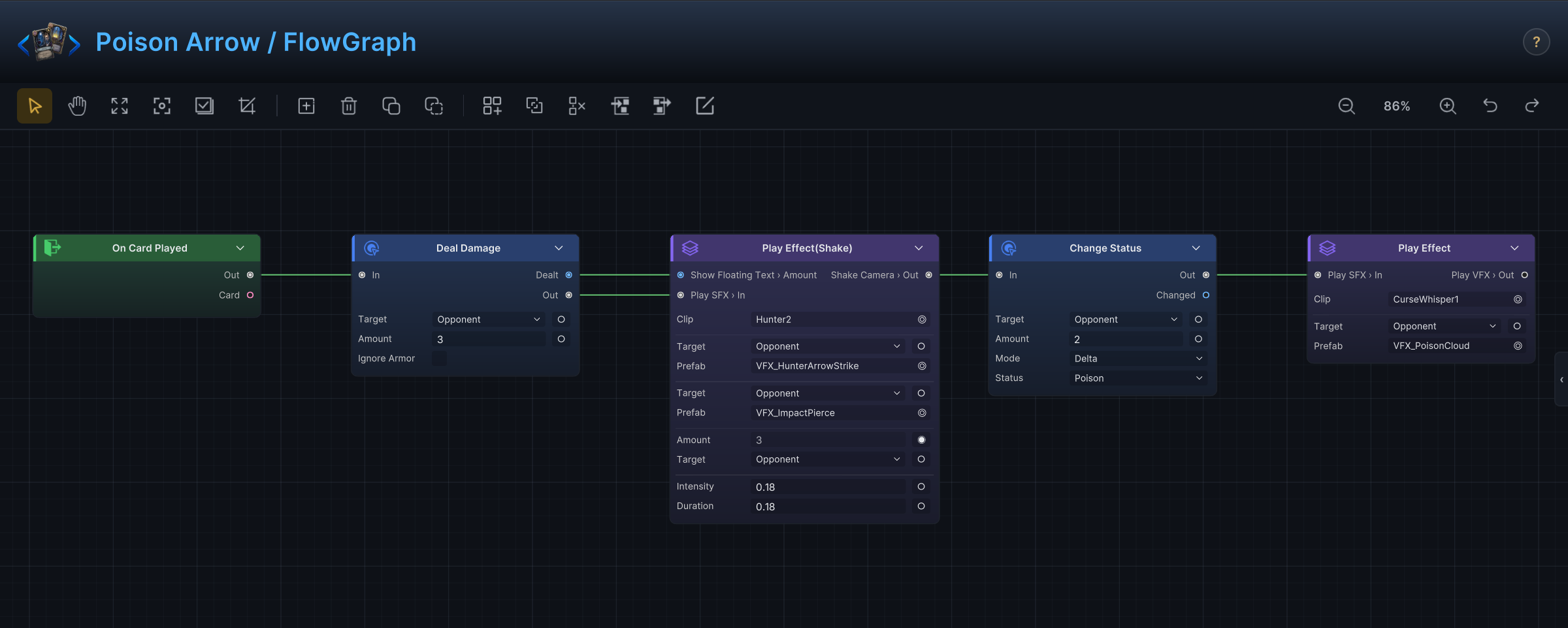
The graph above ships with the demo. Poison Arrow deals 3 damage to the chosen enemy, plays its strike feedback (a Group node that bundles VFX, sound, floating text, and a camera shake), then adds 2 Poison stacks and finishes with a poison cloud effect. That is the whole card. No code exists for it anywhere.
Where graphs live
Three asset families carry a Behavior field with an embedded graph: cards, statuses, and enemy units. There is no separate graph asset; the graph serializes inside the card, status, or enemy it belongs to, and you open it from that asset's inspector in the Workbench.
| Host | What the graph expresses | Typical starting nodes |
|---|---|---|
| Card | What happens when the card is played, drawn, discarded, exhausted, or retained. | On Card Played, On Card Drawn, On Turn Start |
| Status | Passive or reactive behavior owned by a status instance on a unit. | On Turn Start, On Damage Taken, Damage Taken Hook |
| Enemy | Intent selection and turn execution for an enemy unit. | On Enemy Behavior Start, Sequence Pattern, Leaf Intent |
Encounters and battle rules have no FlowGraph field. Battle-wide behavior ("every unit bleeds at turn end") is authored as a status that a unit carries, not as an encounter graph.
How a graph runs
A graph starts at an entry node, a timing point such as On Card Played or Damage Taken Hook. When that moment happens in battle, the entry fires and execution begins. A graph can hold several entries, and each fires independently at its own moment. From the entry, two kinds of wires do different jobs.
Control wires decide order. Execution walks one node at a time, always following the control wire out of the node that most recently ran. Most nodes continue through a single Out port. Flow nodes choose between several: Branch continues on True or False, and Loop runs its Body chain once per iteration before continuing from Done.
Data wires carry values, and they are read on demand. A node asks for its inputs at the moment it runs: when Deal Damage executes, it pulls whatever is wired into Target and Amount, and each pull recomputes the value fresh. Get and Operator nodes never sit on the control path at all; they produce values only when something downstream asks. So On Damage Taken outputs Amount, Source, and Target for the graph to read, Unit Info turns a unit into HP, armor, statuses, and intent data, and Deal Damage outputs Dealt, the damage that actually landed.
| Wire type | Question it answers | Example |
|---|---|---|
| Control | What runs next? | On Card Played -> Deal Damage -> Play VFX |
| Data | What value does this node read or produce? | Unit Info.HP% -> Condition -> Branch |
Two nodes pause the walk instead of finishing it. Wait holds execution for a duration or until an animation completes, and Choice waits for the player to pick. Everything wired after them still runs, in order, once the pause resolves.
The node groups
The Add Node menu organizes 140+ built-in nodes into nine groups, named after what you want to do rather than how the code is structured.
| Group | Use it when you want to... |
|---|---|
| Entry | Pick the battle moment that starts the graph. |
| Hook | Intercept a value before GCS commits it. |
| Action | Change battle state: damage, HP, armor, cards, statuses, turns, variables, units. |
| Get | Read battle state: units, cards, piles, energy, variables, event arguments. |
| Operator | Build conditions, math, constants, and collection operations. |
| Flow | Shape execution with branches, loops, switches, waits, and player choices. |
| FX | Request visible or audible feedback: VFX, SFX, floating text, camera shake. |
| Intent | Build enemy intent patterns (enemy graphs only). |
| Event | Raise internal GCS events or bridge to GES. |
The menu only shows nodes that are valid for the current host, so a card graph never offers Leaf Intent and an enemy graph never offers On Card Played.
Group is not one of these menu entries. Select two or more nodes and press Ctrl+G to wrap them in one collapsible Group node.
Entries versus hooks
Entries react after a moment has happened. Hooks participate while a value is still being decided.
Use an entry when the behavior is a response:
- After this card is played, apply a status.
- When a unit dies, spawn a replacement.
- At the start of each turn, tick poison damage.
Use a hook when the behavior should change a value GCS is about to use:
- Reduce incoming damage while a defensive status is present.
- Make a card cost 0 this turn.
- Block a card from being playable.
A hook graph normally ends with Write Hook (commit the new value) or Cancel Hook (stop the whole thing). If your hook graph only plays VFX, the behavior probably wanted to be an entry instead. The full timing catalog is on Entries and Hooks.
Context you can rely on
The host supplies battle context automatically. You never pass "the current card" or "the acting unit" into a graph by hand.
| You need | Start with |
|---|---|
| The card that owns the graph | This Card, or the entry's Card output |
| The acting unit | Self Unit, Active Unit, or the entry's Source output |
| The chosen target | The card's own target, Opponent Unit, or the entry's Target output |
| Battle numbers | Active Turn, Player Energy, Unit Info, Unit Status Stacks |
| A value produced earlier in the graph | A direct data wire, or Set Variable plus Variable |
| Data carried by an internal event | Event Arg after On Internal Event |
A first card graph
A plain attack card follows the same shape as Poison Arrow above:
- Start from
On Card Played. - On
Deal Damage, leaveTargetSourceonOpponentso the card hits the unit the player picked. - Set
Amountto the card's damage. - Wire
Deal Damage.DealtintoShow Floating Textso the popup shows the real number, not the pre-armor one. - Put
Play VFXandPlay SFXafter the damage node.
State first, presentation second. If the target turns out to be invalid, the damage node does nothing, and because the VFX sits behind it, the card also does not flash and bang over a miss.
What FlowGraph is not
FlowGraph is not the data model. Cost, rarity, tags, artwork, targeting rules, and card text stay on the card asset itself; the graph only describes what happens during battle.
It is also not the place to finalize presentation. FX nodes request feedback, but the actual particle prefabs, audio clips, and mixer routing belong to your asset setup pass.