FlowGraph Recipes
Sixteen graph patterns covering the behaviors most card games need, each verified against the built-in node set. Reuse the structure, then adjust fields to your design.
For authors who know the FlowGraph basics and want a working starting point instead of a blank canvas.Each recipe below lists the nodes in control order, with the field settings that matter. The demo content uses these same shapes, so you can cross-reference any of them against the shipped cards, statuses, and enemies.
Deal damage to the chosen target
For ordinary attack cards.
On Card PlayedDeal DamagewithTargetSource = OpponentandAmountset to the card's damage- Wire
Deal Damage.DealtintoShow Floating Text.Amount Play VFXandPlay SFXafter the damage node
Opponent resolves to the unit the player targeted with the card. And show the Dealt output, never the Amount field: armor, hooks, and prevention can all shrink the number on the way in.
Deal damage to all enemies
For AoE attacks.
On Card PlayedDeal DamagewithTargetSource = AllEnemiesShake Cameraor a screen-widePlay VFXafter the damage
No selector nodes needed; the enum option is the whole target set. Switch to wiring (All Enemies -> Filter -> Deal Damage.Target) only when the set needs narrowing, and use Foreach when each enemy needs its own presentation beat.
Hit random enemies several times
The demo's Rapid Fire card, and the pattern behind every multi-hit flurry. The card text reads "Deal 3 damage to a random enemy 4 times", and the graph is exactly that sentence.
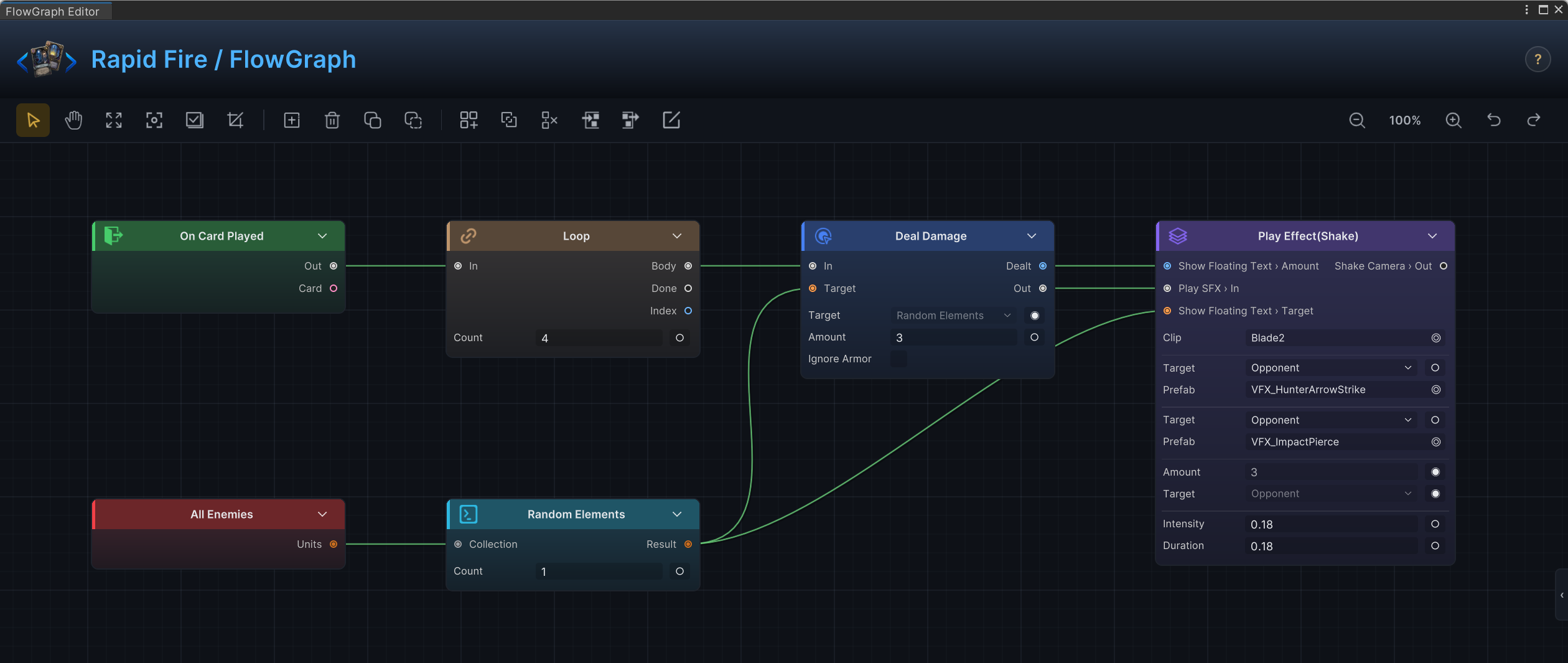
On Card PlayedLoopwithCount = 4- On
Body,Deal DamagewithAmount = 3 - Wire
All Enemies->Random Elements(Count = 1) ->Deal Damage.Target - Presentation inside the loop body, one beat per hit
The target re-rolls on every iteration because Random Elements is re-evaluated each time Deal Damage pulls it. Four hits, potentially four different enemies.
Heal when below half HP
For conditional healing.
- Select the unit with
Self Unitor the entry'sTargetoutput - Wire it into
Unit Info - Wire
Unit Info.HP%intoConditioninputA, setOp = Less, and feed 50 into inputB(aConstantworks) - Wire
ConditionintoBranch.Condition - On
True,Change HPwithAffect = Current,Mode = Delta, and a positiveAmount - Heal text from
Change HP.Changed
Compare HP%, not raw HP. "Below half" means percent, and max HP differs between units.
Gain armor per card played this turn
For combo and momentum cards.
On Card PlayedCards Played This Turn->Count- Optional
Math Binaryto scale the count Change ArmorwithTargetSource = Self, with the computed number wired intoAmount
A flat "gain 5 armor" card needs none of this: set the field and stop.
Apply a status to all enemies
For poison, burn, weaken, and similar spreads.
On Card PlayedChange Statuswith the status selected inStatus,Mode = Delta,Amountset to the stacks, andTargetSource = AllEnemies
Add All Enemies -> Filter -> Change Status.Target when only some enemies should receive it, for example only damaged ones.
Consume a status for bonus damage
For payoff cards that spend stacks.
On Card PlayedUnit Status Stacksfor the target unit and the statusConditionwithOp = Greateragainst 0, intoBranch- On
True,Math Binarycomputes the bonus, thenDeal Damage Change Statuswith a negativeAmountto remove the spent stacks
Remove the stacks after the damage. Hooks and branches may still need the original count while the hit resolves.
Draw up to the hand limit
On Card PlayedDraw CardswithMode = ToHandLimit
Use Mode = Count with a Count value when the card promises a fixed number of draws, even if the hand fills partway through.
Create a card in the draw pile
For generated-card mechanics.
On Card PlayedAdd Cardswith the card picked inCardId,Pile = Draw, andPositionset toTop,Bottom, orRandom- Use the
Addedoutput if the new card should immediately be upgraded, moved, or shown
Add Cards creates instances; Move Cards relocates existing ones. Reaching for Move Cards on a card that does not exist yet is the classic mistake here.
Discount cards for N turns
For temporary cost reductions.
Modify Card CostwithCardsSourceset to the pile you want (or a wired card collection)Mode = Deltawith a negativeAmountDuration = ForNTurnsandTurnsset to the length
Duration also offers ThisTurn and WholeBattle. For a cost that must be recomputed from live state every time the card is checked, use Card Cost Hook instead of a stored modifier.
Block a card from being played
For silence, stun, and resource-lock statuses.
Card Playable Hookon the status's graphCard Infoto inspect the card the hook is asking aboutConditionorContainslogic intoBranch- On the blocked path,
Write HookwithKind = BoolandBoolValue = false
On Card Played cannot do this job. By the time it fires, the card has already passed the playability check.
Reduce incoming damage
For defensive statuses.
Damage Taken HookUnit Status Stacksfor the hook'sTargetBranchon whether stacks are present- On
True,Math Binarysubtracts the mitigation fromValue ClampwithMin = 0if mitigation must never turn a hit into a healWrite HookwithKind = Int
When the modifier conceptually belongs to the attacker ("this unit hits harder"), move the logic to Damage Dealt Hook on the attacker's status instead.
Enemy sequence intent
For enemies that repeat a known rotation.
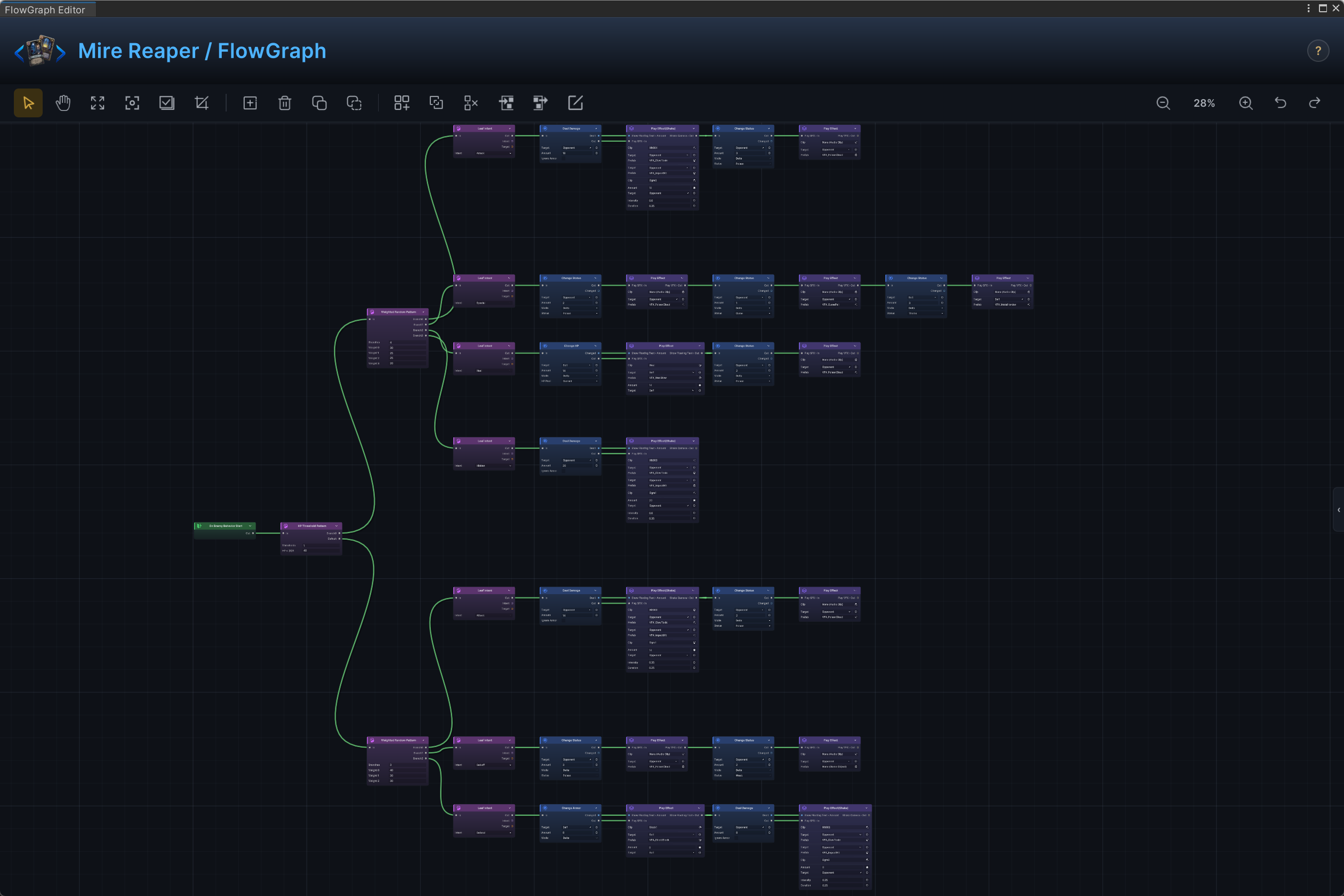
The Mire Reaper, the demo's Hunter boss, is built exactly this way.
On Enemy Behavior StartSequence Pattern, with one branch per step andRepeatCountscontrolling how many turns each step repeats before advancing- A
Leaf Intenton each branch declares the intent icon the player sees, then continues into that step's behavior nodes
Use Weighted Random Pattern (per-branch Weights) for unpredictable enemies.
Enemy HP threshold phases
For bosses that change behavior when wounded.
On Enemy Behavior StartHP Threshold PatternwithThresholdssuch as 15, 40, 70 (HP percent)- One behavior path per threshold band, each fronted by its
Leaf Intent
Tiers are checked top to bottom; the first tier whose threshold is at or above the current HP wins. Put the most wounded tier first: with 15, 40, 70, an enemy at 30% HP matches the 40 tier. Default runs while HP is above every threshold, so it carries the opening rotation.
One-time and periodic enemy moves
For an enrage that fires once, or a special every third turn. Both nodes live in the Intent group, so they are enemy-graph tools.
- Inside the enemy's pattern tree, insert
Once Per Battle - The one-time move goes on
Body; the normal rotation continues fromDone
Every N Turns works the same way with an N field: Body runs on the matching turns, Done on all others.
Player-side "once per battle" effects are not built with these nodes. Track them with a battle-scope variable instead: Set Variable with BattleScope on, and a Branch that checks it before the effect runs.
Raise an internal event
For one graph notifying another without direct wiring.
- The sender runs
Raise Internal Eventwith anEventNameand optional argument bindings - The receiver starts from
On Internal Eventwith the same name - The receiver reads values through
Event Arg
Skip events for sequencing inside a single graph; a control wire is clearer. Events earn their cost when the sender and receiver are different assets that should not know about each other.