Entries and Hooks
Entries start a graph after something happened; hooks let a graph change a value before GCS commits it. This page catalogs all 33 entries and 18 hooks with their firing moments, outputs, and hosts.
Keep this open while authoring. Picking the right timing point is most of the work.Entries and hooks are the timing language of FlowGraph. Before you place any other node, decide when the behavior should start, and whether it reacts to a moment or rewrites a value.
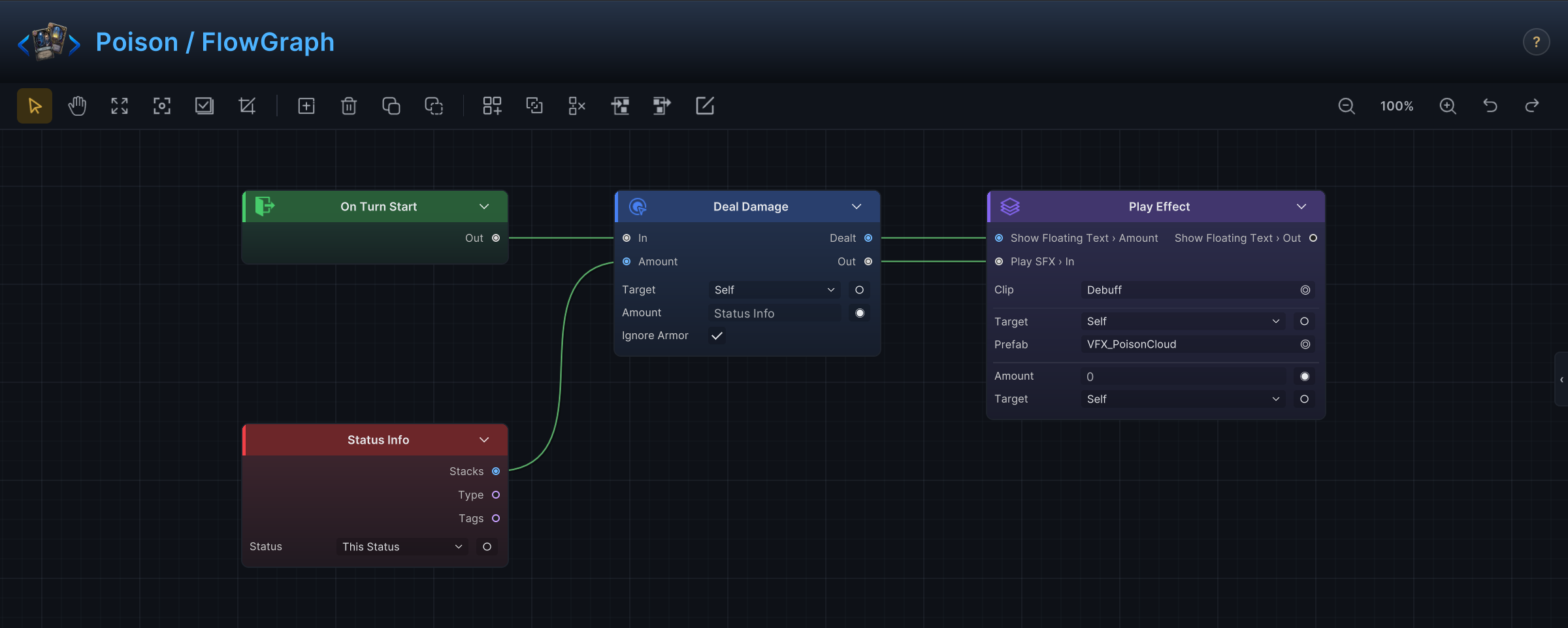
The demo's Poison status is a typical status-hosted graph: an On Turn Start entry deals damage scaled by the status's own stacks, with the presentation trailing behind. Statuses are the most reactive host in GCS, which is why most of the tables below list them.
Entry or hook?
| You want to... | Use |
|---|---|
| React after a battle moment happened | An entry |
| Change a value before GCS commits it | A hook |
| Drive an enemy's turn | On Enemy Behavior Start plus Intent pattern nodes |
| Trigger one graph from another | Raise Internal Event plus On Internal Event |
| Bridge into GES | Raise GES Event plus On GES Event |
Entries are easy to reason about because the event is already over when they run. Hooks need more care: they sit inside a calculation that may still be modified or cancelled by other hooks.
Who can listen to what
Each host only gets the entries that make sense for it, and the Add Node menu enforces this. In short: cards react to their own pile lifecycle and turn boundaries, statuses react to nearly everything that happens to units, and enemies have exactly one entry that starts their turn.
| Host | Available timing points |
|---|---|
| Card | The seven card entries, On Turn Start, On Turn End, On Draw Pile Shuffled, both event entries, all hooks |
| Status | Battle, turn, phase, damage, HP, armor, energy, status, and unit entries, On Card Drawn, both event entries, all hooks |
| Enemy | On Enemy Behavior Start, both event entries, Intent patterns |
If a behavior seems to need an entry its host cannot use ("this card reacts whenever any unit dies"), author it as a status instead and let the card apply that status.
Where a turn's entries fire
One player turn plus the enemy phase, in firing order:
Two details trip people up. The draw phase does not run on turn 1, because the opening hand is drawn at battle start. And inside the enemy phase each enemy gets its own private sequence: its statuses fire On Turn Start, it acts through On Enemy Behavior Start, then its statuses fire On Turn End. A Poison on an enemy therefore ticks on that enemy's own step, not on yours.
Battle and turn entries
None of these output data; they are pure timing.
| Entry | Hosts | Fires | Use for |
|---|---|---|---|
| On Battle Start | Status | Once, when the battle begins. | Opening buffs, starting variables, first-turn setup. Per-turn work belongs in On Turn Start. |
| On Battle End | Status | Once, when the battle ends, won or lost. | Cleanup and end-of-battle effects. Victory screens belong to scene UI, not graphs. |
| On Turn Start | Card, Status | On a status: the start of the owning unit's own turn. On a card: for every card sitting in hand when the player turn starts. | Energy changes, status ticks, per-turn counters. |
| On Turn End | Card, Status | On a status: the end of the owning unit's own turn. On a card: for every card in hand at player turn end, before the hand is discarded. | End-of-turn damage, decay, delayed cleanup. |
| On Draw Phase | Status | At player turn start, right before the per-turn draw. Not on turn 1; the opening hand is drawn at battle start. | Draw-phase reactions. For each individual card, use On Card Drawn. |
| On Discard Phase | Status | At player turn end, before the hand is discarded. | End-of-turn discard reactions. |
| On Draw Pile Shuffled | Card | Whenever the discard pile is reshuffled back into the draw pile. | Shuffle reactions and relic-style mechanics. |
Card entries
Every card entry outputs the Card involved, so downstream nodes can read its cost or type through Card Info. All are card-hosted; On Card Drawn is the one statuses can also listen to.
| Entry | Hosts | Fires | Use for |
|---|---|---|---|
| On Card Drawn | Card, Status | Once per card, as the draw puts it into hand. | Draw triggers and draw-based counters. |
| On Card Played | Card | When GCS accepts the play. This is where a card's main effect lives. | The card's own effect. To change cost or playability instead, use hooks. |
| On Card Discarded | Card | When the card is discarded, by the end-of-turn discard or by an effect. | Discard synergies. |
| On Card Exhausted | Card | When the card exhausts: an Exhaust card being played, an Ethereal card at turn end, or an effect that exhausts it. | Exhaust synergies and cleanup. |
| On Card Retained | Card | When the card stays in hand across turn end, through the Retain keyword or battle rules that keep the whole hand. | Retain synergies. |
| On Card Added To Hand | Card | When an effect creates or moves the card into hand outside the draw step. | Generated-card reactions. For drawn cards, use On Card Drawn. |
| On Card Added To Deck | Card | When an effect adds the card to the draw pile. | Deck-building and summon-card reactions. |
Damage, HP, armor, and unit entries
These are all status-hosted: the unit that should react carries a status, and the status carries the graph. In their outputs, Source is the unit that caused the change and Target is the unit it happened to.
| Entry | Outputs | Fires | Use for |
|---|---|---|---|
| On Damage Dealt | Amount, Source, Target | After damage from the owner lands. Amount is the damage that got through. | Follow-ups after outgoing damage: lifesteal, on-hit riders. To raise the damage itself, use Damage Dealt Hook. |
| On Damage Taken | Amount, Source, Target | After the owner takes damage from any source. | Thorns, retaliation, hit reactions. To reduce incoming damage, use Damage Taken Hook. |
| On Attack Taken | Amount, Source, Target | After an attack hits the owner. Status ticks and other non-attack damage do not fire it. | Attack-only reactions. |
| On HP Gained | Amount, Source, Target | After the owner is healed. | Heal reactions. To change the heal amount, use HP Gain Hook. |
| On HP Lost | Amount, Source, Target | After the owner loses HP, damage or otherwise. | Bleed and sacrifice reactions. |
| On Armor Gained | Amount, Source, Target | After the owner gains armor. | Shield-gain synergies. |
| On Armor Lost | Amount, Source, Target | After the owner loses armor. | Armor-break reactions. |
| On Unit Spawned | Unit | After a unit is summoned onto the battlefield. | Summon reactions. |
| On Unit Died | Was Kill, Source, Target | Twice per death: once for statuses on the dying unit with Was Kill off, once for statuses on the killer with Was Kill on. Source is the killer, Target the unit that died. | Death rattles on the victim side, kill rewards on the killer side. Branch on Was Kill when one status serves both. |
Energy and status entries
Also status-hosted.
| Entry | Outputs | Fires | Use for |
|---|---|---|---|
| On Energy Gained | Amount | After the player gains energy. | Energy-gain reactions. To change the amount, use Energy Gain Hook. |
| On Energy Spent | Amount | After the player spends energy. | Spend reactions and counters. To change card cost, use Card Cost Hook. |
| On Status Inflicted | Status, Stacks, Source, Target | After the owner applies a status to someone. | Source-side effects: "whenever you inflict a debuff". To change the stack count, use Inflict Status Hook. |
| On Status Received | Status, Stacks, Source, Target | After a status lands on the owner. | Receiver-side reactions. |
| On Status Expired | Status, Target | When a status on the owner runs out naturally, its stacks or duration hitting zero. | Expiration effects. |
| On Status Removed | Status, Stacks, Target | When a status on the owner is removed by an effect: cleanse, purge, dispel. | Purge reactions, distinct from natural expiry. |
| On Status Stacks Changed | Status, Stacks, Target | Whenever a status's stack count on the owner moves, up or down. Stacks is the new count. | Threshold effects such as "at 5 stacks". |
Enemy and event entries
| Entry | Outputs | Hosts | Fires |
|---|---|---|---|
| On Enemy Behavior Start | None | Enemy | The root of every enemy graph. GCS runs it to pick the enemy's telegraphed intent and again when the enemy acts on its step of the enemy phase. |
| On Internal Event | Values via Event Arg | All | When a Raise Internal Event with the matching EventName runs anywhere in the battle. |
| On GES Event | Values via Event Arg | All | When the assigned Game Event System event is raised, inside or outside GCS. |
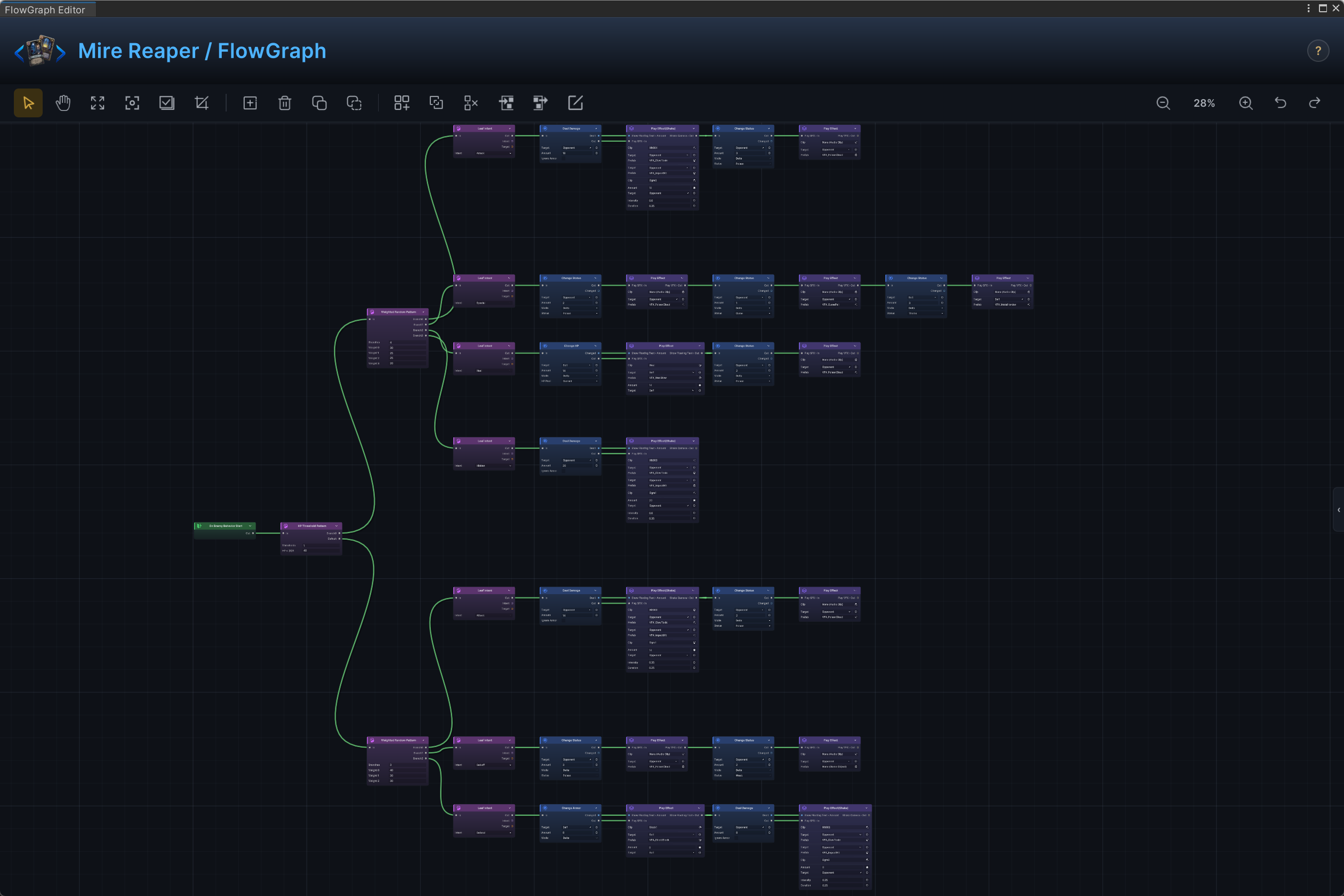
The demo's Mire Reaper shows the enemy shape: On Enemy Behavior Start feeds a Weighted Random Pattern, and each branch ends in a Leaf Intent that telegraphs what the enemy will do next turn.
Hook entries
A hook does not wait for a moment; it runs while the matching value is being calculated, before the result lands. The hook exposes the pending value through its outputs. To change it, compute the new value and run Write Hook. To stop the operation entirely, run Cancel Hook. Hooks are available to card and status graphs; in practice almost all of them live on statuses.
Every hook entry carries three shared settings:
| Setting | Meaning |
|---|---|
Priority | When several hooks intercept the same value, they run in priority order, so a "double damage" and a "cap damage at 10" can be sequenced deliberately. |
Scope | Battle keeps the hook active for the whole battle; Turns limits it. |
Turns | How many turns the hook stays active when Scope = Turns. |
| Hook | Outputs | Fires while | Use for |
|---|---|---|---|
| Damage Dealt Hook | Value, Source, Target | Outgoing damage from the owner is computed. | Raise or reduce damage before it applies. For after-the-hit reactions, use On Damage Dealt. |
| Damage Taken Hook | Value, Source, Target | Incoming damage to the owner is computed. | Mitigation, vulnerability, resistance. |
| Attack Taken Hook | Value, Source, Target | An incoming attack (not status damage) is computed. | Attack-only mitigation or amplification. |
| HP Gain Hook | Value, Source, Target | Healing on the owner is computed. | Amplify or suppress healing. |
| HP Loss Hook | Value, Source, Target | A non-damage HP loss on the owner is computed. | Modify sacrifice-style loss. For damage, use the damage hooks. |
| Armor Gain Hook | Value, Source, Target | Armor the owner is about to gain is computed. | Dexterity-style armor scaling. |
| Armor Loss Hook | Value, Source, Target | Armor the owner is about to lose is computed. | Block preservation. |
| Armor Reset Hook | Value, Target | The start-of-turn armor reset is computed. | Keep armor across turns, barricade-style. |
| Energy Gain Hook | Value | Energy the player is about to gain is computed. | Scale energy gains. |
| Energy Spend Hook | Value | Energy the player is about to spend is computed. | Discounts and surcharges on spending. |
| Energy Per Turn Hook | Value | The per-turn energy refill is computed. | Change the energy baseline. |
| Inflict Status Hook | Status, Stacks, Source, Target | Stacks the owner is about to inflict on someone are computed. | Amplify the debuffs you apply. |
| Receive Status Hook | Status, Stacks, Source, Target | Stacks about to land on the owner are computed. | Status resistance or vulnerability. |
| Status Damage Hook | Value, Source, Target | A status tick's damage is computed. Set the hook's Status field to choose which status it affects. | Scale Poison or Burn ticks without touching attack damage. |
| Card Cost Hook | Card, Value | A card's energy cost is evaluated. | Cost discounts and penalties. |
| Card Playable Hook | Card, Playable | GCS checks whether a card may be played. | Lock cards out, for example while Silence is active. |
| Draw Count Hook | Value | The number of cards about to be drawn is computed. | Extra or reduced draw. |
| Hand Size Hook | Value | The maximum hand size is evaluated. | Raise or lower the hand cap. |
The hook writing pattern
A hook graph almost always has this shape:
- Start from the hook entry and read
Value(plusSource,Target,Card, orStatusas needed). - Compute the new value with
Condition,Math Binary,Unit Info, orCard Info. - Run
Write HookwithKind = Intfor numbers orKind = Boolfor playability. - Reach for
Cancel Hookonly when the intended outcome is "this does not happen at all".
Worked example, "this unit takes 2 less damage while it has Plated Armor stacks":
Damage Taken HookUnit Status Stacksfor the hook'sTargetand the Plated Armor statusConditionwithOp = Greateragainst 0Branch- On
True,Math Binarysubtracts 2 fromValue Write HookwithKind = Int
A hook graph that never reaches Write Hook changes nothing. The graph runs, the VFX plays, and the original value goes through untouched. If the Issues badge is clean but the value never moves, this is the first thing to check.
The event entry pattern
Internal events keep a sender and receiver loosely connected:
- The sender runs
Raise Internal Eventwith anEventNameand optional argument bindings. - The receiver's graph starts from
On Internal Eventwith the same name. - The receiver reads each named value through
Event Arg.
The validator flags an On Internal Event entry with an empty name, so name the event before anything else. Use the GES pair only when the behavior genuinely crosses into Game Event System; for logic that stays inside GCS, internal events are simpler to debug.