GCSApi Guide
One static facade over the battle runtime: GCSApi starts battles, plays cards, reads live state, mutates it safely, and hands out event subscriptions.
For developers building their own UI or scene flow on top of GCS instead of the demo presentation.GCSApi is the public runtime entry point for Game Card System. Everything external code needs goes through it: starting a battle, playing cards, reading live state, mutating that state without bypassing hooks, enumerating content databases, maintaining the master deck, subscribing to events, and discovering the extension registries. The class lives in Runtime/GCS.API.cs, and its XML docs double as the full reference, so IntelliSense shows the same documentation you read here.
The snippets on this page are component excerpts, not complete files. Drop them into your own MonoBehaviour, presenter, or service class and add using System;, using System.Collections.Generic;, and using TinyGiants.GCS.Runtime; as needed.
Guard before you call
GCSApi.IsReady is true once a GameCardManager exists in the scene. Most calls are safe without one: they return empty lists, false, zero, or null instead of throwing. UI code should still guard the paths that only make sense during an active battle.
if (!GCSApi.IsReady)
{
    return;
}

if (!GCSApi.IsBattleActive)
{
    GCSApi.StartBattle(encounter);
}
Start a battle
StartBattle creates a live battle from a GameEncounter asset. Any battle already in progress is disposed first, the opening hand is drawn, and OnBattleStarted is raised before the call returns, with enemy intents already resolved for the first turn.
public GameEncounter Encounter;

public void Begin()
{
    GCSApi.StartBattle(Encounter);
}
With the demo presentation in the scene, that single call is the whole distance from an encounter asset to this:
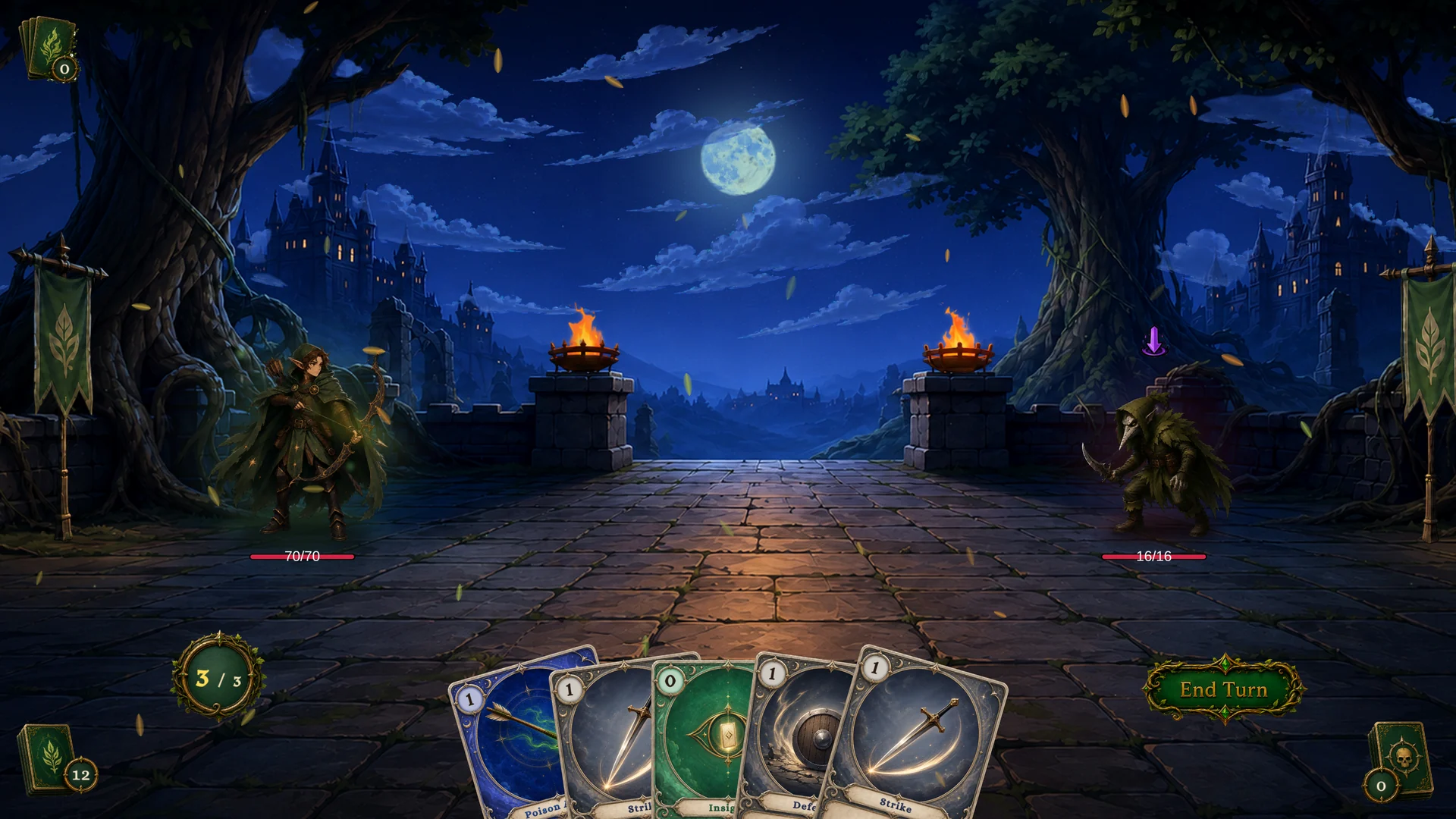
Once the battle exists, let events drive the UI instead of polling:
private IDisposable _battleStarted;

void OnEnable()
{
    _battleStarted = GCSApi.OnBattleStarted(RefreshAll);
}

void OnDisable()
{
    _battleStarted?.Dispose();
}
Play a card
Read the hand, test playability, then call TryPlayCard.
public void TryPlayFirstCard(UnitState target)
{
    foreach (var card in GCSApi.Hand())
    {
        if (!GCSApi.CanPlayCard(card)) continue;
        GCSApi.TryPlayCard(card, target);
        return;
    }
}
Not every card needs a target from the player. RequiresTarget returns true only for cards that target a single enemy unit; self, all-enemy, and untargeted cards resolve their targets automatically, so you can play them without opening a picker.
var activeCard = GCSApi.GetActiveCard(card);
if (GCSApi.RequiresTarget(activeCard))
{
    ShowTargetPicker(card);
}
else
{
    GCSApi.TryPlayCard(card);
}
TryPlayCard returns false when the play is rejected: no active battle, the card is not in the hand, energy is short, the card carries the Unplayable keyword, or a play hook cancelled it.
End the player turn
public void EndTurnButton()
{
    if (GCSApi.Phase == BattlePhase.PlayerPhase)
    {
        GCSApi.EndPlayerTurn();
    }
}
EndPlayerTurn advances to the enemy phase and does nothing outside PlayerPhase, so a stray click on a stale button cannot break the turn order.
Read state for UI
The common UI reads are named helpers:
turnLabel.text = GCSApi.TurnNumber.ToString();
energyLabel.text = $"{GCSApi.PlayerEnergy}/{GCSApi.MaxEnergy}";

var player = GCSApi.Player();
hpLabel.text = $"{GCSApi.Hp(player)}/{GCSApi.MaxHp(player)}";

foreach (var enemy in GCSApi.AliveEnemies())
{
    RenderEnemy(enemy, GCSApi.CurrentIntentTag(enemy), GCSApi.CurrentIntentValue(enemy));
}
When an event fires, refresh from API state instead of trusting a cached copy. The runtime owns the truth; your UI is a projection of it.
Mutate battle state safely
External systems mutate state through GCSApi helpers. The calls route into the runtime controller, so hooks still run and events still fire.
var player = GCSApi.Player();
GCSApi.GainArmor(player, 5);
GCSApi.DrawCards(1);
GCSApi.ApplyStatus(player, shieldedStatus, 2, player);
Do not write to UnitState.CurrentHp, UnitState.Statuses, or the pile lists yourself. Direct writes skip hooks and events, so statuses stop reacting and the UI never hears about the change.
Win and loss are evaluated on phase transitions and after card plays, not on every HP write. Dropping an enemy to zero HP through a mutation helper registers at the next check rather than ending the battle on the spot.
Subscribe to events
Shortcut methods cover the built-in events and return IDisposable handles:
private readonly List<IDisposable> _subs = new();

void OnEnable()
{
    _subs.Add(GCSApi.OnEnergyChanged(_ => RefreshEnergy()));
    _subs.Add(GCSApi.OnUnitHpChanged(_ => RefreshUnits()));
    _subs.Add(GCSApi.OnCardDrawn(_ => RefreshHand()));
}

void OnDisable()
{
    foreach (var sub in _subs) sub.Dispose();
    _subs.Clear();
}
For custom event names, or when you want the channel directly, use Subscribe<TArgs>:
_subs.Add(GCSApi.Subscribe<DamageEventArgs>(
    GCSEventNames.OnDamageDealt,
    args => LogDamage(args.SourceUnitId, args.TargetUnitId, args.Amount)));
Parameterless events use Subscribe(string, Action). Every built-in name is a constant on GCSEventNames, and the payload classes live in GCSEventArgs. Custom events raised through RaiseGameEvent deliver their payload as IReadOnlyDictionary<string, object>, so subscribe with that as TArgs.
Discover content
GCSApi enumerates the active databases and their entities.
foreach (var card in GCSApi.Cards())
{
    AddCardToBrowser(card);
}

var poison = GCSApi.FindStatus(poisonGuid);
Enumeration methods build fresh lists and can allocate. Cache the result for menus that refresh every frame.
Maintain the master deck
The master deck is the run-level deck future battles are built from. StartBattle seeds the draw pile from it.
GCSApi.ClearMasterDeck();
GCSApi.AddCardToMasterDeck(strike);
GCSApi.AddCardToMasterDeck(defend, isUpgraded: true);
GCSApi.StartBattle(encounter);
Changing the master deck does not rewrite the runtime piles of a battle that has already started.
Extension registries
Building tools or debug panels? The four reflection registries are exposed as helpers:
var nodes = GCSApi.NodeTypes();
var cardTypes = GCSApi.CardTypes();
var tags = GCSApi.CardTags();
var tokens = GCSApi.DescriptionTokens();
The results include custom nodes, card types, tags, and description tokens discovered from every loaded assembly that references TinyGiants.GCS.Runtime.
Recommended integration pattern
For a custom battle screen:
- Place a
GameCardManagerin the scene and assign databases. - Start the battle with
GCSApi.StartBattle. - Subscribe to events in
OnEnable; dispose the handles inOnDisable. - Refresh UI from
GCSApistate after each event. - Wire card buttons through
CanPlayCard,RequiresTarget, andTryPlayCard. - Route player decisions through
EndPlayerTurn,ApplyReward, andSkipReward. - Keep presentation state out of gameplay state.
This keeps your UI decoupled from the demo while reusing the same battle engine underneath.