Custom UI Integration
The runtime owns the truth: subscribe to events, read current state through GCSApi, and send player decisions back the same way.
For developers replacing the demo battle UI with their own HUD, hand, unit panels, and reward screens.Custom UI on GCS follows one loop. The runtime raises an event, your UI reads current state through GCSApi and re-renders, and player input goes back in as GCSApi calls. Nothing in your UI owns gameplay state.
The snippets on this page are component excerpts, not complete files. Put them inside your own presenter or MonoBehaviour and add using System;, using System.Collections.Generic;, and using TinyGiants.GCS.Runtime; as needed.
Integration checklist
- Place and configure a
GameCardManager. - Start battles with
GCSApi.StartBattle. - Subscribe to runtime events in UI lifetime methods.
- Refresh UI from
GCSApiafter each event. - Use
GCSApi.CanPlayCardandGCSApi.TryPlayCardfor card buttons. - Use
GCSApi.EndPlayerTurnfor the end-turn button. - Use
GCSApi.ApplyRewardorGCSApi.SkipRewardfor reward screens. - Dispose every subscription.
- Keep demo-only view components optional.
Subscription lifetime
Use a small disposable list per UI object.
private readonly List<IDisposable> _subscriptions = new();

void OnEnable()
{
    _subscriptions.Add(GCSApi.OnBattleStarted(RefreshAll));
    _subscriptions.Add(GCSApi.OnEnergyChanged(_ => RefreshEnergy()));
    _subscriptions.Add(GCSApi.OnCardDrawn(_ => RefreshHand()));
    _subscriptions.Add(GCSApi.OnCardDiscarded(_ => RefreshHand()));
    _subscriptions.Add(GCSApi.OnCardExhausted(_ => RefreshHand()));
    _subscriptions.Add(GCSApi.OnUnitHpChanged(_ => RefreshUnits()));
    _subscriptions.Add(GCSApi.OnStatusChanged(_ => RefreshStatuses()));
}

void OnDisable()
{
    foreach (var subscription in _subscriptions)
    {
        subscription.Dispose();
    }
    _subscriptions.Clear();
}
Never leave a subscription alive after its GameObject is destroyed. Stale listeners are the most common source of doubled UI refreshes.
Battle HUD
Refresh the high-level HUD fields from state:
| Widget | Read |
|---|---|
| Phase label | GCSApi.Phase |
| Turn label | GCSApi.TurnNumber |
| Energy | GCSApi.PlayerEnergy, GCSApi.MaxEnergy |
| End turn button | GCSApi.Phase == BattlePhase.PlayerPhase |
| Battle result overlay | OnBattleEnded and BattleEndedEventArgs.Won |
Do not infer the phase from button clicks. A graph can end the turn, grant an extra turn, open a choice, or finish the battle without your UI touching anything.
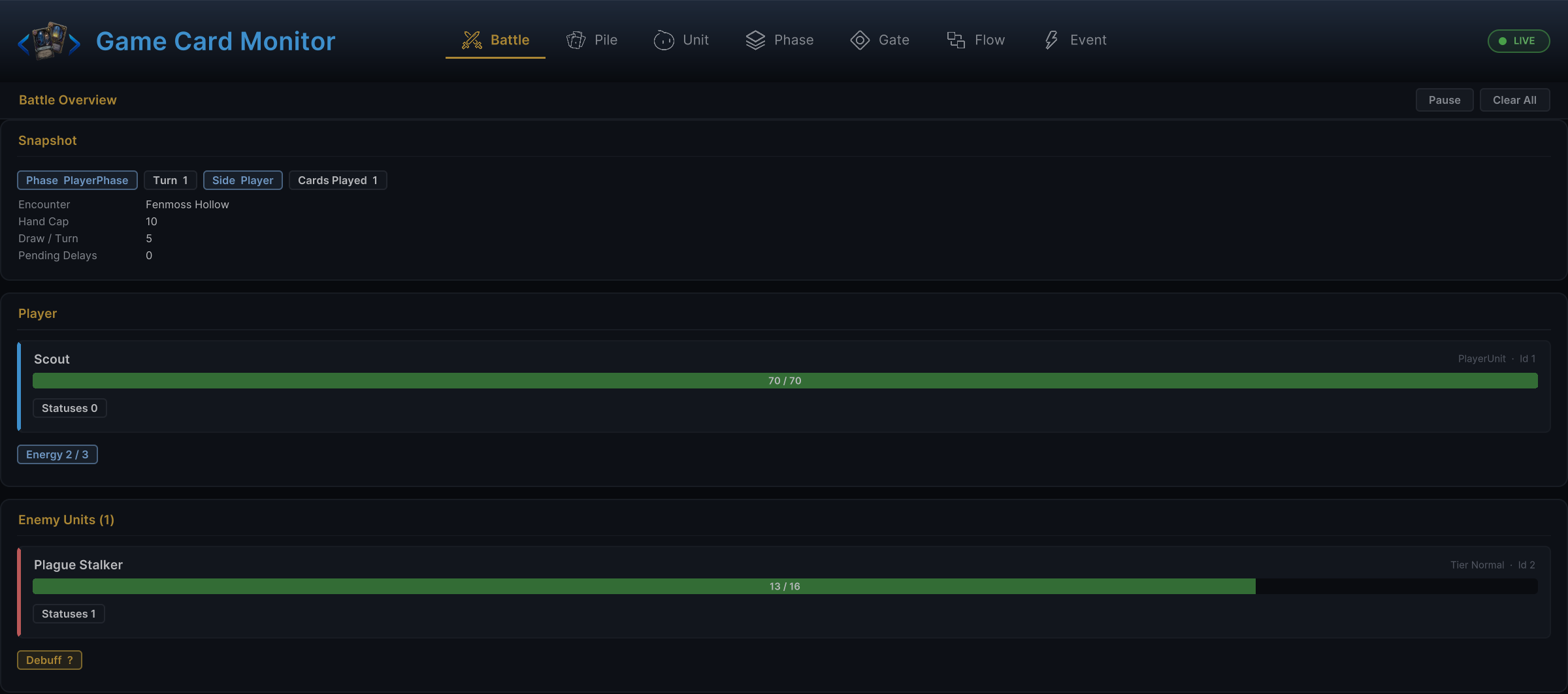
Open Tools/TinyGiants/GCS/Game Card Monitor and check the Battle tab. It renders the same runtime state your widgets should be reading; if the Monitor is right and your HUD is wrong, the bug is in your refresh path, not the battle.
Hand UI
Rebuild or patch the hand from GCSApi.Hand(). It returns the live hand pile at call time, so cards drawn since the turn began are included.
void RefreshHand()
{
    foreach (var card in GCSApi.Hand())
    {
        var active = GCSApi.GetActiveCard(card);
        var cost = GCSApi.GetEffectiveEnergyCost(card);
        var playable = GCSApi.CanPlayCard(card);
        RenderCard(card, active, cost, playable);
    }
}
For click handling:
void OnCardClicked(CardInstance card)
{
    var active = GCSApi.GetActiveCard(card);
    if (GCSApi.RequiresTarget(active))
    {
        OpenTargetPicker(card);
        return;
    }

    GCSApi.TryPlayCard(card);
}
When target selection completes:
void OnTargetSelected(CardInstance card, UnitState target)
{
    GCSApi.TryPlayCard(card, target);
}
Unit panels
Build unit panels from runtime units.
| Panel value | Read |
|---|---|
| HP | GCSApi.Hp(unit), GCSApi.MaxHp(unit) |
| Armor | GCSApi.Armor(unit) |
| Alive/dead | GCSApi.IsAlive(unit) |
| HP percent | GCSApi.HpPercent(unit) |
| Statuses | GCSApi.StatusesOn(unit) |
| Enemy intents | GCSApi.PendingIntents(enemy) |
Recommended refresh events:
OnUnitHpChangedOnUnitDiedOnArmorGainedOnArmorLostOnStatusChangedOnStatusTickedOnEnemyUnitIntentChangedOnEnemyPhaseChanged
Status widgets
Status UI should read the full current map, not only the values in the event payload. Use StatusChangedEventArgs.UnitId to locate which unit changed, then re-read everything on it.
void RefreshStatusList(UnitState unit)
{
    foreach (var pair in GCSApi.StatusesOn(unit))
    {
        var status = pair.Key;
        var stacks = pair.Value;
        RenderStatus(status.Icon, status.DisplayName, stacks, status.ShowStackCount, status.IsDebuff);
    }
}
Enemy intents
Intent UI can show the current top intent or the full pending list.
void RenderIntent(UnitState enemy)
{
    var tag = GCSApi.CurrentIntentTag(enemy);
    var value = GCSApi.CurrentIntentValue(enemy);
    var pending = GCSApi.PendingIntents(enemy);
    RenderIntentIcons(tag, value, pending);
}
Refresh when OnEnemyUnitIntentChanged fires and after enemy phase changes.
Choice UI
When a Choice node asks the player to pick cards, units, or statuses, GCS raises OnEffectChoiceOffered.
| Payload field | Use |
|---|---|
PromptText | Label for the choice panel. |
Candidates | Options to render. |
AllowSkip | Whether to show a skip button. |
The selection itself flows back through IChoicePresenter. Your choice panel implements that interface, and the runtime hands it the prompt text, the candidates, minPicks and maxPicks so the panel can enforce how many options must be selected, and the onPicked and onSkipped callbacks. If no IChoicePresenter exists in the scene, choice nodes resolve as skipped.
After the player picks, GCS raises OnEffectChoiceSelected. If the player skips, it raises OnEffectChoiceSkipped instead. Disable normal card buttons while GCSApi.IsWaitingForChoice is true.
Reward UI
After a won battle, GCS may raise OnBattleRewardOffered.
private void ShowReward(BattleRewardOfferedEventArgs args)
{
    foreach (var card in args.CardCandidates)
    {
        RenderRewardCard(card);
    }
}

public void PickReward(GameCard card)
{
    GCSApi.ApplyReward(RewardChoice.Card, card);
}

public void SkipReward()
{
    GCSApi.SkipReward();
}
RewardChoice also offers Energy and Cost; pass null as the card for those. Applying or skipping resolves the reward step and raises OnBattleEnded. Use GCSApi.IsWaitingForReward to decide whether the reward controls should be visible.
Floating text and presentation
For custom floating text, subscribe to FloatingTextSystem.Requested; the handler receives a FloatingTextRequest.
void OnEnable()
{
    FloatingTextSystem.Requested += ShowFloatingText;
}

void OnDisable()
{
    FloatingTextSystem.Requested -= ShowFloatingText;
}
For unit visuals, either use the built-in UnitView or bind your own view model to the unit ids in event payloads. Do not depend on the demo HandController, CardView, or reward UI classes unless your project is intentionally modifying the demo.
Refresh strategy
| Strategy | Use when |
|---|---|
| Full rebuild | Hand, reward choices, and small status lists. |
| Patch by id | Unit panels, intent widgets, floating text targets. |
| Debounced refresh | Large custom combat logs or analytics panels. |
| Immediate animation plus refresh | Damage, heal, armor, and card movement. |
A full refresh from GCSApi is usually cheap enough for the visible battle UI. Optimize only after a real profile shows a problem.
Common mistakes
| Mistake | Better approach |
|---|---|
| Keeping a local copy of hand cards and mutating it manually. | Rebuild from GCSApi.Hand() after card events. |
| Enabling card buttons based only on energy. | Use GCSApi.CanPlayCard(card). |
| Forgetting to unsubscribe. | Store and dispose IDisposable handles. |
| Treating an event payload as complete state. | Use the payload to locate what changed, then read current state. |
| Depending on demo UI classes in production UI. | Depend on GCSApi, events, and your own view classes. |
| Blocking gameplay because a VFX or SFX asset is missing. | Let gameplay resolve and degrade presentation gracefully. |