Common Card Patterns
Node-by-node recipes for the classic card archetypes: strike, block, status application, card draw, multi-hit, area damage, and conditional payoffs.
For card authors who know the FlowGraph basics and need reusable node chains rather than a theory refresher.Each recipe states the card text it produces, then the node chain and the settings that matter. Every node named here is a built-in; type it into the Add Node search and it appears. Adapt the numbers and the presentation, keep the structure.
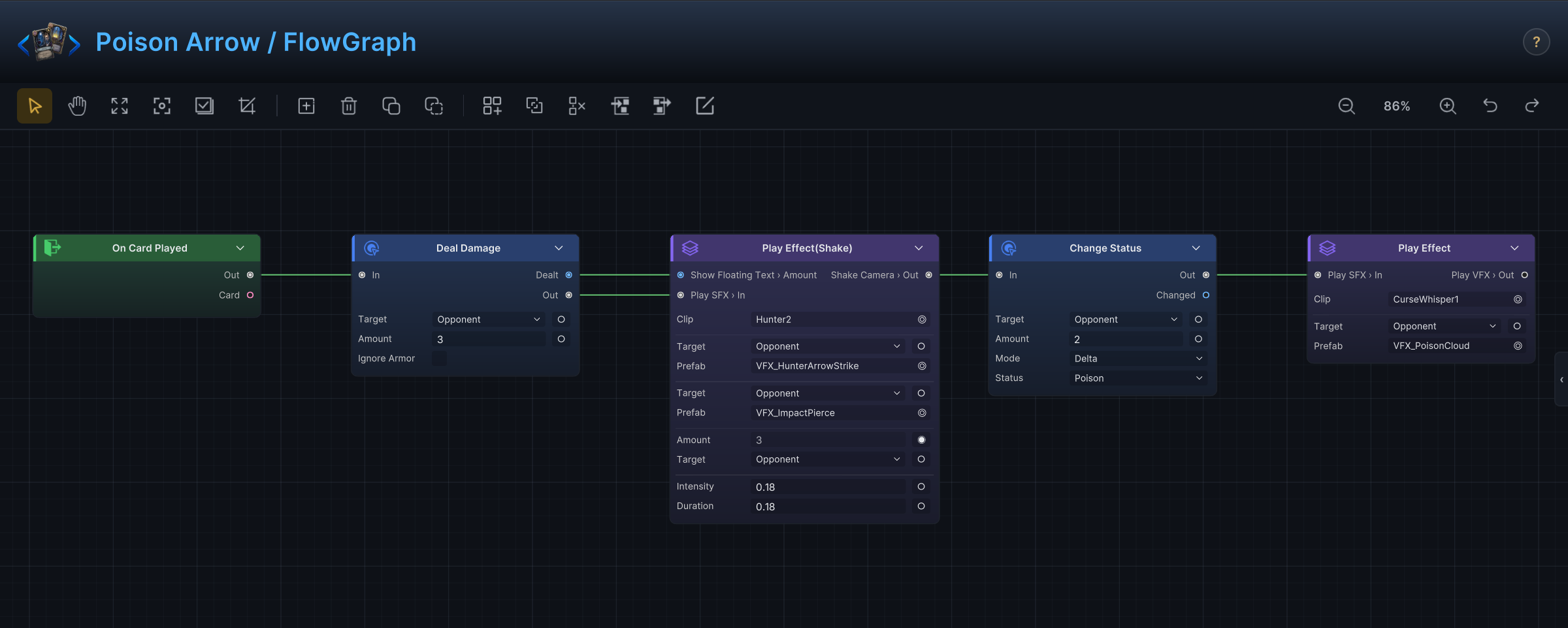
Two demo cards already ship most of these patterns. Open Poison Arrow (strike plus status) and Rapid Fire (multi-hit with random targets) in the Hunter set for a live reference.
Strike
Card text: "Deal 6 damage to the selected enemy."
On Card Played → Deal Damage
- Set the card's Target Mode to
SingleEnemyUnitso the player aims the card. - Leave the damage node's Target on
Opponent. In a card graph that resolves to the enemy the card was played on. - Type the number into Amount, or feed the port from an Operator node when the value is computed.
Deal Damage reports the damage that actually landed, after armor, on its Dealt output. Follow-up nodes can react to the real number instead of the printed one; the demo Poison status pipes Dealt straight into its floating text.
Ticking Ignore Armor makes the hit bypass armor entirely. Poison in the demo uses it so the turn-start tick always hurts.
Block
Card text: "Gain 5 armor."
On Card Played → Change Armor
- Set Target Mode to
SelforNone; there is nothing to aim. - On
Change Armor, keep Target onSelfand Mode onDelta, then set Amount to 5.
Set mode overwrites the current value instead of adding to it; reserve it for "set your armor to X" wording. Whether armor survives into the next turn is a battle rule on the encounter (the demo resets it at every turn start), not something the card decides.
Apply a status
Card text: "Apply 2 Poison."
On Card Played → Change Status
- Pick the status from the node's Status dropdown. The list comes from your status database, so there is nothing to type and nothing to mistype.
- Keep Mode on
Deltaand set Amount to 2. A negative amount removes stacks, andSetforces an exact count. - Point Target at
Opponentfor a debuff,Selffor a buff.
Poison Arrow runs exactly this after its damage step: hit first, then two stacks of Poison, each beat with its own effect group.
How those two stacks combine with stacks already on the target (add up, keep the higher count, or replace) is the status asset's Stack Rule, not the card's decision. The card only offers stacks; the status decides what they become.
Draw cards
Card text: "Draw 2 cards."
On Card Played → Draw Cards
Set Mode to Count and Count to 2. The other mode, ToHandLimit, keeps drawing until the hand is full and matches "fill your hand" wording. Downstream nodes should read the Drawn output rather than assume the count, because the hand-size rule can cut a draw short.
Multi-hit
Card text: "Deal 3 damage 4 times, hitting a random enemy each time."
This is the demo card Rapid Fire, verbatim:
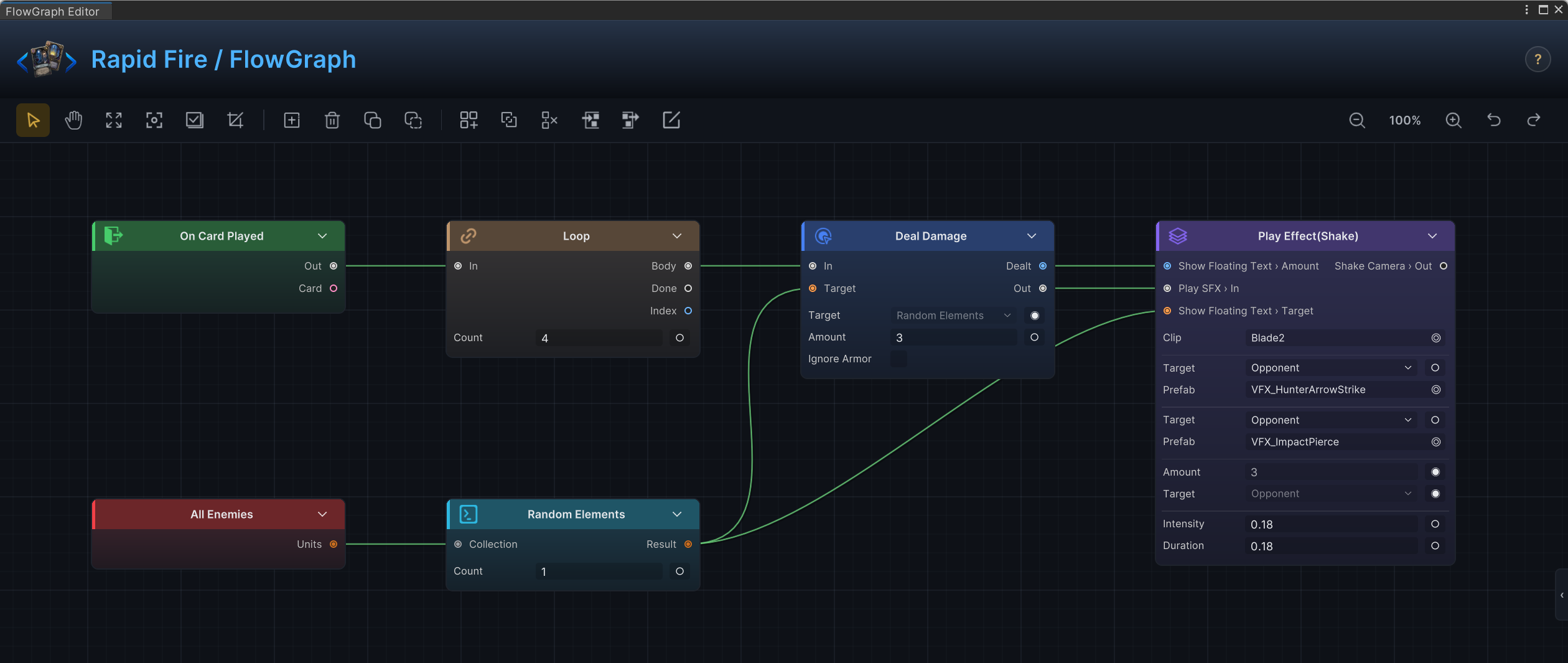
On Card Played → Loop (Count 4), whose Body runs Deal Damage (Amount 3). The damage node's Target port is fed by Random Elements (Count 1), which reads from All Enemies.
Rapid Fire's own Target Mode is AllEnemyUnits: the card sprays the whole field, so the player is never asked to aim.
Each loop pass is a separate damage application, so anything that reacts per hit (armor, Thorns, damage hooks) triggers four times. That is usually what multi-hit text implies. For a multi-hit that stays on one chosen enemy, drop the random chain: switch Target Mode to SingleEnemyUnit and leave the damage target on Opponent.
Area damage
Card text: "Deal 6 damage to all enemies."
On Card Played → Deal Damage with Target switched to AllEnemies. One node, every living enemy.
Set the card's Target Mode to AllEnemyUnits or None. Forcing the player to select a single target for a card that hits everyone reads as a bug.
Conditional payoff
Card text: "If the target is Marked, draw a card."
Build the check from Get and Operator nodes, then split control with Branch:
Unit Status Stacksreads how many Marked stacks the target carries.Conditioncompares that number against 0.Branchtakes the comparison on its Condition input and routes control toTrueorFalse.- Put
Draw Cardson theTruebranch. LeaveFalseunconnected unless the text promises a fallback.
The check reads the stacks at the moment Branch runs. If the same card applied Marked one node earlier in its own chain, those fresh stacks already count. Marked ships in the demo status database, so you can test this card in a Hunter encounter without authoring a new status first.
Discard or exhaust
Card text: "Choose a card in your hand. Exhaust it, then gain 2 armor."
On Card Played → Choice → (OnChosen) Move Cards → Change Armor
- Feed the
Choicenode's Options input fromCard Pileswith its pile set to Hand, and write the instruction the player sees into Prompt. - The battle pauses while the player picks. Control resumes down
OnChosen, and the picked cards come out of theChosenoutput. - Wire
ChosenintoMove Cardsand set the destination pile toExhaust(orDiscard). - Finish with
Change Armor, as in the Block recipe.
Allow Skip adds a skip button and routes control through the Skipped branch instead. Decide what skipping means before you ship the card; an empty Skipped branch silently does nothing.
Card text checklist
Read the finished text against the graph before moving on:
- "Selected enemy" promises aiming, so Target Mode must be
SingleEnemyUnit. - "All enemies" promises no aiming:
AllEnemyUnitsorNone. - Name piles precisely. Draw pile, discard pile, and hand are three different places.
- State the condition before the payoff, in the order the player evaluates it.
- Printed numbers drift away from node values over time. Description tokens can inject the live value into the text; see Card types, tags and tokens.