Common Status Patterns
The node chains behind the six status archetypes: damage over time, stat buff, stat debuff, damage absorber, reactive damage, and control. Every recipe is a shipped demo status you can open.
For authors building their own status set: use Poison, Strength, Thorns, Buffer, and Silence as verified graph references.A status is a rule that lives on a unit: it persists across turns, reacts to what happens, and can rewrite numbers before they land. Authoring one has two halves. The asset fields decide how stacks behave; the Behavior graph decides what the status actually does. Every pattern below exists in the demo status database, so you can open the real graph next to this page.
Stack behavior lives on the asset
Three fields in the Workbench Status mode control stacking, and none of them needs a node:
| Field | Options | What the player experiences |
|---|---|---|
| Stack Rule | Additive / Max / Replace | New applications add up, keep the higher count, or overwrite the current count |
| Max Stacks | -1 or a positive cap | -1 means unlimited; a cap silently clips anything above it |
| Decay Rule | PerTurn / Never | Lose one stack automatically each turn, or persist until removed |
Decide these before touching the graph. Half of the classic status behaviors ("stacks fall off each turn", "does not stack beyond 3") are pure asset configuration.
Damage over time (Poison)
Status text: "At the start of your turn, take 1 damage per stack, ignoring armor, then lose 1 stack."
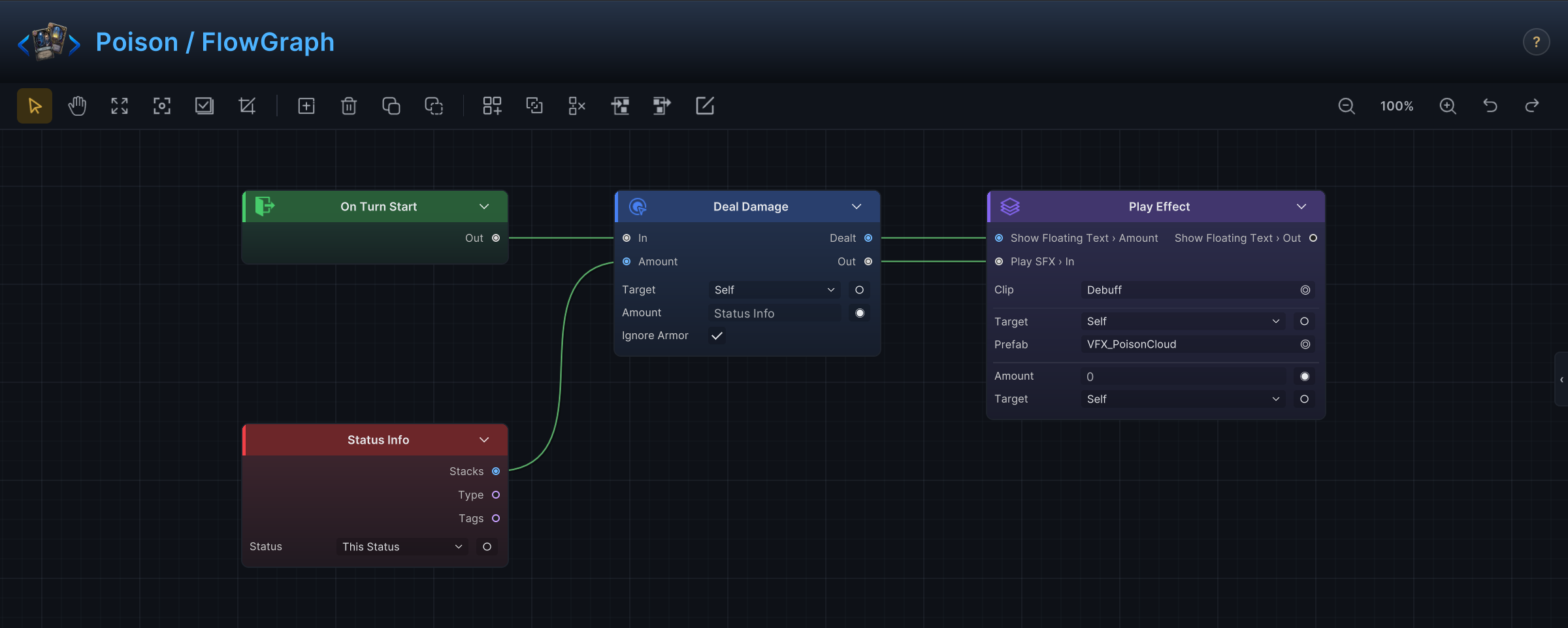
The demo Poison asset: debuff on, Stack Rule Additive, Decay Rule PerTurn, Max Stacks -1. The graph is the screenshot above:
On Turn Start → Deal Damage, with three settings doing the work:
- Target is
Self. In a status graph,Selfmeans the unit carrying the status, whoever that is. - Amount is not typed in. It comes from
Status Info, whoseStacksoutput reports the current stack count. Leave the node's Status field empty and it reads the status the graph belongs to. A wired port always beats the number typed in the field. - Ignore Armor is on, so the tick hurts even a fully armored unit.
Notice what is missing: there is no "lose 1 stack" node. Decay Rule PerTurn handles that on the asset side. Burn in the demo is the same skeleton ticking at turn end through On Turn End; Bleed swaps the entry for On Attack Taken, so it hurts whenever the holder is struck.
Stat buff (Strength)
Status text: "Your attacks deal 1 extra damage per stack."
Buffs that change numbers do not deal damage themselves. They intercept a value on its way through, via a Hook entry:
Damage Dealt Hook → Math Binary → Write Hook
Damage Dealt Hookfires whenever the holder is about to deal damage, and exposes the pending number on itsValueoutput.Math Binary(Add) sums that value withStatus Info→Stacks.Write Hooksubmits the adjusted number, and the attack lands that much harder.
The demo Strength asset uses Decay Rule Never, so the buff stays until something removes it.
Stat debuff (Weak, Vulnerable)
The debuff versions are the same hook chain pointed the other way. Reduce the holder's outgoing damage through Damage Dealt Hook, or raise its incoming damage through Damage Taken Hook. Pick the hook by asking whose number changes: the holder always owns the hook, so "this unit hits softer" and "this unit gets hit harder" are both statuses on that unit.
When you subtract, run the result through Clamp before Write Hook. Without it a big debuff can push damage negative, which heals the target.
One design note from the demo: Weak and Vulnerable adjust the number by a fixed Constant instead of reading Status Info → Stacks. Extra stacks therefore extend the duration rather than deepen the penalty. Both scalings are legitimate; make the printed text match the one you wired.
Damage absorber (Buffer)
Status text: "Each stack prevents 1 HP of loss, then is consumed."
HP Loss Hook → Math Binary chain → Write Hook, plus Change Status to burn the stacks:
HP Loss Hookintercepts HP loss with the pending amount onValue.- Math nodes work out how much the stacks can absorb and what remains.
Write Hooksubmits the reduced loss, andChange Status(negative Amount,Self) consumes the stacks that were spent.
Use this pattern whenever an effect trades its own stacks against an incoming value.
Reactive damage (Thorns)
Status text: "When you take damage, deal 1 damage per stack to the attacker."
Reactive statuses use a plain Entry instead of a Hook, because they respond to an event rather than rewrite a number:
On Damage Taken → Deal Damage
On Damage Takenfires after the holder is hit and exposes the attacking unit on itsSourceoutput.- Wire
Sourceinto the damage node's Target port, so the bounce hits whoever attacked, not a fixed target. - Amount again comes from
Status Info→Stacks.
Reflected damage is damage. If two units both carry a reflect-style status, test them against each other in Play Mode and watch the Monitor Flow tab to confirm the exchange settles the way you intend.
Control status (Silence)
Status text: "Cannot play Skill cards. Lose 1 stack each turn."
Control effects veto a decision instead of changing a number. The demo Silence graph:
Card Playable Hook → Card Info → Condition → Branch → Cancel Hook
Card Playable Hookfires while the battle checks whether a card may be played, exposing the candidate on itsCardoutput.Card Inforeads the card'sType;Conditioncompares it with aConstantset toSkill.- On the
Truebranch,Cancel Hookvetoes the play. The card stays in hand and cannot be played while the status holds.
Silence's "lose 1 stack each turn" half is Decay Rule PerTurn again, with no extra nodes. The demo's other lockouts each pull a different lever instead of repeating the veto: Stunned makes the holder skip its entire turn (On Turn Start into Skip Next Turn, with Max Stacks 1 so it cannot pile up), Frozen shrinks outgoing damage through Damage Dealt Hook, and Restricted cuts cards drawn through Draw Count Hook. Pick the lever that matches the text you want to print.
Status authoring checklist
- Does the display name state the rule, or at least not contradict it?
- Buff or debuff? The
IsDebuffflag drives how the UI presents it. - Should new applications add, keep the max, or replace? That is Stack Rule, not graph logic.
- Should stacks fall off each turn? That is Decay Rule, not a node.
- Which half does the behavior need: an Entry (react to an event), a Hook (rewrite a value), or both?
- Does the player see an icon and a stack count that actually changes? Confirm in the Monitor
Unittab during a test battle.