Card Authoring
Define what a card costs, how it reads in hand, and which FlowGraph runs when it resolves.
For developers building or reviewing card content in Workbench Card mode.Cards are the player's main actions. A card definition controls what the player sees in hand, what it costs to play, and which behavior graph runs when it resolves. All of it lives in one window: open Tools > TinyGiants > GCS > Game Card Editor and switch to the Card tab.
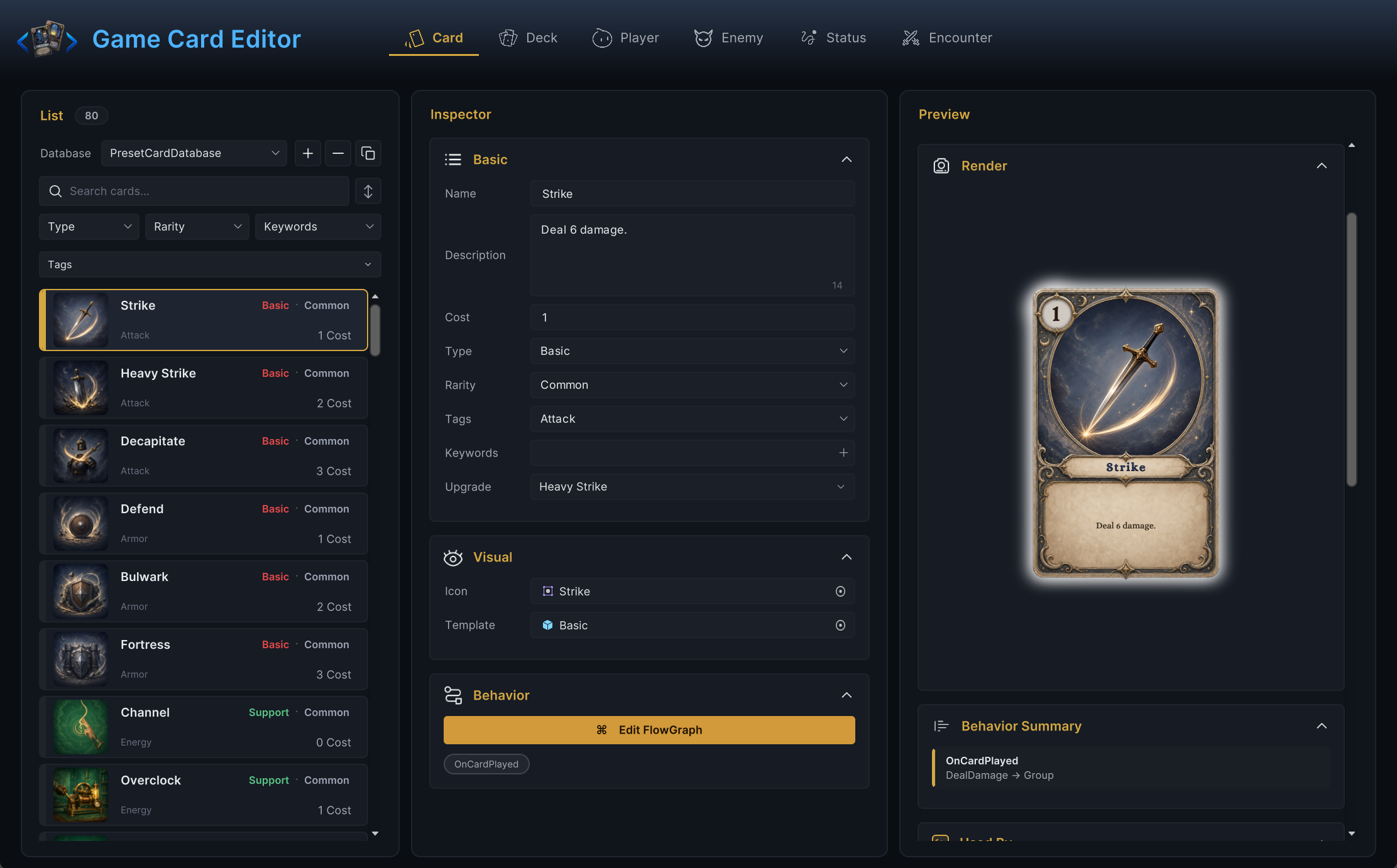
The demo ships 80 cards built exactly this way, so whenever a field feels abstract, open a demo card such as Poison Arrow or Shield Bash next to yours and compare.
Authoring order
Use this order when creating a card from scratch:
- Write the card's player-facing intent in one sentence.
- Fill Name, Description, Cost, Type, and Rarity.
- Add Icon and Template if presentation assets already exist.
- Add Tags for filtering and synergies; add Keywords only when you want built-in rule behavior.
- Open Edit FlowGraph and wire the behavior.
- Put the card in a deck and test it in battle.
Resist wiring graph nodes before the card text is clear. The graph should implement the card the player thinks they are playing, and the one-sentence intent from step 1 is how you check that later.
Basic fields
| Field | What it does |
|---|---|
| Name | Display name shown in hand and in list rows. When not empty, the Workbench also renames the card asset to match. |
| Description | Rules text shown on the card. Keep it aligned with the graph. |
| Cost | Energy required to play the card. Whole numbers only; the editor clamps it to 0 or higher. This is the printed base cost. What the player actually pays in battle can differ once a Card Cost Hook or a Modify Card Cost effect gets involved. |
| Type | Category used for frame color, filtering, and grouping. The dropdown offers Basic, Skill, Curse, Support, and Burst, plus every type already used in your databases. Typing a new label creates it. |
| Rarity | Reward and grouping label. The dropdown offers Common, Rare, Epic, and Legendary, plus any custom values in use. An empty value falls back to Common. |
| Tags | Free-form labels for your own filtering and synergies. No built-in behavior. |
| Keywords | Engine keywords with built-in rule behavior, picked from a dropdown. See the table below. |
| Upgrade | The card this one becomes when upgraded. None means no upgrade path. |
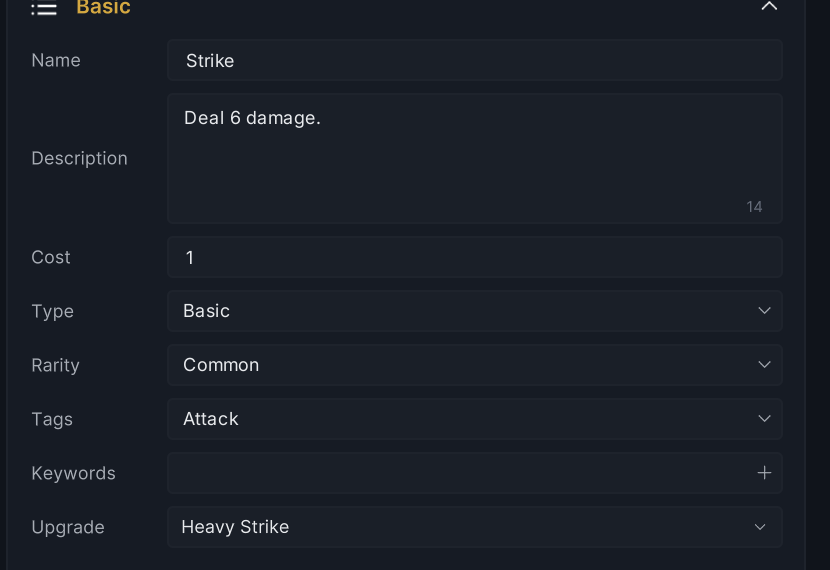
Tags and Keywords look similar in the inspector but behave differently. Tags are your project's labels; nothing in the engine reads them until your graphs or code do. Keywords come from the card keyword registry and carry actual rule behavior. If you expected built-in behavior and typed a tag instead, the card will look right and do nothing.
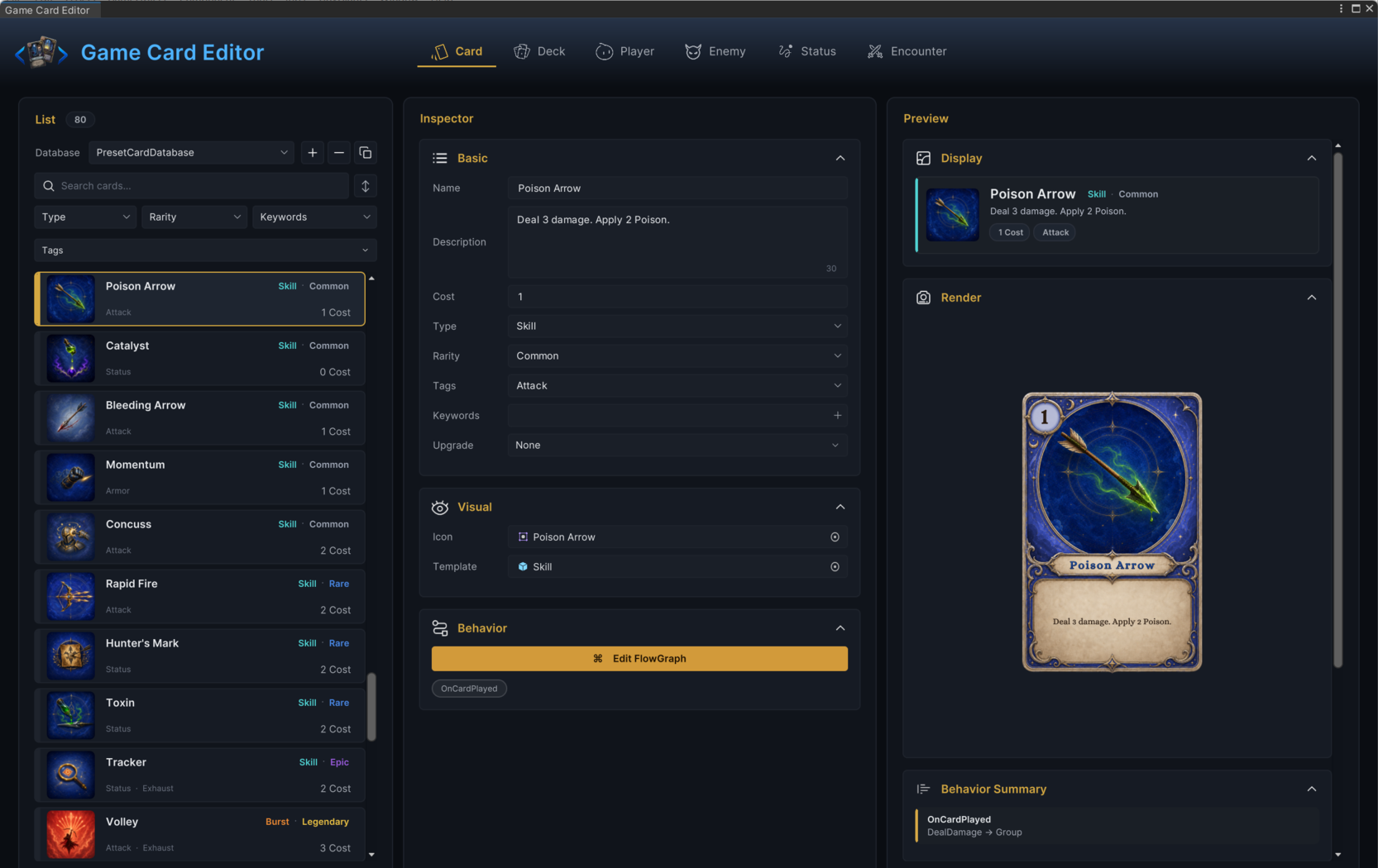
The demo's Poison Arrow shows the whole set filled in: Cost 1, Type Skill, Rarity Common, a single Attack tag, and a description that matches its graph.
Built-in keywords
The Keywords dropdown is fed by the keyword registry ([CardTag] types in C#), so your own assemblies can add more. GCS ships five, each with a precise rule:
| Keyword | Rule behavior |
|---|---|
Exhaust | After the card is played, it goes to the exhaust pile instead of the discard pile, so it does not come back when the discard pile reshuffles. |
Ethereal | If the card is still in hand when the turn ends, it is exhausted instead of discarded. |
Retain | The card stays in hand at end of turn instead of being discarded. Only matters when the encounter's battle rules discard the hand; under a keep-hand rule every card is effectively retained. |
Innate | At battle start the card is moved to the top of the draw pile, so it lands in the opening hand. With more Innate cards than opening-hand slots, a random subset makes it. |
Unplayable | The card can never be played. It sits in hand as dead weight, which is exactly what curses and other effects want to exploit. |
Upgrades
A card and its upgraded form are two separate card definitions. Build the stronger version as its own card, then point the base card's Upgrade field at it. When something in a run upgrades a copy, that copy uses the upgraded definition's cost, text, and graph from then on. The demo's Strike upgrades into Heavy Strike this way, and the upgraded card never needs to appear in any deck itself.
Visual fields
The Visual section has two slots. Icon is the artwork sprite used on the card face and in list rows. Template is the prefab rendered as the card face; when it is empty, the presentation layer falls back to a placeholder.
Temporary art is fine while you test mechanics. A placeholder face is enough to verify damage numbers and targeting; final art can land last.
Targeting
Targeting is data on the card definition: the TargetMode field decides whether playing the card asks the player to point at a unit, and the graph reads that choice at run time.
| Mode | What the player experiences |
|---|---|
None | The card resolves without picking a unit. Draw effects and energy gain live here. |
Self | The card affects the player unit. No unit pick. |
SingleEnemyUnit | The player drags the card onto one living enemy. |
AllEnemyUnits | The card hits every living enemy. No unit pick. |
Only SingleEnemyUnit requires a chosen target; the engine resolves the other three modes on its own. Inside the graph, the picked unit answers to the Opponent target option, which is why Poison Arrow's Deal Damage node aims at Opponent. The same contract applies when you play cards from code:
// TryPlayCard(CardInstance card, UnitState target): card is a hand instance.
// Single-enemy cards need a target unit; every other mode takes null.
var arrow = GCSApi.Hand()[0];
GCSApi.TryPlayCard(arrow, GCSApi.FirstAliveEnemy());
GCSApi.TryPlayCard(GCSApi.Hand()[1], null);
If code plays a single-enemy card without passing a target, the engine falls back to the first living enemy instead of failing the play.
Keep the mode and the graph consistent. If the description says "all enemies", the graph should resolve all enemies rather than only the selected target. If the player must click an enemy, the mode should not be None.
Behavior graph
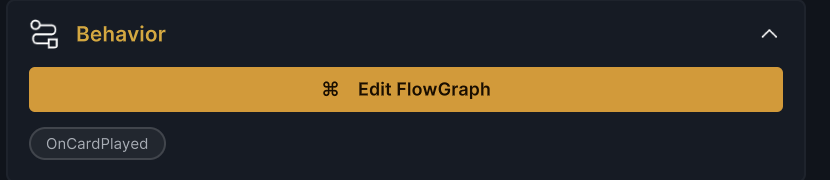
Click Edit FlowGraph in the Behavior section. The graph opens in its own window whose banner reads the owner's name, Poison Arrow / FlowGraph for a card named Poison Arrow. Once entries exist, the foldout lists them as chips you can click to jump back in.
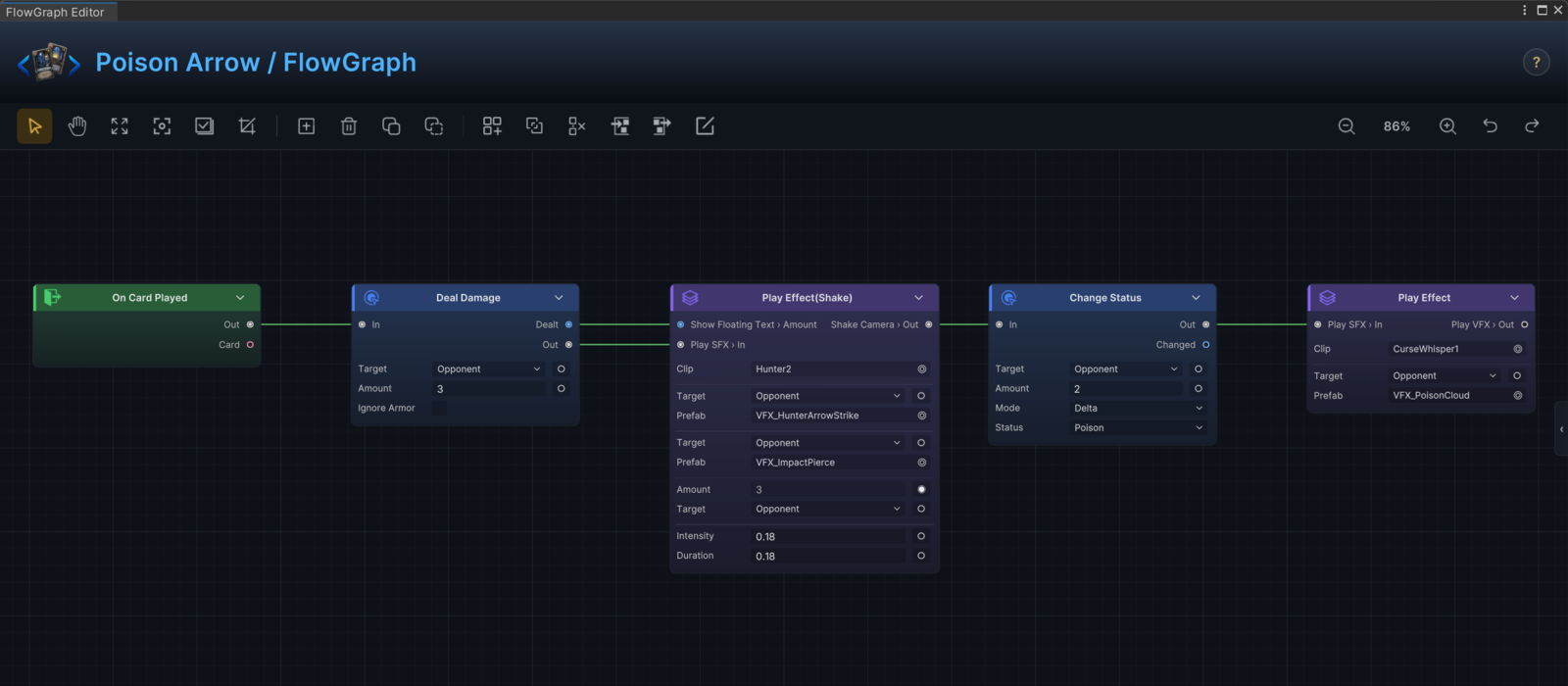
A good card graph answers three questions:
| Question | Example answer |
|---|---|
| When does it run? | When the card is played. |
| Who does it affect? | The selected enemy, all enemies, the player, or a resolved group. |
| What changes? | Damage, armor, draw, status stacks, energy, VFX, or stored values. |
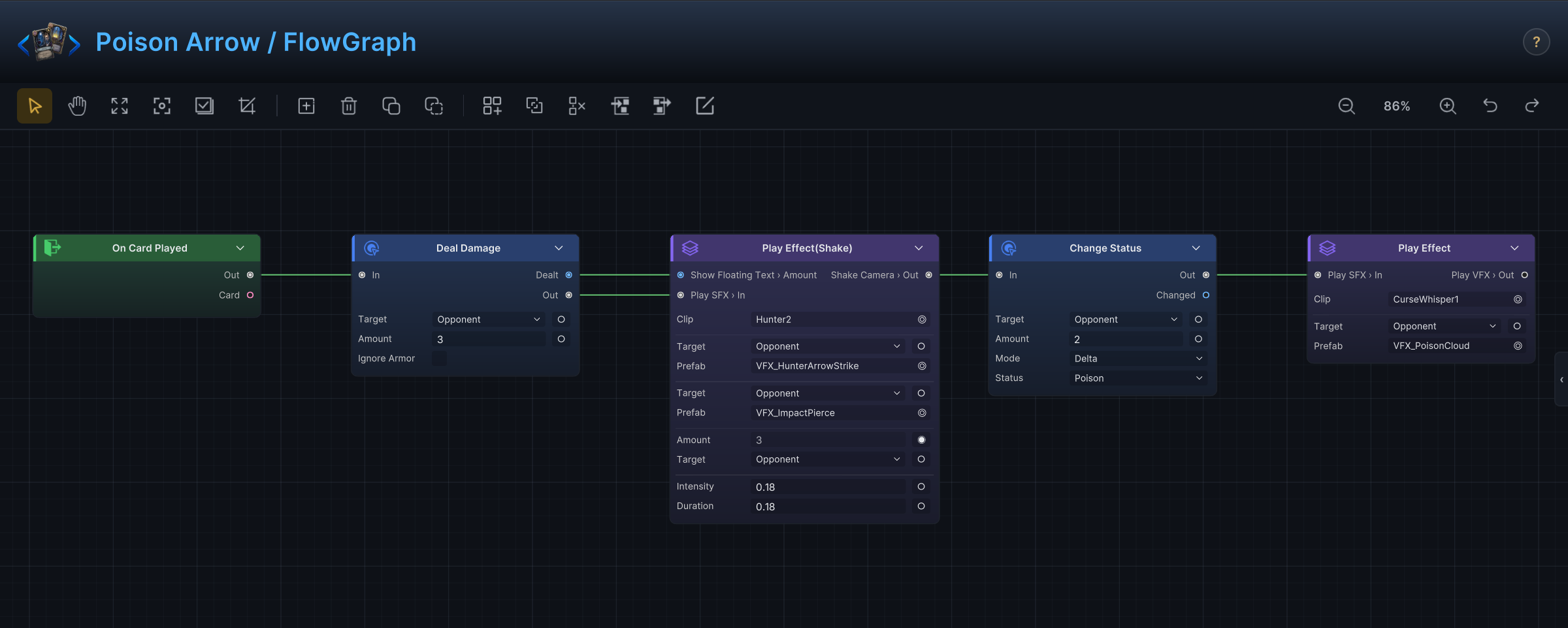
Here is how the demo's Poison Arrow answers them: an On Card Played entry, a Deal Damage node aimed at the selected enemy (Amount 3), then a Change Status node applying 2 stacks of Poison, with effect nodes for the arrow hit and the poison cloud along the way.
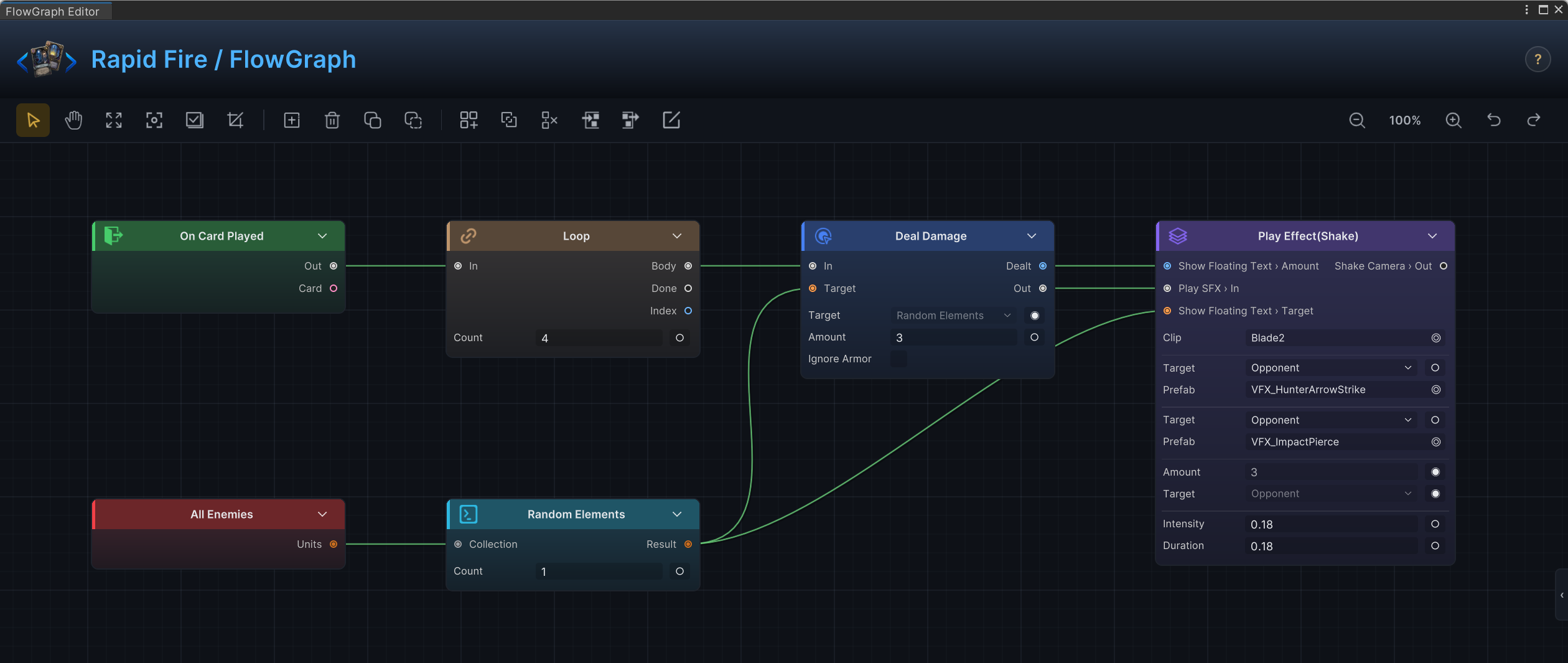
Keep first versions this linear: entry, target, one or two state changes, presentation last. Branches, loops, and random picks come after the simple version works. Rapid Fire is the demo's next step up: for 2 energy, a Loop node runs four passes, and each pass deals 3 damage to one randomly picked enemy.
How a card reaches battle
A card can be perfectly valid and still never show up in a fight. At run time it must be reachable through this chain:
The card sits in an active card database, a deck references it with at least one copy, the encounter's player unit uses that deck (or the run-level master deck contains the card), and the battle starts that encounter. When a new card does not appear, walk this chain before touching the graph. The break is usually in this chain.
Validation
Card mode reports two kinds of issues:
- An empty Name is an error.
- Problems the FlowGraph validator finds in the behavior graph are warnings.
Deck mode adds its own checks: entries with no card assigned and entries with Copies below 1 are both errors. Note what validation cannot see: a card with no issues can still be unreachable because no active deck uses it.
Common mistakes
| Symptom | Likely cause |
|---|---|
| Card appears but cannot be played | Cost exceeds current energy, the battle is not in the player phase, the card carries Unplayable, or a Card Playable Hook blocks it. |
| Card asks for the wrong target | TargetMode and the graph's target resolution disagree. |
| Card text lies | The description was not updated after a graph change. Fix one of them now, not later. |
| Upgrade does nothing | Upgrade points to None, or nothing in the run ever upgrades the card. |
| Keyword has no effect | It was typed as a tag instead of picked as a keyword. |