Encounter Authoring
An encounter is the battle recipe: one player unit, an ordered enemy lineup, a reward deck, and the battle rules, all on a single asset the runtime can start.
For anyone assembling battles in the Workbench. If the player units or enemies are not authored yet, create those first.An encounter is the asset a battle starts from. It picks the player unit, the enemy lineup, the reward deck, a difficulty label, and the battle rules for one playable fight. Cards, statuses, and behaviors all arrive indirectly through those references, so a finished encounter is mostly a matter of pointing at the right things:
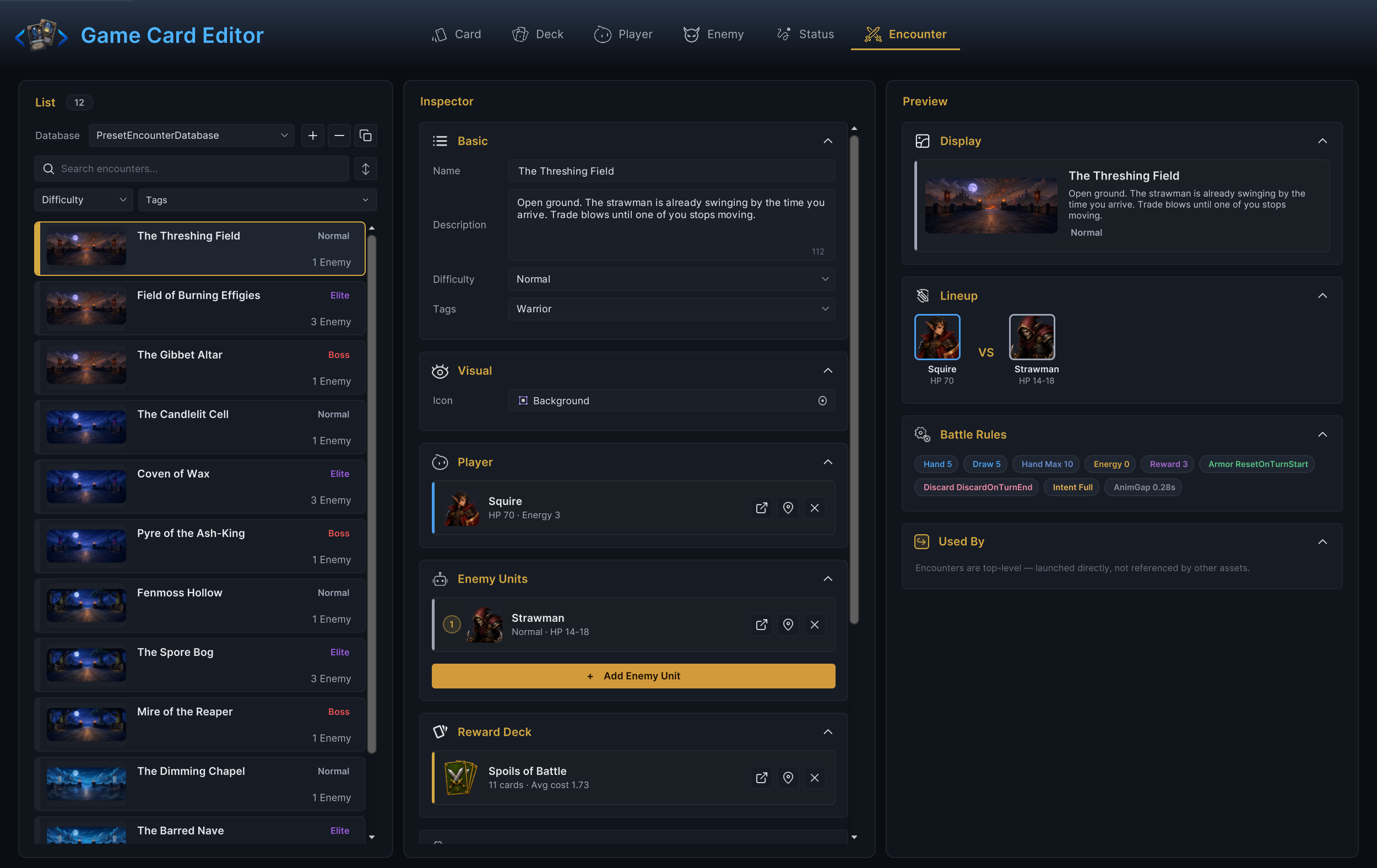
Author encounters in Workbench > Encounter:
Authoring order
- Fill Name, Description, Difficulty, Tags, and Icon.
- Choose a Player Unit.
- Add one or more Enemy Units.
- Assign a Reward Deck if the battle offers card rewards.
- Adjust Battle Rules.
- Make sure the encounter sits in an encounter database that is active on the scene's
GameCardManager. - Point
GameCardEncounterBootstrapat it, or start it from code withGCSApi.StartBattle.
An encounter only counts as finished when a scene or a code path can actually reach it. A perfectly configured asset that nothing references is a draft, not content.
Identity fields
The Basic and Visual foldouts hold the fields that describe the encounter rather than change how it plays:
| Field | Meaning |
|---|---|
| Name | Display name. When non-empty, the Workbench also renames the underlying asset to match. |
| Description | Player-facing blurb shown in the encounter preview. |
| Difficulty | A label such as Normal, Elite, or Boss. Defaults to Normal. The dropdown offers values already used in your project; you can also type a custom one. |
| Tags | Free-form labels for filtering and project-specific grouping. |
| Icon | Battle banner or preview image, shown as a 16:9 thumbnail in the list and preview. |
Difficulty is a label, not a ruleset. Calling an encounter Boss changes its chip color in the editor and whatever your own UI does with the string. The actual challenge comes from the enemy lineup and the battle rules.
Choose the player
The Player section holds exactly one player unit. Its card shows the unit's HP and base energy at a glance. Double-click the card to pick a different unit, or use the jump button to open the current one in Player mode.
The player unit is a package deal. Choosing it also decides the base HP and energy, the starting deck (and therefore every card the player begins with), the energy display name and icon, and the presentation prefab.
If a battle starts with unexpected cards, the fix is almost never in Encounter mode. Check which starting deck the chosen player unit points at.
Build the enemy lineup
Enemy Units is an ordered list of numbered slots. Each slot shows the enemy's tier and HP range. Add slots with Add Enemy Unit, drag rows to reorder, and use the jump button to open any enemy in Enemy mode.
Order matters twice at runtime: enemies enter the battle in list order, and they act in list order during the enemy turn. Put the enemy the player should read first at the top, and think about which enemy you want striking first.
A slot holds a reference, not a copy limit, so the same enemy asset can fill several slots. The demo's Elite fights are built exactly this way: Field of Burning Effigies runs two Strawman slots in front of a single Pyre Effigy.
At least one enemy is required. An empty lineup is a validation error and the inspector flags it inline. While testing new rules, start with a single enemy and add multi-enemy pressure once the core loop works.
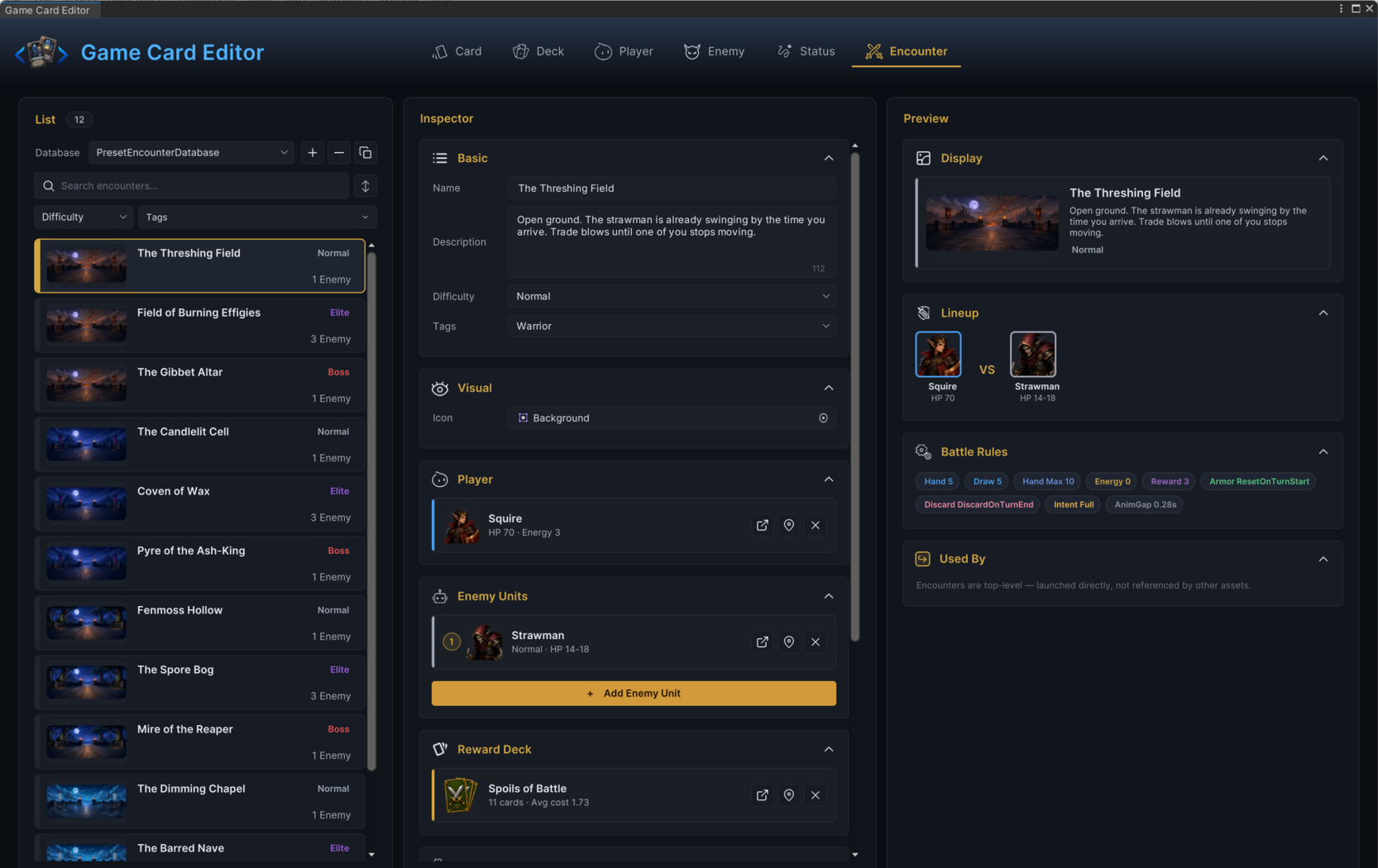
The Threshing Field is that shape in shipped form: the Squire against a single Strawman, rewarded from Spoils of Battle.
Reward deck
The Reward Deck section picks the card pool the victory screen draws from. Its card shows the deck's total card count and average cost, so an accidental three-card reward pool stands out before Play Mode.
The deck reference decides whether victory offers cards at all:
| Setup | Result on victory |
|---|---|
| Reward Deck assigned and stocked | The screen offers card candidates drawn from it. How many is set by Card Reward Count in the battle rules. |
| Reward Deck missing or empty | No card candidates. This is how you build a reward-free encounter. |
One thing the count cannot do is switch card rewards off. The runtime treats any Card Reward Count below 1 as 1, so a stocked reward deck always yields at least one candidate. Battle Rules covers how candidates are rolled.
In the demo, each class arc shares one reward deck across its three encounters; the Warrior arc draws every reward from Spoils of Battle.
Battle rules
The Battle Rules foldout stores the per-encounter ruleset: draw counts, hand limit, energy override, reward count, armor and hand persistence, intent display, and animation pacing. The preview column mirrors the whole set as chips (Hand 5, Draw 5, Energy 0, and so on), so you can read an encounter's rhythm without expanding the foldout.
Every field is covered on Battle Rules.
Learn from the demo encounters
The demo ships twelve encounters, three per class, and every one of them keeps the default battle rules. The whole difficulty spread comes from lineups and enemy behavior graphs, which makes the set a useful reference before you invent your own:
| Encounter | Arc | Lineup | Difficulty |
|---|---|---|---|
| The Threshing Field | Warrior (Squire, HP 70, Energy 3) | 1 Strawman (HP 14-18) | Normal |
| Fenmoss Hollow | Hunter (Scout, HP 70, Energy 3) | 1 Plague Stalker (HP 14-18) | Normal |
| Pyre of the Ash-King | Mage (Archmage, HP 100, Energy 4) | 1 Ashen Hierarch (HP 200-240) | Boss |
The pattern inside each arc: the Normal fight is one weak enemy for learning the class, the Elite fight is a three-slot lineup, and the Boss fight is one large enemy whose pressure lives entirely in its behavior graph. Open any of them in Encounter mode and read the preview chips before changing anything.
Start the encounter
- Bootstrap component (no code)
- C# API
Add GameCardEncounterBootstrap to the GameCardManager object in your battle scene (the component requires the manager) and assign:
| Field | Meaning |
|---|---|
| Default Encounter | The encounter this scene starts. |
| Auto Start On Play | When on (the default), the battle starts as soon as Play Mode begins. |
| On Bootstrap | UnityEvent fired right after the battle starts. |
If nothing happens on Play, check the Console first. The bootstrap logs a warning when Default Encounter is empty or when no GameCardManager instance exists.
using TinyGiants.GCS.Runtime;
using UnityEngine;

public class BattleLauncher : MonoBehaviour
{
    public GameEncounter Encounter;

    public void Launch()
    {
        GCSApi.StartBattle(Encounter);
    }
}
StartBattle takes a direct asset reference, so the encounter itself does not have to live in a database to start. The databases still matter during the battle: statuses, cards, and enemies looked up by name resolve against the active databases registered on the GameCardManager, and the Workbench only lists encounters from active encounter databases.
Validation
Encounter mode checks the essentials before Play Mode has a chance to hide them:
| Check | Severity |
|---|---|
| Player Unit missing | Error |
| No enemy units assigned | Error |
| Reward Deck missing | Warning |
| Difficulty empty | Warning |
A missing reward deck is a warning rather than an error because reward-free encounters are legitimate: with no deck assigned, the victory screen offers no cards. Setting Card Reward Count to 0 does not achieve the same thing, since the runtime still offers one candidate while the deck is stocked. The deck reference is the actual switch.
Common mistakes
| Symptom | Likely cause |
|---|---|
| Nothing starts on Play | Auto Start On Play is off, Default Encounter is empty, or the scene has no GameCardManager. The bootstrap logs a warning for the last two. |
| Battle starts with the wrong cards | The encounter's player unit points at a different starting deck. |
| No enemy appears | The Enemy Units list is empty, or a slot lost its reference. |
| Reward screen appears empty | The Reward Deck is missing or has no cards. |
Victory offers a card despite a reward count of 0 | The runtime never offers fewer than one candidate while a stocked reward deck is assigned. Clear the Reward Deck to offer none. |
| Intents look different than expected | The Enemy Intent Display rule is set to Hidden or IconOnly. |