Status Authoring
Define what one stack means, how stacks merge and decay, and what the status does on battle timings.
For developers building buffs, debuffs, and counters in Workbench Status mode.Statuses are the buffs, debuffs, counters, and ongoing rules that sit on units. A good status tells the player what it means, signals whether it helps or hurts, and has stack and decay rules that match that meaning. Author them in Workbench > Status; the demo ships 30 of them, from Poison and Burn to Strength and Marked.
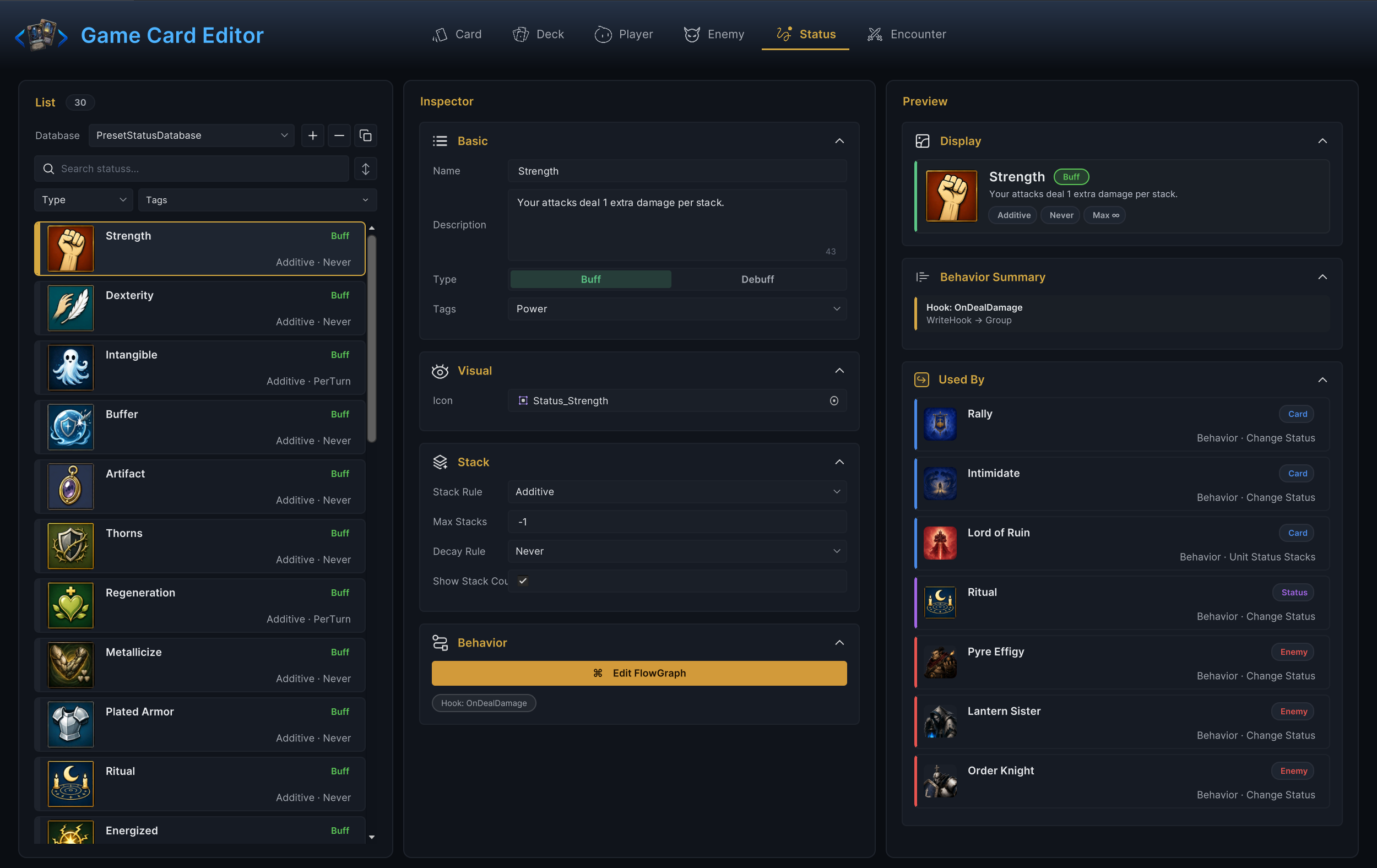
Each list row shows the stack and decay rules right under the name (Additive · Never for the demo's Strength), so a quick scroll already reveals which statuses persist and which fade.
Authoring order
- Decide what one stack means, in player language.
- Fill Name, Description, Type, and Icon.
- Set Stack Rule, Max Stacks, Decay Rule, and Show Stack Count.
- Add Tags only when they help filtering or targeting.
- Open Edit FlowGraph if the status reacts to battle timings or modifies values.
- Apply the status from a card or enemy and test it in battle.
If you cannot explain one stack in one sentence ("one stack of Poison deals 1 damage per turn"), the status is not ready to author.
Basic fields
| Field | What it does |
|---|---|
| Name | Display name. When not empty, the Workbench also renames the status asset to match. |
| Description | Player-facing rules or flavor text. Say whether the status is a passive marker or does something on its own. |
| Type | A Buff / Debuff toggle. Display classification only; it does not select targets. |
| Tags | Free-form labels for filtering and targeting. No automatic behavior. |
Use Buff for helpful effects and Debuff for harmful ones. For counters that are neither clearly good nor bad, pick the closer one and keep the wording neutral.
Visual field
Icon is the sprite shown on the unit's status badge. A temporary icon is fine for early testing; the name and stack rules still need to read correctly, because that is what the player hovers to understand.
Stacking and decay
| Field | What it does |
|---|---|
| Stack Rule | How re-applying merges with existing stacks. Additive adds them, Max keeps the higher value, Replace overwrites. |
| Max Stacks | A positive number caps the total. -1 means no cap. 0 is almost always a mistake and triggers a validation warning. |
| Decay Rule | Never keeps stacks until something removes them. PerTurn removes one stack at the end of the holder's own turn. |
| Show Stack Count | Whether the number appears on the badge. Turn it off for pure on/off flags. |
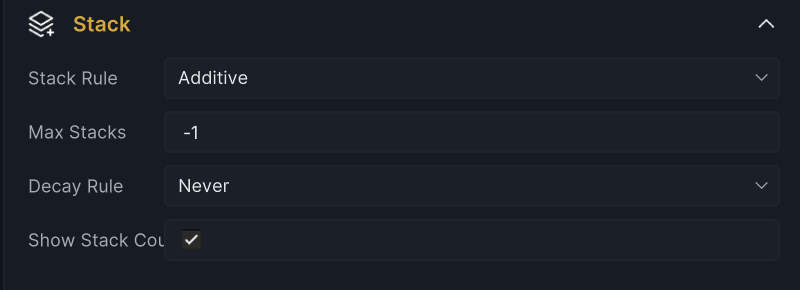
Three semantics are worth spelling out.
First, re-applying a status never creates a second icon. The incoming stacks first pass through hooks (the applier's Inflict Status Hook, then the holder's Receive Status Hook, either of which can shrink or cancel the application), then merge with the current count according to the Stack Rule, and finally Max Stacks caps the result.
Second, the PerTurn tick follows the holder: a status on the player loses one stack when the player's turn ends, while a status on an enemy loses one stack at the end of that enemy's own action in the enemy phase.
Third, losing the last stack has two distinct flavors. When decay clears it, the status expires: the graph's On Status Expired entry runs and code hears OnStatusExpired. When an effect strips it (a Remove Statuses node, a cleanse, a stack change to zero), the status is removed instead: On Status Removed and OnStatusRemoved. Put cleanup reactions on whichever moment matches the design, or on both.
The demo's Poison is a complete worked example: Debuff, Additive, no cap, PerTurn decay, stack count visible. Every one of those choices restates its one-sentence meaning.
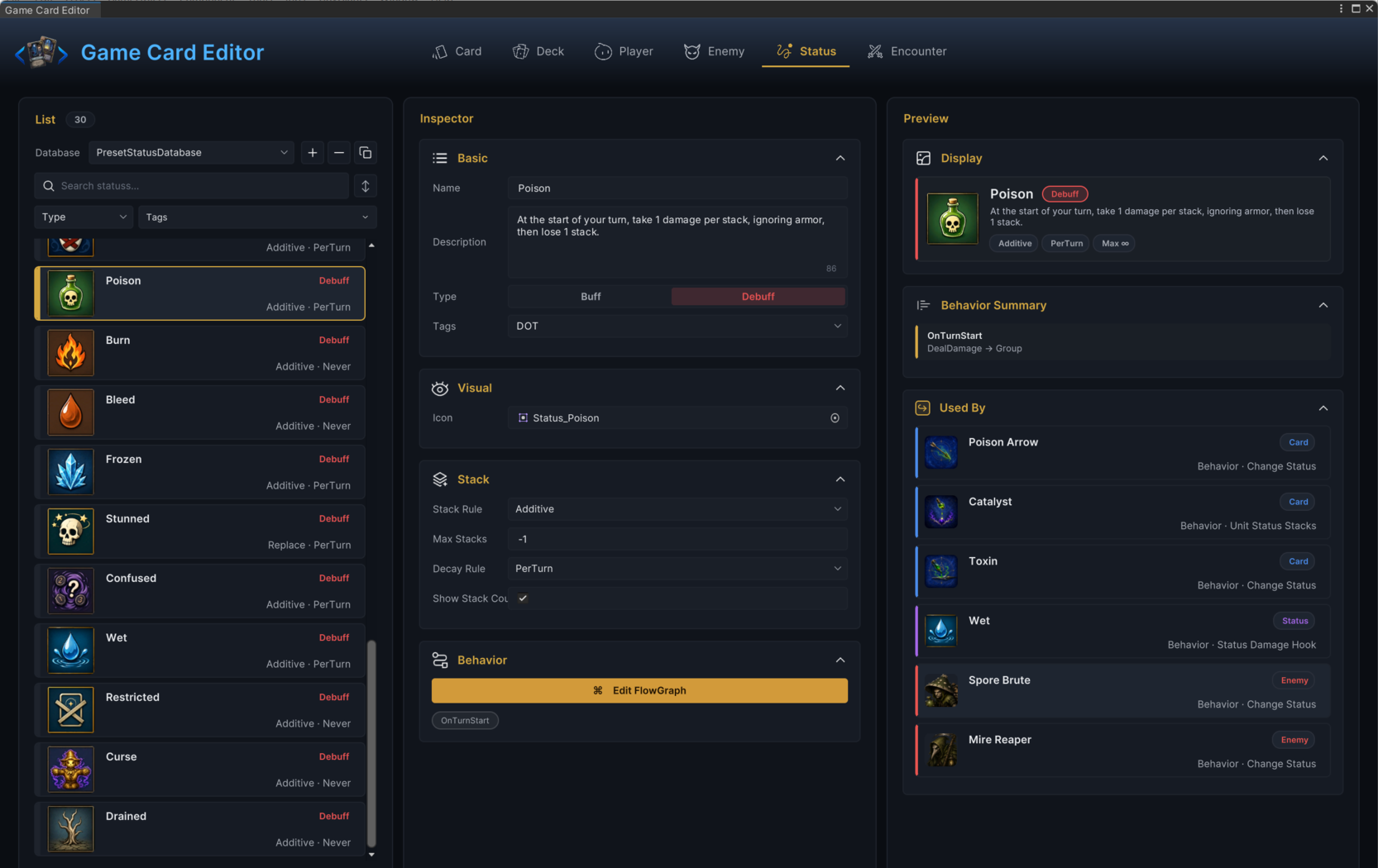
Do not use the stack count as hidden state. If the number changes gameplay, the player should normally see it; if the status is a plain flag, hide the count instead of leaving a meaningless 1 on screen.
Behavior graph
Click Edit FlowGraph in the Behavior section when the status needs timing or reactive behavior. Common patterns:
| Behavior | Example |
|---|---|
| Turn timing | Gain armor at turn start, take damage at turn end. |
| Reaction | Modify a value through a hook, respond when a card is played, react when stacks change. |
| Cleanup | Remove itself once a condition is met. |
| Presentation | Play a buff or debuff effect when applied or triggered. |
The demo's Strength shows the reaction pattern with no turn timing at all: a Damage Dealt Hook adds 1 damage per stack to every attack the holder makes, and that hook is the entire graph. The preview's Behavior Summary foldout condenses that structure into one line, so you can confirm a status's shape without opening the graph.

One more timing detail worth knowing: the On Status Received entry runs on every application the hooks let through, including re-applications that merge into existing stacks, so it is the right place for an "applied" puff or sound.
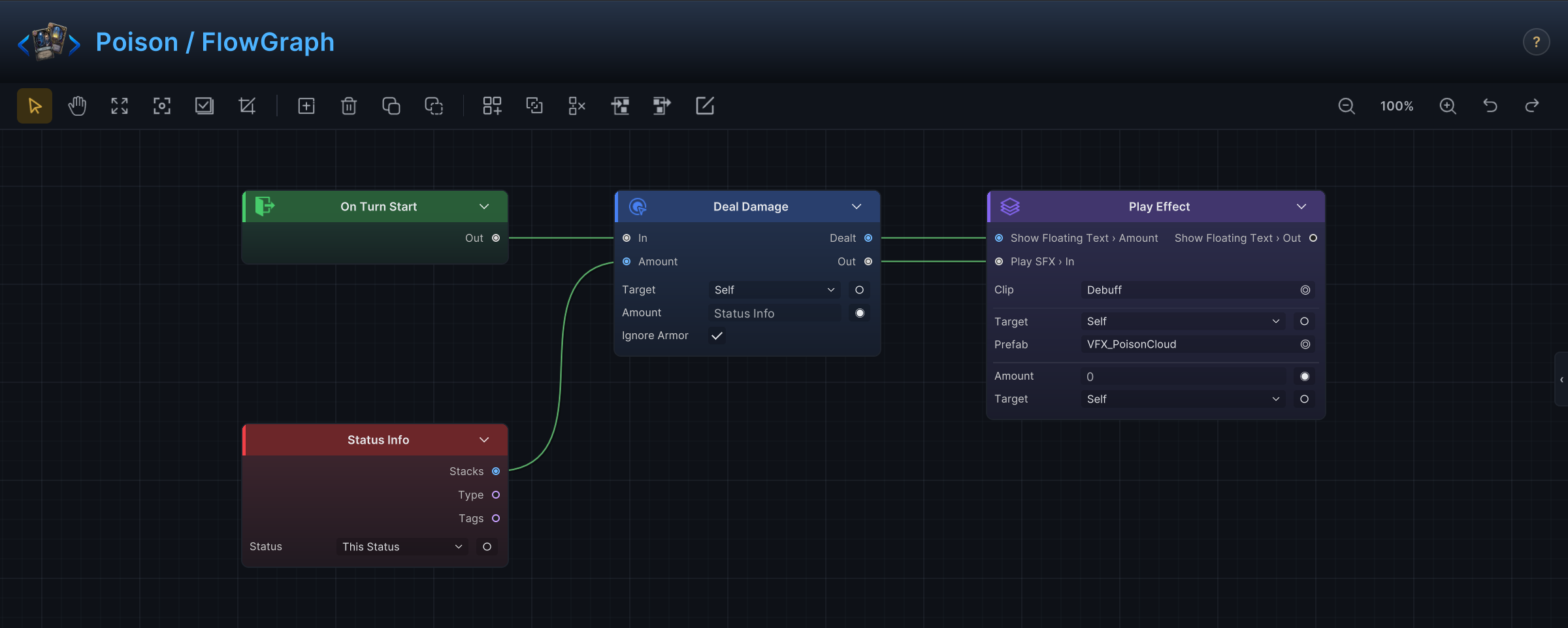
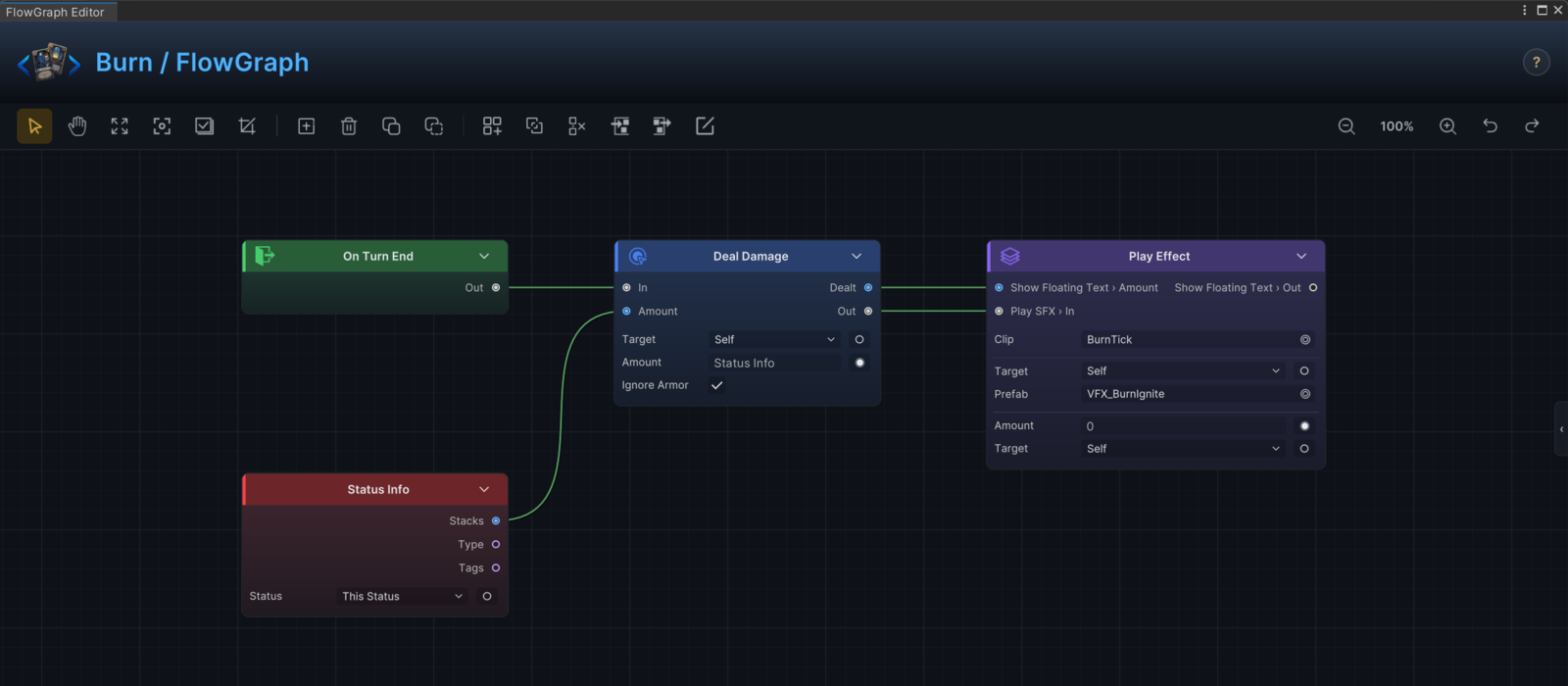
Burn shows the turn-timing pattern at its smallest: an On Turn End entry drives a Deal Damage node aimed at the holder, the amount wired from the status's own stack count, with the burn tick effect after the damage.
Marker statuses stay graph-free. Something like Marked may only need a name, an icon, and stack rules, because the cards that care about the mark read it from their own graphs.
Applying statuses
A status becomes visible in battle only when something applies it:
- A card graph applies stacks. Poison Arrow's Change Status node adds 2 Poison to its target.
- An enemy graph applies stacks as part of its action.
- Another status reacts and applies stacks.
- Runtime code applies stacks through the battle controller.
A status that exists in a database but is never applied by anything will never appear in a fight. That is not a bug in the status; it is a missing application site. The fastest audit is the Used By panel in the preview column: for the demo's Strength it lists the cards Rally, Intimidate, and Lord of Ruin, the Ritual status, and three enemies, which is every place the buff can enter play.
Validation
Status mode reports:
- An empty Name as an error.
- Max Stacks of exactly
0as a warning, with the suggestion to use-1for unlimited or a positive cap. - FlowGraph validator findings as warnings.
Validation cannot judge whether your description matches your design. Read the wording once as a player before shipping the status.
Common mistakes
| Symptom | Likely cause |
|---|---|
| Status never appears | The status database is inactive, the graph applies a different status, or target resolution returned no unit. |
| Stacks land lower than applied | Max Stacks caps the merge, or an Inflict / Receive Status Hook shrinks the incoming amount. |
| Stack count confuses players | Max Stacks, Stack Rule, or Show Stack Count contradicts the player-facing meaning. |
| Status disappears too soon | Decay Rule is PerTurn while the design wanted a persistent status. |
| Status never triggers | The behavior graph lacks the matching entry or hook. |
| Status looks harmful but is a buff | Type is set wrong, or the name and description mislead. |