Validation and Where Used
Two safety rails built into the Workbench: validation reports what is structurally broken, and the Used By panel reports which assets a change will touch.
For anyone editing shared GCS content. Read this before your first delete.The two tools answer different questions. Validation answers "what is structurally wrong in this database?". The Used By panel answers "what references this asset?". Run validation before every Play Mode session; check Used By before renaming, replacing, or deleting anything another asset might depend on.
Where validation shows up
The Workbench validates the database currently selected in the mode's list column and reports the result as a badge in the window header. The badge reads 3 Issues when errors are present, 2 Warnings when only warnings remain, and disappears entirely when the database is clean. Click it to open the issue list. Each entry carries a jump action that opens the offending asset, focuses the broken field, or opens the FlowGraph editor when the problem lives in a behavior graph.
A practical loop:
- Open the mode you are editing (Card, Deck, Player, Enemy, Status, or Encounter).
- Glance at the badge after each edit; it refreshes with the content.
- Click through the issues, jump, fix, and repeat until the badge disappears or only intentional warnings remain.
- Enter Play Mode.
The editor already knows when a reference is missing. The runtime symptom for the same problem is far less direct: an effect that silently does nothing, an empty reward screen, a list that never populates.
What each mode checks
| Mode | Errors | Warnings |
|---|---|---|
| Card | Empty Name | FlowGraph issues in the card's Behavior |
| Deck | Entry with no card assigned; Copies below 1 | none |
| Player | Empty Name | Missing Starting Deck; missing Template prefab |
| Enemy | Empty Name; HP Min above HP Max | FlowGraph issues in the enemy's Behavior |
| Status | Empty Display Name | Max Stacks of 0 (use -1 for unlimited or a positive count); FlowGraph issues |
| Encounter | Missing Player Unit; no enemy units | Missing Reward Deck; empty Difficulty |
Validation is structural. It can prove a deck entry has no card; it cannot know whether that card is balanced, whether a status is fun, or whether a description reads well. Player-facing quality still needs an author's eye.
Reading severity
There are exactly two levels:
| Severity | Meaning |
|---|---|
| Error | The content is broken or unsafe to run. Fix it before testing. |
| Warning | Possibly intentional, but worth a decision before testing. |
Warnings deserve a decision, not a reflex dismissal. A missing reward deck is fine on a rewardless test encounter and wrong on a normal victory flow. Only you know which one you are looking at, which is exactly why the editor does not upgrade it to an error.
The Used By panel
Select any asset in the Workbench and the Preview column ends with a Used By foldout. It lists every asset that references the selection, each labeled with how: Starting deck, Reward deck, Player unit, Enemy unit, Deck entry ×2, Upgrades into this, or Behavior · Change Status when the reference sits inside a behavior graph node. Click a row to open that asset in its own Workbench mode.
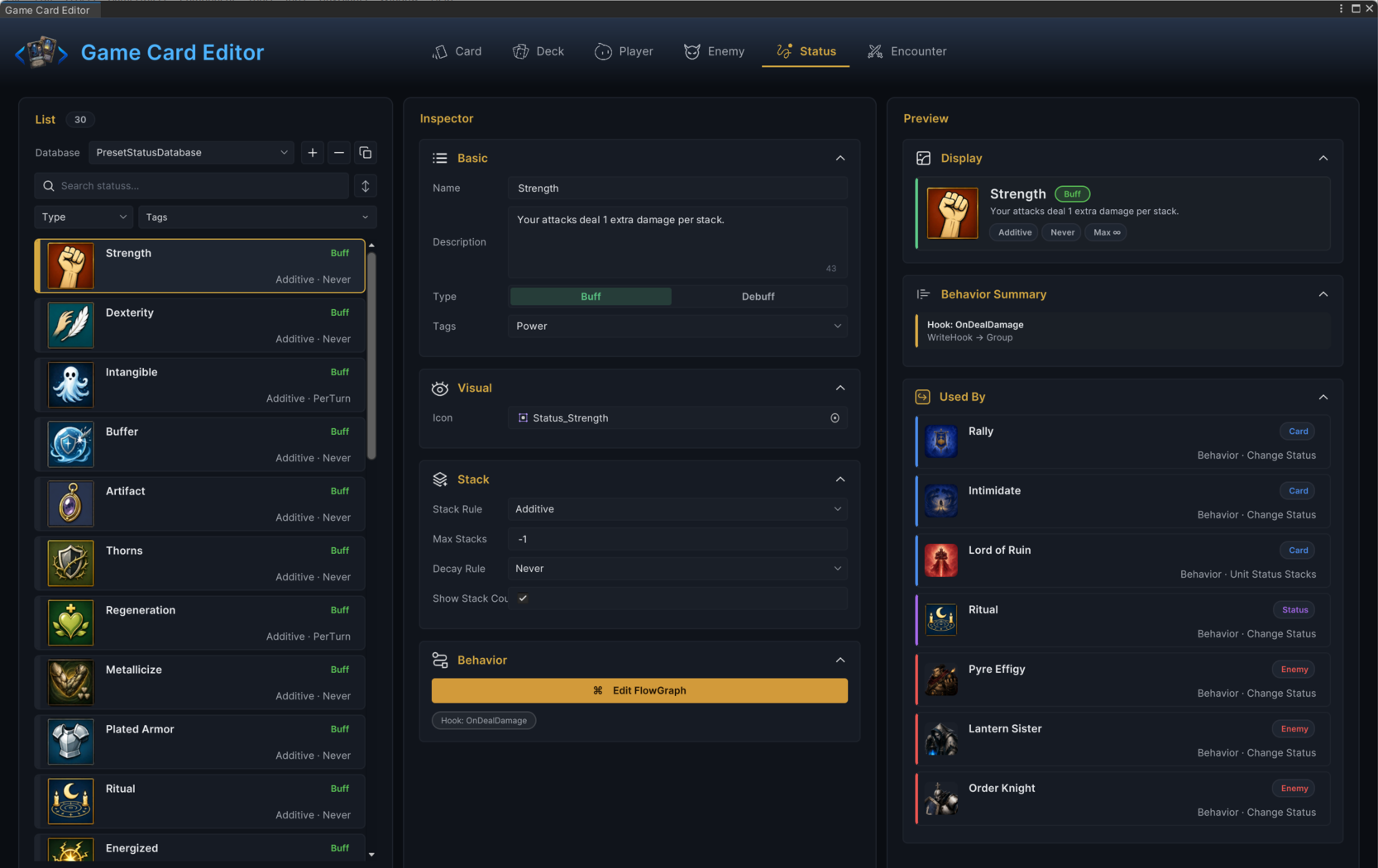
What it finds depends on what you selected:
| Selected asset | Listed references |
|---|---|
| Card | Decks containing it (with copy count), cards that upgrade into it, and card / status / enemy behavior graphs whose nodes reference it |
| Deck | Player units using it as their starting deck; encounters using it as their reward deck |
| Player unit | Encounters that field it |
| Enemy unit | Encounters that include it in the lineup |
| Status | Card / status / enemy behavior graphs whose nodes apply or read it |
| Encounter | None. Encounters are top-level; they get launched, never referenced. |
The behavior scan understands both direct asset references and nodes that name a card or status by its display name, it descends into groups, and it reports the node so you know where in the graph to look. In the demo databases, selecting the Poison status lists Poison Arrow under Behavior · Change Status, because the card's graph applies two stacks of Poison on play.
When nothing references the selection, the panel says so explicitly rather than staying blank. Treat that message as a green light for deletion, not as a malfunction.
Used By resolves references through the databases registered on the scene's GameCardManager. Without a manager in the open scene it cannot enumerate anything, and the panel says so instead of showing a misleading empty list.
Check before you change
| Before doing this | Ask Used By |
|---|---|
| Deleting a card | Which decks and behavior graphs still include it? |
| Renaming or replacing a status | Which cards, enemies, or statuses apply it? |
| Reworking an enemy | Which encounters field it? |
| Swapping a player unit | Which encounters start with it? |
| Editing a shared deck | Which player units and encounters draw from it? |
When a deck or status is shared across many encounters, duplicate it and experiment on the copy. Editing the shared original turns one risky change into twelve.
Tracing a runtime symptom
When a battle misbehaves, trace the content chain before touching any graph logic. Most authoring bugs are a missing database, deck, or encounter reference:
| Symptom | Likely authoring problem |
|---|---|
| A card never appears | The deck or player-unit chain to that card is broken. |
| Encounter starts with no enemies | The enemy list has missing references. |
| Applying a status does nothing | The status database is inactive, or a graph points at the wrong status. |
| Reward screen has no cards | The reward deck is missing, empty, or unreachable. |
| Workbench list is empty | The scene manager has no active database for that mode. |
Fix from evidence
- Read the validation message.
- Use the jump action to land on the field or graph.
- Confirm the referenced asset exists.
- Confirm the asset sits inside an active database.
- Confirm the scene uses the expected manager and encounter.
- Retest with the smallest encounter that reproduces the issue.
Change one asset at a time. If you edit a card, a deck, a player unit, and an encounter in one pass, you will not know which edit fixed the problem, and you will not know which one broke the next thing either.
What validation does not replace
Validation catches bad structure early so the later checks are spent on real questions. It does not replace Play Mode testing, FlowGraph logic review (a graph can be structurally valid and still wrong), card text review, balance passes, or presentation QA.