Custom Nodes
A custom node is a plain runtime C# class: subclass a node family, decorate it with [FlowNode], and it appears in the Add Node menu after Unity compiles. No registration call, no editor code.
For programmers extending the node library their card authors build with.Custom nodes add behavior the built-in library does not cover, while card authors keep wiring graphs in the normal FlowGraph editor. Reach for one when the built-ins get close but your game needs a specific action: "heal allies below half HP", "count combo stacks", "pick enemies marked by my custom keyword", or "play a beat from my own combat view".
The whole extension surface lives in TinyGiants.GCS.Runtime. Your class never references TinyGiants.GCS.Editor, and GCS discovers it by reflection from any loaded assembly that references the runtime:
Where the class lives
Put node files in one of your own runtime assemblies that references TinyGiants.GCS.Runtime, never in an editor-only assembly. The FlowGraph editor reads runtime nodes through the public runtime API, so it can draw your node without your code depending on editor types.
The fastest start is the shipped sample folder:
Assets/TinyGiants/GameCardSystem/Samples~/CustomNodes/
Copy a sample into your project, then rename the namespace, class, category, display name, and fields. The sample walkthroughs page covers each file in detail.
A working node needs exactly three pieces:
| Requirement | Why it matters |
|---|---|
[Serializable] | Unity serializes the node instance inside the owner's FlowGraph. |
[FlowNode(category, displayName)] | Registers the node under a group in the Add Node menu. |
| A public node base class | Decides what the node does when the graph reaches or reads it. |
using System;
using TinyGiants.GCS.Runtime;

namespace YourGame.Cards
{
    [Serializable]
    [FlowNode("Action", "Gain Armor To Self")]
    public sealed class GainArmorToSelfNode : MutatorNode
    {
        public int Amount = 1;

        public override void Execute(IExecutionContext ctx)
        {
            int amount = ctx.PullInputOr(this, nameof(Amount), Amount);
            if (amount <= 0 || ctx.Host == null) return;
            ctx.Controller.GainArmor(ctx.Host, amount);
        }
    }
}
Pick the node family
Choose the base class from the behavior the card author expects, not from how you happen to implement it.
| Base class | Override | Use it for |
|---|---|---|
MutatorNode | Execute(IExecutionContext ctx) | Battle-state changes: damage, healing, armor, statuses, card movement, energy, variables. |
OperatorNode | Evaluate(IEvaluationContext ctx, string outPort) | Pure values: math, comparisons, conversions, string or number results. |
SourceNode | Evaluate(IEvaluationContext ctx, string outPort) | Reading context data: current turn, source unit, played card, status stacks. |
SelectorNode | Evaluate(IEvaluationContext ctx, string outPort) | Producing unit or card selections that other nodes consume. |
ControlNode | DecideNext(IExecutionContext ctx) | Routing the flow to one or more named branches. |
PatternNode | DecideNext(IExecutionContext ctx) | Enemy targeting patterns that pick the next intent branch. |
VfxNode | Play(IExecutionContext ctx) | Presentation only: effects, camera impulses, UI beats. |
Most gameplay nodes end up as MutatorNode or OperatorNode. If something in the battle changes, it is a mutator. If the node exists only to feed a value into another node, it is an operator.
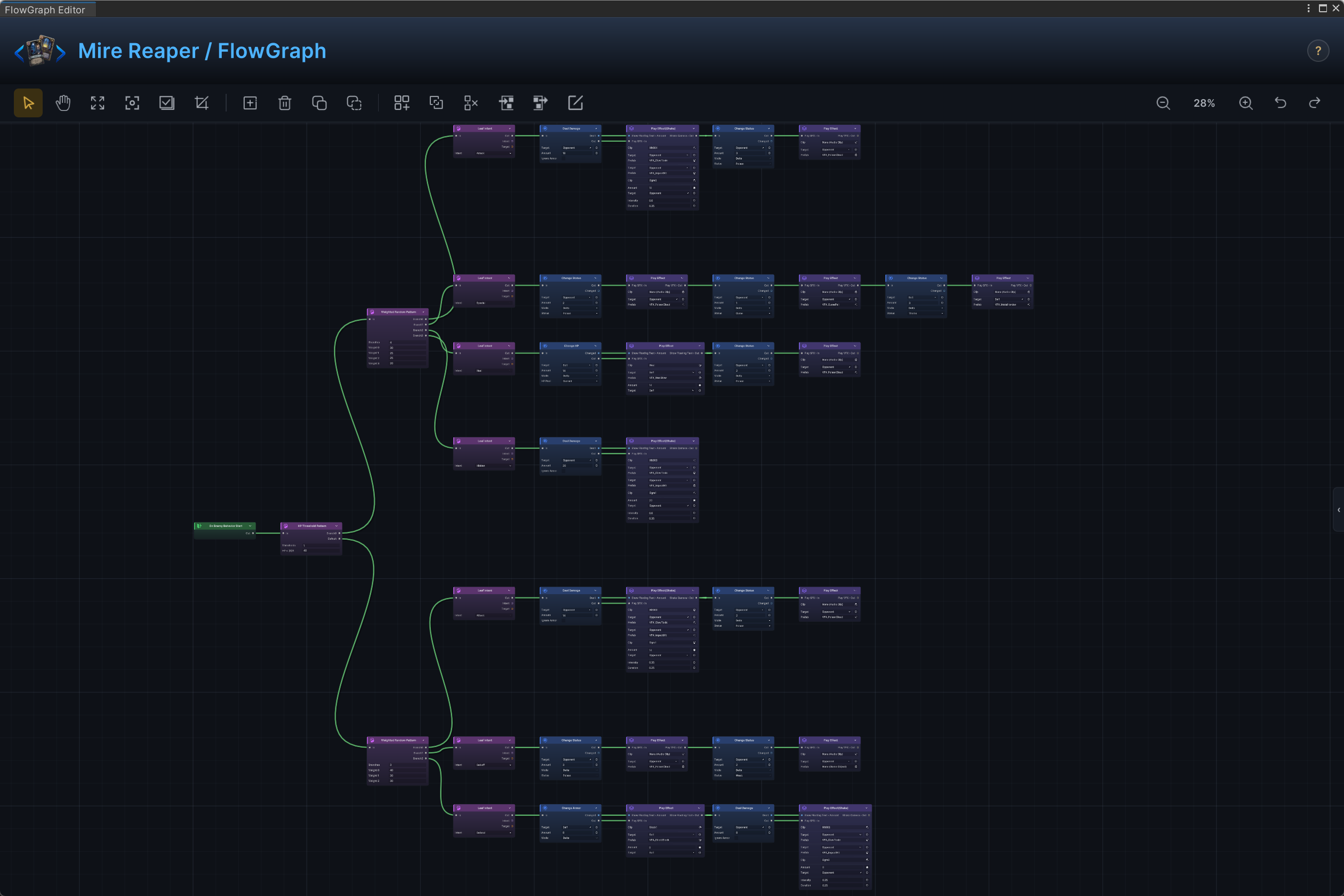
These families are the same ones the demo content runs on. Mire Reaper, a Hunter-scene enemy, drives its whole turn from pattern nodes that pick an intent branch, and every branch ends in the action and FX nodes a custom MutatorNode or VfxNode sits beside:
Name it for the card author
The [FlowNode] category is the Add Node menu group. Reuse a built-in group when your node belongs next to built-in behavior: Action for state-changing effects, Operator for calculated values, Get for context reads and selections, Flow for branching, FX for presentation, Intent for enemy intent patterns. Any other category string creates a group of its own, which is the right call for a family of game-specific nodes.
The display name should describe the result a content author wants (Heal If Below Half), not the helper you wrote (ConditionalHpRestoreUtil). A designer scanning that menu is asking one question: what can this card do?
Fields are the authoring UI
Public fields become what the designer sees and edits on the node. Start there:
public UnitSource TargetSource = UnitSource.Self;
public int HealAmount = 5;
public bool OnlyBelowHalf = true;
GCS infers ports from those fields:
- Every public
int,float,bool, orstringfield can be exposed as a scalar input port. - A
UnitSourcefield named<Name>Sourceexposes a unit input named<Name>, soTargetSourcegives aTargetport. - A
CardSourcefield named<Name>Sourceexposes a card input the same way. - Any other public field type (an enum, a prefab, a color) renders as a configuration row on the node body, not as a port.
Exposing is the card author's choice, made per node in the FlowGraph editor. Until a field is exposed and wired, it stays a plain value typed on the node body.
Read scalar fields through ctx.PullInputOr(this, nameof(Field), Field). That one call gives the authoring behavior designers expect: a wired port wins, an unwired port falls back to the value typed on the node.
Route every change through the controller
Inside MutatorNode.Execute, every battle change goes through ctx.Controller. Never edit UnitState, CardInstance, piles, HP, statuses, or energy directly.
public override void Execute(IExecutionContext ctx)
{
    int amount = ctx.PullInputOr(this, nameof(HealAmount), HealAmount);
    if (amount <= 0) return;

    foreach (var target in ctx.ResolveUnits(this, TargetSource, nameof(TargetSource)))
    {
        if (target == null || target.IsDead) continue;
        ctx.Controller.GainHp(target, amount);
    }
}
Controller calls are what keep runtime events, status hooks, Monitor output, and the presentation layer in sync. A direct field write skips all of that, and the result is a card that "works" in the numbers but fires no events, no visuals, and no reactions.
Publish a result other nodes can read
If a downstream node should read a value your node produced, implement INodePorts and declare a result output.
using System;
using System.Collections.Generic;
using TinyGiants.GCS.Runtime;

[Serializable]
[FlowNode("Action", "Count Living Targets")]
public sealed class CountLivingTargetsNode : MutatorNode, INodePorts
{
    public UnitSource TargetSource = UnitSource.AllEnemies;

    public IEnumerable<NodePort> DeclarePorts()
    {
        yield return NodePort.ResultOut("Count", PortDataType.Int);
    }

    public override void Execute(IExecutionContext ctx)
    {
        int count = 0;
        foreach (var target in ctx.ResolveUnits(this, TargetSource, nameof(TargetSource)))
            if (target != null && !target.IsDead) count++;

        ctx.StoreResult(this, "Count", count);
    }
}
The name in NodePort.ResultOut("Count", ...) must match the name passed to ctx.StoreResult(this, "Count", value).
In the editor, StoreResult logs a warning when the port name matches no declared output. A misspelled name shows up as a Console message instead of a value that silently goes nowhere.
Treat names as saved-content contracts
Once real graphs use your node, its class name, field names, and declared port names are contracts baked into saved content. Rename them only when you also migrate the FlowGraph assets that reference them.
Good custom nodes are small and literal:
- One node does one card-authoring job.
- Field names describe the visible choice:
HealAmount,TargetSource,OnlyBelowHalf. - Output names describe the value:
Healed,DamageDealt,Count. - Rules an author could misread belong in the field name or tooltip, not in their guesses.
Compile and find it
- Let Unity compile with no errors.
- Open any GCS FlowGraph.
- Open the Add Node menu and search for your
[FlowNode]display name. - Add the node, expose the ports you need, and run a battle with the Monitor open.
If the node does not appear, check that the class is concrete (not abstract), [Serializable], decorated with [FlowNode], and compiled in a runtime assembly that references TinyGiants.GCS.Runtime.