Sample Walkthroughs
Three shipped files cover the extension surface end to end: a starter template, a real card effect with a condition, and a pure value node.
For programmers who prefer starting from working code over reading API docs.GCS ships its custom node samples under:
Assets/TinyGiants/GameCardSystem/Samples~/CustomNodes/
Unity ignores folders whose name ends in ~, so these files ship as reference source and are never compiled in place. Copy the .cs file you want into one of your own runtime assemblies to build it. Each sample is small on purpose and exercises the public surface: [Serializable], [FlowNode], the node base classes, inferred fields, declared ports, and the context helpers.
Recommended workflow
- Copy one sample file out of
Samples~into your own project code. - Put it in a runtime assembly that references
TinyGiants.GCS.Runtime. - Change the namespace to your project's.
- Rename the class and the
[FlowNode]display name. - Replace the fields with the choices your card author should see.
- Keep context reads on
PullInputOr,ResolveUnits, andResolveCards. - Keep battle changes inside
ctx.Controller. - Let Unity compile, then find the node in the Add Node menu.
Copying first also means a package update never overwrites your game-specific node.
FlowNodeTemplate
FlowNodeTemplate.cs is the broad starting point: every required moving part in one file, registered as Action / Your Node Name.
| Part | Purpose |
|---|---|
[Serializable] | Lets Unity save node instances inside FlowGraph assets. |
[FlowNode("Action", "Your Node Name")] | Adds the node to the Add Node menu. |
MutatorNode | Runs writable battle logic in Execute. |
UnitSource TargetSource | Auto-creates a Target unit input (defaults to Opponent). |
int Amount | Auto-creates an Amount scalar input. |
DamageStyle Style | An enum configuration row, shown on the node body instead of a port. |
INodePorts | Declares the Result output field inference cannot create. |
ctx.PullInputOr | Reads wired values, falling back to the node's fields. |
ctx.ResolveUnits | Handles both the target dropdown and a connected target port. |
ctx.Controller.DealDamage | Mutates battle state through the supported gateway. |
ctx.StoreResult | Publishes the declared Result output for downstream nodes. |
Start here when your node will change battle state and may expose an output.
Safe edits:
- Change the category and display name.
- Replace
TargetSource,Amount, and the enum with your own author-facing fields. - Replace the controller call with the battle change your node performs.
- Rename the result output, as long as no saved content connects to it yet.
Risky edits:
- Removing
[Serializable]. - Moving the file into an editor-only assembly.
- Mutating unit, card, or pile fields directly.
- Renaming fields or outputs after saved graphs already connect to them.
HealIfBelowHalfNode
HealIfBelowHalfNode.cs is the best sample for a normal card effect. It models a user-facing behavior: heal the selected units, optionally only those at or below half HP.
| Field | What the author sees |
|---|---|
TargetSource | Who can be healed. Defaults to Self; can be exposed and wired. |
HealAmount | How much HP to restore. A fixed value or a connected input. |
OnlyBelowHalf | Whether the half-HP condition applies. |
How it behaves:
HealAmountis read throughctx.PullInputOr(this, nameof(HealAmount), HealAmount).- Targets come from
ctx.ResolveUnits(this, TargetSource, nameof(TargetSource)). - Dead and null units are skipped, and the half-HP check compares each target's current and max HP.
- Healing goes through
ctx.Controller.GainHp. - The
Healedoutput publishes the HP actually restored, measured before and after each heal. A target already at full HP contributes 0.
Copy this pattern for project-specific actions such as healing allies under a custom condition, bonus damage against marked enemies, armor scaled by missing HP, or counting how many targets passed a check and feeding that count onward.
AddValuesNode
AddValuesNode.cs is the minimal pure value sample, registered as Operator / Add Values: read two inputs, return their sum.
| Field | Meaning |
|---|---|
A | First number, with the field as fallback. |
B | Second number, with the field as fallback. |
How it behaves:
- The class subclasses
OperatorNodeand never callsctx.Controller. - It declares
ResultwithNodePort.ResultOut("Result", PortDataType.Int). - It returns the sum from
Evaluate(IEvaluationContext ctx, string outPort).
Copy this pattern for math, comparisons, score calculations, converters, and any project formula meant to be wired into another node's input. A node with several outputs declares each one and switches on outPort:
public override object Evaluate(IEvaluationContext ctx, string outPort)
{
    int value = ctx.PullInputOr(this, nameof(Value), Value);
    return outPort == "Double" ? value * 2 : value;
}
Which sample to start from
| You want to create | Start from |
|---|---|
| A state-changing card effect | HealIfBelowHalfNode or FlowNodeTemplate |
| A calculated value | AddValuesNode |
| A custom selector | AddValuesNode, base class switched to SelectorNode, returning units or cards |
| A custom branch node | FlowNodeTemplate, base class switched to ControlNode, with declared ControlOut ports |
| A presentation beat | FlowNodeTemplate, base class switched to VfxNode, implementing Play |
Verify the adapted node
- Unity compiles with no C# errors.
- The node appears in the Add Node menu under its
[FlowNode]category. - Scalar fields show as editable values that can be exposed as ports.
<Name>Sourcefields expose their matching unit or card inputs.- Declared result outputs are visible for downstream connections.
- A test battle shows the expected state changes in the Monitor.
The Monitor's Flow tab is the fastest proof that your node actually ran. Every graph execution is captured with its trigger, node count, and timing, so a played card that reaches your node shows up as a row:
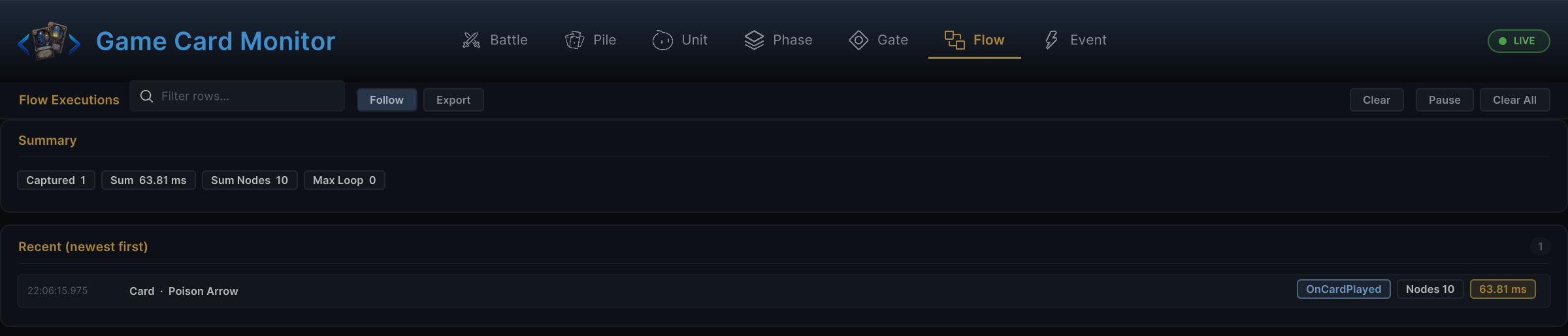
If a node compiles but behaves strangely, test it with fixed field values before wiring dynamic ports. Once the fixed version works, expose one port at a time.
Common mistakes
| Symptom | Likely cause |
|---|---|
| Node missing from Add Node | Missing [FlowNode], an abstract class, or the assembly does not reference TinyGiants.GCS.Runtime. |
| Connected value is ignored | Code reads the field directly instead of ctx.PullInputOr. |
| Connected target is ignored | Code skips ctx.ResolveUnits / ctx.ResolveCards. |
| Output cannot be connected | Output was never declared with NodePort.ResultOut or NodePort.Out. |
| Output value is always missing | The StoreResult name does not match the declared output name. |
| No events or visuals fire | Code mutates battle objects directly instead of calling ctx.Controller. |