Battle Loop
Every GCS battle runs the same loop: load an encounter, draw, play cards, resolve enemy intent, repeat until one side falls. This page maps that loop to the real BattlePhase values.
Read this when you need to know exactly when a card is playable, when statuses tick, or why the battle has not ended yet.GCS battles follow a readable card-battle rhythm: load an encounter, draw cards, play cards during the player phase, resolve enemy intent, then loop until victory or defeat. Design cards and encounters from this rhythm first. The runtime phase names exist to support what the player sees on screen, not the other way around.
The whole loop is one enum, BattlePhase:
Phase overview
| Phase | User-facing meaning |
|---|---|
Initialize | The encounter, units, decks, rules, and starting hand are being prepared. |
PlayerTurnStart | Start-of-turn rules, draw, energy, statuses, and hooks resolve. |
PlayerPhase | The player can inspect the hand, select targets, play cards, and end the turn. |
PlayerTurnEnd | End-of-turn discard, status decay, delayed triggers, and cleanup resolve. |
EnemyPhase | Enemies reveal or resolve intent and run their behavior graphs. |
BattleWon | All victory conditions are met. Rewards and victory presentation can run. |
BattleLost | The player loses. Defeat presentation and cleanup can run. |
None is the inactive state before a battle exists or after teardown.
Encounter load
A battle starts from an encounter. The encounter provides the player unit, the enemy lineup, the reward deck, the battle rules, plus tags and display information for the scene. The scene bootstrap and GameCardManager connect the scene to the selected encounter and the active databases.
The battle rules are worth a close look, because they drive most of what PlayerTurnStart and PlayerTurnEnd do. The demo encounter The Threshing Field, for example, sets starting hand 5, draw 5 per turn, hand max 10, armor reset on turn start, and discard on turn end. Change those chips and the loop below changes with them.
Player turn
At PlayerTurnStart, GCS applies the encounter's rules in order: reset or preserve armor, add energy for the turn, draw cards, resolve start-of-turn statuses and hooks, and enforce the hand limit.
During PlayerPhase, a card can be played when all of these hold:
- it is in the hand;
- the player has enough energy after cost modifiers;
- the target mode is satisfied (a
SingleEnemyUnitcard needs a selected living enemy); - playability hooks do not cancel it;
- the battle is not waiting on another flow, such as a choice or an animation gate.
GCSApi.CanPlayCard runs the same checklist from code, and GCSApi.TryPlayCard returns false rather than throwing when any point fails.
After a card resolves, it moves according to card tags and rules, usually to the discard pile, or to the exhaust pile for exhaust cards.
Yes. The hand is whatever is in the hand pile at the moment of the check, including cards drawn by other card effects during the same turn.
Enemy turn
Enemy behavior is authored through FlowGraphs. The enemy phase usually does three things in order: resolve enemy intent, run each enemy's actions, then advance back toward the next player turn.
Intent is player-facing. Each enemy telegraphs what it is about to do before it acts, even when the underlying graph is more complex than the icon suggests. Keep the telegraph honest; a player who cannot read the enemy turn cannot plan the player turn.
Victory, defeat, and rewards
Victory means every required enemy is defeated. Defeat means the player unit dies, or battle rules choose a loss state. One detail matters for effect authors: the outcome check runs inside the phase machinery, on turn transitions and after card plays. Mutating HP from code alone does not end the battle mid-action; the loop notices on its next check.
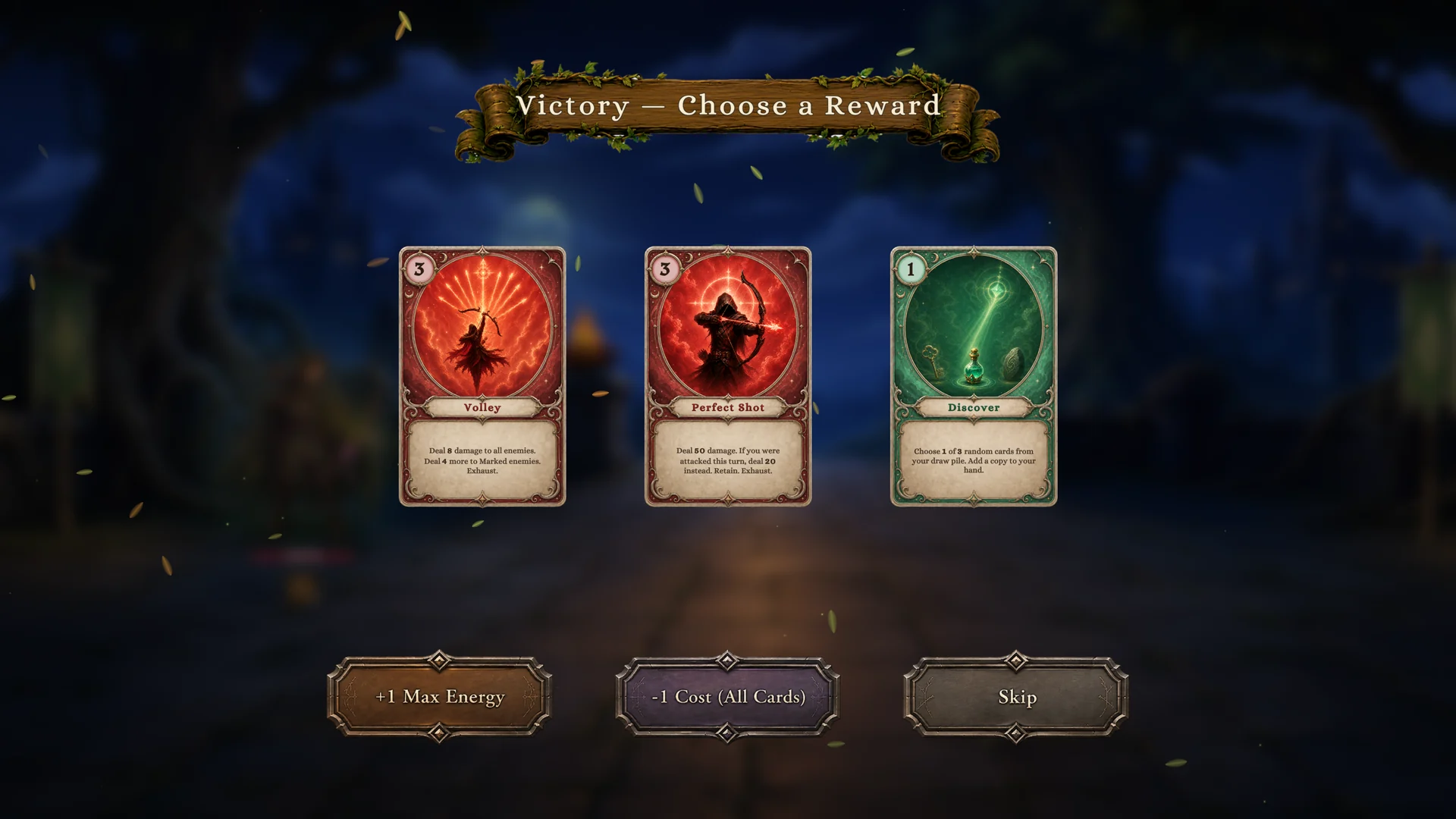
When the phase reaches BattleWon, the demo shows the three-choice reward screen: cards drawn from the encounter's reward pool, a permanent energy upgrade, or a permanent cost discount.
Watching the loop from code
GCSApi exposes the loop directly. Subscriptions return IDisposable, so dispose them when your component goes away:
using TinyGiants.GCS.Runtime;

// React to loop milestones.
var turnSub = GCSApi.OnTurnStarted(args =>
    Debug.Log($"Turn {GCSApi.TurnNumber} started"));
var playSub = GCSApi.OnCardPlayed(args =>
    Debug.Log("A card resolved"));

// Or poll the phase anywhere.
if (GCSApi.Phase == BattlePhase.PlayerPhase && GCSApi.IsPlayerTurn)
{
    GCSApi.EndPlayerTurn();
}
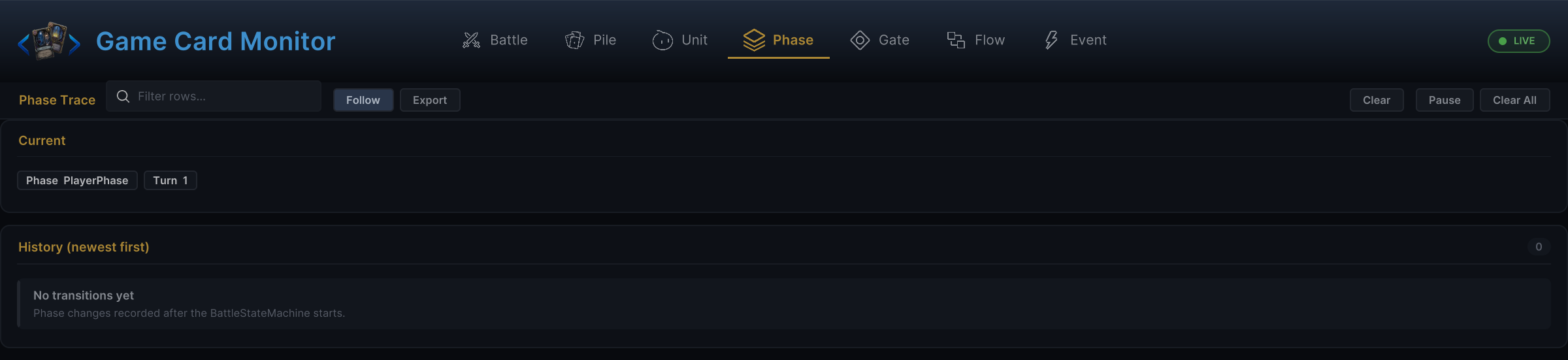
For visual inspection, open the Game Card Monitor during Play Mode. Its Phase tab shows the current phase and its history, and BattleWon or BattleLost there confirms the core runtime reached an outcome even while reward UI or defeat presentation is still on screen.
Design guidance
- Keep card effects fast to understand during
PlayerPhase. - Put delayed or reactive behavior on explicit triggers or statuses.
- Make enemy intent readable before the enemy acts.
- Use hooks for modifying values, not for hiding the main card result.
- Whenever phase behavior surprises you, check the Monitor before checking the graph.