FlowGraph Model
Every card effect, status trigger, and enemy turn in GCS is a graph: an entry that says when, nodes that say what, and ports that say with which values. This page is the model behind all of it.
Read this before your first non-trivial graph, or whenever a node behaves differently than its field values suggest.FlowGraph is the behavior-authoring model for GCS. Designers build card, status, enemy, and presentation logic by connecting nodes instead of writing code for every effect. A graph reads like a sentence:
When this entry happens, run these actions, using these targets and values.
Here is that sentence in practice. The demo card Poison Arrow reads left to right: an On Card Played entry, a Deal Damage node aimed at the opponent for 3, a Play Effect group for the arrow strike, a Change Status node adding 2 Poison, and a closing poison-cloud effect.
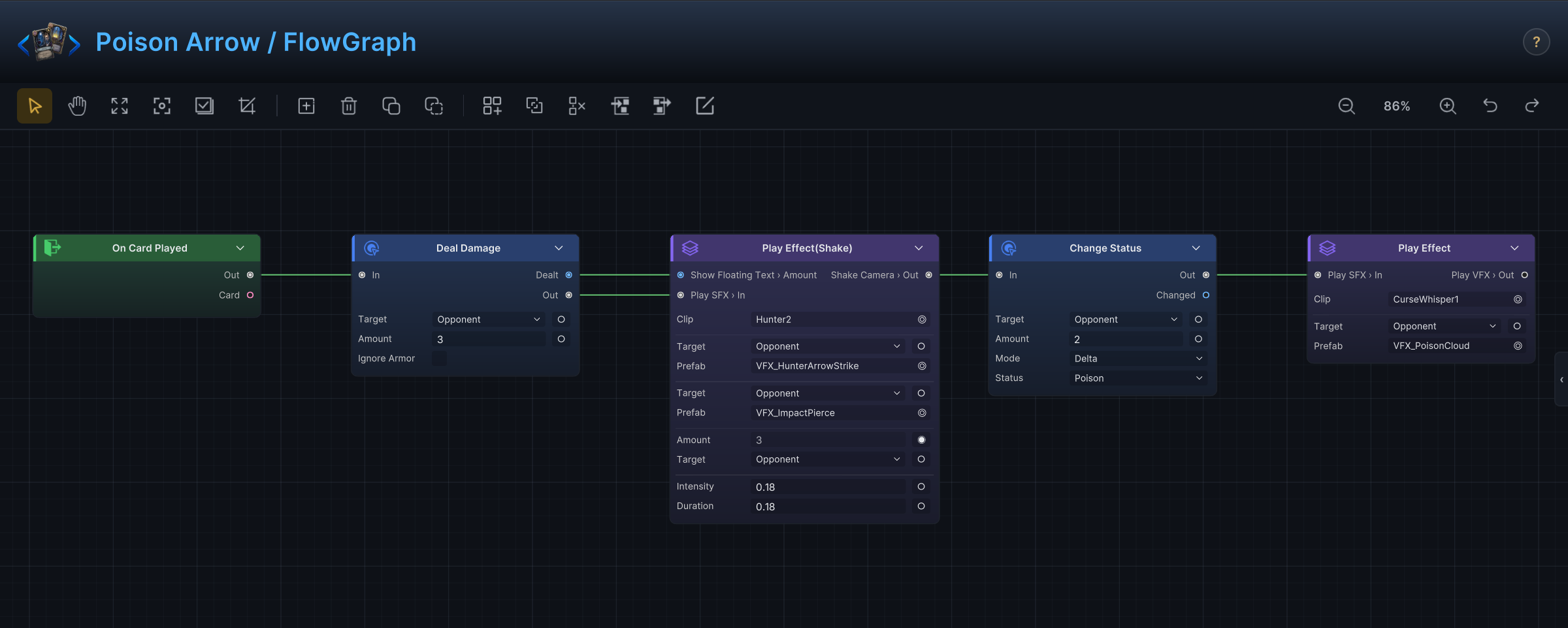
Entries
Entries start a graph. They are the "when" of the sentence: this card is played, the enemy turn starts, a status is applied, a value hook fires, an internal event is raised. A graph without a meaningful entry has no user-visible moment to run, so every graph design starts by picking the moment the player will experience.
Hooks
Hooks modify or cancel a value that is already in flight: increase outgoing damage, reduce incoming damage, change a card's cost, change the draw count, prevent a status from applying.
The distinction from actions is a player-expectation question. When the player would call it a modifier ("Strength adds 2 to my attacks"), author it as a hook. When the player would call it the card's result ("this card deals 8"), author it as a normal action.
Node groups
GCS ships 140+ built-in nodes organized into nine Add Node menu groups. Search by the result you want, not by any C# type name:
| Group | User-facing purpose |
|---|---|
Entry | Start the graph from a battle, turn, card, status, damage, energy, event, or unit moment. |
Hook | Change or cancel a value before GCS commits it. |
Action | Change battle state: damage, healing, armor, statuses, cards, energy, turns. |
Get | Read context: current card, source unit, turn number, piles, variables, units, statuses. |
Operator | Calculate, compare, filter, sort, convert, or combine values. |
Flow | Route execution: sequence, branch, gate, loop, switch, choice, wait, delayed trigger. |
Intent | Build enemy intent and targeting patterns. |
FX | Show visual, audio, animation, floating text, movement, or camera feedback. |
Event | Raise internal GCS events or optional GES events. |
Group nodes are not added from this menu. Select two or more nodes and press Ctrl+G to wrap them in one collapsible Group.
Ports
Ports connect nodes, and they come in two kinds. Control ports decide execution order; data ports pass values, targets, cards, statuses, and results between nodes.
Three port behaviors are worth memorizing:
- scalar fields (numbers, booleans, text) can be exposed as input ports;
<Name>Sourcefields can be exposed as unit or card inputs;- result outputs publish a node's outcome for downstream nodes to read.
When a node has both a field value and a connected port, the connected port wins. Treat the field as the card's designed default and the port as the dynamic override.
Poison Arrow shows the default side: its Deal Damage keeps Amount as a plain field set to 3. A card that scales damage with the turn instead would connect something like Cards Played This Turn through a Math Binary into that same Amount port, and the field value would only matter if the connection were removed.
Context
Graph nodes never run in a vacuum. Each execution carries context: the source unit, the selected target, the current card or status, the battle state, the incoming hook value, variables and event args, and a controller for safe state mutations.
Context is why the same Deal Damage node works on a player card, an enemy action, and a status reaction. The node describes the effect; the context supplies who is doing it to whom.
Authoring rule
Build graphs from the user's desired outcome, then pick nodes:
- "Deal 8 to the selected enemy" starts with target mode and damage.
- "If the target is marked, draw a card" starts with selection, then a condition, then draw.
- "Reduce incoming damage by 2" starts with a damage-taken hook.
Do not expose internal code concepts to content authors when a direct node or a dropdown can express the choice. The graph is a card-making tool, not a C# type system.