Content Model
GCS content is a small set of authorable assets: cards, decks, statuses, units, and encounters, all discovered through six database families. Know who owns what and the rest of the docs falls into place.
Read this before authoring content at scale, or when an asset exists on disk but refuses to show up in a picker or a battle.GCS content is built from a small set of authorable objects, and each one answers a user-facing question:
| User question | GCS object |
|---|---|
| What can the player play? | Card |
| What deck does the player start with or earn from rewards? | Deck |
| What temporary rule sits on a unit? | Status |
| Who can the player control? | Player unit |
| What enemies appear and how do they act? | Enemy unit |
| What battle should a scene start? | Encounter |
| What global battle rules apply? | Battle rules (part of the encounter) |
| Where does the runtime discover content? | Database |
Every object lives inside one of six database families, and the scene's GameCardManager reads from those databases:
Authorable objects
| Object | Owns |
|---|---|
| Card | Name, cost, type, target mode, tags, artwork, and on-play behavior. |
| Deck | An ordered or curated list of card definitions. |
| Status | Stack rules, decay rules, icon, tags, and reactive behavior. |
| Player unit | Player stats, avatar or prefab, starting deck, and class identity. |
| Enemy unit | HP range, prefab, tags, tier, intent, and enemy-turn behavior. |
| Encounter | Player unit, enemy lineup, reward deck, battle rules, tags, and display data. |
| Database | The active set of cards, decks, statuses, units, and encounters available at runtime. |
All of these are edited in one window. The Workbench gives each family its own mode, and every mode follows the same pattern: pick a database, select an entry, edit its fields, watch the live preview. Card mode below is the busiest of the six:
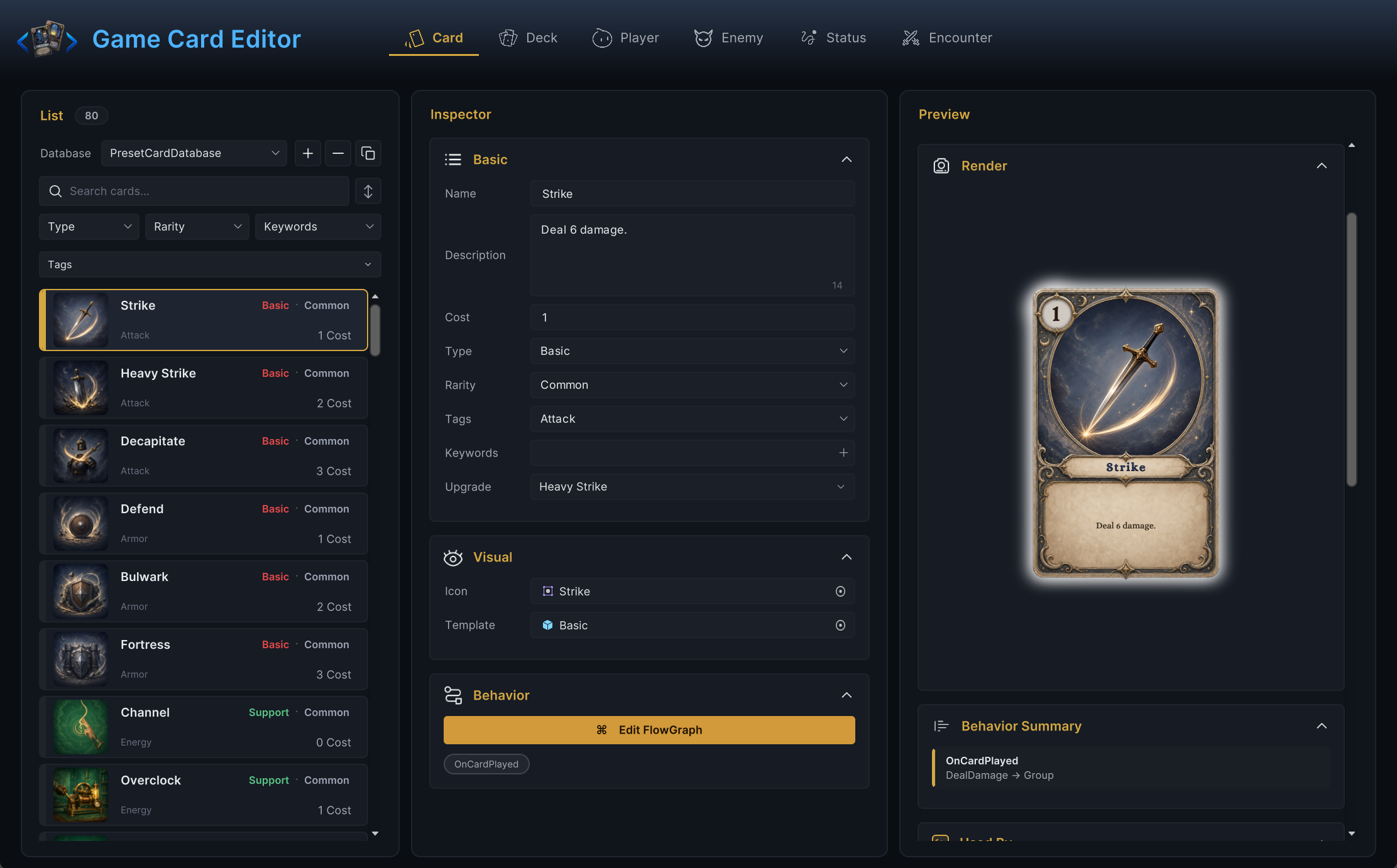
Behavior ownership
Cards, statuses, and enemies each carry an embedded FlowGraph in their Behavior field. There is no separate behavior asset to manage, and encounters have no graph at all: an encounter describes who fights under which rules, while the fighting itself is authored on the participants.
Put behavior on the object whose outcome you are authoring:
- a card's effect belongs on the card;
- a status's reaction belongs on the status;
- an enemy's action belongs on the enemy;
- encounter-level pacing belongs in the encounter's battle rules;
- project-specific reusable behavior can become a custom node.
Avoid moving behavior into external systems unless it genuinely leaves GCS, such as notifying GES for achievements or quest systems.
Presentation ownership
Presentation assets sit next to the object that owns them: card artwork under card or card-type folders, unit artwork and prefabs under unit folders, status icons under status folders, encounter backgrounds under encounter folders. Only genuinely shared assets (UI sprites, fonts, shared combat effects) go to Content/Art/.
This is the vertical-first layout the demo uses. It keeps an object and everything it needs in one place, so deleting or exporting a card family never leaves orphans behind.
Runtime availability
An object is not runtime available merely because a file exists. It must be part of a database that the scene's GameCardManager uses.
When something does not appear in a picker or at runtime, check in order:
- the object exists;
- the object is in the correct database;
- the manager references that database;
- the scene uses that manager or bootstrap setup.
Nine times out of ten, a "missing" card is sitting in a database the current scene never registered. Check step 3 first when you work with more than one database.
Demo as a model
The demo keeps all sample definitions in six preset databases under Demo/Databases/: 80 cards, 16 decks, 30 statuses, 12 player units, 16 enemies, and 12 encounters, with every presentation asset under Demo/Content/. Use it as a structural pattern, but keep production content in project-owned databases and folders so demo updates never touch your data.