First battle
Run Fenmoss Hollow and verify the opening, single-card resolution, enemy turn, victory, and rewards
The bundled Single-Character/Hunter/1-Fenmoss Hollow.unity scene contains the objects and content for a Normal battle, entering Play Mode starts it through GameCardEncounterBootstrap, Battle Runtime and Battle Canvas display the opening hand, card play, enemy turns, and victory rewards to confirm installation and runtime behavior
Open Fenmoss Hollow and enter Play Mode
Each class includes Normal, Elite, and Boss single-character encounters, Party Showcase adds a three-member battle, use the Hunter Normal encounter for this check
Assets/TinyGiants/GameCardSystem/Demo/Scenes/Single-Character/Hunter/1-Fenmoss Hollow.unity
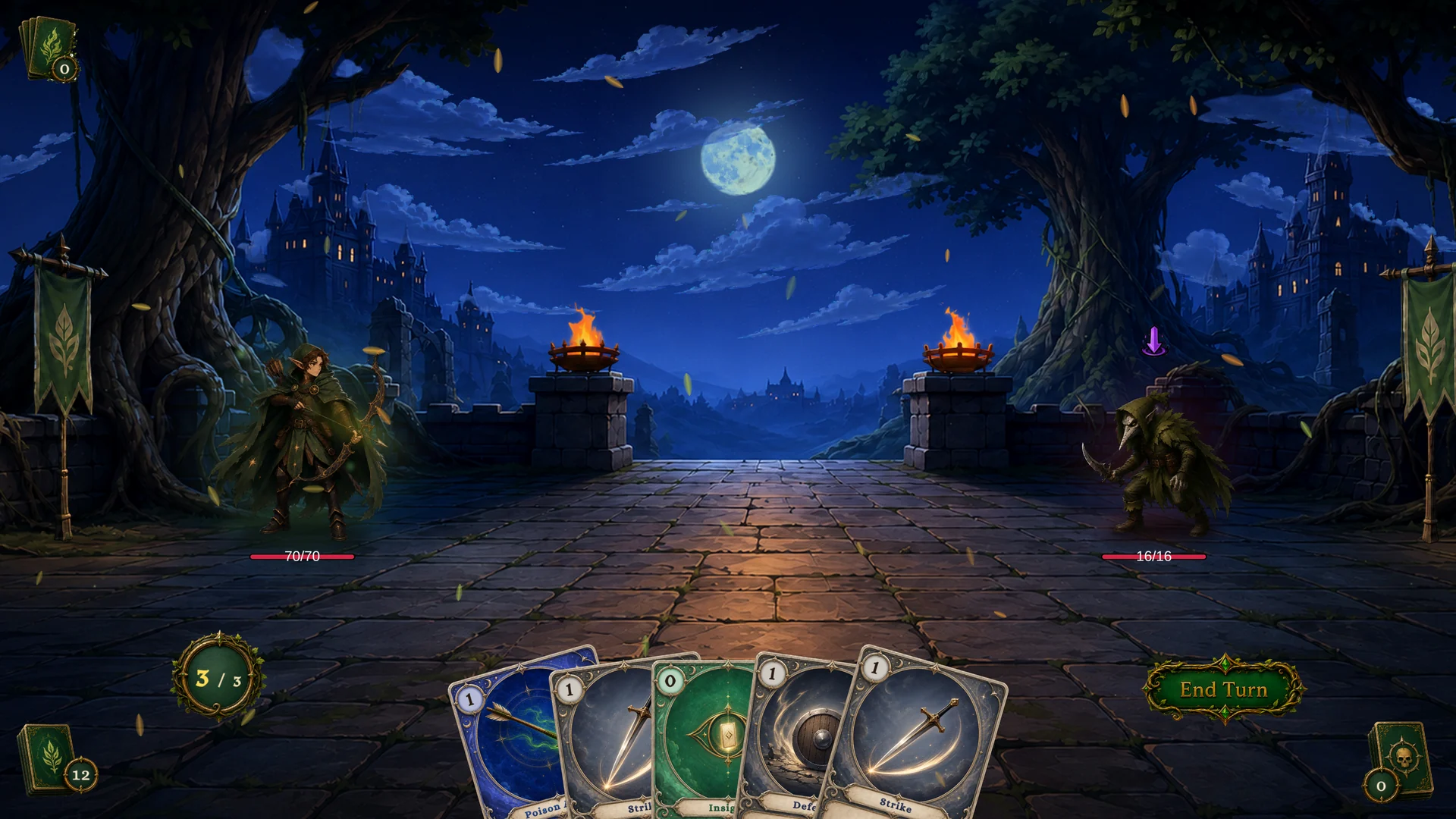
Open the scene and press Play. GameCardEncounterBootstrap already references Fenmoss Hollow and has Auto Start On Play enabled, so the battle begins without additional setup. After the opening presentation finishes, the screen should show the player and enemy, a five-card opening hand, 3 energy, pile counters, and the enemy intent at the same time. The exact cards, enemy HP, and intent branch vary with the random result of the current run. Demo scene reference lists the player, enemies, and difficulty for the other scenes.
Confirm the battle from the opening board
The opening hand, enemy HP, and intent branch can change between runs. The image above shows one valid result. The relationship between each visible result and its configuration source remains the same.
| Screen area | This opening | Content and rule source |
|---|---|---|
| Player unit | 70/70 HP and 3/3 energy | Scout provides 70 maximum HP, 3 base energy, and the First Hunt starting deck |
| Hand and piles | 5 cards in hand, 12 in the draw pile, and 0 in both discard and exhaust | A new run shuffles the 17-card starting deck, then draws an opening hand of 5 according to the encounter rules |
| Enemy unit | Plague Stalker at 16/16 HP | Fenmoss Hollow references this enemy, whose HP is generated randomly from 14 to 18 |
| Enemy intent | Purple Debuff icon | The enemy behavior graph plans its next action from four weighted branches. Full mode shows the intent icon and any numeric value the intent can calculate |
Fenmoss Hollow brings together the player unit, enemy, reward deck, and Battle Rules for this encounter. Scout then brings the First Hunt starting deck into battle. The deck generates the opening hand, while the Plague Stalker behavior graph plans its next action before the player moves. Once these relationships are visible, use the intent to choose a card and play Poison Arrow to check one complete card resolution.
Complete the first resolution with Poison Arrow
Poison Arrow uses Single Enemy as its Target. Start dragging it from the hand to display the targeting line, move it over Plague Stalker, and release after the enemy is highlighted.
First Hunt is shuffled randomly at the start of battle. If Poison Arrow is not in the current hand, re-enter Play Mode or continue through turns until you draw it.
After the play succeeds, the enemy takes 3 damage and gains 2 stacks of Poison. The player spends 1 energy, and the card enters the discard pile.
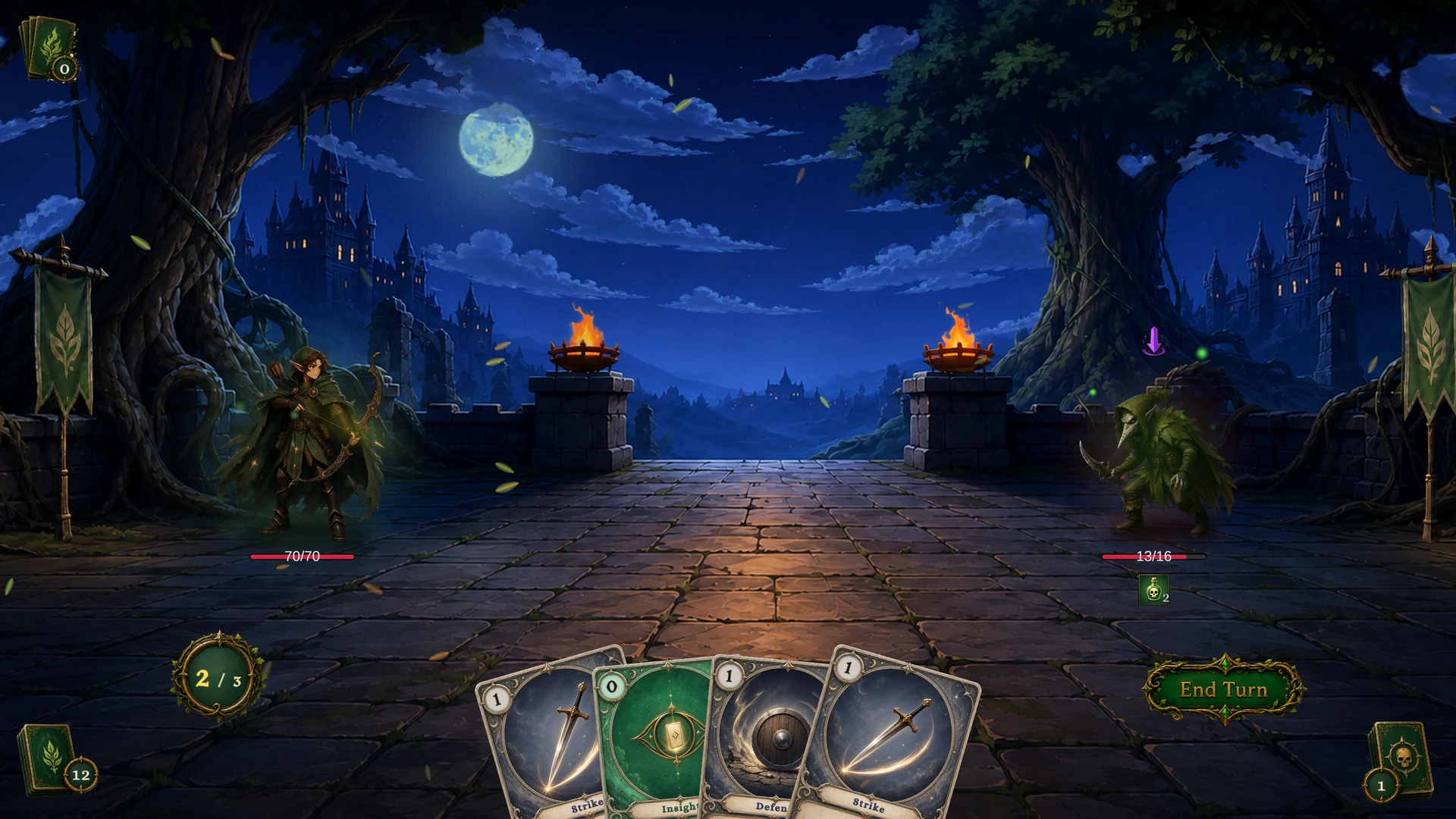
The 16 → 13 HP, Poison 0 → 2, energy 3 → 2, and discard pile 0 → 1 changes in the image above all come from the same card-play request. The targeting interaction first confirms a selected living enemy. The runtime then validates the player phase, ownership in the hand, card state, effective cost, and Hooks. Once every condition passes, the system spends the energy, raises OnCardPlayed, and executes the behavior graph. After resolution, Poison Arrow enters the discard pile because it does not have the Exhaust keyword.
You can trace every change to the visual behavior graph for Poison Arrow.
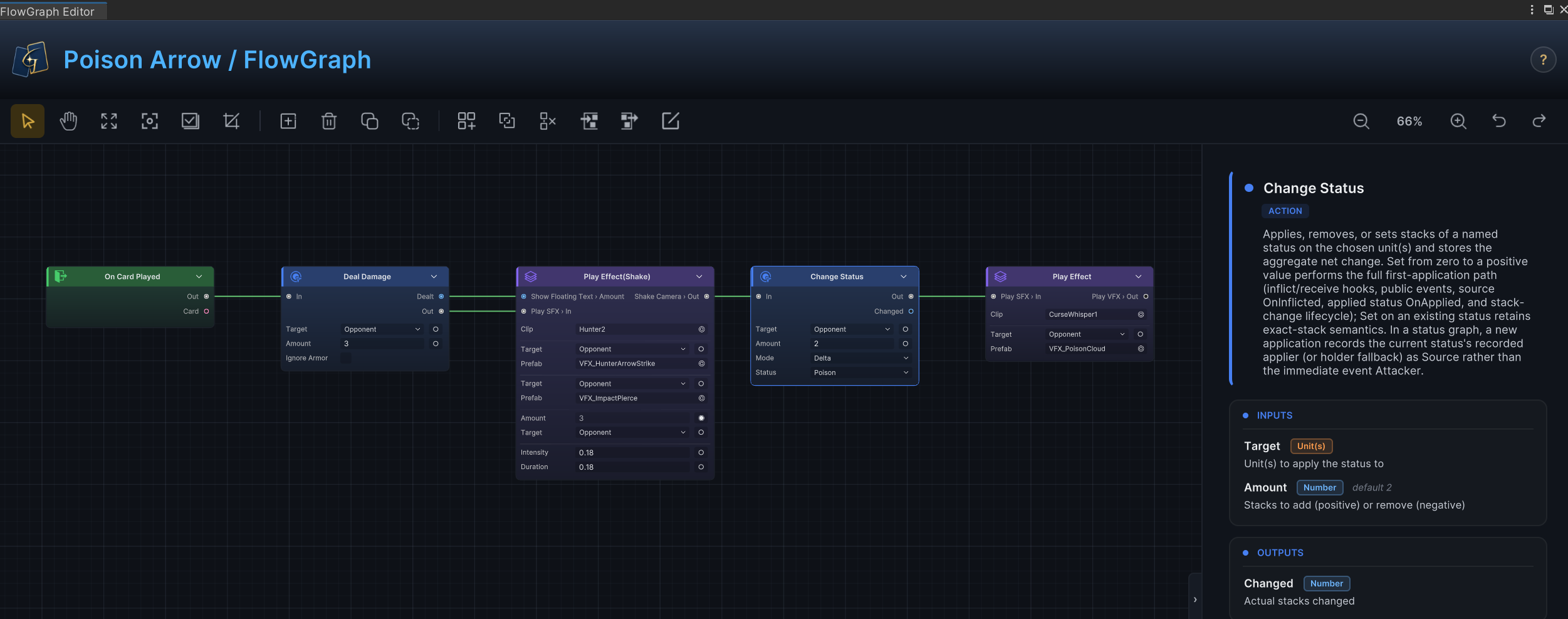
On Card Played passes execution to Deal Damage. The first group of Play Effect nodes then plays the hit SFX, VFX, floating text, and screen shake. Change Status adds 2 stacks of Poison, and the final Play Effect presents the application. Numeric logic and battle feedback happen in order on the same graph.
Open the FlowGraph window to inspect each node's parameters and connections. Target selection explains how Single Enemy works with the target sources in the behavior graph.
If the card returns to its original position after release, first confirm that the targeting line ended on a highlighted living enemy. Then check the player phase, effective cost, Unplayable, and the OnPlayCard and OnCardPlayable Hooks. Authoring errors provides more diagnosis paths.
End the turn and observe status progression
The first card play confirms the resolution path for one card. Click End Turn. GCS handles the cards that are not retained, then gives control to the enemy. In the branch captured here, Plague Stalker first takes Poison damage at the start of its turn. It then executes the Debuff intent shown earlier and applies 2 stacks of Marked to Scout. The second player turn begins only after the enemy turn finishes.
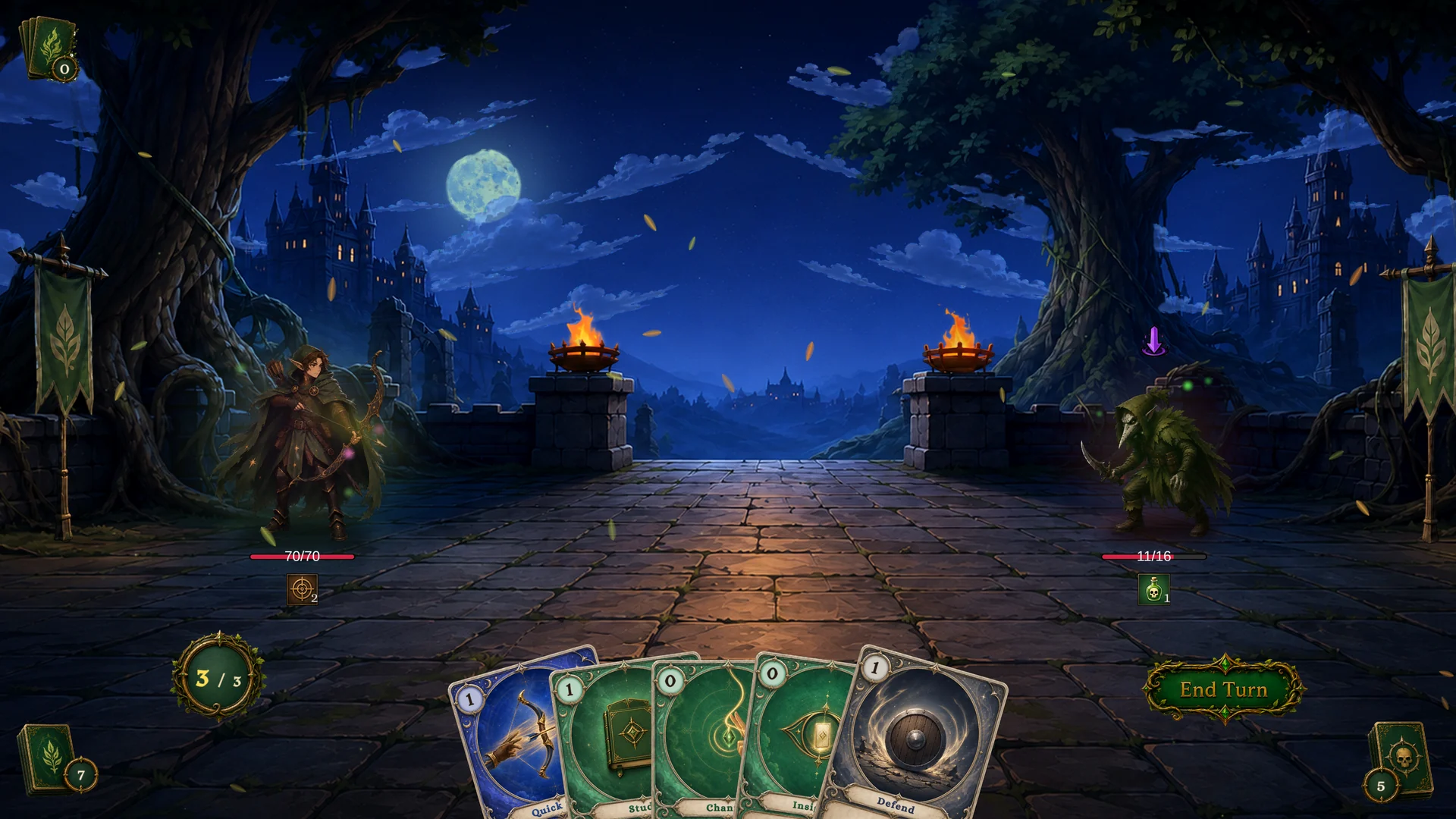
Compared with the board after the card play, the second turn brings every cross-phase change together on one board:
| Change | After the card play | Start of turn two | Reason |
|---|---|---|---|
| Enemy HP | 13/16 | 11/16 | Two stacks of Poison deal 2 armor-ignoring damage at the start of this enemy turn |
Enemy Poison | 2 stacks | 1 stack | PerTurn decay reduces the stack count by 1 after the enemy finishes acting |
Player Marked | 0 stacks | 2 stacks | This Debuff intent executed the behavior branch that applies 2 stacks of Marked |
| Player energy | 2/3 | 3/3 | Energy resets to the maximum at the start of the new player turn |
| Draw and discard piles | 12 / 1 | 7 / 5 | The other four cards are discarded at turn end, then five new cards are drawn for the next turn |
These changes occur in a fixed phase order.
The diagram above connects end-of-turn discarding, status resolution, the enemy action, status decay, and preparation for the next turn in one fixed order. During the enemy planning stage, Plague Stalker chooses its next action from four weighted branches. Another run can show attack, Debuff, or multi-hit attack icons, and two branches that share the Debuff icon can apply either Marked or Restricted.
Battle flow and Status lifecycle cover the complete phase, draw and discard, and status timing rules. If the displayed intent matches the behavior that follows in the current run, the enemy planning and execution path is connected correctly.
Win and resolve the reward
Continue playing around the enemy intent. When the last enemy is defeated, the state machine enters BattleWon. GCS completes the battle-end timing, draws three candidates without replacement from the Wild Harvest reward pool, and opens the reward screen. This run produced Volley, Perfect Shot, and Discover. Another run can produce different candidates.
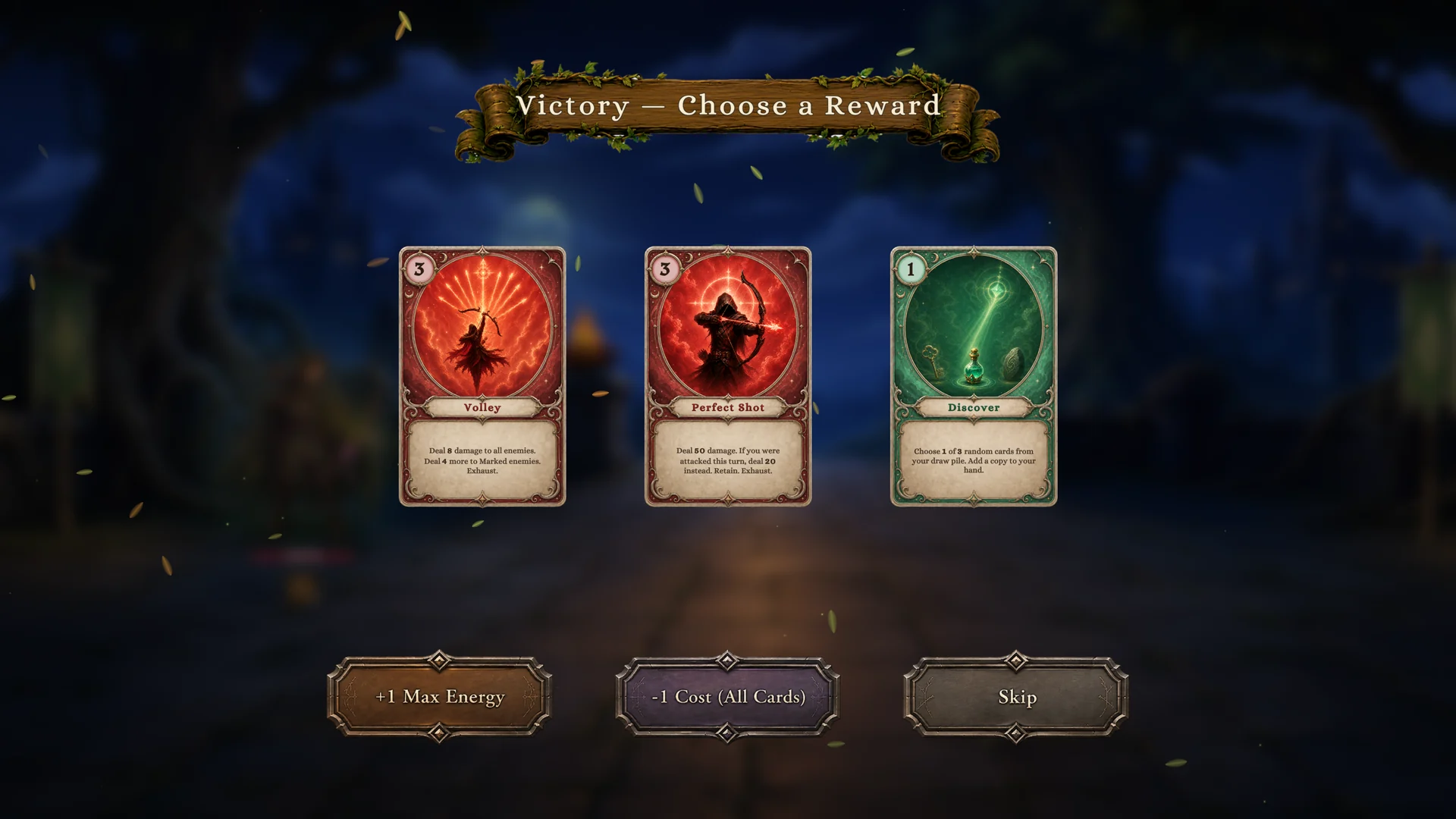
The reward screen applies the selection to the master deck and energy bonus currently held by GameCardManager. A standalone Demo scene does not copy the First Hunt starting deck into the runtime master deck automatically.
| Selection | Effect on the current run |
|---|---|
| Any candidate card | Adds the selected card to the runtime master deck. On the first standalone run, the master deck is empty, so only this card is added |
| +1 Max Energy | Increases the runtime energy bonus by 1, which applies to battles started later in the run |
| -1 Cost (All Cards) | Reduces the cost modifier of every existing runtime master-deck entry by 1. It has no cost effect when the master deck is empty and does not modify the original card assets |
| Skip | Ends the reward flow without changing the master deck or energy bonus |
A multi-battle Run must initialize the master deck before the first battle. The map, progression, and results UI can then take over after the reward flow. See Card and pile lifecycle for master-deck rules and Event guide for code integration.
Move from the included battle to custom authoring
If this battle runs from its opening through the end of the reward flow without GCS errors in the Console, the Demo is working correctly in the current project. Continue to Second battle and create Ember Trial from six custom databases, replacing the content relationships and runtime path you just verified with your own cards, statuses, enemies, and encounter.