Event guide
Subscribe to battle changes through typed shortcuts or event names, refresh UI in the correct lifecycle, and release every listener
The event model
The event layer has four parts
| Piece | Type | Role |
|---|---|---|
| Event names | GCSEventNames | Stable string constants for the 47 built-in events |
| Payloads | Classes in GCSEventArgs.cs | Typed data delivered with each event |
| Channel | IGCSEventChannel | Event publishing and subscription interface |
| Unified entry | GCSApi | Typed shortcuts and general subscription methods; project code starts here |
An event tells you that something changed, and roughly what; it is not the source of truth; use the payload to identify the changed object, then read its current values from GCSApi
The diagram above shows the complete path from battle resolution to interface refresh. The Channel dispatches events, GCSApi provides typed and named subscription entries, and callbacks read live state again after receiving a notification. This keeps the Payload from becoming a long-lived copy of battle state
Subscribe with shortcuts
Every built-in event has a GCSApi shortcut whose signature determines the event name and Payload type
private IDisposable _energySubscription;

void OnEnable()
{
    _energySubscription = GCSApi.OnEnergyChanged(args =>
    {
        energyLabel.text = $"{args.CurrentEnergy}/{args.MaxEnergy}";
    });
}

void OnDisable()
{
    _energySubscription?.Dispose();
}
Each shortcut returns an IDisposable. Store the handle and dispose it when the listening object is disabled or destroyed
Subscribe by event name
Subscribe<TArgs> accepts an event name and a typed callback. Use it for dynamically constructed subscriptions or custom events
private IDisposable _damageSubscription;

void OnEnable()
{
    _damageSubscription = GCSApi.Subscribe<DamageEventArgs>(
        GCSEventNames.OnDamageDealt,
        args => AddCombatLog(args.SourceUnitId, args.TargetUnitId, args.Amount));
}
Use the parameterless overload for events without a Payload
private IDisposable _shuffleSubscription;

void OnEnable()
{
    _shuffleSubscription = GCSApi.Subscribe(
        GCSEventNames.OnDrawPileShuffled,
        RefreshDrawPileWidget);
}
The bundled Demo uses the OnEnemyUnitActing shortcut to play the attacker's lunge toward the player
_actingSubscription = GCSApi.OnEnemyUnitActing(
    args => PlayAttackWindup(args.UnitId, args.Intent));
The Channel dispatches on both event name and argument type. A callback with the wrong TArgs does not run. Subscribing to one event name with two different argument types writes a [GCSEvents] error to the Console and ignores the second subscription. When the type is uncertain, use a shortcut or check the event reference
Pick the right event
| UI or system need | Good events |
|---|---|
| Refresh the full battle HUD | OnBattleStarted, OnTurnStarted, OnTurnEnded, OnEnemyTurnStarted, OnBattleEnded |
| Refresh energy | OnEnergyChanged, OnEnergyGained, OnEnergySpent |
| Refresh hand cards | OnCardDrawn, OnCardDiscarded, OnCardExhausted, OnCardRetained, OnCardAddedToHand, OnCardModified |
| Refresh unit HP and armor | OnUnitHpChanged, OnArmorGained, OnArmorLost, OnUnitDied, OnUnitRevived |
| Create, replace, or remove party panels | OnPlayerUnitAdded, OnUnitRemoved, OnActivePlayerUnitChanged |
| Refresh status widgets | OnStatusChanged, OnStatusTicked, OnStatusInflicted, OnStatusExpired, OnStatusRemoved |
| Refresh enemy intents | OnEnemyUnitIntentChanged, OnEnemyPhaseChanged |
| Play attack wind-ups on acting enemies | OnEnemyUnitActing |
| Show choices | OnEffectChoiceOffered, OnEffectChoiceSelected, OnEffectChoiceSkipped |
| Show rewards | OnBattleRewardOffered, OnBattleRewardSelected, OnBattleRewardSkipped |
| Log combat details | OnCardPlayed, OnDamageDealt, OnDamageTaken, OnStatusInflicted, OnUnitDied |
Cases that use only the Payload
One-time presentation can use the change data in the Payload directly
| Event | Payload-only use |
|---|---|
OnDamageDealt | Spawn a damage number or a combat log row |
OnDamageTaken | Show a hit reaction on the target |
OnArmorGained | Show an armor gain number |
OnEnergyGained | Show an energy pulse |
OnEffectChoiceOffered | Render the choice candidates from the payload |
OnBattleRewardOffered | Render the reward cards from the payload |
After the one-time presentation, still refresh state from GCSApi so that floating text and the health bar settle on the same result
Subscription lifetime
Subscription and disposal must appear as a pair. Suitable lifecycles include:
-
OnEnable/OnDisable -
View Model
Initialize/Dispose -
Scene Controller Setup and Teardown
Do not create undisposed subscriptions in these repeated paths:
-
Update -
every button render
-
every hand rebuild that never disposes the previous subscriptions
When the same callback runs multiple times for one event, an earlier subscription was usually not disposed
Events without a payload
Four built-in events have no Payload:
-
OnBattleStarted -
OnBattleRewardSkipped -
OnEffectChoiceSkipped -
OnDrawPileShuffled
Subscribe to these with a plain Action:
_sub = GCSApi.OnDrawPileShuffled(RefreshPiles);
Custom named events
GCSApi.RaiseGameEvent raises an event under any name you choose, with an optional argument dictionary; the FlowGraph node Raise Internal Event does the same thing from inside a graph
GCSApi.RaiseGameEvent("PlayerMarkedTarget", new Dictionary<string, object>
{
    ["TargetId"] = target.UnitId
});
Subscription shape must match raise shape. A raise with an argument dictionary arrives typed as IReadOnlyDictionary<string, object>; a raise without arguments arrives on the parameterless path:
_sub = GCSApi.Subscribe<IReadOnlyDictionary<string, object>>(
    "PlayerMarkedTarget",
    args => HighlightUnit((int)args["TargetId"]));
Custom events also trigger a matching On Internal Event entry in Card, Status, and Enemy Behaviors, allowing a business event defined by project code to enter an existing FlowGraph directly
Add a custom name only when no built-in event describes the business timing accurately. Publishing an existing state event again creates two subscription entries with the same meaning, increasing maintenance and debugging cost
Inspect the event channel in the Monitor
The Event tab in Game Card Monitor shows the live channel. GCS Channel lists each broadcast in order, while Dispatcher Probes shows the subscriber count for every dispatch. Together, they distinguish an event that never fired from one that fired with subs 0
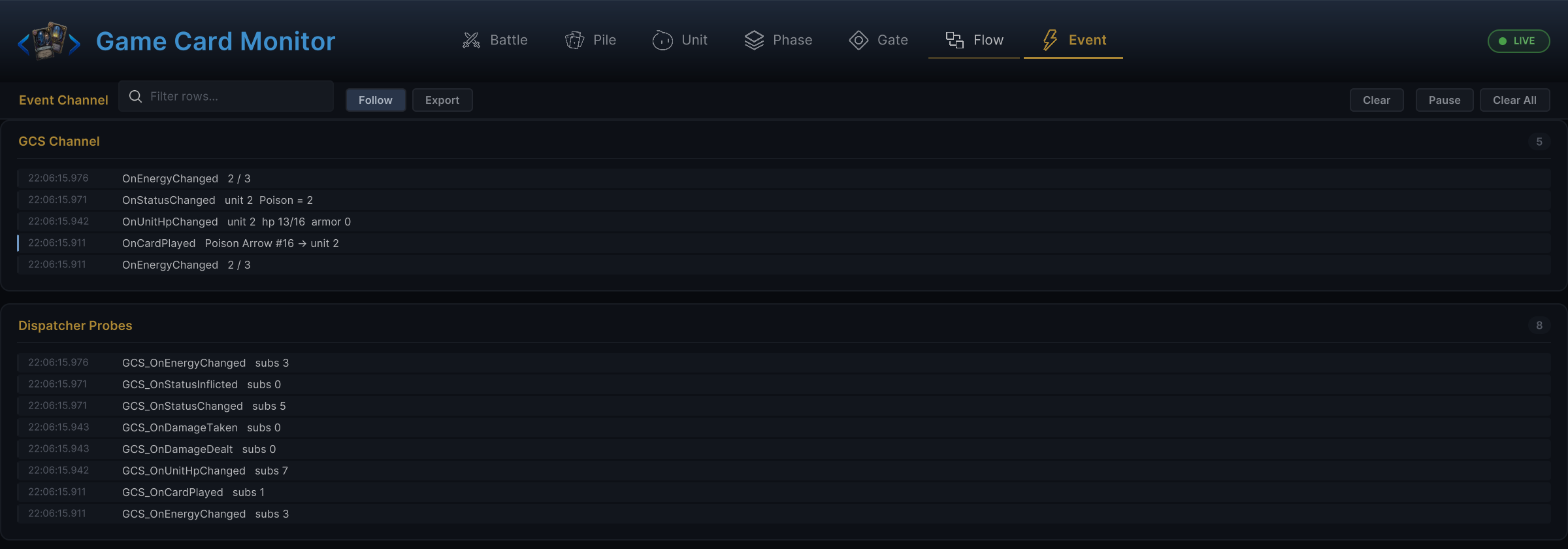
The image above places readable event details beside the low-level dispatch record. Confirm that the target event entered GCS Channel, then inspect the subscriber count on its probe to determine whether the problem is the gameplay timing or subscription lifecycle
When a project also uses Game Event System, it can forward battle timings to GES or start FlowGraph entries from GES events. See GES integration for that setup. For behavior contained entirely within GCS, continue using GCSApi.Subscribe and GCSApi.RaiseGameEvent
Troubleshooting
| Symptom | Check |
|---|---|
| Handler fires two or more times per event | You resubscribed without disposing the previous handle |
| Handler never fires | Event name and payload type must both match; see the Event Reference; also look for a [GCSEvents] argument-type error in the Console |
| UI shows stale values | Refresh from GCSApi after the event instead of caching payload values |
| Card buttons stay enabled during a choice | Gate them on GCSApi.IsWaitingForChoice |
| Reward UI never closes | Finish the flow with GCSApi.ApplyReward or GCSApi.SkipReward |
| GES listeners receive nothing | The bridge must be installed and the event picked on the node; see GES integration |