Card Recipes
Choose from 52 card-mechanic recipes and rebuild each effect from its node connections, configuration, and editable FlowGraph
Recipe overview
| # | Mechanism | What it builds |
|---|---|---|
| 1 | Selected-target strike | Use this for the standard “deal N damage to the chosen enemy” card |
| 2 | Block and armor gain | Use this for defend cards, temporary shields, and armor packages |
| 3 | Strike plus debuff | Use this for poison arrows, bleeding cuts, vulnerable strikes, and any attack that leaves a status |
| 4 | Area damage | Use this for whirlwind, blizzard, chain explosion, or any attack that hits every enemy |
| 5 | Multi-hit and random-hit attack | Use this for flurries, ricochets, rapid fire, and attacks whose hit count scales |
| 6 | X-cost scaling | Use this for “spend all energy” cards whose damage, armor, draw, or stacks scale with the energy spent |
| 7 | Conditional payoff and execute | Use this for executes, “while wounded” bonuses, combo thresholds, and target-state checks |
| 8 | Consume a status as a resource | Use this for spending poison, rage, frost, prayer, or marks to power a card |
| 9 | Blood cost and lifesteal | Use this for HP-cost cards, self-damage bargains, drain, and vampiric attacks |
| 10 | Draw, discard, and hand filtering | Use this for cycling, loot-style draw-then-discard, prepared hands, and discard payoffs |
| 11 | Scry the top of the draw pile | Inspect the top cards and move selected cards to discard without shuffling the remaining draw pile |
| 12 | Exhaust and retain lifecycle | Enable Exhaust and Retain on the card asset, then attach reactions to the played, exhausted, and retained events |
| 13 | Create cards and curses | Add configured temporary cards or curses such as Spark and Pain to a selected pile |
| 14 | Discover, draft, and choose one | Use this for discovering one of three cards, improvised spells, and reward-like choices during combat |
| 15 | Replay, copy, and auto-play | Use this for echo, double-cast, play-the-last-card, and effects that force another card to resolve |
| 16 | Transform and upgrade cards | Use this for temporary forms, permanent upgrades, evolve effects, and hand mutation |
| 17 | Temporary and dynamic cost rules | Change card costs during a defined window and calculate them dynamically from statuses or other battle data |
| 18 | Power, equipment, and delayed prayer | Use a status for persistent powers or equipment, and resolve delayed effects after the specified number of turns |
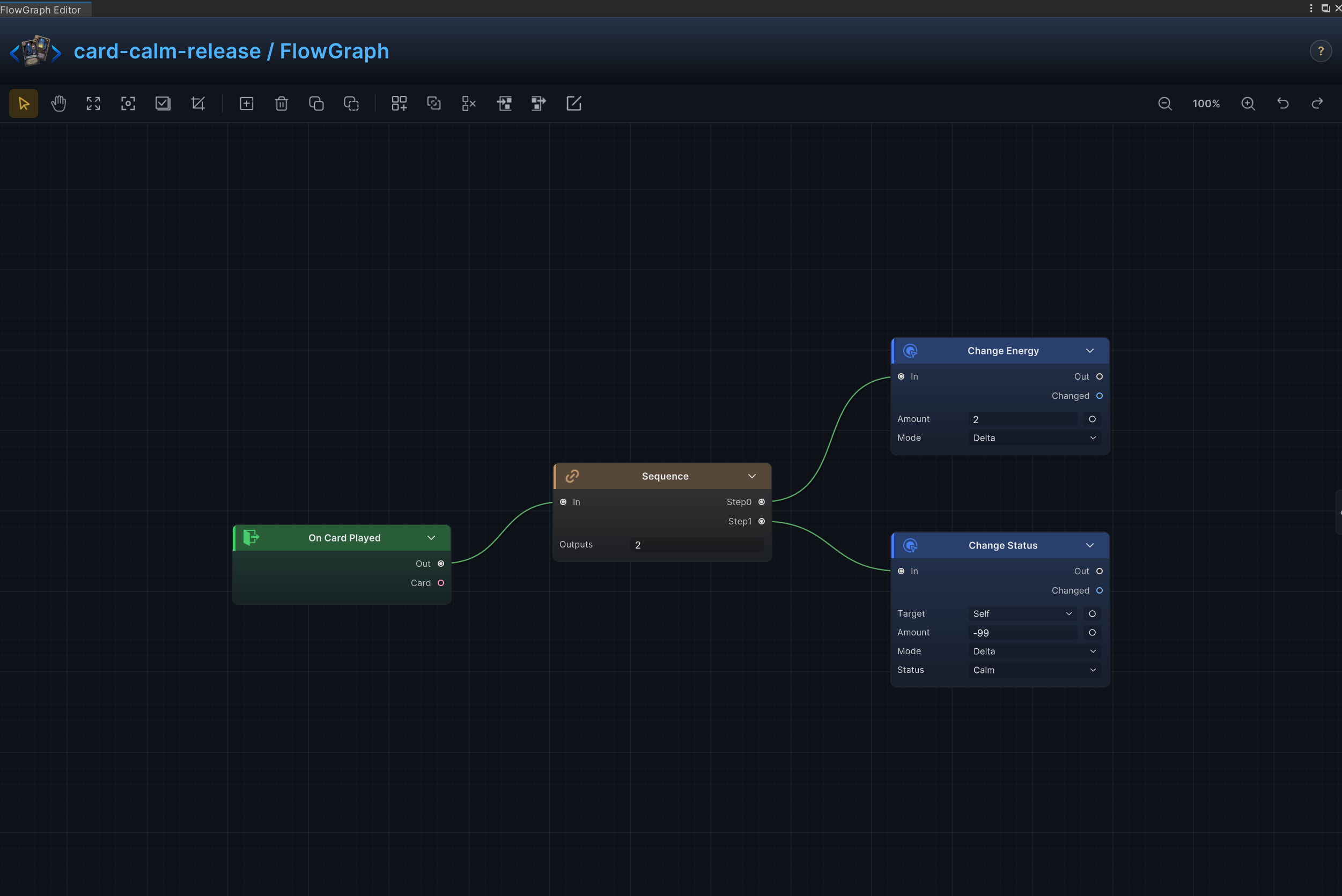
| 19 | Status Switch | Remove Empower, then add Drained as one ordered card resolution |
| 20 | Empower Exit Energy | Gain energy, then remove the source unit's Empower stacks |
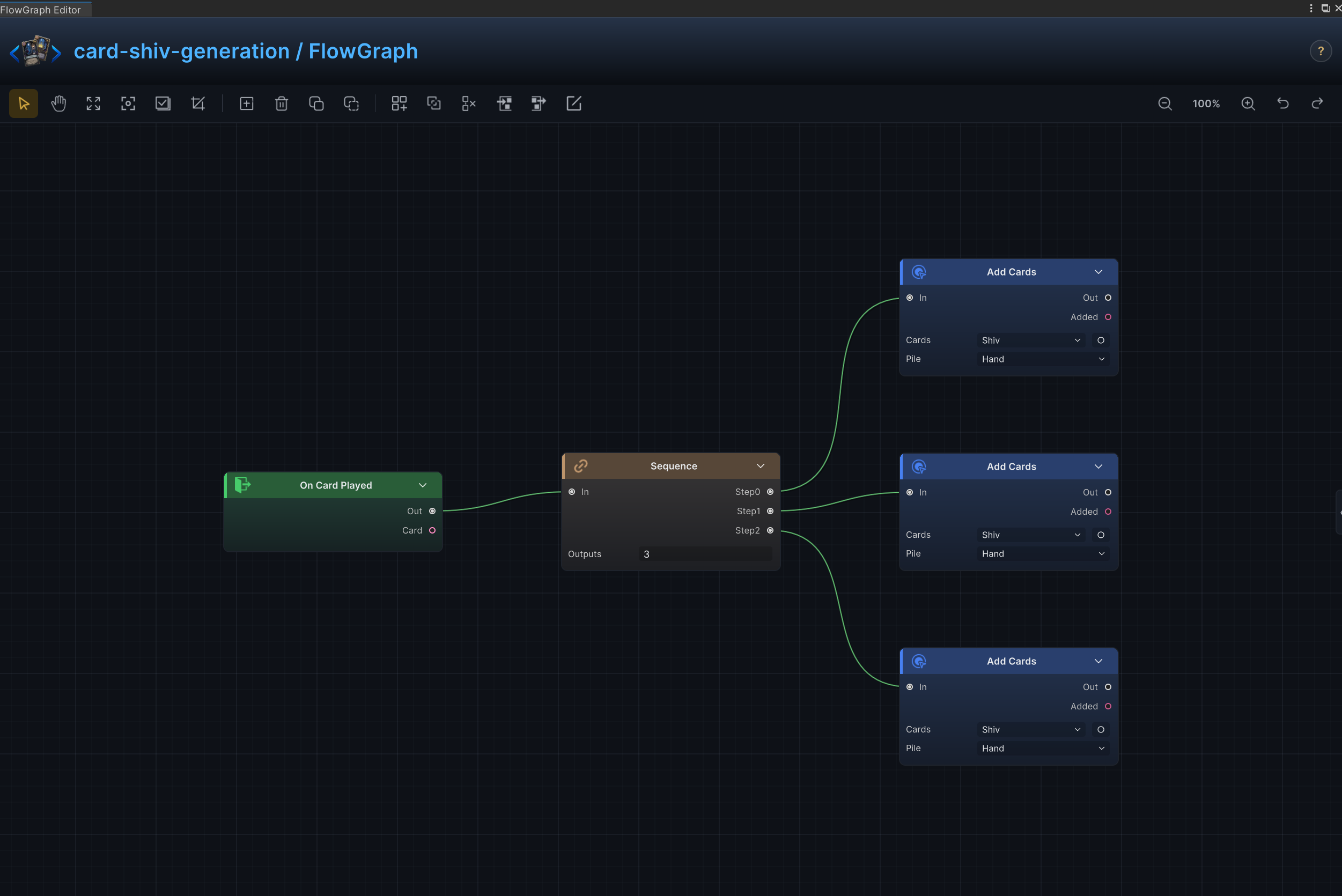
| 21 | Temporary Quick Shot Generation | Create several temporary Quick Shot cards in hand |
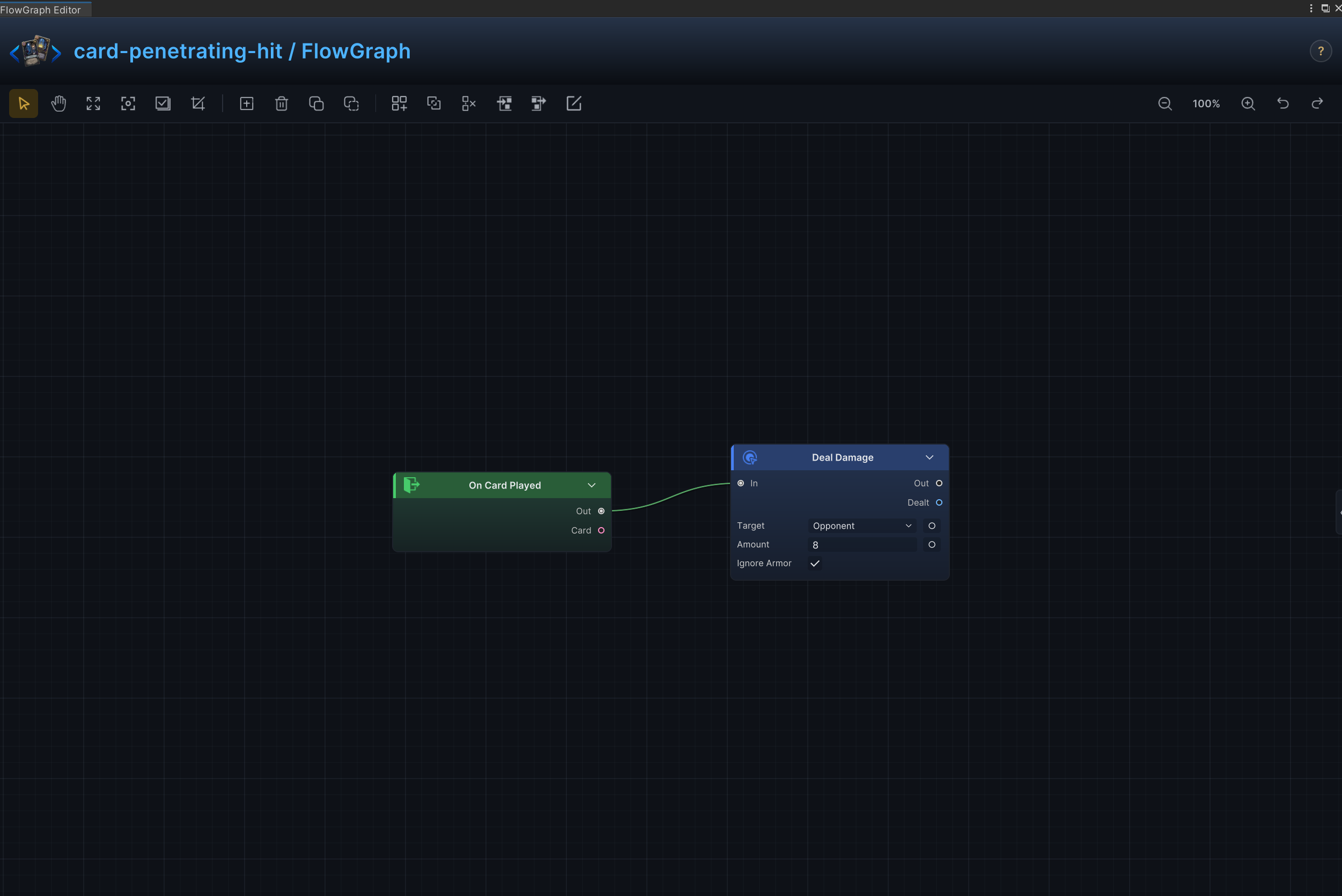
| 22 | Armor-Piercing Damage | Deal damage directly through armor |
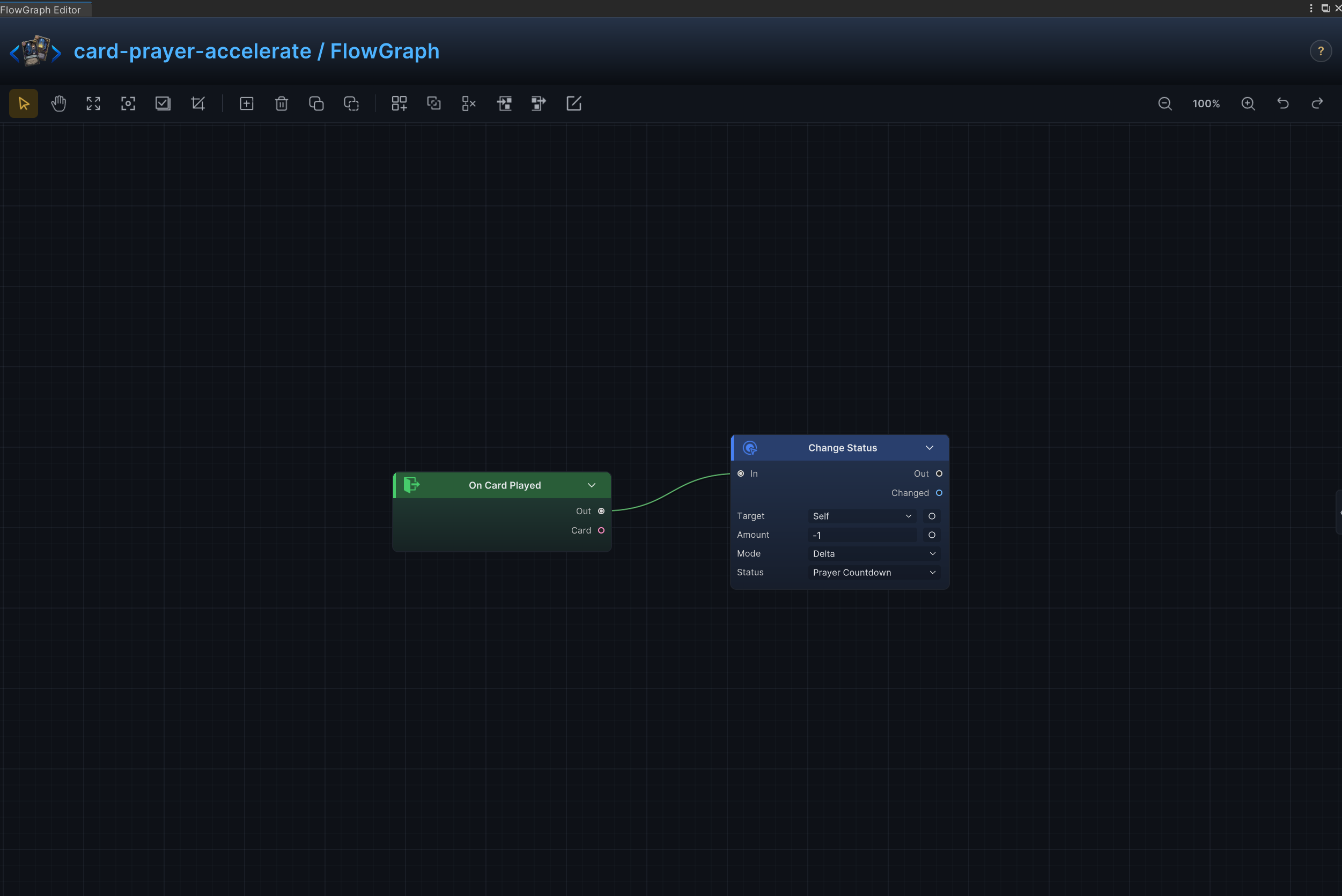
| 23 | Ritual Countdown Acceleration | Reduce the source unit's Ritual stacks immediately |
| 24 | Retained Card Growth | With Retain enabled on the asset, upgrade cards when this card is retained |
| 25 | Direct Energy Gain | Grant energy immediately when the card resolves |
| 26 | Energy per Turn | Increase the energy granted at the start of each player turn |
| 27 | Direct Self-Healing | Restore a fixed amount of HP to the source unit |
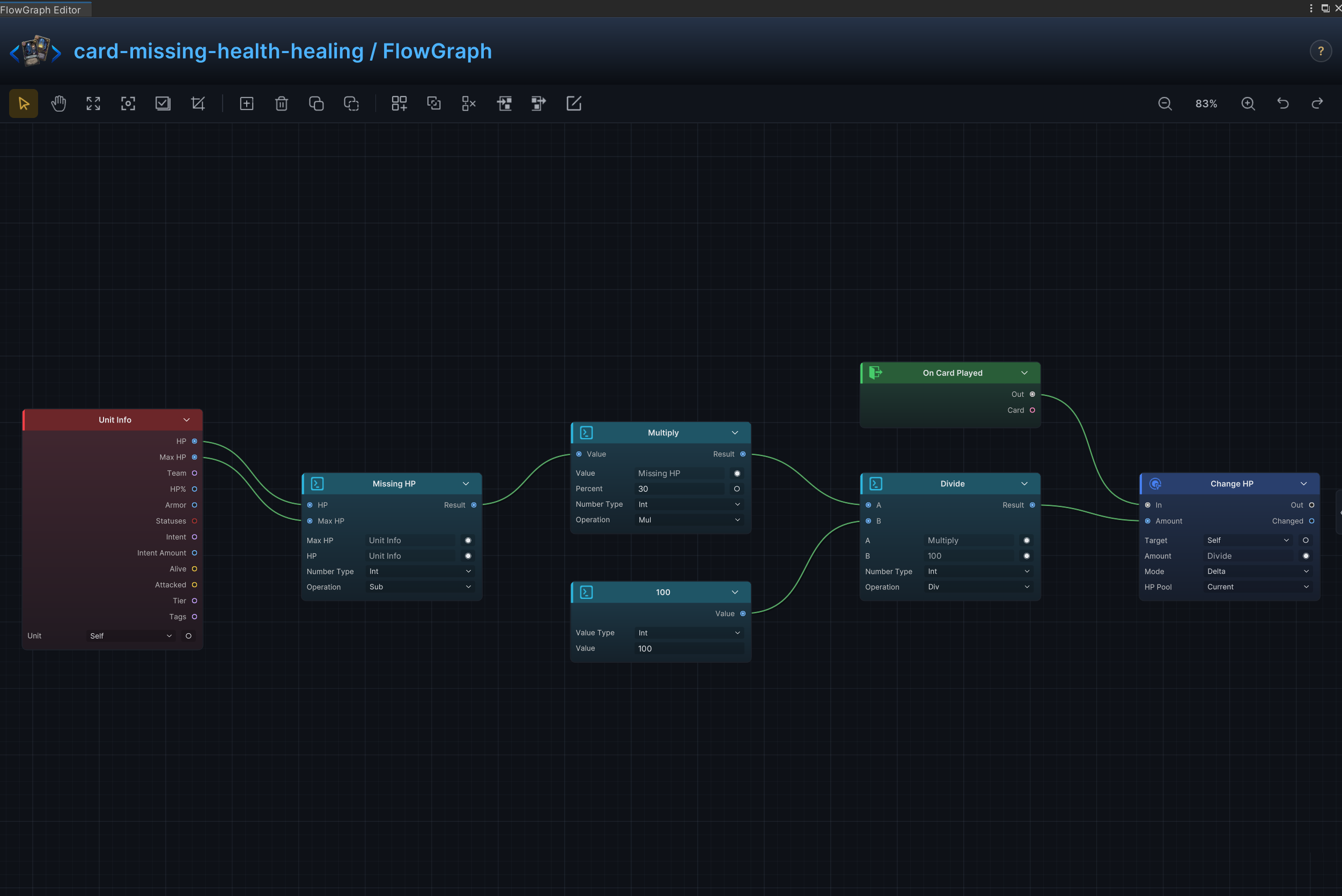
| 28 | Missing-Health Healing | Restore HP as a percentage of the unit's missing health |
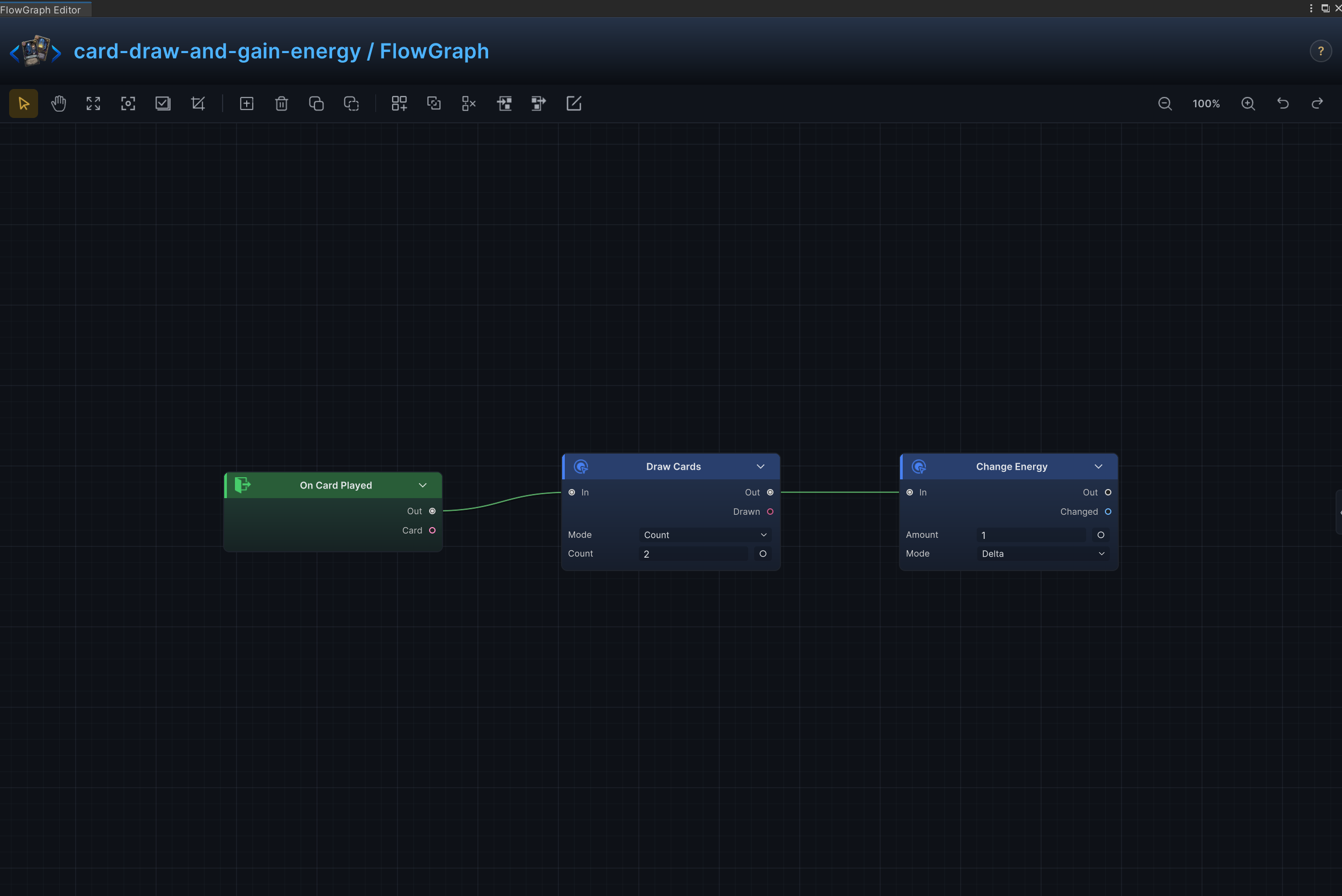
| 29 | Draw and Gain Energy | Draw cards and grant energy in the same resolution |
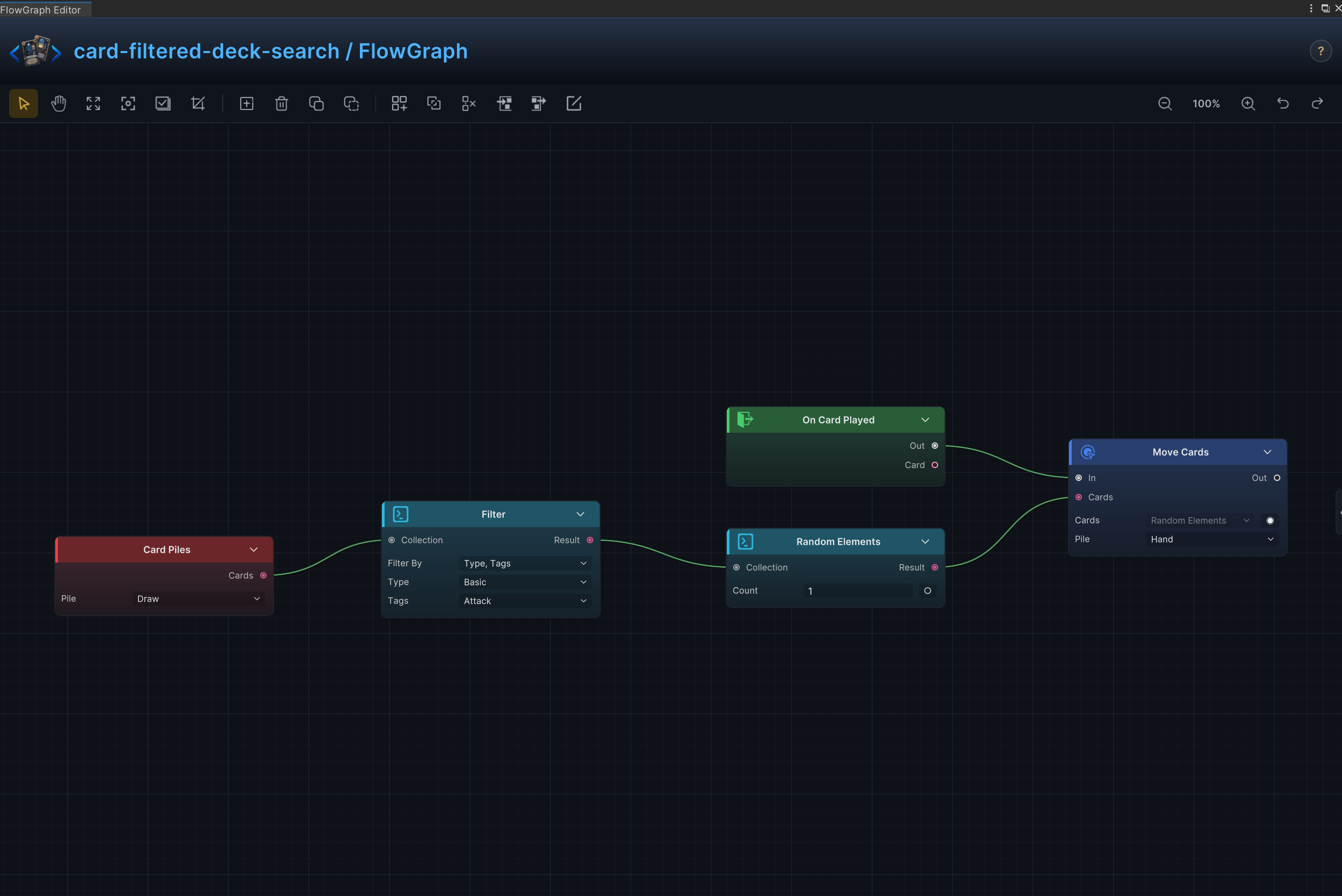
| 30 | Filtered Deck Search | Find cards in the draw pile by rule and move a matching result into the hand |
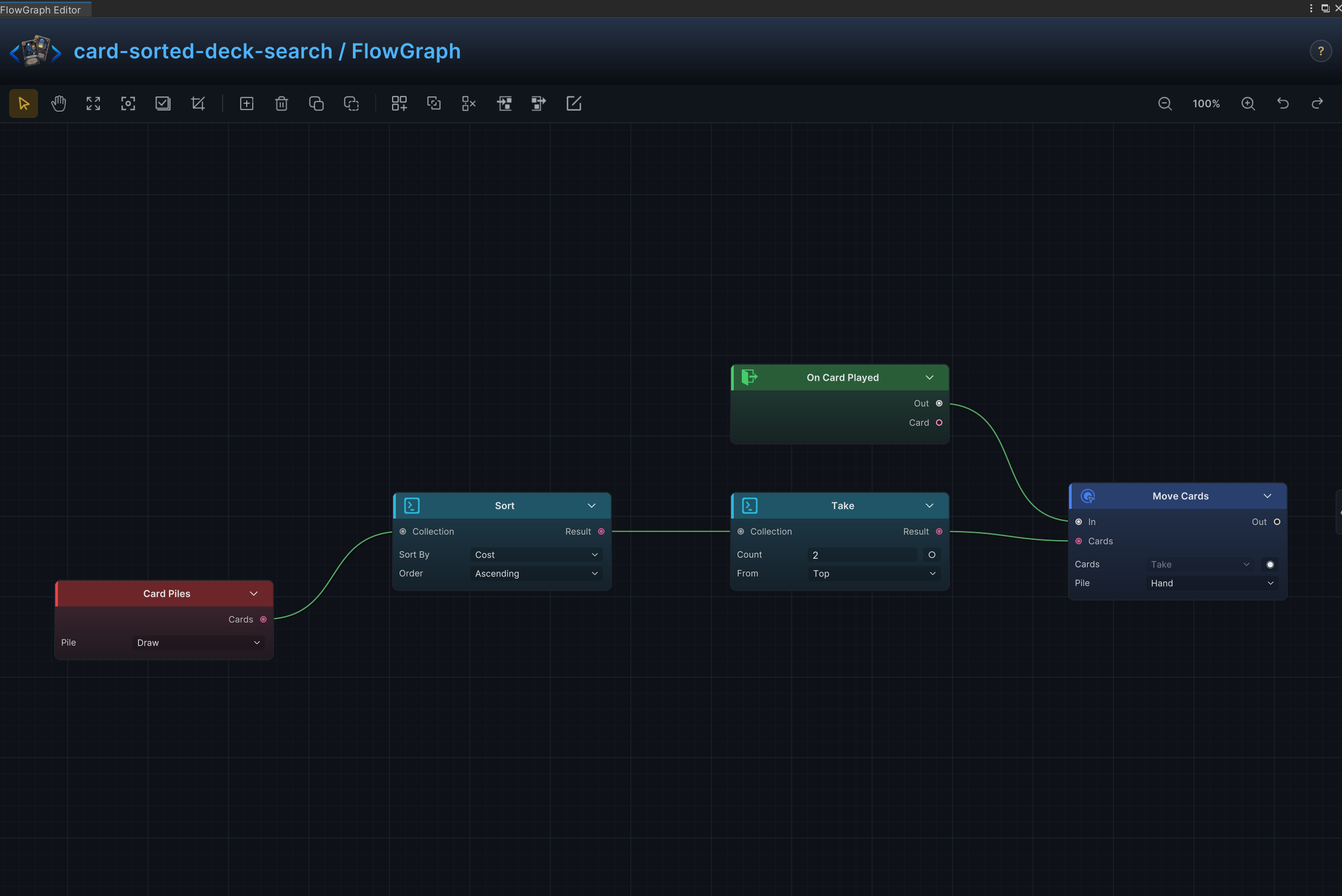
| 31 | Sorted Deck Search | Sort cards by a property, take a fixed number, and move them between piles |
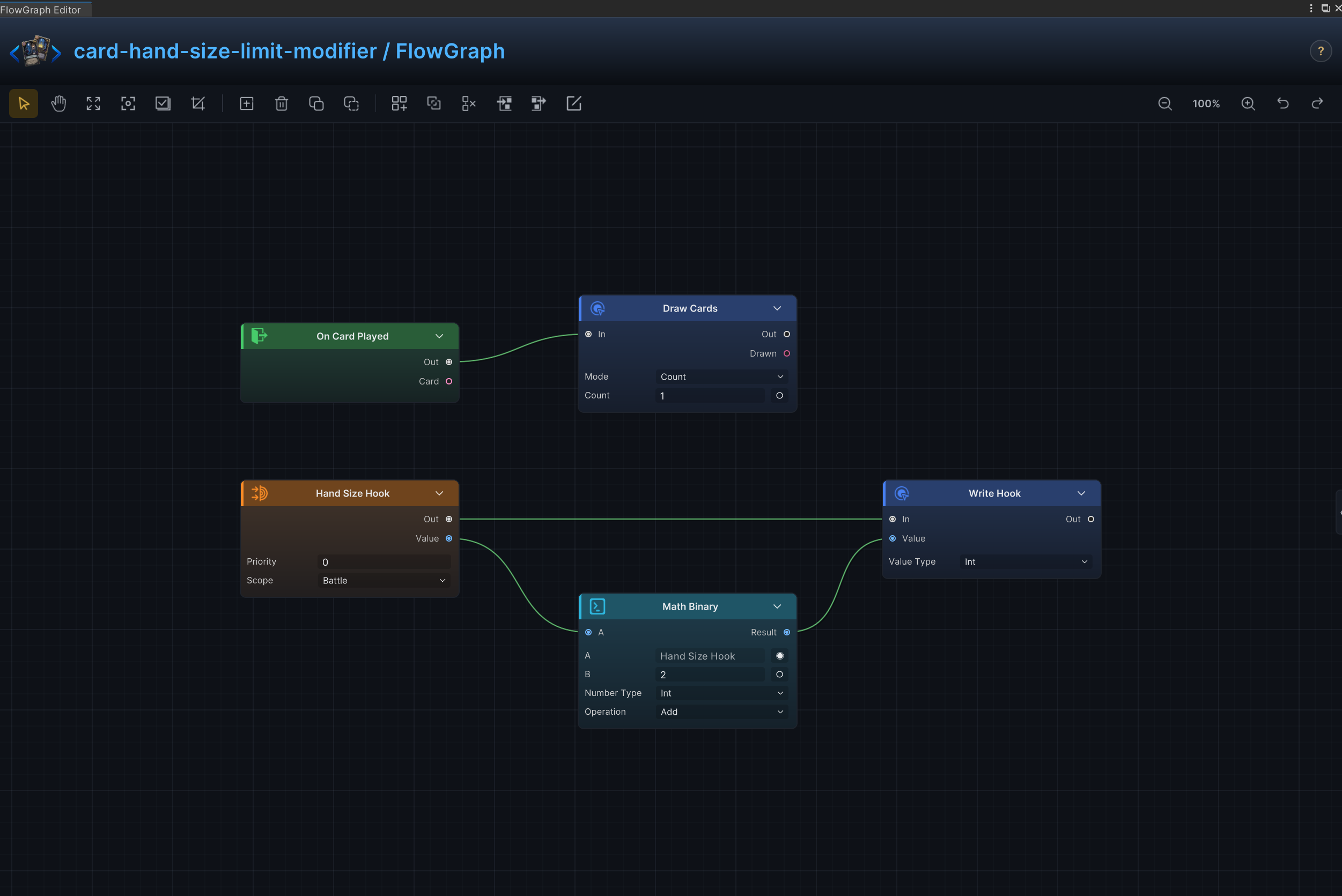
| 32 | Hand-Size Limit Modifier | Change the maximum hand size for the battle or a limited duration |
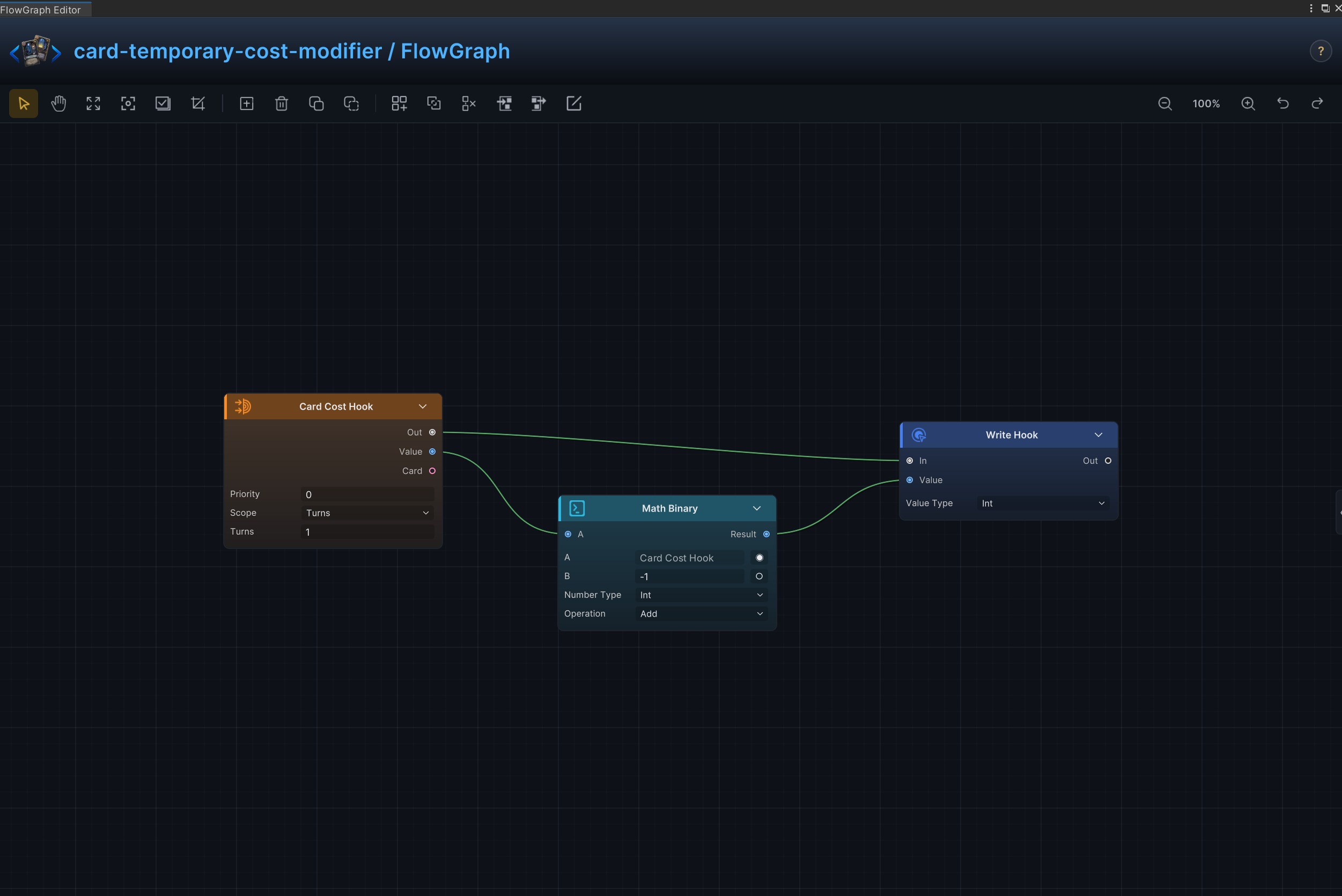
| 33 | Temporary Cost Modifier | Modify card energy costs for a limited duration through the card-cost hook |
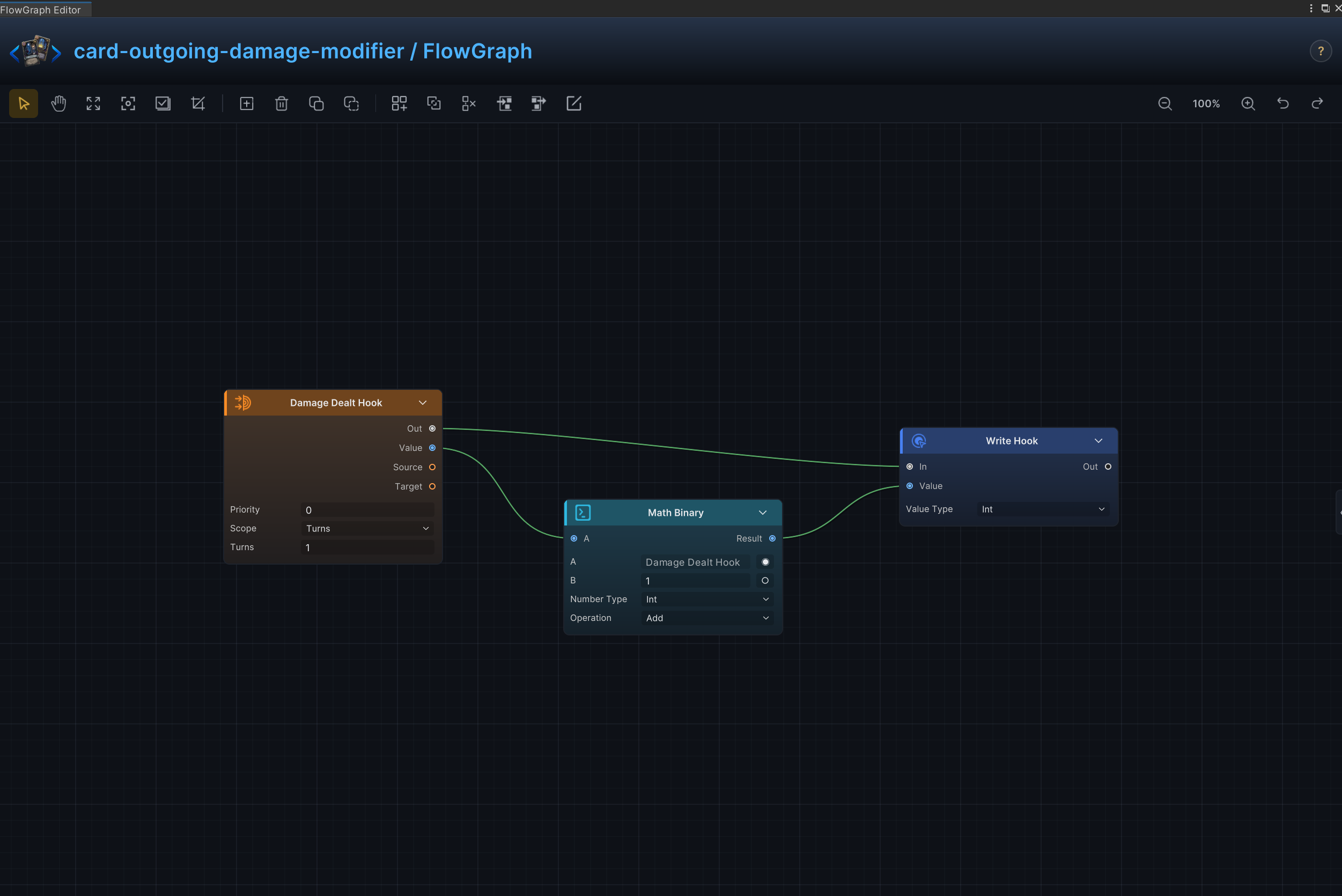
| 34 | Outgoing Damage Modifier | Modify damage dealt for a limited duration through a damage hook |
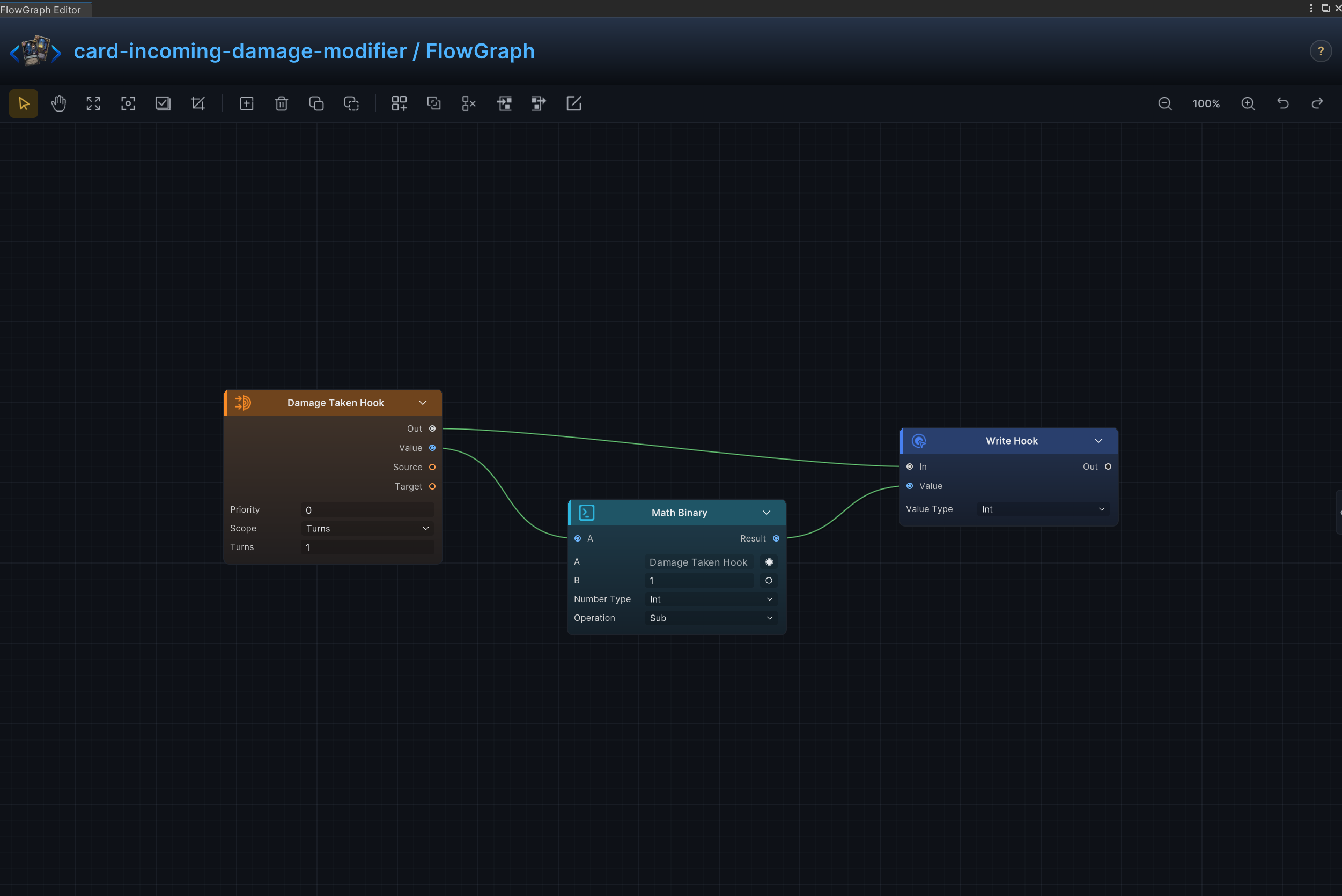
| 35 | Incoming Damage Modifier | Reduce or amplify incoming damage for a limited duration through a damage hook |
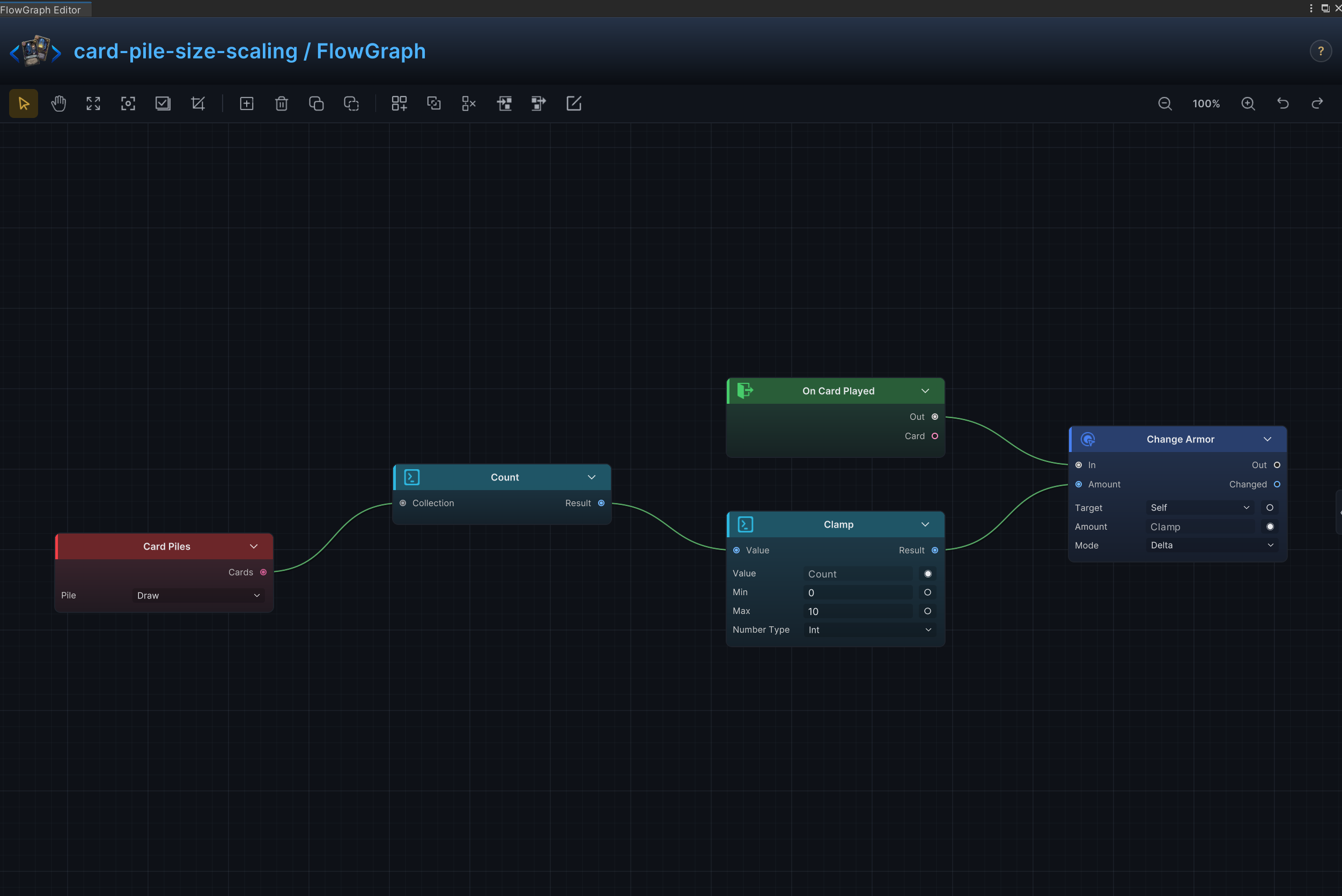
| 36 | Pile-Size Scaling | Scale an effect from the number of cards in a selected pile, with an optional cap |
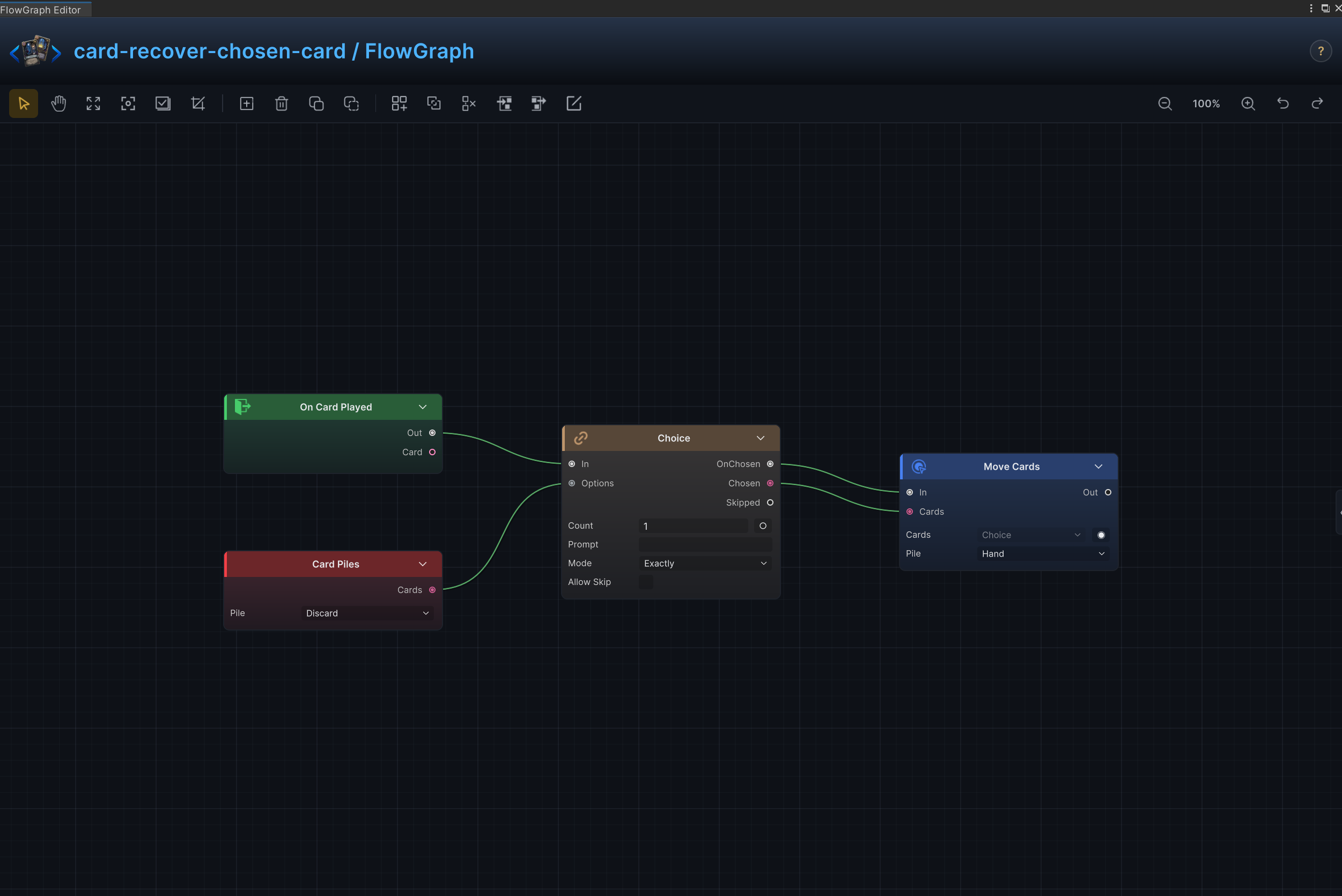
| 37 | Recover Chosen Card | Let the player choose a card from the discard pile and return it to hand |
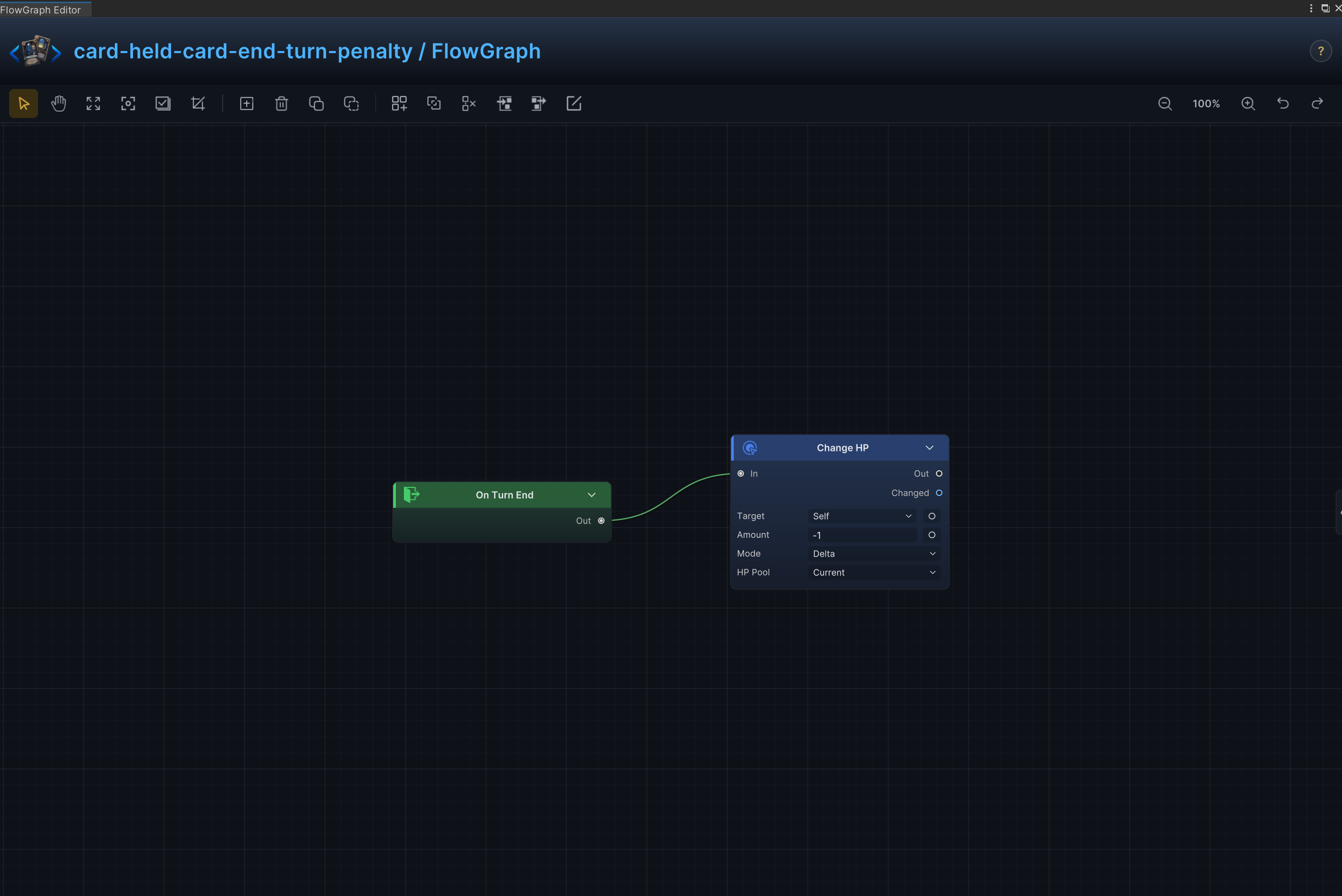
| 38 | Held-Card End-Turn Penalty | Trigger an effect when an unplayed card remains in hand at turn end |
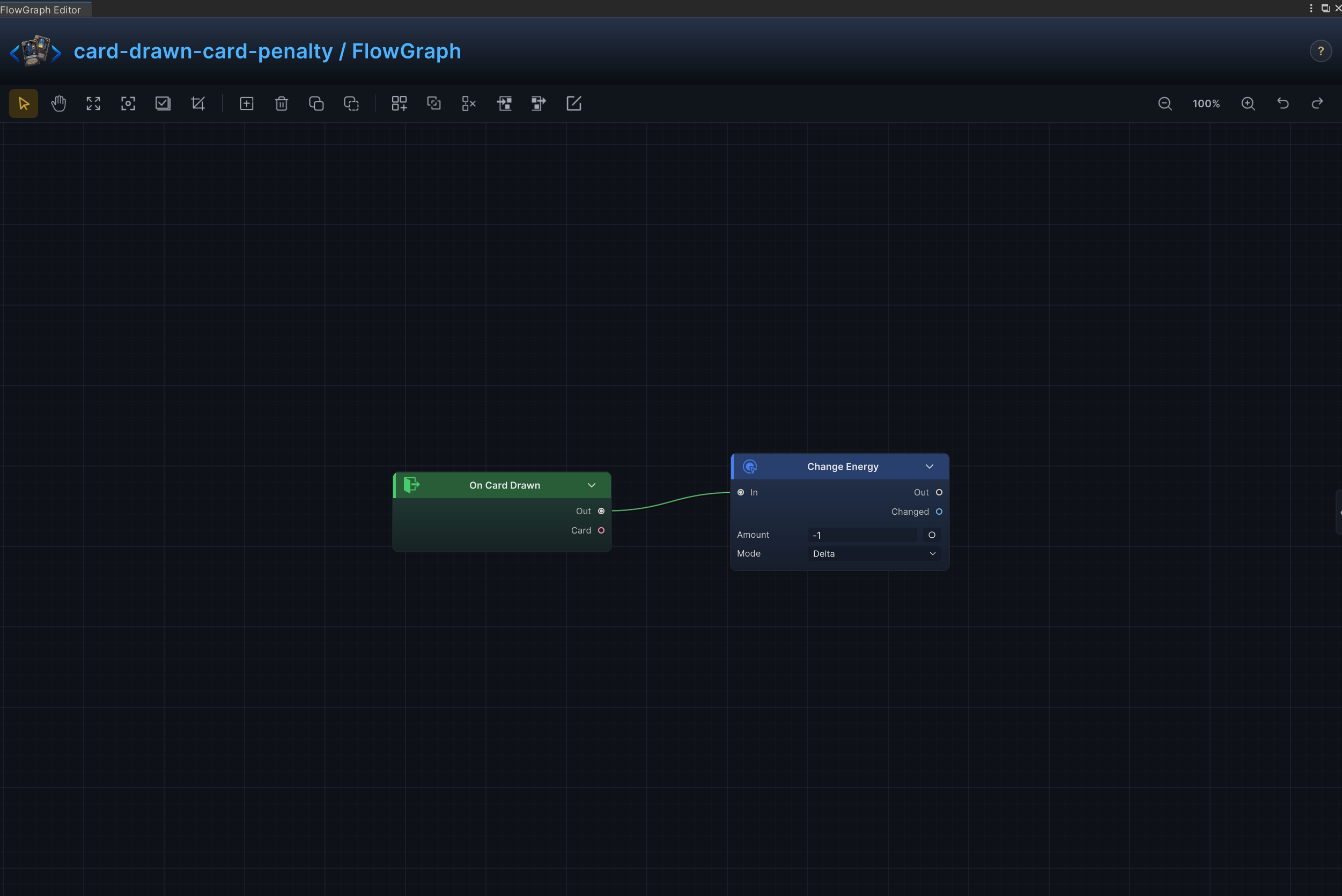
| 39 | Drawn-Card Penalty | Trigger a penalty when this card enters the hand from the draw pile |
| 40 | Cancel Armor Reset | Override the normal armor reset rule for the duration of a persistent effect |
| 41 | Armor-Scaled Damage | Convert the user's current armor into attack damage |
| 42 | Repeated Hit with Status | Repeat an attack that deals damage and applies a status on every hit |
| 43 | Area Status Detonation | Consume a status on every enemy and turn its stacks into area damage |
| 44 | Recover and Auto-Play | Recover a matching card from another pile and immediately play it |
| 45 | Energy-Scaled Area Damage | Scale area damage from the energy currently available |
| 46 | Extra Turn | Schedule an additional player turn after the current turn |
| 47 | Status Stack Multiplier | Read a target's status stacks and multiply the existing amount |
| 48 | Combat Counter Scaling | Track uses during combat and scale later resolutions from the accumulated count |
| 49 | Split Targets by Status | Partition enemies by a status condition and apply different effects to each group |
| 50 | Status-Scaled Damage | Scale damage from the number of status stacks on the target |
| 51 | Cleanse and Heal | Remove matching negative statuses, then restore HP |
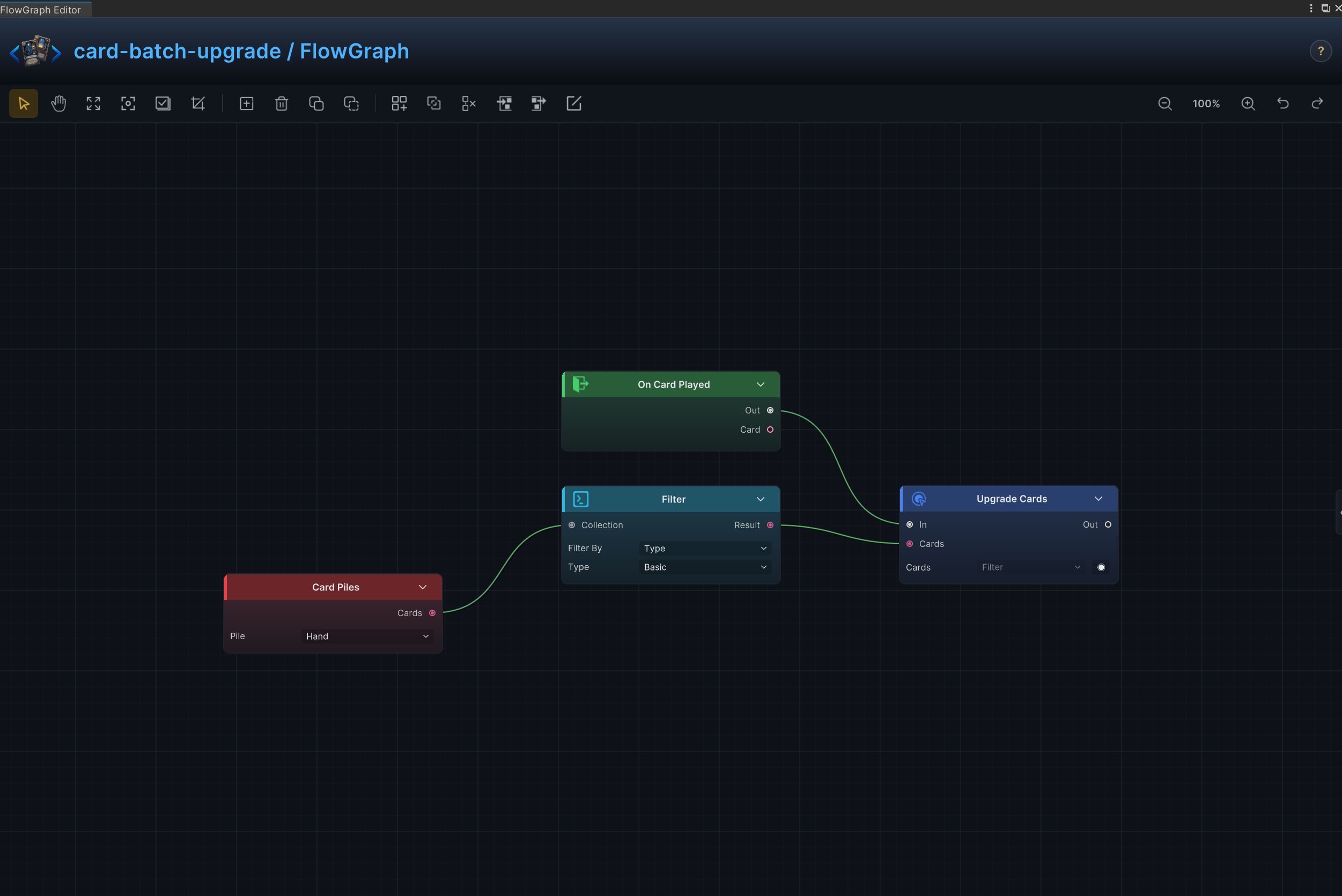
| 52 | Batch Upgrade | Filter a card collection and upgrade every matching card in one resolution |
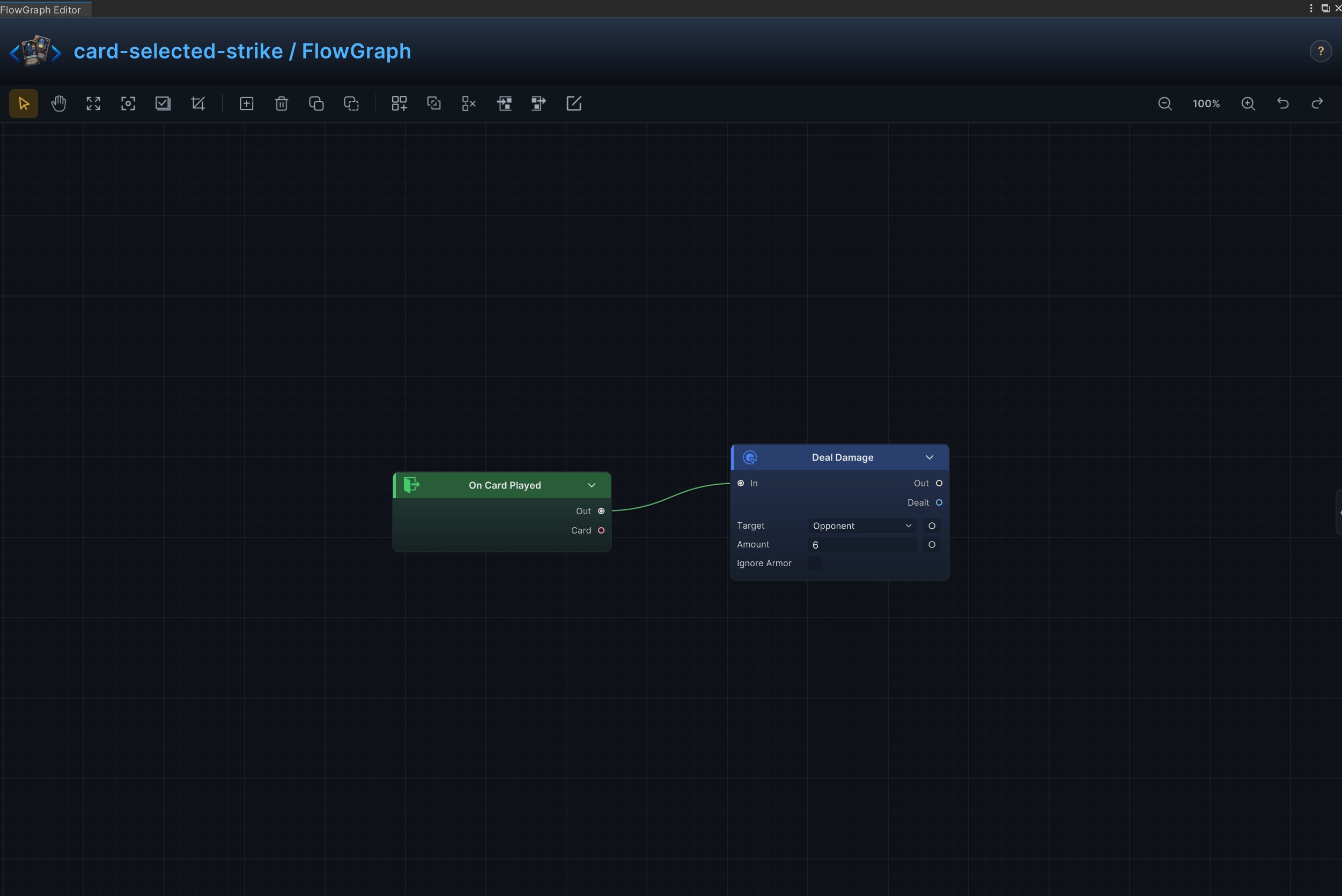
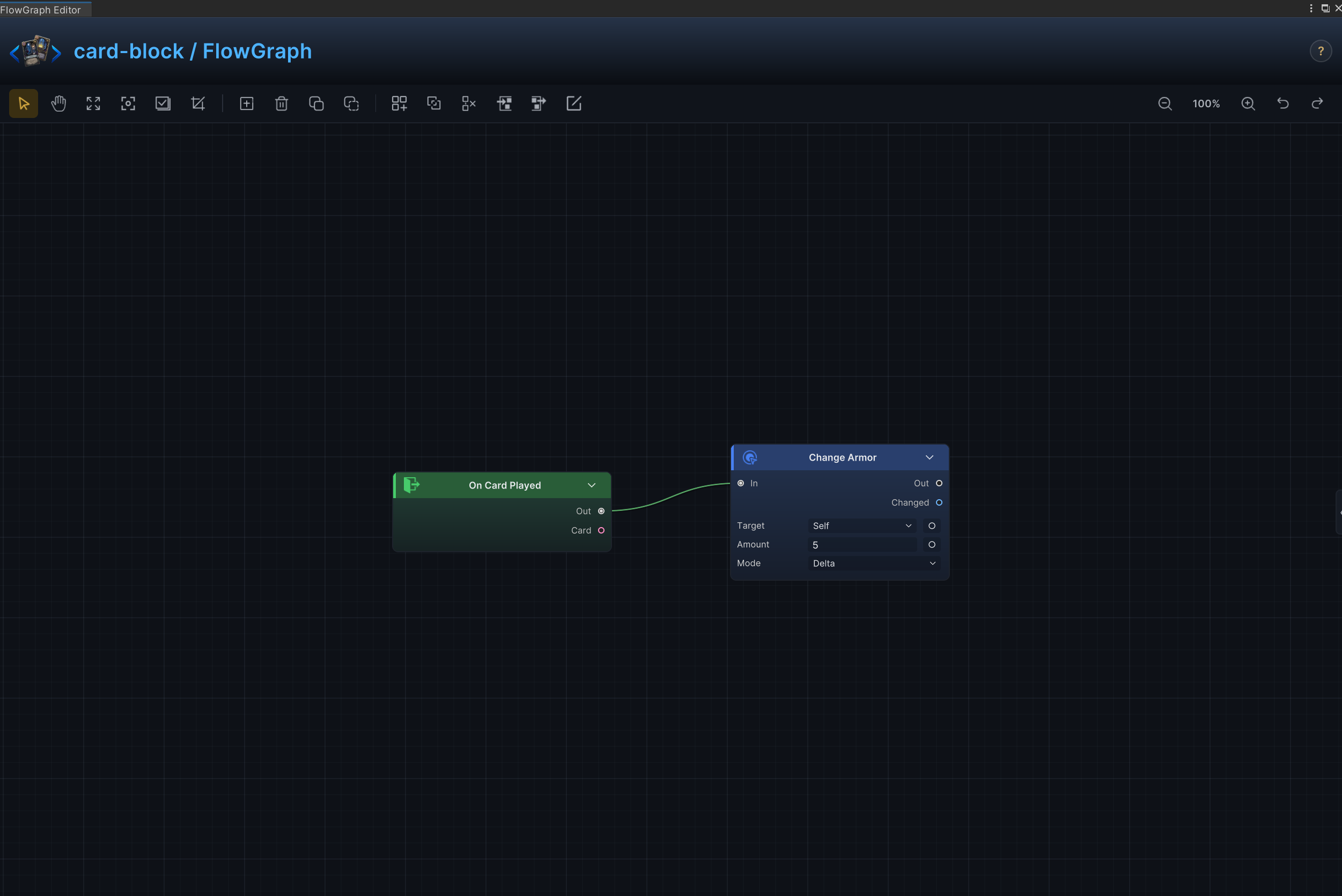
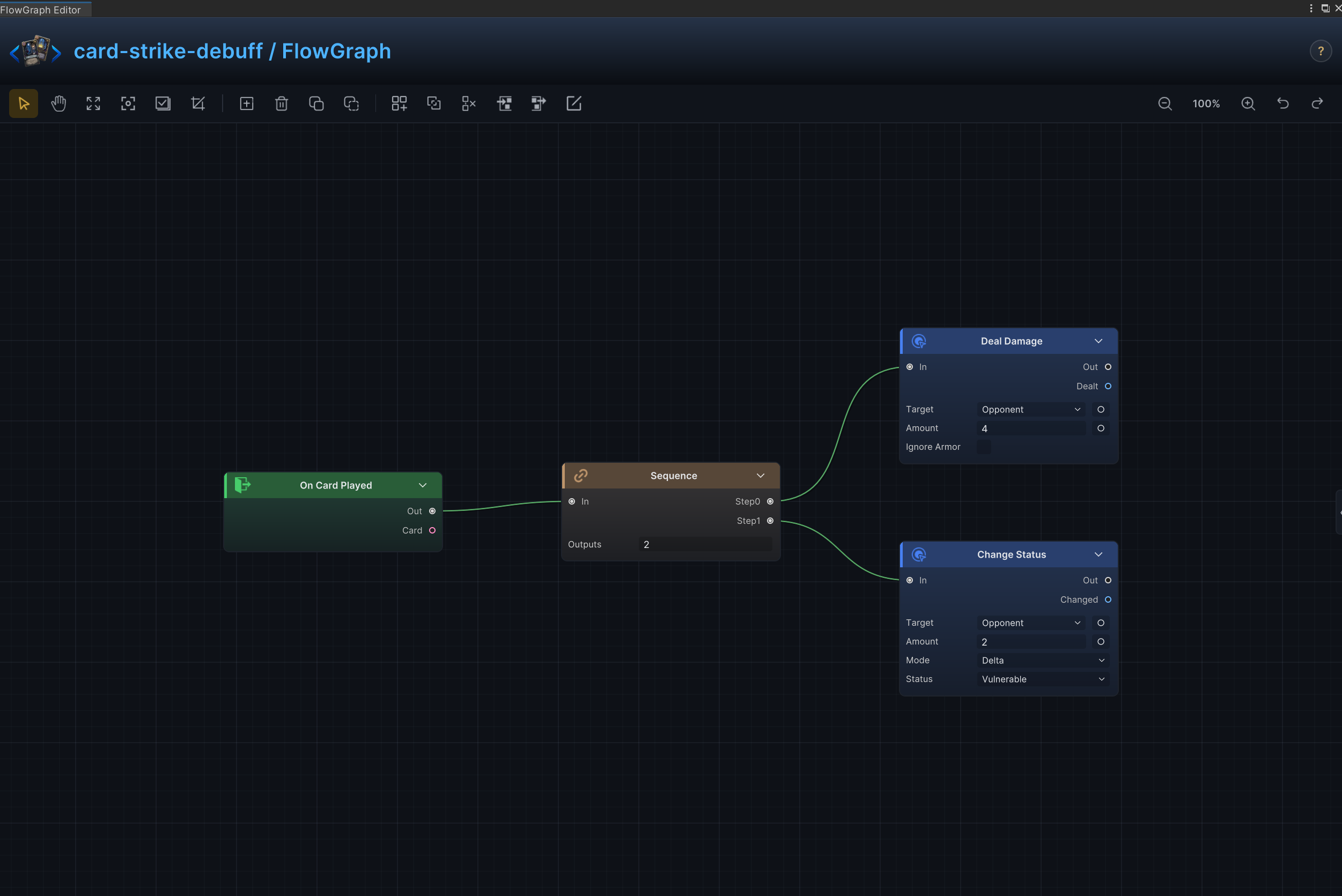
Every entry uses the same Effect, Node connections, and Node configuration structure. The graph on the right verifies node layout; port arrows show connections only, while field meanings and example values remain in Node configuration
Selected-target strike
Effect
Deals a configurable amount of damage to the enemy selected for the card.
Node connections
On Card Played.Out → Deal Damage.In
Node configuration
Deal DamageTarget = Opponent: Uses the enemy currently selected by the card or behavior.Amount = 6: Uses 6 as the example value; replace it with the amount required by the card.Ignore Armor = Off: Damage resolves through armor normally.
Block and armor gain
Effect
Grants a configurable amount of armor to the player.
Node connections
On Card Played.Out → Change Armor.In
Node configuration
Change ArmorTarget = Self: Targets the source unit itself.Mode = Delta: Adds to or subtracts from the current value; positive values increase it and negative values decrease it.Amount = 5: Uses 5 as the example value; replace it with the amount required by the card.
Strike plus debuff
Effect
Deals damage to the selected enemy, then applies a configured debuff to the same target.
Node connections
On Card Played.Out → Sequence.InSequence.Step0 → Deal Damage.InSequence.Step1 → Change Status.In
Node configuration
SequenceOutputs = 2: Sets the number of ordered control-flow branches.
Deal DamageTarget = Opponent: Uses the enemy currently selected by the card or behavior.Amount = 4: Uses 4 as the example value; replace it with the amount required by the card.Ignore Armor = Off: Damage resolves through armor normally.
Change StatusTarget = Opponent: Uses the enemy currently selected by the card or behavior.Status = Vulnerable: Reads or changes the Vulnerable status.Mode = Delta: Adds to or subtracts from the current value; positive values increase it and negative values decrease it.Amount = 2: Uses 2 as the example value; replace it with the amount required by the card.
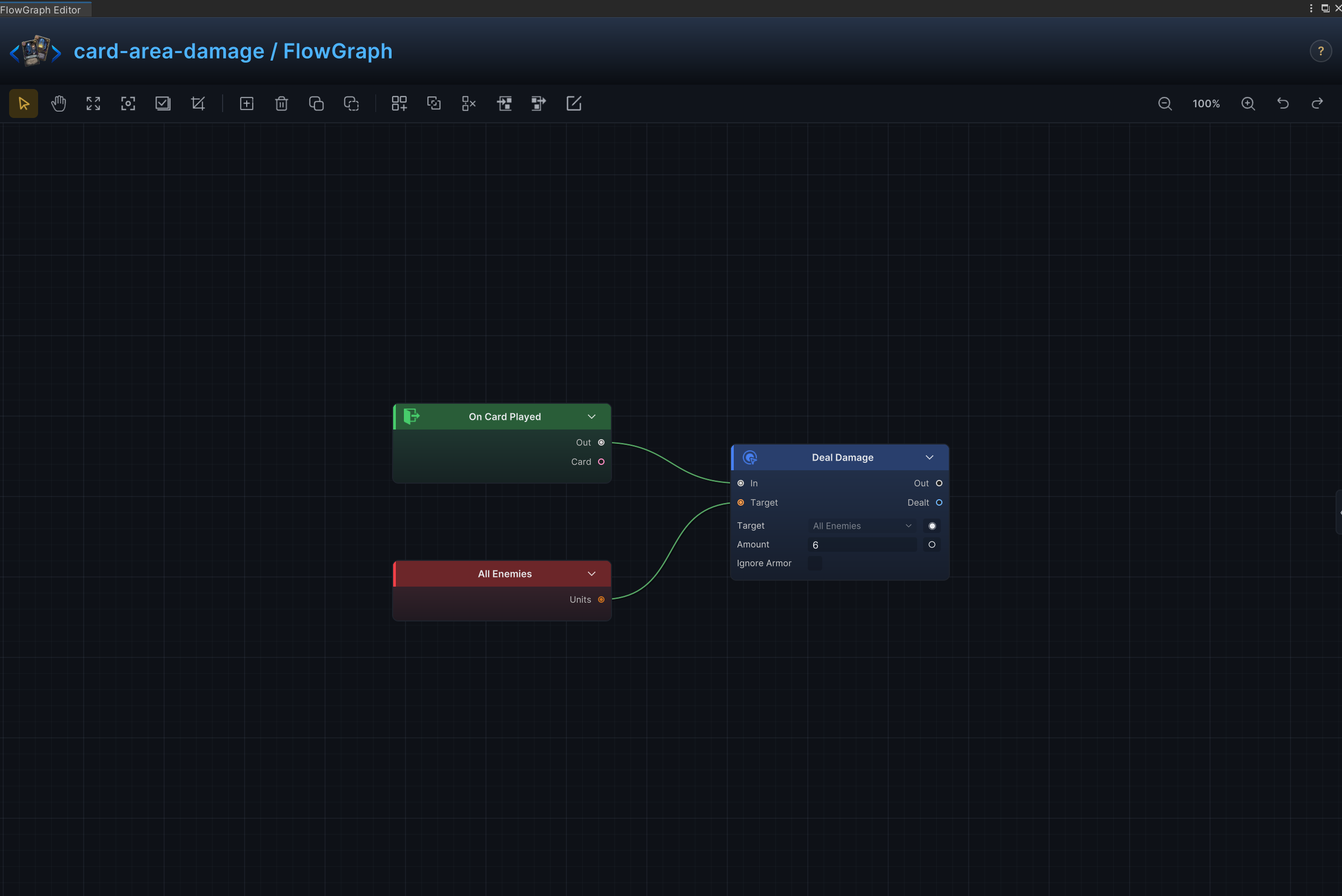
Area damage
Effect
Deals the same amount of damage to every living enemy.
Node connections
On Card Played.Out → Deal Damage.InAll Opponents.Units → Deal Damage.Target
Node configuration
Deal DamageTarget = Opponent: All Opponents.Units supplies the runtime value, this setting is the fallback when unconnectedAmount = 6: Uses 6 as the example value; replace it with the amount required by the card.Ignore Armor = Off: Damage resolves through armor normally.
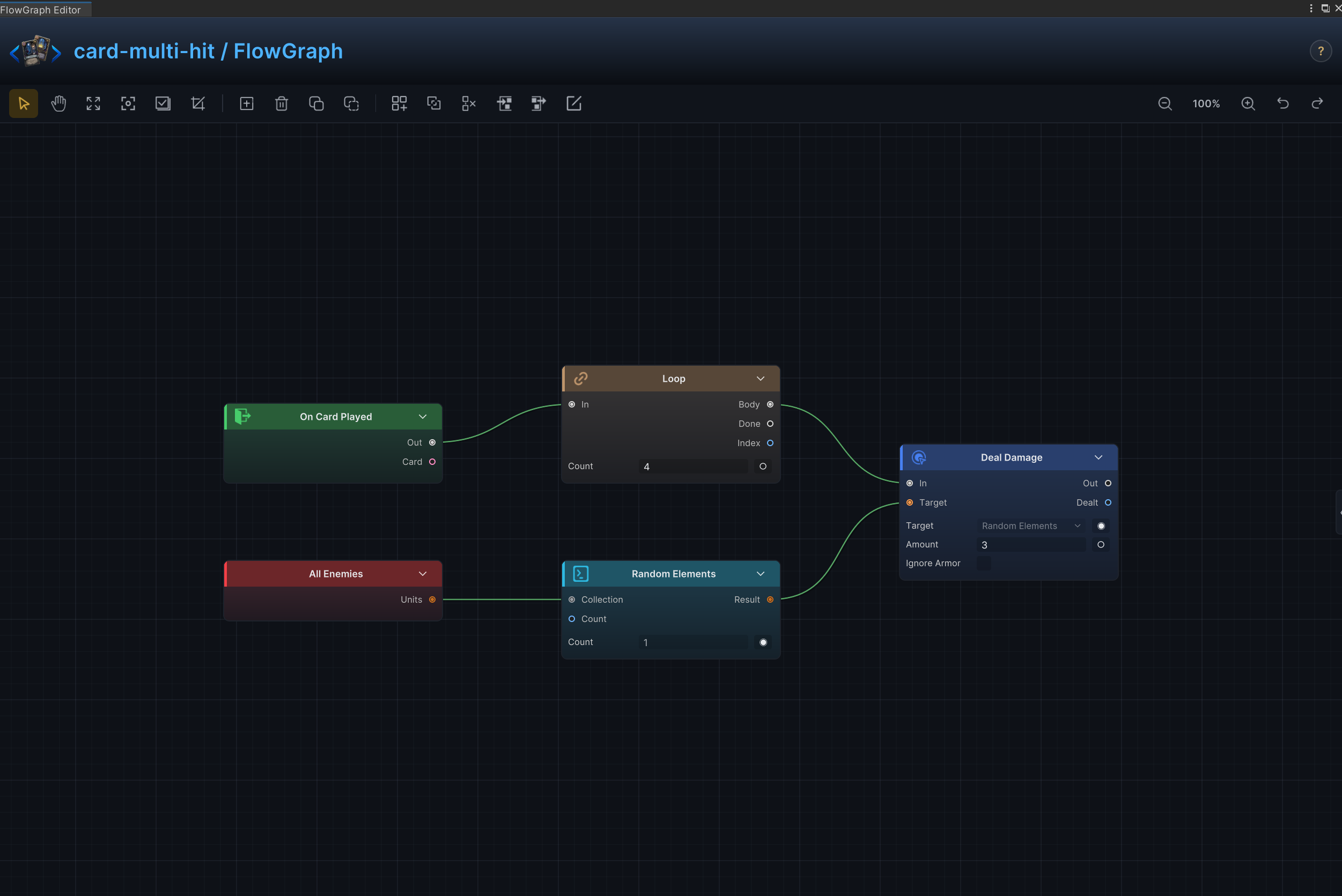
Multi-hit and random-hit attack
Effect
Repeats an attack for a configured number of hits and can select a new random target for each hit.
Node connections
On Card Played.Out → Loop.InLoop.Body → Deal Damage.InAll Opponents.Units → Random Elements.CollectionRandom Elements.Result → Deal Damage.Target
Node configuration
LoopCount = 4: Sets how many cards, elements, choices, or loop iterations are produced.
Random ElementsKind = Unit: Selects the data, collection, choice, or hook value type handled by this node.Count = 1: Sets how many cards, elements, choices, or loop iterations are produced.
Deal DamageTarget = Opponent: Driven at runtime by Random Elements.Result; this value is only the unconnected fallback.Amount = 3: Uses 3 as the example value; replace it with the amount required by the card.Ignore Armor = Off: Damage resolves through armor normally.
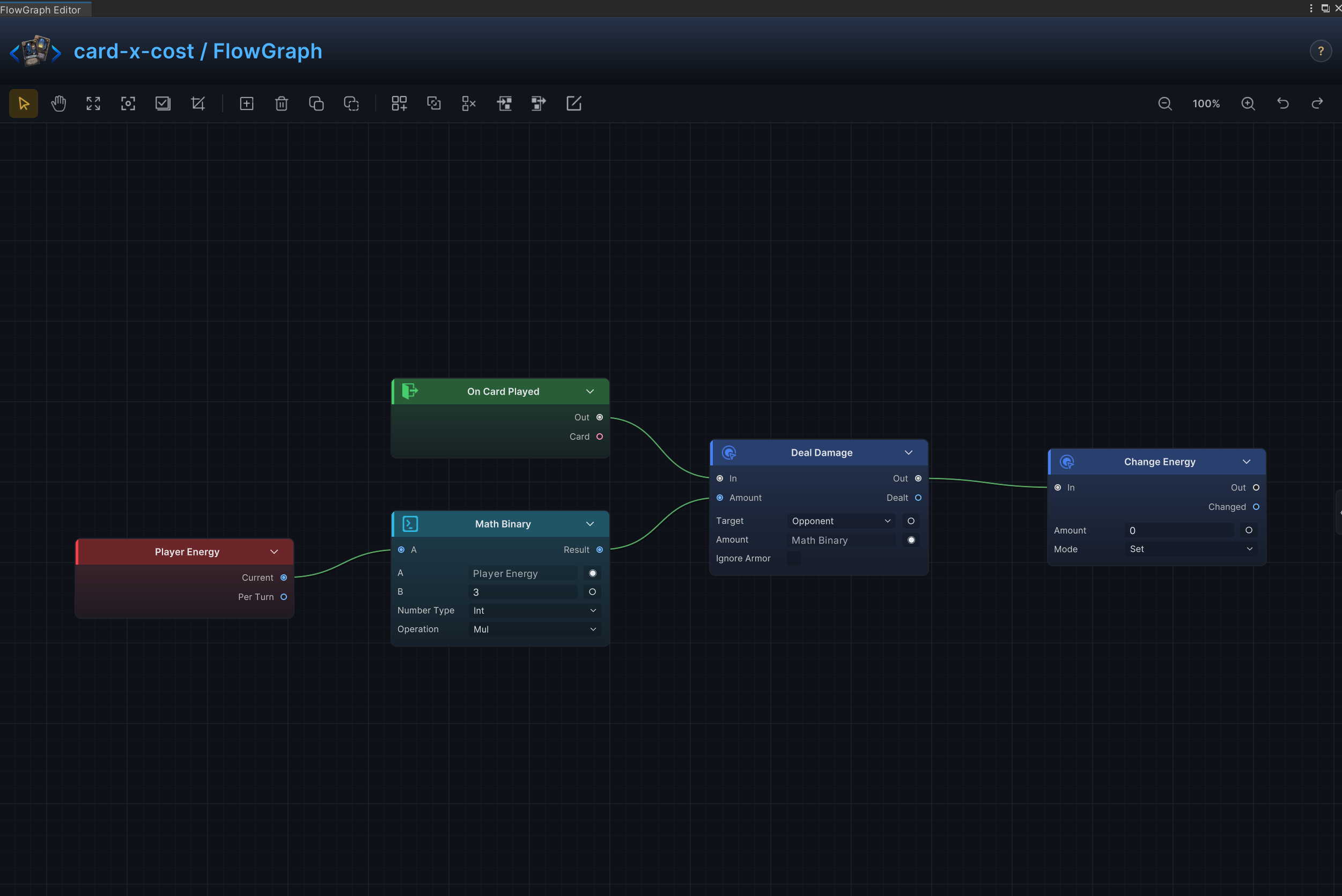
X-cost scaling
Effect
Deals 6 damage to the opponent for each point of current energy, then sets current energy to 0.
Node connections
On Card Played.Out → Deal Damage.InDeal Damage.Out → Change Energy.InPlayer Energy.Current → Math Binary.AMath Binary.Result → Deal Damage.Amount
Node configuration
Math BinaryKind = Int: Selects the data, collection, choice, or hook value type handled by this node.A = 0: Driven at runtime by Player Energy.Current; this value is only the unconnected fallback.B = 3: Sets the second operand when the B input is not connected.Op = Mul: Multiplies A by B.
Deal DamageTarget = Opponent: Uses the enemy currently selected by the card or behavior.Amount = 6: Driven at runtime by Math Binary.Result; this value is only the unconnected fallback.Ignore Armor = Off: Damage resolves through armor normally.
Change EnergyMode = Set: Replaces the current value with the configured value.Amount = 0: Uses 0 as the example value; replace it with the amount required by the card.
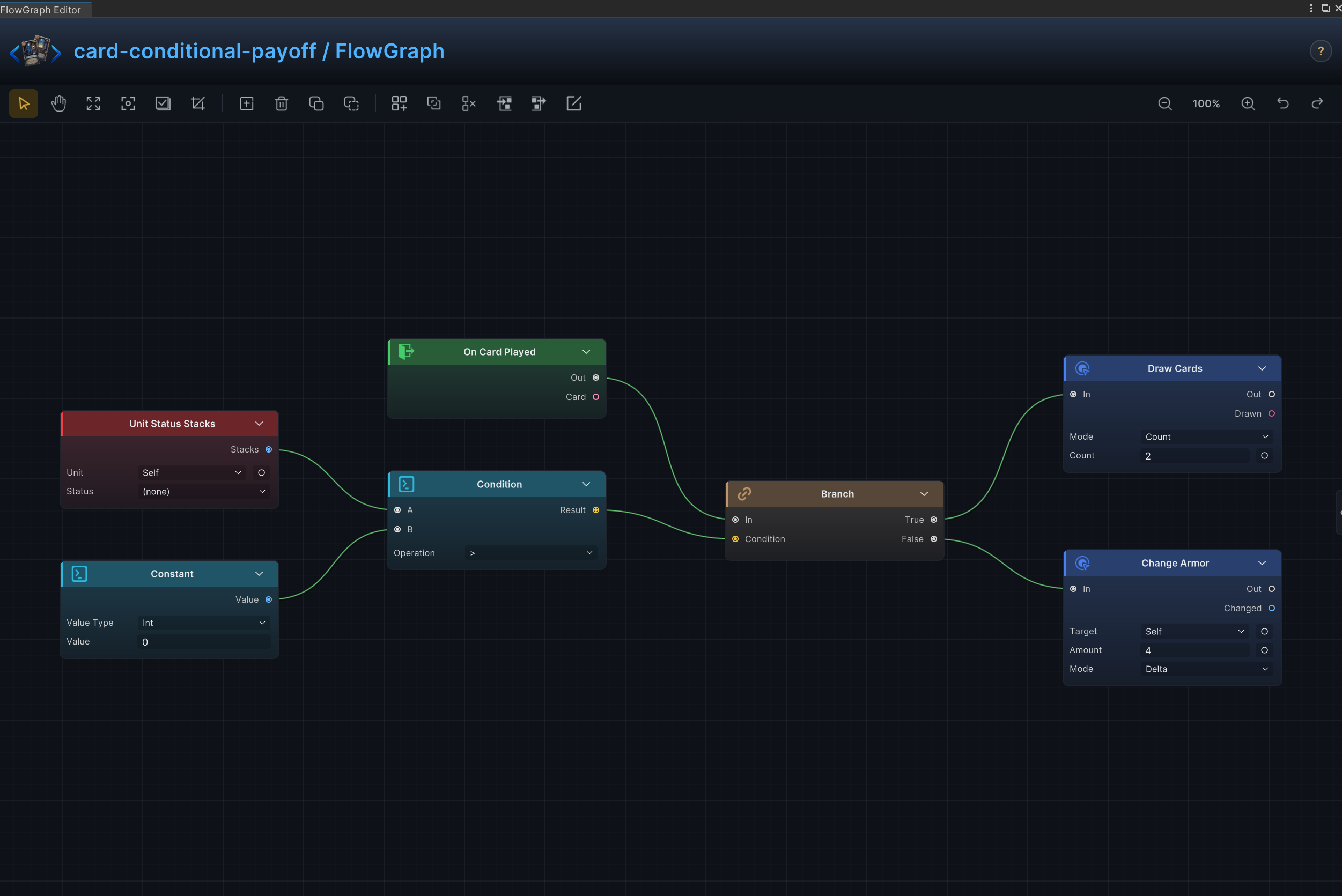
Conditional payoff and execute
Effect
Draws 2 cards when the opponent has at least one Marked stack; otherwise grants the source unit 4 armor.
Node connections
On Card Played.Out → Branch.InUnit Status Stacks.Stacks → Condition.AConstant.Value → Condition.BCondition.Result → Branch.ConditionBranch.True → Draw Cards.InBranch.False → Change Armor.In
Node configuration
Unit Status StacksUnit = Self: Reads the source unit itself.Status = Marked: Reads the source unit's Marked stacks.
ConstantKind = Int: Selects the data, collection, choice, or hook value type handled by this node.Int Value = 0: Supplies the integer constant.
ConditionOp = Greater: Passes when A is greater than B.
Draw CardsMode = Count: Advances the delay by turn count.Count = 2: Sets how many cards, elements, choices, or loop iterations are produced.
Change ArmorTarget = Self: Targets the source unit itself.Mode = Delta: Adds to or subtracts from the current value; positive values increase it and negative values decrease it.Amount = 4: Uses 4 as the example value; replace it with the amount required by the card.
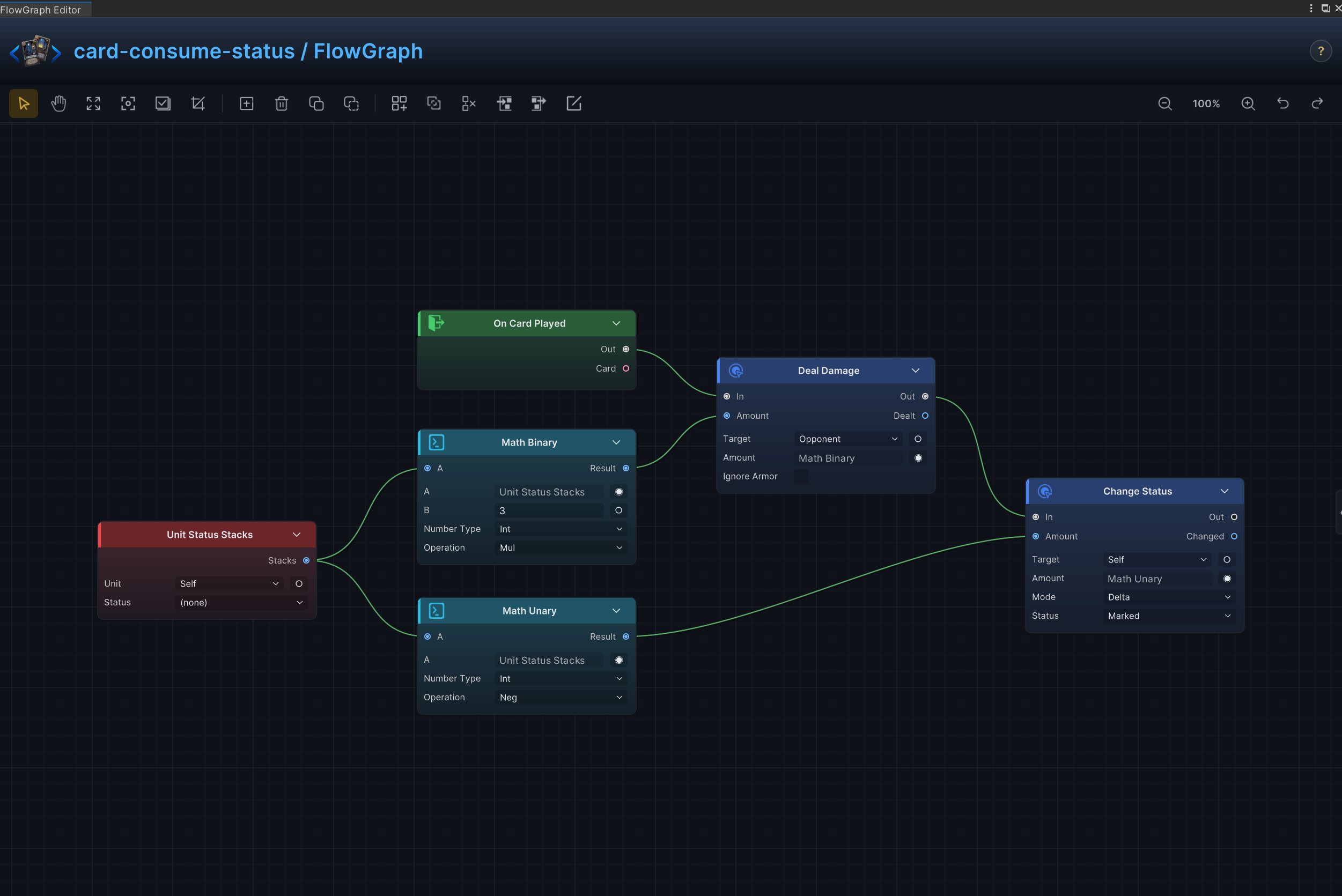
Consume a status as a resource
Effect
Reads and removes status stacks, then calculates the card payoff from the amount consumed.
Node connections
On Card Played.Out → Deal Damage.InDeal Damage.Out → Change Status.InUnit Status Stacks.Stacks → Math Binary.AMath Binary.Result → Deal Damage.AmountUnit Status Stacks.Stacks → Math Unary.AMath Unary.Result → Change Status.Amount
Node configuration
Unit Status StacksUnit = Self: Reads the source unit itself.Status = Marked: Reads the source unit's Marked stacks.
Math BinaryKind = Int: Selects the data, collection, choice, or hook value type handled by this node.A = 0: Driven at runtime by Unit Status Stacks.Stacks; this value is only the unconnected fallback.B = 3: Sets the second operand when the B input is not connected.Op = Mul: Multiplies A by B.
Deal DamageTarget = Opponent: Uses the enemy currently selected by the card or behavior.Amount = 6: Driven at runtime by Math Binary.Result; this value is only the unconnected fallback.Ignore Armor = Off: Damage resolves through armor normally.
Math UnaryKind = Int: Selects the data, collection, choice, or hook value type handled by this node.A = 0: Driven at runtime by Unit Status Stacks.Stacks; this value is only the unconnected fallback.Op = Neg: Negates the input value.
Change StatusTarget = Self: Targets the source unit itself.Status = Marked: Reads or changes the Marked status.Mode = Delta: Adds to or subtracts from the current value; positive values increase it and negative values decrease it.Amount = 1: Driven at runtime by Math Unary.Result; this value is only the unconnected fallback.
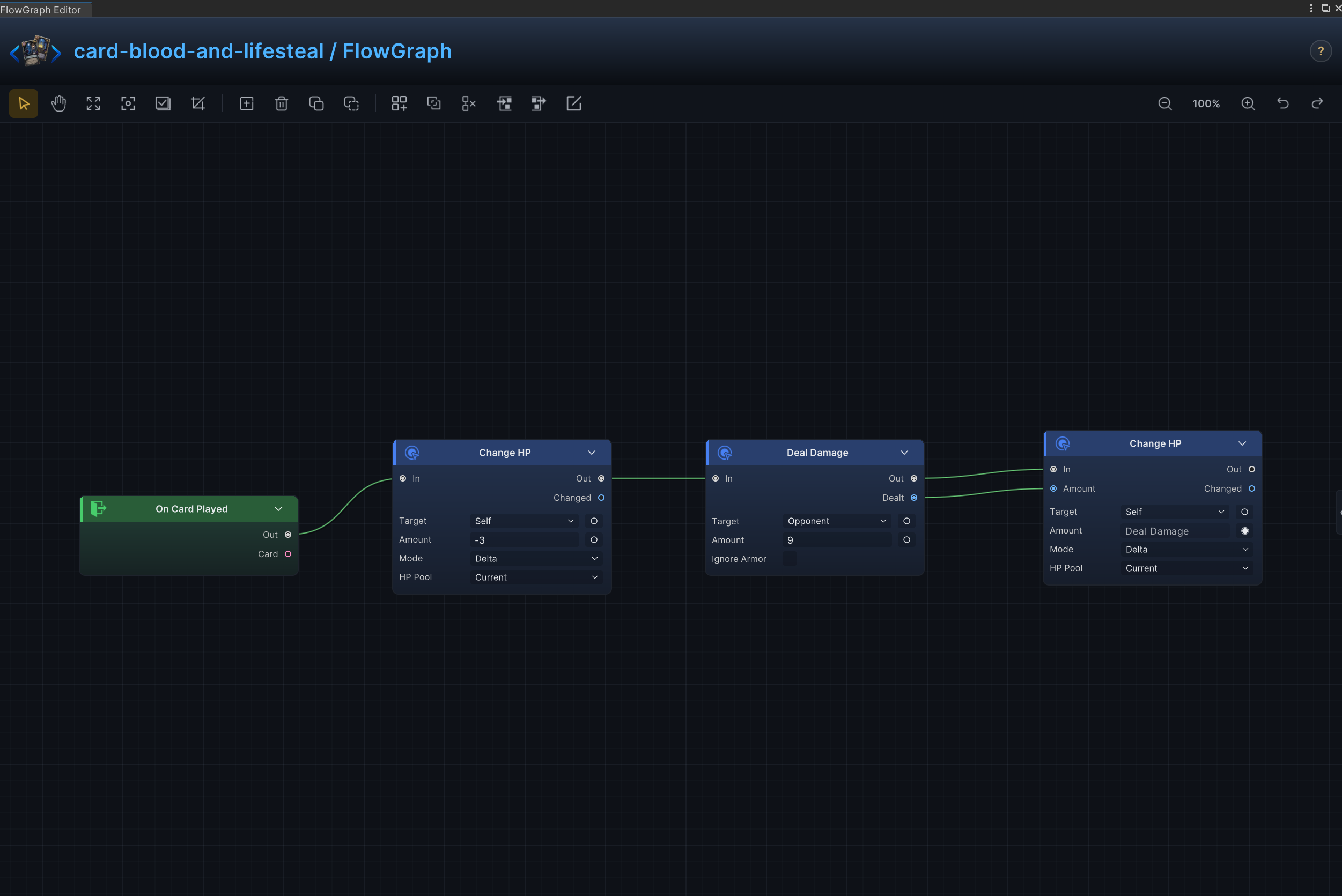
Blood cost and lifesteal
Effect
Pays HP or deals self-damage for an effect, with optional healing based on damage dealt.
Node connections
On Card Played.Out → Change HP (1).InChange HP (1).Out → Deal Damage.InDeal Damage.Out → Change HP (2).InDeal Damage.Dealt → Change HP (2).Amount
Node configuration
Change HP (1)Target = Self: Targets the source unit itself.Affect = Current: Changes current HP without changing maximum HP.Mode = Delta: Adds to or subtracts from the current value; positive values increase it and negative values decrease it.Amount = -3: Uses -3 as the example value; replace it with the amount required by the card.
Deal DamageTarget = Opponent: Uses the enemy currently selected by the card or behavior.Amount = 9: Uses 9 as the example value; replace it with the amount required by the card.Ignore Armor = Off: Damage resolves through armor normally.
Change HP (2)Target = Self: Targets the source unit itself.Affect = Current: Changes current HP without changing maximum HP.Mode = Delta: Adds to or subtracts from the current value; positive values increase it and negative values decrease it.Amount = 1: Driven at runtime by Deal Damage.Dealt; this value is only the unconnected fallback.
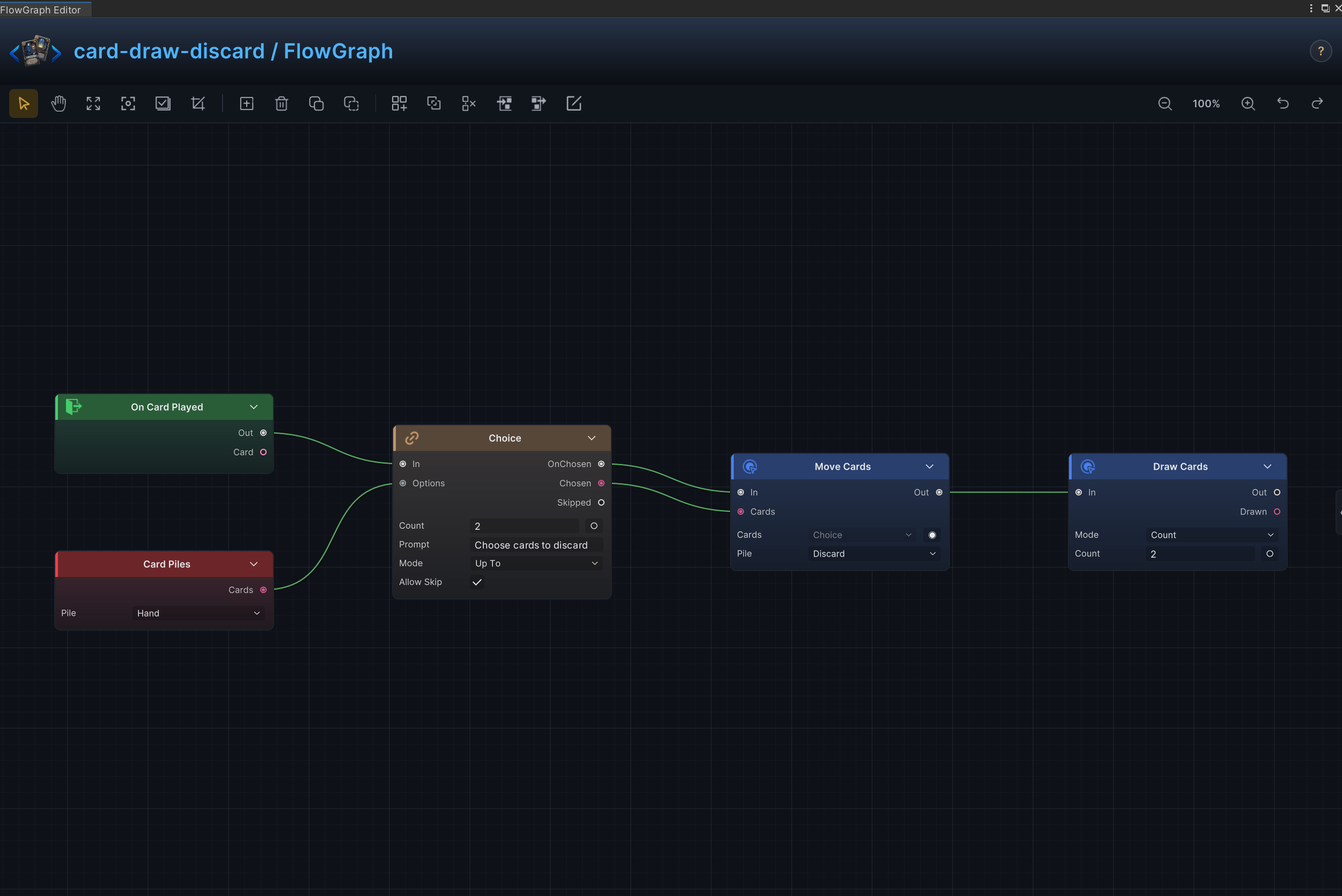
Draw, discard, and hand filtering
Effect
Lets the player choose up to 2 cards from the hand, moves the chosen cards to the top of the discard pile, then draws 2 cards.
Node connections
On Card Played.Out → Choice.InCard Piles.Cards → Choice.OptionsChoice.OnChosen → Move Cards.InChoice.Chosen → Move Cards.CardsMove Cards.Out → Draw Cards.In
Node configuration
Card PilesPile = Hand: Selects the source or destination card pile.
ChoiceKind = Card: Selects the data, collection, choice, or hook value type handled by this node.Prompt = Choose cards to discard: Sets the player-facing choice prompt.Count = 2: Sets how many cards, elements, choices, or loop iterations are produced.Mode = UpTo: Uses up to the configured number when fewer results are available.Allow Skip = On: Controls whether the player may close the choice without selecting an option.
Move CardsCards = ThisCard: Driven at runtime by Choice.Chosen; this value is only the unconnected fallback.Pile = Discard: Selects the source or destination card pile.Position = Top: Selects where cards are inserted in the destination pile.
Draw CardsMode = Count: Advances the delay by turn count.Count = 2: Sets how many cards, elements, choices, or loop iterations are produced.
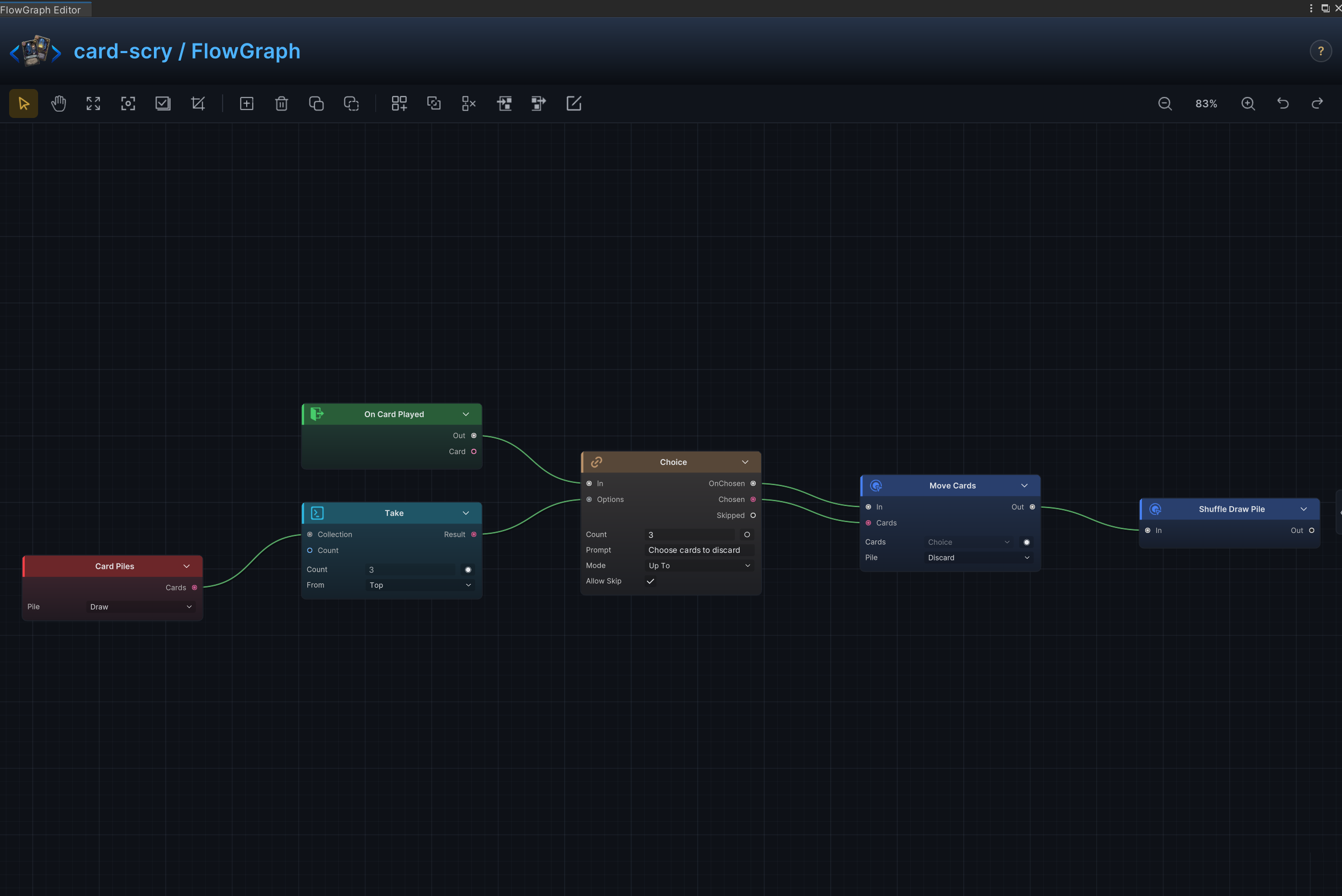
Scry the top of the draw pile
Effect
Inspects the top 3 cards and moves up to 3 selected cards to the discard pile without shuffling the remaining draw pile.
Node connections
On Card Played.Out → Choice.InCard Piles.Cards → Take.CollectionTake.Result → Choice.OptionsChoice.OnChosen → Move Cards.InChoice.Chosen → Move Cards.Cards
Node configuration
Card PilesPile = Draw: Selects the source or destination card pile.
TakeKind = Card: Selects the data, collection, choice, or hook value type handled by this node.Count = 3: Sets how many cards, elements, choices, or loop iterations are produced.From = Top: Selects the side of the collection from which elements are taken.
ChoiceKind = Card: Selects the data, collection, choice, or hook value type handled by this node.Prompt = Choose cards to discard: Sets the player-facing choice prompt.Count = 3: Sets how many cards, elements, choices, or loop iterations are produced.Mode = UpTo: Uses up to the configured number when fewer results are available.Allow Skip = On: Controls whether the player may close the choice without selecting an option.
Move CardsCards = ThisCard: Driven at runtime by Choice.Chosen; this value is only the unconnected fallback.Pile = Discard: Selects the source or destination card pile.Position = Top: Selects where cards are inserted in the destination pile.
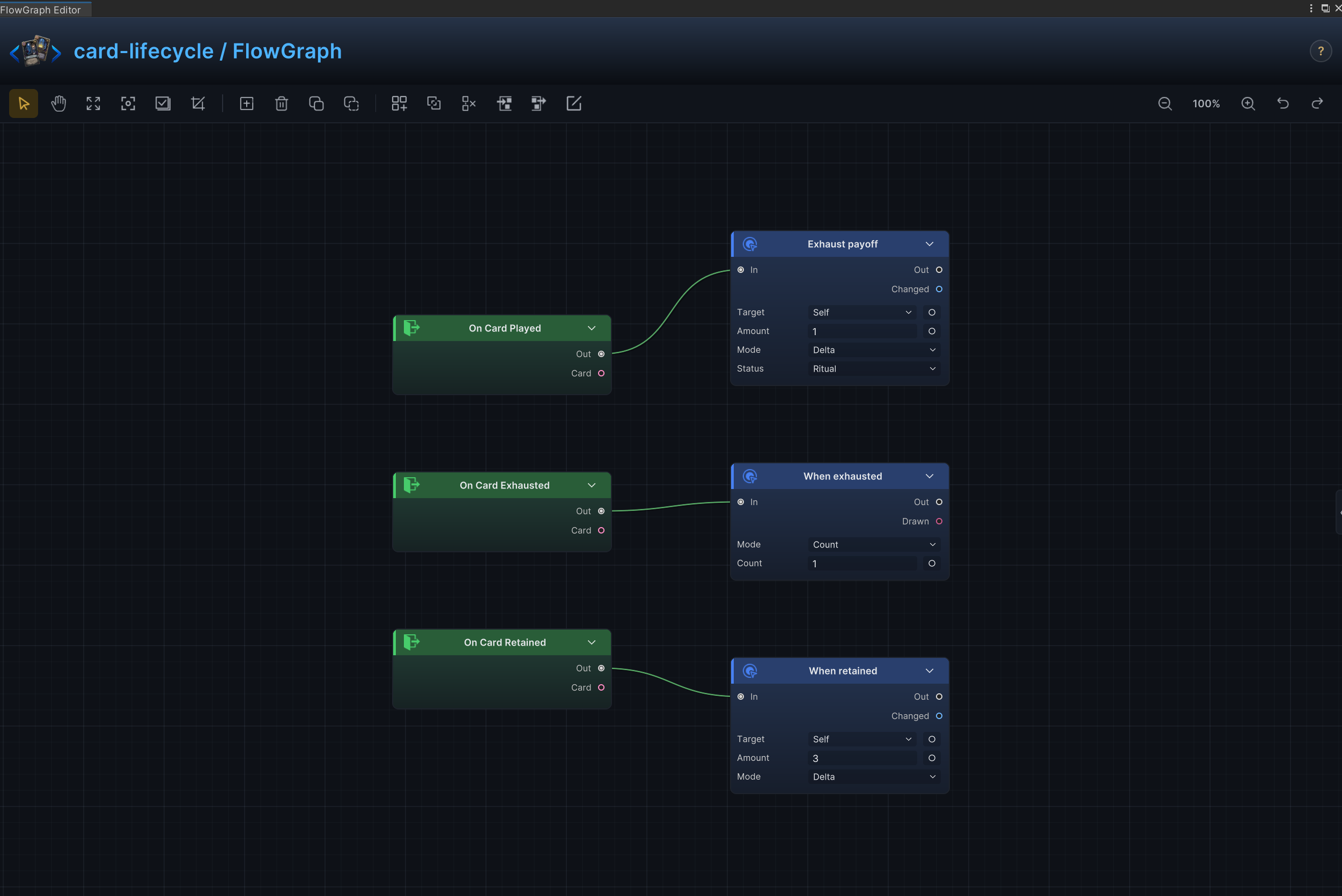
Exhaust and retain lifecycle
Effect
Uses the card asset's Exhaust and Retain keywords, then adds a payoff when the card is played, exhausted, or retained.
Node connections
On Card Played.Out → Change Status.InOn Card Exhausted.Out → Draw Cards.InOn Card Retained.Out → Change Armor.In
Node configuration
Change StatusTarget = Self: Targets the source unit itself.Status = Ritual: Reads or changes the Ritual status.Mode = Delta: Adds to or subtracts from the current value; positive values increase it and negative values decrease it.Amount = 1: Uses 1 as the example value; replace it with the amount required by the card.
Draw CardsMode = Count: Advances the delay by turn count.Count = 1: Sets how many cards, elements, choices, or loop iterations are produced.
Change ArmorTarget = Self: Targets the source unit itself.Mode = Delta: Adds to or subtracts from the current value; positive values increase it and negative values decrease it.Amount = 3: Uses 3 as the example value; replace it with the amount required by the card.
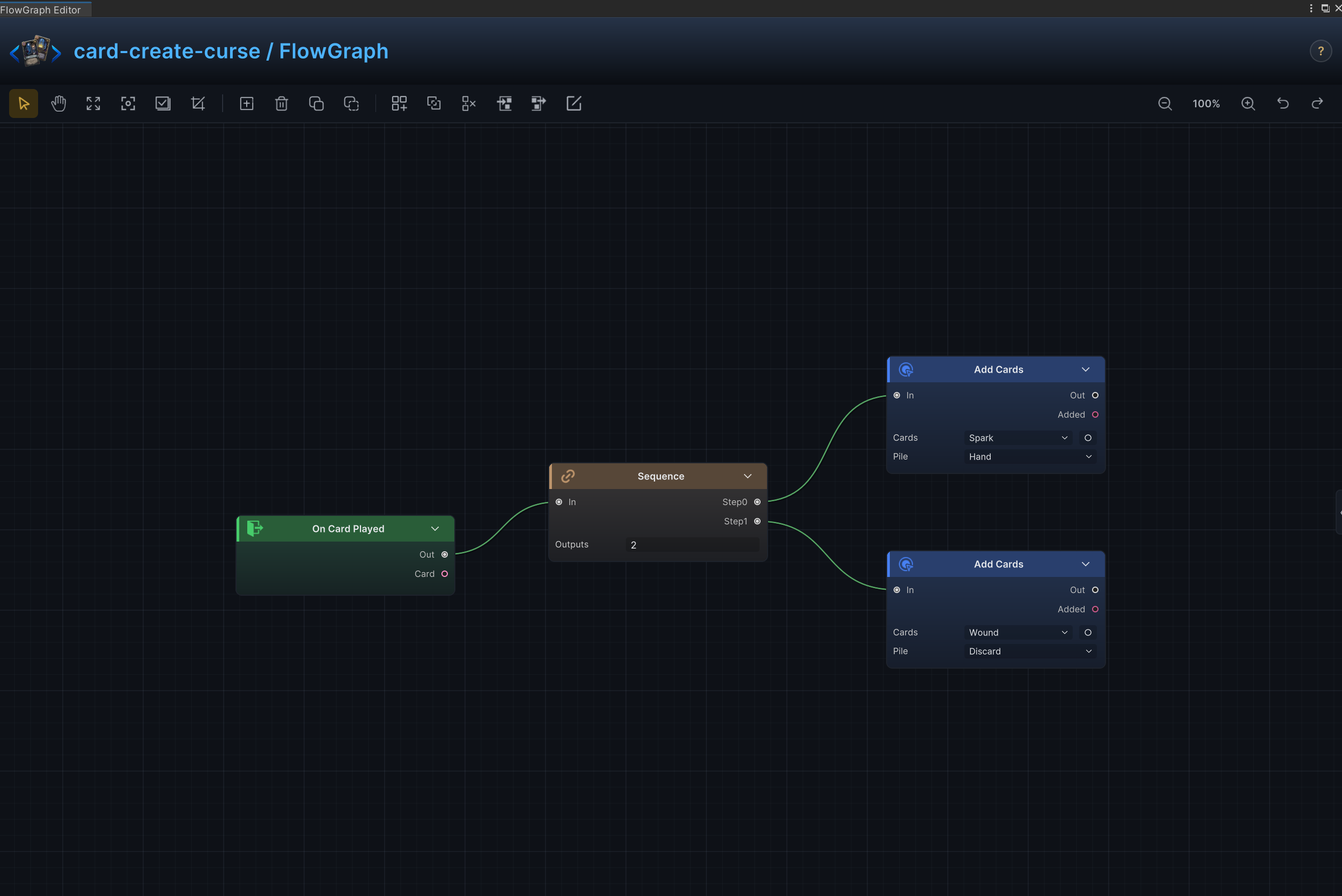
Create cards and curses
Effect
Adds configured temporary cards or curses such as Spark and Pain to the hand or another pile.
Node connections
On Card Played.Out → Sequence.InSequence.Step0 → Add Cards (1).InSequence.Step1 → Add Cards (2).In
Node configuration
SequenceOutputs = 2: Sets the number of ordered control-flow branches.
Add Cards (1)Card = Spark: Selects the card asset created by this node.Pile = Hand: Selects the source or destination card pile.Position = Top: Selects where cards are inserted in the destination pile.
Add Cards (2)Card = Pain: Selects the card asset created by this node.Pile = Discard: Selects the source or destination card pile.Position = Top: Selects where cards are inserted in the destination pile.
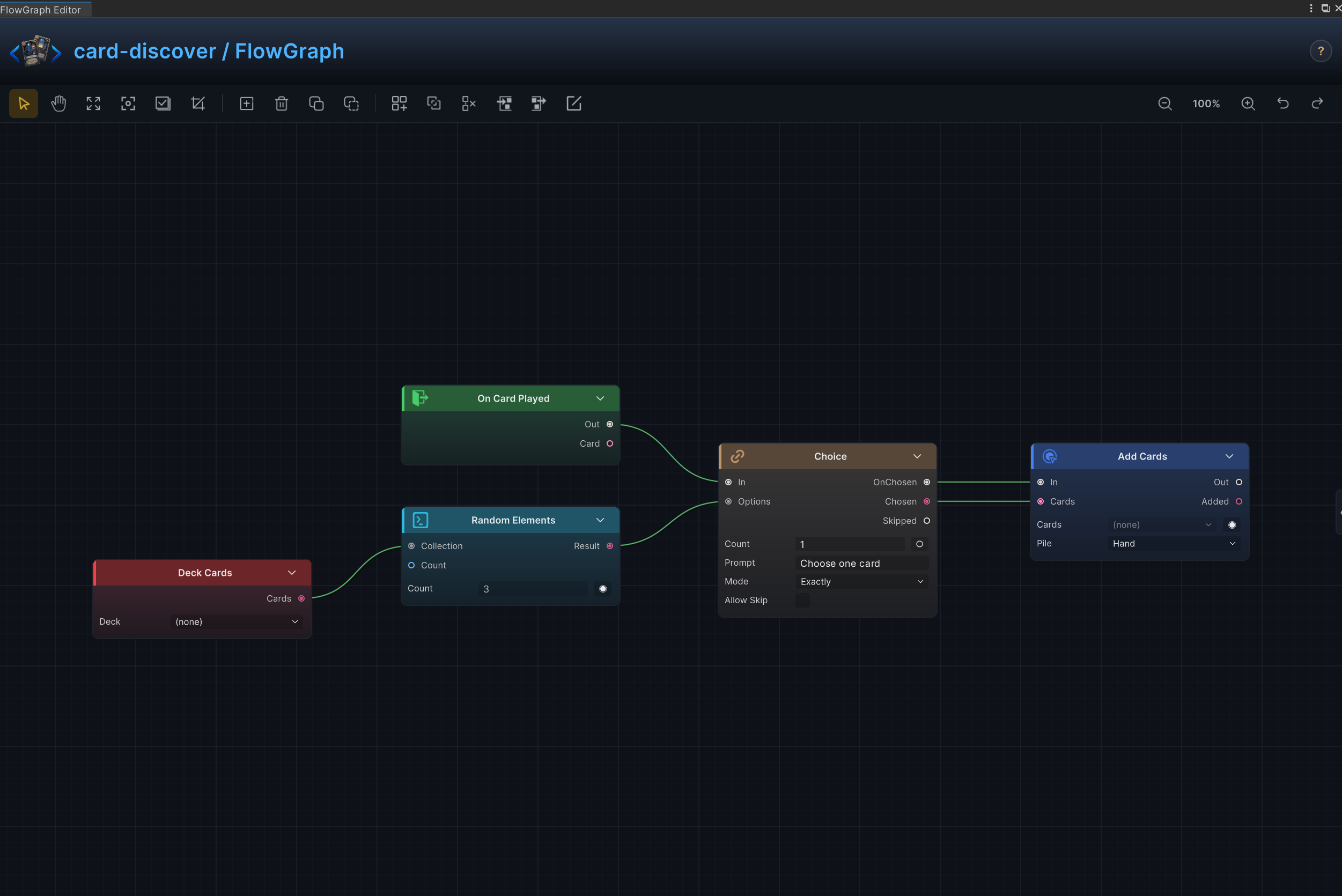
Discover, draft, and choose one
Effect
Presents several candidate cards and adds the player's selection to the hand.
Node connections
On Card Played.Out → Choice.InDeck Cards.Cards → Random Elements.CollectionRandom Elements.Result → Choice.OptionsChoice.OnChosen → Add Cards.InChoice.Chosen → Add Cards.Cards
Node configuration
Deck CardsDeck = None: Selects the deck whose cards are read.
Random ElementsKind = Card: Selects the data, collection, choice, or hook value type handled by this node.Count = 3: Sets how many cards, elements, choices, or loop iterations are produced.
ChoiceKind = Card: Selects the data, collection, choice, or hook value type handled by this node.Prompt = Choose one card: Sets the player-facing choice prompt.Count = 1: Sets how many cards, elements, choices, or loop iterations are produced.Mode = Exactly: Requires exactly the configured number of results.Allow Skip = Off: Controls whether the player may close the choice without selecting an option.
Add CardsCard = None: Selects the card asset created by this node.Pile = Hand: Selects the source or destination card pile.Position = Top: Selects where cards are inserted in the destination pile.
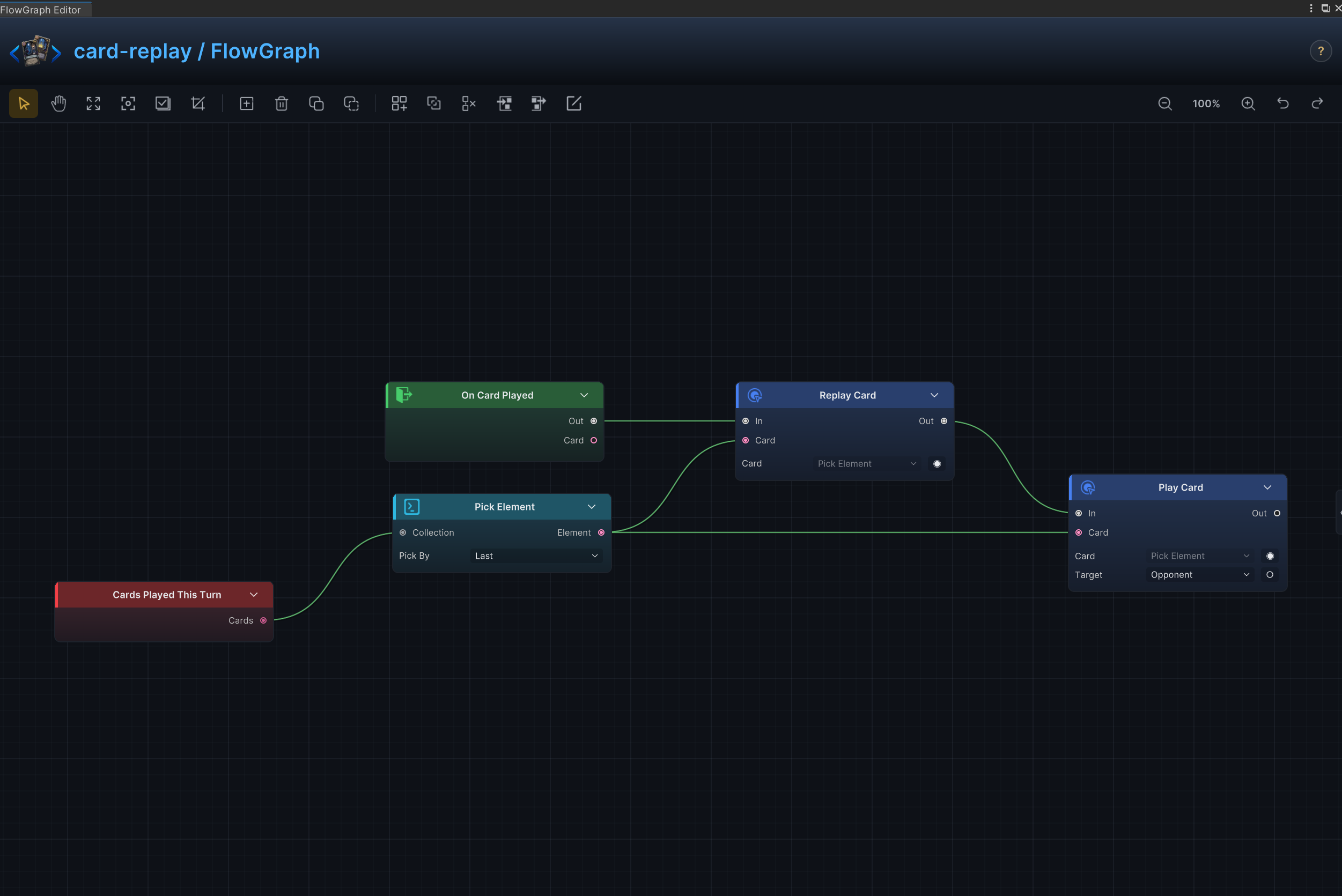
Replay, copy, and auto-play
Effect
Replays the most recently played other card this turn. The triggering card is excluded before the last card is selected, preventing the graph from immediately replaying itself.
Node connections
On Card Played.Out → Replay Card.InCards Played This Turn.Cards → Exclude.CollectionThis Card.Card → Make Collection.Slot0Make Collection.Result → Exclude.ExcludeExclude.Result → Pick Element.CollectionPick Element.Element → Replay Card.Card
Node configuration
Make CollectionKind = Card: Builds a collection of cards.Slots = 1: Creates the one-card collection used to exclude the triggering card.
ExcludeKind = Card: Removes the cards in Exclude from the source collection.
Pick ElementKind = Card: Selects the data, collection, choice, or hook value type handled by this node.By = Last: Selects the property used to pick an element.Index = 0: Selects the zero-based collection element.
Replay CardCard = ThisCard: Driven at runtime by Pick Element.Element; this value is only the unconnected fallback.
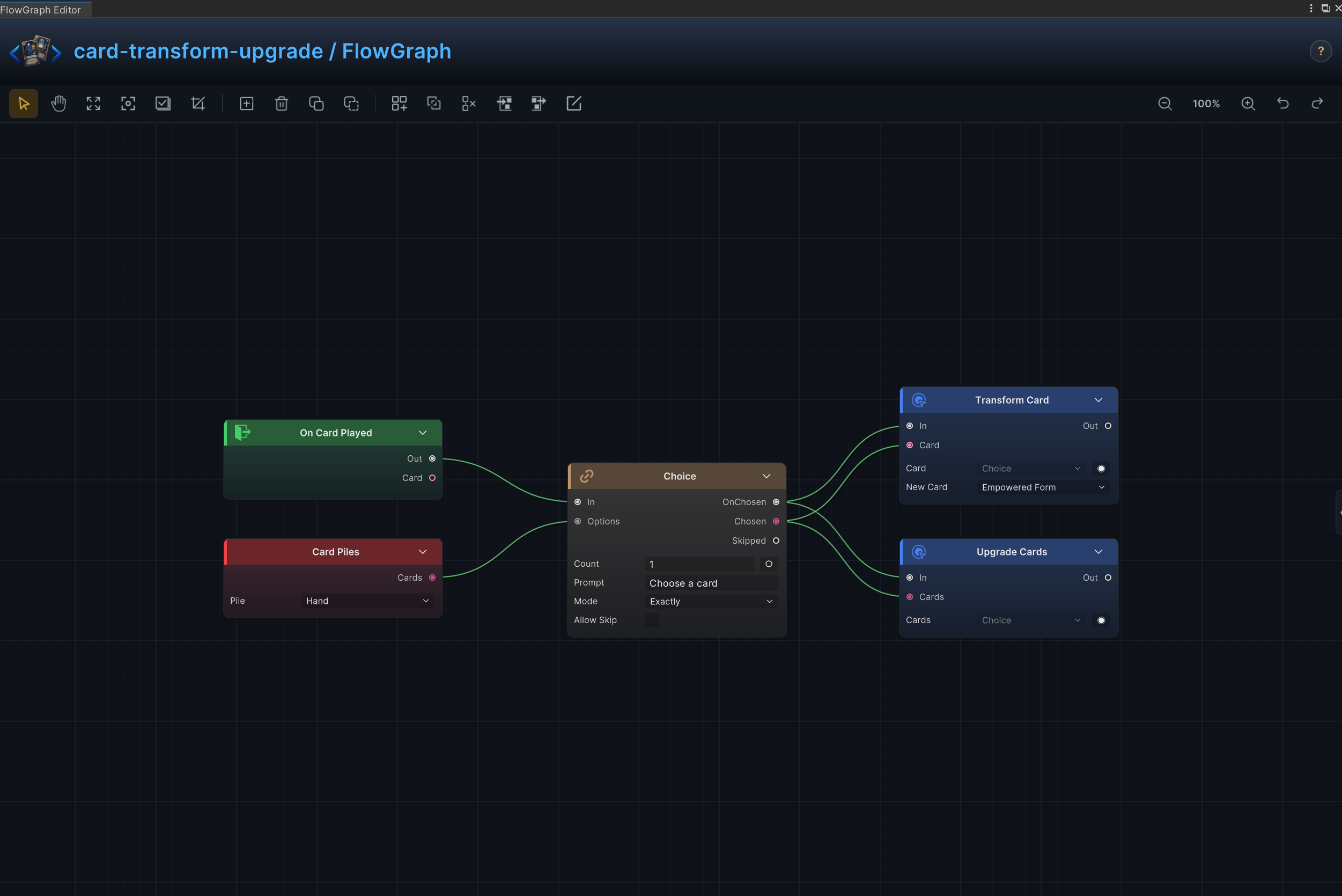
Transform and upgrade cards
Effect
Replaces a selected card with another card or upgrades matching cards in the hand and piles.
Node connections
On Card Played.Out → Choice.InCard Piles.Cards → Choice.OptionsChoice.OnChosen → Transform Card.InChoice.Chosen → Transform Card.CardChoice.Chosen → Upgrade Cards.CardsTransform Card.Out → Upgrade Cards.In
Node configuration
Card PilesPile = Hand: Selects the source or destination card pile.
ChoiceKind = Card: Selects the data, collection, choice, or hook value type handled by this node.Prompt = Choose a card: Sets the player-facing choice prompt.Count = 1: Sets how many cards, elements, choices, or loop iterations are produced.Mode = Exactly: Requires exactly the configured number of results.Allow Skip = Off: Controls whether the player may close the choice without selecting an option.
Transform CardCard = ThisCard: Driven at runtime by Choice.Chosen; this value is only the unconnected fallback.New Card = Apotheosis: Selects the card asset that replaces the original card.
Upgrade CardsCards = ThisCard: Driven at runtime by Choice.Chosen; this value is only the unconnected fallback.
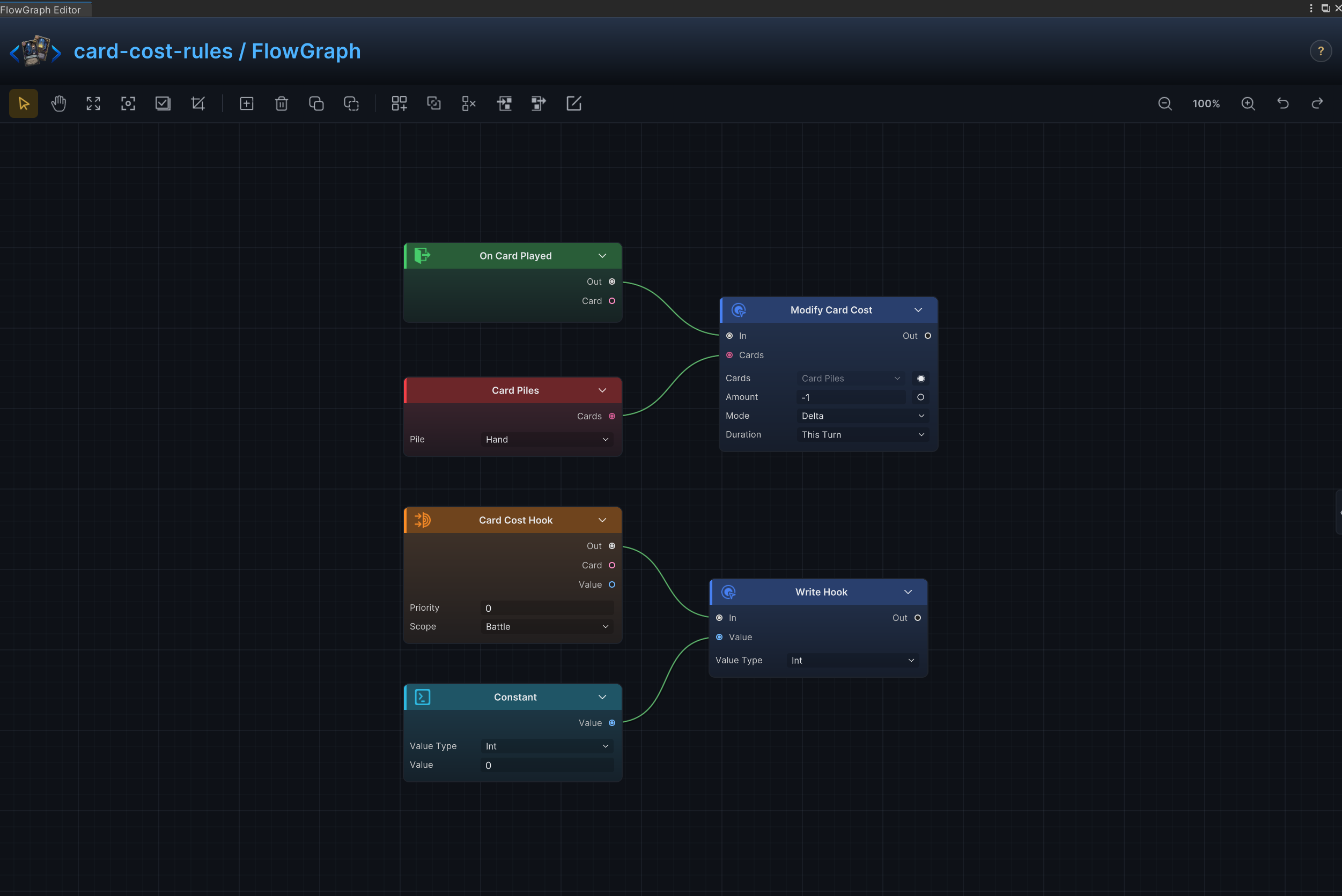
Temporary and dynamic cost rules
Effect
Changes card costs for a defined duration and can calculate the cost from statuses or other battle data.
Node connections
On Card Played.Out → Modify Card Cost.InCard Piles.Cards → Modify Card Cost.CardsCard Cost Hook.Out → Write Hook.InConstant.Value → Write Hook.Value
Node configuration
Card PilesPile = Hand: Selects the source or destination card pile.
Modify Card CostCards = ThisCard: Driven at runtime by Card Piles.Cards; this value is only the unconnected fallback.Mode = Delta: Adds to or subtracts from the current value; positive values increase it and negative values decrease it.Amount = -1: Uses -1 as the example value; replace it with the amount required by the card.Duration = ThisTurn: Selects how long the card-cost change remains active.Turns = 1: Sets the limited duration in turns; battle-scoped hooks ignore this value.
Card Cost HookPriority = 0: Sets this hook's order relative to other hooks at the same timing.Scope = Battle: Keeps the hook active for the entire battle.
ConstantKind = Int: Selects the data, collection, choice, or hook value type handled by this node.Int Value = 0: Supplies the integer constant.
Write HookKind = Int: Selects the data, collection, choice, or hook value type handled by this node.Value = 0: Driven at runtime by Constant.Value; this value is only the unconnected fallback.
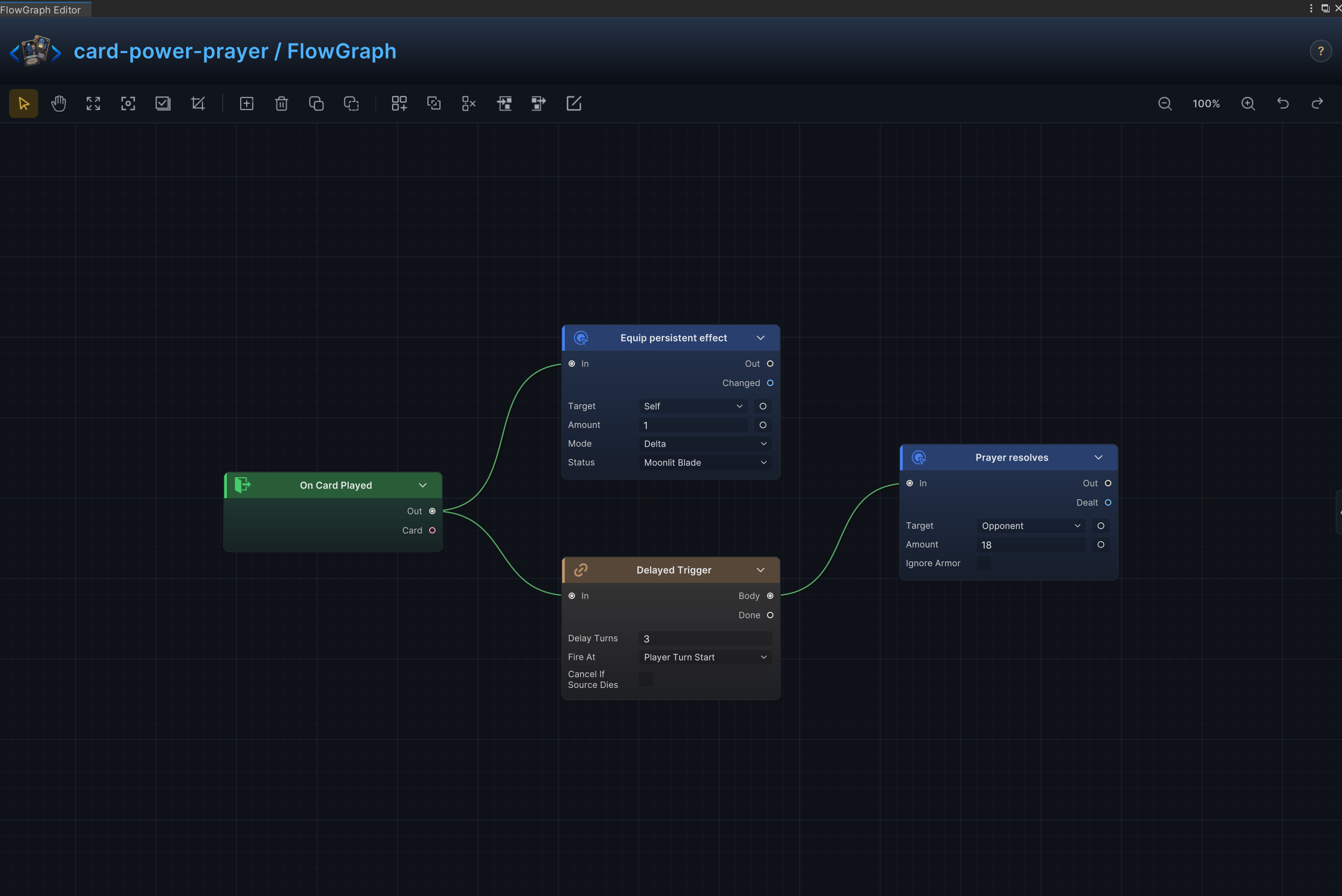
Power, equipment, and delayed prayer
Effect
Maintains persistent power or equipment rules with a status and resolves delayed effects after a configured number of turns.
Node connections
Delayed Trigger.Body → Deal Damage.InOn Card Played.Out → Sequence.InSequence.Step0 → Change Status.InSequence.Step1 → Delayed Trigger.In
Node configuration
-
SequenceOutputs = 2: Sets the number of ordered control-flow branches.
-
Change StatusTarget = Self: Targets the source unit itself.Status = Strength: Reads or changes the Strength status.Mode = Delta: Adds to or subtracts from the current value; positive values increase it and negative values decrease it.Amount = 1: Uses 1 as the example value; replace it with the amount required by the card.
-
Delayed TriggerDelay Turns = 3: Sets how many turns pass before the delayed branch resolves.Tick Phase = PlayerTurnStart: Selects the battle phase that advances the delayed countdown.Cancel On Source Death = Off: Cancels the delayed resolution if its source unit dies first.
-
Deal DamageTarget = Opponent: Uses the enemy currently selected by the card or behavior.Amount = 18: Uses 18 as the example value; replace it with the amount required by the card.Ignore Armor = Off: Damage resolves through armor normally.
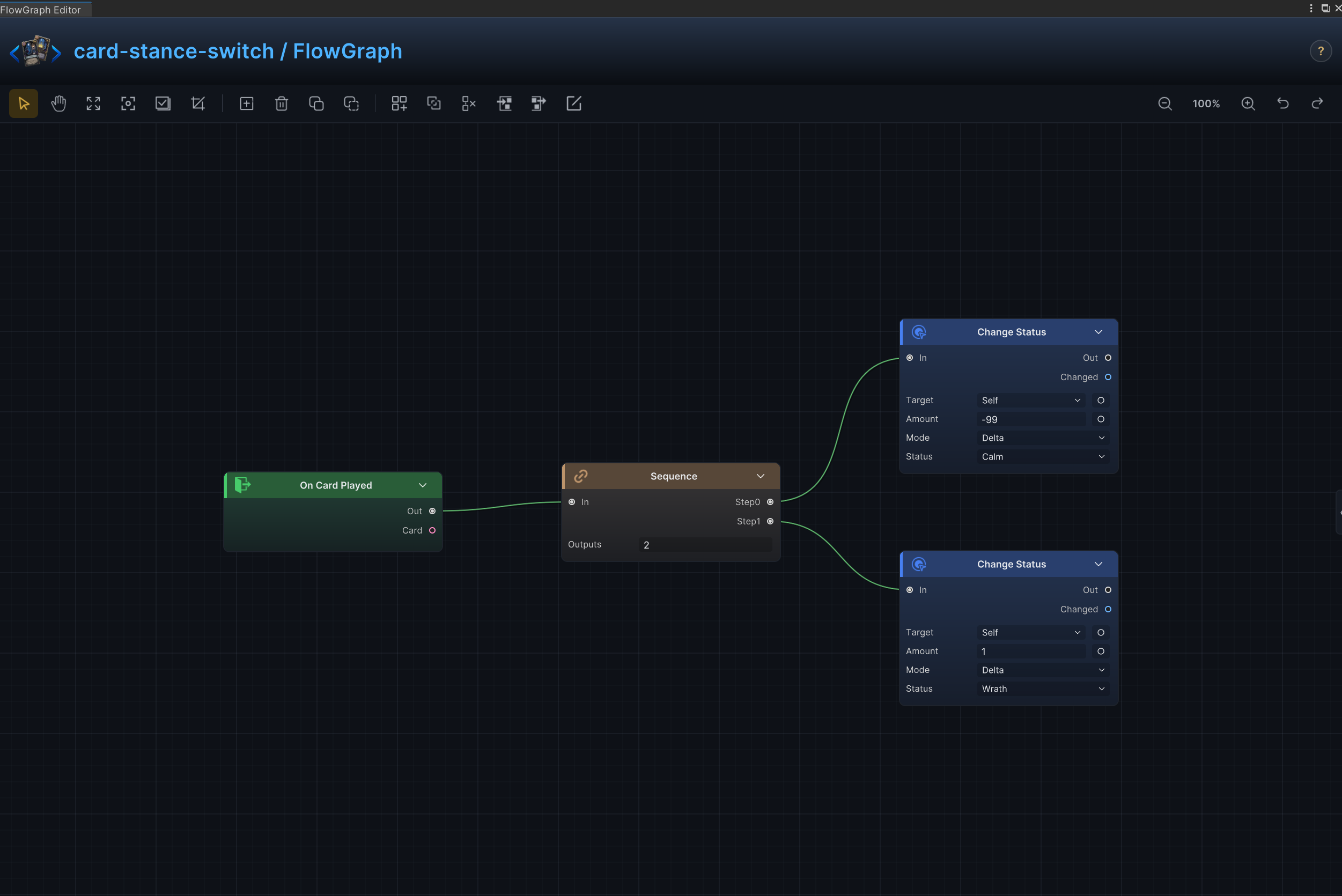
Status Switch
Effect
Remove all Empower stacks, then add 1 Drained stack as one ordered card resolution.
Node connections
On Card Played.Out → Sequence.InSequence.Step0 → Change Status (1).InSequence.Step1 → Change Status (2).In
Node configuration
SequenceOutputs = 2: Sets the number of ordered control-flow branches.
Change Status (1)Target = Self: Targets the source unit itself.Status = Empower: Reads or changes the Empower status.Mode = Delta: Adds to or subtracts from the current value; positive values increase it and negative values decrease it.Amount = -99: Uses -99 as the example value; replace it with the amount required by the card.
Change Status (2)Target = Self: Targets the source unit itself.Status = Drained: Reads or changes the Drained status.Mode = Delta: Adds to or subtracts from the current value; positive values increase it and negative values decrease it.Amount = 1: Uses 1 as the example value; replace it with the amount required by the card.
Empower Exit Energy
Effect
Gain 2 energy, then remove all Empower stacks from the source unit.
Node connections
On Card Played.Out → Sequence.InSequence.Step0 → Change Energy.InSequence.Step1 → Change Status.In
Node configuration
SequenceOutputs = 2: Sets the number of ordered control-flow branches.
Change EnergyMode = Delta: Adds to or subtracts from the current value; positive values increase it and negative values decrease it.Amount = 2: Uses 2 as the example value; replace it with the amount required by the card.
Change StatusTarget = Self: Targets the source unit itself.Status = Empower: Reads or changes the Empower status.Mode = Delta: Adds to or subtracts from the current value; positive values increase it and negative values decrease it.Amount = -99: Uses -99 as the example value; replace it with the amount required by the card.
Temporary Quick Shot Generation
Effect
Create several temporary attack cards in hand.
Node connections
On Card Played.Out → Sequence.InSequence.Step0 → Add Cards (1).InSequence.Step1 → Add Cards (2).InSequence.Step2 → Add Cards (3).In
Node configuration
SequenceOutputs = 3: Sets the number of ordered control-flow branches.
Add Cards (1)Card = Quick Shot: Selects the card asset created by this node.Pile = Hand: Selects the source or destination card pile.Position = Top: Selects where cards are inserted in the destination pile.
Add Cards (2)Card = Quick Shot: Selects the card asset created by this node.Pile = Hand: Selects the source or destination card pile.Position = Top: Selects where cards are inserted in the destination pile.
Add Cards (3)Card = Quick Shot: Selects the card asset created by this node.Pile = Hand: Selects the source or destination card pile.Position = Top: Selects where cards are inserted in the destination pile.
Armor-Piercing Damage
Effect
Deal damage directly through armor.
Node connections
On Card Played.Out → Deal Damage.In
Node configuration
Deal DamageTarget = Opponent: Uses the enemy currently selected by the card or behavior.Amount = 8: Uses 8 as the example value; replace it with the amount required by the card.Ignore Armor = On: Damage bypasses armor and reduces HP directly.
Ritual Countdown Acceleration
Effect
Reduce the source unit's Ritual stacks by 1 immediately.
Node connections
On Card Played.Out → Change Status.In
Node configuration
Change StatusTarget = Self: Targets the source unit itself.Status = Ritual: Reads or changes the Ritual status.Mode = Delta: Adds to or subtracts from the current value; positive values increase it and negative values decrease it.Amount = -1: Uses -1 as the example value; replace it with the amount required by the card.
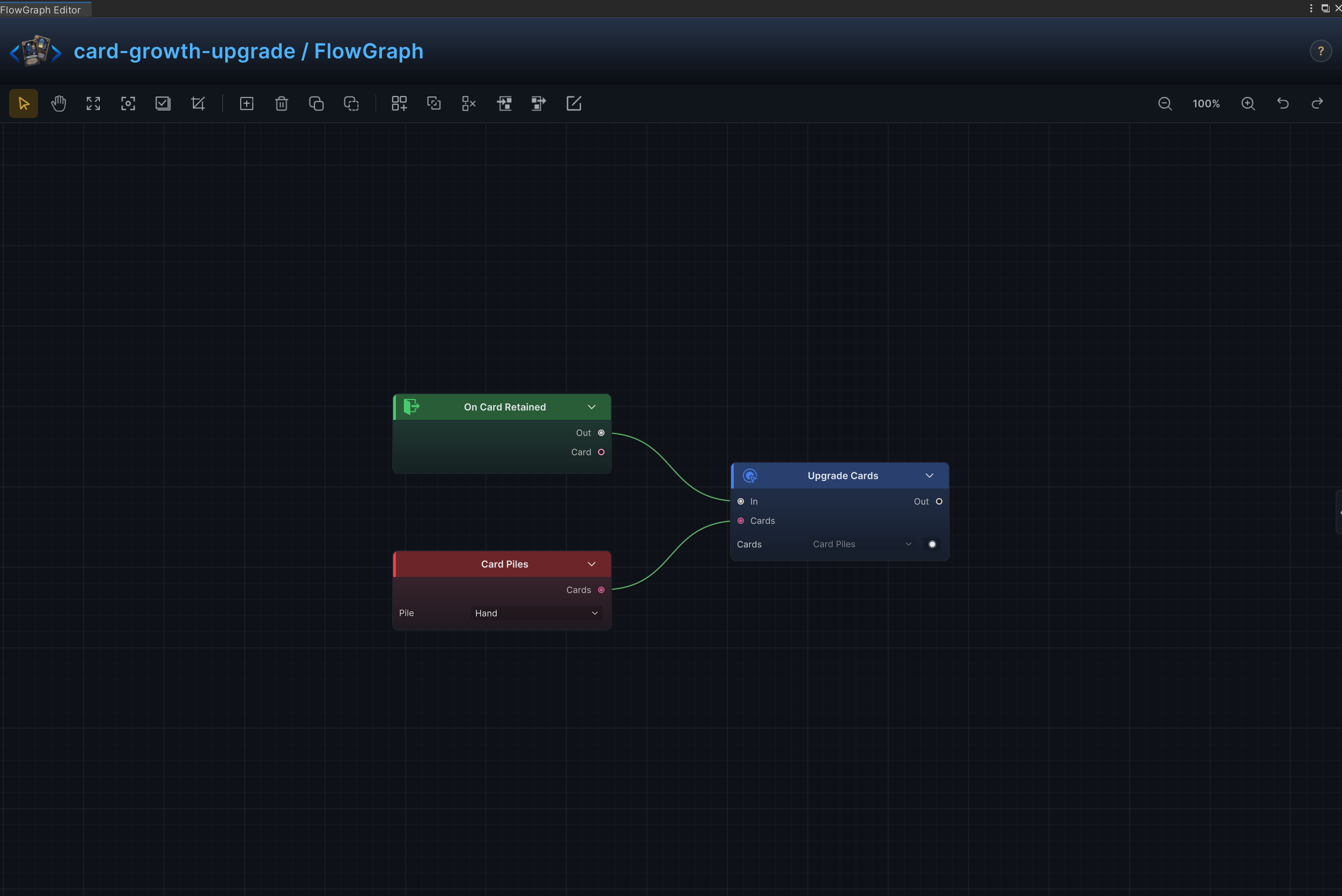
Retained Card Growth
Effect
Requires the Retain keyword on the card asset, then upgrades every card in hand when this card is retained.
Node connections
On Card Retained.Out → Upgrade Cards.InCard Piles.Cards → Upgrade Cards.Cards
Node configuration
Card PilesPile = Hand: Selects the source or destination card pile.
Upgrade CardsCards = ThisCard: Driven at runtime by Card Piles.Cards; this value is only the unconnected fallback.
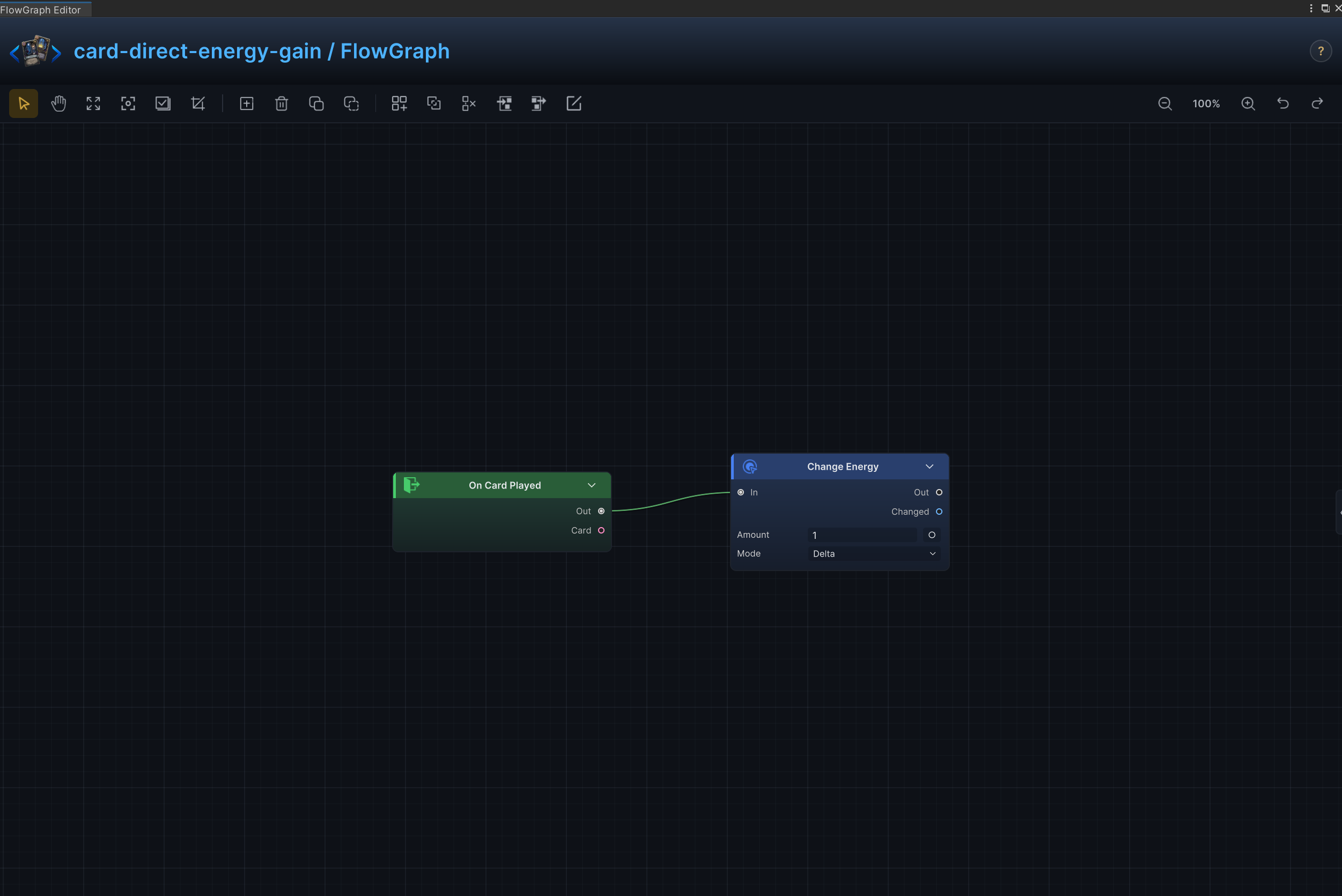
Direct Energy Gain
Effect
Grant energy immediately when the card resolves.
Node connections
On Card Played.Out → Change Energy.In
Node configuration
Change EnergyMode = Delta: Adds to or subtracts from the current value; positive values increase it and negative values decrease it.Amount = 1: Uses 1 as the example value; replace it with the amount required by the card.
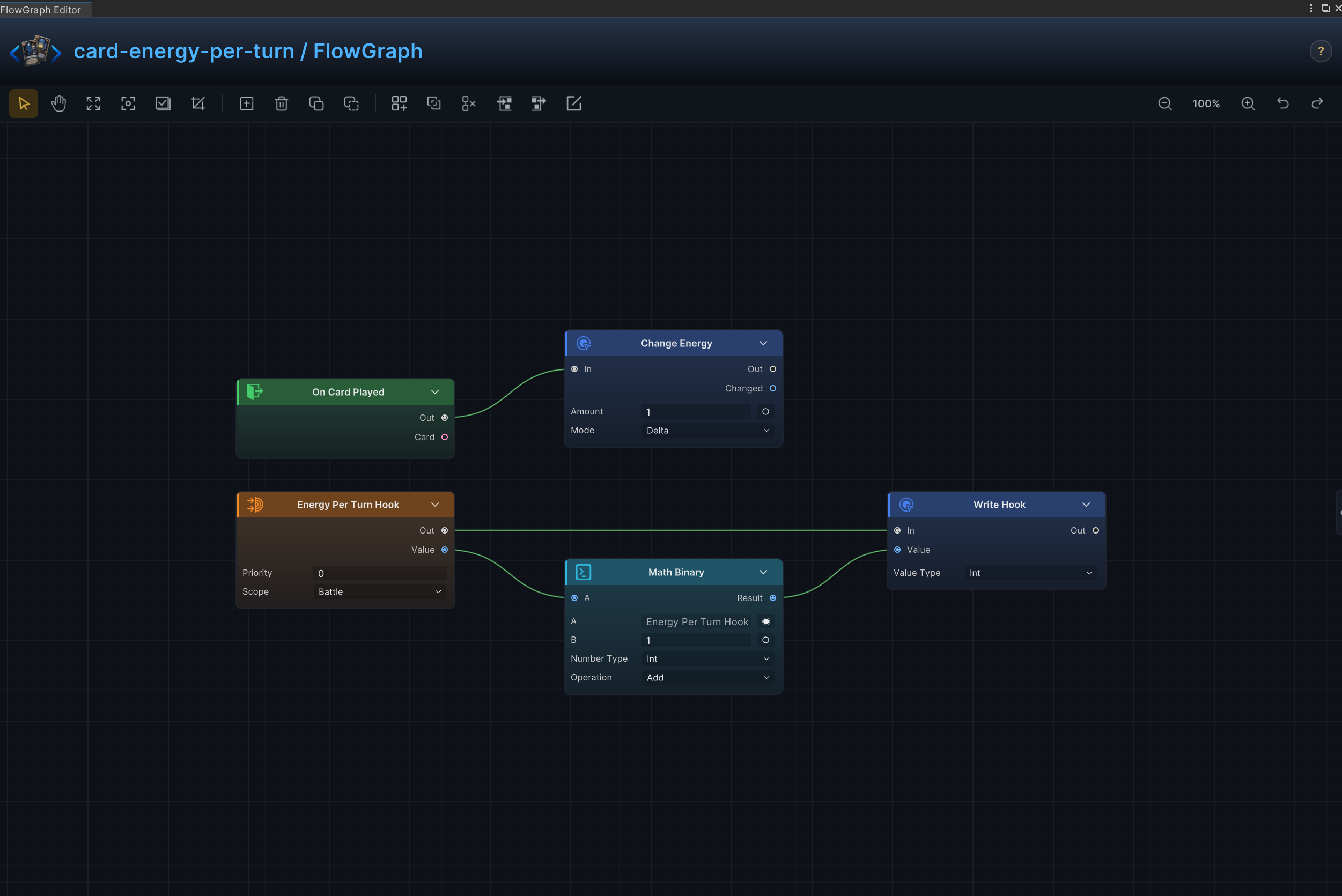
Energy per Turn
Effect
Increases the Energy Per Turn hook by 1 and immediately grants 1 energy.
Node connections
Energy Per Turn Hook.Value → Math Binary.AMath Binary.Result → Write Hook.ValueEnergy Per Turn Hook.Out → Write Hook.InOn Card Played.Out → Change Energy.In
Node configuration
Energy Per Turn HookPriority = 0: Sets this hook's order relative to other hooks at the same timing.Scope = Battle: Keeps the hook active for the entire battle.
Math BinaryKind = Int: Selects the data, collection, choice, or hook value type handled by this node.A = 0: Driven at runtime by Energy Per Turn Hook.Value; this value is only the unconnected fallback.B = 1: Sets the second operand when the B input is not connected.Op = Add: Adds the two operands.
Write HookKind = Int: Selects the data, collection, choice, or hook value type handled by this node.Value = 0: Driven at runtime by Math Binary.Result; this value is only the unconnected fallback.
Change EnergyMode = Delta: Adds to or subtracts from the current value; positive values increase it and negative values decrease it.Amount = 1: Uses 1 as the example value; replace it with the amount required by the card.
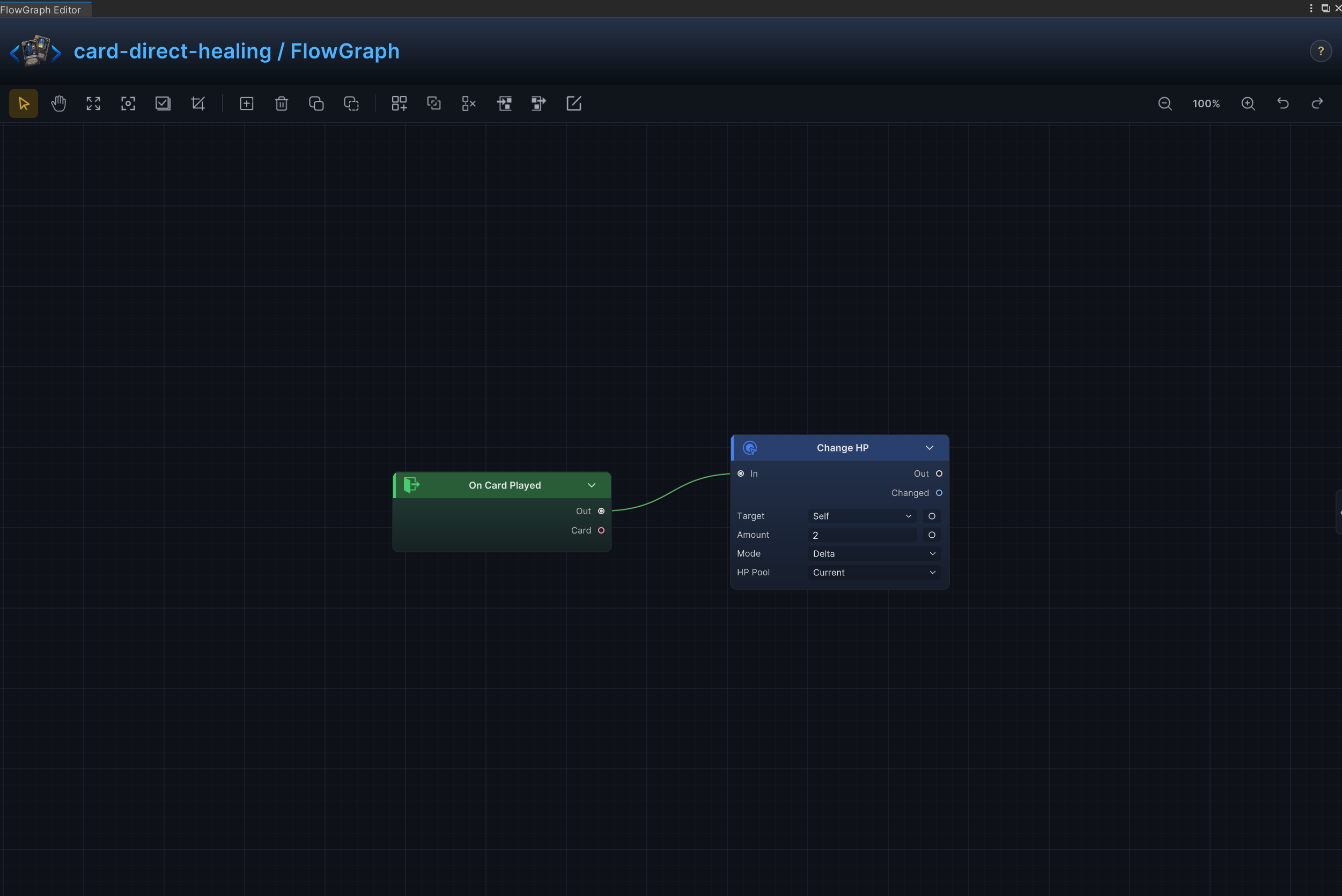
Direct Self-Healing
Effect
Restore a fixed amount of HP to the source unit.
Node connections
On Card Played.Out → Change HP.In
Node configuration
Change HPTarget = Self: Targets the source unit itself.Affect = Current: Changes current HP without changing maximum HP.Mode = Delta: Adds to or subtracts from the current value; positive values increase it and negative values decrease it.Amount = 2: Uses 2 as the example value; replace it with the amount required by the card.
Missing-Health Healing
Effect
Restore HP as a percentage of the unit's missing health.
Node connections
Constant.Value → Math Binary (1).BMath Binary (2).Result → Math Binary (1).AMath Binary (3).Result → Math Binary (2).AUnit Info.MaxHP → Math Binary (3).AUnit Info.HP → Math Binary (3).BMath Binary (1).Result → Change HP.AmountOn Card Played.Out → Change HP.In
Node configuration
Unit InfoUnit = Self: Reads the source unit itself.
Change HPTarget = Self: Targets the source unit itself.Affect = Current: Changes current HP without changing maximum HP.Mode = Delta: Adds to or subtracts from the current value; positive values increase it and negative values decrease it.Amount = 1: Driven at runtime by Math Binary (1).Result; this value is only the unconnected fallback.
Math Binary (1)Kind = Int: Selects the data, collection, choice, or hook value type handled by this node.A = 0: Driven at runtime by Math Binary (2).Result; this value is only the unconnected fallback.B = 0: Driven at runtime by Constant.Value; this value is only the unconnected fallback.Op = Div: Divides A by B.
Math Binary (2)Kind = Int: Selects the data, collection, choice, or hook value type handled by this node.A = 0: Driven at runtime by Math Binary (3).Result; this value is only the unconnected fallback.B = 30: Sets the second operand when the B input is not connected.Op = Mul: Multiplies A by B.
ConstantKind = Int: Selects the data, collection, choice, or hook value type handled by this node.Int Value = 100: Supplies the integer constant.
Math Binary (3)Kind = Int: Selects the data, collection, choice, or hook value type handled by this node.A = 0: Driven at runtime by Unit Info.MaxHP; this value is only the unconnected fallback.B = 0: Driven at runtime by Unit Info.HP; this value is only the unconnected fallback.Op = Sub: Subtracts B from A.
Draw and Gain Energy
Effect
Draw cards and grant energy in the same resolution.
Node connections
On Card Played.Out → Draw Cards.InDraw Cards.Out → Change Energy.In
Node configuration
Draw CardsMode = Count: Advances the delay by turn count.Count = 2: Sets how many cards, elements, choices, or loop iterations are produced.
Change EnergyMode = Delta: Adds to or subtracts from the current value; positive values increase it and negative values decrease it.Amount = 1: Uses 1 as the example value; replace it with the amount required by the card.
Filtered Deck Search
Effect
Find cards in the draw pile by rule and move a matching result into the hand.
Node connections
Card Piles.Cards → Filter.CollectionFilter.Result → Random Elements.CollectionRandom Elements.Result → Move Cards.CardsOn Card Played.Out → Move Cards.In
Node configuration
Card PilesPile = Draw: Selects the source or destination card pile.
FilterKind = Card: Selects the data, collection, choice, or hook value type handled by this node.Card Rule = [Type, Tags]: Selects the card property used by this collection operation.Tags = [Attack]: Sets the card tags matched by the filter.Type = Basic: Sets the card type matched by the filter.
Random ElementsKind = Card: Selects the data, collection, choice, or hook value type handled by this node.Count = 1: Sets how many cards, elements, choices, or loop iterations are produced.
Move CardsCards = ThisCard: Driven at runtime by Random Elements.Result; this value is only the unconnected fallback.Pile = Hand: Selects the source or destination card pile.Position = Top: Selects where cards are inserted in the destination pile.
Sorted Deck Search
Effect
Sort cards by a property, take a fixed number, and move them between piles.
Node connections
Card Piles.Cards → Sort.CollectionSort.Result → Take.CollectionTake.Result → Move Cards.CardsOn Card Played.Out → Move Cards.In
Node configuration
SortKind = Card: Selects the data, collection, choice, or hook value type handled by this node.Card Rule = Cost: Selects the card property used by this collection operation.Order = Ascending: Selects ascending or descending sort order.
Card PilesPile = Draw: Selects the source or destination card pile.
TakeKind = Card: Selects the data, collection, choice, or hook value type handled by this node.Count = 2: Sets how many cards, elements, choices, or loop iterations are produced.From = Top: Selects the side of the collection from which elements are taken.
Move CardsCards = ThisCard: Driven at runtime by Take.Result; this value is only the unconnected fallback.Pile = Hand: Selects the source or destination card pile.Position = Top: Selects where cards are inserted in the destination pile.
Hand-Size Limit Modifier
Effect
Increases the Max Hand Size hook by 1 and immediately draws 1 card.
Node connections
Hand Size Hook.Value → Math Binary.AMath Binary.Result → Write Hook.ValueHand Size Hook.Out → Write Hook.InOn Card Played.Out → Draw Cards.In
Node configuration
Hand Size HookPriority = 0: Sets this hook's order relative to other hooks at the same timing.Scope = Battle: Keeps the hook active for the entire battle.
Math BinaryKind = Int: Selects the data, collection, choice, or hook value type handled by this node.A = 0: Driven at runtime by Hand Size Hook.Value; this value is only the unconnected fallback.B = 2: Sets the second operand when the B input is not connected.Op = Add: Adds the two operands.
Write HookKind = Int: Selects the data, collection, choice, or hook value type handled by this node.Value = 0: Driven at runtime by Math Binary.Result; this value is only the unconnected fallback.
Draw CardsMode = Count: Advances the delay by turn count.Count = 1: Sets how many cards, elements, choices, or loop iterations are produced.
Temporary Cost Modifier
Effect
Modify card energy costs for a limited duration through the card-cost hook.
Node connections
Card Cost Hook.Value → Math Binary.AMath Binary.Result → Write Hook.ValueCard Cost Hook.Out → Write Hook.In
Node configuration
Card Cost HookPriority = 0: Sets this hook's order relative to other hooks at the same timing.Scope = Turns: Keeps the hook active only for the configured number of turns.Turns = 1: Sets the limited duration in turns; battle-scoped hooks ignore this value.
Math BinaryKind = Int: Selects the data, collection, choice, or hook value type handled by this node.A = 0: Driven at runtime by Card Cost Hook.Value; this value is only the unconnected fallback.B = -1: Sets the second operand when the B input is not connected.Op = Add: Adds the two operands.
Write HookKind = Int: Selects the data, collection, choice, or hook value type handled by this node.Value = 0: Driven at runtime by Math Binary.Result; this value is only the unconnected fallback.
Outgoing Damage Modifier
Effect
Modify damage dealt for a limited duration through a damage hook.
Node connections
Damage Dealt Hook.Value → Math Binary.AMath Binary.Result → Write Hook.ValueDamage Dealt Hook.Out → Write Hook.In
Node configuration
Damage Dealt HookPriority = 0: Sets this hook's order relative to other hooks at the same timing.Scope = Turns: Keeps the hook active only for the configured number of turns.Turns = 1: Sets the limited duration in turns; battle-scoped hooks ignore this value.
Math BinaryKind = Int: Selects the data, collection, choice, or hook value type handled by this node.A = 0: Driven at runtime by Damage Dealt Hook.Value; this value is only the unconnected fallback.B = 1: Sets the second operand when the B input is not connected.Op = Add: Adds the two operands.
Write HookKind = Int: Selects the data, collection, choice, or hook value type handled by this node.Value = 0: Driven at runtime by Math Binary.Result; this value is only the unconnected fallback.
Incoming Damage Modifier
Effect
Reduce or amplify incoming damage for a limited duration through a damage hook.
Node connections
Damage Taken Hook.Value → Math Binary.AMath Binary.Result → Write Hook.ValueDamage Taken Hook.Out → Write Hook.In
Node configuration
Damage Taken HookPriority = 0: Sets this hook's order relative to other hooks at the same timing.Scope = Turns: Keeps the hook active only for the configured number of turns.Turns = 1: Sets the limited duration in turns; battle-scoped hooks ignore this value.
Math BinaryKind = Int: Selects the data, collection, choice, or hook value type handled by this node.A = 0: Driven at runtime by Damage Taken Hook.Value; this value is only the unconnected fallback.B = 1: Sets the second operand when the B input is not connected.Op = Sub: Subtracts B from A.
Write HookKind = Int: Selects the data, collection, choice, or hook value type handled by this node.Value = 0: Driven at runtime by Math Binary.Result; this value is only the unconnected fallback.
Pile-Size Scaling
Effect
Scale an effect from the number of cards in a selected pile, with an optional cap.
Node connections
Card Piles.Cards → Count.CollectionCount.Result → Clamp.ValueClamp.Result → Change Armor.AmountOn Card Played.Out → Change Armor.In
Node configuration
CountKind = Card: Selects the data, collection, choice, or hook value type handled by this node.
Card PilesPile = Draw: Selects the source or destination card pile.
ClampKind = Int: Selects the data, collection, choice, or hook value type handled by this node.Value = 0: Driven at runtime by Count.Result; this value is only the unconnected fallback.Min = 0: Sets the lower clamp limit.Max = 10: Sets the upper clamp limit.
Change ArmorTarget = Self: Targets the source unit itself.Mode = Delta: Adds to or subtracts from the current value; positive values increase it and negative values decrease it.Amount = 1: Driven at runtime by Clamp.Result; this value is only the unconnected fallback.
Recover Chosen Card
Effect
Let the player choose a card from the discard pile and return it to hand.
Node connections
Card Piles.Cards → Choice.OptionsChoice.Chosen → Move Cards.CardsChoice.OnChosen → Move Cards.InOn Card Played.Out → Choice.In
Node configuration
Card PilesPile = Discard: Selects the source or destination card pile.
ChoiceKind = Card: Selects the data, collection, choice, or hook value type handled by this node.Prompt = None: Sets the player-facing choice prompt.Count = 1: Sets how many cards, elements, choices, or loop iterations are produced.Mode = Exactly: Requires exactly the configured number of results.Allow Skip = Off: Controls whether the player may close the choice without selecting an option.
Move CardsCards = ThisCard: Driven at runtime by Choice.Chosen; this value is only the unconnected fallback.Pile = Hand: Selects the source or destination card pile.Position = Top: Selects where cards are inserted in the destination pile.
Held-Card End-Turn Penalty
Effect
Trigger an effect when an unplayed card remains in hand at turn end.
Node connections
On Turn End.Out → Change HP.In
Node configuration
Change HPTarget = Self: Targets the source unit itself.Affect = Current: Changes current HP without changing maximum HP.Mode = Delta: Adds to or subtracts from the current value; positive values increase it and negative values decrease it.Amount = -1: Uses -1 as the example value; replace it with the amount required by the card.
Drawn-Card Penalty
Effect
Trigger a penalty when this card enters the hand from the draw pile.
Node connections
On Card Drawn.Out → Change Energy.In
Node configuration
Change EnergyMode = Delta: Adds to or subtracts from the current value; positive values increase it and negative values decrease it.Amount = -1: Uses -1 as the example value; replace it with the amount required by the card.
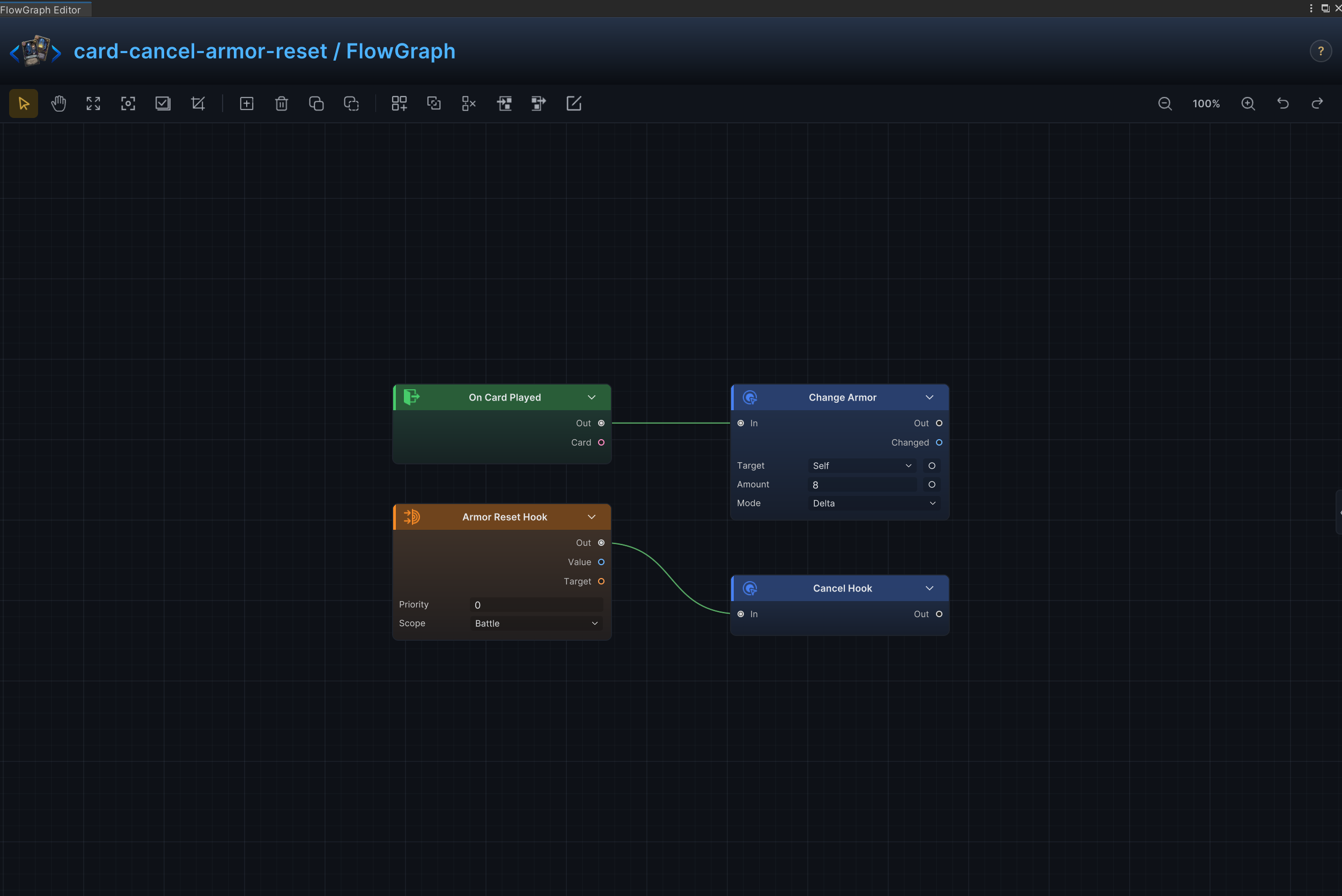
Cancel Armor Reset
Effect
Override the normal armor reset rule for the duration of a persistent effect.
Node connections
Armor Reset Hook.Out → Cancel Hook.InOn Card Played.Out → Change Armor.In
Node configuration
Armor Reset HookPriority = 0: Sets this hook's order relative to other hooks at the same timing.Scope = Battle: Keeps the hook active for the entire battle.
Change ArmorTarget = Self: Targets the source unit itself.Mode = Delta: Adds to or subtracts from the current value; positive values increase it and negative values decrease it.Amount = 8: Uses 8 as the example value; replace it with the amount required by the card.
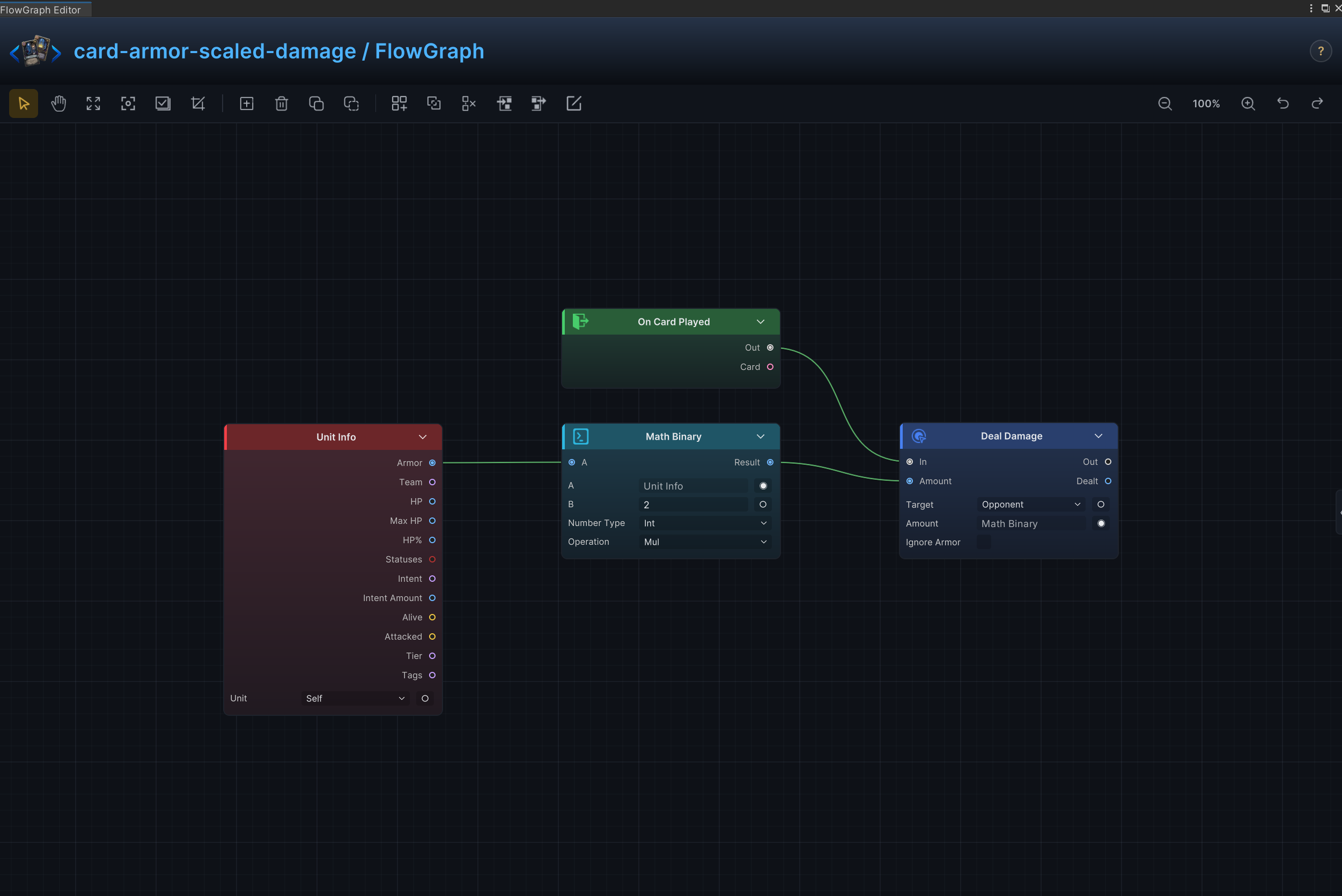
Armor-Scaled Damage
Effect
Convert the user's current armor into attack damage.
Node connections
Unit Info.Armor → Math Binary.AMath Binary.Result → Deal Damage.AmountOn Card Played.Out → Deal Damage.In
Node configuration
Deal DamageTarget = Opponent: Uses the enemy currently selected by the card or behavior.Amount = 6: Driven at runtime by Math Binary.Result; this value is only the unconnected fallback.Ignore Armor = Off: Damage resolves through armor normally.
Unit InfoUnit = Self: Reads the source unit itself.
Math BinaryKind = Int: Selects the data, collection, choice, or hook value type handled by this node.A = 0: Driven at runtime by Unit Info.Armor; this value is only the unconnected fallback.B = 2: Sets the second operand when the B input is not connected.Op = Mul: Multiplies A by B.
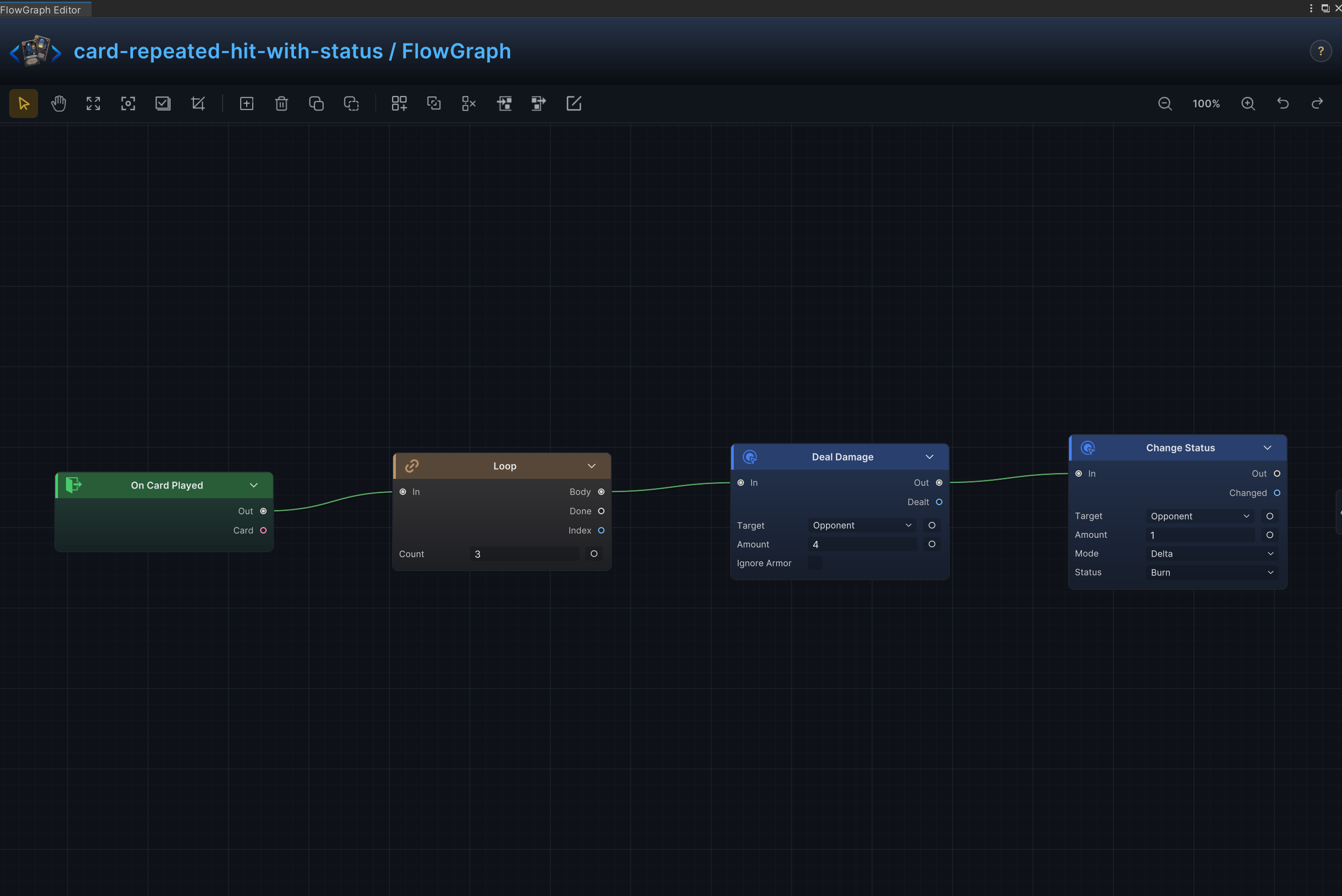
Repeated Hit with Status
Effect
Repeat an attack that deals damage and applies a status on every hit.
Node connections
Loop.Body → Deal Damage.InOn Card Played.Out → Loop.InDeal Damage.Out → Change Status.In
Node configuration
Deal DamageTarget = Opponent: Uses the enemy currently selected by the card or behavior.Amount = 4: Uses 4 as the example value; replace it with the amount required by the card.Ignore Armor = Off: Damage resolves through armor normally.
Change StatusTarget = Opponent: Uses the enemy currently selected by the card or behavior.Status = Burn: Reads or changes the Burn status.Mode = Delta: Adds to or subtracts from the current value; positive values increase it and negative values decrease it.Amount = 1: Uses 1 as the example value; replace it with the amount required by the card.
LoopCount = 3: Sets how many cards, elements, choices, or loop iterations are produced.
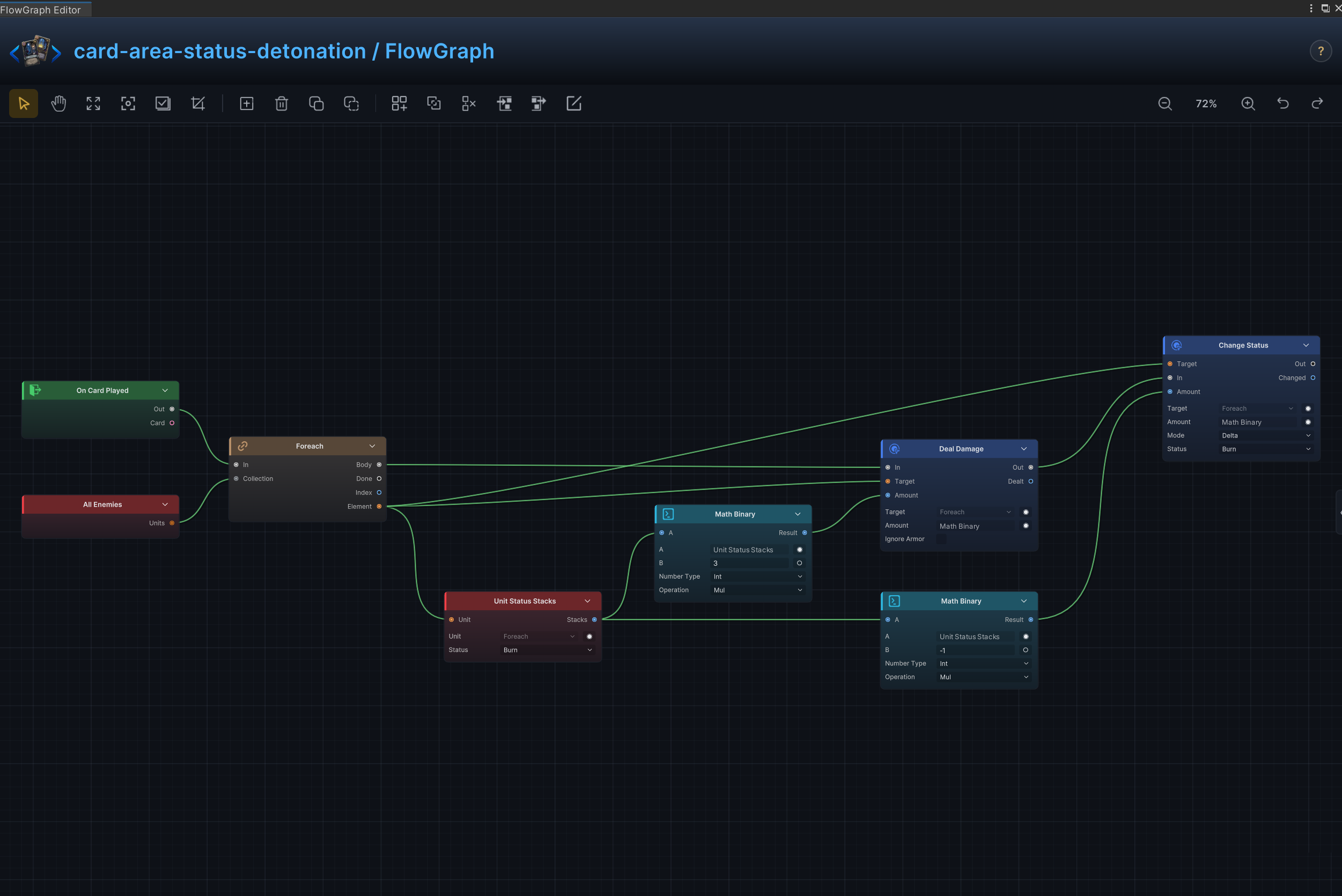
Area Status Detonation
Effect
Consume a status on every enemy and turn its stacks into area damage.
Node connections
All Opponents.Units → Foreach.CollectionForeach.Element → Unit Status Stacks.UnitUnit Status Stacks.Stacks → Math Binary (1).AForeach.Element → Deal Damage.TargetMath Binary (1).Result → Deal Damage.AmountUnit Status Stacks.Stacks → Math Binary (2).AMath Binary (2).Result → Change Status.AmountForeach.Body → Deal Damage.InDeal Damage.Out → Change Status.InOn Card Played.Out → Foreach.InForeach.Element → Change Status.Target
Node configuration
ForeachKind = Unit: Selects the data, collection, choice, or hook value type handled by this node.
Unit Status StacksUnit = Self: Driven at runtime by Foreach.Element; this value is only the unconnected fallback.Status = Burn: Reads or changes the Burn status.
Math Binary (1)Kind = Int: Selects the data, collection, choice, or hook value type handled by this node.A = 0: Driven at runtime by Unit Status Stacks.Stacks; this value is only the unconnected fallback.B = 3: Sets the second operand when the B input is not connected.Op = Mul: Multiplies A by B.
Deal DamageTarget = Opponent: Driven at runtime by Foreach.Element; this value is only the unconnected fallback.Amount = 6: Driven at runtime by Math Binary (1).Result; this value is only the unconnected fallback.Ignore Armor = Off: Damage resolves through armor normally.
Change StatusTarget = Self: Driven at runtime by Foreach.Element; this value is only the unconnected fallback.Status = Burn: Reads or changes the Burn status.Mode = Delta: Adds to or subtracts from the current value; positive values increase it and negative values decrease it.Amount = 1: Driven at runtime by Math Binary (2).Result; this value is only the unconnected fallback.
Math Binary (2)Kind = Int: Selects the data, collection, choice, or hook value type handled by this node.A = 0: Driven at runtime by Unit Status Stacks.Stacks; this value is only the unconnected fallback.B = -1: Sets the second operand when the B input is not connected.Op = Mul: Multiplies A by B.
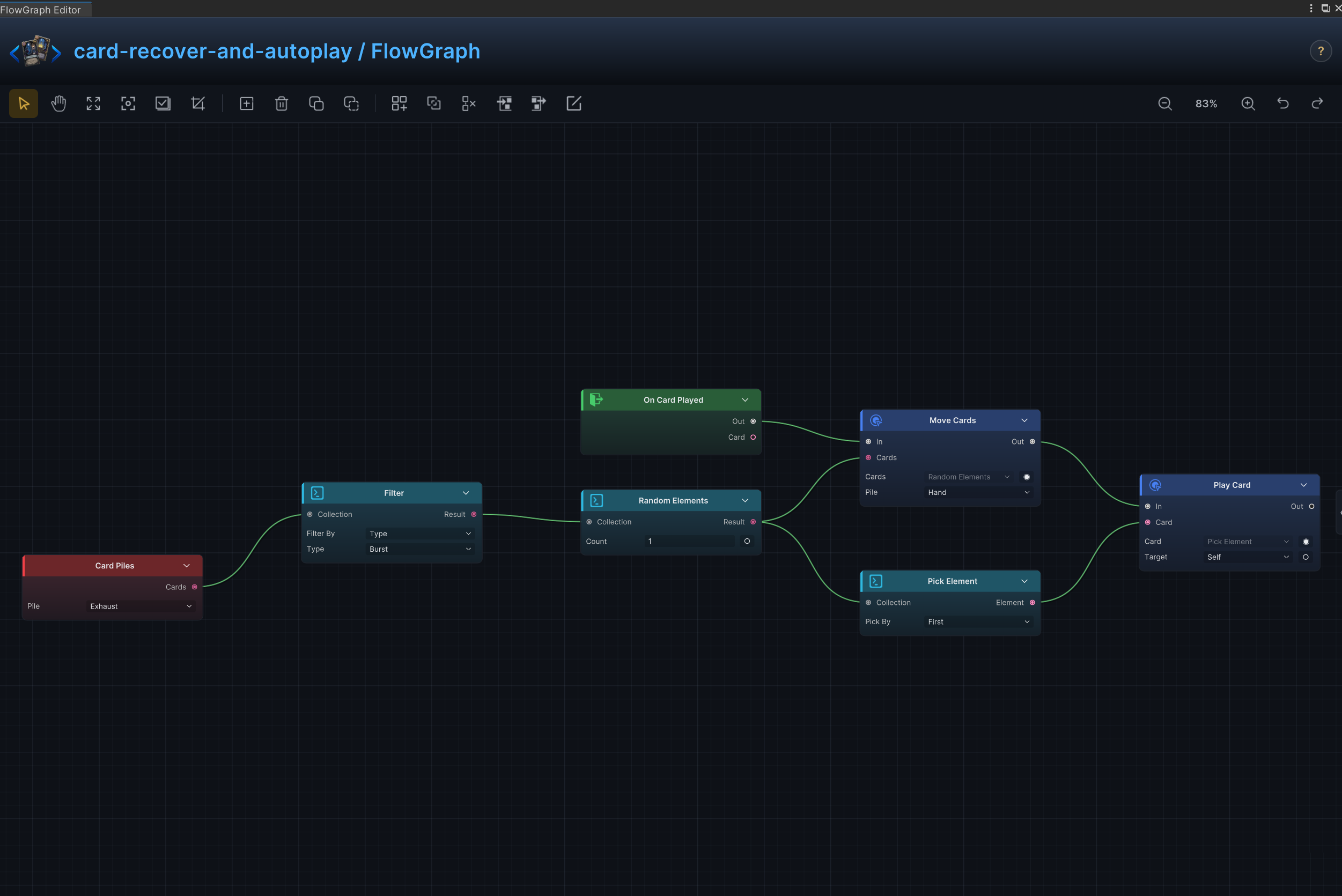
Recover and Auto-Play
Effect
Recover a matching card from another pile and immediately play it.
Node connections
Card Piles.Cards → Filter.CollectionFilter.Result → Random Elements.CollectionRandom Elements.Result → Move Cards.CardsRandom Elements.Result → Pick Element.CollectionPick Element.Element → Play Card.CardMove Cards.Out → Play Card.InOn Card Played.Out → Move Cards.In
Node configuration
Card PilesPile = Exhaust: Selects the source or destination card pile.
FilterKind = Card: Selects the data, collection, choice, or hook value type handled by this node.Card Rule = [Type]: Selects the card property used by this collection operation.Type = Burst: Sets the card type matched by the filter.
Random ElementsKind = Card: Selects the data, collection, choice, or hook value type handled by this node.Count = 1: Sets how many cards, elements, choices, or loop iterations are produced.
Move CardsCards = ThisCard: Driven at runtime by Random Elements.Result; this value is only the unconnected fallback.Pile = Hand: Selects the source or destination card pile.Position = Top: Selects where cards are inserted in the destination pile.
Pick ElementKind = Card: Selects the data, collection, choice, or hook value type handled by this node.By = First: Selects the property used to pick an element.Index = 0: Selects the zero-based collection element.
Play CardCard = ThisCard: Driven at runtime by Pick Element.Element; this value is only the unconnected fallback.Target = Self: Targets the source unit itself.
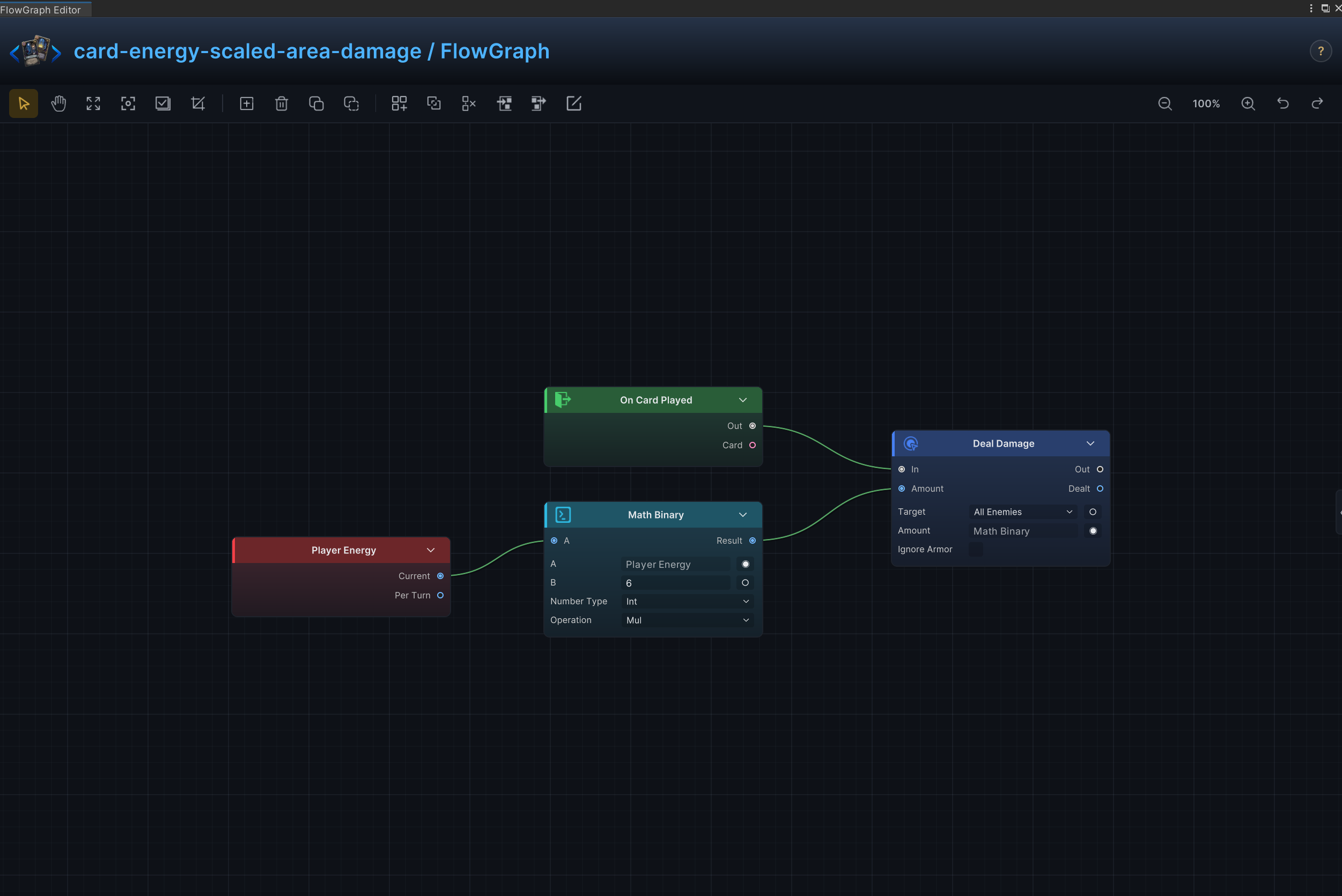
Energy-Scaled Area Damage
Effect
Scale area damage from the energy currently available.
Node connections
Player Energy.Current → Math Binary.AMath Binary.Result → Deal Damage.AmountOn Card Played.Out → Deal Damage.In
Node configuration
Deal DamageTarget = AllOpponents: Applies to all living enemiesAmount = 6: Driven at runtime by Math Binary.Result; this value is only the unconnected fallback.Ignore Armor = Off: Damage resolves through armor normally.
Math BinaryKind = Int: Selects the data, collection, choice, or hook value type handled by this node.A = 0: Driven at runtime by Player Energy.Current; this value is only the unconnected fallback.B = 6: Sets the second operand when the B input is not connected.Op = Mul: Multiplies A by B.
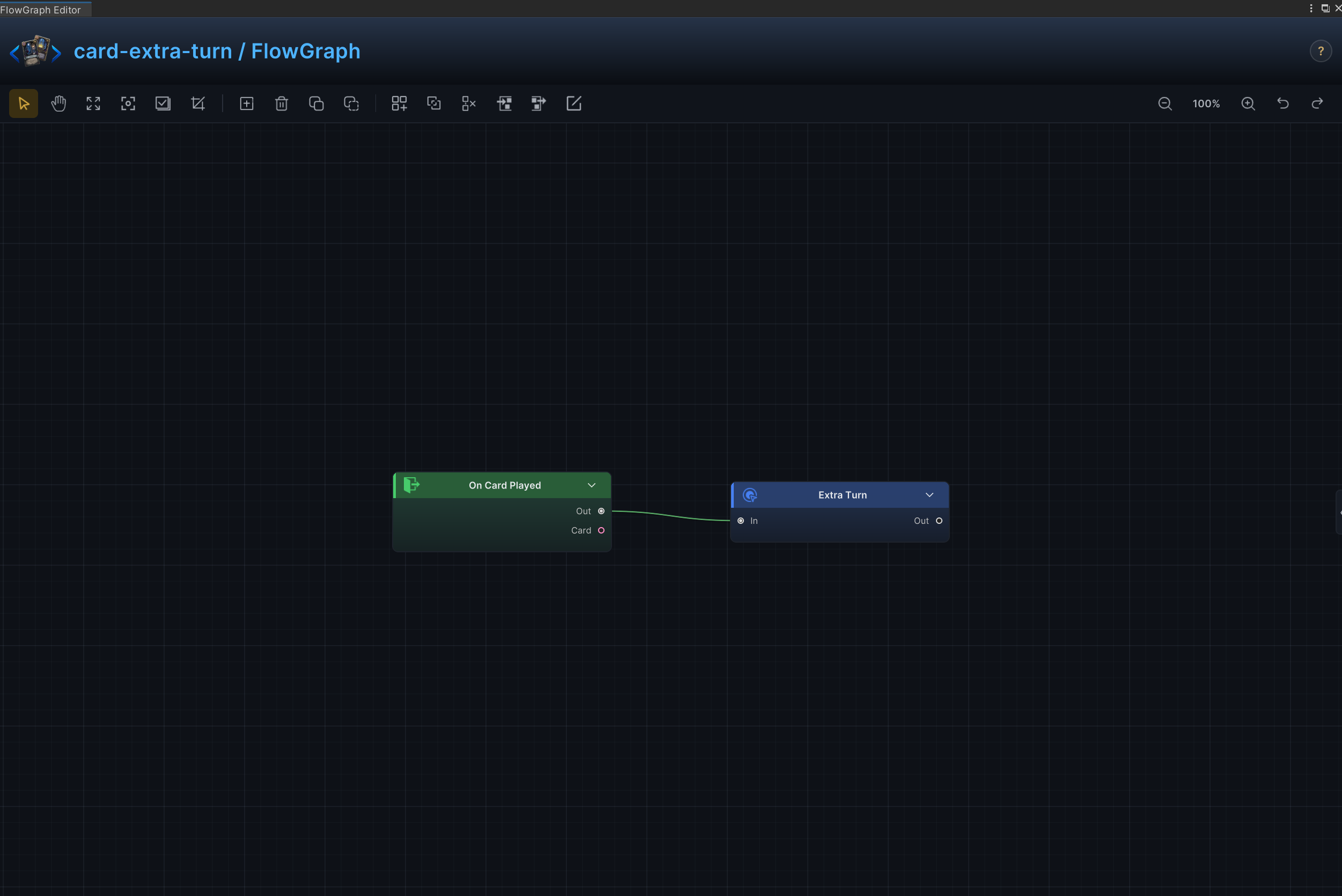
Extra Turn
Effect
Schedule an additional player turn after the current turn.
Node connections
On Card Played.Out → Extra Turn.In
Node configuration
Extra Turn- This node has no configurable fields; when triggered, it schedules one extra turn.
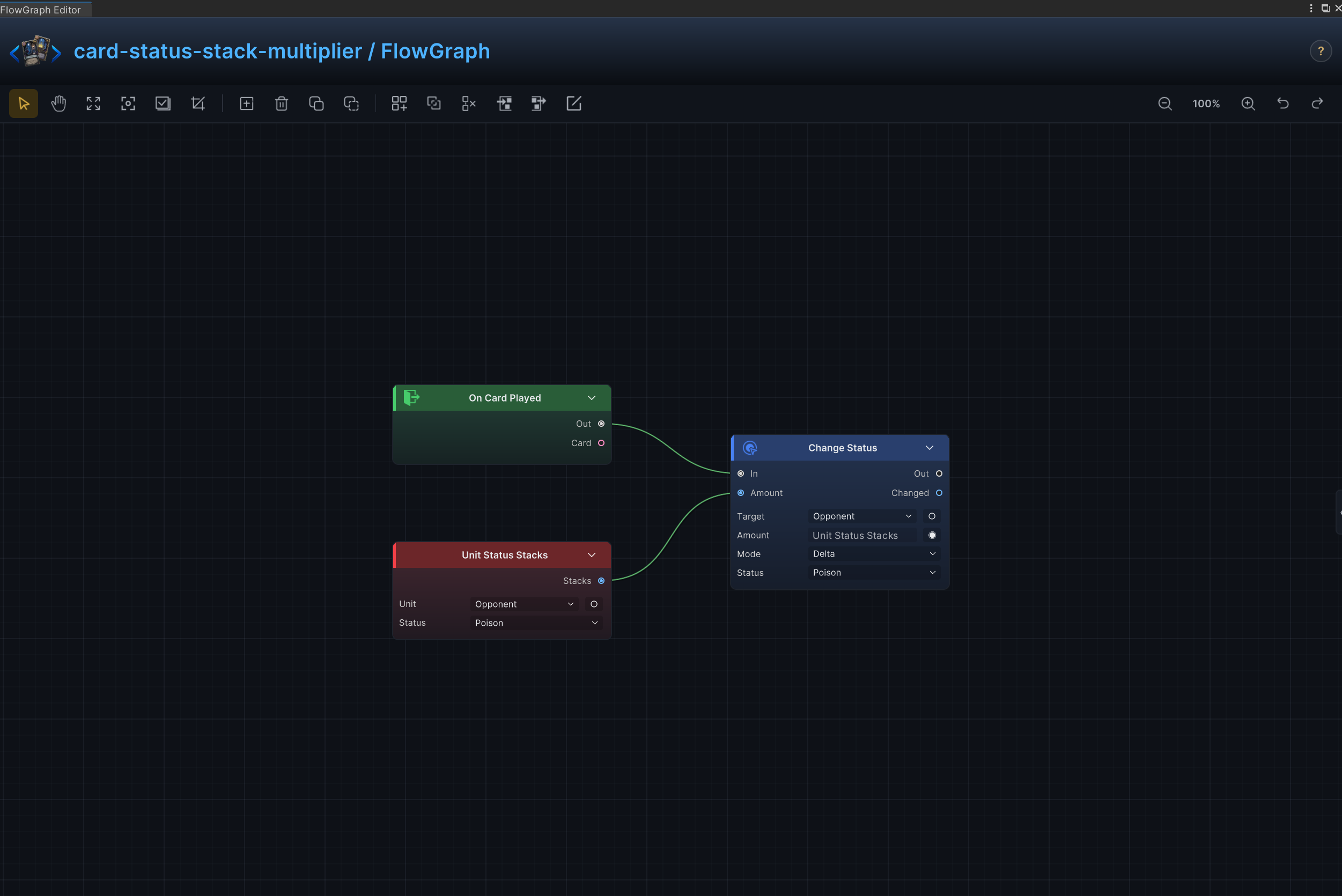
Status Stack Multiplier
Effect
Read a target's status stacks and multiply the existing amount.
Node connections
Unit Status Stacks.Stacks → Change Status.AmountOn Card Played.Out → Change Status.In
Node configuration
Unit Status StacksUnit = Opponent: Reads the enemy currently selected by the card or behavior.Status = Poison: Reads or changes the Poison status.
Change StatusTarget = Opponent: Uses the enemy currently selected by the card or behavior.Status = Poison: Reads or changes the Poison status.Mode = Delta: Adds to or subtracts from the current value; positive values increase it and negative values decrease it.Amount = 1: Driven at runtime by Unit Status Stacks.Stacks; this value is only the unconnected fallback.
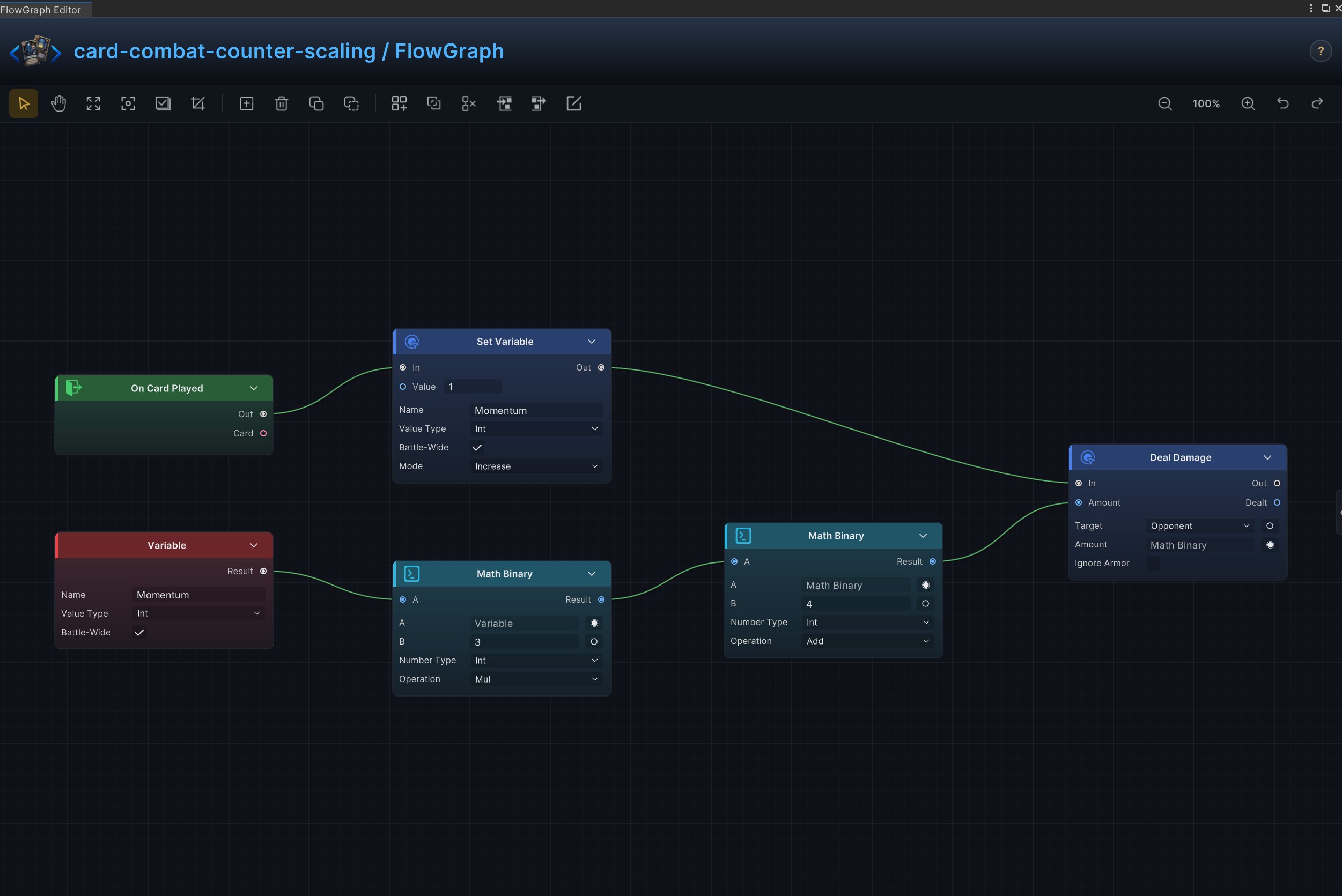
Combat Counter Scaling
Effect
Track uses during combat and scale later resolutions from the accumulated count.
Node connections
Variable.Result → Math Binary (1).AMath Binary (1).Result → Math Binary (2).AMath Binary (2).Result → Deal Damage.AmountSet Variable.Out → Deal Damage.InOn Card Played.Out → Set Variable.In
Node configuration
Set VariableName = Momentum: Identifies the battle or graph variable.Battle Scope = On: Stores or reads the variable for the current battle rather than one graph execution.Mode = Increase: Increases the existing cost by the configured amount.Kind = Int: Selects the data, collection, choice, or hook value type handled by this node.Value = 1: Sets the value written or processed when the Value input is not connected.
VariableName = Momentum: Identifies the battle or graph variable.Kind = Int: Selects the data, collection, choice, or hook value type handled by this node.Battle Scope = On: Stores or reads the variable for the current battle rather than one graph execution.
Math Binary (1)Kind = Int: Selects the data, collection, choice, or hook value type handled by this node.A = 0: Driven at runtime by Variable.Result; this value is only the unconnected fallback.B = 3: Sets the second operand when the B input is not connected.Op = Mul: Multiplies A by B.
Math Binary (2)Kind = Int: Selects the data, collection, choice, or hook value type handled by this node.A = 0: Driven at runtime by Math Binary (1).Result; this value is only the unconnected fallback.B = 4: Sets the second operand when the B input is not connected.Op = Add: Adds the two operands.
Deal DamageTarget = Opponent: Uses the enemy currently selected by the card or behavior.Amount = 6: Driven at runtime by Math Binary (2).Result; this value is only the unconnected fallback.Ignore Armor = Off: Damage resolves through armor normally.
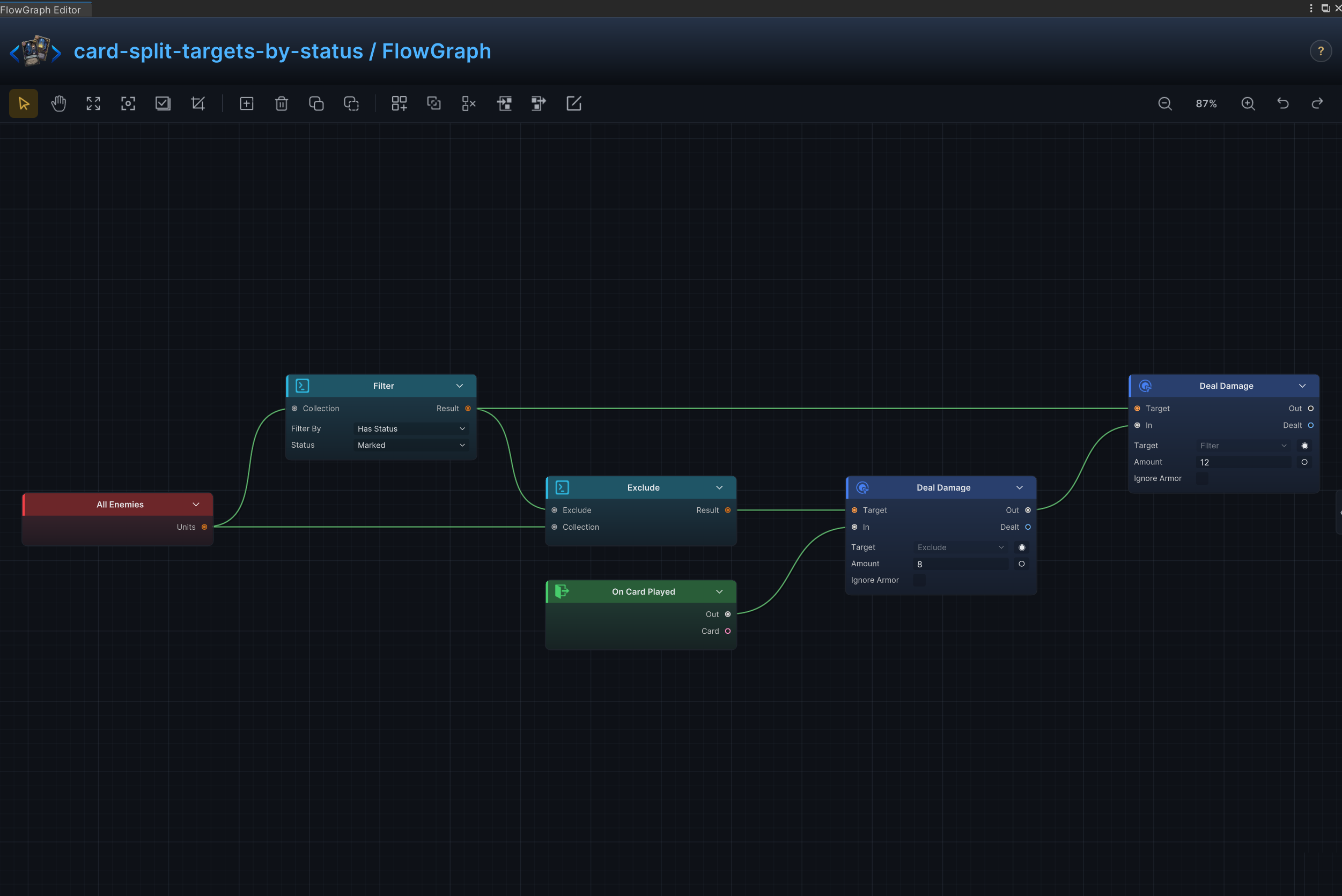
Split Targets by Status
Effect
Partition enemies by a status condition and apply different effects to each group.
Node connections
All Opponents.Units → Filter.CollectionAll Opponents.Units → Exclude.CollectionFilter.Result → Exclude.ExcludeExclude.Result → Deal Damage (1).TargetFilter.Result → Deal Damage (2).TargetOn Card Played.Out → Deal Damage (1).InDeal Damage (1).Out → Deal Damage (2).In
Node configuration
FilterKind = Unit: Selects the data, collection, choice, or hook value type handled by this node.Unit Rule = [HasStatus]: Selects the unit property used by this collection operation.Status ID = Marked: Sets the status identifier matched by the filter.
ExcludeKind = Unit: Selects the data, collection, choice, or hook value type handled by this node.
Deal Damage (1)Target = Opponent: Driven at runtime by Exclude.Result; this value is only the unconnected fallback.Amount = 8: Uses 8 as the example value; replace it with the amount required by the card.Ignore Armor = Off: Damage resolves through armor normally.
Deal Damage (2)Target = Opponent: Driven at runtime by Filter.Result; this value is only the unconnected fallback.Amount = 12: Uses 12 as the example value; replace it with the amount required by the card.Ignore Armor = Off: Damage resolves through armor normally.
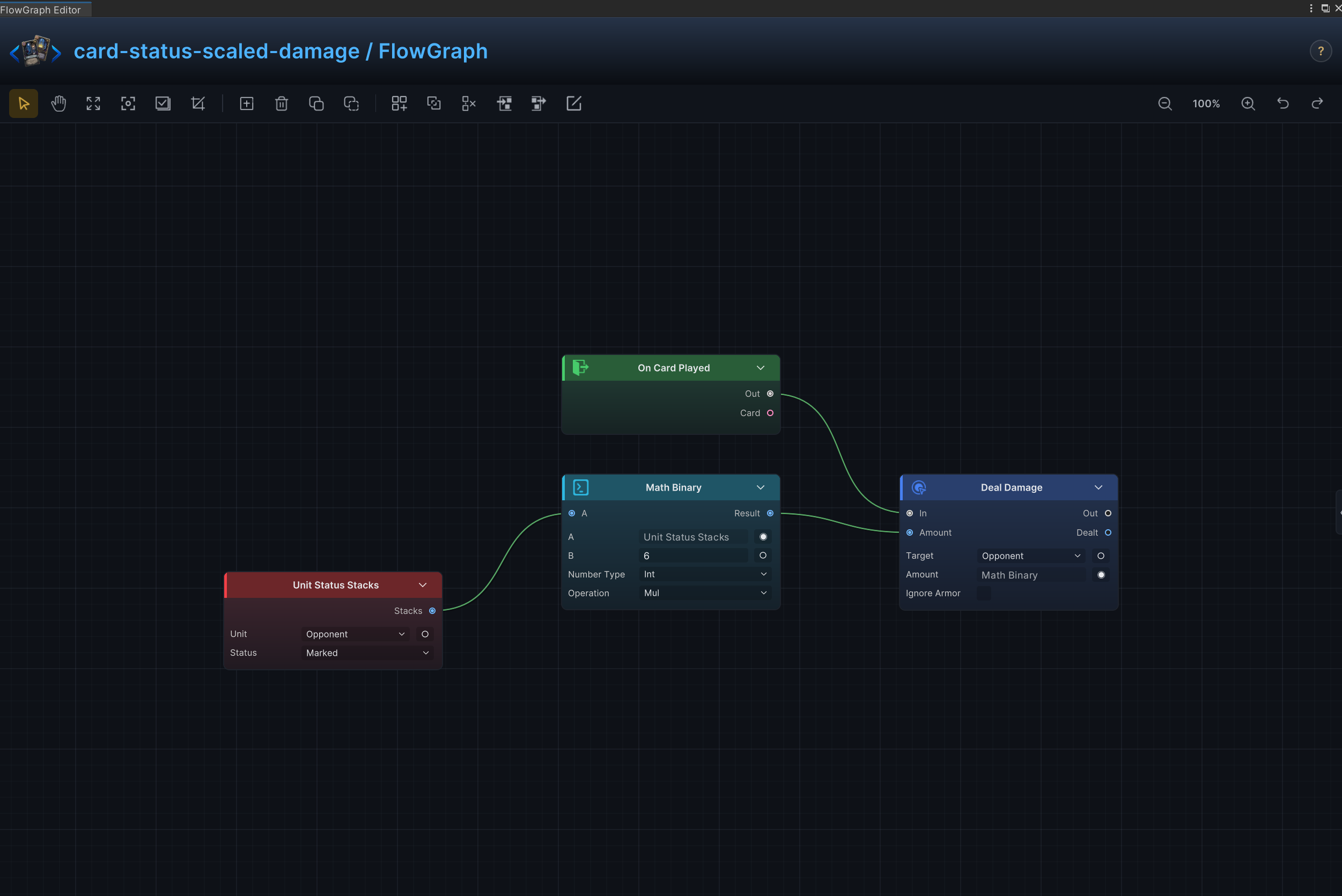
Status-Scaled Damage
Effect
Scale damage from the number of status stacks on the target.
Node connections
Unit Status Stacks.Stacks → Math Binary.AMath Binary.Result → Deal Damage.AmountOn Card Played.Out → Deal Damage.In
Node configuration
Deal DamageTarget = Opponent: Uses the enemy currently selected by the card or behavior.Amount = 6: Driven at runtime by Math Binary.Result; this value is only the unconnected fallback.Ignore Armor = Off: Damage resolves through armor normally.
Unit Status StacksUnit = Opponent: Reads the enemy currently selected by the card or behavior.Status = Marked: Reads or changes the Marked status.
Math BinaryKind = Int: Selects the data, collection, choice, or hook value type handled by this node.A = 0: Driven at runtime by Unit Status Stacks.Stacks; this value is only the unconnected fallback.B = 6: Sets the second operand when the B input is not connected.Op = Mul: Multiplies A by B.
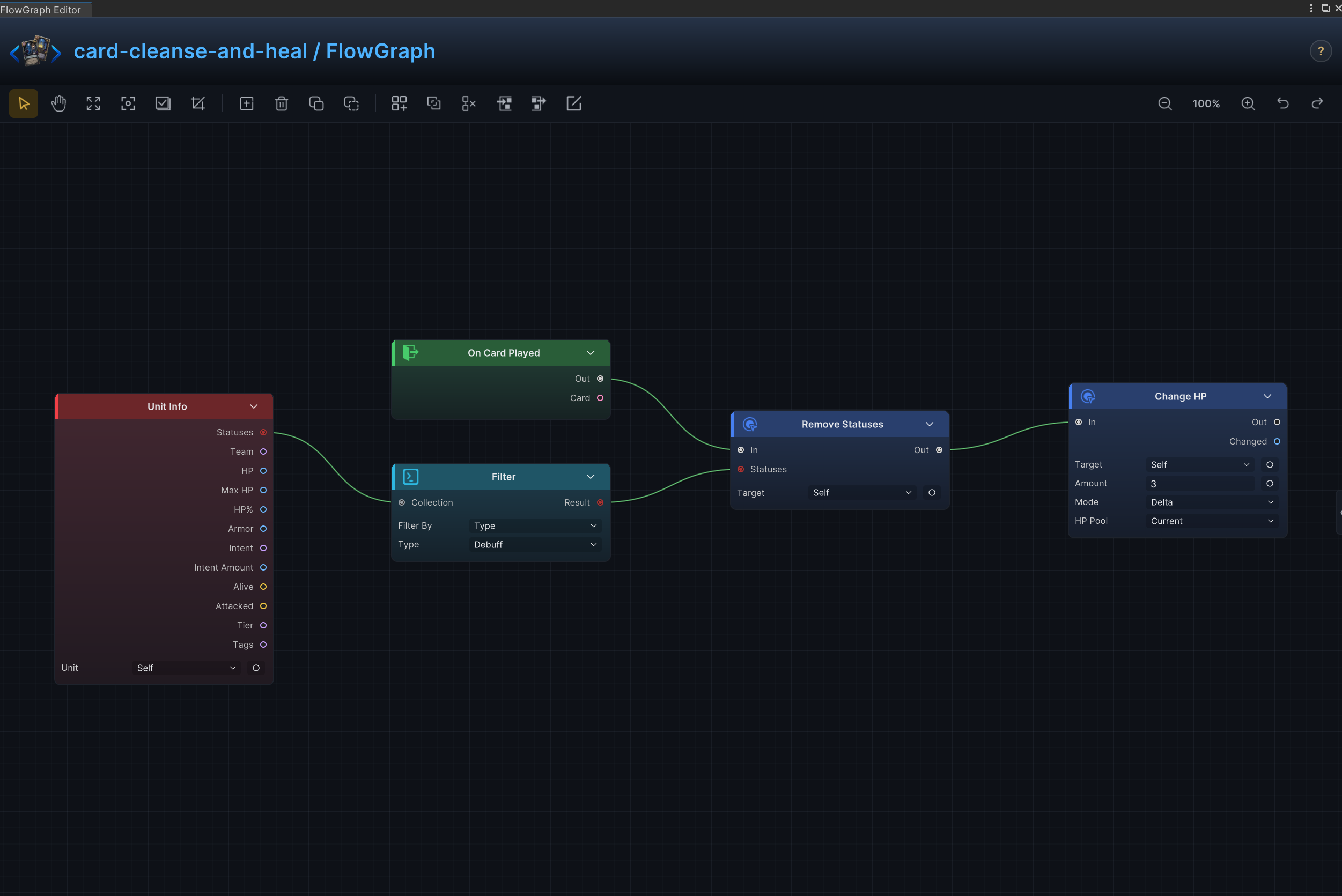
Cleanse and Heal
Effect
Remove matching negative statuses, then restore HP.
Node connections
Unit Info.Statuses → Filter.CollectionFilter.Result → Remove Statuses.StatusesOn Card Played.Out → Remove Statuses.InRemove Statuses.Out → Change HP.In
Node configuration
Unit InfoUnit = Self: Reads the source unit itself.
FilterKind = Status: Selects the data, collection, choice, or hook value type handled by this node.Status Rule = [Type]: Selects the status property used by this collection operation.Status Type = Debuff: Sets the status category matched by the filter.
Remove StatusesTarget = Self: Targets the source unit itself.
Change HPTarget = Self: Targets the source unit itself.Affect = Current: Changes current HP without changing maximum HP.Mode = Delta: Adds to or subtracts from the current value; positive values increase it and negative values decrease it.Amount = 3: Uses 3 as the example value; replace it with the amount required by the card.
Batch Upgrade
Effect
Filter a card collection and upgrade every matching card in one resolution.
Node connections
Card Piles.Cards → Filter.CollectionFilter.Result → Upgrade Cards.CardsOn Card Played.Out → Upgrade Cards.In
Node configuration
Upgrade CardsCards = ThisCard: Driven at runtime by Filter.Result; this value is only the unconnected fallback.
Card PilesPile = Hand: Selects the source or destination card pile.
FilterKind = Card: Selects the data, collection, choice, or hook value type handled by this node.Card Rule = [Type]: Selects the card property used by this collection operation.Type = Basic: Sets the card type matched by the filter.