Enemy recipes
Choose from 21 enemy-mechanic recipes and rebuild each behavior from its node connections, configuration, and editable FlowGraph
Recipe overview
| # | Mechanism | What it builds |
|---|---|---|
| 1 | Split at Half HP | Replace the normal action with split behavior below 50% HP |
| 2 | Escape Countdown | Telegraph an escape, then remove the enemy when the countdown completes |
| 3 | Steal and Exhaust a Card | Choose 1 random card from the player's hand and move it to the exhaust pile |
| 4 | Opening Status or Battle Rule | Run a persistent status or battle-wide rule once when the enemy behavior graph first starts |
| 5 | Mode Shift at HP Threshold | Switch from a normal attack pattern to a defensive phase below the HP threshold |
| 6 | Deterministic Intent Sequence | Cycle through attack, defense, buff, and other enemy intents in a fixed order |
| 7 | Weighted Random Intents | Choose the next enemy intent from several options by weight |
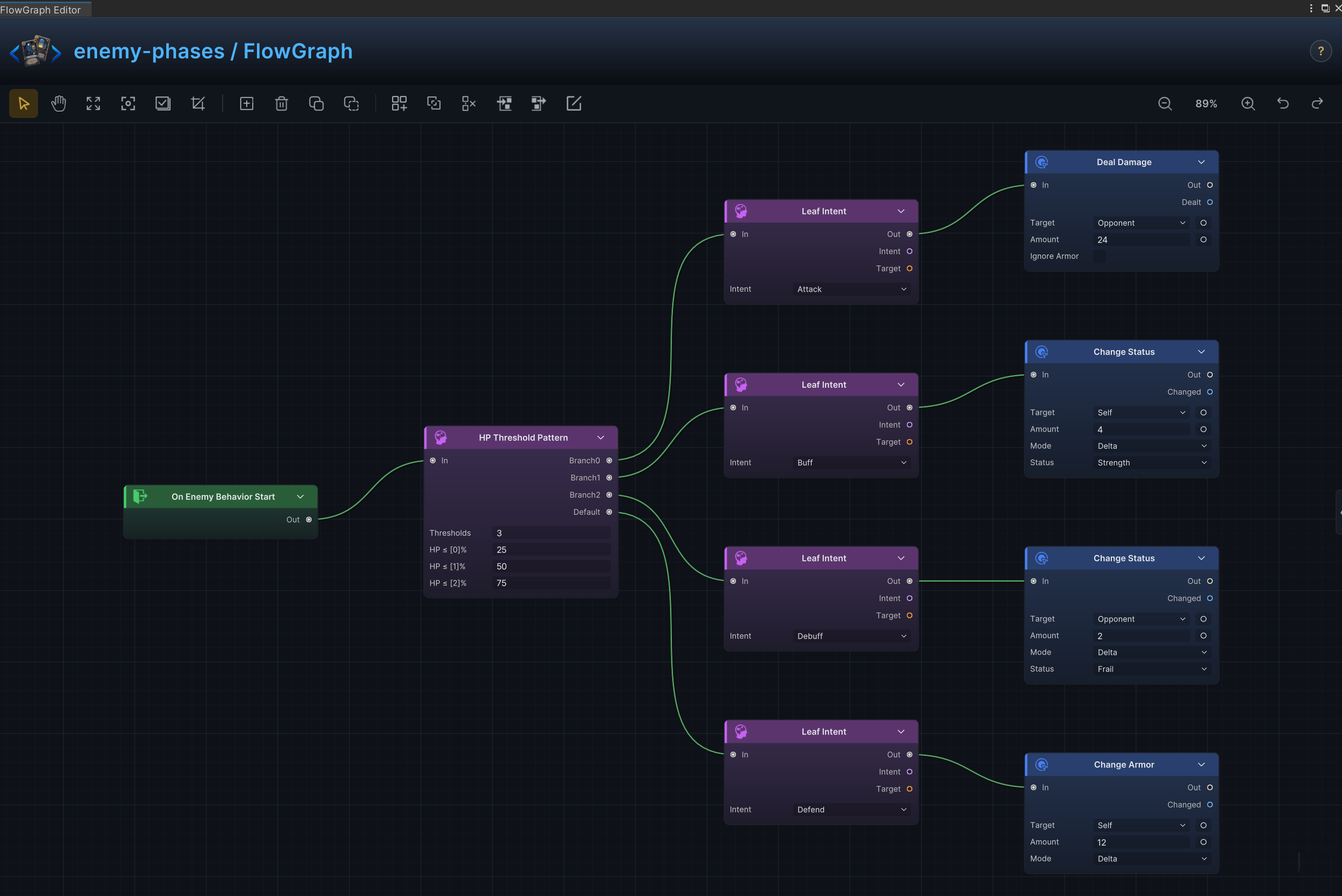
| 8 | HP-Threshold Boss Phases | Switch boss phases and available actions according to HP percentage |
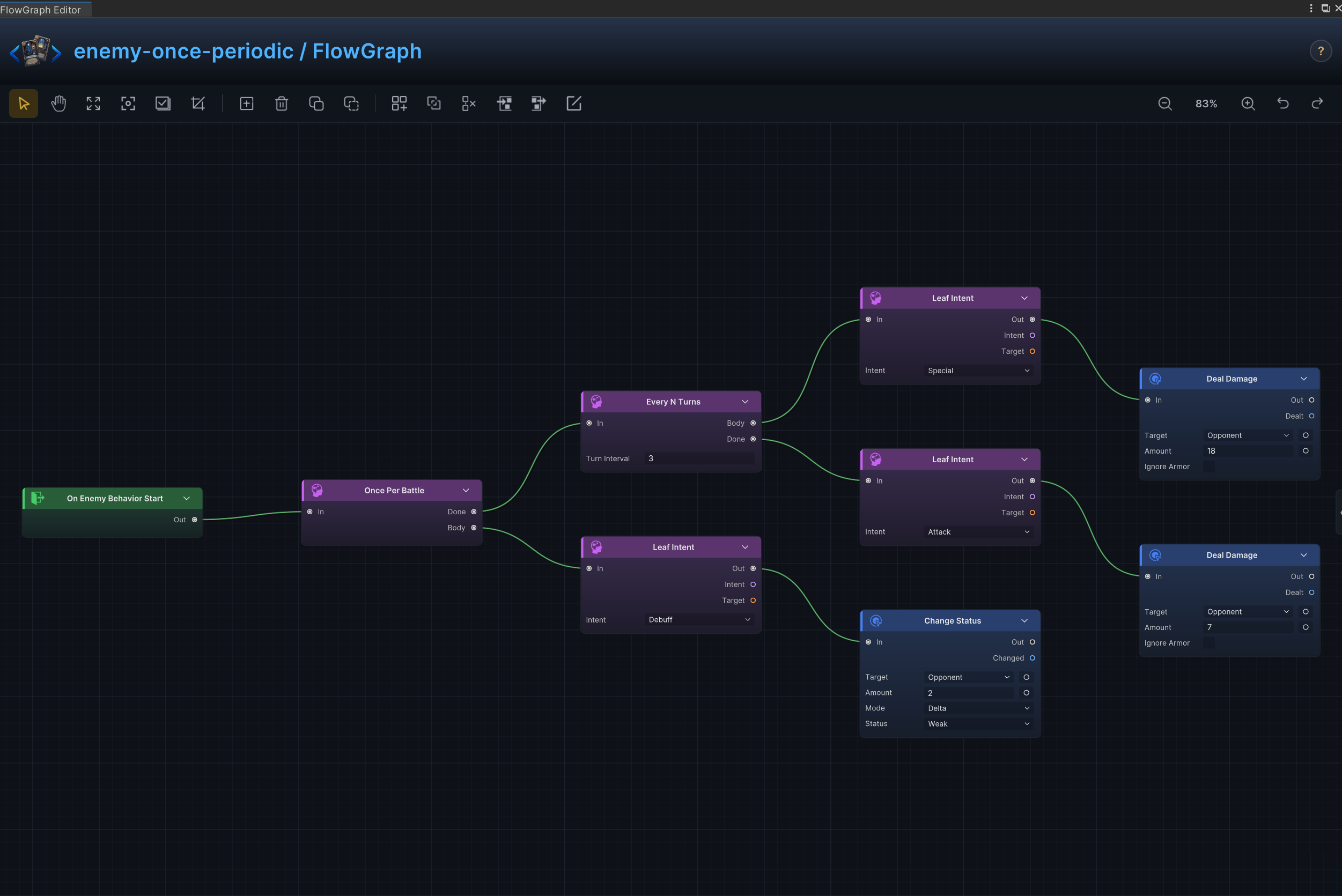
| 9 | Opening Move and Periodic Special | Run one opening move, then use a special action every N turns and a normal action on the remaining turns |
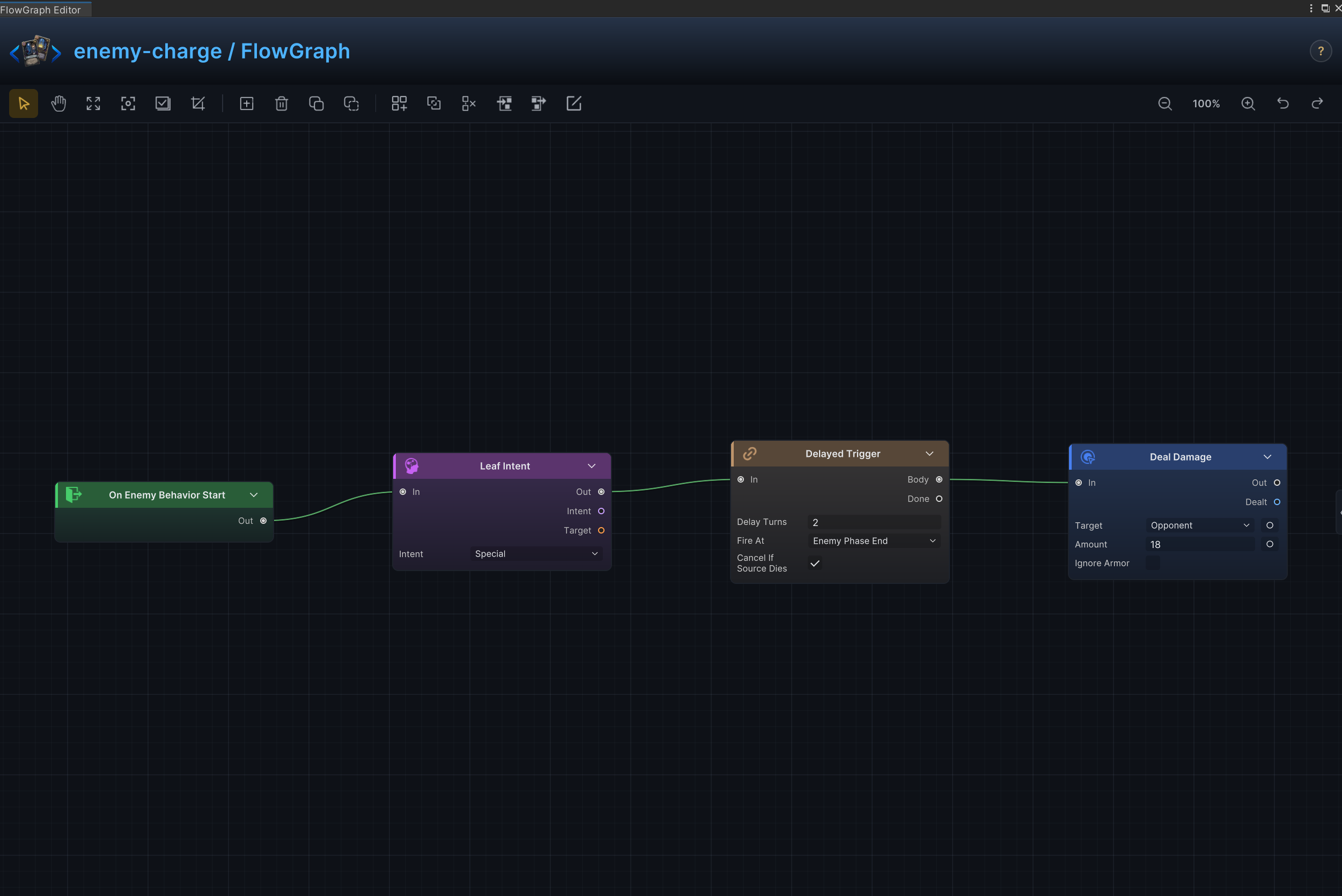
| 10 | Charge, Countdown, and Delayed Attack | Show a charge intent first, then resolve the attack during the enemy phase after the countdown completes |
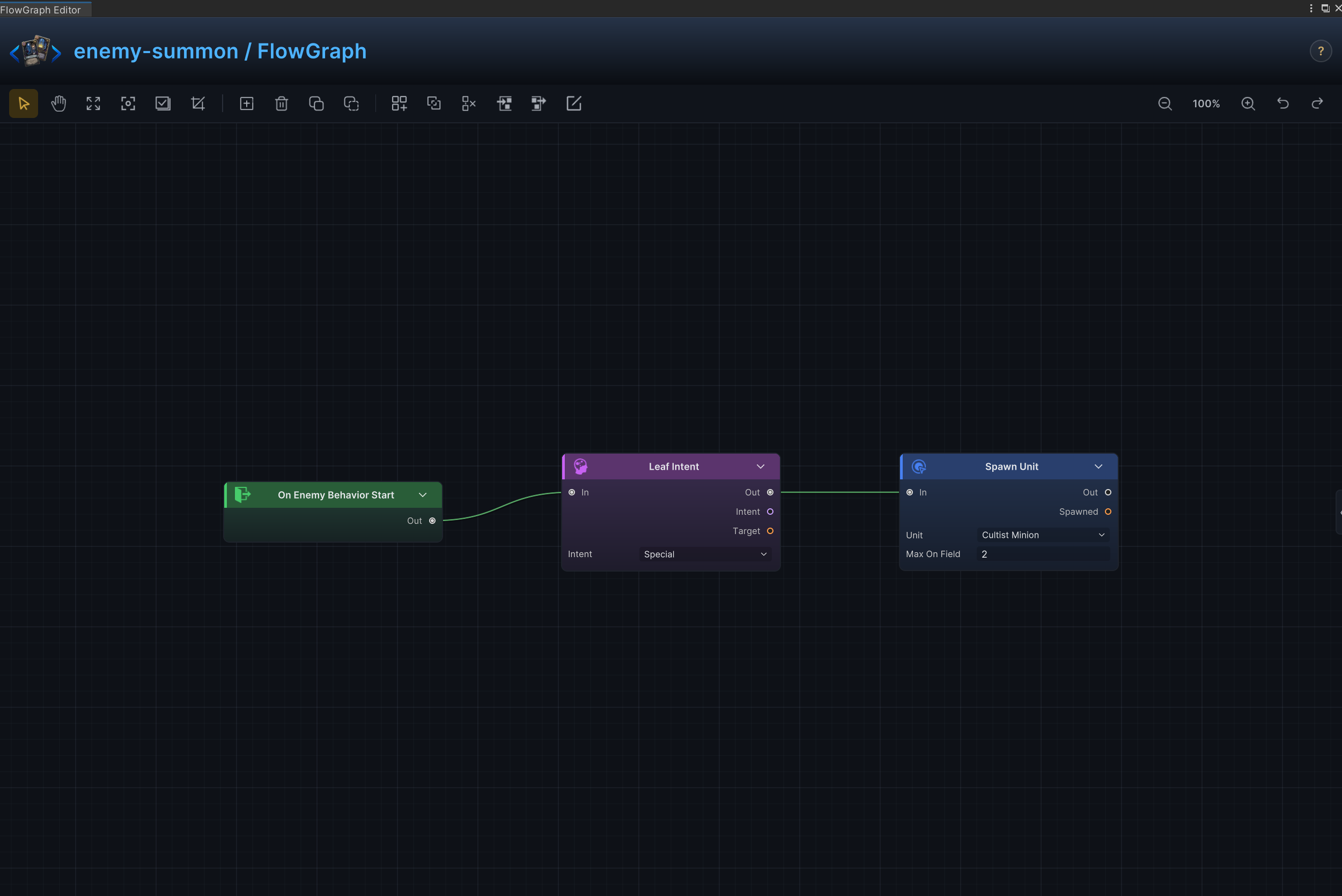
| 11 | Summon, minions, and reinforcement waves | Summon minions or add the next wave while limiting how many matching units can remain on the field |
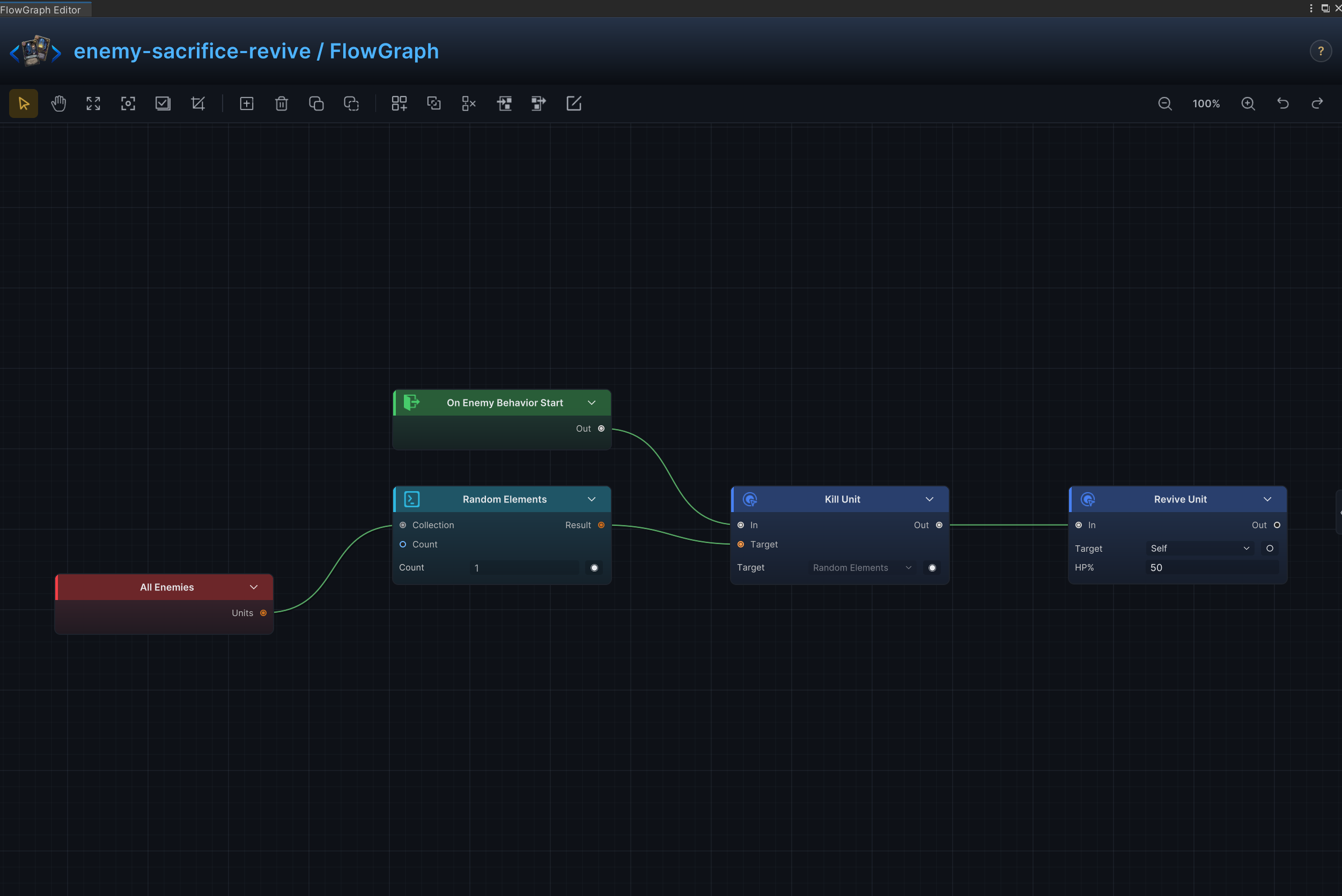
| 12 | Sacrifice an Ally and Revive | Sacrifice a random allied unit, then revive a target or gain a large payoff |
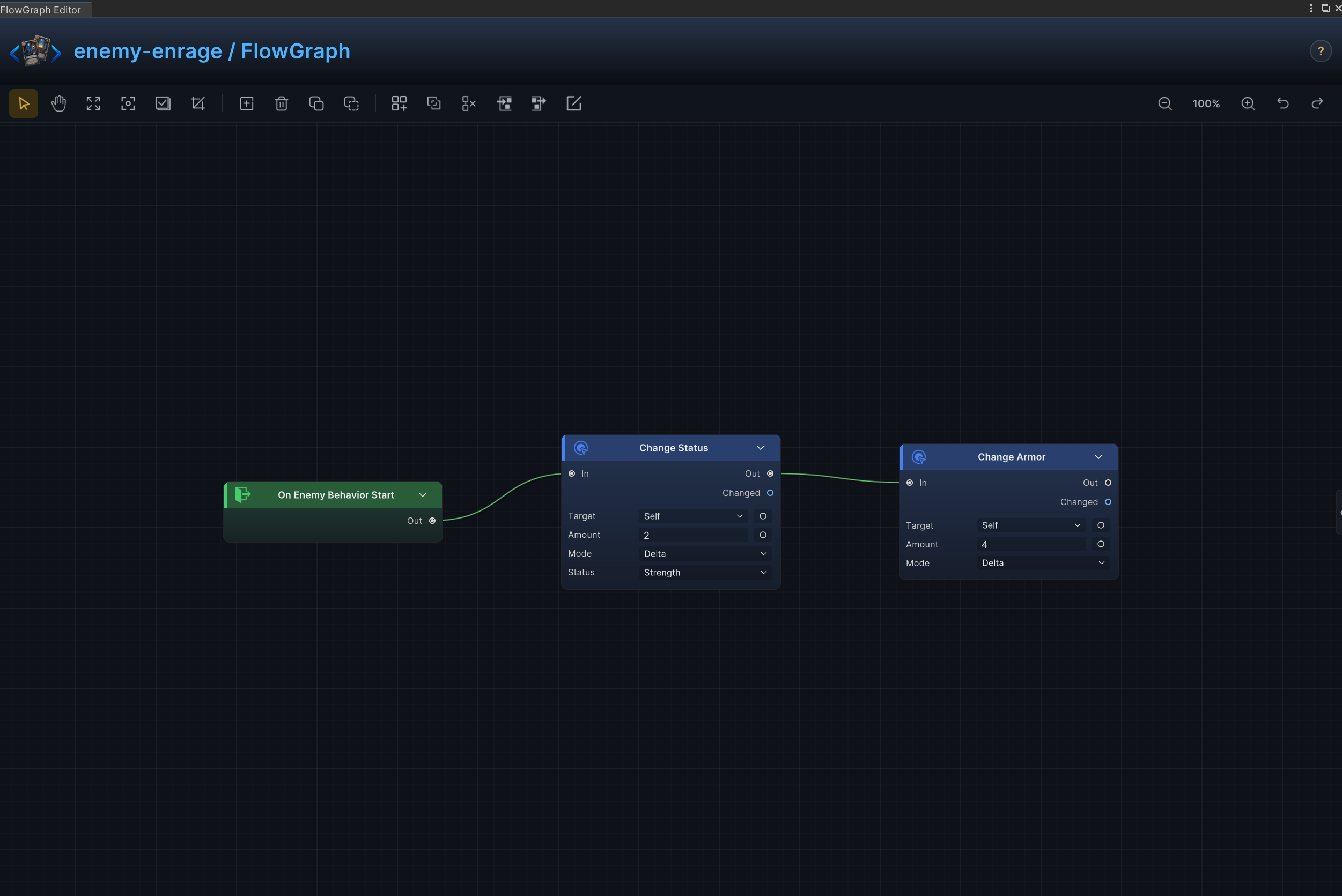
| 13 | Enrage and Scaling Over Time | Keep granting strength, armor, regeneration, or another resource after each enemy action |
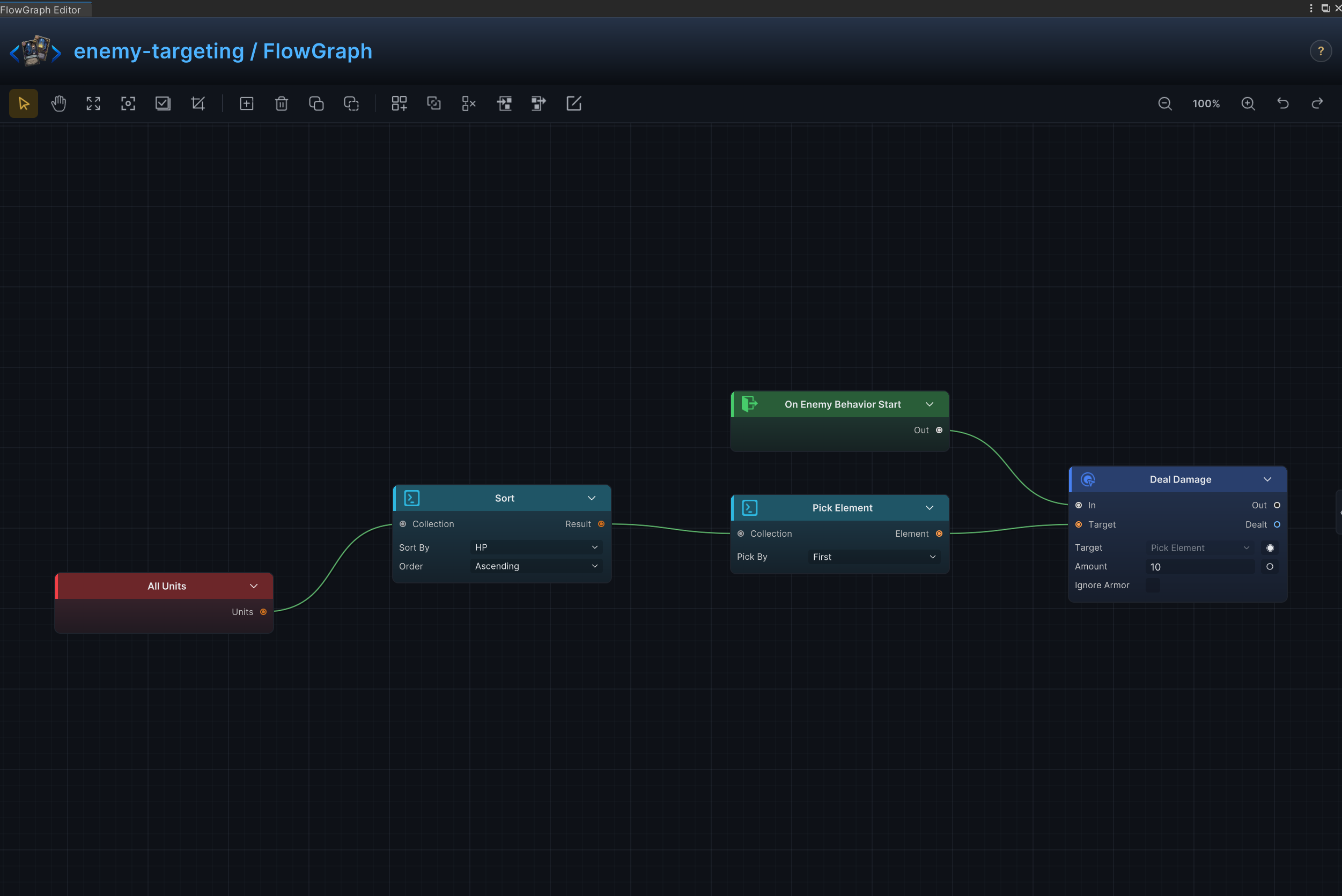
| 14 | Combat-Property Targeting | Select the lowest-HP, highest-armor, or otherwise prioritized target from a unit collection |
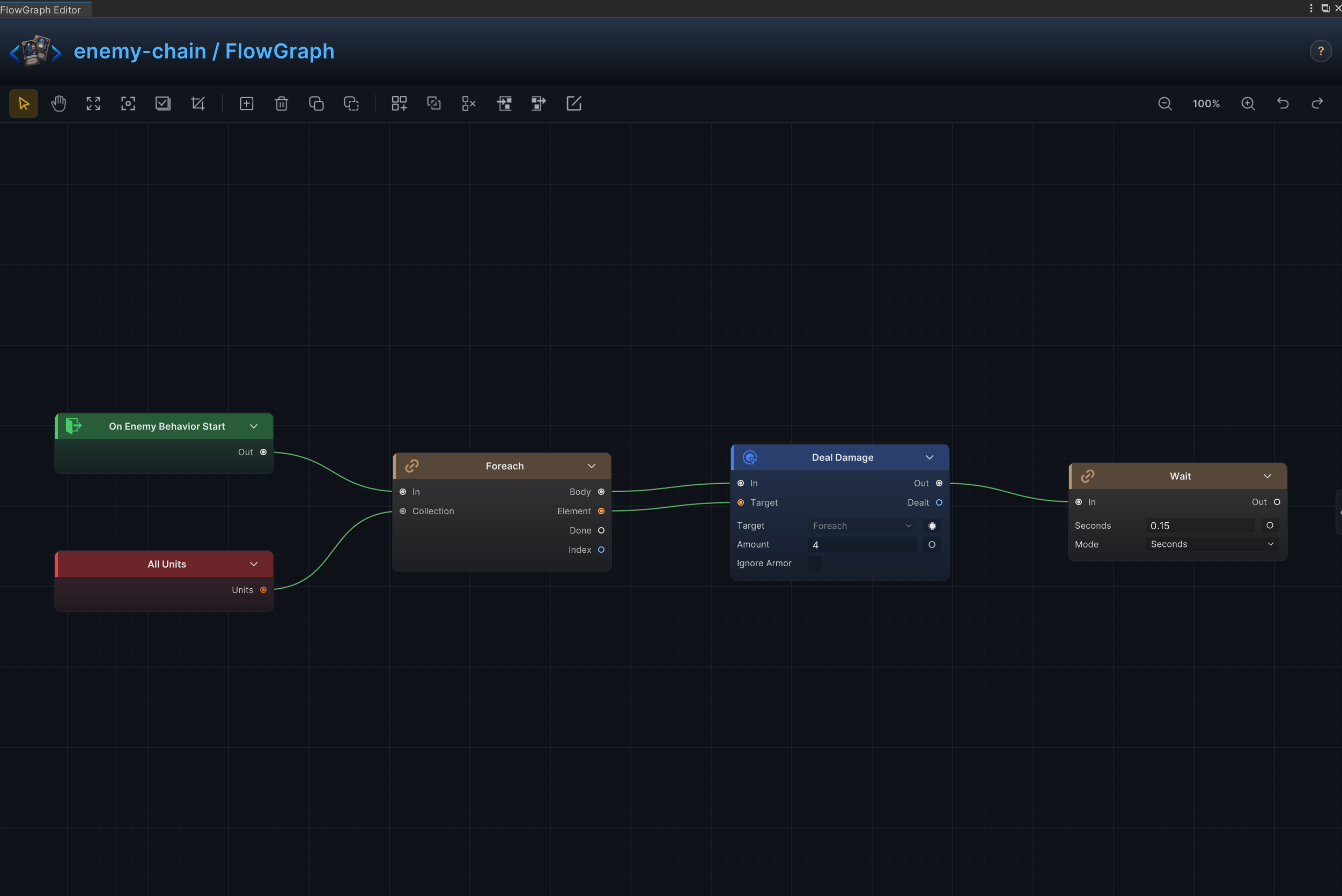
| 15 | Per-Target Chained Action | Iterate through multiple targets and resolve a complete action on each target in order |
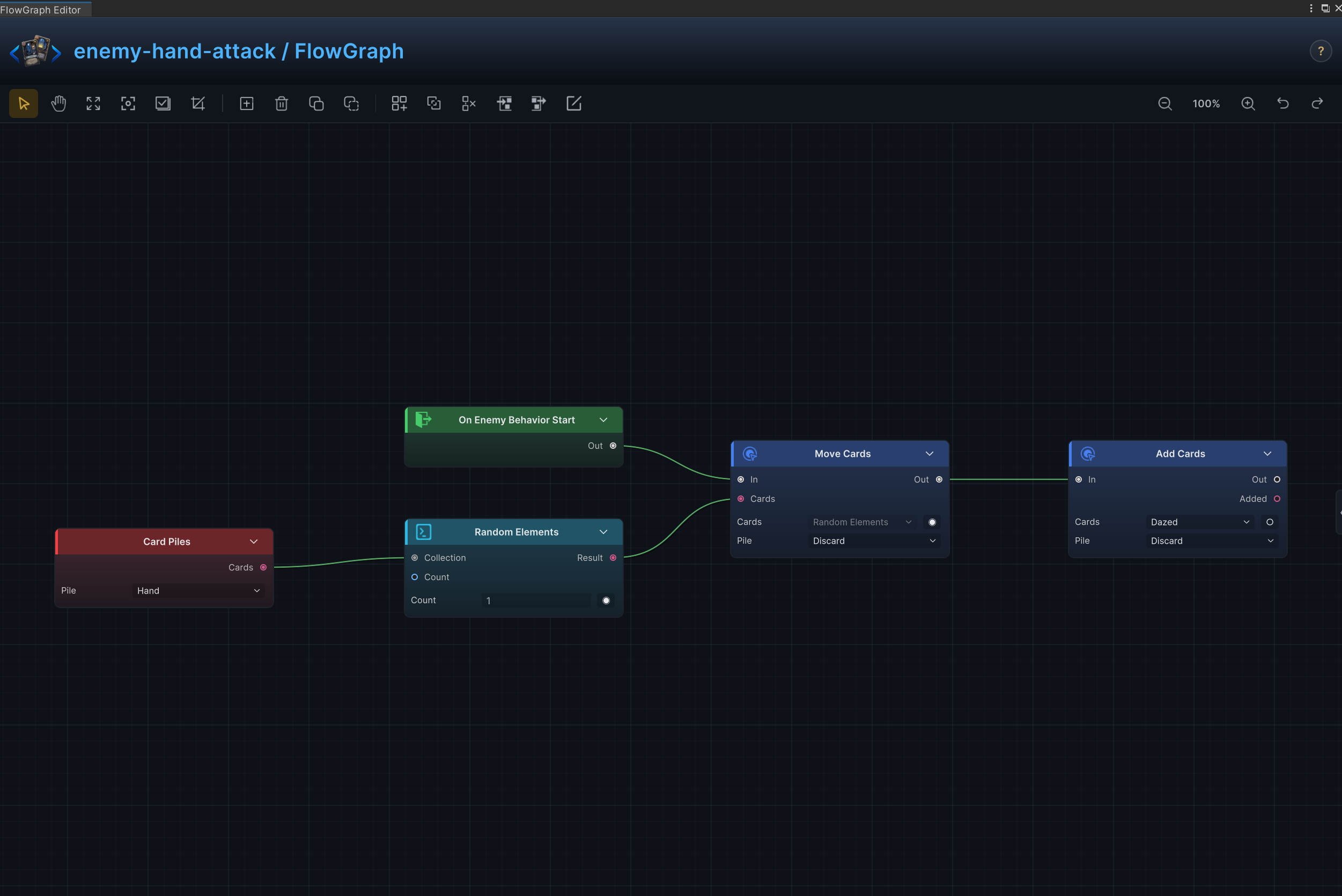
| 16 | Hand Disruption and Curses | Randomly discard cards, change costs, transform cards, or add curses to the player's piles |
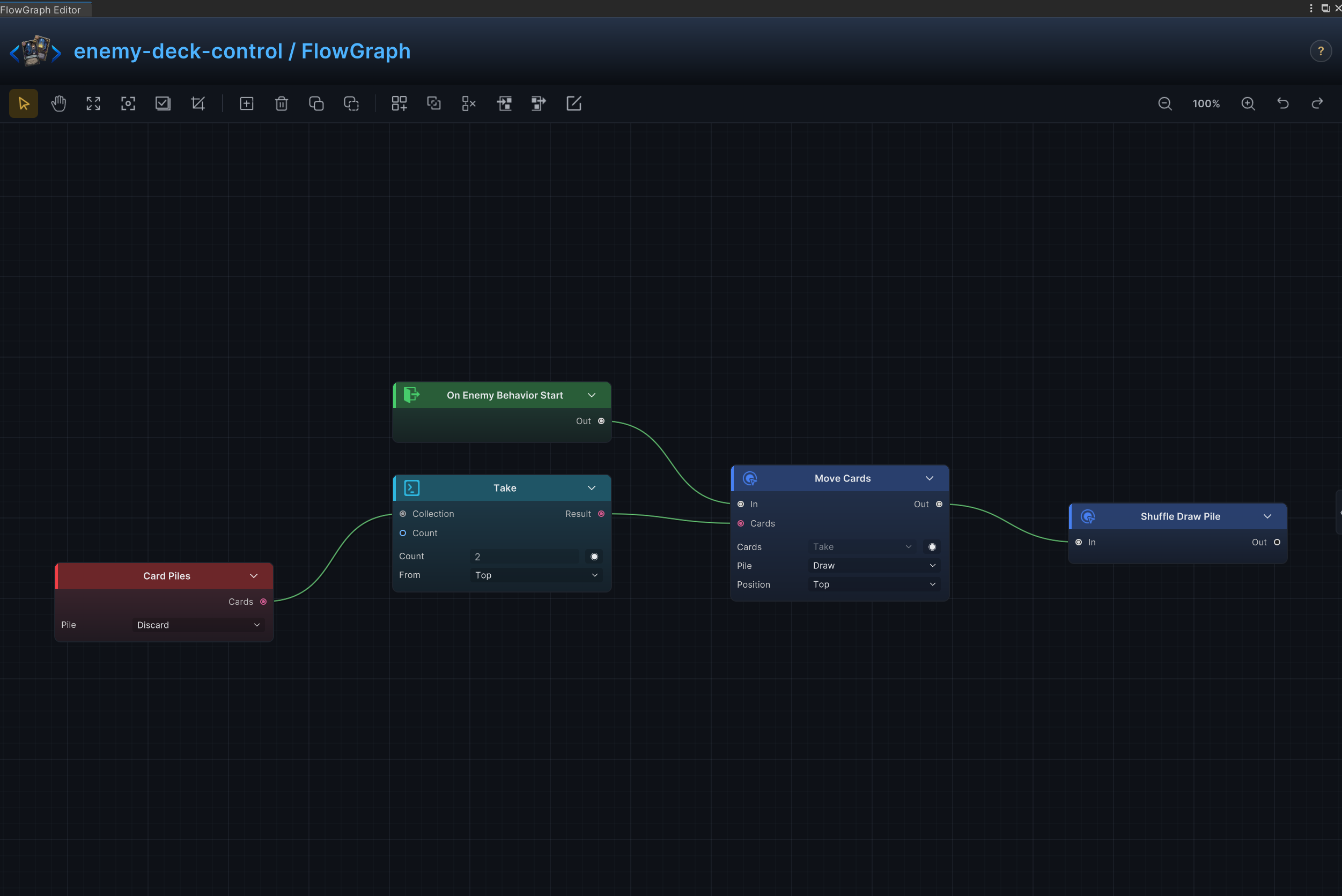
| 17 | Deck Top, Bottom, and Shuffle Control | Move cards from discard, place chosen cards at the top or bottom of the draw pile, and control shuffling |
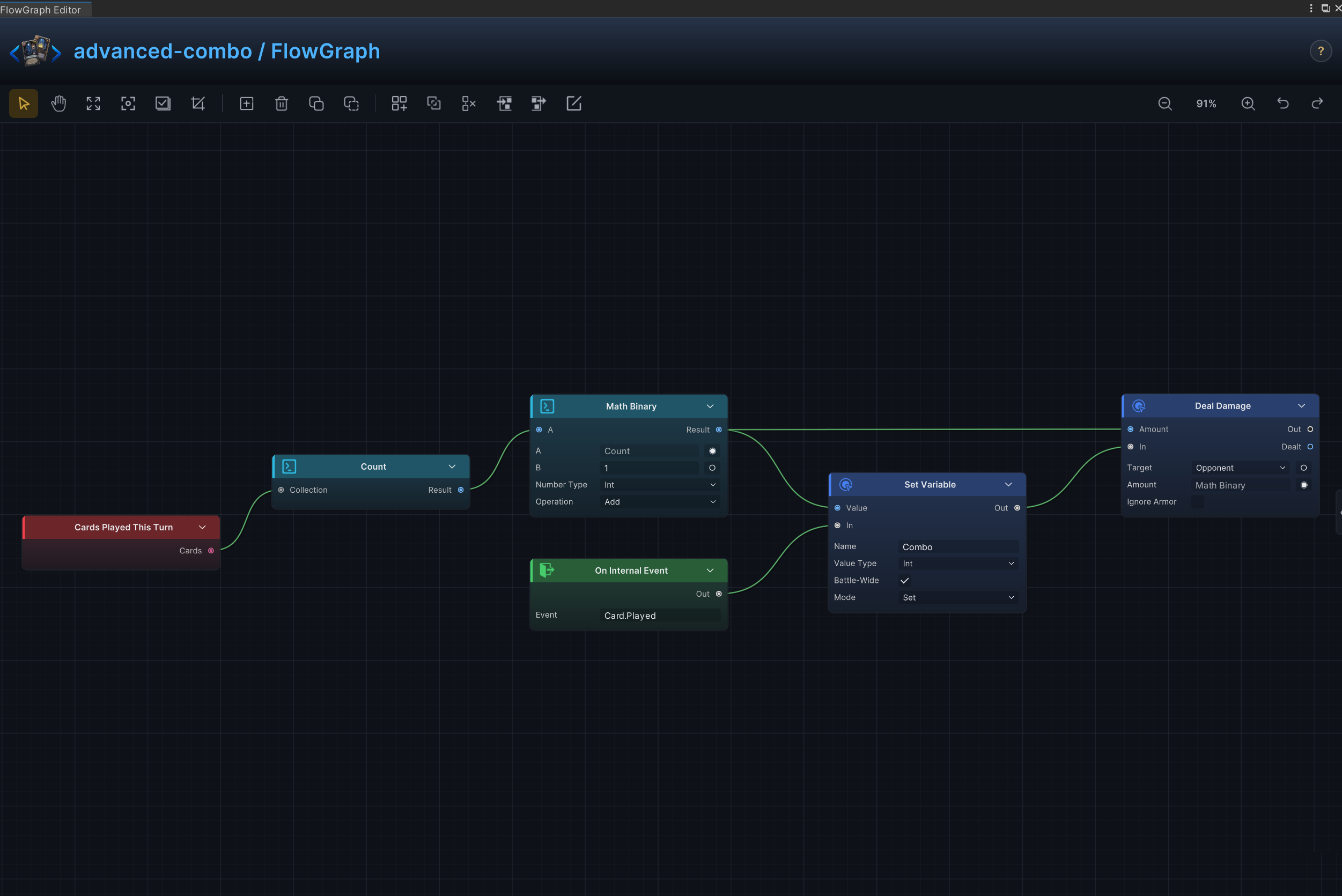
| 18 | Battle Combo Meter | Track cards played in a battle variable, then read or spend the combo count in other FlowGraphs |
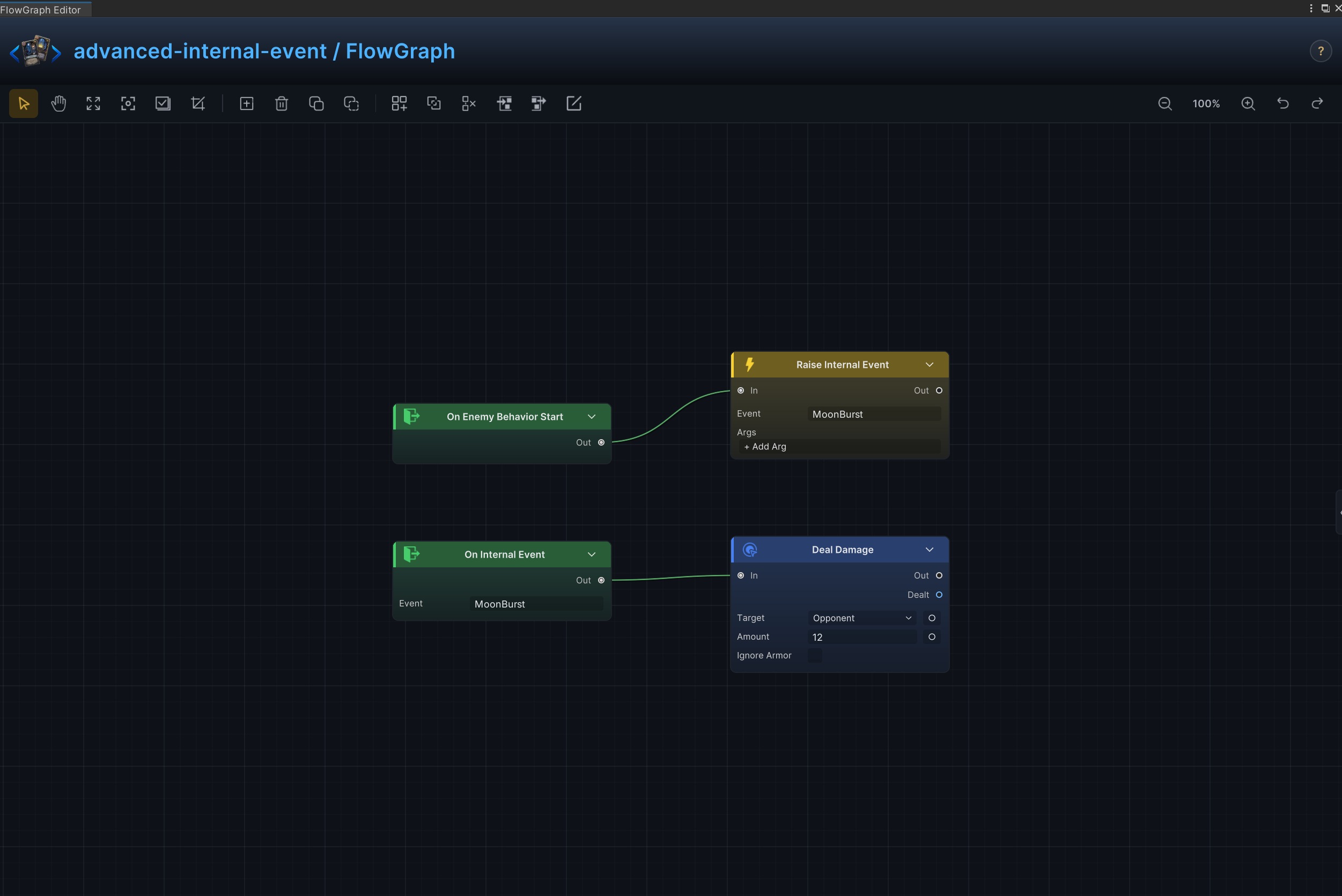
| 19 | Cross-Graph Internal Event | Use GCS internal events to trigger card, status, and enemy FlowGraphs from one another |
| 20 | External GES Event | Use GES events to connect FlowGraph with UI, quests, scene systems, or other game code |
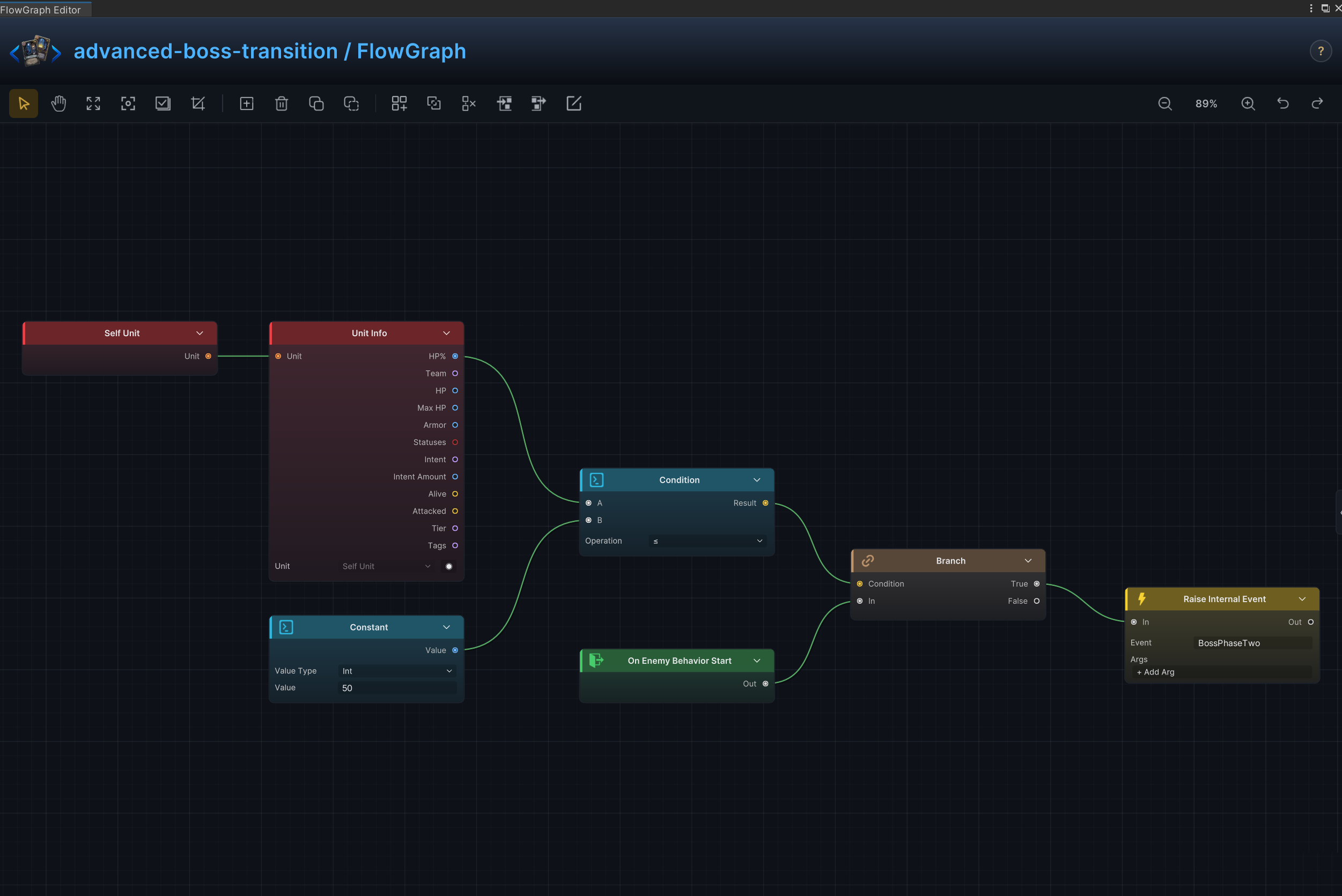
| 21 | Boss Phase Broadcast | Broadcast a phase change to UI, music, scene mechanics, and statuses when HP crosses a phase threshold |
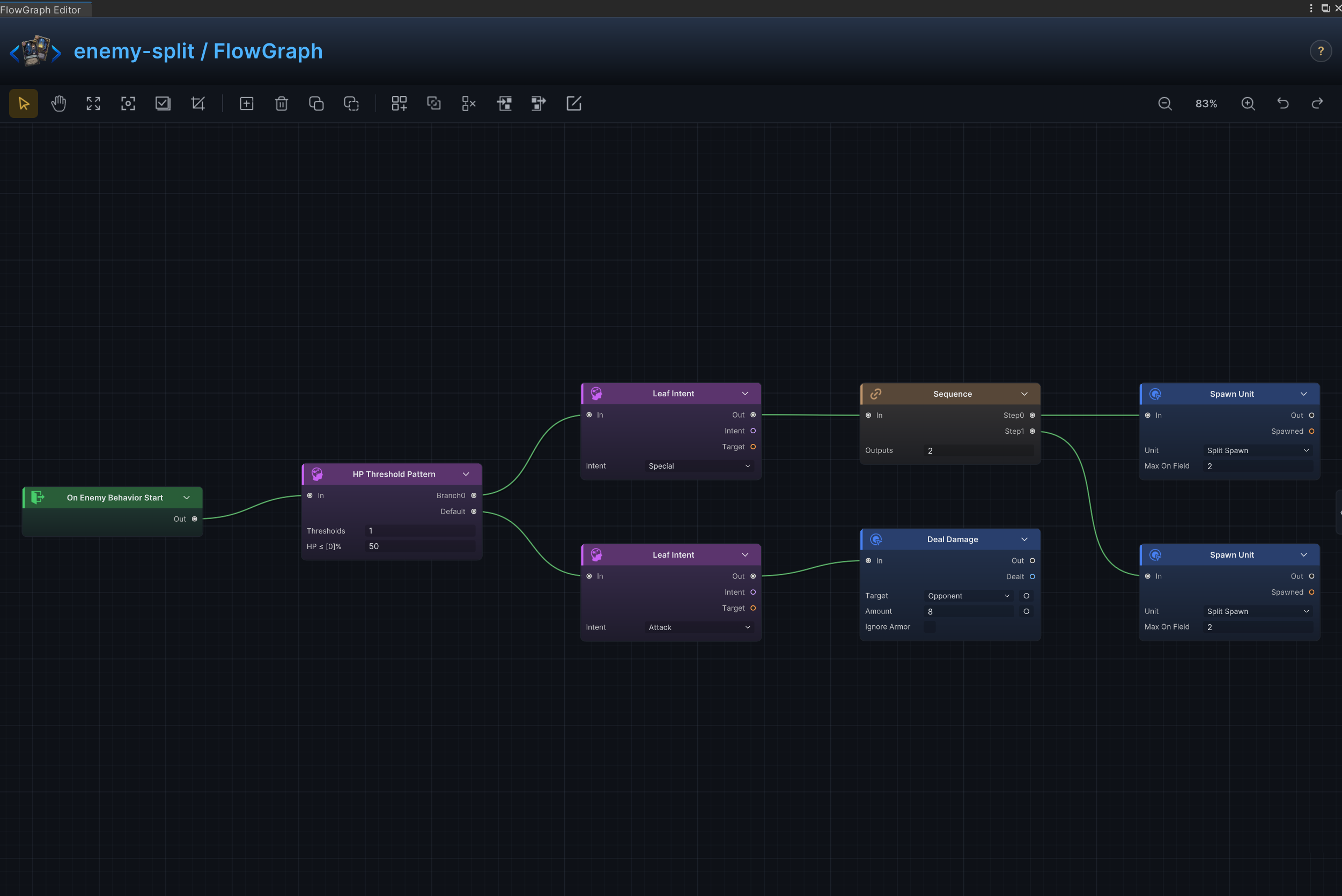
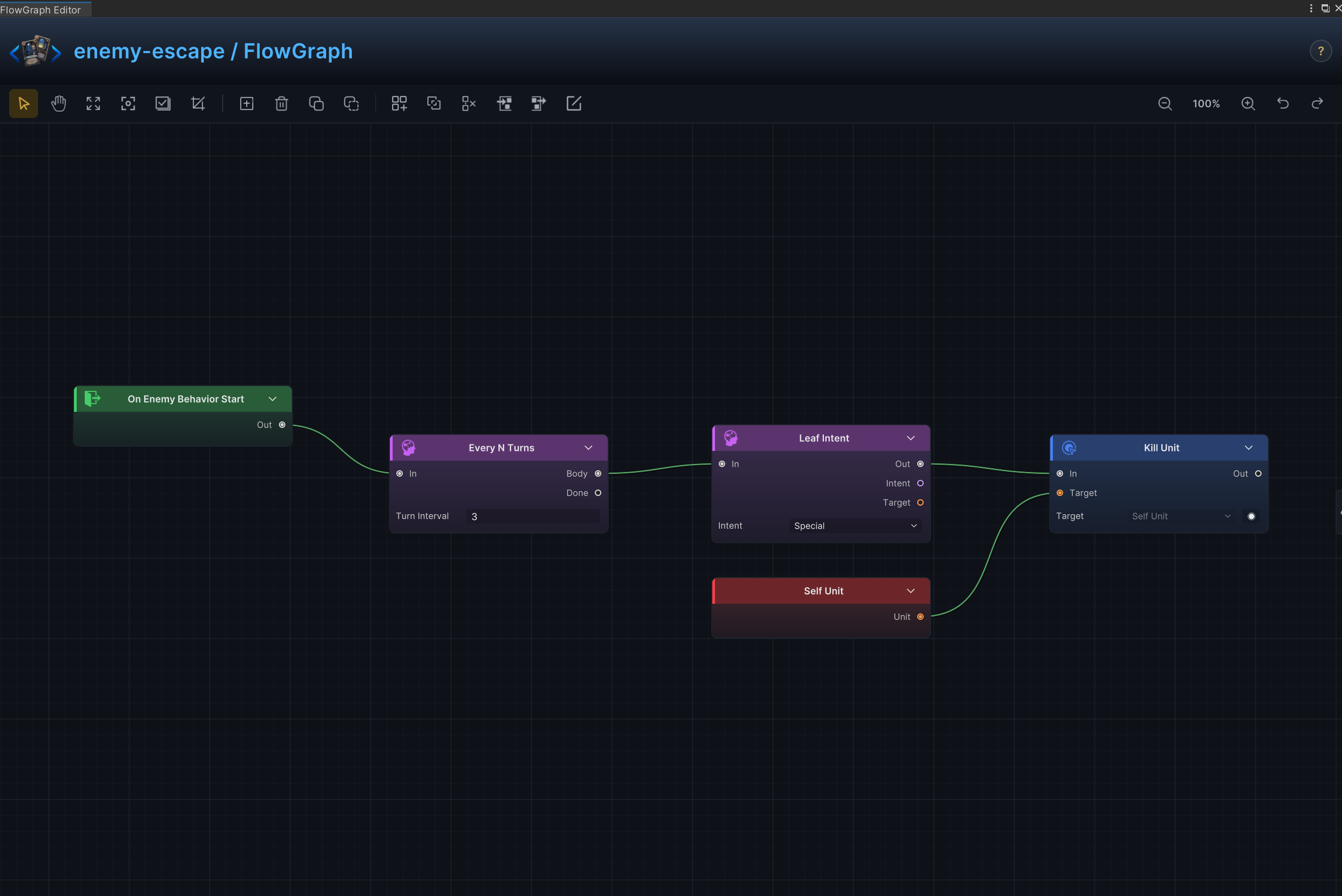
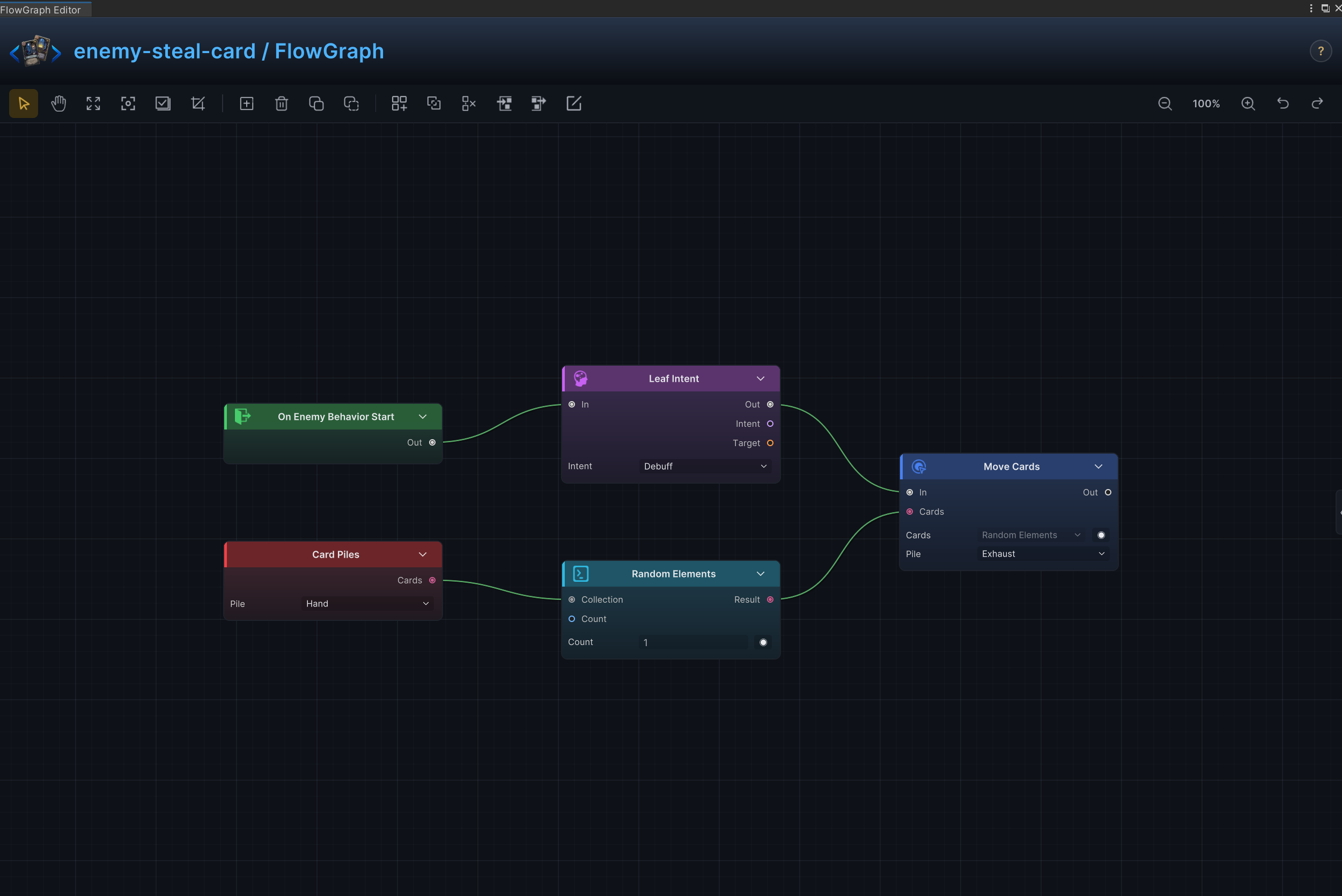
Every entry uses the same Effect, Node connections, and Node configuration structure. The graph on the right verifies node layout; port arrows show connections only, while field meanings and example values remain in Node configuration
Split at Half HP
Effect
Below 50% HP, split once into two Bog Polyps and despawn the source; on later evaluations, use the normal attack branch.
Node connections
On Enemy Behavior Start.Out → HP Threshold Pattern.InHP Threshold Pattern.Default → Leaf Intent (2).InLeaf Intent (1).Out → Sequence.InSequence.Step0 → Spawn Unit (1).InSequence.Step1 → Spawn Unit (2).InLeaf Intent (2).Out → Deal Damage.InHP Threshold Pattern.Branch0 → Once Per Battle.InOnce Per Battle.Body → Leaf Intent (1).InOnce Per Battle.Done → Leaf Intent (2).InSequence.Step2 → Despawn Unit.InSelf Unit.Unit → Despawn Unit.Target
Node configuration
-
Once Per Battle- Executes the split branch only once; later threshold matches continue through
Done.
- Executes the split branch only once; later threshold matches continue through
-
HP Threshold PatternThresholds = [50]: Defines the HP percentages at which the behavior changes branch.
-
Leaf Intent (1)Intent = Special: Selects the enemy intent represented by this leaf.
-
Leaf Intent (2)Intent = Attack: Selects the enemy intent represented by this leaf.
-
SequenceOutputs = 3: Sets the number of ordered control-flow branches.
-
Spawn Unit (1)Unit = Bog Polyp: Selects the unit asset spawned by this node.Max On Field = 2: Prevents the spawn when this many matching units are already present.
-
Spawn Unit (2)Unit = Bog Polyp: Selects the unit asset spawned by this node.Max On Field = 2: Prevents the spawn when this many matching units are already present.
-
Despawn UnitTarget = Opponent: Driven at runtime by Self Unit.Unit, so this unconnected fallback is ignored and the source is removed after both spawns.
-
Deal DamageTarget = Opponent: Uses the enemy currently selected by the card or behavior.Amount = 8: Uses 8 as the example value; replace it with the amount required by the card.Ignore Armor = Off: Damage resolves through armor normally.
Escape Countdown
Effect
Telegraph an escape, then remove the enemy when the countdown completes.
Node connections
On Enemy Behavior Start.Out → Every N Turns.InEvery N Turns.Body → Leaf Intent (1).InLeaf Intent (1).Out → Kill Unit.InSelf Unit.Unit → Kill Unit.TargetEvery N Turns.Done → Leaf Intent (2).In
Node configuration
-
Leaf Intent (1)Intent = Special: Shows the escape action on the countdown turn.
-
Leaf Intent (2)Intent = Special: Keeps a valid non-attack intent on the intervening turns.
-
Every N TurnsN = 3: Sets the interval between recurring executions.
-
Kill UnitTarget = Opponent: Driven at runtime by Self Unit.Unit; this value is only the unconnected fallback.
Steal and Exhaust a Card
Effect
Choose 1 random card from the player's hand and move it to the exhaust pile.
Node connections
On Enemy Behavior Start.Out → Leaf Intent.InLeaf Intent.Out → Move Cards.InCard Piles.Cards → Random Elements.CollectionRandom Elements.Result → Move Cards.Cards
Node configuration
Leaf IntentIntent = Debuff: Selects the enemy intent represented by this leaf.
Card PilesPile = Hand: Selects the source or destination card pile.
Random ElementsKind = Card: Selects the data, collection, choice, or hook value type handled by this node.Count = 1: Sets how many cards, elements, choices, or loop iterations are produced.
Move CardsCards = ThisCard: Driven at runtime by Random Elements.Result; this value is only the unconnected fallback.Pile = Exhaust: Selects the source or destination card pile.Position = Top: Selects where cards are inserted in the destination pile.
Opening Status or Battle Rule
Effect
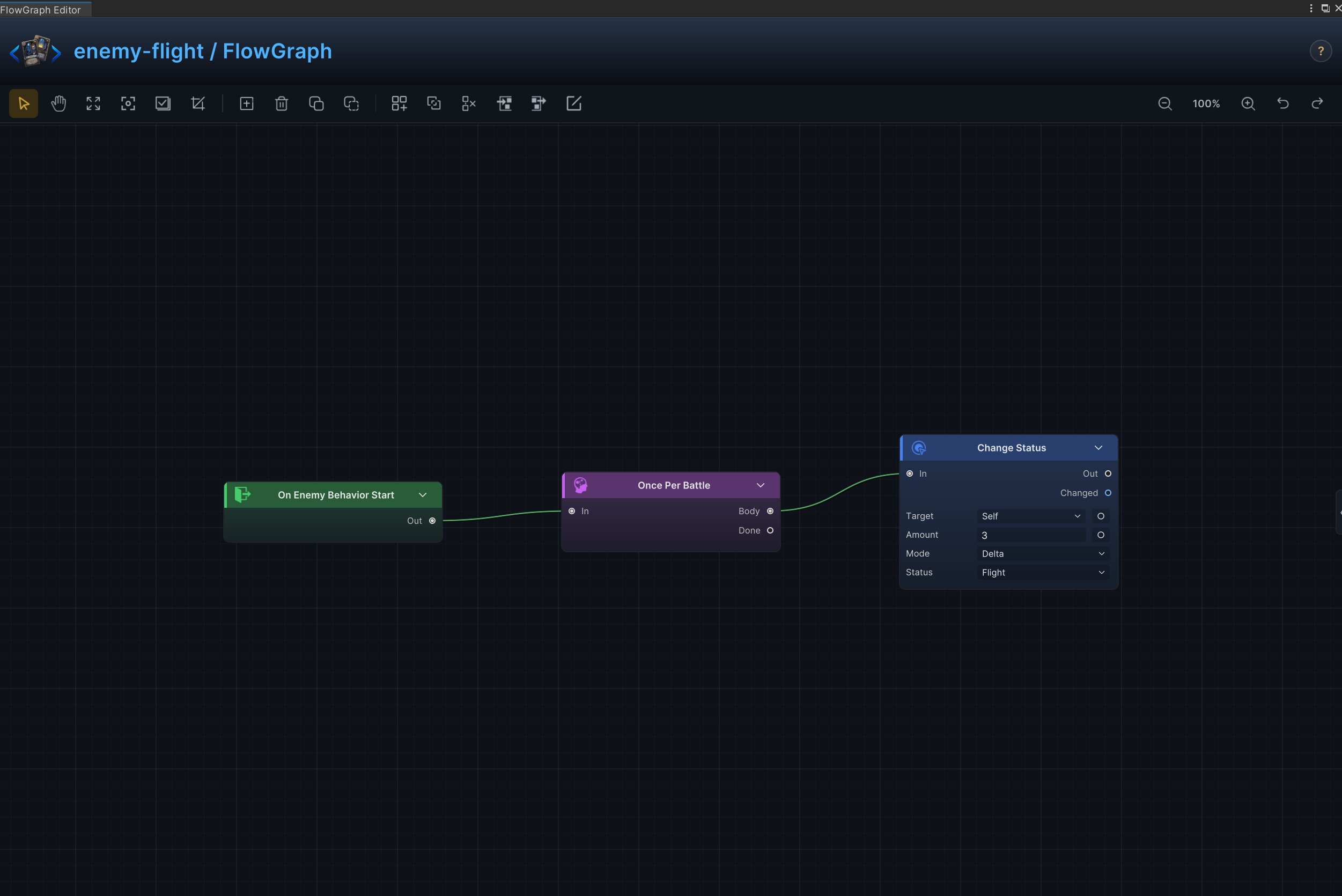
Apply Intangible once with a Buff intent, then use an Attack intent and deal 6 damage on later behavior evaluations.
Node connections
On Enemy Behavior Start.Out → Once Per Battle.InOnce Per Battle.Body → Leaf Intent (1).InLeaf Intent (1).Out → Change Status.InOnce Per Battle.Done → Leaf Intent (2).InLeaf Intent (2).Out → Deal Damage.In
Node configuration
-
Leaf Intent (1)Intent = Buff: Telegraphs the one-time Intangible application.
-
Leaf Intent (2)Intent = Attack: Telegraphs the fallback attack after setup.
-
Change StatusTarget = Self: Targets the source unit itself.Status = Intangible: Reads or changes the Intangible status.Mode = Delta: Adds to or subtracts from the current value; positive values increase it and negative values decrease it.Amount = 3: Uses 3 as the example value; replace it with the amount required by the card.
-
Deal DamageTarget = Opponent: Targets the opposing player unit.Amount = 6: Deals the normal fallback attack damage.Ignore Armor = Off: Damage resolves through armor normally.
Mode Shift at HP Threshold
Effect
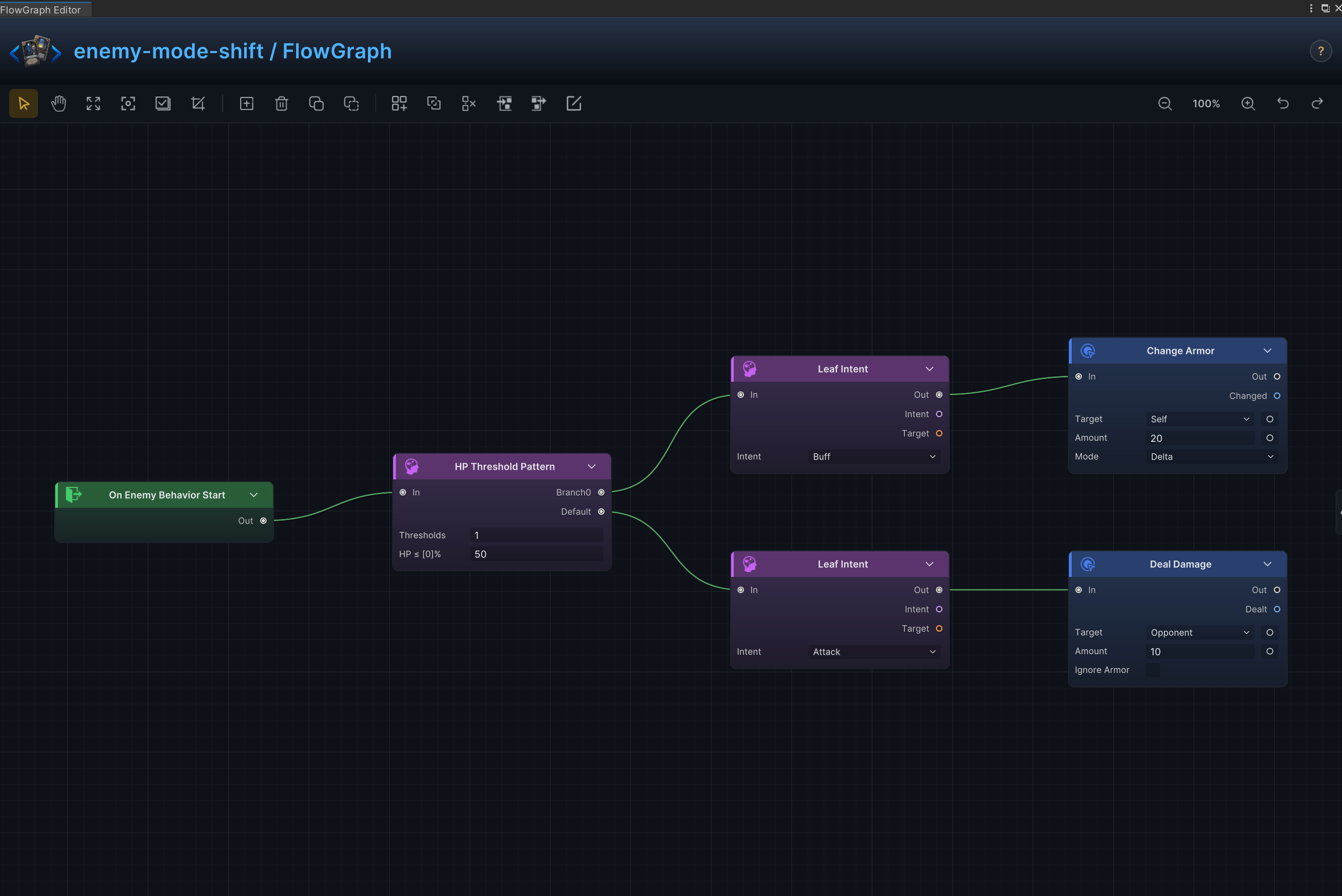
Switch from a normal attack pattern to a defensive phase below the HP threshold.
Node connections
On Enemy Behavior Start.Out → HP Threshold Pattern.InHP Threshold Pattern.Branch0 → Leaf Intent (1).InHP Threshold Pattern.Default → Leaf Intent (2).InLeaf Intent (1).Out → Change Armor.InLeaf Intent (2).Out → Deal Damage.In
Node configuration
HP Threshold PatternThresholds = [50]: Defines the HP percentages at which the behavior changes branch.
Leaf Intent (1)Intent = Buff: Selects the enemy intent represented by this leaf.
Leaf Intent (2)Intent = Attack: Selects the enemy intent represented by this leaf.
Change ArmorTarget = Self: Targets the source unit itself.Mode = Delta: Adds to or subtracts from the current value; positive values increase it and negative values decrease it.Amount = 20: Uses 20 as the example value; replace it with the amount required by the card.
Deal DamageTarget = Opponent: Uses the enemy currently selected by the card or behavior.Amount = 10: Uses 10 as the example value; replace it with the amount required by the card.Ignore Armor = Off: Damage resolves through armor normally.
Deterministic Intent Sequence
Effect
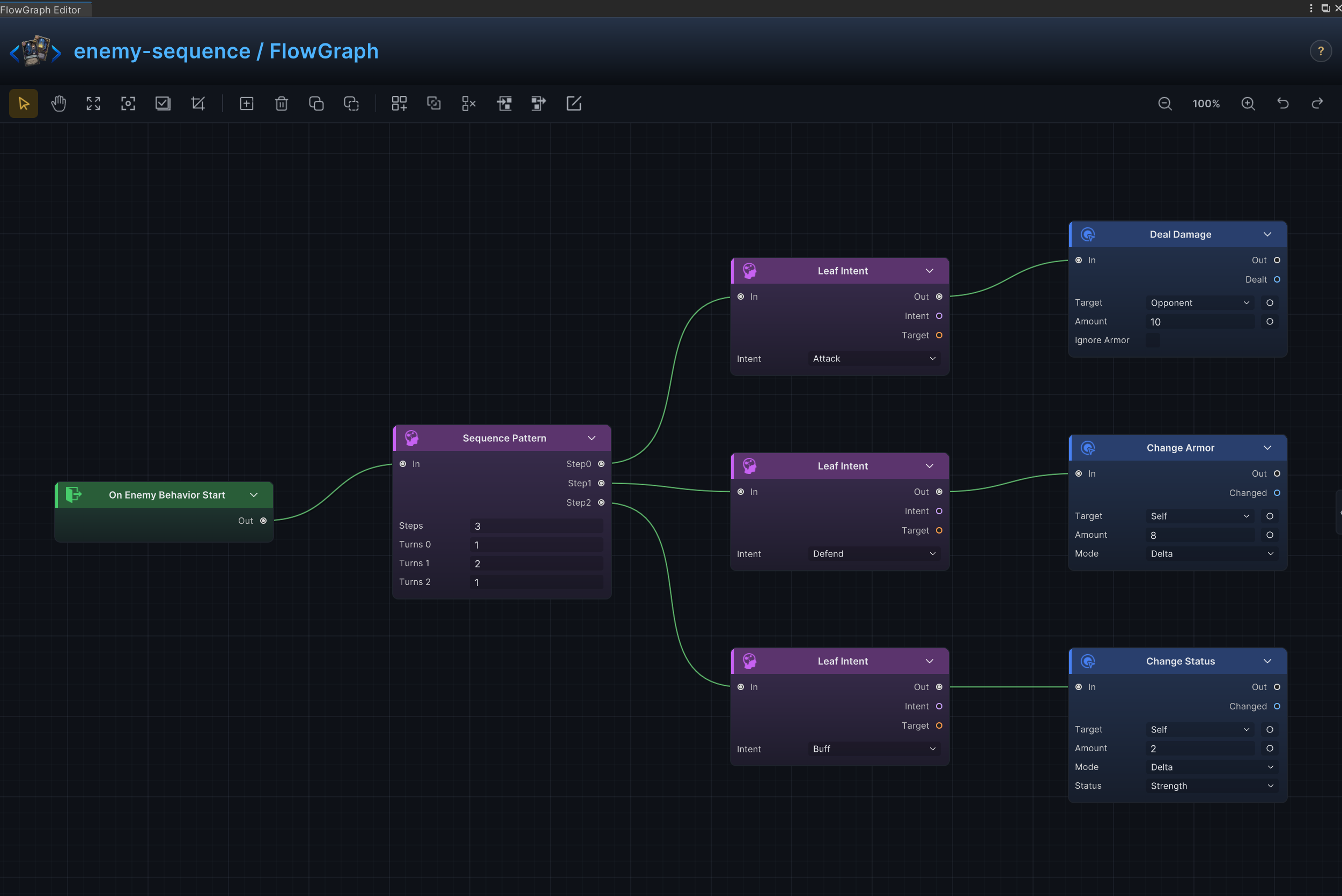
Cycle through attack, defense, buff, and other enemy intents in a fixed order.
Node connections
On Enemy Behavior Start.Out → Sequence Pattern.InSequence Pattern.Step0 → Leaf Intent (1).InSequence Pattern.Step1 → Leaf Intent (2).InSequence Pattern.Step2 → Leaf Intent (3).InLeaf Intent (1).Out → Deal Damage.InLeaf Intent (2).Out → Change Armor.InLeaf Intent (3).Out → Change Status.In
Node configuration
Sequence PatternRepeat Counts = [1, 2, 1]: Sets how many times each sequence entry repeats.
Leaf Intent (1)Intent = Attack: Selects the enemy intent represented by this leaf.
Leaf Intent (2)Intent = Defend: Selects the enemy intent represented by this leaf.
Leaf Intent (3)Intent = Buff: Selects the enemy intent represented by this leaf.
Deal DamageTarget = Opponent: Uses the enemy currently selected by the card or behavior.Amount = 10: Uses 10 as the example value; replace it with the amount required by the card.Ignore Armor = Off: Damage resolves through armor normally.
Change ArmorTarget = Self: Targets the source unit itself.Mode = Delta: Adds to or subtracts from the current value; positive values increase it and negative values decrease it.Amount = 8: Uses 8 as the example value; replace it with the amount required by the card.
Change StatusTarget = Self: Targets the source unit itself.Status = Strength: Reads or changes the Strength status.Mode = Delta: Adds to or subtracts from the current value; positive values increase it and negative values decrease it.Amount = 2: Uses 2 as the example value; replace it with the amount required by the card.
Weighted Random Intents
Effect
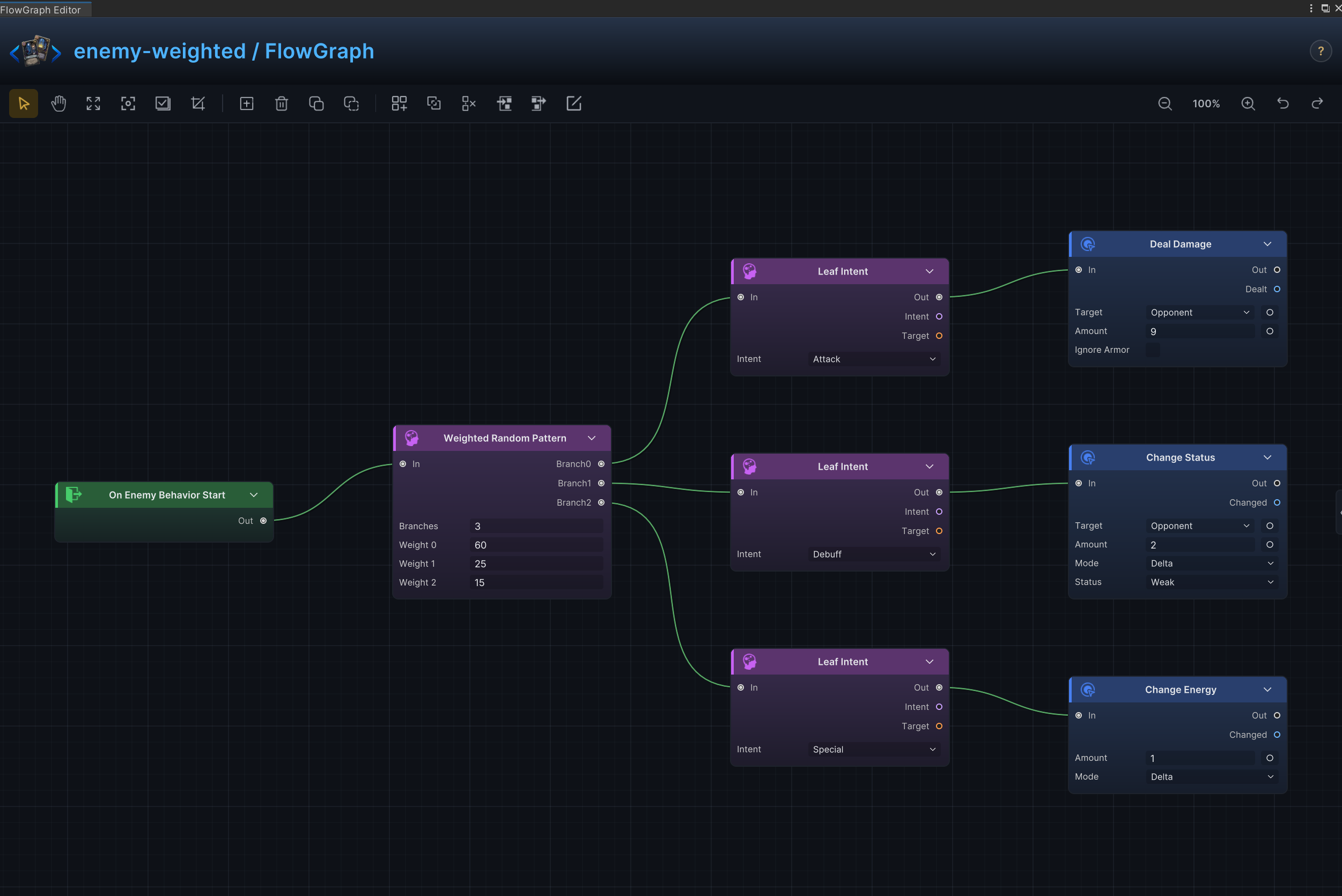
Choose the next enemy intent from several options by weight.
Node connections
On Enemy Behavior Start.Out → Weighted Random Pattern.InWeighted Random Pattern.Branch0 → Leaf Intent (1).InWeighted Random Pattern.Branch1 → Leaf Intent (2).InWeighted Random Pattern.Branch2 → Leaf Intent (3).InLeaf Intent (1).Out → Deal Damage.InLeaf Intent (2).Out → Change Status.InLeaf Intent (3).Out → Change Energy.In
Node configuration
Weighted Random PatternWeights = [60, 25, 15]: Sets the relative selection weight of each random branch.
Leaf Intent (1)Intent = Attack: Selects the enemy intent represented by this leaf.
Leaf Intent (2)Intent = Debuff: Selects the enemy intent represented by this leaf.
Leaf Intent (3)Intent = Special: Selects the enemy intent represented by this leaf.
Deal DamageTarget = Opponent: Uses the enemy currently selected by the card or behavior.Amount = 9: Uses 9 as the example value; replace it with the amount required by the card.Ignore Armor = Off: Damage resolves through armor normally.
Change StatusTarget = Opponent: Uses the enemy currently selected by the card or behavior.Status = Weak: Reads or changes the Weak status.Mode = Delta: Adds to or subtracts from the current value; positive values increase it and negative values decrease it.Amount = 2: Uses 2 as the example value; replace it with the amount required by the card.
Change EnergyMode = Delta: Adds to or subtracts from the current value; positive values increase it and negative values decrease it.Amount = 1: Uses 1 as the example value; replace it with the amount required by the card.
HP-Threshold Boss Phases
Effect
Switch boss phases and available actions according to HP percentage.
Node connections
On Enemy Behavior Start.Out → HP Threshold Pattern.InHP Threshold Pattern.Branch0 → Leaf Intent (1).InHP Threshold Pattern.Branch1 → Leaf Intent (2).InHP Threshold Pattern.Branch2 → Leaf Intent (3).InHP Threshold Pattern.Default → Leaf Intent (4).InLeaf Intent (1).Out → Deal Damage.InLeaf Intent (2).Out → Change Status (1).InLeaf Intent (3).Out → Change Status (2).InLeaf Intent (4).Out → Change Armor.In
Node configuration
HP Threshold PatternThresholds = [25, 50, 75]: Defines the HP percentages at which the behavior changes branch.
Leaf Intent (1)Intent = Attack: Selects the enemy intent represented by this leaf.
Leaf Intent (2)Intent = Buff: Selects the enemy intent represented by this leaf.
Leaf Intent (3)Intent = Debuff: Selects the enemy intent represented by this leaf.
Leaf Intent (4)Intent = Defend: Selects the enemy intent represented by this leaf.
Deal DamageTarget = Opponent: Uses the enemy currently selected by the card or behavior.Amount = 24: Uses 24 as the example value; replace it with the amount required by the card.Ignore Armor = Off: Damage resolves through armor normally.
Change Status (1)Target = Self: Targets the source unit itself.Status = Strength: Reads or changes the Strength status.Mode = Delta: Adds to or subtracts from the current value; positive values increase it and negative values decrease it.Amount = 4: Uses 4 as the example value; replace it with the amount required by the card.
Change Status (2)Target = Opponent: Uses the enemy currently selected by the card or behavior.Status = Frail: Reads or changes the Frail status.Mode = Delta: Adds to or subtracts from the current value; positive values increase it and negative values decrease it.Amount = 2: Uses 2 as the example value; replace it with the amount required by the card.
Change ArmorTarget = Self: Targets the source unit itself.Mode = Delta: Adds to or subtracts from the current value; positive values increase it and negative values decrease it.Amount = 12: Uses 12 as the example value; replace it with the amount required by the card.
Opening Move and Periodic Special
Effect
Run one opening move, then use a special action every N turns and a normal action on the remaining turns.
Node connections
On Enemy Behavior Start.Out → Once Per Battle.InOnce Per Battle.Body → Leaf Intent (1).InOnce Per Battle.Done → Every N Turns.InEvery N Turns.Body → Leaf Intent (2).InEvery N Turns.Done → Leaf Intent (3).InLeaf Intent (1).Out → Change Status.InLeaf Intent (2).Out → Deal Damage (1).InLeaf Intent (3).Out → Deal Damage (2).In
Node configuration
Every N TurnsN = 3: Sets the interval between recurring executions.
Leaf Intent (1)Intent = Debuff: Selects the enemy intent represented by this leaf.
Leaf Intent (2)Intent = Special: Selects the enemy intent represented by this leaf.
Leaf Intent (3)Intent = Attack: Selects the enemy intent represented by this leaf.
Change StatusTarget = Opponent: Uses the enemy currently selected by the card or behavior.Status = Weak: Reads or changes the Weak status.Mode = Delta: Adds to or subtracts from the current value; positive values increase it and negative values decrease it.Amount = 2: Uses 2 as the example value; replace it with the amount required by the card.
Deal Damage (1)Target = Opponent: Uses the enemy currently selected by the card or behavior.Amount = 18: Uses 18 as the example value; replace it with the amount required by the card.Ignore Armor = Off: Damage resolves through armor normally.
Deal Damage (2)Target = Opponent: Uses the enemy currently selected by the card or behavior.Amount = 7: Uses 7 as the example value; replace it with the amount required by the card.Ignore Armor = Off: Damage resolves through armor normally.
Charge, Countdown, and Delayed Attack
Effect
Shows a charge Intent first, then resolves the attack during the enemy phase after the countdown ends.
Node connections
Leaf Intent (1).Out → Delayed Trigger.InDelayed Trigger.Body → Deal Damage (1).InOn Enemy Behavior Start.Out → Once Per Battle.InOnce Per Battle.Body → Leaf Intent (1).InOnce Per Battle.Done → Leaf Intent (2).InLeaf Intent (2).Out → Deal Damage (2).In
Node configuration
-
Once Per Battle- Routes only the first evaluation through the delayed charge branch.
-
Leaf Intent (1)Intent = Special: Telegraphs the one-time charge.
-
Leaf Intent (2)Intent = Attack: Telegraphs the normal attack used afterward.
-
Delayed TriggerDelay Turns = 2: Sets how many turns pass before the delayed branch resolves.Tick Phase = EnemyPhaseEnd: Selects the battle phase that advances the delayed countdown.Cancel On Source Death = On: Cancels the delayed resolution if its source unit dies first.
-
Deal Damage (1)Target = Opponent: Uses the enemy currently selected by the card or behavior.Amount = 18: Uses 18 as the example value; replace it with the amount required by the card.Ignore Armor = Off: Damage resolves through armor normally.
-
Deal Damage (2)Target = Opponent: Uses the enemy currently selected by the card or behavior.Amount = 6: Uses 6 as the normal attack used after the one-time charge branch.Ignore Armor = Off: Damage resolves through armor normally.
Summon, minions, and reinforcement waves
Effect
Summon minions or add the next wave while limiting how many matching units can remain on the field.
Node connections
On Enemy Behavior Start.Out → Leaf Intent.InLeaf Intent.Out → Spawn Unit.In
Node configuration
Leaf IntentIntent = Special: Selects the enemy intent represented by this leaf.
Spawn UnitUnit = Hex Acolyte: Selects the unit asset spawned by this node.Max On Field = 2: Prevents the spawn when this many matching units are already present.
Sacrifice an Ally and Revive
Effect
Selects one random enemy unit, captures that selection as a single Foreach element, kills it, then revives the same unit at 50% HP.
Node connections
All Allies.Units → Random Elements.CollectionRandom Elements.Result → Foreach.CollectionOn Enemy Behavior Start.Out → Leaf Intent.InLeaf Intent.Out → Foreach.InForeach.Body → Kill Unit.InForeach.Element → Kill Unit.TargetKill Unit.Out → Revive Unit.InForeach.Element → Revive Unit.Target
Node configuration
-
Leaf IntentIntent = Special: Selects the enemy intent represented by this leaf.
-
Random ElementsKind = Unit: Selects the data, collection, choice, or hook value type handled by this node.Count = 1: Sets how many cards, elements, choices, or loop iterations are produced.
-
ForeachKind = Unit: Captures the selected unit as the element shared by the kill and revive actions.
-
Kill UnitTarget = Opponent: Driven at runtime by Foreach.Element; this value is only the unconnected fallback.
-
Revive UnitTarget = Self: Driven at runtime by Foreach.Element; this value is only the unconnected fallback.HP Percent = 50: Sets the percentage of maximum HP restored on revival.
Enrage and Scaling Over Time
Effect
After the enemy action begins, adds 2 Strength and then grants 4 armor to the source unit.
Node connections
Change Status.Out → Change Armor.InOn Enemy Behavior Start.Out → Leaf Intent.InLeaf Intent.Out → Change Status.In
Node configuration
-
Leaf IntentIntent = Buff: Selects the enemy intent represented by this leaf.
-
Change StatusTarget = Self: Targets the source unit itself.Status = Strength: Reads or changes the Strength status.Mode = Delta: Adds to or subtracts from the current value; positive values increase it and negative values decrease it.Amount = 2: Uses 2 as the example value; replace it with the amount required by the card.
-
Change ArmorTarget = Self: Targets the source unit itself.Mode = Delta: Adds to or subtracts from the current value; positive values increase it and negative values decrease it.Amount = 4: Uses 4 as the example value; replace it with the amount required by the card.
Combat-Property Targeting
Effect
Select the lowest-HP, highest-armor, or otherwise prioritized target from a unit collection.
Node connections
All Units.Units → Sort.CollectionSort.Result → Pick Element.CollectionPick Element.Element → Deal Damage.TargetOn Enemy Behavior Start.Out → Leaf Intent.InLeaf Intent.Out → Deal Damage.In
Node configuration
-
Leaf IntentIntent = Attack: Selects the enemy intent represented by this leaf.
-
SortKind = Unit: Selects the data, collection, choice, or hook value type handled by this node.Unit Rule = HP: Selects the unit property used by this collection operation.Order = Ascending: Selects ascending or descending sort order.
-
Pick ElementKind = Unit: Selects the data, collection, choice, or hook value type handled by this node.By = First: Selects the property used to pick an element.Index = 0: Selects the zero-based collection element.
-
Deal DamageTarget = Opponent: Driven at runtime by Pick Element.Element; this value is only the unconnected fallback.Amount = 10: Uses 10 as the example value; replace it with the amount required by the card.Ignore Armor = Off: Damage resolves through armor normally.
Per-Target Chained Action
Effect
After declaring an Attack intent, iterates through All Units and deals 4 damage to each unit.
Node connections
All Units.Units → Foreach.CollectionForeach.Body → Deal Damage.InForeach.Element → Deal Damage.TargetOn Enemy Behavior Start.Out → Leaf Intent.InLeaf Intent.Out → Foreach.In
Node configuration
-
Leaf IntentIntent = Attack: Selects the enemy intent represented by this leaf.
-
ForeachKind = Unit: Selects the data, collection, choice, or hook value type handled by this node.
-
Deal DamageTarget = Opponent: Driven at runtime by Foreach.Element; this value is only the unconnected fallback.Amount = 4: Uses 4 as the example value; replace it with the amount required by the card.Ignore Armor = Off: Damage resolves through armor normally.
Hand Disruption and Curses
Effect
Discards one random card from the player's hand, then adds one Doubt to the top of the discard pile.
Node connections
Move Cards.Out → Add Cards.InCard Piles.Cards → Random Elements.CollectionRandom Elements.Result → Move Cards.CardsOn Enemy Behavior Start.Out → Leaf Intent.InLeaf Intent.Out → Move Cards.In
Node configuration
-
Leaf IntentIntent = Debuff: Selects the enemy intent represented by this leaf.
-
Card PilesPile = Hand: Selects the source or destination card pile.
-
Random ElementsKind = Card: Selects the data, collection, choice, or hook value type handled by this node.Count = 1: Sets how many cards, elements, choices, or loop iterations are produced.
-
Move CardsCards = ThisCard: Driven at runtime by Random Elements.Result; this value is only the unconnected fallback.Pile = Discard: Selects the source or destination card pile.Position = Top: Selects where cards are inserted in the destination pile.
-
Add CardsCard = Doubt: Selects the card asset created by this node.Pile = Discard: Selects the source or destination card pile.Position = Top: Selects where cards are inserted in the destination pile.
Deck Top, Bottom, and Shuffle Control
Effect
Takes the top 2 cards from the discard pile, moves them to the top of the draw pile, then shuffles the draw pile.
Node connections
Move Cards.Out → Shuffle Draw Pile.InCard Piles.Cards → Take.CollectionTake.Result → Move Cards.CardsOn Enemy Behavior Start.Out → Leaf Intent.InLeaf Intent.Out → Move Cards.In
Node configuration
-
Leaf IntentIntent = Debuff: Selects the enemy intent represented by this leaf.
-
Card PilesPile = Discard: Selects the source or destination card pile.
-
TakeKind = Card: Selects the data, collection, choice, or hook value type handled by this node.Count = 2: Sets how many cards, elements, choices, or loop iterations are produced.From = Top: Selects the side of the collection from which elements are taken.
-
Move CardsCards = ThisCard: Driven at runtime by Take.Result; this value is only the unconnected fallback.Pile = Draw: Selects the source or destination card pile.Position = Top: Selects where cards are inserted in the destination pile.
Battle Combo Meter
Effect
At enemy behavior start, stores Cards Played This Turn plus 1 in the Combo battle variable and deals that same value as damage to the opponent.
Node connections
Set Variable.Out → Deal Damage.InCards Played This Turn.Cards → Count.CollectionCount.Result → Math Binary.AMath Binary.Result → Set Variable.ValueMath Binary.Result → Deal Damage.AmountOn Enemy Behavior Start.Out → Leaf Intent.InLeaf Intent.Out → Set Variable.In
Node configuration
-
Leaf IntentIntent = Attack: Selects the enemy intent represented by this leaf.
-
CountKind = Card: Selects the data, collection, choice, or hook value type handled by this node.
-
Math BinaryKind = Int: Selects the data, collection, choice, or hook value type handled by this node.A = 0: Driven at runtime by Count.Result; this value is only the unconnected fallback.B = 1: Sets the second operand when the B input is not connected.Op = Add: Adds the two operands.
-
Set VariableName = Combo: Identifies the battle or graph variable.Battle Scope = On: Stores or reads the variable for the current battle rather than one graph execution.Mode = Set: Replaces the current value with the configured value.Kind = Int: Selects the data, collection, choice, or hook value type handled by this node.Value = 0: Driven at runtime by Math Binary.Result; this value is only the unconnected fallback.
-
Deal DamageTarget = Opponent: Uses the enemy currently selected by the card or behavior.Amount = 6: Driven at runtime by Math Binary.Result; this value is only the unconnected fallback.Ignore Armor = Off: Damage resolves through armor normally.
Cross-Graph Internal Event
Effect
Uses a named GCS event to trigger card, status, and enemy FlowGraphs from one another.
Node connections
On Internal Event.Out → Deal Damage.InOn Enemy Behavior Start.Out → Leaf Intent.InLeaf Intent.Out → Raise Internal Event.In
Node configuration
-
Leaf IntentIntent = Special: Selects the enemy intent represented by this leaf.
-
Raise Internal EventEvent Name = MoonBurst: Identifies the named internal event sent or received by this graph.Argument Bindings = []: Maps internal-event arguments into graph values.
-
On Internal EventEvent Name = MoonBurst: Identifies the named internal event sent or received by this graph.
-
Deal DamageTarget = Opponent: Uses the enemy currently selected by the card or behavior.Amount = 12: Uses 12 as the example value; replace it with the amount required by the card.Ignore Armor = Off: Damage resolves through armor normally.
External GES Event
Effect
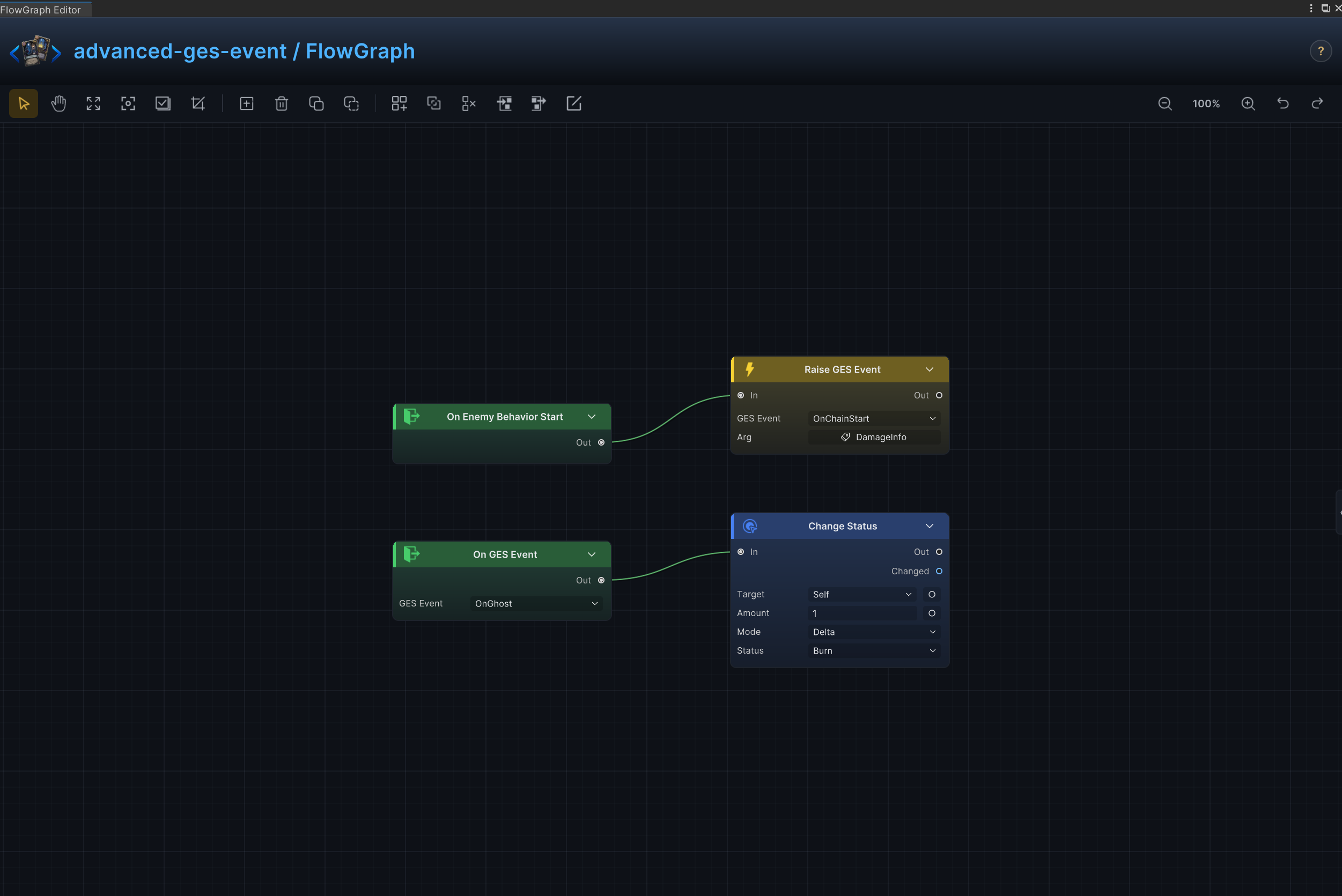
Uses a GES event to connect FlowGraph with UI, quests, scene systems, or other game code.
Node connections
On GES Event.Out → Change Status.InOn Enemy Behavior Start.Out → Leaf Intent.InLeaf Intent.Out → Raise GES Event.In
Node configuration
-
Leaf IntentIntent = Special: Selects the enemy intent represented by this leaf.
-
Raise GES EventGES Event GUID = 651fc1ec-858e-4864-9795-8f6ef1df19ea: Binds the node to one GES event asset.GES Argument Source = Fixed: Selects how the GES event argument is obtained.GES Sender Source = Fixed: Selects how the GES sender value is obtained.
-
On GES EventGES Event GUID = 651fc1ec-858e-4864-9795-8f6ef1df19ea: Binds the node to one GES event asset.
-
Change StatusTarget = Self: Targets the source unit itself.Status = Burn: Reads or changes the Burn status.Mode = Delta: Adds to or subtracts from the current value; positive values increase it and negative values decrease it.Amount = 1: Uses 1 as the example value; replace it with the amount required by the card.
Boss Phase Broadcast
Effect
When the boss begins an action at 50% HP or below, raises BossPhaseTwo exactly once per battle so UI, music, scene mechanics, and statuses can transition once.
Node connections
Self Unit.Unit → Unit Info.UnitUnit Info.HPPercent → Condition.AConstant.Value → Condition.BCondition.Result → Branch.ConditionOn Enemy Behavior Start.Out → Leaf Intent.InLeaf Intent.Out → Branch.InBranch.True → Once Per Battle.InOnce Per Battle.Body → Raise Internal Event.In
Node configuration
-
Leaf IntentIntent = Special: Selects the enemy intent represented by this leaf.
-
Unit InfoUnit = Self: Driven at runtime by Self Unit.Unit; this value is only the unconnected fallback.
-
ConstantKind = Int: Selects the data, collection, choice, or hook value type handled by this node.Int Value = 50: Supplies the integer constant.
-
ConditionOp = LessEqual: Passes when A is less than or equal to B.
-
Once Per Battle- No configurable fields: Allows Body to run only on the first valid entry during the battle.
-
Raise Internal EventEvent Name = BossPhaseTwo: Identifies the named internal event sent or received by this graph.Argument Bindings = []: Maps internal-event arguments into graph values.