Status recipes
Choose from 30 status-mechanic recipes and rebuild each effect from its node connections, configuration, and editable FlowGraph
Recipe overview
| # | Mechanism | What it builds |
|---|---|---|
| 1 | Poison, burn, regeneration, and periodic ticks | Read the status stack count at the specified turn timing, then deal damage, heal, or grant resources according to that count |
| 2 | Strength and Weak | Change damage dealt by the status holder before it is applied |
| 3 | Incoming Damage Multiplier | Multiply incoming damage while the status is active; use positive or negative scaling for vulnerability or resistance |
| 4 | Dexterity and Frail | Change the armor the status holder gains from each card |
| 5 | Barricade and armor retention | Use this when armor should survive the normal turn reset |
| 6 | Thorns, retaliation, and counterattack | Use this for damage returned after the owner is attacked |
| 7 | Buffer and one-hit prevention | Use this for charges that negate the next incoming damage instance |
| 8 | Per-Hit Damage Cap | Clamp HP loss from each hit to a configured maximum while the status is active |
| 9 | Artifact and debuff immunity | Use this for charges that block the next incoming debuff |
| 10 | Plated Armor, Ritual, and growth over time | Use timing entries to create statuses that grant armor, strength, energy, or another status every turn |
| 11 | Afterimage and “whenever a card is played” powers | Global card-play powers are cross-owner rules; broadcast the card event once, then let statuses listen for it |
| 12 | Draw, discard, exhaust, and shuffle triggers | Use named internal events when a persistent status reacts to card-pile transitions owned elsewhere |
| 13 | Energy per turn and global card-cost rules | Use hooks for persistent resource rules such as extra energy, Confusion, or cards costing zero |
| 14 | Draw count and hand-size limits | Use this for extra draw, No Draw, enlarged hands, and hand compression |
| 15 | Silence and card-play restrictions | Block cards by type or prevent the status holder from playing cards entirely |
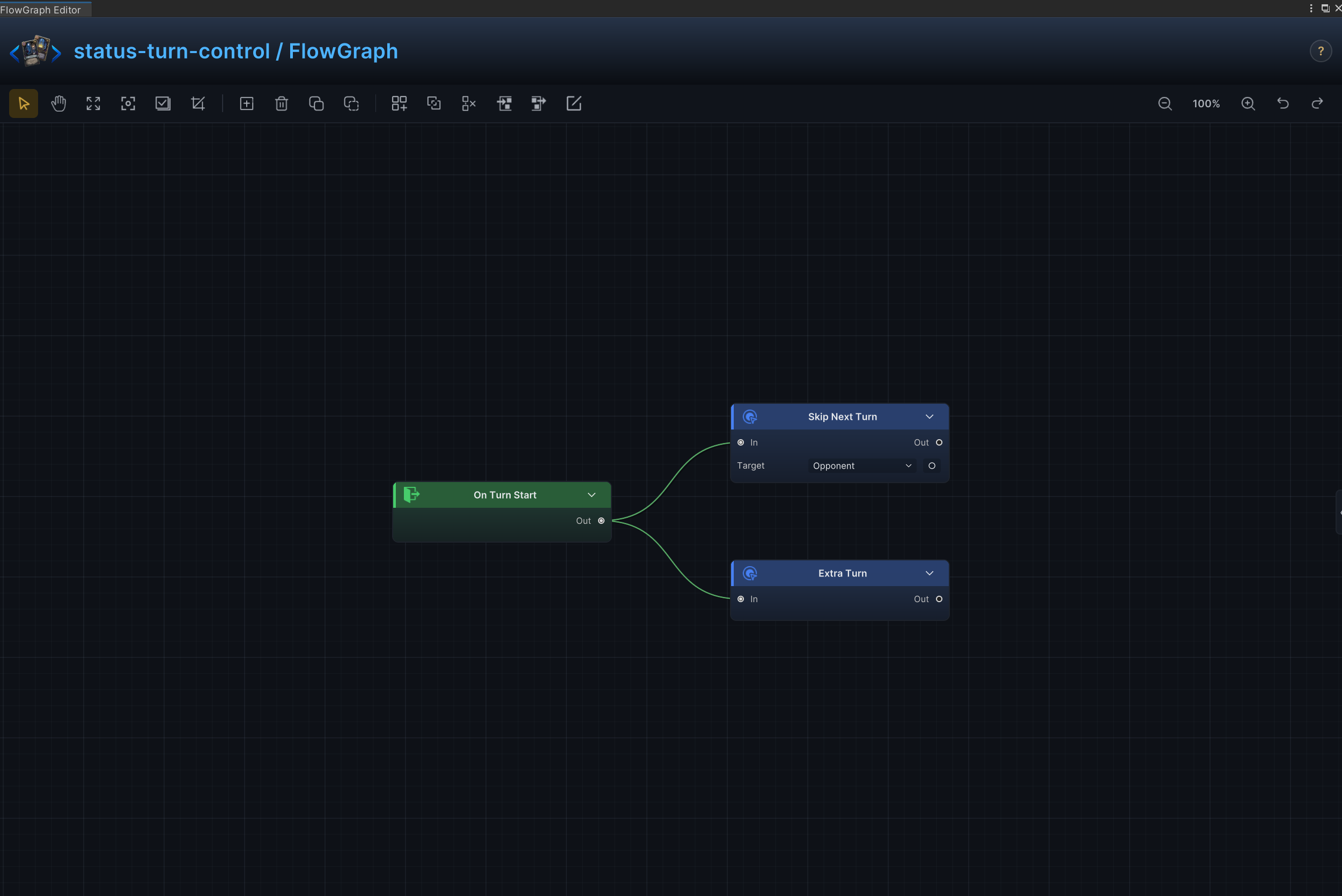
| 16 | Stun, skip turn, and extra turn | These are distinct turn-control results; use the branch that matches the status; do not run both from one status |
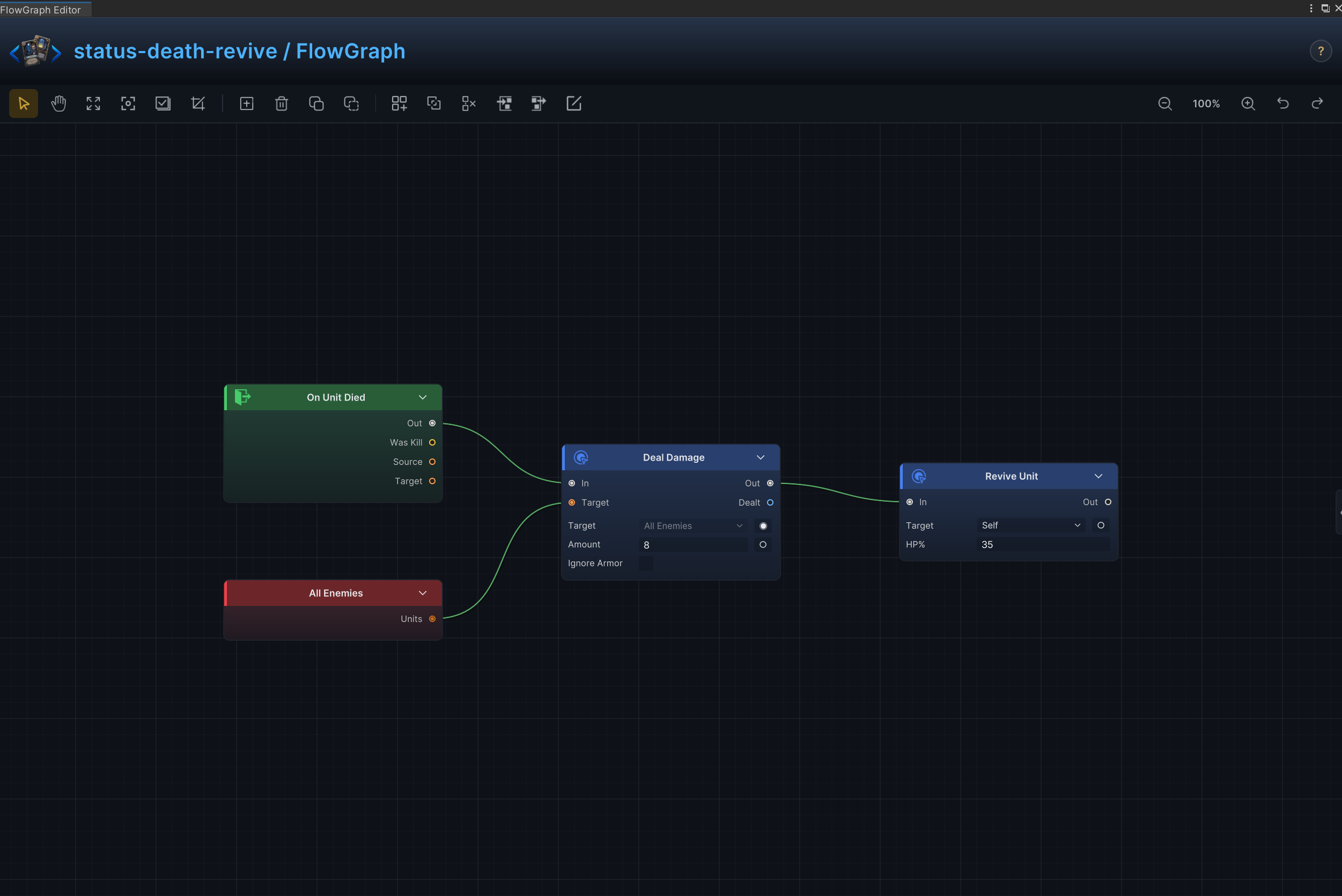
| 17 | Death burst, revive, and rebirth | Use this for corpse explosions, phoenix effects, second lives, and on-death support |
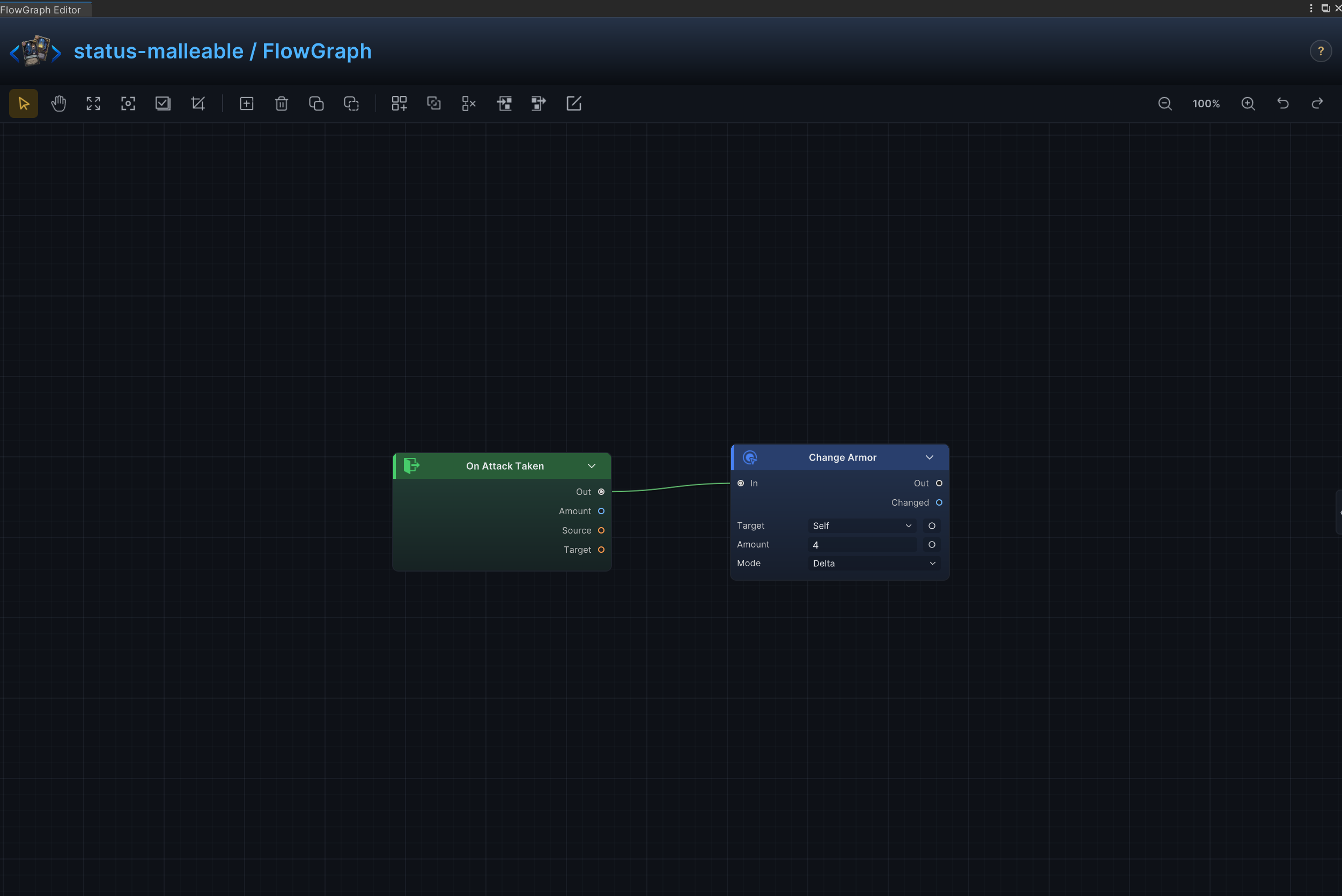
| 18 | Malleable Reactive Armor | Gain armor after each attack received |
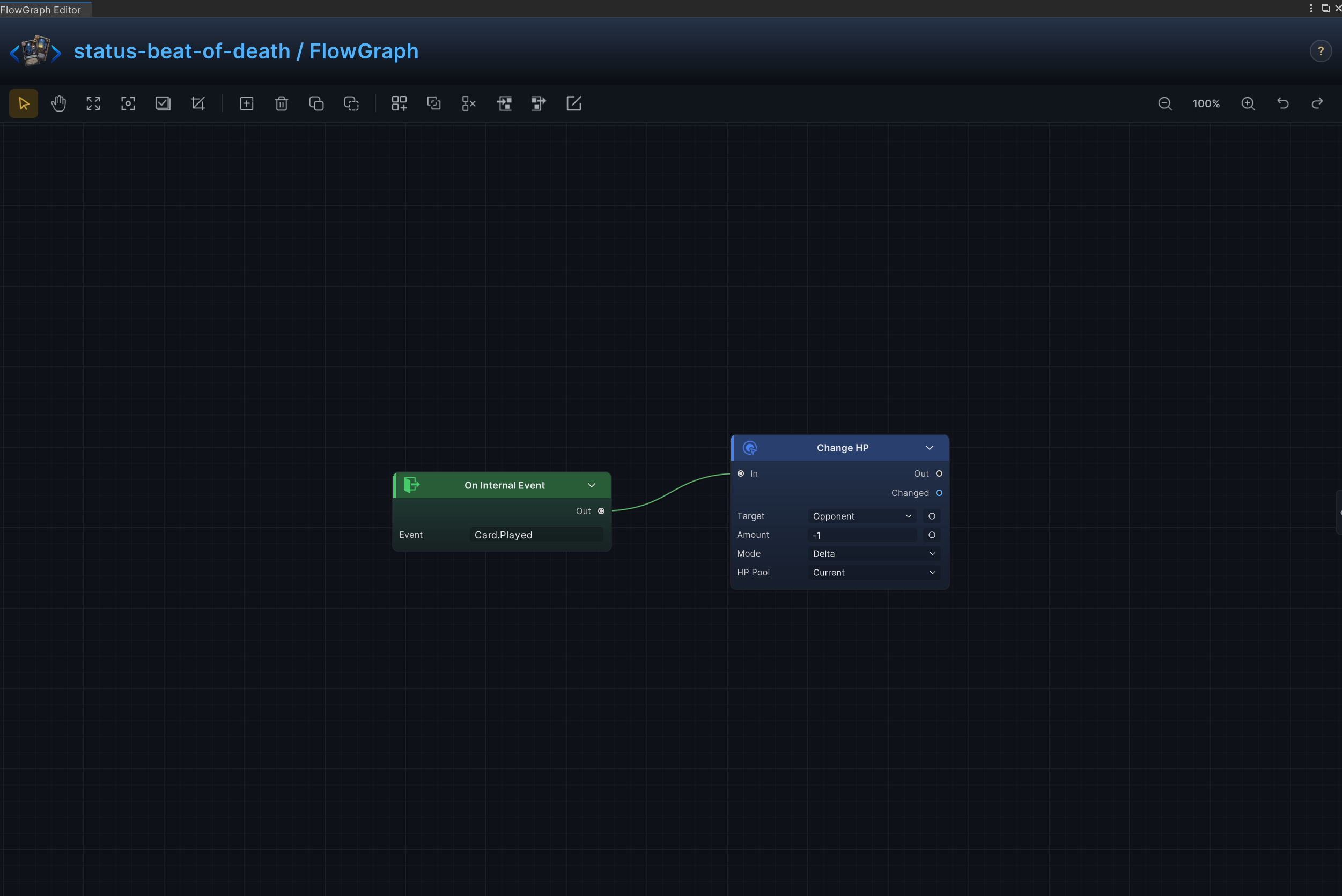
| 19 | Beat of Death | Punish the player every time a card is played |
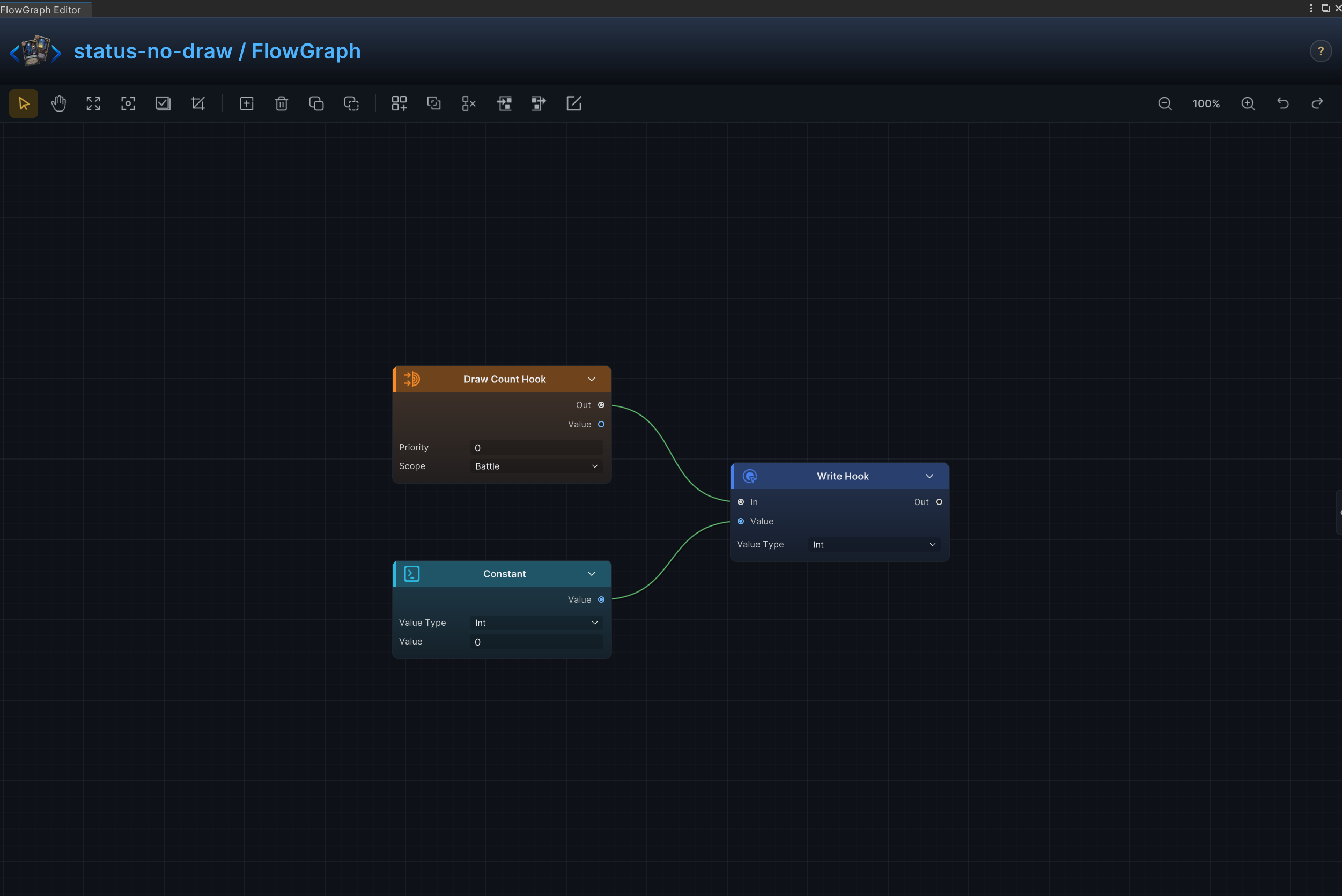
| 20 | No Draw | Replace the normal draw count with 0 |
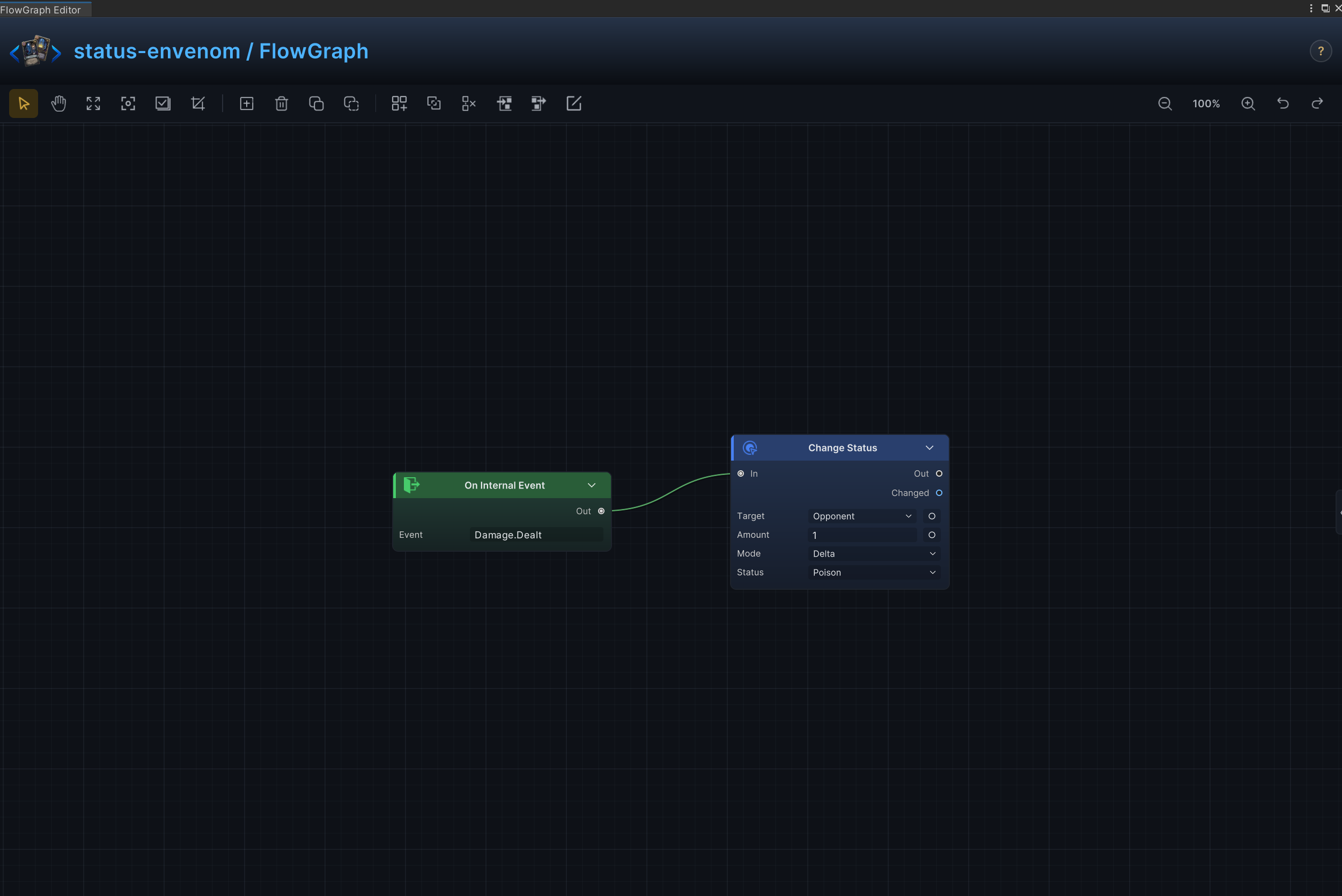
| 21 | Envenom on Hit | Apply poison whenever attack damage is dealt |
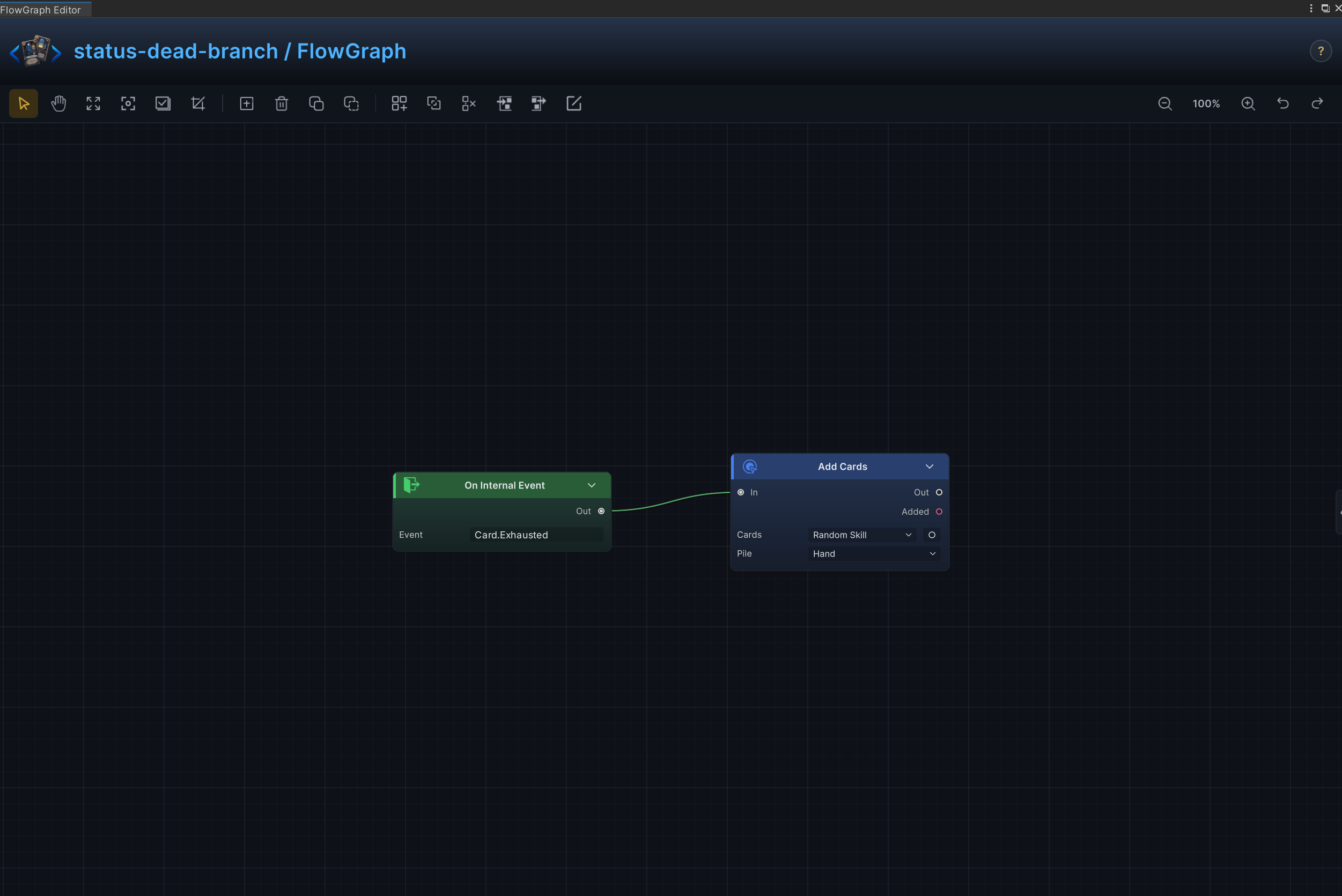
| 22 | Exhaust Reward | Create a replacement card whenever another card is exhausted |
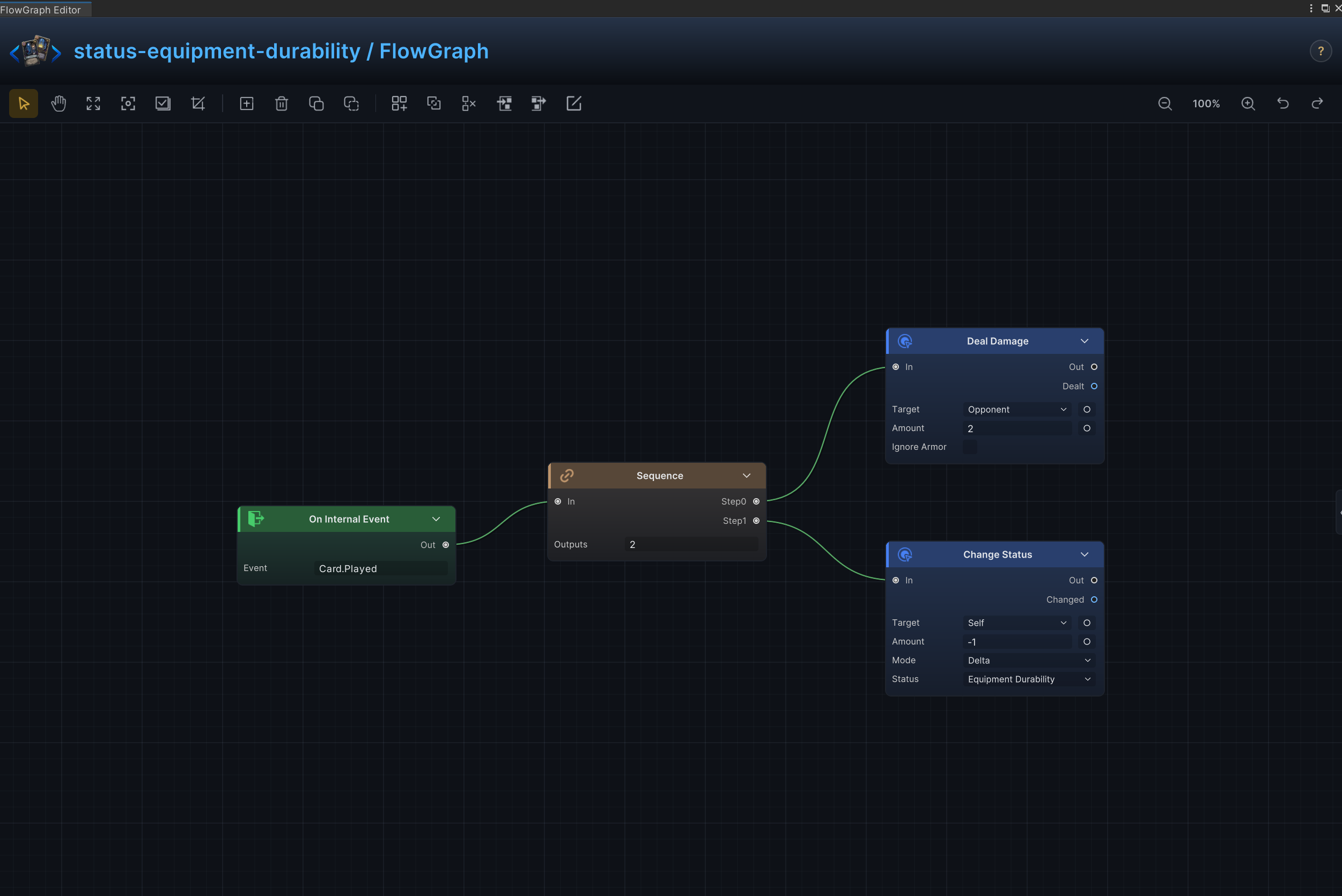
| 23 | Equipment Durability | Trigger an equipment effect and consume 1 durability stack |
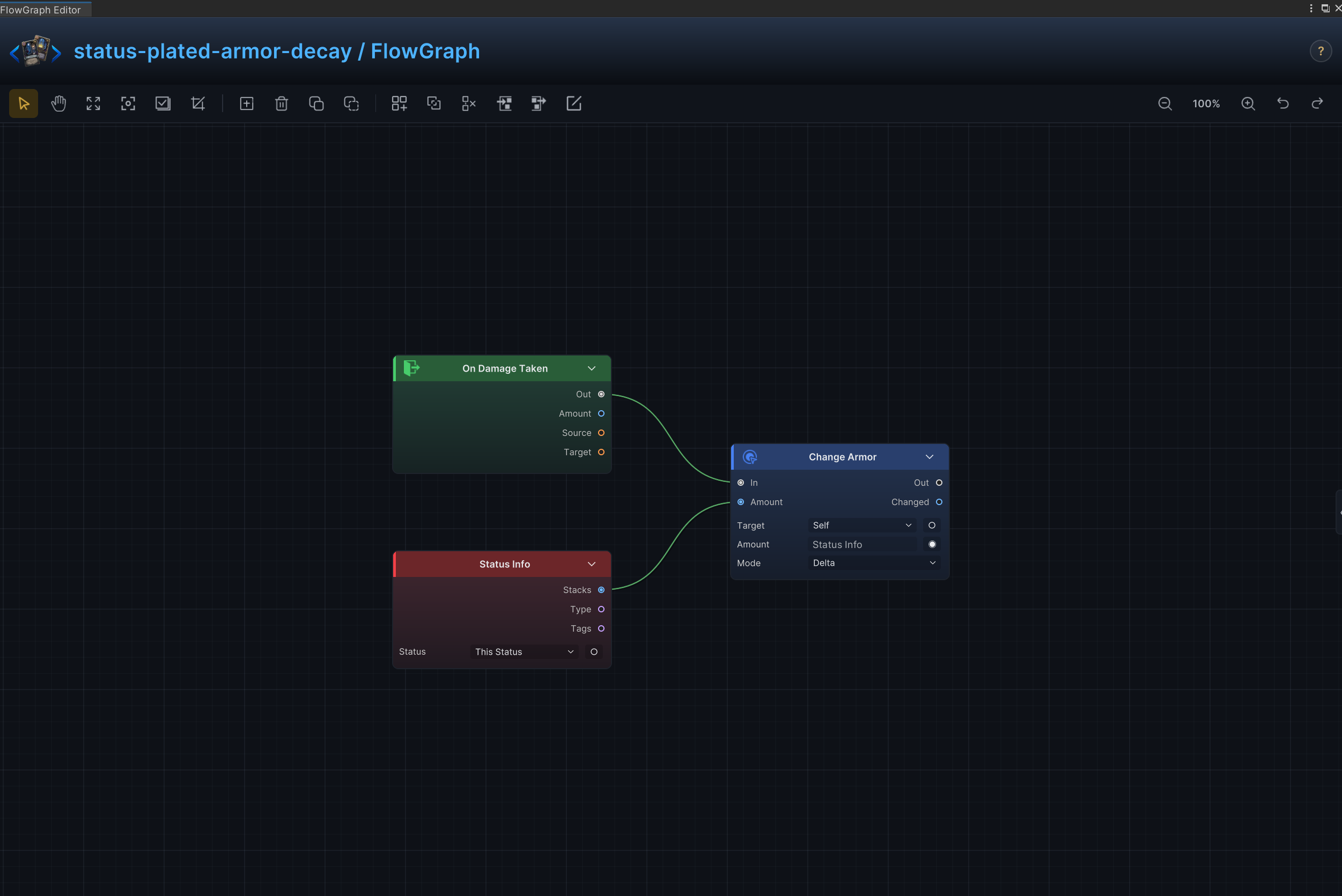
| 24 | Plated Armor Decay | Grant armor over time and reduce the status when an attack breaks through |
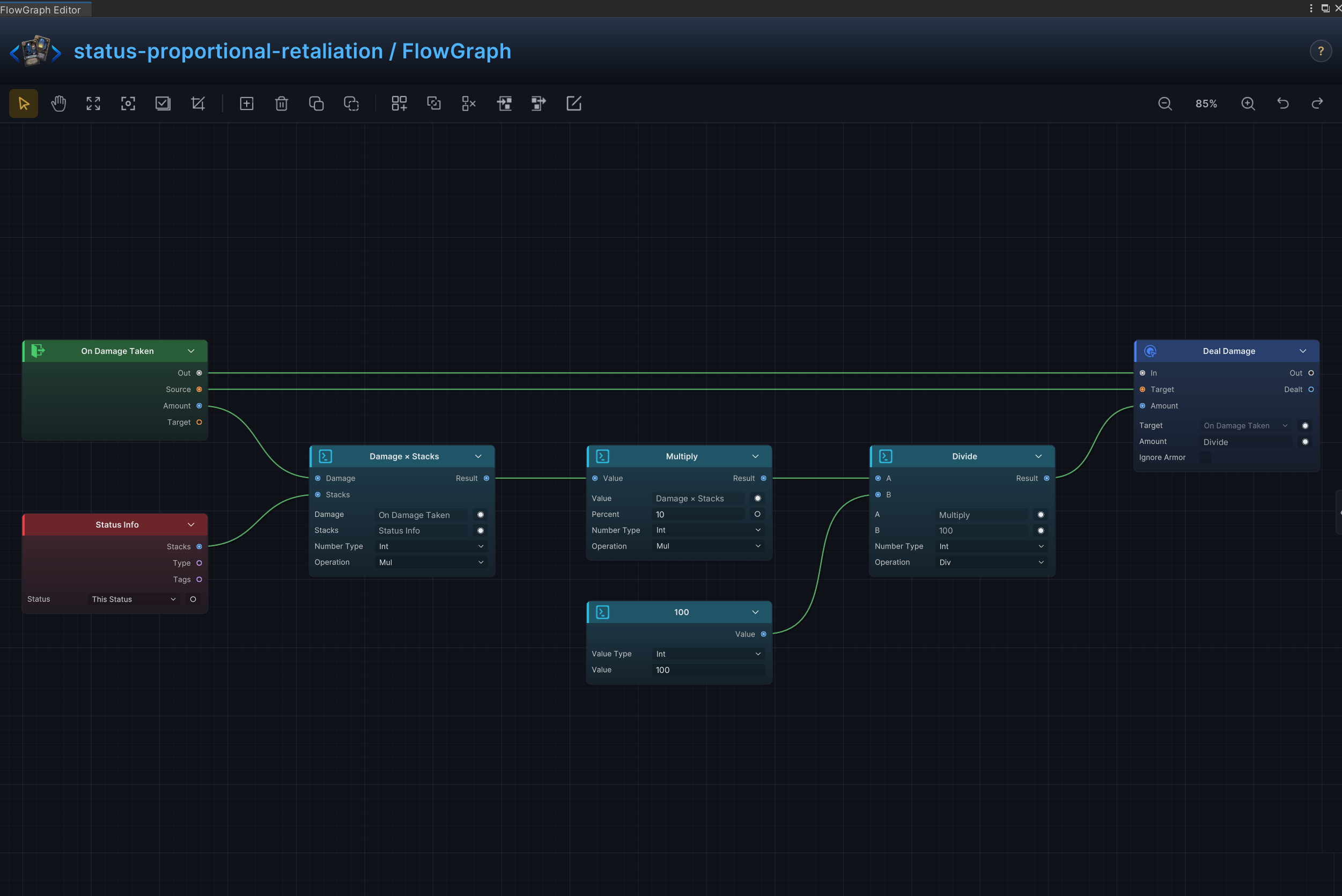
| 25 | Proportional Retaliation | Return a percentage of received damage to the attacker |
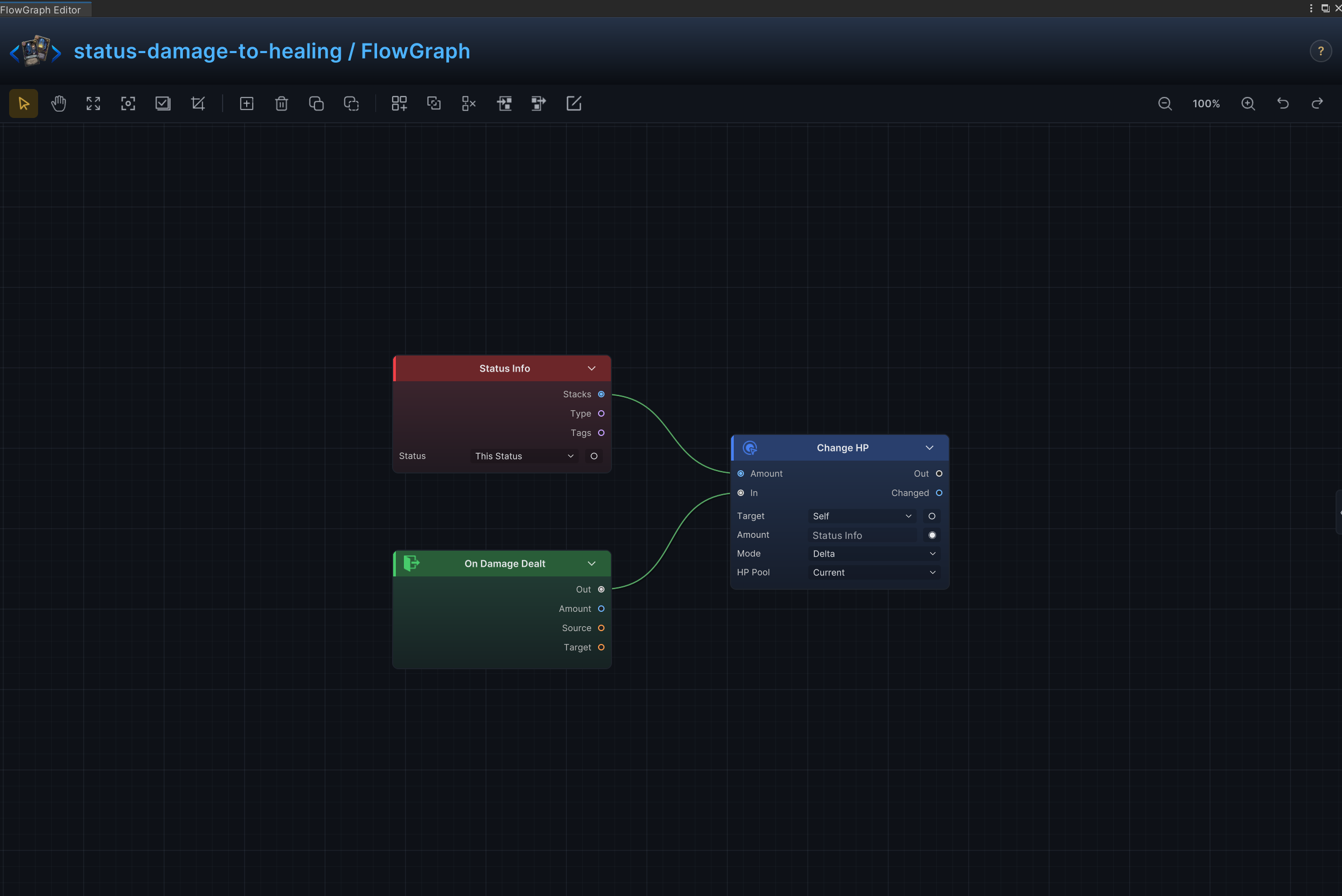
| 26 | Damage-to-Healing Conversion | Convert damage dealt into healing for the status owner |
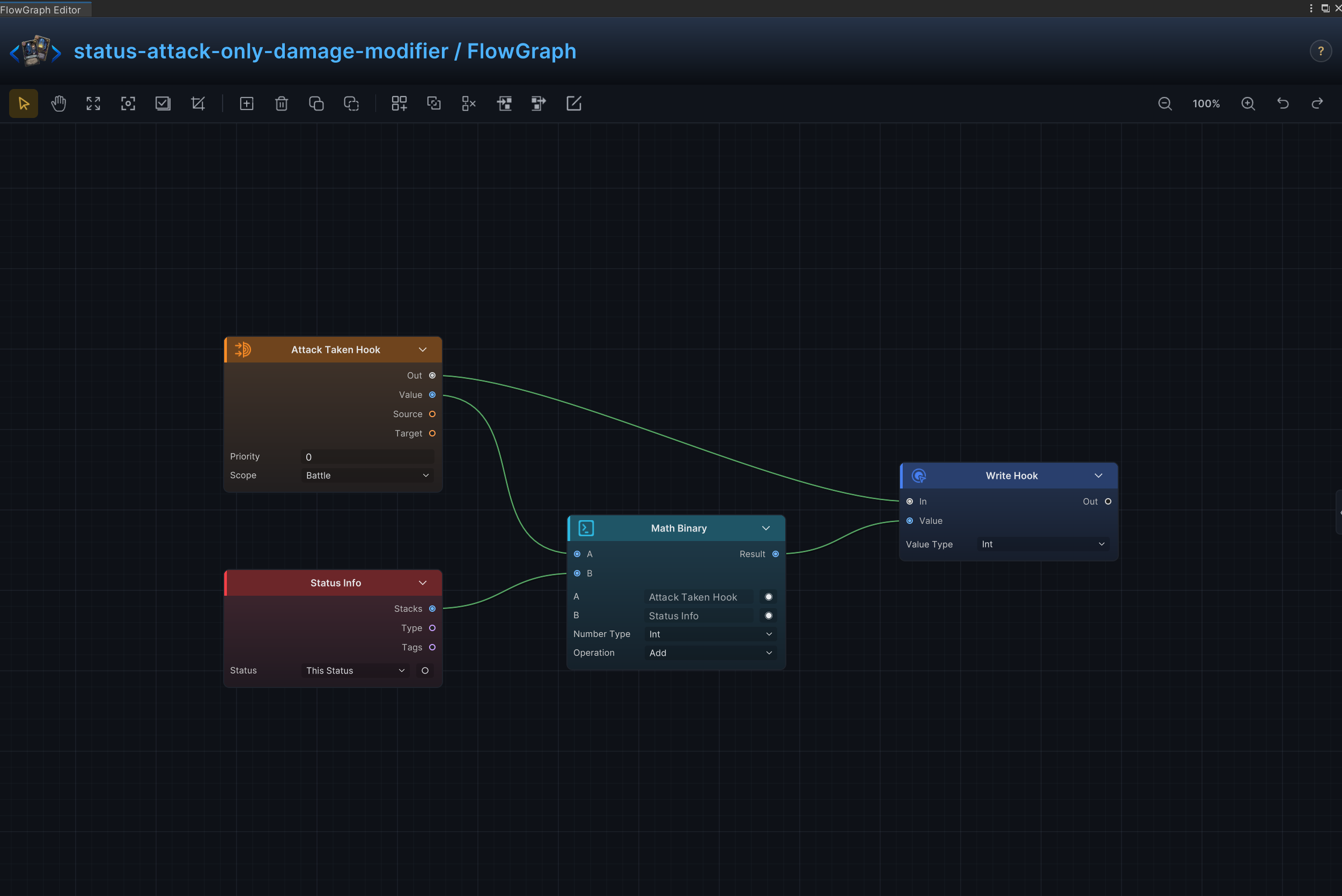
| 27 | Attack-Only Damage Modifier | Modify incoming attack damage without changing other damage sources |
| 28 | Random Cost on Draw | Randomize a card's energy cost when it is drawn |
| 29 | Multi-Element Damage Modifier | Apply different incoming-damage multipliers for several elemental status pairings |
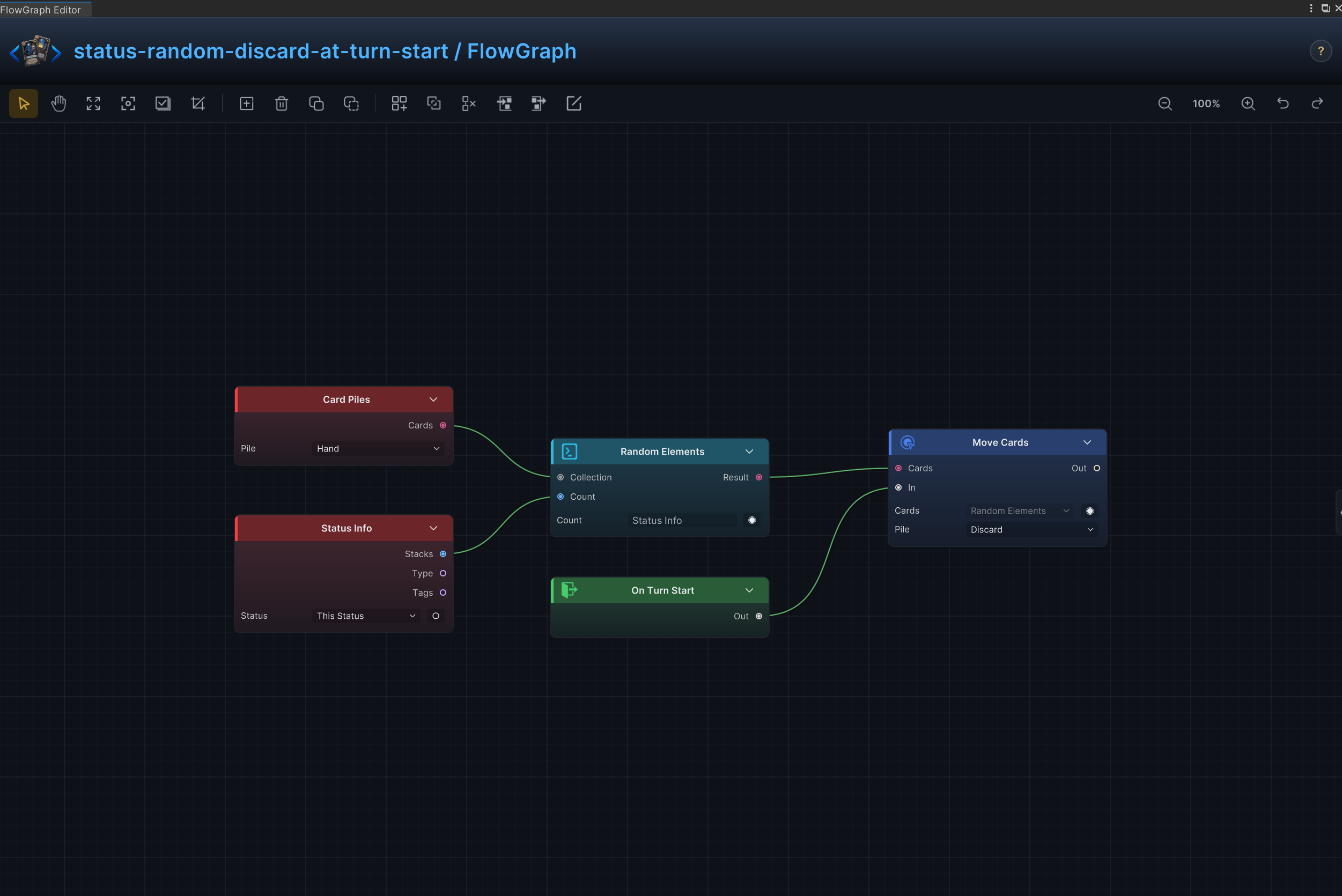
| 30 | Random Discard at Turn Start | Choose cards from the hand at turn start and move them to the discard pile |
Every entry uses the same Effect, Node connections, and Node configuration structure. The graph on the right verifies node layout; port arrows show connections only, while field meanings and example values remain in Node configuration
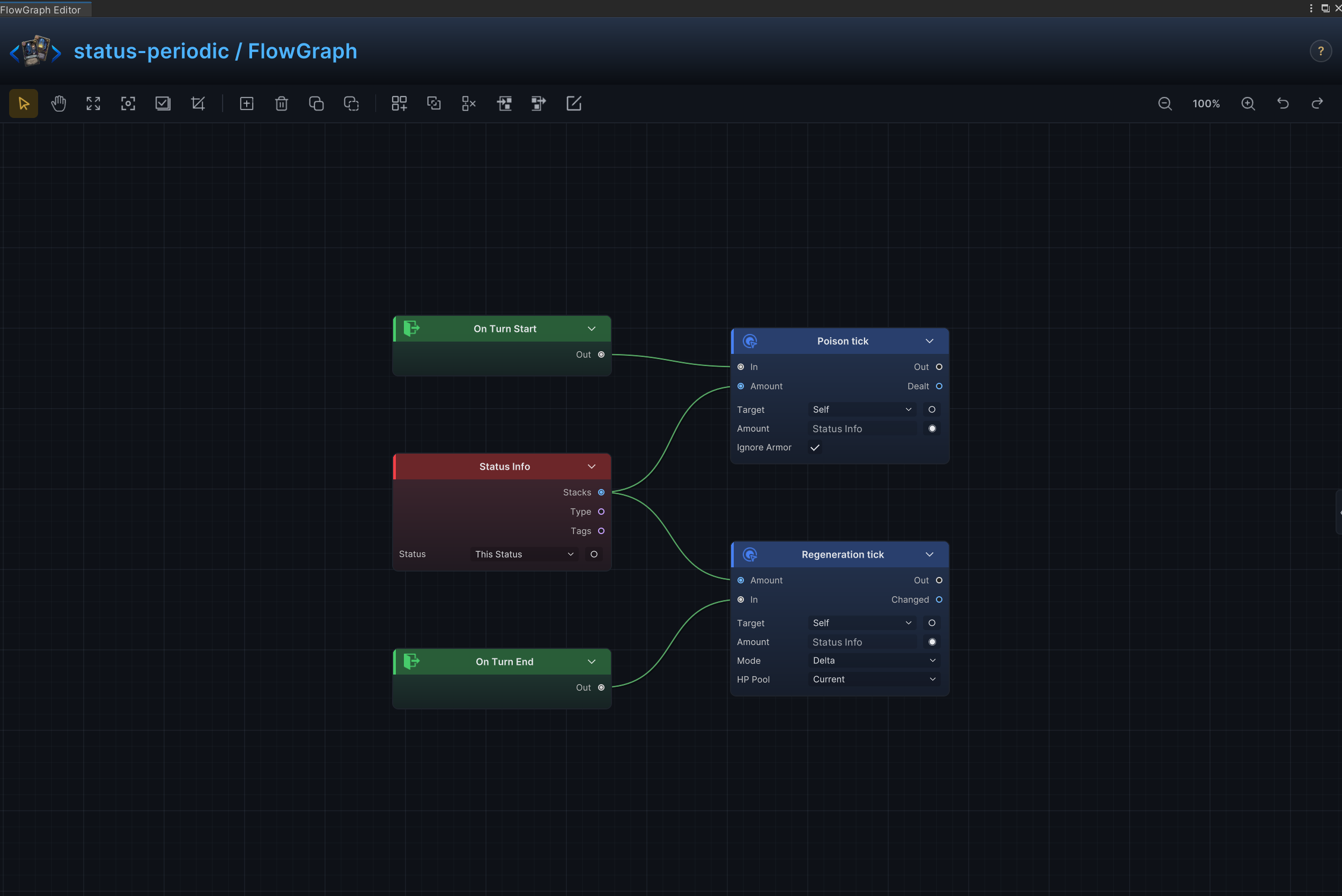
Poison, burn, regeneration, and periodic ticks
Effect
At turn start, deals damage to the source unit equal to current stacks; at turn end, restores HP to that unit by the same stack count.
Node connections
On Turn Start.Out → Deal Damage.InOn Turn End.Out → Change HP.InStatus Info.Stacks → Deal Damage.AmountStatus Info.Stacks → Change HP.Amount
Node configuration
Status InfoStatus = None: Selects the status read, changed, removed, or observed by the node.
Deal DamageTarget = Self: Targets the source unit itself.Amount = 6: Driven at runtime by Status Info.Stacks; this value is only the unconnected fallback.Ignore Armor = On: Damage bypasses armor and reduces HP directly.
Change HPTarget = Self: Targets the source unit itself.Affect = Current: Changes current HP without changing maximum HP.Mode = Delta: Adds to or subtracts from the current value; positive values increase it and negative values decrease it.Amount = 1: Driven at runtime by Status Info.Stacks; this value is only the unconnected fallback.
Strength and Weak
Effect
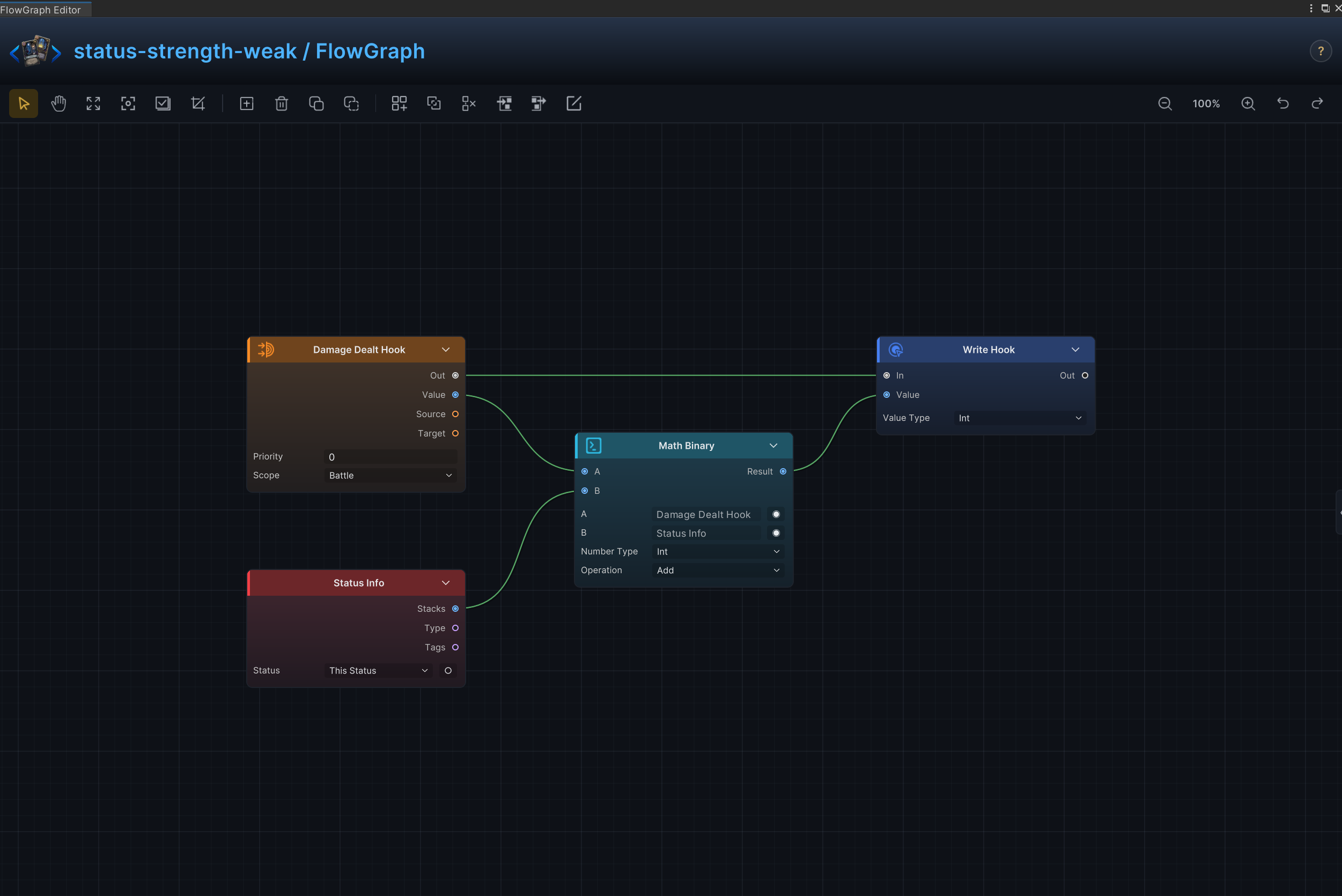
Modifies outgoing damage before it is applied.
Node connections
Damage Dealt Hook.Out → Write Hook.InDamage Dealt Hook.Value → Math Binary.AStatus Info.Stacks → Math Binary.BMath Binary.Result → Write Hook.Value
Node configuration
Damage Dealt HookPriority = 0: Sets this hook's order relative to other hooks at the same timing.Scope = Battle: Keeps the hook active for the entire battle.
Status InfoStatus = None: Selects the status read, changed, removed, or observed by the node.
Math BinaryKind = Int: Selects the data, collection, choice, or hook value type handled by this node.A = 0: Driven at runtime by Damage Dealt Hook.Value; this value is only the unconnected fallback.B = 0: Driven at runtime by Status Info.Stacks; this value is only the unconnected fallback.Op = Add: Adds the two operands.
Write HookKind = Int: Selects the data, collection, choice, or hook value type handled by this node.Value = 0: Driven at runtime by Math Binary.Result; this value is only the unconnected fallback.
Incoming Damage Multiplier
Effect
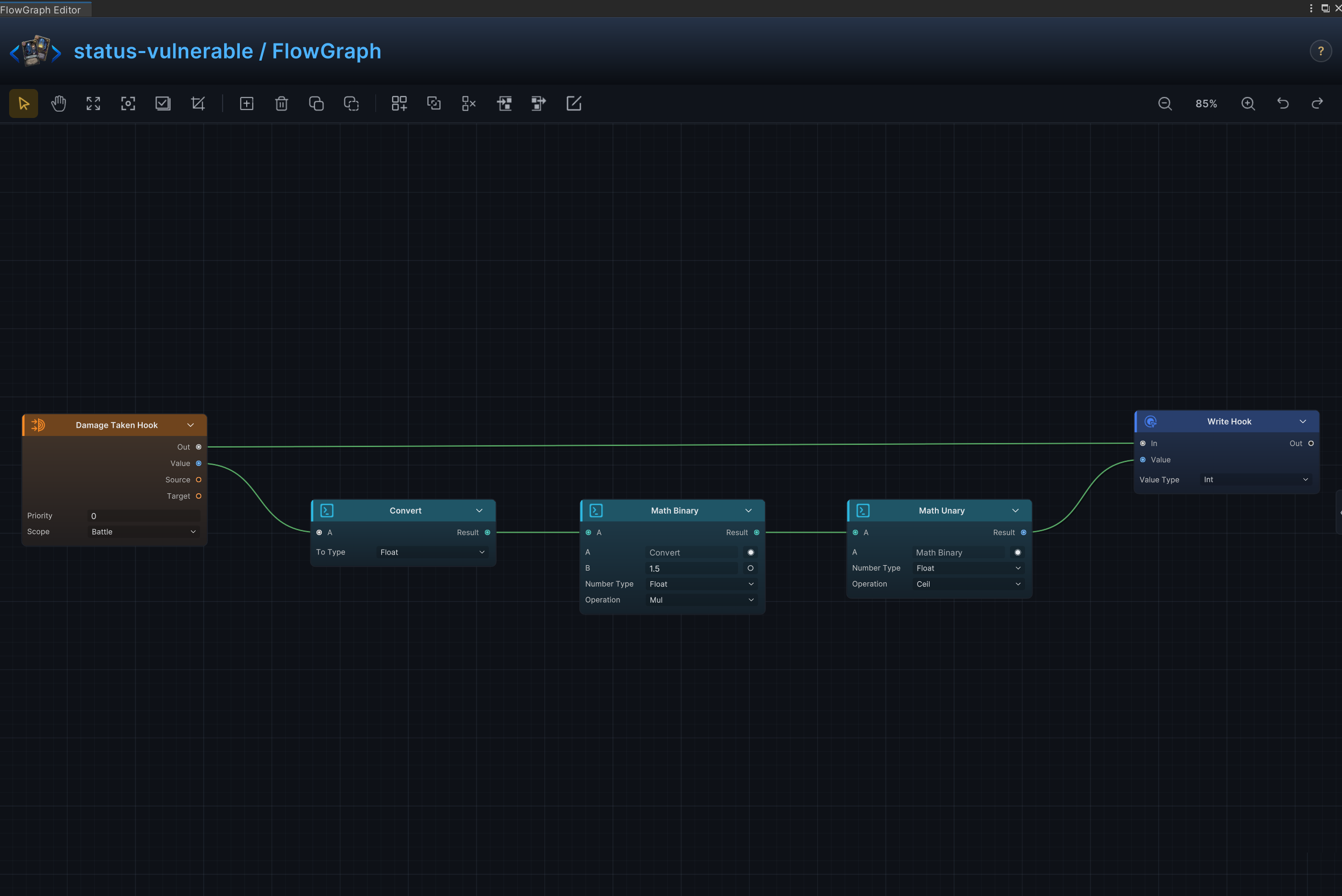
Multiply incoming damage while the status is active; use positive or negative scaling for vulnerability or resistance.
Node connections
Damage Taken Hook.Out → Write Hook.InDamage Taken Hook.Value → Convert.AConvert.Result → Math Binary.AMath Binary.Result → Math Unary.AMath Unary.Result → Write Hook.Value
Node configuration
Damage Taken HookPriority = 0: Sets this hook's order relative to other hooks at the same timing.Scope = Battle: Keeps the hook active for the entire battle.
ConvertTo = Float: Selects the destination data type for conversion.
Math BinaryKind = Float: Selects the data, collection, choice, or hook value type handled by this node.A = 0: Driven at runtime by Convert.Result; this value is only the unconnected fallback.B = 1.5: Sets the second operand when the B input is not connected.Op = Mul: Multiplies A by B.
Math UnaryKind = Float: Selects the data, collection, choice, or hook value type handled by this node.A = 0: Driven at runtime by Math Binary.Result; this value is only the unconnected fallback.Op = Ceil: Rounds the input up.
Write HookKind = Int: Selects the data, collection, choice, or hook value type handled by this node.Value = 0: Driven at runtime by Math Unary.Result; this value is only the unconnected fallback.
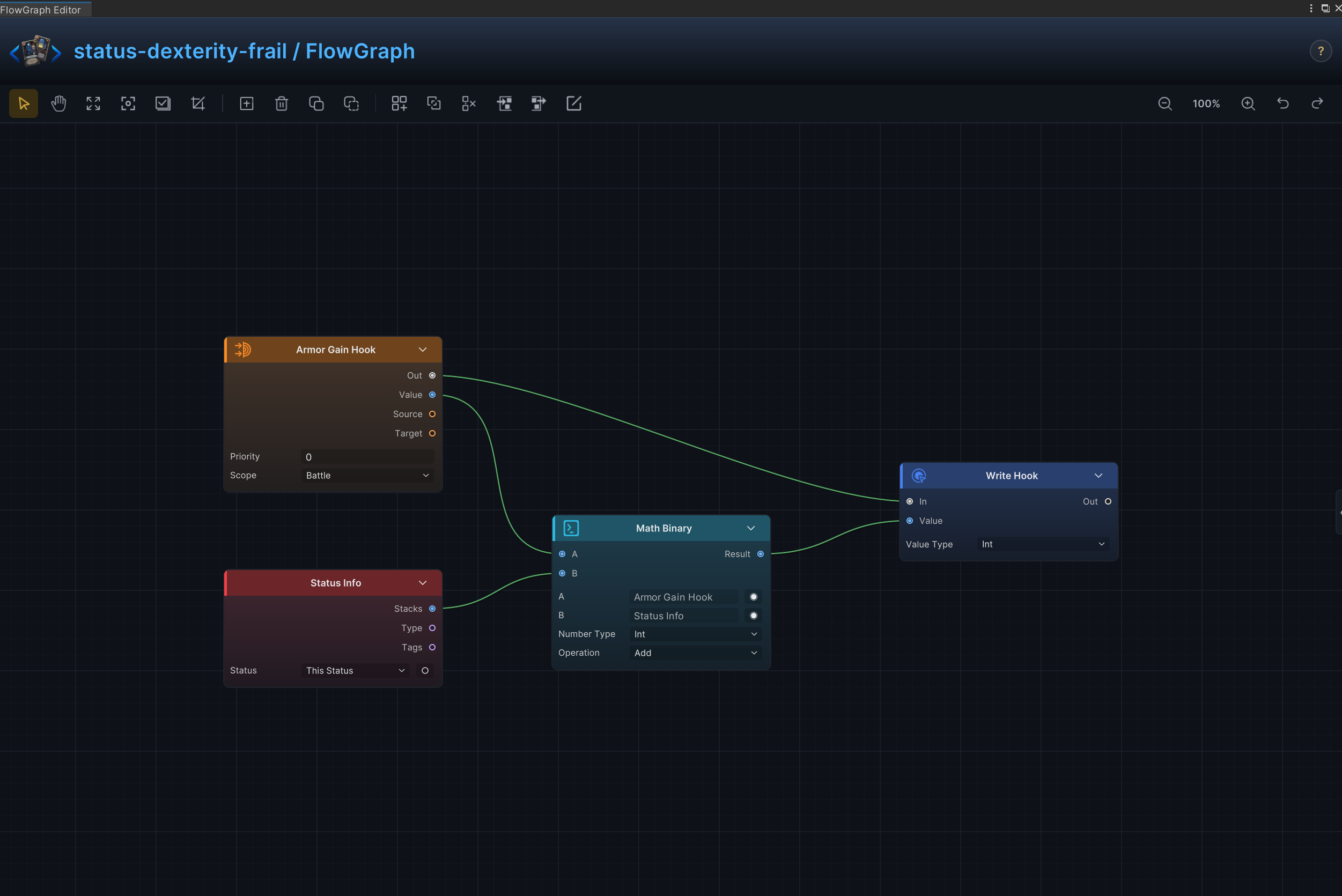
Dexterity and Frail
Effect
Modifies every armor gain while the status is active.
Node connections
Armor Gain Hook.Out → Write Hook.InArmor Gain Hook.Value → Math Binary.AStatus Info.Stacks → Math Binary.BMath Binary.Result → Write Hook.Value
Node configuration
Armor Gain HookPriority = 0: Sets this hook's order relative to other hooks at the same timing.Scope = Battle: Keeps the hook active for the entire battle.
Status InfoStatus = None: Selects the status read, changed, removed, or observed by the node.
Math BinaryKind = Int: Selects the data, collection, choice, or hook value type handled by this node.A = 0: Driven at runtime by Armor Gain Hook.Value; this value is only the unconnected fallback.B = 0: Driven at runtime by Status Info.Stacks; this value is only the unconnected fallback.Op = Add: Adds the two operands.
Write HookKind = Int: Selects the data, collection, choice, or hook value type handled by this node.Value = 0: Driven at runtime by Math Binary.Result; this value is only the unconnected fallback.
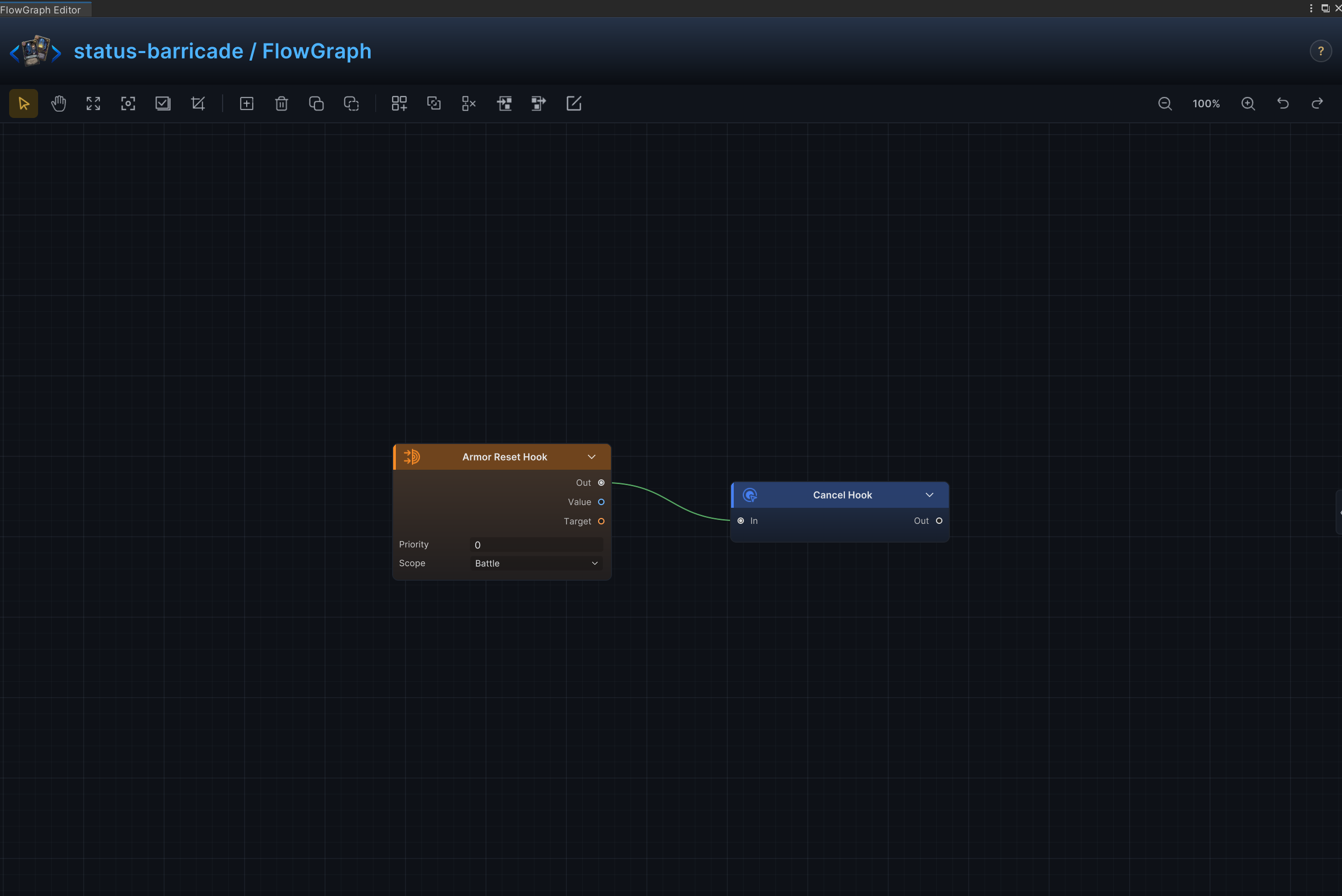
Barricade and armor retention
Effect
Preserves armor when the normal turn-based armor reset would occur.
Node connections
Armor Reset Hook.Out → Cancel Hook.In
Node configuration
Armor Reset HookPriority = 0: Sets this hook's order relative to other hooks at the same timing.Scope = Battle: Keeps the hook active for the entire battle.
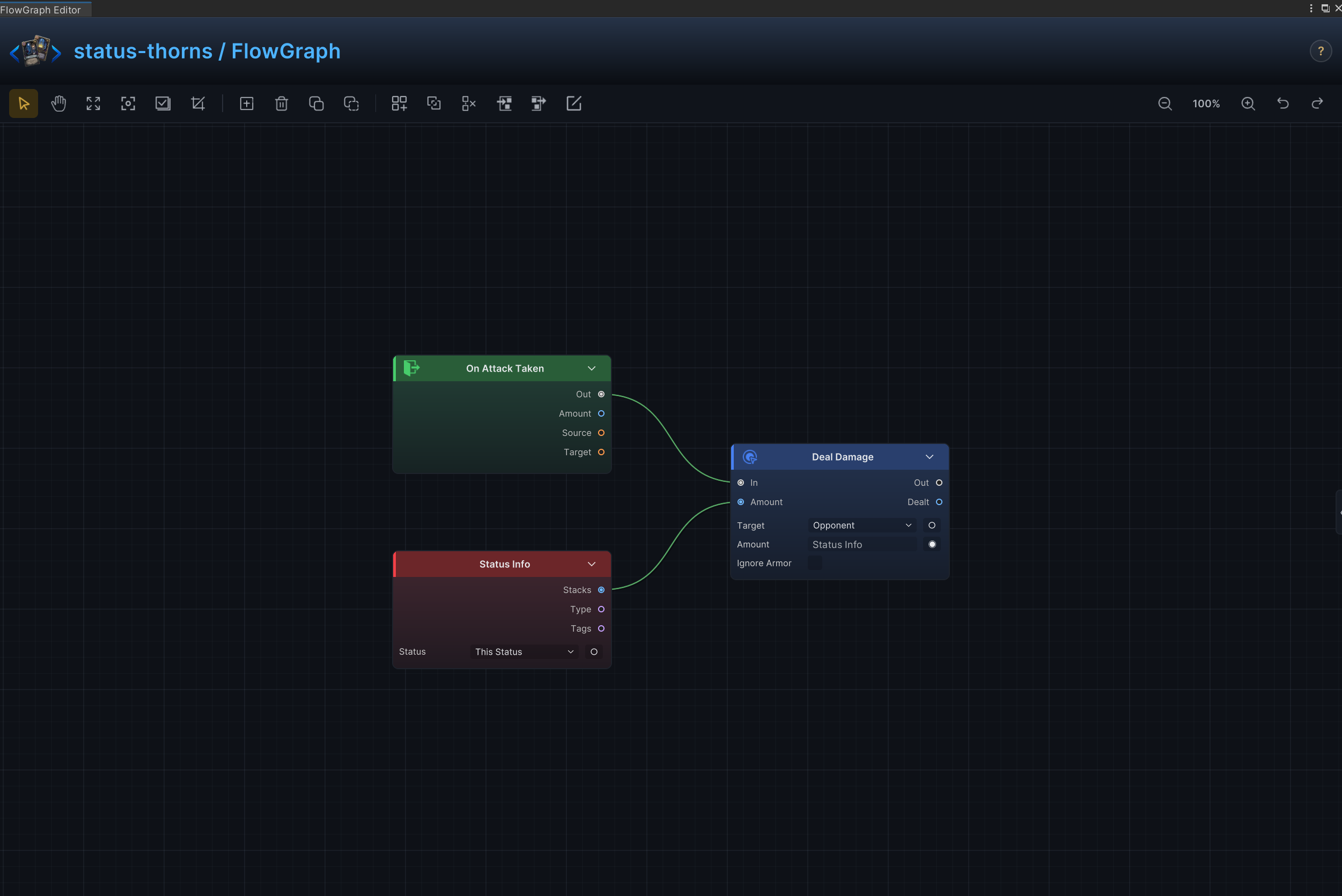
Thorns, retaliation, and counterattack
Effect
Returns damage after the status owner is attacked.
Node connections
On Attack Taken.Out → Deal Damage.InStatus Info.Stacks → Deal Damage.AmountOn Attack Taken.Source → Deal Damage.Target
Node configuration
Status InfoStatus = None: Selects the status read, changed, removed, or observed by the node.
Deal DamageTarget = Opponent: Driven at runtime by On Attack Taken.Source, returning damage to the actual attacker.Amount = 6: Driven at runtime by Status Info.Stacks; this value is only the unconnected fallback.Ignore Armor = Off: Damage resolves through armor normally.
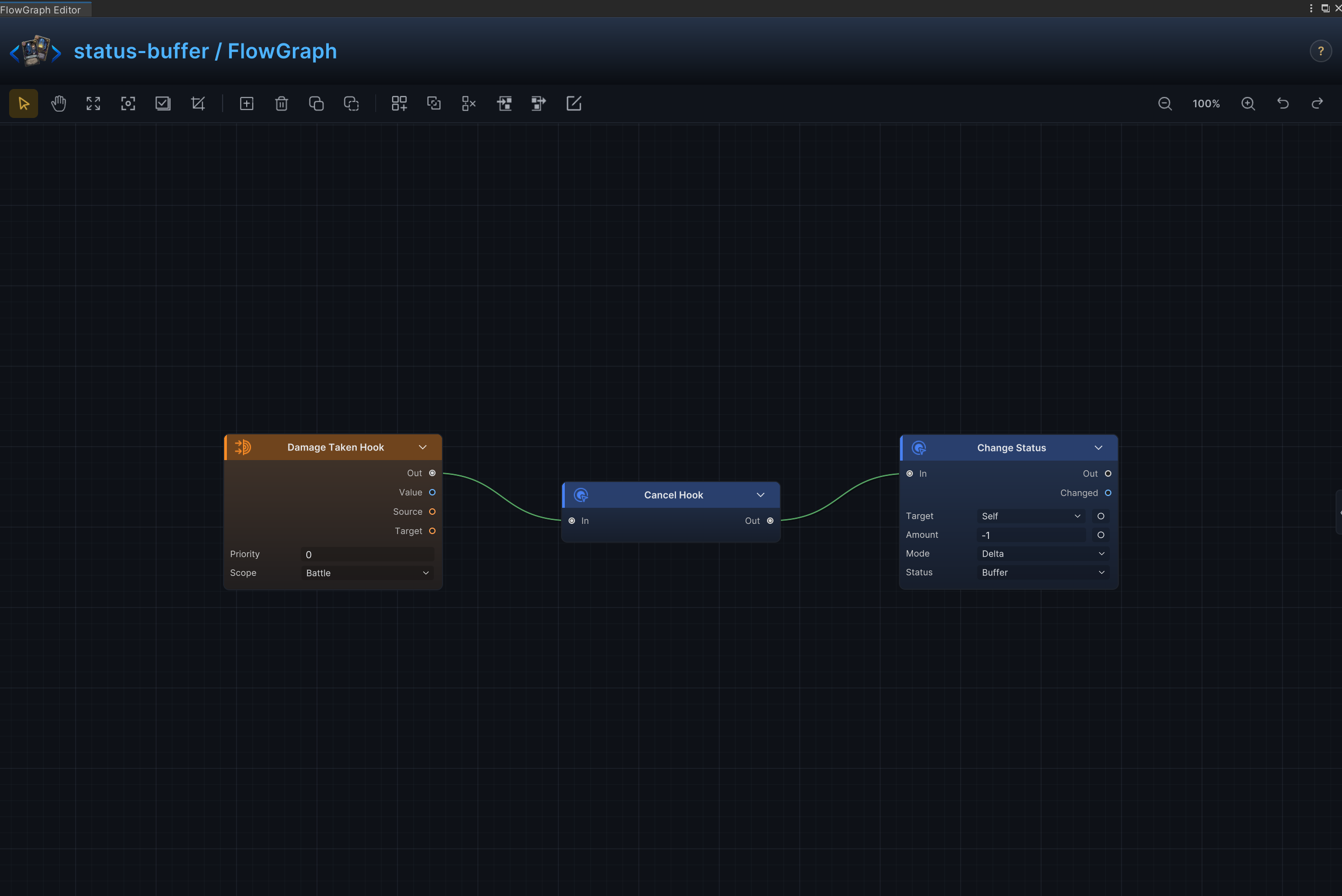
Buffer and one-hit prevention
Effect
Consumes one charge to negate the next incoming damage instance.
Node connections
Damage Taken Hook.Out → Cancel Hook.InCancel Hook.Out → Change Status.In
Node configuration
Damage Taken HookPriority = 0: Sets this hook's order relative to other hooks at the same timing.Scope = Battle: Keeps the hook active for the entire battle.
Change StatusTarget = Self: Targets the source unit itself.Status = Buffer: Reads or changes the Buffer status.Mode = Delta: Adds to or subtracts from the current value; positive values increase it and negative values decrease it.Amount = -1: Uses -1 as the example value; replace it with the amount required by the card.
Per-Hit Damage Cap
Effect
Clamp HP loss from each hit to a configured maximum while the status is active.
Node connections
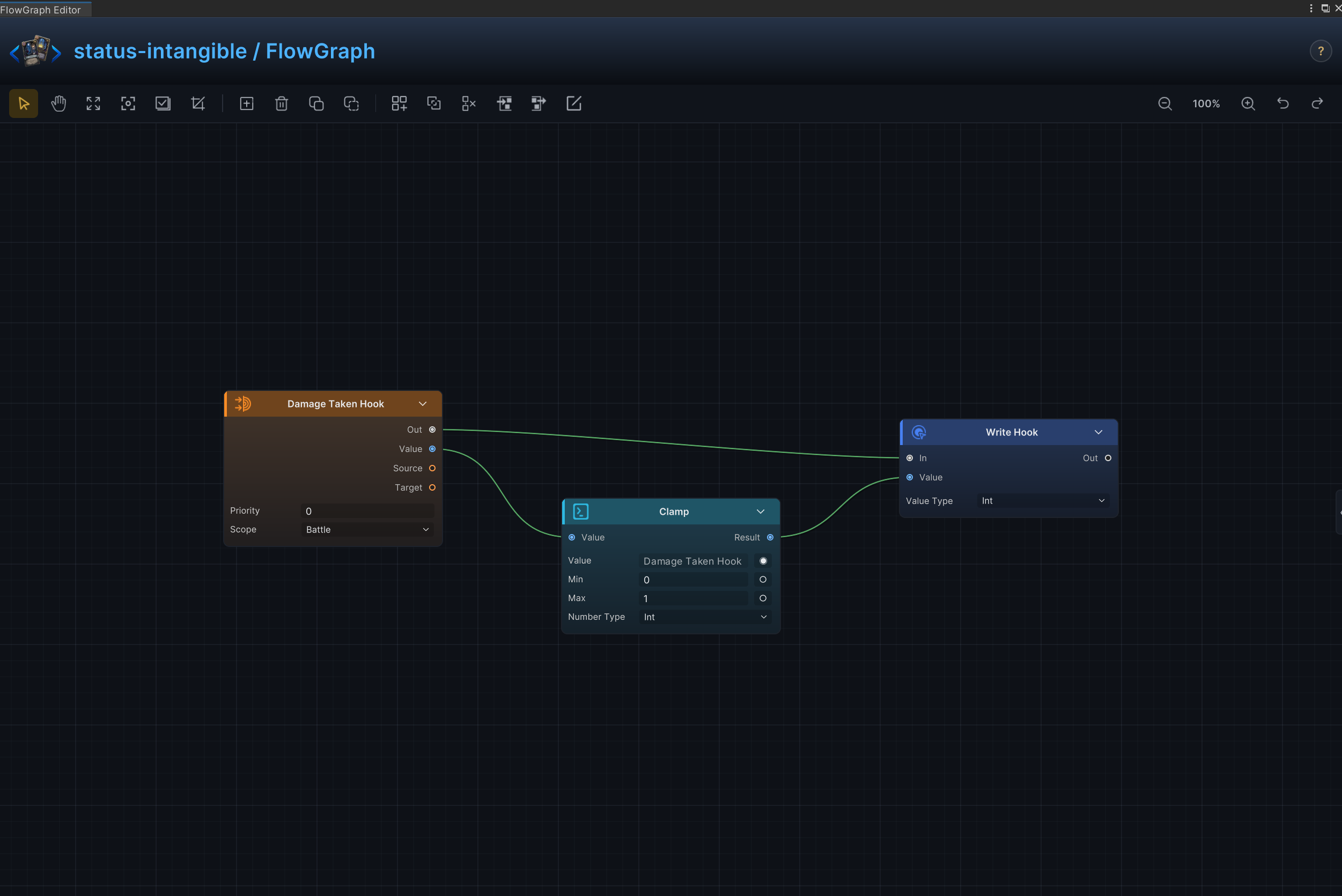
Damage Taken Hook.Out → Write Hook.InDamage Taken Hook.Value → Clamp.ValueClamp.Result → Write Hook.Value
Node configuration
Damage Taken HookPriority = 0: Sets this hook's order relative to other hooks at the same timing.Scope = Battle: Keeps the hook active for the entire battle.
ClampKind = Int: Selects the data, collection, choice, or hook value type handled by this node.Value = 0: Driven at runtime by Damage Taken Hook.Value; this value is only the unconnected fallback.Min = 0: Sets the lower clamp limit.Max = 1: Sets the upper clamp limit.
Write HookKind = Int: Selects the data, collection, choice, or hook value type handled by this node.Value = 0: Driven at runtime by Clamp.Result; this value is only the unconnected fallback.
Artifact and debuff immunity
Effect
Consumes one charge to block the next incoming debuff.
Node connections
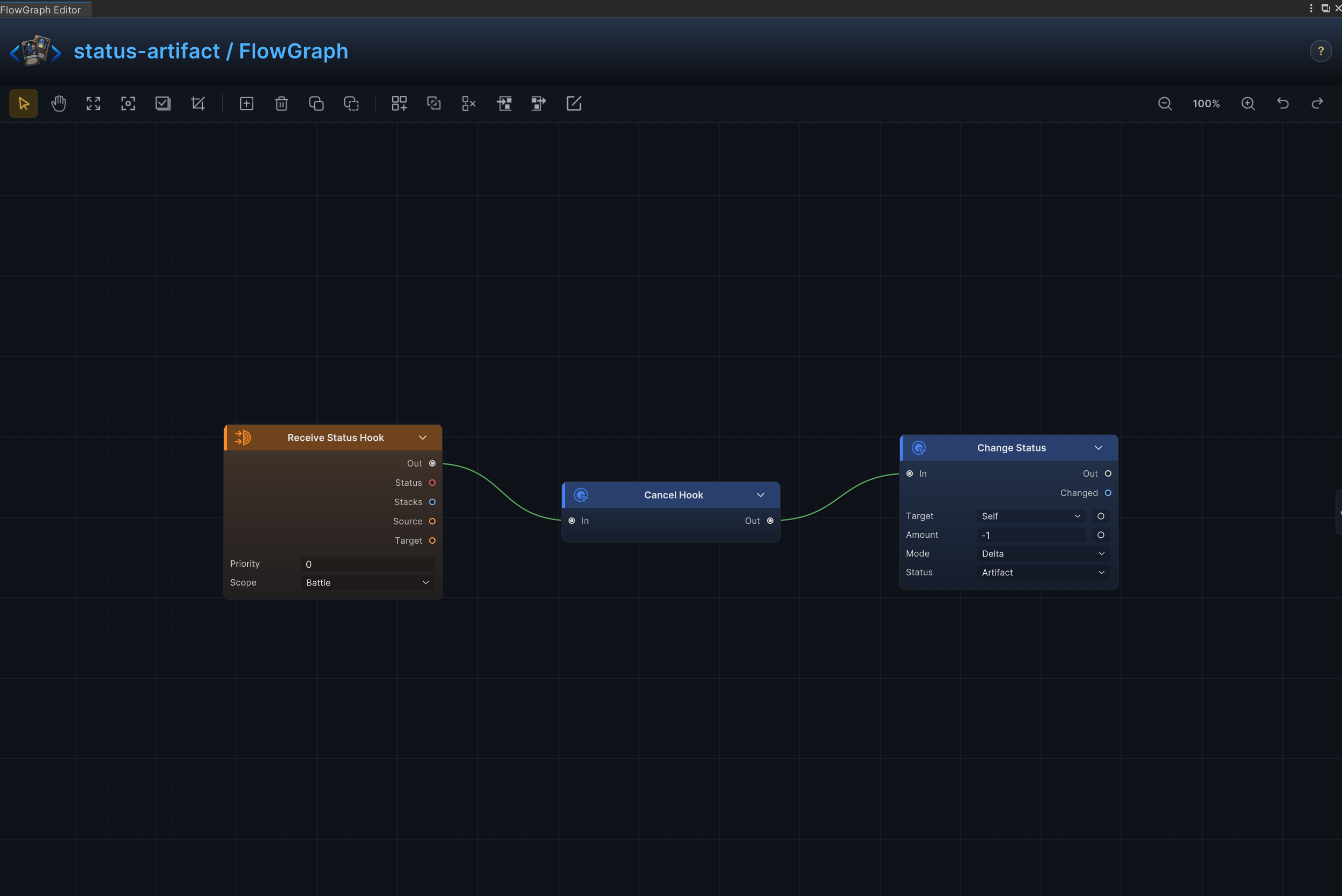
Cancel Hook.Out → Change Status.InReceive Status Hook.Out → Branch.InReceive Status Hook.Status → Status Info.StatusStatus Info.Type → Condition.AConstant.Value → Condition.BCondition.Result → Branch.ConditionBranch.True → Cancel Hook.In
Node configuration
Receive Status HookPriority = 0: Sets this hook's order relative to other hooks at the same timing.Scope = Battle: Keeps the hook active for the entire battle.
Status InfoStatus = None: The Receive Status Hook.Status connection supplies the actual incoming status, so this unconnected fallback is ignored.
ConstantKind = String: Compares the incoming status category as text.String Value = Debuff: Limits cancellation to debuffs.
ConditionOp = Equal: Passes only when the incoming status type is Debuff.
BranchCondition = connected: Routes only matching debuffs into Cancel Hook.
Cancel Hook- Cancels the active receive-status hook before spending one Artifact stack.
Change StatusTarget = Self: Targets the source unit itself.Status = Artifact: Reads or changes the Artifact status.Mode = Delta: Adds to or subtracts from the current value; positive values increase it and negative values decrease it.Amount = -1: Uses -1 as the example value; replace it with the amount required by the card.
Plated Armor, Ritual, and growth over time
Effect
At turn start, grants the source unit armor equal to current stacks; at turn end, adds 1 Strength.
Node connections
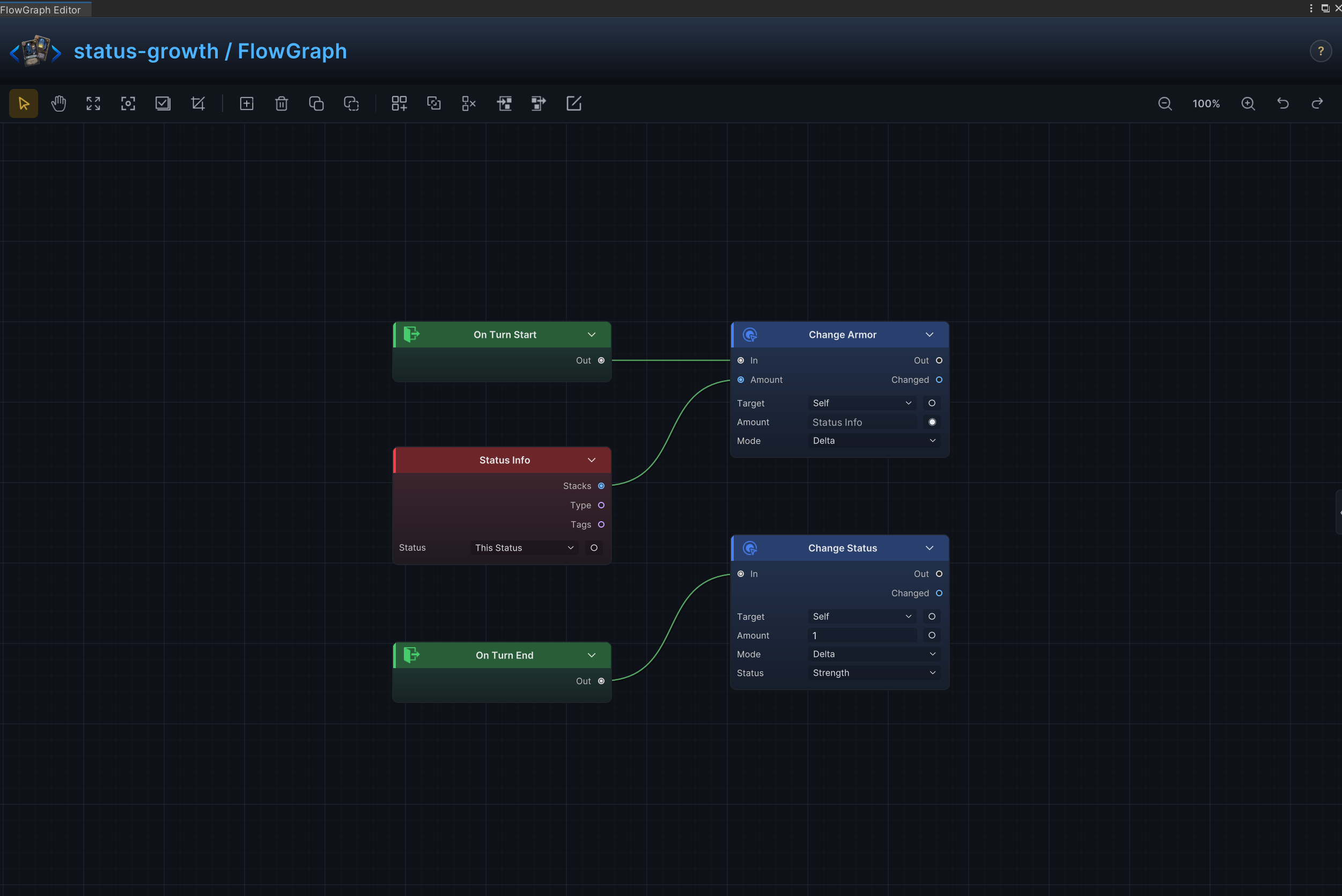
On Turn Start.Out → Change Armor.InOn Turn End.Out → Change Status.InStatus Info.Stacks → Change Armor.Amount
Node configuration
Status InfoStatus = None: Selects the status read, changed, removed, or observed by the node.
Change ArmorTarget = Self: Targets the source unit itself.Mode = Delta: Adds to or subtracts from the current value; positive values increase it and negative values decrease it.Amount = 1: Driven at runtime by Status Info.Stacks; this value is only the unconnected fallback.
Change StatusTarget = Self: Targets the source unit itself.Status = Strength: Reads or changes the Strength status.Mode = Delta: Adds to or subtracts from the current value; positive values increase it and negative values decrease it.Amount = 1: Uses 1 as the example value; replace it with the amount required by the card.
Afterimage and “whenever a card is played” powers
Effect
Reacts to each card played through one shared card-play event.
Node connections
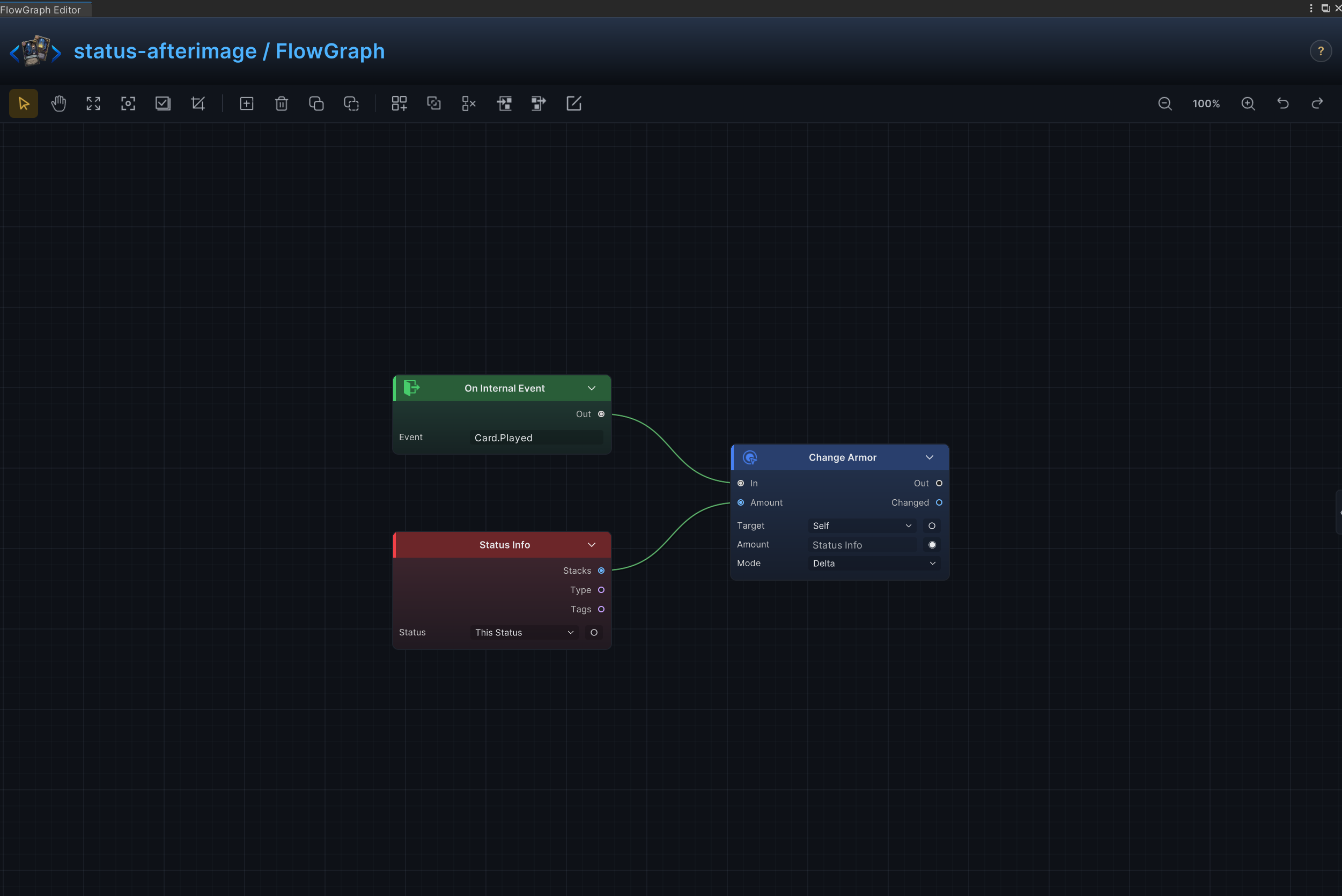
On Card Played.Out → Change Armor.InStatus Info.Stacks → Change Armor.Amount
Node configuration
Status InfoStatus = None: Selects the status read, changed, removed, or observed by the node.
Change ArmorTarget = Self: Targets the source unit itself.Mode = Delta: Adds to or subtracts from the current value; positive values increase it and negative values decrease it.Amount = 1: Driven at runtime by Status Info.Stacks; this value is only the unconnected fallback.
Draw, discard, exhaust, and shuffle triggers
Effect
Reacts to named card-pile transitions such as draw, discard, and exhaust.
Node connections
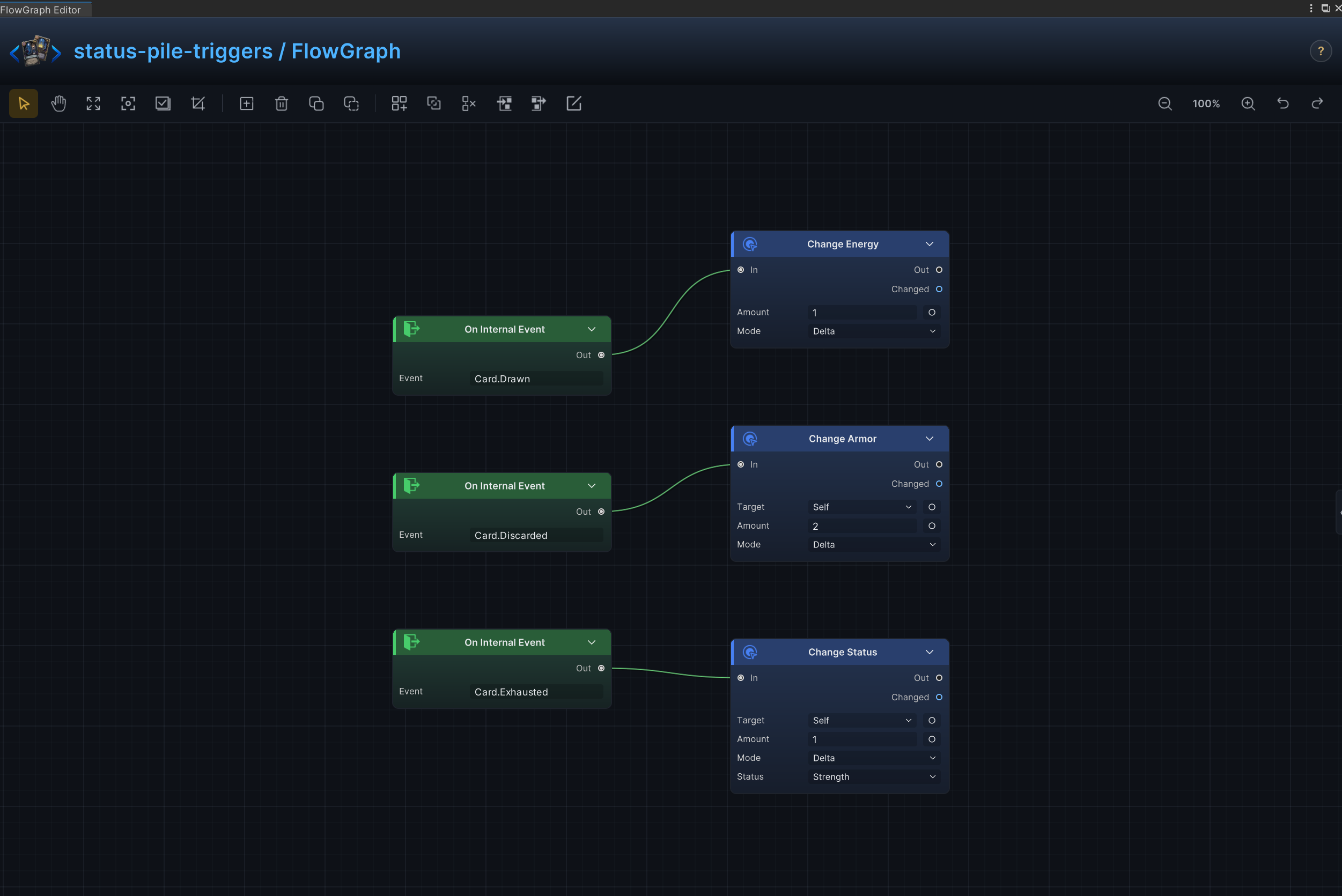
On Card Drawn.Out → Change Energy.InOn Card Discarded.Out → Change Armor.InOn Card Exhausted.Out → Change Status.In
Node configuration
Change EnergyMode = Delta: Adds to or subtracts from the current value; positive values increase it and negative values decrease it.Amount = 1: Uses 1 as the example value; replace it with the amount required by the card.
Change ArmorTarget = Self: Targets the source unit itself.Mode = Delta: Adds to or subtracts from the current value; positive values increase it and negative values decrease it.Amount = 2: Uses 2 as the example value; replace it with the amount required by the card.
Change StatusTarget = Self: Targets the source unit itself.Status = Strength: Reads or changes the Strength status.Mode = Delta: Adds to or subtracts from the current value; positive values increase it and negative values decrease it.Amount = 1: Uses 1 as the example value; replace it with the amount required by the card.
Energy per turn and global card-cost rules
Effect
Increases Energy Per Turn by 1 and sets the global card-cost hook to 0 while the status is active.
Node connections
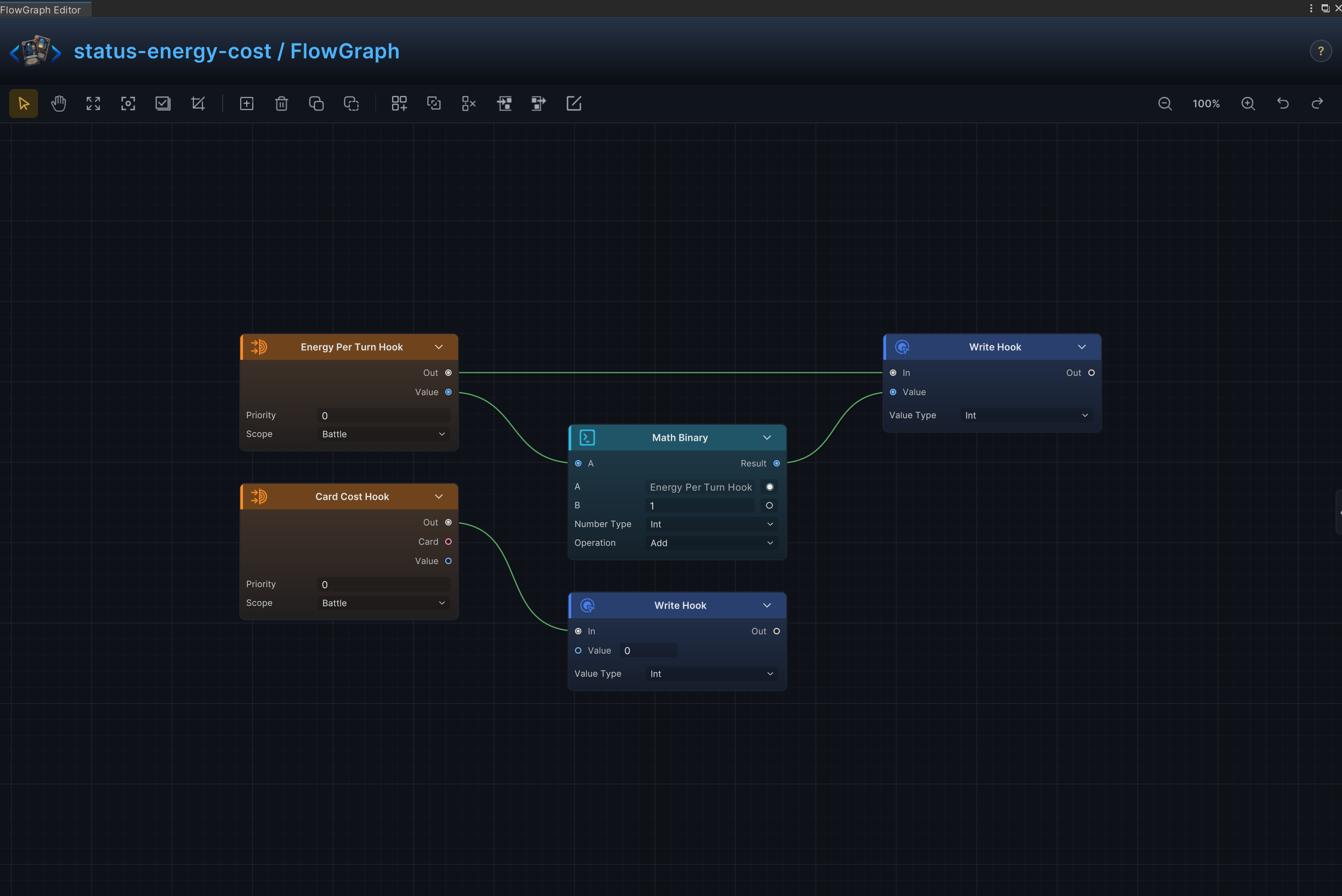
Energy Per Turn Hook.Out → Write Hook (1).InEnergy Per Turn Hook.Value → Math Binary.AMath Binary.Result → Write Hook (1).ValueCard Cost Hook.Out → Write Hook (2).In
Node configuration
Energy Per Turn HookPriority = 0: Sets this hook's order relative to other hooks at the same timing.Scope = Battle: Keeps the hook active for the entire battle.
Card Cost HookPriority = 0: Sets this hook's order relative to other hooks at the same timing.Scope = Battle: Keeps the hook active for the entire battle.
Math BinaryKind = Int: Selects the data, collection, choice, or hook value type handled by this node.A = 0: Driven at runtime by Energy Per Turn Hook.Value; this value is only the unconnected fallback.B = 1: Sets the second operand when the B input is not connected.Op = Add: Adds the two operands.
Write Hook (1)Kind = Int: Selects the data, collection, choice, or hook value type handled by this node.Value = 0: Driven at runtime by Math Binary.Result; this value is only the unconnected fallback.
Write Hook (2)Kind = Int: Selects the data, collection, choice, or hook value type handled by this node.Value = 0: Sets the value written or processed when the Value input is not connected.
Draw count and hand-size limits
Effect
Increases Draw Count by 2 and sets Max Hand Size to 10 while the status is active.
Node connections
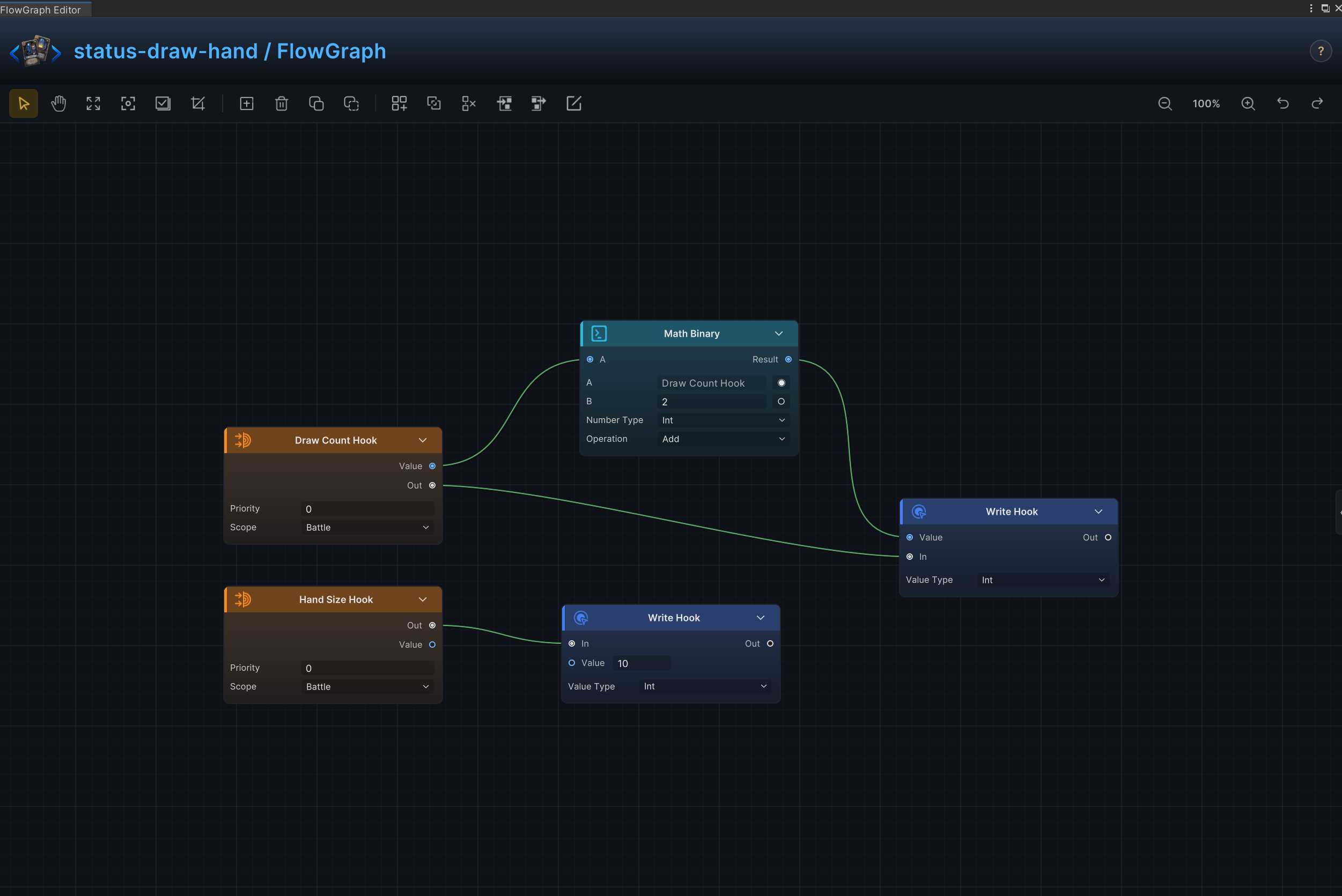
Draw Count Hook.Out → Write Hook (1).InDraw Count Hook.Value → Math Binary.AMath Binary.Result → Write Hook (1).ValueHand Size Hook.Out → Write Hook (2).In
Node configuration
Draw Count HookPriority = 0: Sets this hook's order relative to other hooks at the same timing.Scope = Battle: Keeps the hook active for the entire battle.
Hand Size HookPriority = 0: Sets this hook's order relative to other hooks at the same timing.Scope = Battle: Keeps the hook active for the entire battle.
Math BinaryKind = Int: Selects the data, collection, choice, or hook value type handled by this node.A = 0: Driven at runtime by Draw Count Hook.Value; this value is only the unconnected fallback.B = 2: Sets the second operand when the B input is not connected.Op = Add: Adds the two operands.
Write Hook (1)Kind = Int: Selects the data, collection, choice, or hook value type handled by this node.Value = 0: Driven at runtime by Math Binary.Result; this value is only the unconnected fallback.
Write Hook (2)Kind = Int: Selects the data, collection, choice, or hook value type handled by this node.Value = 10: Sets the value written or processed when the Value input is not connected.
Silence and card-play restrictions
Effect
Restricts which cards can be played, including type-specific locks and complete silence.
Node connections
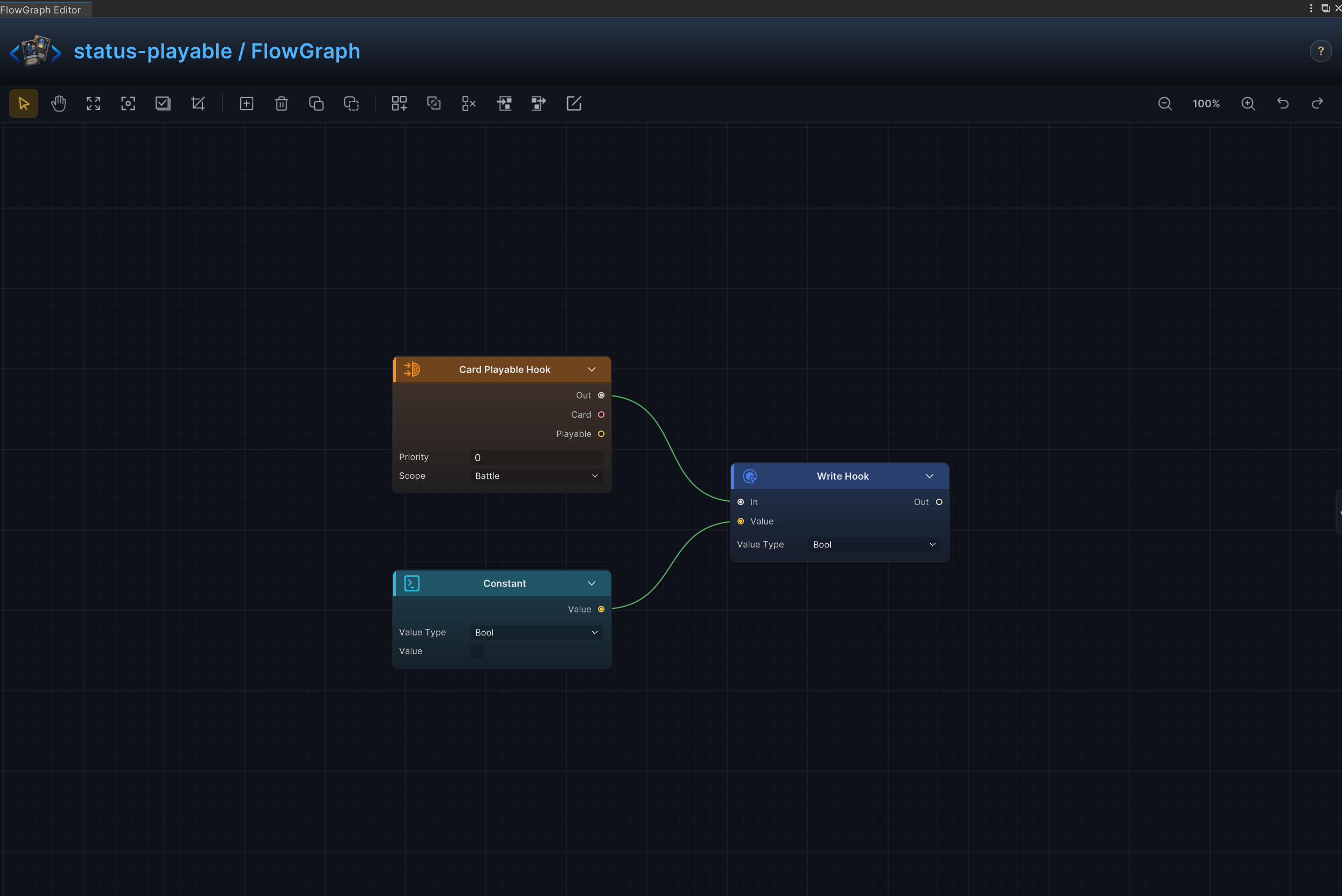
Card Playable Hook.Out → Write Hook.InConstant.Value → Write Hook.Value
Node configuration
Card Playable HookPriority = 0: Sets this hook's order relative to other hooks at the same timing.Scope = Battle: Keeps the hook active for the entire battle.
ConstantKind = Bool: Selects the data, collection, choice, or hook value type handled by this node.Bool Value = Off: Supplies the Boolean value used by the selected operation.
Write HookKind = Bool: Selects the data, collection, choice, or hook value type handled by this node.Bool Value = Off: Supplies the Boolean value used by the selected operation.
Stun, skip turn, and extra turn
Effect
At turn start, skips the opponent's next turn and then grants the source side one extra turn.
Node connections
On Turn Start.Out → Sequence.InSequence.Step0 → Skip Next Turn.InSequence.Step1 → Extra Turn.In
Node configuration
-
SequenceOutputs = 2: Executes Skip Next Turn and Extra Turn as separate ordered branches.
-
Skip Next TurnTarget = Opponent: Uses the enemy currently selected by the card or behavior.
Death burst, revive, and rebirth
Effect
When the status owner dies, deal 8 damage to all enemies, then revive the owner at 35% HP; deaths caused by killing another unit do not trigger this branch.
Node connections
All Opponents.Units → Deal Damage.TargetDeal Damage.Out → Revive Unit.InOn Unit Died.Out → Gate.InOn Unit Died.WasKill → Logic.ALogic.Result → Gate.AllowGate.Out → Deal Damage.In
Node configuration
-
LogicOp = Not: Inverts On Unit Died.WasKill so only the status owner's own death is allowed.
-
GateAllow = connected: Passes control only when Logic.Result is true.
-
Deal DamageTarget = Opponent: All Opponents.Units supplies the runtime value, this setting is the fallback when unconnectedAmount = 8: Uses 8 as the example value; replace it with the amount required by the card.Ignore Armor = Off: Damage resolves through armor normally.
-
Revive UnitTarget = Self: Targets the source unit itself.HP Percent = 35: Sets the percentage of maximum HP restored on revival.
Malleable Reactive Armor
Effect
Gain armor after each attack received.
Node connections
On Attack Taken.Out → Change Armor.In
Node configuration
Change ArmorTarget = Self: Targets the source unit itself.Mode = Delta: Adds to or subtracts from the current value; positive values increase it and negative values decrease it.Amount = 4: Uses 4 as the example value; replace it with the amount required by the card.
Beat of Death
Effect
Punish the player every time a card is played.
Node connections
On Card Played.Out → Change HP.In
Node configuration
Change HPTarget = Opponent: Uses the enemy currently selected by the card or behavior.Affect = Current: Changes current HP without changing maximum HP.Mode = Delta: Adds to or subtracts from the current value; positive values increase it and negative values decrease it.Amount = -1: Uses -1 as the example value; replace it with the amount required by the card.
No Draw
Effect
Replace the normal draw count with 0.
Node connections
Draw Count Hook.Out → Write Hook.InConstant.Value → Write Hook.Value
Node configuration
Draw Count HookPriority = 0: Sets this hook's order relative to other hooks at the same timing.Scope = Battle: Keeps the hook active for the entire battle.
ConstantKind = Int: Selects the data, collection, choice, or hook value type handled by this node.Int Value = 0: Supplies the integer constant.
Write HookKind = Int: Selects the data, collection, choice, or hook value type handled by this node.Value = 0: Driven at runtime by Constant.Value; this value is only the unconnected fallback.
Envenom on Hit
Effect
Apply poison whenever attack damage is dealt.
Node connections
On Damage Dealt.Out → Change Status.InOn Damage Dealt.Target → Change Status.Target
Node configuration
Change StatusTarget = Opponent: Driven at runtime by On Damage Dealt.Target, so Poison is applied to the unit actually damaged.Status = Poison: Reads or changes the Poison status.Mode = Delta: Adds to or subtracts from the current value; positive values increase it and negative values decrease it.Amount = 1: Uses 1 as the example value; replace it with the amount required by the card.
Exhaust Reward
Effect
Create a replacement card whenever another card is exhausted.
Node connections
On Card Exhausted.Out → Add Cards.In
Node configuration
Add CardsCard = Spark: Selects the card asset created by this node.Pile = Hand: Selects the source or destination card pile.Position = Top: Selects where cards are inserted in the destination pile.
Equipment Durability
Effect
Trigger an equipment effect and consume 1 durability stack.
Node connections
On Card Played.Out → Sequence.InSequence.Step0 → Deal Damage.InSequence.Step1 → Change Status.In
Node configuration
SequenceOutputs = 2: Sets the number of ordered control-flow branches.
Deal DamageTarget = Opponent: Uses the enemy currently selected by the card or behavior.Amount = 2: Uses 2 as the example value; replace it with the amount required by the card.Ignore Armor = Off: Damage resolves through armor normally.
Change StatusTarget = Self: Targets the source unit itself.Status = Equipment Durability: Reads or changes the Equipment Durability status.Mode = Delta: Adds to or subtracts from the current value; positive values increase it and negative values decrease it.Amount = -1: Uses -1 as the example value; replace it with the amount required by the card.
Plated Armor Decay
Effect
At turn start, gain armor equal to the current Plated Armor stacks; the status asset's PerTurn decay removes 1 stack at turn end.
Node connections
Status Info.Stacks → Change Armor.AmountOn Turn Start.Out → Change Armor.In
Node configuration
Change ArmorTarget = Self: Targets the source unit itself.Mode = Delta: Adds to or subtracts from the current value; positive values increase it and negative values decrease it.Amount = 1: Driven at runtime by Status Info.Stacks; this value is only the unconnected fallback.
Status InfoStatus = None: Reads the currently executing status instance, which is Plated Armor in this recipe.
Proportional Retaliation
Effect
Return a percentage of received damage to the attacker.
Node connections
Constant.Value → Math Binary (2).BMath Binary (3).Result → Math Binary (2).AOn Damage Taken.Amount → Math Binary (1).AStatus Info.Stacks → Math Binary (1).BMath Binary (1).Result → Math Binary (3).AMath Binary (2).Result → Deal Damage.AmountOn Damage Taken.Source → Deal Damage.TargetOn Damage Taken.Out → Deal Damage.In
Node configuration
Status InfoStatus = None: Selects the status read, changed, removed, or observed by the node.
Math Binary (1)Kind = Int: Selects the data, collection, choice, or hook value type handled by this node.A = 0: Driven at runtime by On Damage Taken.Amount; this value is only the unconnected fallback.B = 0: Driven at runtime by Status Info.Stacks; this value is only the unconnected fallback.Op = Mul: Multiplies A by B.
Deal DamageTarget = Opponent: Driven at runtime by On Damage Taken.Source; this value is only the unconnected fallback.Amount = 6: Driven at runtime by Math Binary (2).Result; this value is only the unconnected fallback.Ignore Armor = Off: Damage resolves through armor normally.
Math Binary (2)Kind = Int: Selects the data, collection, choice, or hook value type handled by this node.A = 0: Driven at runtime by Math Binary (3).Result; this value is only the unconnected fallback.B = 0: Driven at runtime by Constant.Value; this value is only the unconnected fallback.Op = Div: Divides A by B.
Math Binary (3)Kind = Int: Selects the data, collection, choice, or hook value type handled by this node.A = 0: Driven at runtime by Math Binary (1).Result; this value is only the unconnected fallback.B = 10: Sets the second operand when the B input is not connected.Op = Mul: Multiplies A by B.
ConstantKind = Int: Selects the data, collection, choice, or hook value type handled by this node.Int Value = 100: Supplies the integer constant.
Damage-to-Healing Conversion
Effect
Convert damage dealt into healing for the status owner.
Node connections
On Damage Dealt.Out → Change HP.InOn Damage Dealt.Amount → Change HP.Amount
Node configuration
Change HPTarget = Self: Targets the source unit itself.Affect = Current: Changes current HP without changing maximum HP.Mode = Delta: Adds to or subtracts from the current value; positive values increase it and negative values decrease it.Amount = 1: Driven at runtime by On Damage Dealt.Amount; this value is only the unconnected fallback.
Attack-Only Damage Modifier
Effect
Modify incoming attack damage without changing other damage sources.
Node connections
Attack Taken Hook.Value → Math Binary.AStatus Info.Stacks → Math Binary.BMath Binary.Result → Write Hook.ValueAttack Taken Hook.Out → Write Hook.In
Node configuration
Attack Taken HookPriority = 0: Sets this hook's order relative to other hooks at the same timing.Scope = Battle: Keeps the hook active for the entire battle.
Write HookKind = Int: Selects the data, collection, choice, or hook value type handled by this node.Value = 0: Driven at runtime by Math Binary.Result; this value is only the unconnected fallback.
Status InfoStatus = None: Selects the status read, changed, removed, or observed by the node.
Math BinaryKind = Int: Selects the data, collection, choice, or hook value type handled by this node.A = 0: Driven at runtime by Attack Taken Hook.Value; this value is only the unconnected fallback.B = 0: Driven at runtime by Status Info.Stacks; this value is only the unconnected fallback.Op = Add: Adds the two operands.
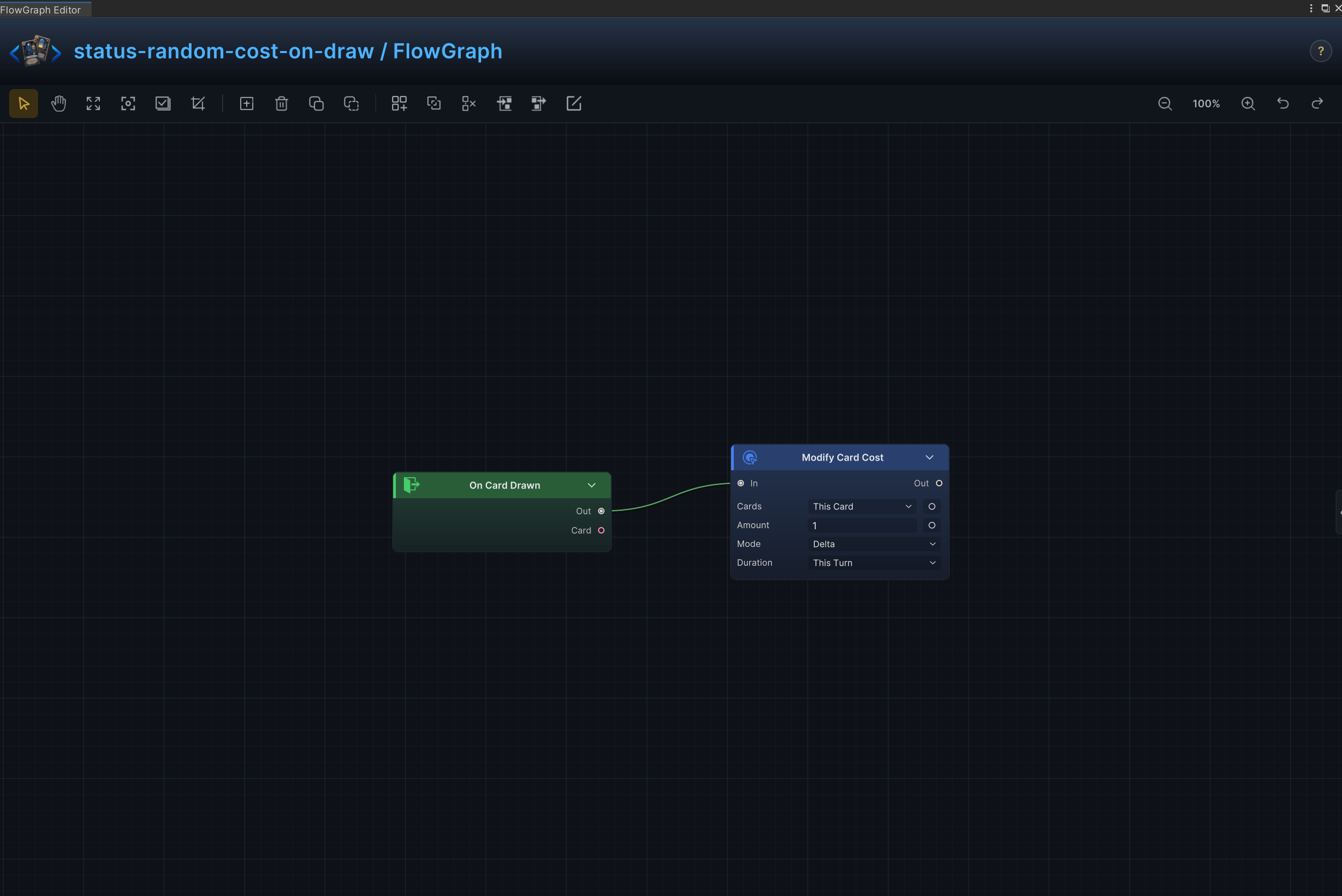
Random Cost on Draw
Effect
Randomize a card's energy cost when it is drawn.
Node connections
On Card Drawn.Out → Modify Card Cost.InRandom.Result → Modify Card Cost.Amount
Node configuration
-
RandomKind = Int: Produces an integer result.Min = 0: Sets the inclusive minimum energy cost.Max = 3: Sets the inclusive maximum energy cost.
-
Modify Card CostCards = ThisCard: Selects the card collection used when the Cards input is not connected.Mode = Set: Replaces the card's current cost with the random result.Amount = 1: Driven at runtime by Random.Result; this value is only the unconnected fallback.Duration = ThisTurn: Selects how long the card-cost change remains active.Turns = 1: Sets the limited duration in turns; battle-scoped hooks ignore this value.
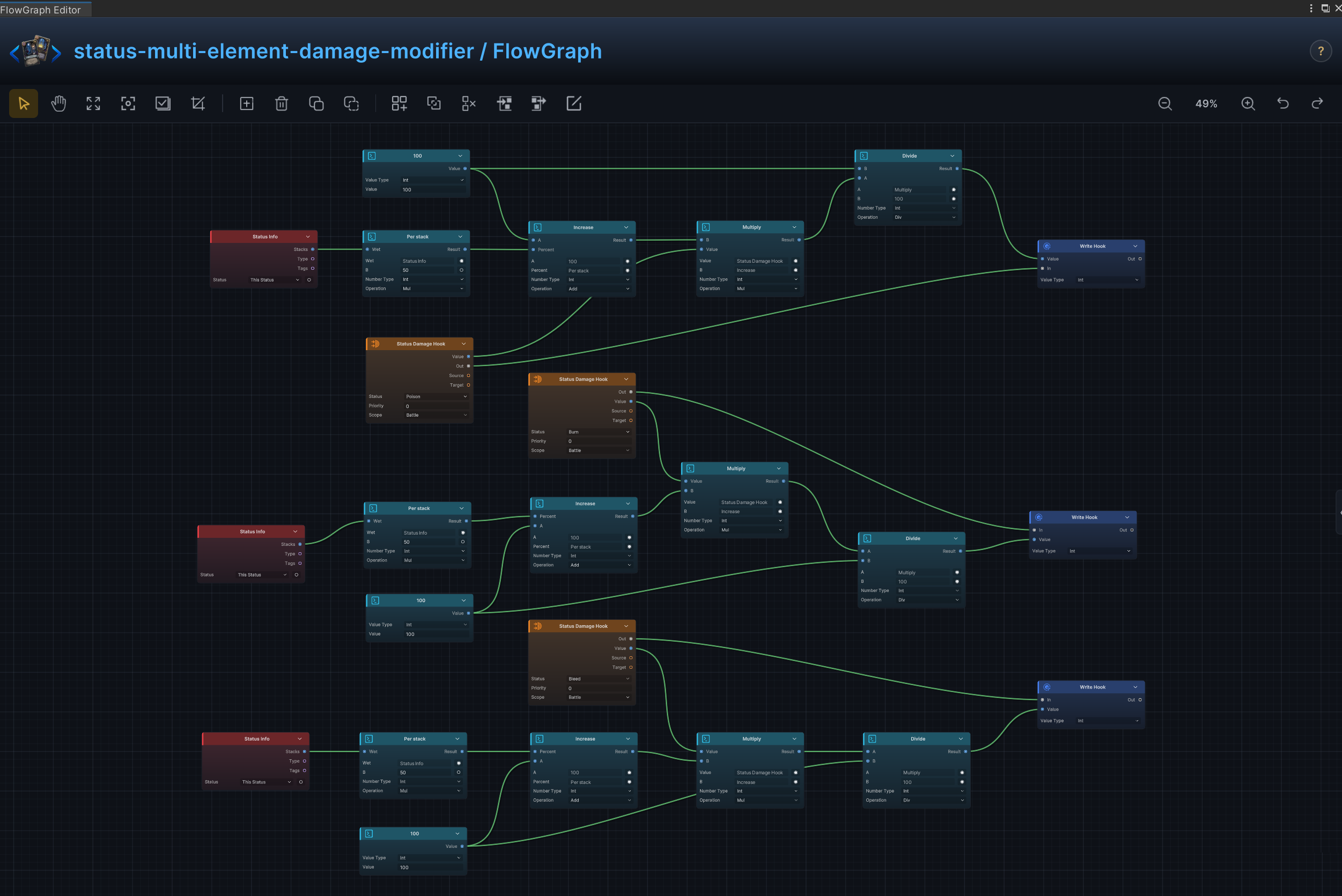
Multi-Element Damage Modifier
Effect
Apply different incoming-damage multipliers for several elemental status pairings.
Node connections
Math Binary (2).Result → Math Binary (4).BConstant (1).Value → Math Binary (2).AConstant (1).Value → Math Binary (3).BMath Binary (4).Result → Math Binary (3).AMath Binary (6).Result → Math Binary (8).BConstant (2).Value → Math Binary (6).AConstant (2).Value → Math Binary (7).BMath Binary (8).Result → Math Binary (7).AMath Binary (10).Result → Math Binary (12).BConstant (3).Value → Math Binary (10).AConstant (3).Value → Math Binary (11).BMath Binary (12).Result → Math Binary (11).AStatus Info (1).Stacks → Math Binary (1).AStatus Damage Hook (1).Value → Math Binary (4).AMath Binary (3).Result → Write Hook (1).ValueMath Binary (1).Result → Math Binary (2).BStatus Damage Hook (1).Out → Write Hook (1).InStatus Info (2).Stacks → Math Binary (5).AStatus Damage Hook (2).Value → Math Binary (8).AMath Binary (7).Result → Write Hook (2).ValueMath Binary (5).Result → Math Binary (6).BStatus Damage Hook (2).Out → Write Hook (2).InStatus Info (3).Stacks → Math Binary (9).AStatus Damage Hook (3).Value → Math Binary (12).AMath Binary (11).Result → Write Hook (3).ValueMath Binary (9).Result → Math Binary (10).BStatus Damage Hook (3).Out → Write Hook (3).In
Node configuration
Status Damage Hook (1)Status = Poison: Reads or changes the Poison status.Priority = 0: Sets this hook's order relative to other hooks at the same timing.Scope = Battle: Keeps the hook active for the entire battle.
Write Hook (1)Kind = Int: Selects the data, collection, choice, or hook value type handled by this node.Value = 0: Driven at runtime by Math Binary (3).Result; this value is only the unconnected fallback.
Status Info (1)Status = None: Selects the status read, changed, removed, or observed by the node.
Math Binary (1)Kind = Int: Selects the data, collection, choice, or hook value type handled by this node.A = 0: Driven at runtime by Status Info (1).Stacks; this value is only the unconnected fallback.B = 50: Sets the second operand when the B input is not connected.Op = Mul: Multiplies A by B.
Math Binary (2)Kind = Int: Selects the data, collection, choice, or hook value type handled by this node.A = 0: Driven at runtime by Constant (1).Value; this value is only the unconnected fallback.B = 0: Driven at runtime by Math Binary (1).Result; this value is only the unconnected fallback.Op = Add: Adds the two operands.
Math Binary (3)Kind = Int: Selects the data, collection, choice, or hook value type handled by this node.A = 0: Driven at runtime by Math Binary (4).Result; this value is only the unconnected fallback.B = 0: Driven at runtime by Constant (1).Value; this value is only the unconnected fallback.Op = Div: Divides A by B.
Math Binary (4)Kind = Int: Selects the data, collection, choice, or hook value type handled by this node.A = 0: Driven at runtime by Status Damage Hook (1).Value; this value is only the unconnected fallback.B = 0: Driven at runtime by Math Binary (2).Result; this value is only the unconnected fallback.Op = Mul: Multiplies A by B.
Constant (1)Kind = Int: Selects the data, collection, choice, or hook value type handled by this node.Int Value = 100: Supplies the integer constant.
Status Damage Hook (2)Status = Burn: Reads or changes the Burn status.Priority = 0: Sets this hook's order relative to other hooks at the same timing.Scope = Battle: Keeps the hook active for the entire battle.
Write Hook (2)Kind = Int: Selects the data, collection, choice, or hook value type handled by this node.Value = 0: Driven at runtime by Math Binary (7).Result; this value is only the unconnected fallback.
Status Info (2)Status = None: Selects the status read, changed, removed, or observed by the node.
Math Binary (5)Kind = Int: Selects the data, collection, choice, or hook value type handled by this node.A = 0: Driven at runtime by Status Info (2).Stacks; this value is only the unconnected fallback.B = 50: Sets the second operand when the B input is not connected.Op = Mul: Multiplies A by B.
Math Binary (6)Kind = Int: Selects the data, collection, choice, or hook value type handled by this node.A = 0: Driven at runtime by Constant (2).Value; this value is only the unconnected fallback.B = 0: Driven at runtime by Math Binary (5).Result; this value is only the unconnected fallback.Op = Add: Adds the two operands.
Math Binary (7)Kind = Int: Selects the data, collection, choice, or hook value type handled by this node.A = 0: Driven at runtime by Math Binary (8).Result; this value is only the unconnected fallback.B = 0: Driven at runtime by Constant (2).Value; this value is only the unconnected fallback.Op = Div: Divides A by B.
Math Binary (8)Kind = Int: Selects the data, collection, choice, or hook value type handled by this node.A = 0: Driven at runtime by Status Damage Hook (2).Value; this value is only the unconnected fallback.B = 0: Driven at runtime by Math Binary (6).Result; this value is only the unconnected fallback.Op = Mul: Multiplies A by B.
Constant (2)Kind = Int: Selects the data, collection, choice, or hook value type handled by this node.Int Value = 100: Supplies the integer constant.
Status Damage Hook (3)Status = Bleed: Reads or changes the Bleed status.Priority = 0: Sets this hook's order relative to other hooks at the same timing.Scope = Battle: Keeps the hook active for the entire battle.
Write Hook (3)Kind = Int: Selects the data, collection, choice, or hook value type handled by this node.Value = 0: Driven at runtime by Math Binary (11).Result; this value is only the unconnected fallback.
Status Info (3)Status = None: Selects the status read, changed, removed, or observed by the node.
Math Binary (9)Kind = Int: Selects the data, collection, choice, or hook value type handled by this node.A = 0: Driven at runtime by Status Info (3).Stacks; this value is only the unconnected fallback.B = 50: Sets the second operand when the B input is not connected.Op = Mul: Multiplies A by B.
Math Binary (10)Kind = Int: Selects the data, collection, choice, or hook value type handled by this node.A = 0: Driven at runtime by Constant (3).Value; this value is only the unconnected fallback.B = 0: Driven at runtime by Math Binary (9).Result; this value is only the unconnected fallback.Op = Add: Adds the two operands.
Math Binary (11)Kind = Int: Selects the data, collection, choice, or hook value type handled by this node.A = 0: Driven at runtime by Math Binary (12).Result; this value is only the unconnected fallback.B = 0: Driven at runtime by Constant (3).Value; this value is only the unconnected fallback.Op = Div: Divides A by B.
Math Binary (12)Kind = Int: Selects the data, collection, choice, or hook value type handled by this node.A = 0: Driven at runtime by Status Damage Hook (3).Value; this value is only the unconnected fallback.B = 0: Driven at runtime by Math Binary (10).Result; this value is only the unconnected fallback.Op = Mul: Multiplies A by B.
Constant (3)Kind = Int: Selects the data, collection, choice, or hook value type handled by this node.Int Value = 100: Supplies the integer constant.
Random Discard at Turn Start
Effect
Choose cards from the hand at turn start and move them to the discard pile.
Node connections
Card Piles.Cards → Random Elements.CollectionStatus Info.Stacks → Random Elements.CountRandom Elements.Result → Move Cards.CardsOn Turn Start.Out → Move Cards.In
Node configuration
Move CardsCards = ThisCard: Driven at runtime by Random Elements.Result; this value is only the unconnected fallback.Pile = Discard: Selects the source or destination card pile.Position = Top: Selects where cards are inserted in the destination pile.
Card PilesPile = Hand: Selects the source or destination card pile.
Random ElementsKind = Card: Selects the data, collection, choice, or hook value type handled by this node.Count = 1: Driven at runtime by Status Info.Stacks; this value is only the unconnected fallback.
Status InfoStatus = None: Selects the status read, changed, removed, or observed by the node.