状态配方
从 30 个状态机制配方中选择所需效果,并根据节点连接、节点配置与可编辑 FlowGraph 完成复现
配方总览
| 序号 | 机制 | 实现效果 |
|---|---|---|
| 1 | 毒、灼烧、再生与周期结算 | 在指定回合时点读取状态层数,并按层数造成伤害、治疗或提供资源 |
| 2 | 力量与虚弱 | 在伤害落地前修改状态持有者造成的伤害 |
| 3 | 受到伤害倍率修正 | 状态生效时按倍率修改受到的伤害,正向和负向缩放可分别表示易伤与抗性 |
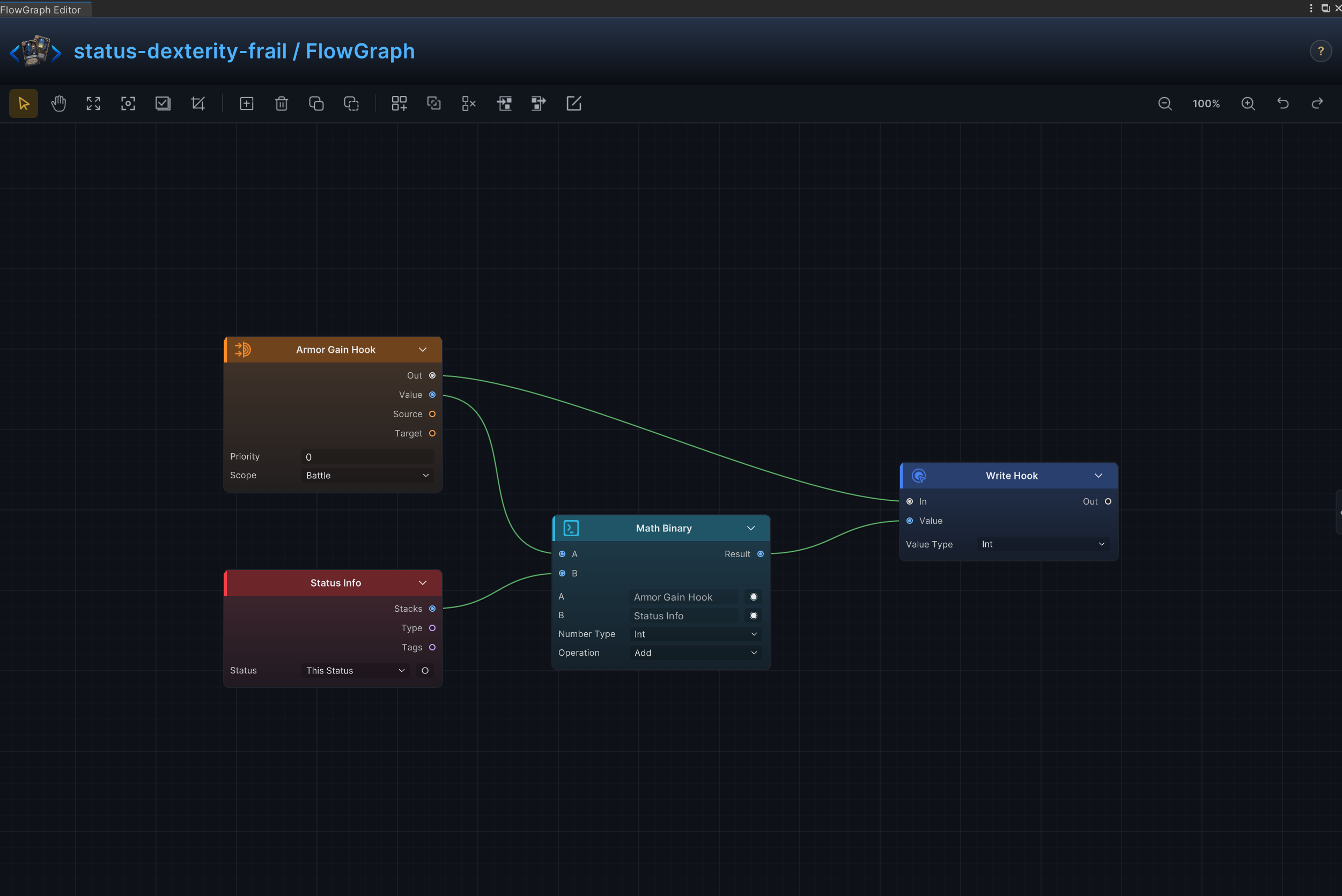
| 4 | 敏捷与脆弱 | 修改状态持有者每次通过卡牌获得的护甲 |
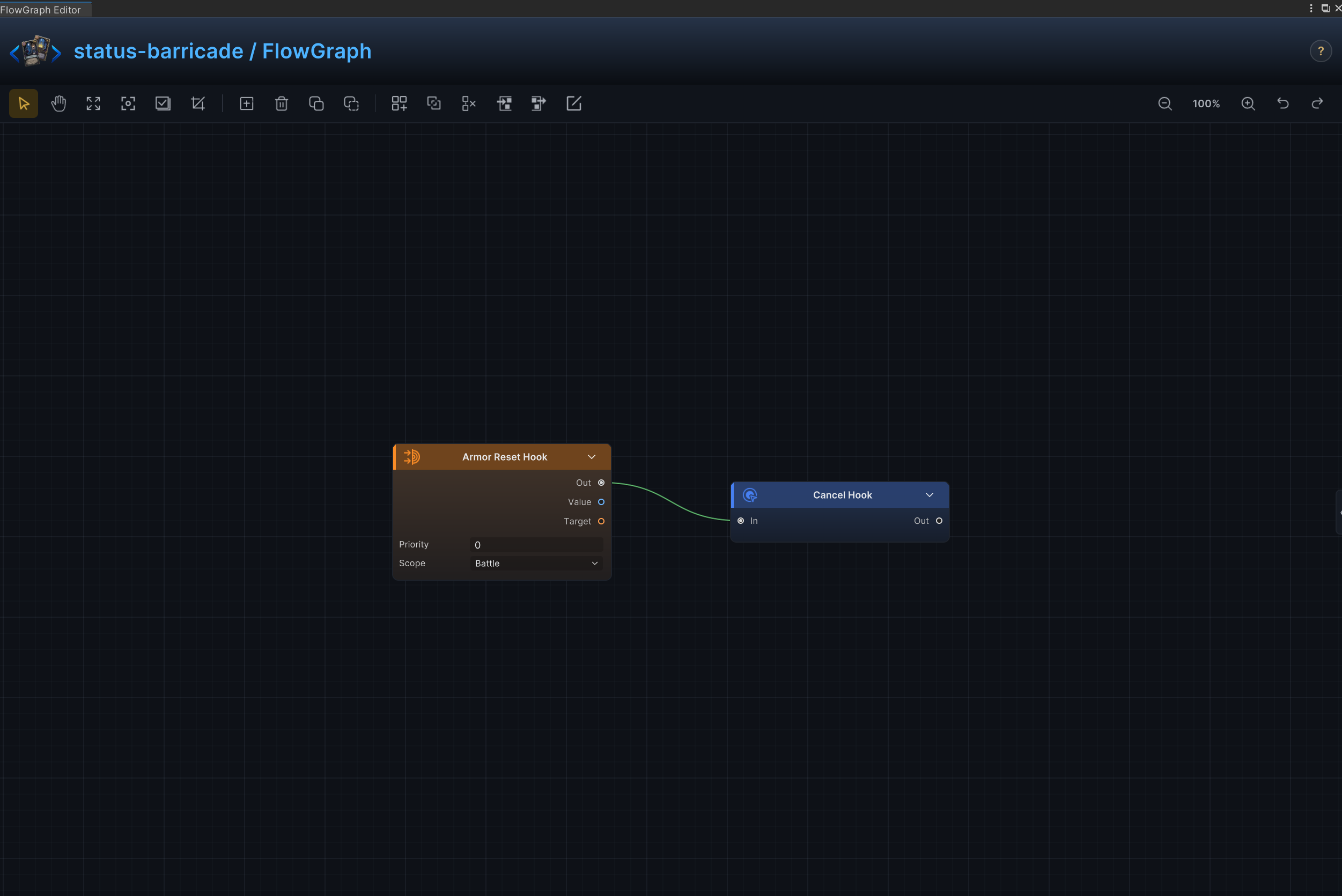
| 5 | 壁垒与保留护甲 | 跳过回合开始时的护甲重置,让护甲保留到后续回合 |
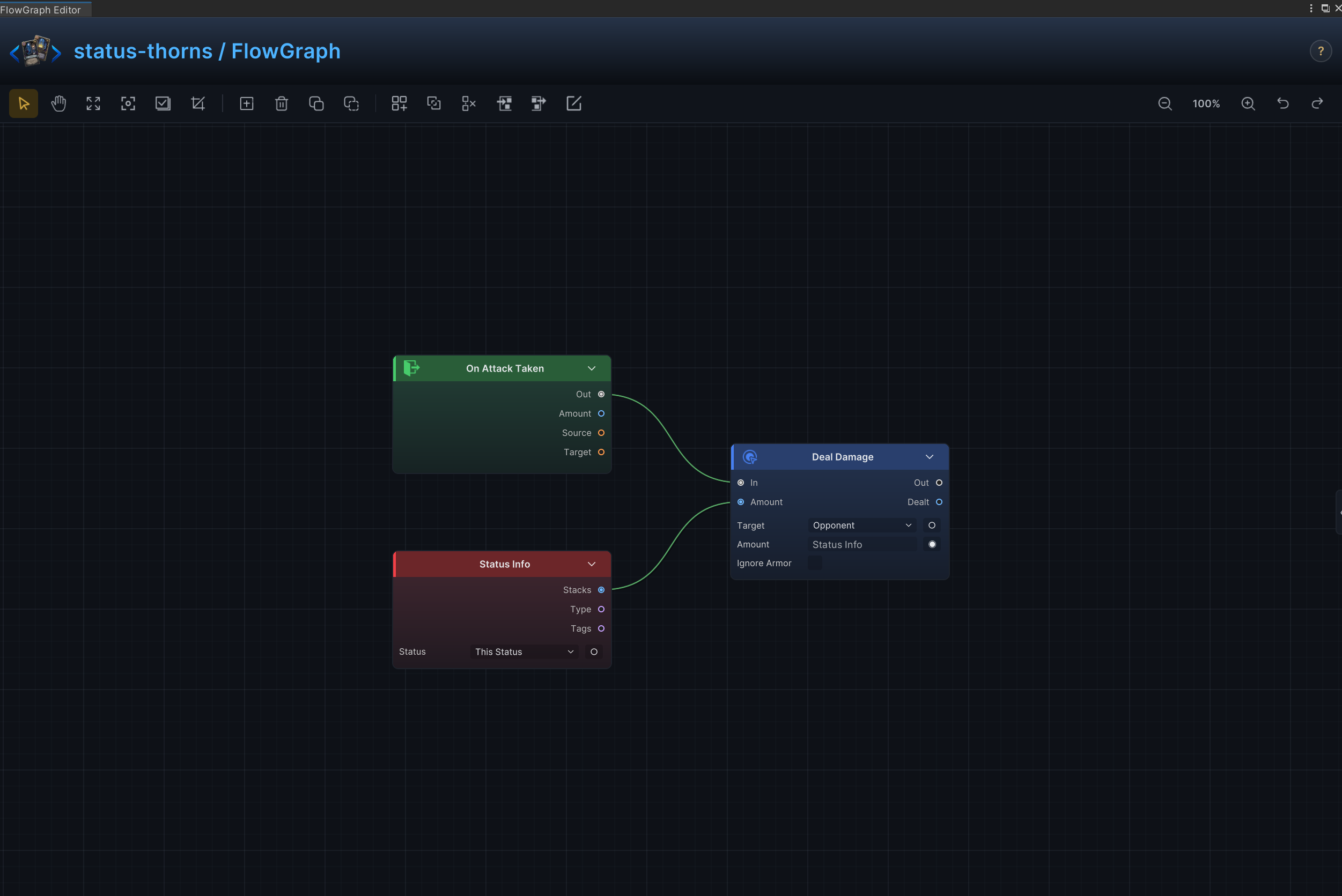
| 6 | 荆棘、反伤与反击 | 状态持有者受击后,向攻击者返还伤害 |
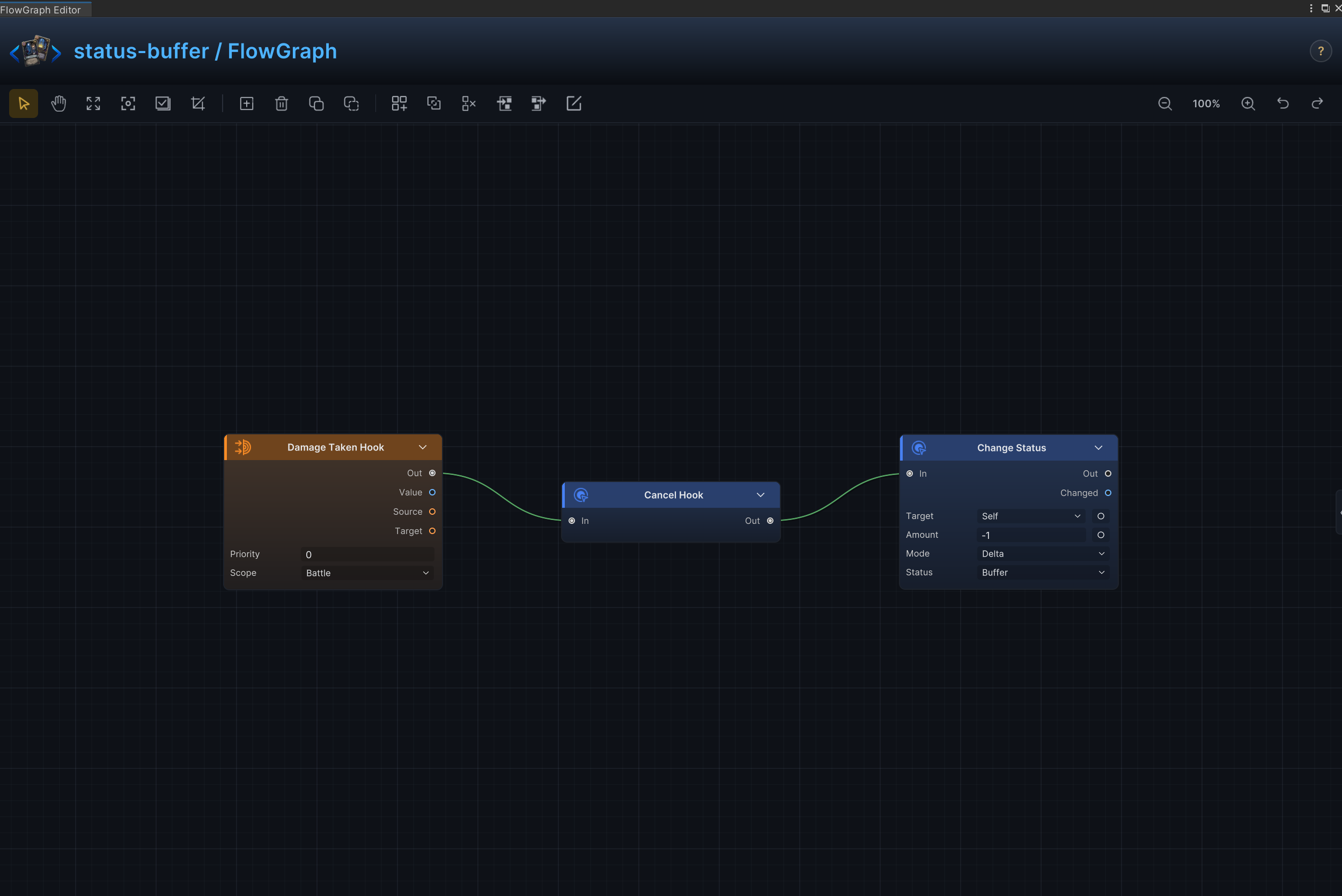
| 7 | 缓冲与单次伤害抵消 | 消耗一层状态,抵消下一次生命损失 |
| 8 | 单次伤害上限 | 状态生效时把每次生命损失限制在指定上限 |
| 9 | 人工制品与减益免疫 | 消耗一层状态,阻止下一次减益生效 |
| 10 | 多层护甲、仪式与逐回合成长 | 在指定回合时点按层数提供护甲、力量、能量或其他状态 |
| 11 | 残影与出牌触发能力 | 每当任意卡牌打出时,让状态持有者获得对应收益 |
| 12 | 牌堆变化触发 | 在抽牌、弃牌、消耗或洗牌发生时触发状态效果 |
| 13 | 每回合能量与全局费用规则 | 持续修改每回合能量或卡牌费用 |
| 14 | 抽牌数量与手牌上限 | 持续增加或减少抽牌数量与手牌容量 |
| 15 | 沉默与卡牌使用限制 | 按卡牌类型阻止打出,或完全禁止状态持有者使用卡牌 |
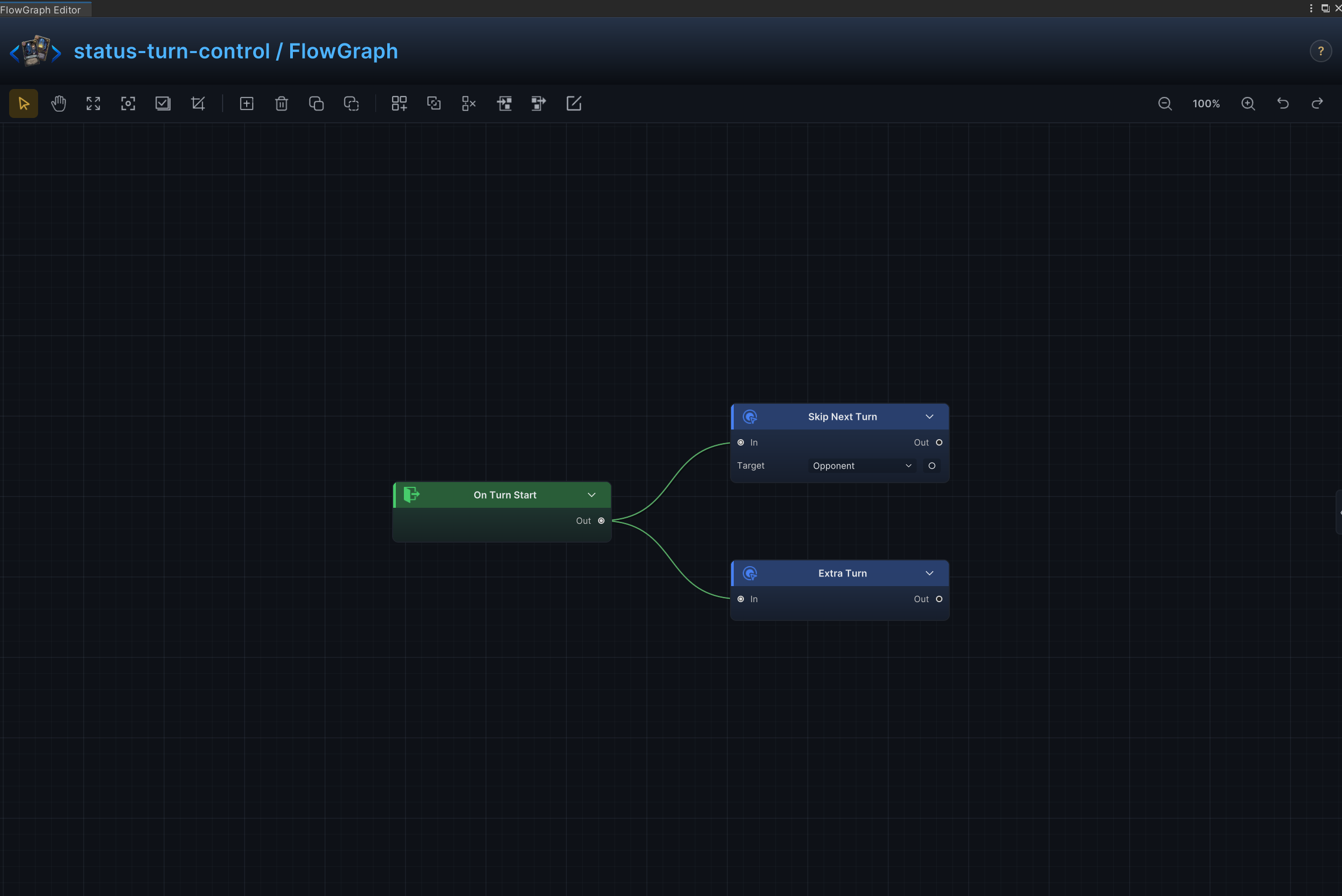
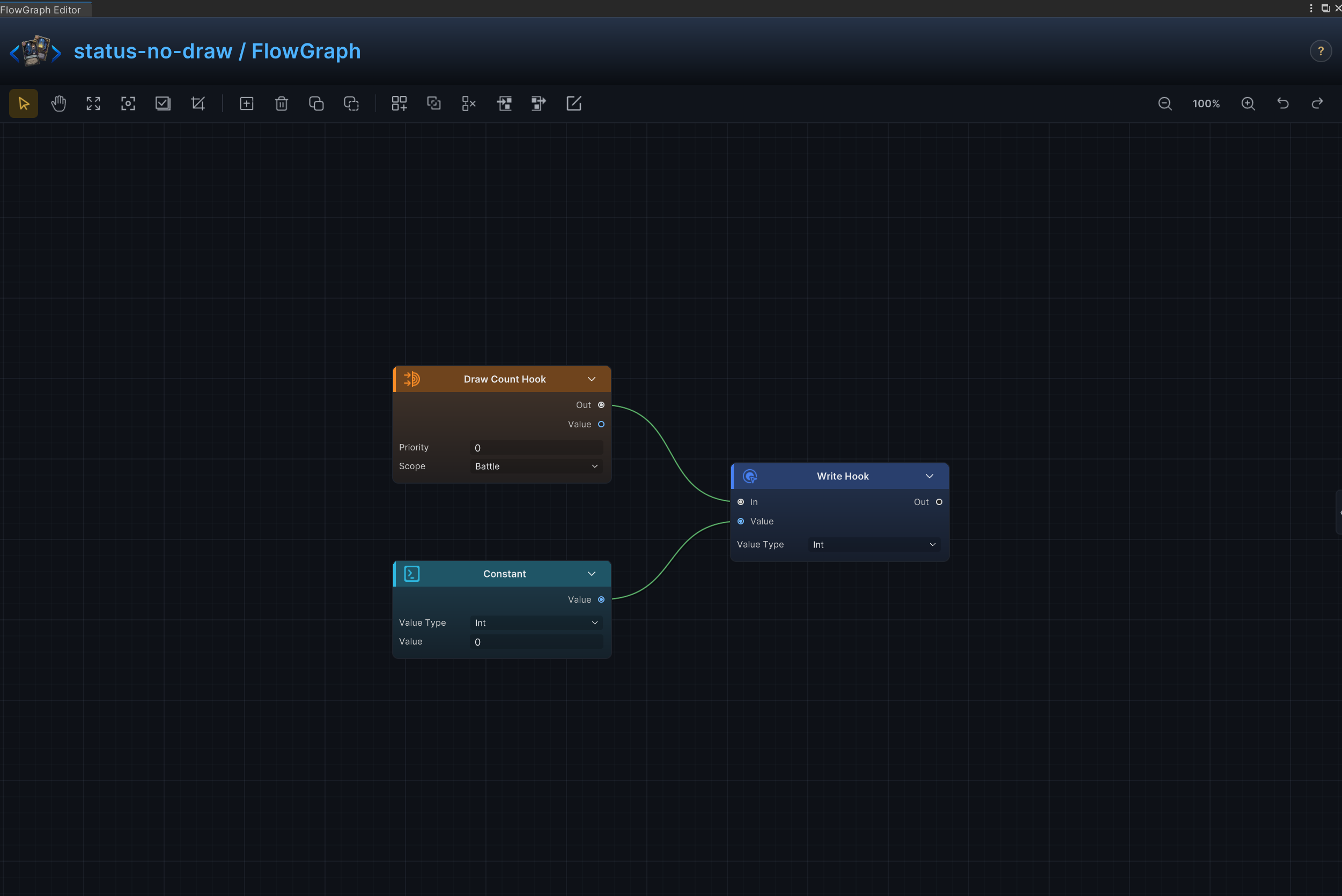
| 16 | 跳过回合与额外回合 | 让目标跳过下一个回合,或在当前回合后获得额外回合 |
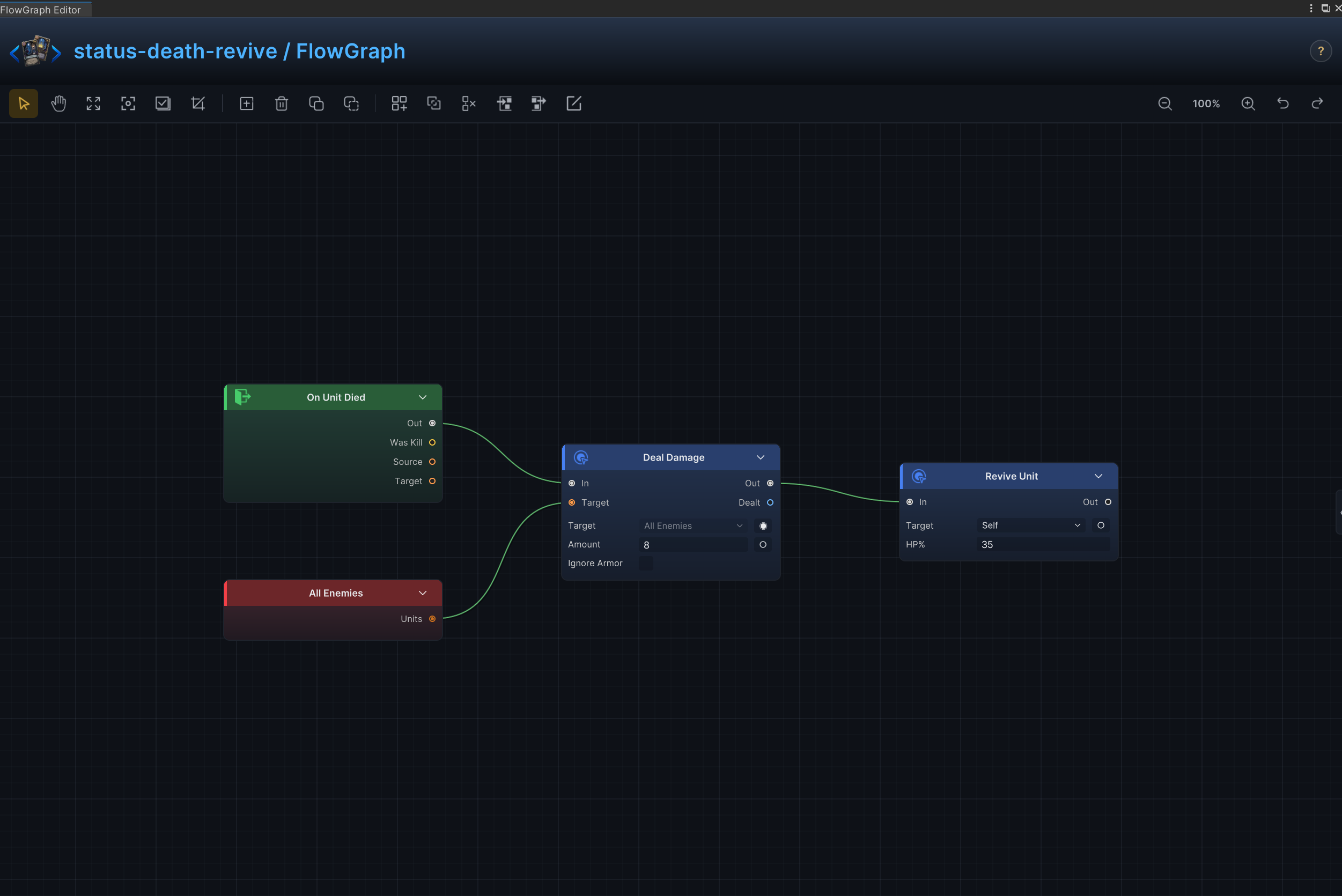
| 17 | 死亡爆发、复活与重生 | 在单位死亡时造成额外效果、复活单位或触发第二条命 |
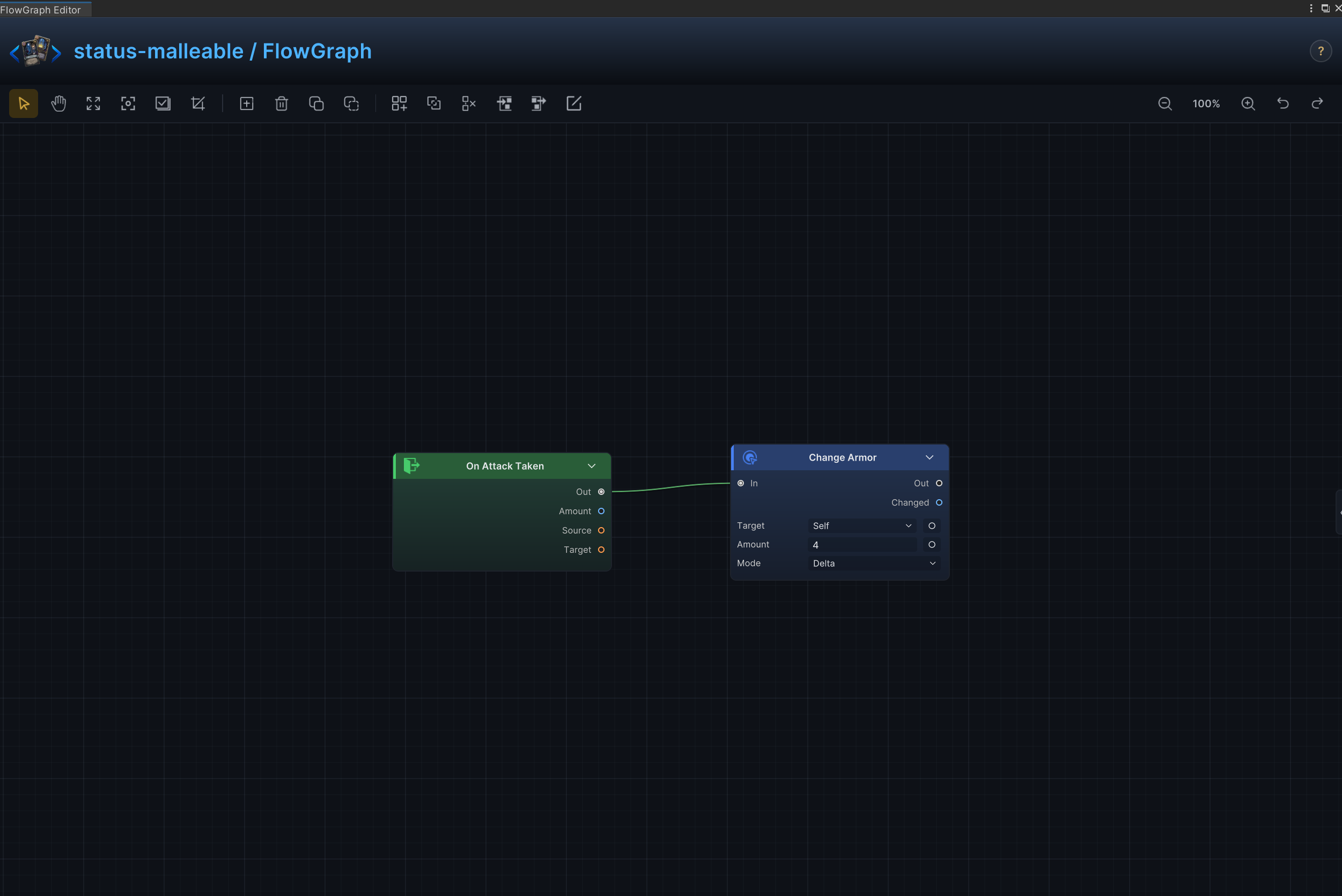
| 18 | 受击获得护甲 | 每次受到攻击后获得护甲 |
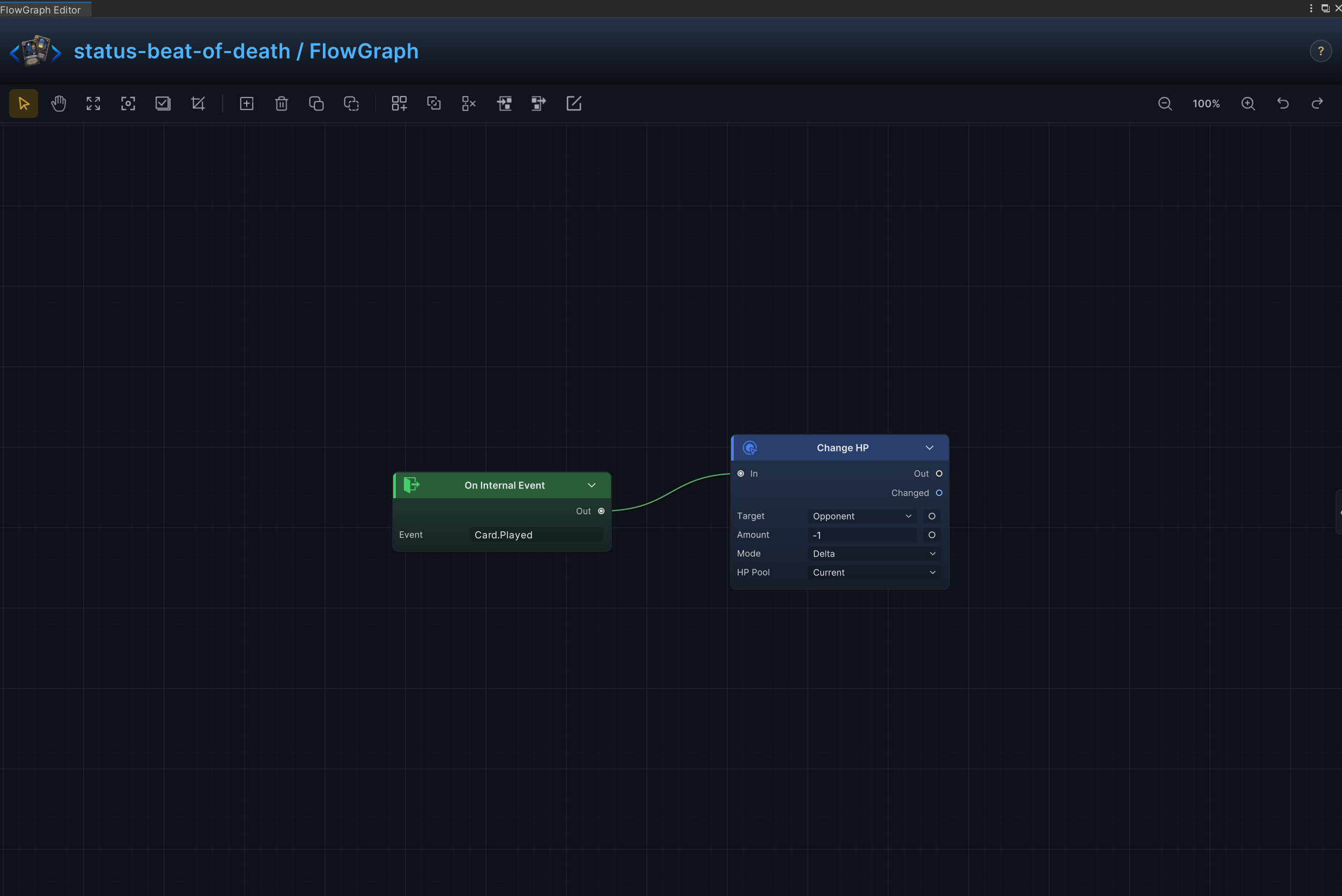
| 19 | 出牌惩罚 | 玩家每打出一张牌便受到一次惩罚 |
| 20 | 禁止抽牌 | 把常规抽牌数量改为 0 |
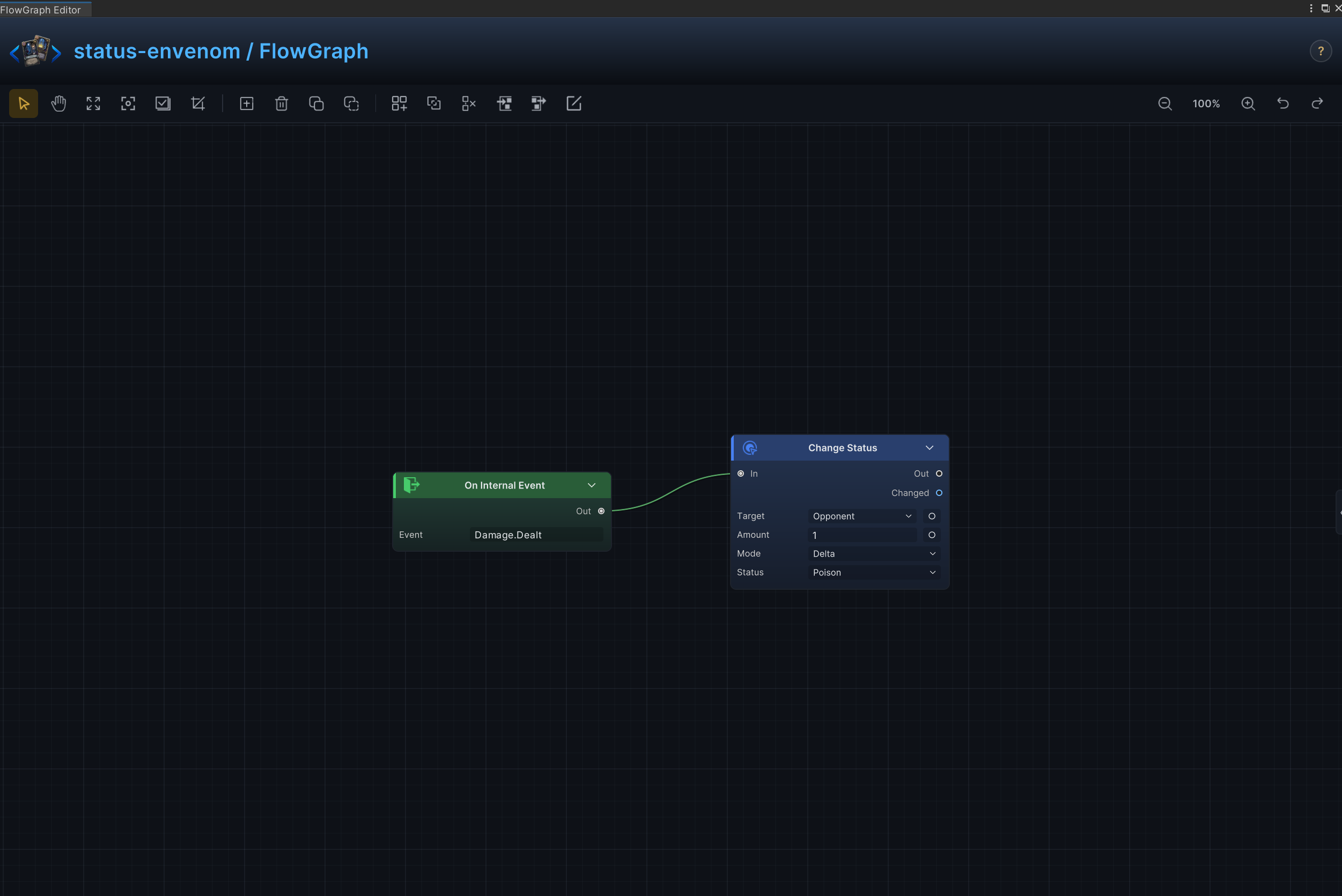
| 21 | 命中施毒 | 每次攻击造成伤害时给目标附加中毒 |
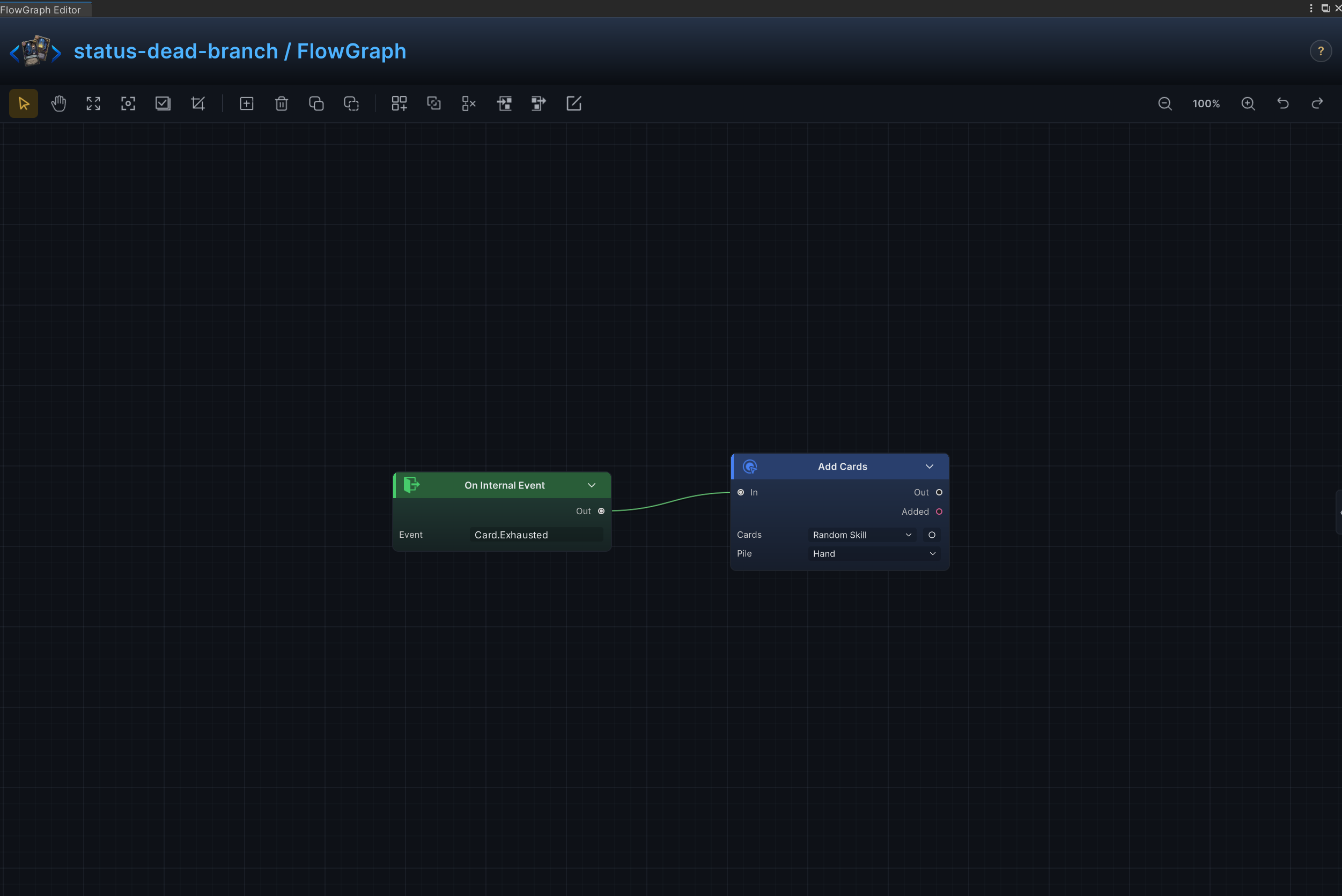
| 22 | 消耗奖励 | 每当一张卡牌被消耗时生成替代卡牌 |
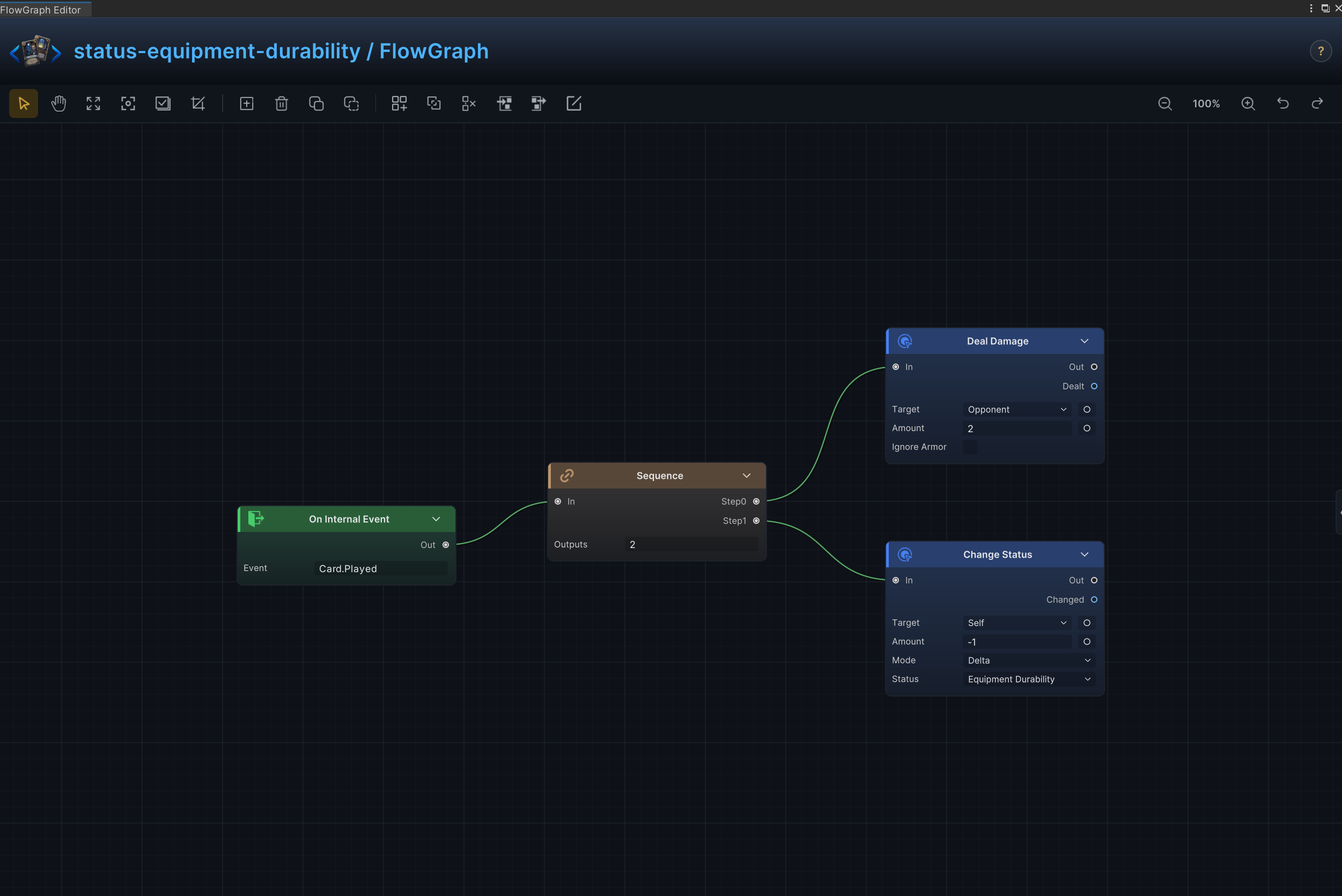
| 23 | 装备耐久 | 触发装备效果后消耗 1 层耐久 |
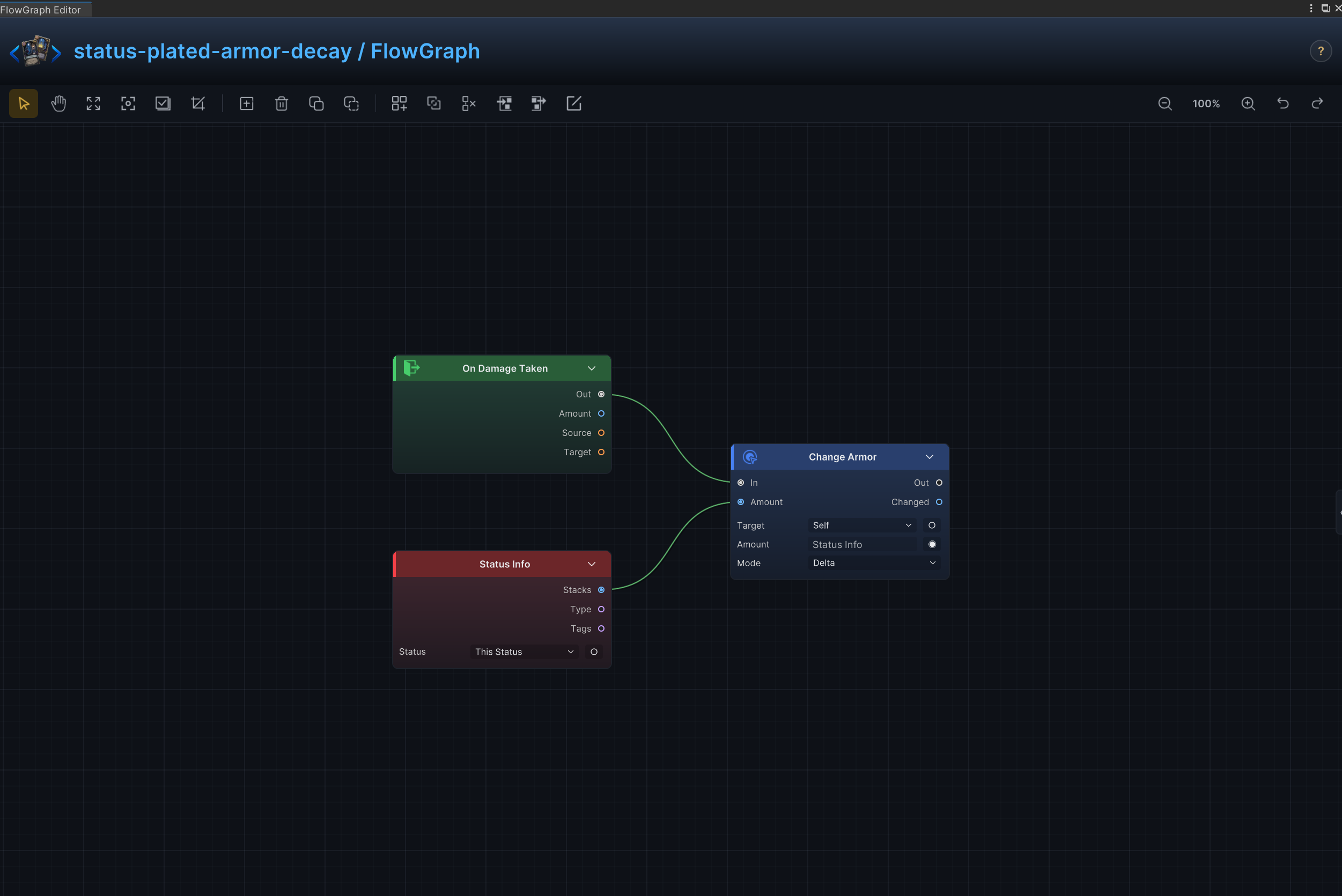
| 24 | 多层护甲受击衰减 | 持续提供护甲,并在攻击穿透防护后减少状态层数 |
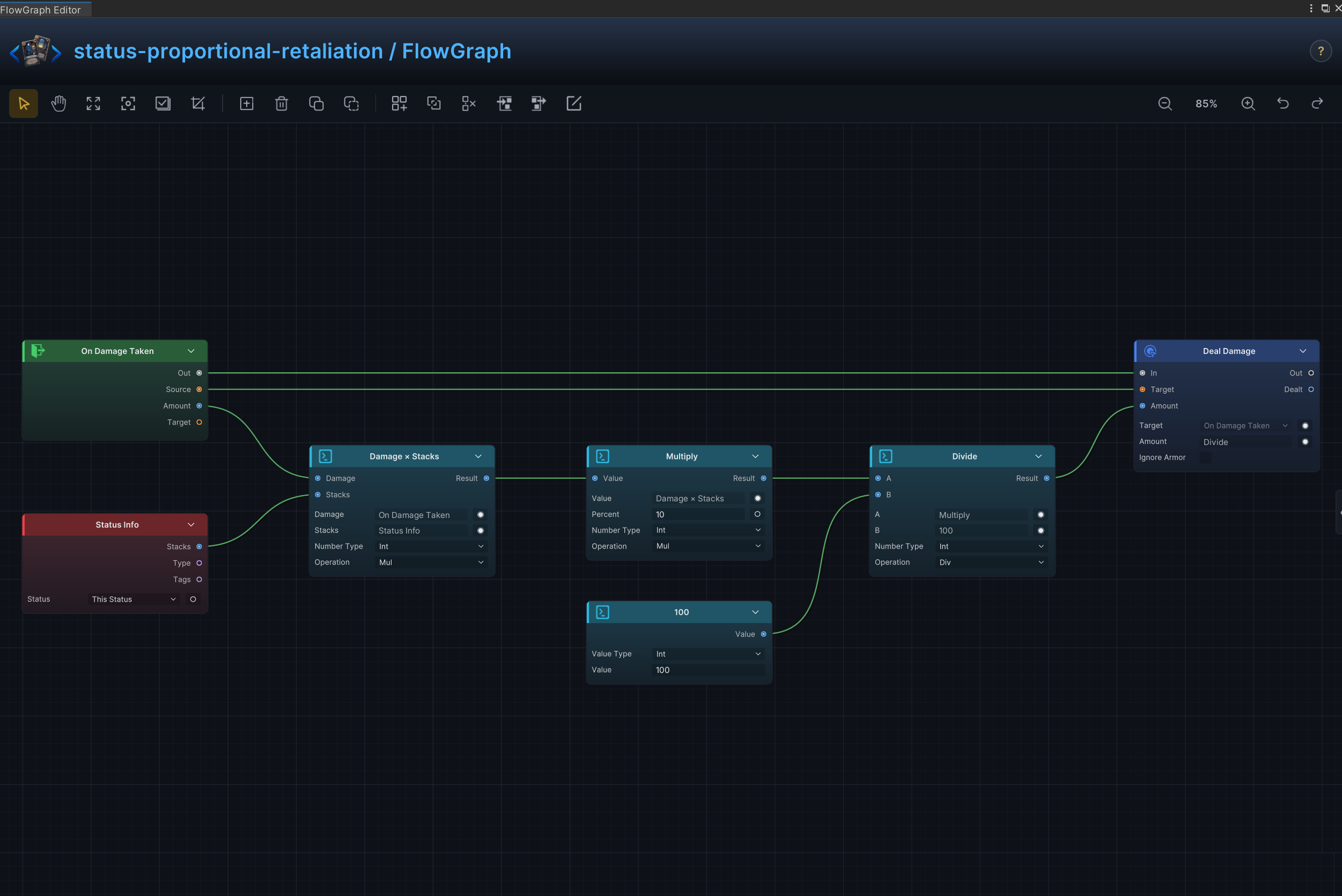
| 25 | 按比例反伤 | 按本次受到伤害的比例对攻击者造成反击伤害 |
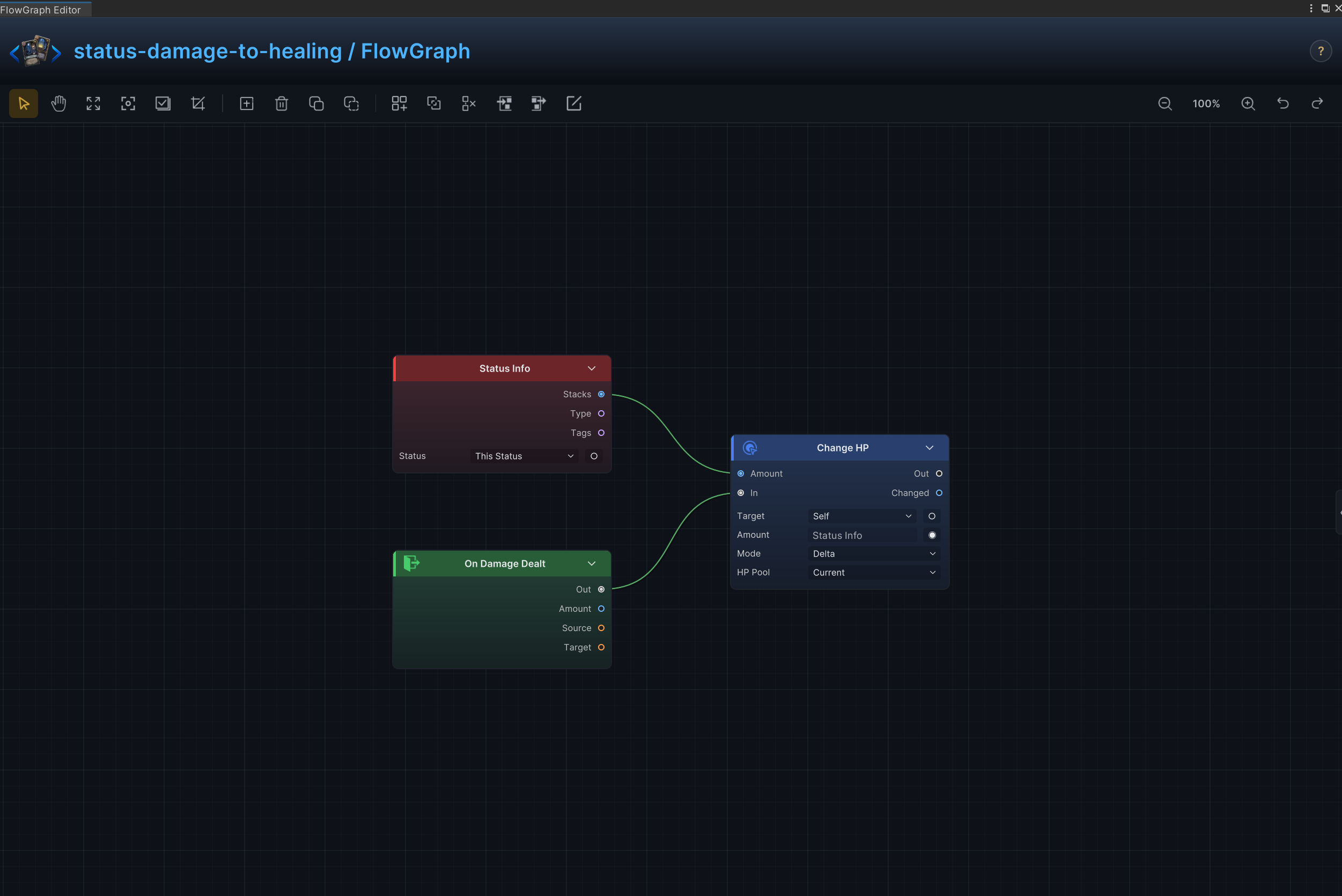
| 26 | 伤害转化治疗 | 把状态持有者造成的伤害按规则转换为自身治疗 |
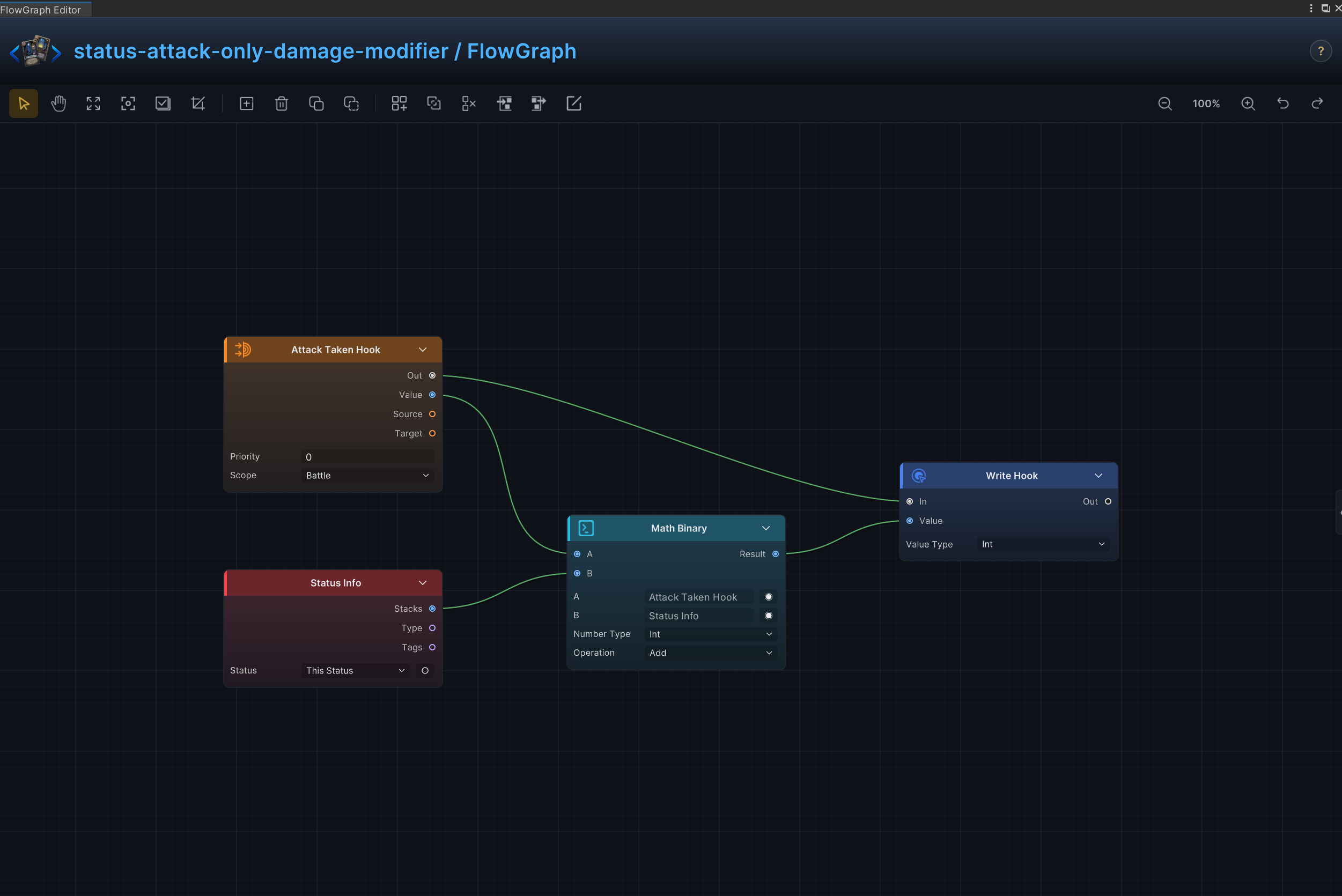
| 27 | 仅攻击伤害修正 | 只修改攻击造成的伤害,不影响其他伤害来源 |
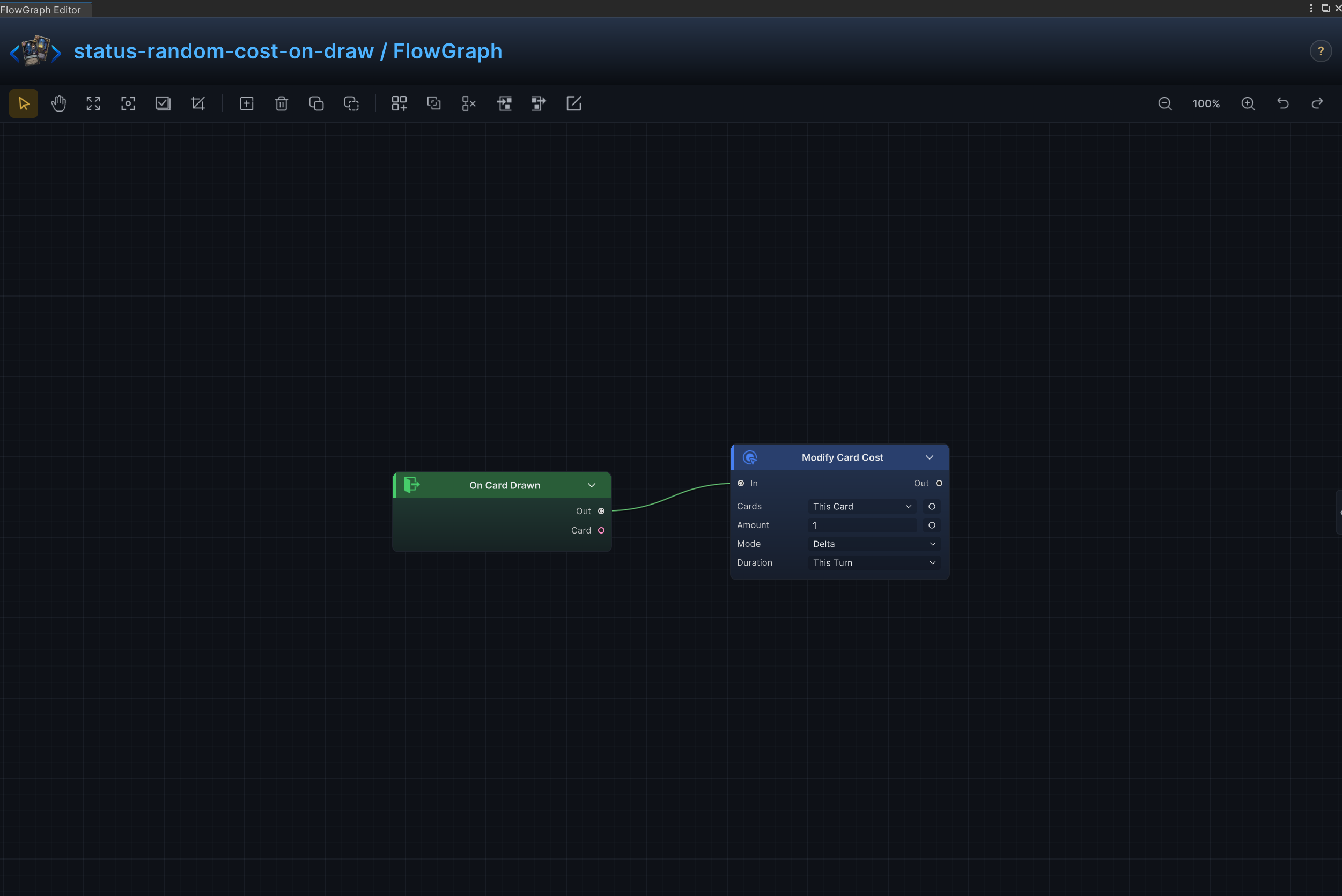
| 28 | 抽牌时随机费用 | 卡牌被抽到时随机重设其能量费用 |
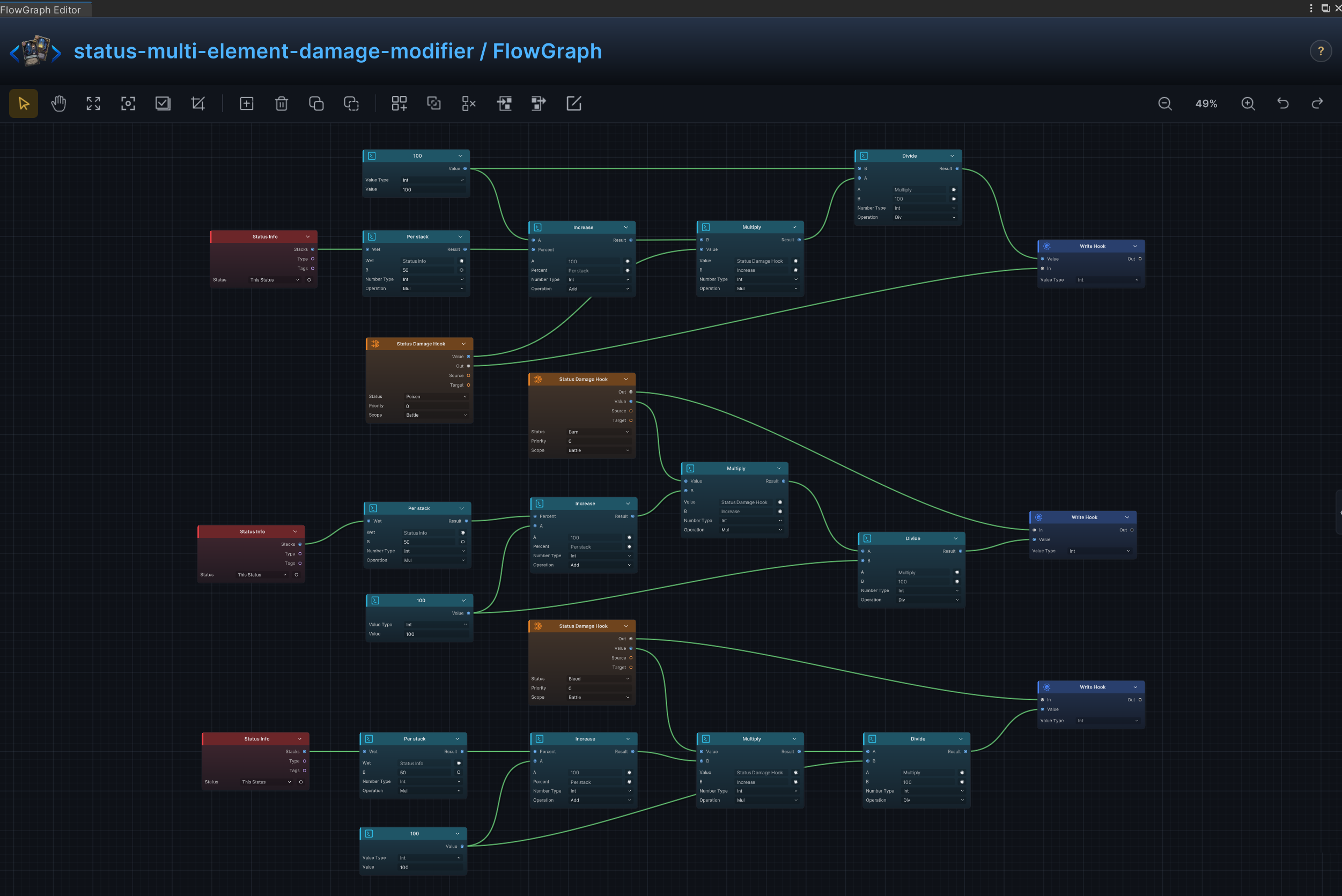
| 29 | 多元素伤害修正 | 针对多个元素状态组合分别修改受到的伤害 |
| 30 | 回合开始随机弃牌 | 回合开始时从手牌中随机选择卡牌并移入弃牌堆 |
每个折叠项固定包含“效果”“节点连接”与“节点配置”,右侧流图用于核对节点布局,端口箭头只表示连接,字段含义和示例值只在配置段说明
毒、灼烧、再生与周期结算
效果
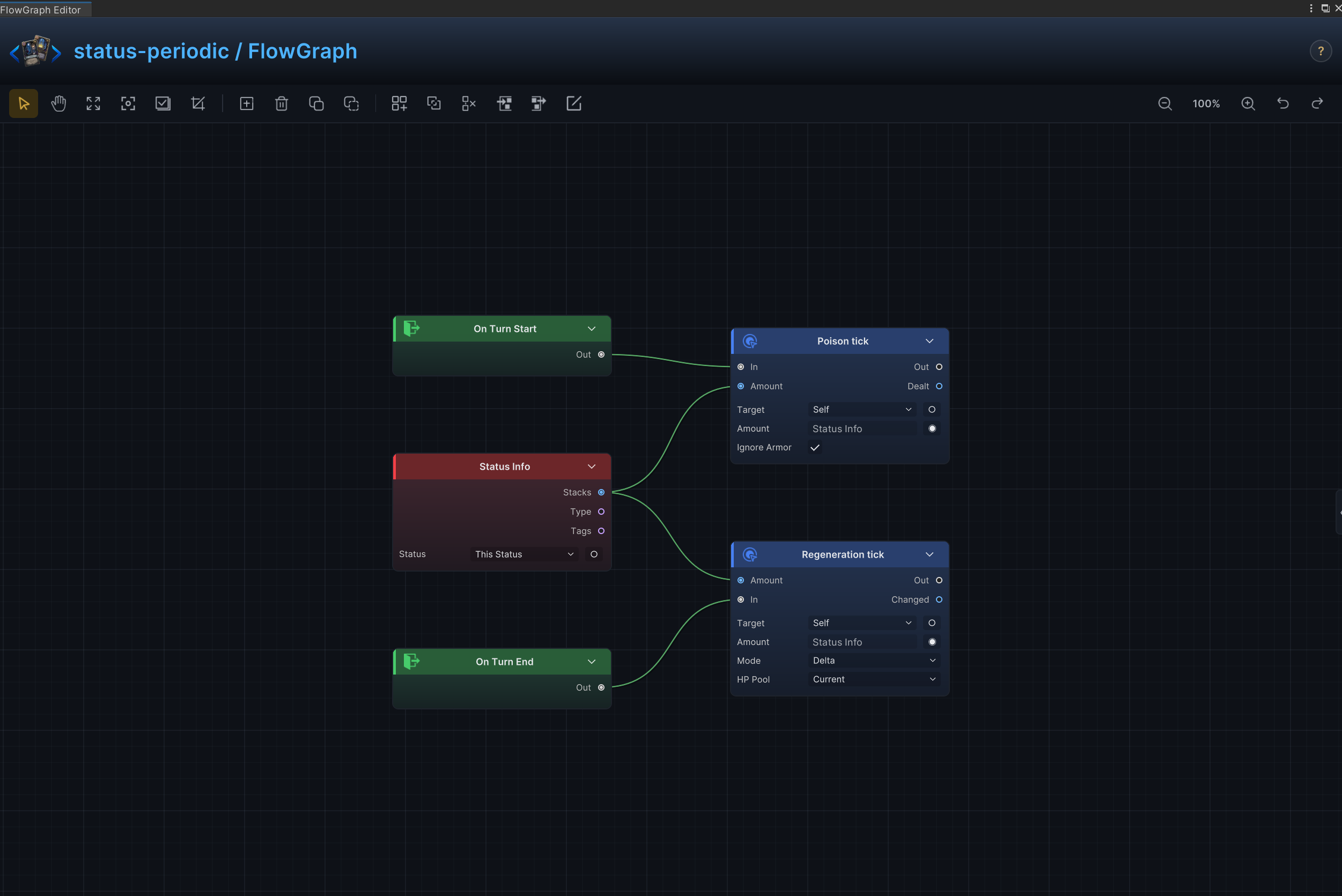
回合开始时按当前层数对来源单位造成伤害,回合结束时再按相同层数为该单位恢复生命
节点连接
On Turn Start.Out → Deal Damage.InOn Turn End.Out → Change HP.InStatus Info.Stacks → Deal Damage.AmountStatus Info.Stacks → Change HP.Amount
节点配置
Status InfoStatus = None:选择节点读取、修改、移除或监听的状态
Deal DamageTarget = Self:效果作用于来源单位自身Amount = 6:运行时由 Status Info.Stacks 提供;此处数值仅作未连接时的后备值Ignore Armor = On:伤害绕过护甲,直接扣除生命
Change HPTarget = Self:效果作用于来源单位自身Affect = Current:只修改当前生命,不改变最大生命Mode = Delta:在当前值上增减;正数增加,负数减少Amount = 1:运行时由 Status Info.Stacks 提供;此处数值仅作未连接时的后备值
力量与虚弱
效果
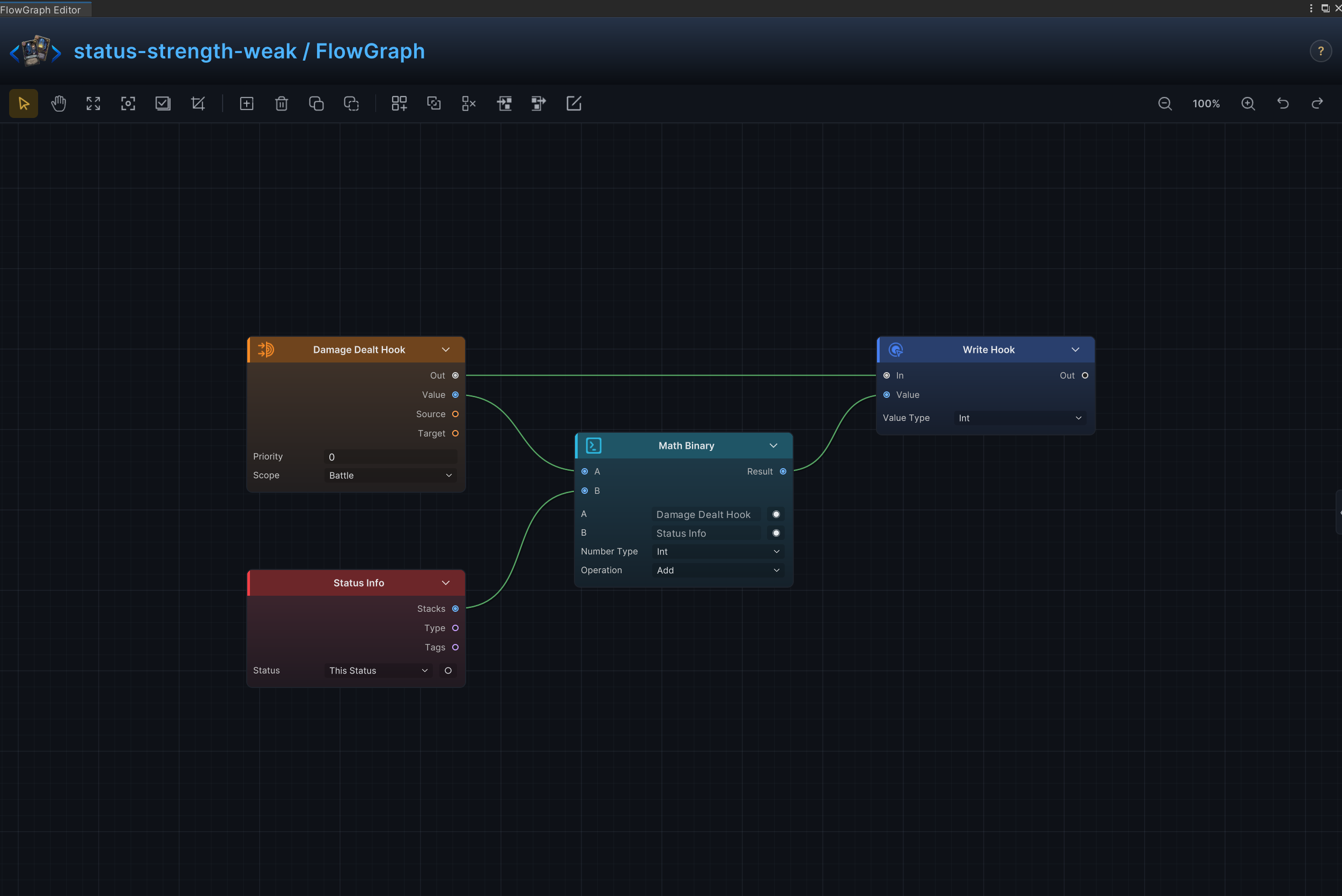
在伤害落地前修改状态持有者造成的伤害
节点连接
Damage Dealt Hook.Out → Write Hook.InDamage Dealt Hook.Value → Math Binary.AStatus Info.Stacks → Math Binary.BMath Binary.Result → Write Hook.Value
节点配置
Damage Dealt HookPriority = 0:设置此钩子相对同一时机其他钩子的执行顺序Scope = Battle:钩子在整场战斗中持续生效
Status InfoStatus = None:选择节点读取、修改、移除或监听的状态
Math BinaryKind = Int:选择节点处理的数据、集合、选项或钩子数值类型A = 0:运行时由 Damage Dealt Hook.Value 提供;此处数值仅作未连接时的后备值B = 0:运行时由 Status Info.Stacks 提供;此处数值仅作未连接时的后备值Op = Add:执行加法
Write HookKind = Int:选择节点处理的数据、集合、选项或钩子数值类型Value = 0:运行时由 Math Binary.Result 提供;此处数值仅作未连接时的后备值
受到伤害倍率修正
效果
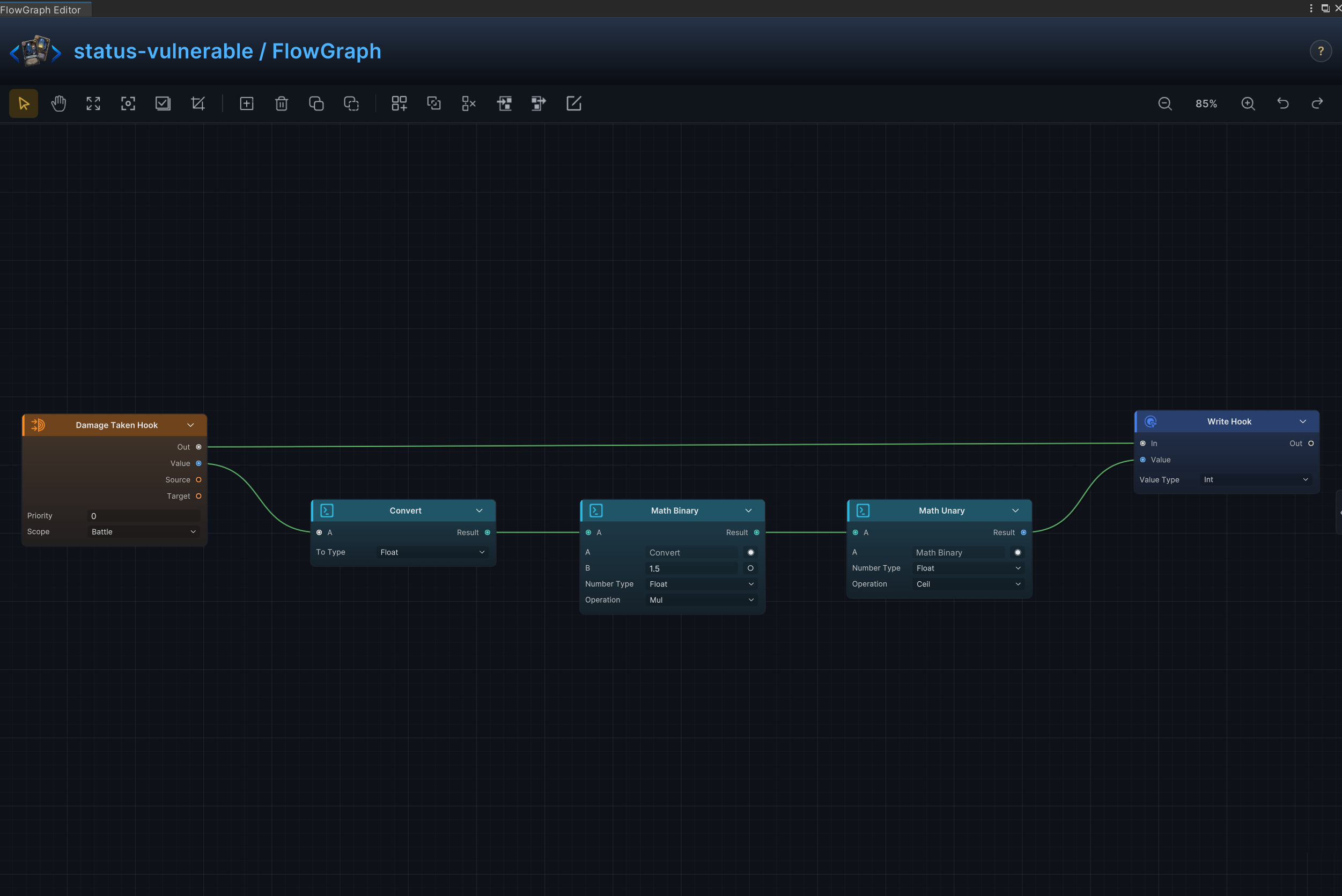
状态生效时按倍率修改受到的伤害,正向和负向缩放可分别表示易伤与抗性
节点连接
Damage Taken Hook.Out → Write Hook.InDamage Taken Hook.Value → Convert.AConvert.Result → Math Binary.AMath Binary.Result → Math Unary.AMath Unary.Result → Write Hook.Value
节点配置
Damage Taken HookPriority = 0:设置此钩子相对同一时机其他钩子的执行顺序Scope = Battle:钩子在整场战斗中持续生效
ConvertTo = Float:选择数据转换后的目标类型
Math BinaryKind = Float:选择节点处理的数据、集合、选项或钩子数值类型A = 0:运行时由 Convert.Result 提供;此处数值仅作未连接时的后备值B = 1.5:设置 B 输入未连接时使用的第二个运算数Op = Mul:将 A 与 B 相乘
Math UnaryKind = Float:选择节点处理的数据、集合、选项或钩子数值类型A = 0:运行时由 Math Binary.Result 提供;此处数值仅作未连接时的后备值Op = Ceil:将输入向上取整
Write HookKind = Int:选择节点处理的数据、集合、选项或钩子数值类型Value = 0:运行时由 Math Unary.Result 提供;此处数值仅作未连接时的后备值
敏捷与脆弱
效果
修改状态持有者每次通过卡牌获得的护甲
节点连接
Armor Gain Hook.Out → Write Hook.InArmor Gain Hook.Value → Math Binary.AStatus Info.Stacks → Math Binary.BMath Binary.Result → Write Hook.Value
节点配置
Armor Gain HookPriority = 0:设置此钩子相对同一时机其他钩子的执行顺序Scope = Battle:钩子在整场战斗中持续生效
Status InfoStatus = None:选择节点读取、修改、移除或监听的状态
Math BinaryKind = Int:选择节点处理的数据、集合、选项或钩子数值类型A = 0:运行时由 Armor Gain Hook.Value 提供;此处数值仅作未连接时的后备值B = 0:运行时由 Status Info.Stacks 提供;此处数值仅作未连接时的后备值Op = Add:执行加法
Write HookKind = Int:选择节点处理的数据、集合、选项或钩子数值类型Value = 0:运行时由 Math Binary.Result 提供;此处数值仅作未连接时的后备值
壁垒与保留护甲
效果
跳过回合开始时的护甲重置,让护甲保留到后续回合
节点连接
Armor Reset Hook.Out → Cancel Hook.In
节点配置
Armor Reset HookPriority = 0:设置此钩子相对同一时机其他钩子的执行顺序Scope = Battle:钩子在整场战斗中持续生效
荆棘、反伤与反击
效果
状态持有者受击后,向攻击者返还伤害
节点连接
On Attack Taken.Out → Deal Damage.InStatus Info.Stacks → Deal Damage.AmountOn Attack Taken.Source → Deal Damage.Target
节点配置
Status InfoStatus = None:选择节点读取、修改、移除或监听的状态
Deal DamageTarget = Opponent:运行时由 On Attack Taken.Source 提供,将伤害返还给实际攻击者Amount = 6:运行时由 Status Info.Stacks 提供;此处数值仅作未连接时的后备值Ignore Armor = Off:伤害正常参与护甲结算
缓冲与单次伤害抵消
效果
消耗一层状态,抵消下一次生命损失
节点连接
Damage Taken Hook.Out → Cancel Hook.InCancel Hook.Out → Change Status.In
节点配置
Damage Taken HookPriority = 0:设置此钩子相对同一时机其他钩子的执行顺序Scope = Battle:钩子在整场战斗中持续生效
Change StatusTarget = Self:效果作用于来源单位自身Status = Buffer:读取或修改 Buffer 状态Mode = Delta:在当前值上增减;正数增加,负数减少Amount = -1:示例数值为 -1,制卡时替换为所需数值
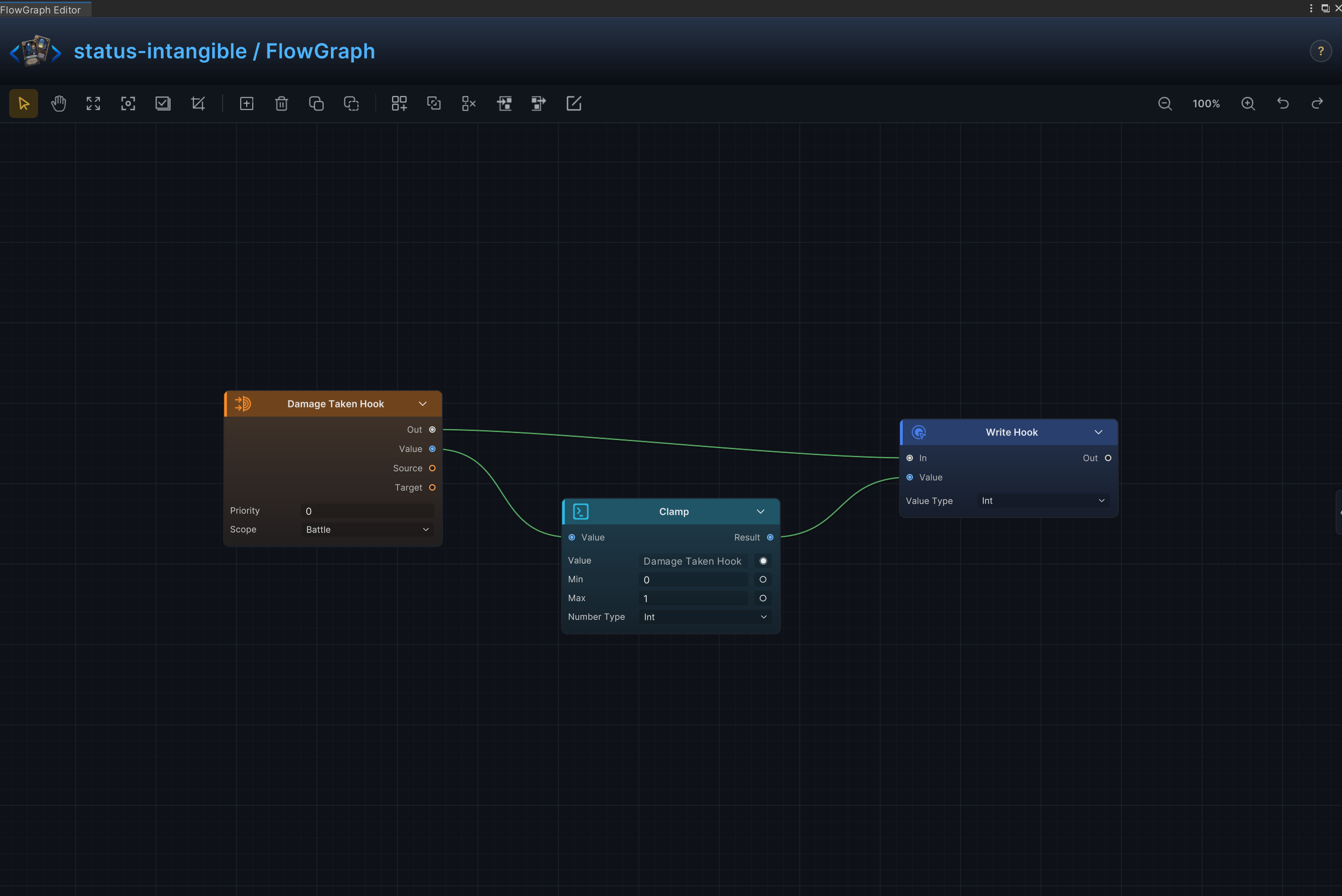
单次伤害上限
效果
状态生效时把每次生命损失限制在指定上限
节点连接
Damage Taken Hook.Out → Write Hook.InDamage Taken Hook.Value → Clamp.ValueClamp.Result → Write Hook.Value
节点配置
Damage Taken HookPriority = 0:设置此钩子相对同一时机其他钩子的执行顺序Scope = Battle:钩子在整场战斗中持续生效
ClampKind = Int:选择节点处理的数据、集合、选项或钩子数值类型Value = 0:运行时由 Damage Taken Hook.Value 提供;此处数值仅作未连接时的后备值Min = 0:设置钳制运算的下限Max = 1:设置钳制运算的上限
Write HookKind = Int:选择节点处理的数据、集合、选项或钩子数值类型Value = 0:运行时由 Clamp.Result 提供;此处数值仅作未连接时的后备值
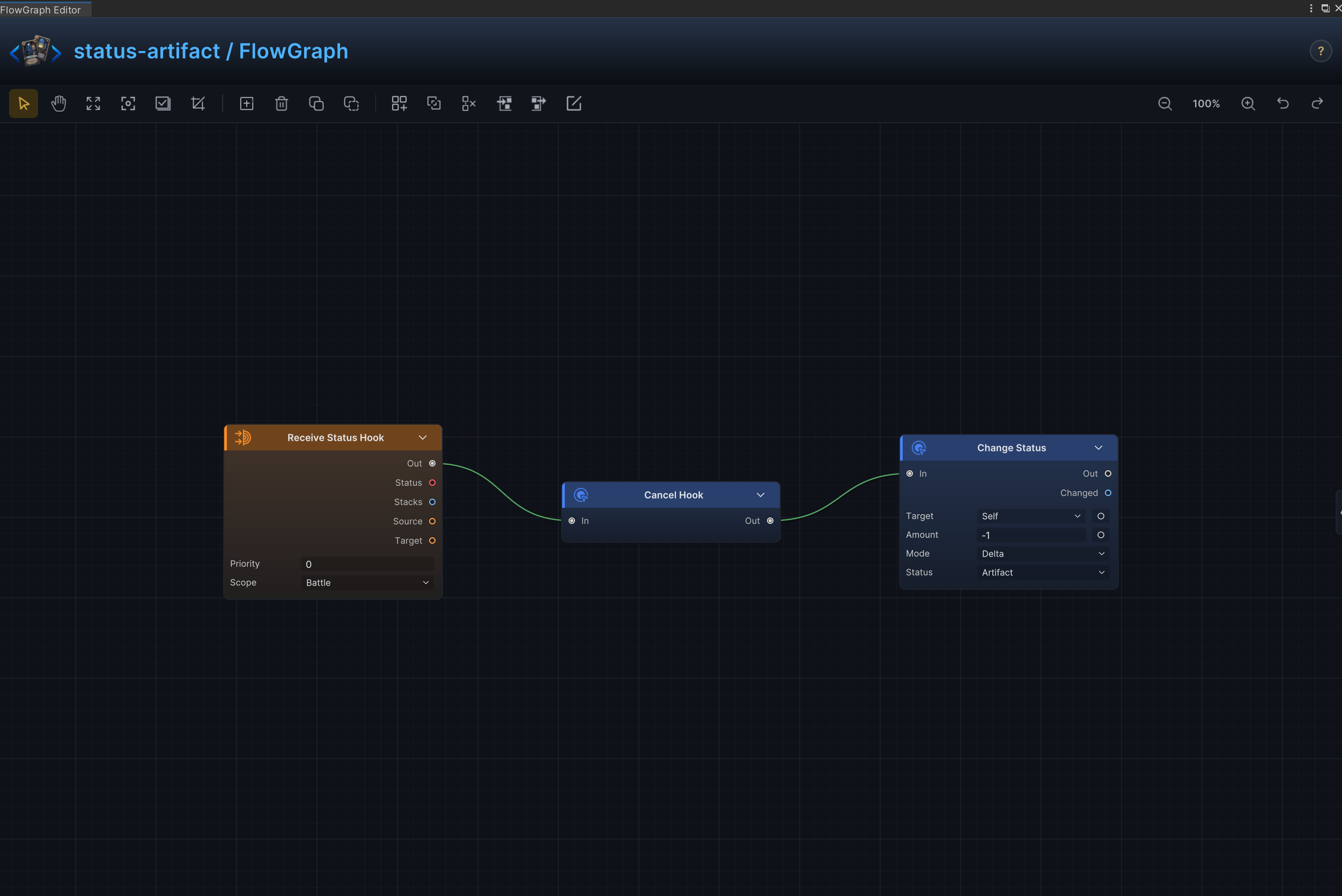
人工制品与减益免疫
效果
消耗一层状态,阻止下一次减益生效
节点连接
Cancel Hook.Out → Change Status.InReceive Status Hook.Out → Branch.InReceive Status Hook.Status → Status Info.StatusStatus Info.Type → Condition.AConstant.Value → Condition.BCondition.Result → Branch.ConditionBranch.True → Cancel Hook.In
节点配置
Receive Status HookPriority = 0:设置此钩子相对同一时机其他钩子的执行顺序Scope = Battle:钩子在整场战斗中持续生效
Status InfoStatus = None:由 Receive Status Hook.Status 连接提供实际传入状态,因此忽略该未连接回退值
ConstantKind = String:以字符串比较传入状态类别String Value = Debuff:只匹配减益状态
ConditionOp = Equal:传入状态类型为 Debuff 时成立
BranchCondition = connected:只有匹配的减益进入 Cancel Hook
Cancel Hook- 在消耗 1 层 Artifact 前取消当前 Receive Status Hook
Change StatusTarget = Self:效果作用于来源单位自身Status = Artifact:读取或修改 Artifact 状态Mode = Delta:在当前值上增减;正数增加,负数减少Amount = -1:示例数值为 -1,制卡时替换为所需数值
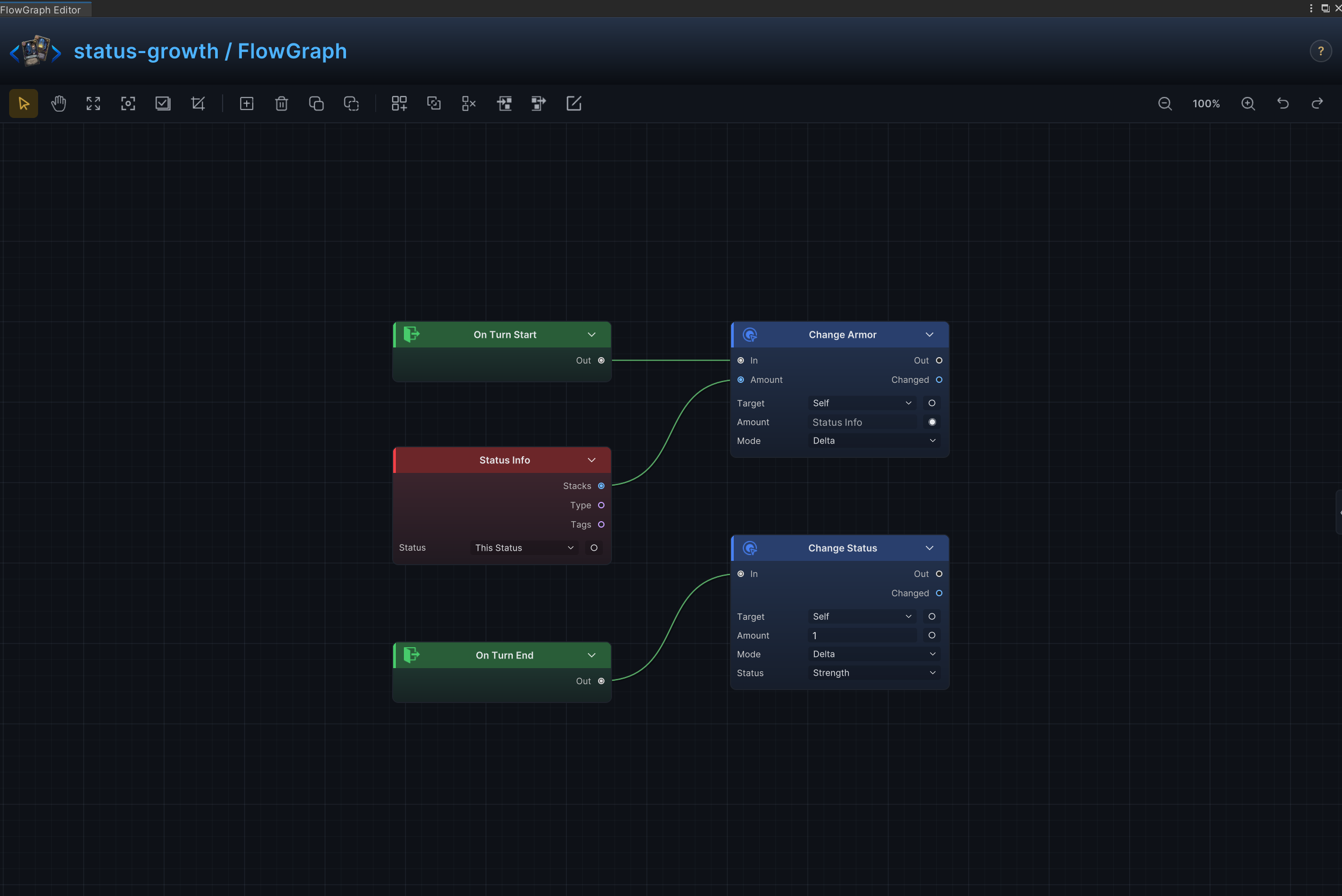
多层护甲、仪式与逐回合成长
效果
回合开始时为来源单位提供等同当前层数的护甲,回合结束时再增加 1 层 Strength
节点连接
On Turn Start.Out → Change Armor.InOn Turn End.Out → Change Status.InStatus Info.Stacks → Change Armor.Amount
节点配置
Status InfoStatus = None:选择节点读取、修改、移除或监听的状态
Change ArmorTarget = Self:效果作用于来源单位自身Mode = Delta:在当前值上增减;正数增加,负数减少Amount = 1:运行时由 Status Info.Stacks 提供;此处数值仅作未连接时的后备值
Change StatusTarget = Self:效果作用于来源单位自身Status = Strength:读取或修改 Strength 状态Mode = Delta:在当前值上增减;正数增加,负数减少Amount = 1:示例数值为 1,制卡时替换为所需数值
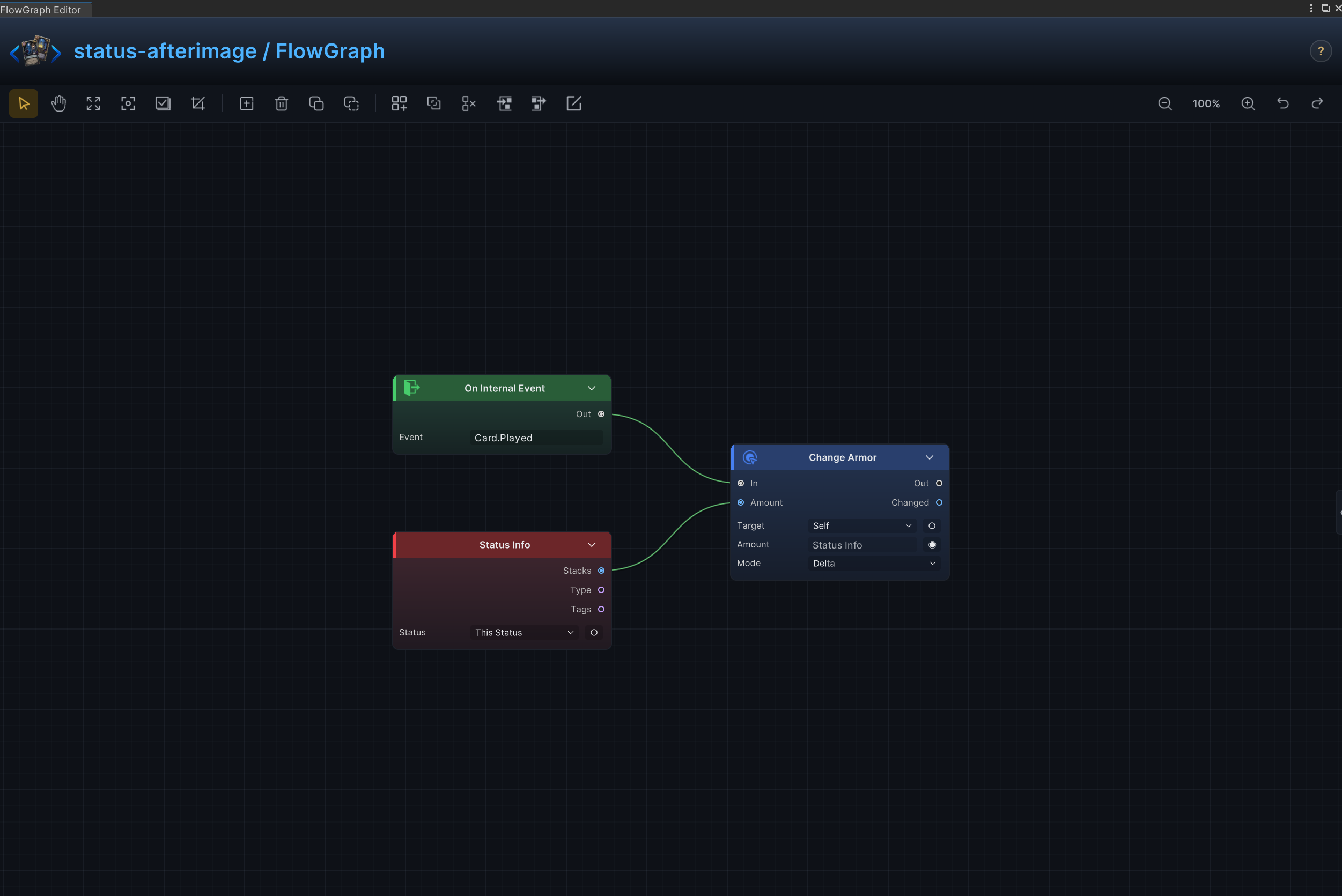
残影与出牌触发能力
效果
每当任意卡牌打出时,让状态持有者获得对应收益
节点连接
On Card Played.Out → Change Armor.InStatus Info.Stacks → Change Armor.Amount
节点配置
Status InfoStatus = None:选择节点读取、修改、移除或监听的状态
Change ArmorTarget = Self:效果作用于来源单位自身Mode = Delta:在当前值上增减;正数增加,负数减少Amount = 1:运行时由 Status Info.Stacks 提供;此处数值仅作未连接时的后备值
牌堆变化触发
效果
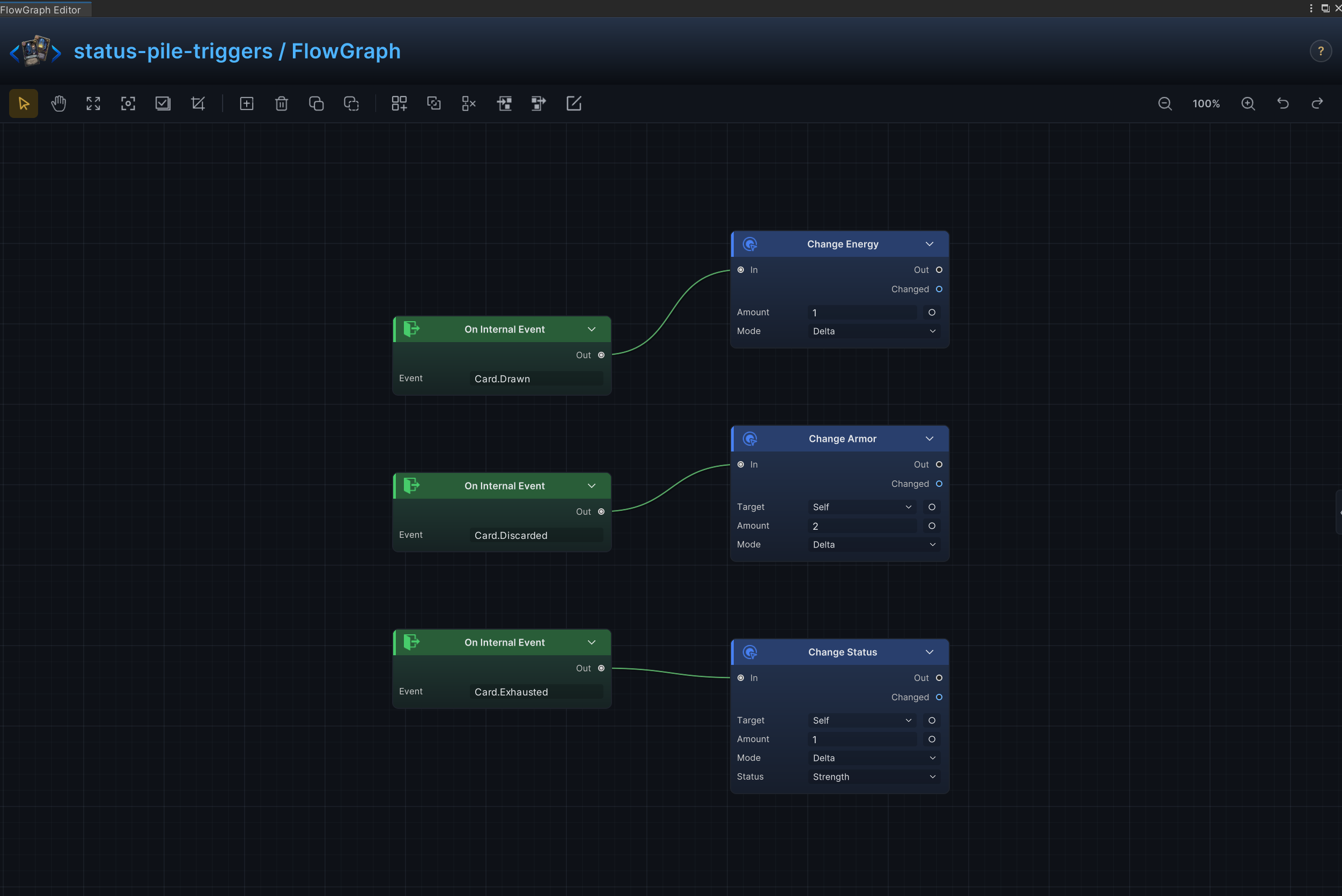
在抽牌、弃牌、消耗或洗牌发生时触发状态效果
节点连接
On Card Drawn.Out → Change Energy.InOn Card Discarded.Out → Change Armor.InOn Card Exhausted.Out → Change Status.In
节点配置
Change EnergyMode = Delta:在当前值上增减;正数增加,负数减少Amount = 1:示例数值为 1,制卡时替换为所需数值
Change ArmorTarget = Self:效果作用于来源单位自身Mode = Delta:在当前值上增减;正数增加,负数减少Amount = 2:示例数值为 2,制卡时替换为所需数值
Change StatusTarget = Self:效果作用于来源单位自身Status = Strength:读取或修改 Strength 状态Mode = Delta:在当前值上增减;正数增加,负数减少Amount = 1:示例数值为 1,制卡时替换为所需数值
每回合能量与全局费用规则
效果
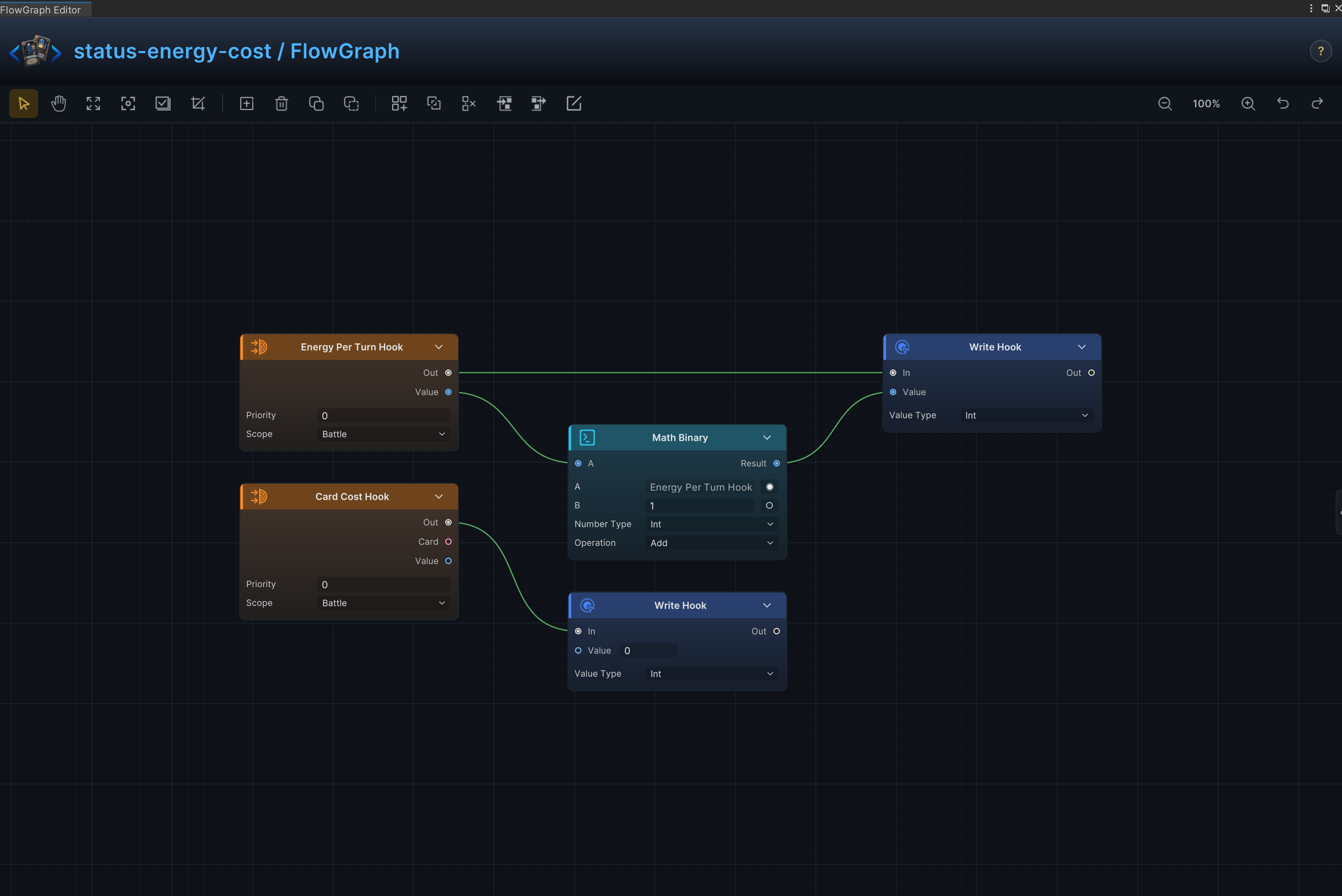
状态生效期间把 Energy Per Turn 增加 1,并把全局卡牌费用钩子设为 0
节点连接
Energy Per Turn Hook.Out → Write Hook (1).InEnergy Per Turn Hook.Value → Math Binary.AMath Binary.Result → Write Hook (1).ValueCard Cost Hook.Out → Write Hook (2).In
节点配置
Energy Per Turn HookPriority = 0:设置此钩子相对同一时机其他钩子的执行顺序Scope = Battle:钩子在整场战斗中持续生效
Card Cost HookPriority = 0:设置此钩子相对同一时机其他钩子的执行顺序Scope = Battle:钩子在整场战斗中持续生效
Math BinaryKind = Int:选择节点处理的数据、集合、选项或钩子数值类型A = 0:运行时由 Energy Per Turn Hook.Value 提供;此处数值仅作未连接时的后备值B = 1:设置 B 输入未连接时使用的第二个运算数Op = Add:执行加法
Write Hook (1)Kind = Int:选择节点处理的数据、集合、选项或钩子数值类型Value = 0:运行时由 Math Binary.Result 提供;此处数值仅作未连接时的后备值
Write Hook (2)Kind = Int:选择节点处理的数据、集合、选项或钩子数值类型Value = 0:Value 输入未连接时,设置要写入或处理的数值
抽牌数量与手牌上限
效果
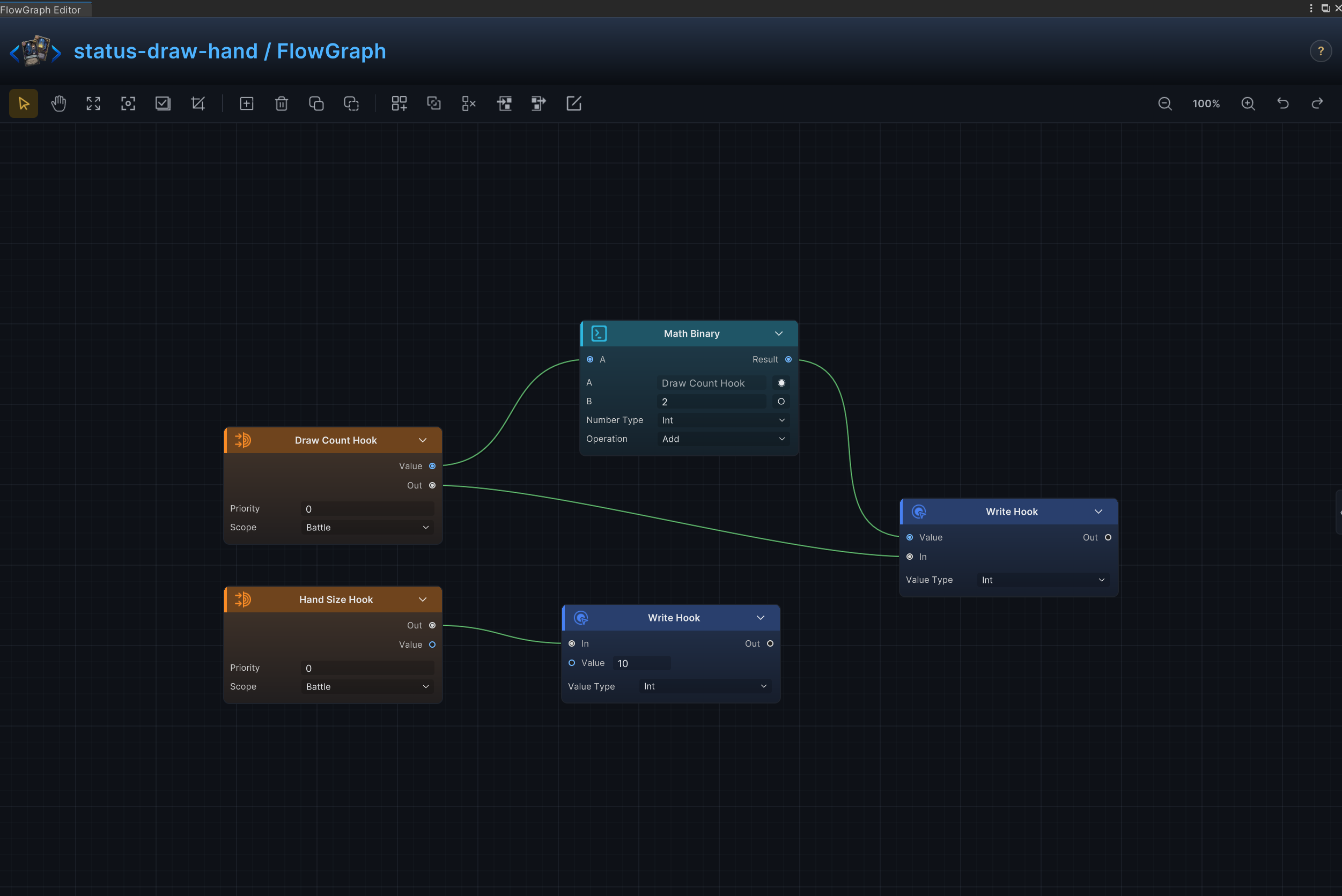
状态生效期间把 Draw Count 增加 2,并把 Max Hand Size 设为 10
节点连接
Draw Count Hook.Out → Write Hook (1).InDraw Count Hook.Value → Math Binary.AMath Binary.Result → Write Hook (1).ValueHand Size Hook.Out → Write Hook (2).In
节点配置
Draw Count HookPriority = 0:设置此钩子相对同一时机其他钩子的执行顺序Scope = Battle:钩子在整场战斗中持续生效
Hand Size HookPriority = 0:设置此钩子相对同一时机其他钩子的执行顺序Scope = Battle:钩子在整场战斗中持续生效
Math BinaryKind = Int:选择节点处理的数据、集合、选项或钩子数值类型A = 0:运行时由 Draw Count Hook.Value 提供;此处数值仅作未连接时的后备值B = 2:设置 B 输入未连接时使用的第二个运算数Op = Add:执行加法
Write Hook (1)Kind = Int:选择节点处理的数据、集合、选项或钩子数值类型Value = 0:运行时由 Math Binary.Result 提供;此处数值仅作未连接时的后备值
Write Hook (2)Kind = Int:选择节点处理的数据、集合、选项或钩子数值类型Value = 10:Value 输入未连接时,设置要写入或处理的数值
沉默与卡牌使用限制
效果
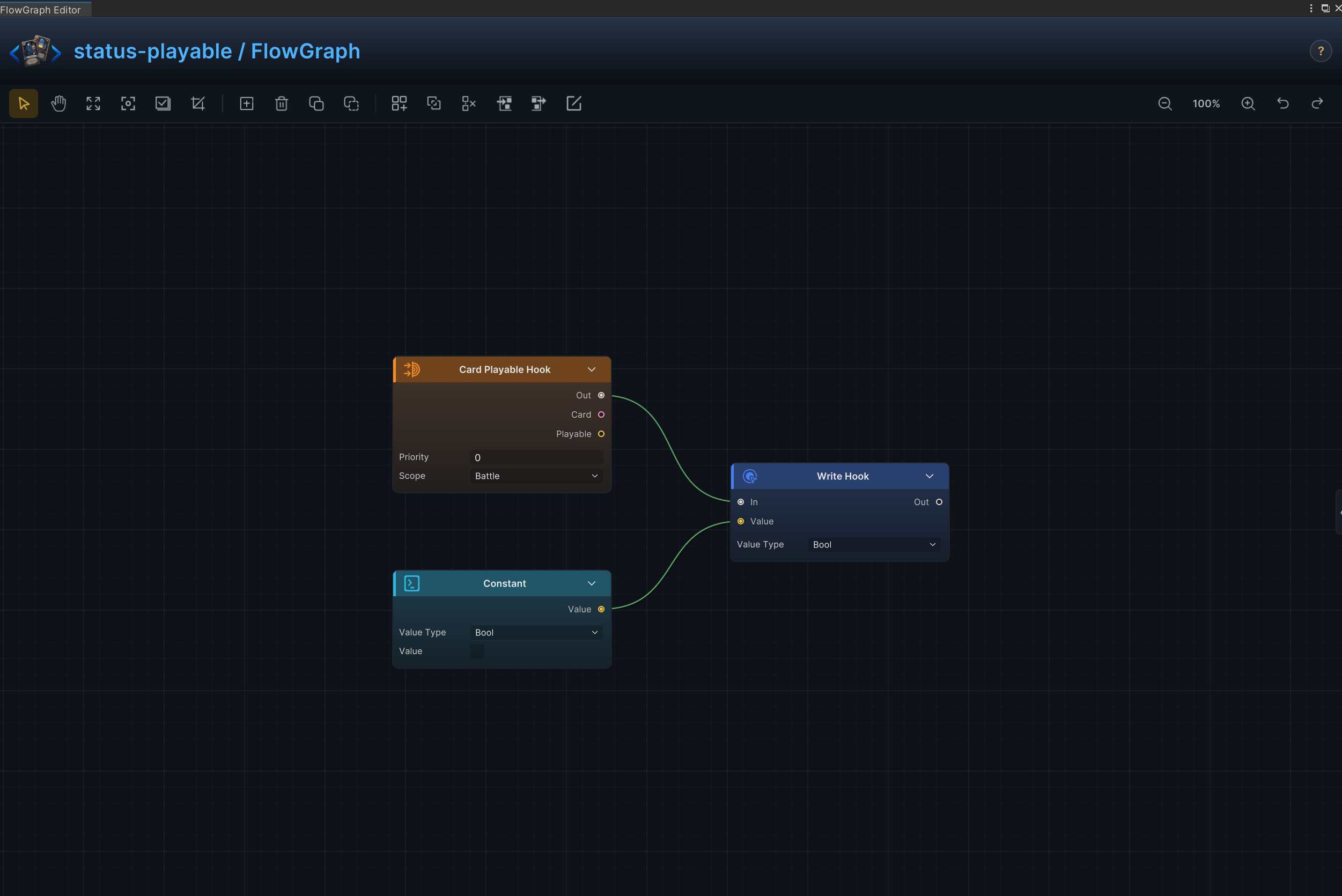
按卡牌类型阻止打出,或完全禁止状态持有者使用卡牌
节点连接
Card Playable Hook.Out → Write Hook.InConstant.Value → Write Hook.Value
节点配置
Card Playable HookPriority = 0:设置此钩子相对同一时机其他钩子的执行顺序Scope = Battle:钩子在整场战斗中持续生效
ConstantKind = Bool:选择节点处理的数据、集合、选项或钩子数值类型Bool Value = Off:提供所选操作使用的布尔值
Write HookKind = Bool:选择节点处理的数据、集合、选项或钩子数值类型Bool Value = Off:提供所选操作使用的布尔值
跳过回合与额外回合
效果
回合开始时先让敌方跳过下一个回合,再为来源阵营提供一个额外回合
节点连接
On Turn Start.Out → Sequence.InSequence.Step0 → Skip Next Turn.InSequence.Step1 → Extra Turn.In
节点配置
-
SequenceOutputs = 2:把 Skip Next Turn 与 Extra Turn 作为两个有序分支执行
-
Skip Next TurnTarget = Opponent:读取卡牌或行为当前选中的敌方单位
死亡爆发、复活与重生
效果
在单位死亡时造成额外效果、复活单位或触发第二条命
节点连接
All Opponents.Units → Deal Damage.TargetDeal Damage.Out → Revive Unit.InOn Unit Died.Out → Gate.InOn Unit Died.WasKill → Logic.ALogic.Result → Gate.AllowGate.Out → Deal Damage.In
节点配置
-
LogicOp = Not:反转 On Unit Died.WasKill,只允许状态持有者自身死亡事件
-
GateAllow = connected:仅在 Logic.Result 为 true 时放行控制流
-
Deal DamageTarget = Opponent:运行时由 All Opponents.Units 提供,此处数值仅作未连接时的后备值Amount = 8:示例数值为 8,制卡时替换为所需数值Ignore Armor = Off:伤害正常参与护甲结算
-
Revive UnitTarget = Self:效果作用于来源单位自身HP Percent = 35:设置复活时恢复的最大生命百分比
受击获得护甲
效果
每次受到攻击后获得护甲
节点连接
On Attack Taken.Out → Change Armor.In
节点配置
Change ArmorTarget = Self:效果作用于来源单位自身Mode = Delta:在当前值上增减;正数增加,负数减少Amount = 4:示例数值为 4,制卡时替换为所需数值
出牌惩罚
效果
玩家每打出一张牌便受到一次惩罚
节点连接
On Card Played.Out → Change HP.In
节点配置
Change HPTarget = Opponent:读取卡牌或行为当前选中的敌方单位Affect = Current:只修改当前生命,不改变最大生命Mode = Delta:在当前值上增减;正数增加,负数减少Amount = -1:示例数值为 -1,制卡时替换为所需数值
禁止抽牌
效果
把常规抽牌数量改为 0
节点连接
Draw Count Hook.Out → Write Hook.InConstant.Value → Write Hook.Value
节点配置
Draw Count HookPriority = 0:设置此钩子相对同一时机其他钩子的执行顺序Scope = Battle:钩子在整场战斗中持续生效
ConstantKind = Int:选择节点处理的数据、集合、选项或钩子数值类型Int Value = 0:提供整数常量
Write HookKind = Int:选择节点处理的数据、集合、选项或钩子数值类型Value = 0:运行时由 Constant.Value 提供;此处数值仅作未连接时的后备值
命中施毒
效果
每次攻击造成伤害时给目标附加中毒
节点连接
On Damage Dealt.Out → Change Status.InOn Damage Dealt.Target → Change Status.Target
节点配置
Change StatusTarget = Opponent:运行时由 On Damage Dealt.Target 提供,因此 Poison 施加到实际受伤单位Status = Poison:读取或修改 Poison 状态Mode = Delta:在当前值上增减;正数增加,负数减少Amount = 1:示例数值为 1,制卡时替换为所需数值
消耗奖励
效果
每当一张卡牌被消耗时生成替代卡牌
节点连接
On Card Exhausted.Out → Add Cards.In
节点配置
Add CardsCard = Spark:选择此节点生成的卡牌资产Pile = Hand:选择卡牌来源牌堆或目标牌堆Position = Top:选择卡牌插入目标牌堆的位置
装备耐久
效果
触发装备效果后消耗 1 层耐久
节点连接
On Card Played.Out → Sequence.InSequence.Step0 → Deal Damage.InSequence.Step1 → Change Status.In
节点配置
SequenceOutputs = 2:设置按顺序执行的控制流分支数量
Deal DamageTarget = Opponent:读取卡牌或行为当前选中的敌方单位Amount = 2:示例数值为 2,制卡时替换为所需数值Ignore Armor = Off:伤害正常参与护甲结算
Change StatusTarget = Self:效果作用于来源单位自身Status = Equipment Durability:读取或修改 Equipment Durability 状态Mode = Delta:在当前值上增减;正数增加,负数减少Amount = -1:示例数值为 -1,制卡时替换为所需数值
多层护甲受击衰减
效果
持续提供护甲,并在攻击穿透防护后减少状态层数
节点连接
Status Info.Stacks → Change Armor.AmountOn Turn Start.Out → Change Armor.In
节点配置
Change ArmorTarget = Self:效果作用于来源单位自身Mode = Delta:在当前值上增减;正数增加,负数减少Amount = 1:运行时由 Status Info.Stacks 提供;此处数值仅作未连接时的后备值
Status InfoStatus = None:读取当前正在执行的状态实例,本配方中即 Plated Armor
按比例反伤
效果
按本次受到伤害的比例对攻击者造成反击伤害
节点连接
Constant.Value → Math Binary (2).BMath Binary (3).Result → Math Binary (2).AOn Damage Taken.Amount → Math Binary (1).AStatus Info.Stacks → Math Binary (1).BMath Binary (1).Result → Math Binary (3).AMath Binary (2).Result → Deal Damage.AmountOn Damage Taken.Source → Deal Damage.TargetOn Damage Taken.Out → Deal Damage.In
节点配置
Status InfoStatus = None:选择节点读取、修改、移除或监听的状态
Math Binary (1)Kind = Int:选择节点处理的数据、集合、选项或钩子数值类型A = 0:运行时由 On Damage Taken.Amount 提供;此处数值仅作未连接时的后备值B = 0:运行时由 Status Info.Stacks 提供;此处数值仅作未连接时的后备值Op = Mul:将 A 与 B 相乘
Deal DamageTarget = Opponent:运行时由 On Damage Taken.Source 提供;此处数值仅作未连接时的后备值Amount = 6:运行时由 Math Binary (2).Result 提供;此处数值仅作未连接时的后备值Ignore Armor = Off:伤害正常参与护甲结算
Math Binary (2)Kind = Int:选择节点处理的数据、集合、选项或钩子数值类型A = 0:运行时由 Math Binary (3).Result 提供;此处数值仅作未连接时的后备值B = 0:运行时由 Constant.Value 提供;此处数值仅作未连接时的后备值Op = Div:用 A 除以 B
Math Binary (3)Kind = Int:选择节点处理的数据、集合、选项或钩子数值类型A = 0:运行时由 Math Binary (1).Result 提供;此处数值仅作未连接时的后备值B = 10:设置 B 输入未连接时使用的第二个运算数Op = Mul:将 A 与 B 相乘
ConstantKind = Int:选择节点处理的数据、集合、选项或钩子数值类型Int Value = 100:提供整数常量
伤害转化治疗
效果
把状态持有者造成的伤害按规则转换为自身治疗
节点连接
On Damage Dealt.Out → Change HP.InOn Damage Dealt.Amount → Change HP.Amount
节点配置
Change HPTarget = Self:效果作用于来源单位自身Affect = Current:只修改当前生命,不改变最大生命Mode = Delta:在当前值上增减;正数增加,负数减少Amount = 1:运行时由 On Damage Dealt.Amount 提供;此处数值仅作未连接时的后备值
仅攻击伤害修正
效果
只修改攻击造成的伤害,不影响其他伤害来源
节点连接
Attack Taken Hook.Value → Math Binary.AStatus Info.Stacks → Math Binary.BMath Binary.Result → Write Hook.ValueAttack Taken Hook.Out → Write Hook.In
节点配置
Attack Taken HookPriority = 0:设置此钩子相对同一时机其他钩子的执行顺序Scope = Battle:钩子在整场战斗中持续生效
Write HookKind = Int:选择节点处理的数据、集合、选项或钩子数值类型Value = 0:运行时由 Math Binary.Result 提供;此处数值仅作未连接时的后备值
Status InfoStatus = None:选择节点读取、修改、移除或监听的状态
Math BinaryKind = Int:选择节点处理的数据、集合、选项或钩子数值类型A = 0:运行时由 Attack Taken Hook.Value 提供;此处数值仅作未连接时的后备值B = 0:运行时由 Status Info.Stacks 提供;此处数值仅作未连接时的后备值Op = Add:执行加法
抽牌时随机费用
效果
卡牌被抽到时随机重设其能量费用
节点连接
On Card Drawn.Out → Modify Card Cost.InRandom.Result → Modify Card Cost.Amount
节点配置
-
RandomKind = Int:生成整数结果Min = 0:设置能量费用下限并包含该值Max = 3:设置能量费用上限并包含该值
-
Modify Card CostCards = ThisCard:Cards 输入未连接时,选择要处理的卡牌集合Mode = Set:用随机结果替换卡牌当前费用Amount = 1:运行时由 Random.Result 提供;此处数值仅作未连接时的后备值Duration = ThisTurn:选择卡牌费用变化的持续时间Turns = 1:设置以回合计的有限持续时间;战斗范围钩子忽略此值
多元素伤害修正
效果
针对多个元素状态组合分别修改受到的伤害
节点连接
Math Binary (2).Result → Math Binary (4).BConstant (1).Value → Math Binary (2).AConstant (1).Value → Math Binary (3).BMath Binary (4).Result → Math Binary (3).AMath Binary (6).Result → Math Binary (8).BConstant (2).Value → Math Binary (6).AConstant (2).Value → Math Binary (7).BMath Binary (8).Result → Math Binary (7).AMath Binary (10).Result → Math Binary (12).BConstant (3).Value → Math Binary (10).AConstant (3).Value → Math Binary (11).BMath Binary (12).Result → Math Binary (11).AStatus Info (1).Stacks → Math Binary (1).AStatus Damage Hook (1).Value → Math Binary (4).AMath Binary (3).Result → Write Hook (1).ValueMath Binary (1).Result → Math Binary (2).BStatus Damage Hook (1).Out → Write Hook (1).InStatus Info (2).Stacks → Math Binary (5).AStatus Damage Hook (2).Value → Math Binary (8).AMath Binary (7).Result → Write Hook (2).ValueMath Binary (5).Result → Math Binary (6).BStatus Damage Hook (2).Out → Write Hook (2).InStatus Info (3).Stacks → Math Binary (9).AStatus Damage Hook (3).Value → Math Binary (12).AMath Binary (11).Result → Write Hook (3).ValueMath Binary (9).Result → Math Binary (10).BStatus Damage Hook (3).Out → Write Hook (3).In
节点配置
Status Damage Hook (1)Status = Poison:读取或修改 Poison 状态Priority = 0:设置此钩子相对同一时机其他钩子的执行顺序Scope = Battle:钩子在整场战斗中持续生效
Write Hook (1)Kind = Int:选择节点处理的数据、集合、选项或钩子数值类型Value = 0:运行时由 Math Binary (3).Result 提供;此处数值仅作未连接时的后备值
Status Info (1)Status = None:选择节点读取、修改、移除或监听的状态
Math Binary (1)Kind = Int:选择节点处理的数据、集合、选项或钩子数值类型A = 0:运行时由 Status Info (1).Stacks 提供;此处数值仅作未连接时的后备值B = 50:设置 B 输入未连接时使用的第二个运算数Op = Mul:将 A 与 B 相乘
Math Binary (2)Kind = Int:选择节点处理的数据、集合、选项或钩子数值类型A = 0:运行时由 Constant (1).Value 提供;此处数值仅作未连接时的后备值B = 0:运行时由 Math Binary (1).Result 提供;此处数值仅作未连接时的后备值Op = Add:执行加法
Math Binary (3)Kind = Int:选择节点处理的数据、集合、选项或钩子数值类型A = 0:运行时由 Math Binary (4).Result 提供;此处数值仅作未连接时的后备值B = 0:运行时由 Constant (1).Value 提供;此处数值仅作未连接时的后备值Op = Div:用 A 除以 B
Math Binary (4)Kind = Int:选择节点处理的数据、集合、选项或钩子数值类型A = 0:运行时由 Status Damage Hook (1).Value 提供;此处数值仅作未连接时的后备值B = 0:运行时由 Math Binary (2).Result 提供;此处数值仅作未连接时的后备值Op = Mul:将 A 与 B 相乘
Constant (1)Kind = Int:选择节点处理的数据、集合、选项或钩子数值类型Int Value = 100:提供整数常量
Status Damage Hook (2)Status = Burn:读取或修改 Burn 状态Priority = 0:设置此钩子相对同一时机其他钩子的执行顺序Scope = Battle:钩子在整场战斗中持续生效
Write Hook (2)Kind = Int:选择节点处理的数据、集合、选项或钩子数值类型Value = 0:运行时由 Math Binary (7).Result 提供;此处数值仅作未连接时的后备值
Status Info (2)Status = None:选择节点读取、修改、移除或监听的状态
Math Binary (5)Kind = Int:选择节点处理的数据、集合、选项或钩子数值类型A = 0:运行时由 Status Info (2).Stacks 提供;此处数值仅作未连接时的后备值B = 50:设置 B 输入未连接时使用的第二个运算数Op = Mul:将 A 与 B 相乘
Math Binary (6)Kind = Int:选择节点处理的数据、集合、选项或钩子数值类型A = 0:运行时由 Constant (2).Value 提供;此处数值仅作未连接时的后备值B = 0:运行时由 Math Binary (5).Result 提供;此处数值仅作未连接时的后备值Op = Add:执行加法
Math Binary (7)Kind = Int:选择节点处理的数据、集合、选项或钩子数值类型A = 0:运行时由 Math Binary (8).Result 提供;此处数值仅作未连接时的后备值B = 0:运行时由 Constant (2).Value 提供;此处数值仅作未连接时的后备值Op = Div:用 A 除以 B
Math Binary (8)Kind = Int:选择节点处理的数据、集合、选项或钩子数值类型A = 0:运行时由 Status Damage Hook (2).Value 提供;此处数值仅作未连接时的后备值B = 0:运行时由 Math Binary (6).Result 提供;此处数值仅作未连接时的后备值Op = Mul:将 A 与 B 相乘
Constant (2)Kind = Int:选择节点处理的数据、集合、选项或钩子数值类型Int Value = 100:提供整数常量
Status Damage Hook (3)Status = Bleed:读取或修改 Bleed 状态Priority = 0:设置此钩子相对同一时机其他钩子的执行顺序Scope = Battle:钩子在整场战斗中持续生效
Write Hook (3)Kind = Int:选择节点处理的数据、集合、选项或钩子数值类型Value = 0:运行时由 Math Binary (11).Result 提供;此处数值仅作未连接时的后备值
Status Info (3)Status = None:选择节点读取、修改、移除或监听的状态
Math Binary (9)Kind = Int:选择节点处理的数据、集合、选项或钩子数值类型A = 0:运行时由 Status Info (3).Stacks 提供;此处数值仅作未连接时的后备值B = 50:设置 B 输入未连接时使用的第二个运算数Op = Mul:将 A 与 B 相乘
Math Binary (10)Kind = Int:选择节点处理的数据、集合、选项或钩子数值类型A = 0:运行时由 Constant (3).Value 提供;此处数值仅作未连接时的后备值B = 0:运行时由 Math Binary (9).Result 提供;此处数值仅作未连接时的后备值Op = Add:执行加法
Math Binary (11)Kind = Int:选择节点处理的数据、集合、选项或钩子数值类型A = 0:运行时由 Math Binary (12).Result 提供;此处数值仅作未连接时的后备值B = 0:运行时由 Constant (3).Value 提供;此处数值仅作未连接时的后备值Op = Div:用 A 除以 B
Math Binary (12)Kind = Int:选择节点处理的数据、集合、选项或钩子数值类型A = 0:运行时由 Status Damage Hook (3).Value 提供;此处数值仅作未连接时的后备值B = 0:运行时由 Math Binary (10).Result 提供;此处数值仅作未连接时的后备值Op = Mul:将 A 与 B 相乘
Constant (3)Kind = Int:选择节点处理的数据、集合、选项或钩子数值类型Int Value = 100:提供整数常量
回合开始随机弃牌
效果
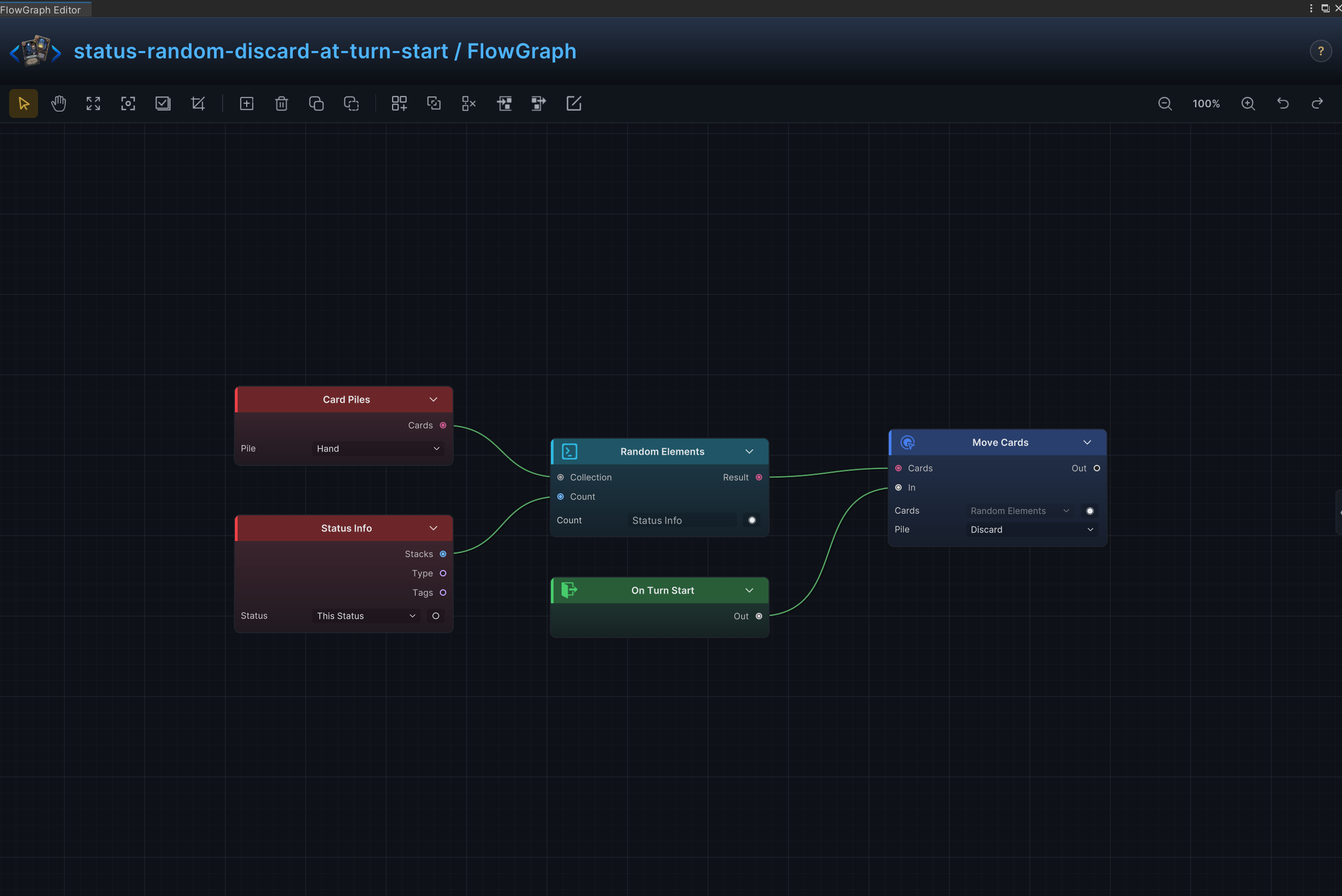
回合开始时从手牌中随机选择卡牌并移入弃牌堆
节点连接
Card Piles.Cards → Random Elements.CollectionStatus Info.Stacks → Random Elements.CountRandom Elements.Result → Move Cards.CardsOn Turn Start.Out → Move Cards.In
节点配置
Move CardsCards = ThisCard:运行时由 Random Elements.Result 提供;此处数值仅作未连接时的后备值Pile = Discard:选择卡牌来源牌堆或目标牌堆Position = Top:选择卡牌插入目标牌堆的位置
Card PilesPile = Hand:选择卡牌来源牌堆或目标牌堆
Random ElementsKind = Card:选择节点处理的数据、集合、选项或钩子数值类型Count = 1:运行时由 Status Info.Stacks 提供;此处数值仅作未连接时的后备值
Status InfoStatus = None:选择节点读取、修改、移除或监听的状态