自定义节点
掌握自定义节点的创建与使用方法,并基于七类可下载模板和完整示例实现符合项目需求的 FlowGraph 节点
当内置节点无法完整表达项目规则时,可以沿用 GCS 已有的节点工作流,把自己的玩法逻辑实现为可在 FlowGraph 中直接使用的自定义节点
按节点职责选择七类公开基类中的一种,复制对应模板,再参考完整示例实现注册信息、端口与执行逻辑,Unity 编译后即可从 Add Node 菜单添加节点,并保存到 Behavior
从节点类别判断扩展入口
九个菜单类别中,Action、Event、Operator、Get、Flow、FX 与 Intent 可以通过七个公开基类扩展,Entry 与 Hook 由 GCS 的生命周期和结算点驱动,没有面向项目节点开放的通用创作基类:
| Add Node 类别 | FlowGraph 中的职责 | 公开扩展基类 | 运行入口 |
|---|---|---|---|
| Entry | 在战斗、回合、卡牌、状态与单位事件发生后启动 Behavior | 不开放通用扩展 | 由 GCS 注册并触发 |
| Hook | 在数值或规则提交前进入 Hook 路径 | 不开放通用扩展 | 由 Hook 系统注册并触发 |
| Action | 修改 HP、护甲、能量、卡牌、状态、变量与单位 | MutatorNode | Execute(IExecutionContext) |
| Event | 向 GCS 或 GES 发布事件 | MutatorNode | Execute(IExecutionContext) |
| Operator | 计算、比较、转换与组合数据 | OperatorNode | Evaluate(IEvaluationContext, string) |
| Get | 读取数据或选择单位与卡牌引用 | SourceNode、SelectorNode | Evaluate(IEvaluationContext, string) |
| Flow | 根据条件组织执行路径 | ControlNode | DecideNext(IExecutionContext) |
| FX | 请求 Prefab、声音、动画、相机与 UI 表现 | VfxNode | Play(IExecutionContext) |
| Intent | 为 Enemy 选择下一项意图 | PatternNode | DecideNext(IExecutionContext) |
Group是 FlowGraph Editor 用于整理画布和复用子图的编辑结构,不是可注册的运行时节点家族,菜单 Category 也不等于基类[FlowNode("Event", ...)]可以把一个MutatorNode放进 Event 分组,却不会改变它通过Execute修改状态的运行契约
只从 MutatorNode、OperatorNode、SourceNode、SelectorNode、ControlNode、PatternNode 与 VfxNode 开始编写项目节点,不要直接继承 EffectFlowNode,也不要把 Entry、Hook 或 Group 当作自定义节点家族
从可下载模板开始
下载 GCS-Samples.zip 并在 Unity 项目外解压,包内包含源码与 Assembly Definition,不含 Unity .meta 文件,也不会随 GCS 自动导入,按需将 Samples~ 中的模板或示例复制到 Assets/ 下的项目运行时程序集
GCS-Samples.zip
└── Samples~/
    └── CustomNodes/
        ├── Templates/
        │   ├── MutatorNodeTemplate.cs
        │   ├── OperatorNodeTemplate.cs
        │   ├── SourceNodeTemplate.cs
        │   ├── SelectorNodeTemplate.cs
        │   ├── ControlNodeTemplate.cs
        │   ├── PatternNodeTemplate.cs
        │   └── VfxNodeTemplate.cs
        └── Examples/
            ├── HealIfBelowHalfNode.cs
            ├── AddValuesNode.cs
            ├── UnitHealthNode.cs
            ├── LowestHealthUnitNode.cs
            ├── BranchByHealthNode.cs
            ├── PeriodicSpecialIntentNode.cs
            └── SpawnTargetEffectNode.cs
Templates/ 为七类节点各提供一份带说明的模板,Examples/ 为每类节点各提供一个完整实现
| 模板 | 对应样例 | 适合表达的规则 |
|---|---|---|
MutatorNodeTemplate.cs | HealIfBelowHalfNode.cs | 修改战斗状态并发布实际结果 |
OperatorNodeTemplate.cs | AddValuesNode.cs | 生成供其他节点拉取的计算值 |
SourceNodeTemplate.cs | UnitHealthNode.cs | 读取上下文中的对象与数据 |
SelectorNodeTemplate.cs | LowestHealthUnitNode.cs | 从候选集合返回单位或卡牌引用 |
ControlNodeTemplate.cs | BranchByHealthNode.cs | 根据条件选择一个或多个执行分支 |
PatternNodeTemplate.cs | PeriodicSpecialIntentNode.cs | 为敌人选择并推进跨回合意图模式 |
VfxNodeTemplate.cs | SpawnTargetEffectNode.cs | 播放不影响规则结算的表现 |
先按运行职责选择基类,再复制同名家族模板,不要复制 MutatorNodeTemplate.cs 后只替换基类,不同家族的重写方法、控制端口、求值时机与状态权限并不相同
建立可发现的节点类
模板复制到项目目录后,程序集、注册信息、端口和上下文会共同决定节点能否被发现、怎样显示以及运行时执行什么逻辑
放进运行时程序集
节点程序集只需要引用 TinyGiants.GCS.Runtime,不要引用 TinyGiants.GCS.Editor,Editor-only 程序集不会进入玩家构建,其中的节点也无法在运行时执行
{
  "name": "YourGame.Cards",
  "references": [
    "TinyGiants.GCS.Runtime"
  ]
}
当项目脚本已经位于一个运行时 Assembly Definition 时,只需给该程序集增加引用,尚未使用 Assembly Definition 的项目也可以把节点放进普通运行时脚本目录
注册具体节点
节点类需要同时满足可序列化、可发现与可执行三项条件
using System;
using TinyGiants.GCS.Runtime;

namespace YourGame.Cards
{
    [Serializable]
    [FlowNode("Action", "Restore Armor")]
    public sealed class RestoreArmorNode : MutatorNode
    {
        public override void Execute(IExecutionContext ctx)
        {
        }
    }
}
[Serializable] 让 Unity 把节点实例保存在 Behavior 中,[FlowNode(category, displayName)] 提供 Add Node 分组与节点标题,公开且非抽象的七类基类子类会由 FlowNodeRegistry 自动发现,不需要手工注册调用
类名、字段名与端口名都会进入已保存的 Behavior,节点投入使用后不要直接改名,需要调整公开契约时保留旧字段、增加迁移,或发布新的节点类型
让字段成为输入端口
公共实例字段会按固定规则推断端口,节点只在推断无法表达输出或分支时实现 INodePorts
| 字段或声明 | 生成的端口 |
|---|---|
public int Amount | Amount 整数输入 |
public float Scale | Scale 小数输入 |
public bool Enabled | Enabled 布尔输入 |
public string Key | Key 文本输入 |
public UnitSource TargetSource | Target 单位输入 |
public CardSource CardSource | Card 卡牌输入 |
NodePort.ResultOut(...) | 显式数据输出 |
NodePort.ControlOut(...) | 显式控制分支 |
连接到端口的值必须通过 ctx.PullInputOr(this, nameof(Field), Field) 读取,直接读取字段只会得到 Inspector 回落值,单位与卡牌引用同样要通过 ResolveUnit、ResolveUnits、ResolveCard 或 ResolveCards 解析,完整声明方式见自定义端口
按家族使用上下文
IEvaluationContext 只提供读取与求值能力,适用于 Operator、Source 与 Selector,IExecutionContext 在此基础上提供 Controller、结果存储、变量、Hook 与执行宿主,适用于 Mutator、Control、Pattern 与 VFX
状态修改统一经过 ctx.Controller,结果统一通过 ctx.StoreResult 保存,表现节点允许读取模型和查找 View,却不能把伤害、治疗、状态或回合推进放进 Play,上下文成员与失败约定见执行上下文
七类完整实现
以下代码保留 Examples/ 的字段、端口、边界处理与执行逻辑,只省略随包文件中的 XML 注释
- Mutator
- Operator
- Source
- Selector
- Control
- Pattern
- VFX
HealIfBelowHalfNode 读取目标、治疗量与过滤条件,通过 Controller 治疗存活单位,并把最大 HP 限制后的实际恢复量写入 Healed
Mutator 可以修改规则状态,但不能直接写 UnitState 字段,所有提前返回路径也要考虑下游是否仍会读取结果
using System;
using System.Collections.Generic;
using TinyGiants.GCS.Runtime;

namespace TinyGiants.GCS.Samples
{
    [Serializable]
    [FlowNode("Action", "Heal If Below Half")]
    public sealed class HealIfBelowHalfNode : MutatorNode, INodePorts
    {
        private const string HealedPort = "Healed";

        public UnitSource TargetSource = UnitSource.Self;
        public int HealAmount = 5;
        public bool OnlyBelowHalf = true;

        public IEnumerable<NodePort> DeclarePorts()
        {
            yield return NodePort.ResultOut(HealedPort, PortDataType.Int);
        }

        public override void Execute(IExecutionContext ctx)
        {
            int amount = ctx.PullInputOr(this, nameof(HealAmount), HealAmount);
            bool onlyBelowHalf = ctx.PullInputOr(this, nameof(OnlyBelowHalf), OnlyBelowHalf);
            int healed = 0;

            if (amount > 0)
            {
                foreach (var target in ctx.ResolveUnits(this, TargetSource, nameof(TargetSource)))
                {
                    if (target == null || target.IsDead) continue;
                    if (onlyBelowHalf && target.CurrentHp * 2 > target.MaxHp) continue;

                    int before = target.CurrentHp;
                    ctx.Controller.GainHp(target, amount);
                    healed += target.CurrentHp - before;
                }
            }

            ctx.StoreResult(this, HealedPort, healed);
        }
    }
}
AddValuesNode 把两个可连接整数相加,字段保存未连线时的回落值,Evaluate 只返回计算结果,不修改变量、战斗对象或表现状态
Operator 会在下游拉取结果时求值,多输出实现需要按 outPort 返回对应类型,除数为零、解析失败与溢出等边界也应在同一个纯计算方法内处理
using System;
using System.Collections.Generic;
using TinyGiants.GCS.Runtime;

namespace TinyGiants.GCS.Samples
{
    [Serializable]
    [FlowNode("Operator", "Add Values")]
    public sealed class AddValuesNode : OperatorNode, INodePorts
    {
        private const string ResultPort = "Result";

        public int A;
        public int B;

        public IEnumerable<NodePort> DeclarePorts()
        {
            yield return NodePort.ResultOut(ResultPort, PortDataType.Int);
        }

        public override object Evaluate(IEvaluationContext ctx, string outPort)
            => ctx.PullInputOr(this, nameof(A), A) +
               ctx.PullInputOr(this, nameof(B), B);
    }
}
UnitHealthNode 从一个目标同时公开当前 HP、最大 HP、缺失 HP 与百分比,四个显式输出共用同一项只读数据来源
Source 会在同一求值周期内缓存,Evaluate 必须可重复调用且没有副作用,目标缺失时还要为每个输出返回类型稳定的回落值
using System;
using System.Collections.Generic;
using TinyGiants.GCS.Runtime;

namespace TinyGiants.GCS.Samples
{
    [Serializable]
    [FlowNode("Get", "Unit Health")]
    public sealed class UnitHealthNode : SourceNode, INodePorts
    {
        private const string CurrentPort = "Current";
        private const string MaximumPort = "Maximum";
        private const string MissingPort = "Missing";
        private const string PercentPort = "Percent";

        public UnitSource TargetSource = UnitSource.Self;

        public IEnumerable<NodePort> DeclarePorts()
        {
            yield return NodePort.ResultOut(CurrentPort, PortDataType.Int);
            yield return NodePort.ResultOut(MaximumPort, PortDataType.Int);
            yield return NodePort.ResultOut(MissingPort, PortDataType.Int);
            yield return NodePort.ResultOut(PercentPort, PortDataType.Int);
        }

        public override object Evaluate(IEvaluationContext ctx, string outPort)
        {
            var target = ctx.ResolveUnit(this, TargetSource, nameof(TargetSource));
            if (target == null) return 0;

            switch (outPort)
            {
                case MaximumPort:
                    return target.MaxHp;
                case MissingPort:
                    return Math.Max(0, target.MaxHp - target.CurrentHp);
                case PercentPort:
                    return target.HpPercent;
                default:
                    return target.CurrentHp;
            }
        }
    }
}
LowestHealthUnitNode 从候选集合中跳过空引用与死亡单位,返回当前 HP 最低的存活单位,HP 相同时保留来源顺序作为稳定的决胜规则
Selector 只负责返回引用,不负责对选中对象施加效果,没有合格候选时返回 null,由下游节点决定是否跳过、回退或改走另一条路径
using System;
using System.Collections.Generic;
using TinyGiants.GCS.Runtime;

namespace TinyGiants.GCS.Samples
{
    [Serializable]
    [FlowNode("Get", "Lowest Health Unit")]
    public sealed class LowestHealthUnitNode : SelectorNode, INodePorts
    {
        private const string UnitPort = "Unit";

        public UnitSource CandidatesSource = UnitSource.AllOpponents;

        public IEnumerable<NodePort> DeclarePorts()
        {
            yield return NodePort.ResultOut(UnitPort, PortDataType.UnitRef);
        }

        public override object Evaluate(IEvaluationContext ctx, string outPort)
        {
            UnitState selected = null;

            foreach (var candidate in ctx.ResolveUnits(
                this,
                CandidatesSource,
                nameof(CandidatesSource)))
            {
                if (candidate == null || candidate.IsDead) continue;
                if (selected == null || candidate.CurrentHp < selected.CurrentHp)
                    selected = candidate;
            }

            return selected;
        }
    }
}
BranchByHealthNode 把已解析单位分到低于阈值、高于阈值或目标缺失三个控制输出,目标缺失不会被误判为零血单位
Control 返回的每个名称都会被执行器继续跟随,互斥判断只返回一个分支,需要并行推进多个路径时才返回多个已声明名称
using System;
using System.Collections.Generic;
using TinyGiants.GCS.Runtime;

namespace TinyGiants.GCS.Samples
{
    [Serializable]
    [FlowNode("Flow", "Branch By Health")]
    public sealed class BranchByHealthNode : ControlNode, INodePorts
    {
        private const string AtOrBelowBranch = "At Or Below";
        private const string AboveBranch = "Above";
        private const string MissingBranch = "Missing";

        public UnitSource TargetSource = UnitSource.Self;
        public int ThresholdPercent = 50;

        public IEnumerable<NodePort> DeclarePorts()
        {
            yield return NodePort.ControlOut(AtOrBelowBranch);
            yield return NodePort.ControlOut(AboveBranch);
            yield return NodePort.ControlOut(MissingBranch);
        }

        public override IEnumerable<string> DecideNext(IExecutionContext ctx)
        {
            var target = ctx.ResolveUnit(this, TargetSource, nameof(TargetSource));
            if (target == null)
            {
                yield return MissingBranch;
                yield break;
            }

            int threshold = ctx.PullInputOr(
                this,
                nameof(ThresholdPercent),
                ThresholdPercent);

            threshold = Math.Max(0, Math.Min(100, threshold));
            bool atOrBelow = target.MaxHp <= 0 ||
                (long)target.CurrentHp * 100 <= (long)target.MaxHp * threshold;

            yield return atOrBelow ? AtOrBelowBranch : AboveBranch;
        }
    }
}
PeriodicSpecialIntentNode 为敌人连续选择常规意图,并在计数达到间隔时切换到特殊意图,每个敌人与节点实例通过 NodeId 保存独立进度
自定义 Pattern 的计数含义只有该节点知道,因此需要自行推进 PatternRuntimeState,不要用没有敌人范围的战斗变量保存计数,否则多个敌人会共享进度
using System;
using System.Collections.Generic;
using TinyGiants.GCS.Runtime;

namespace TinyGiants.GCS.Samples
{
    [Serializable]
    [FlowNode("Intent", "Periodic Special Intent")]
    public sealed class PeriodicSpecialIntentNode : PatternNode, INodePorts
    {
        private const string RegularBranch = "Regular";
        private const string SpecialBranch = "Special";

        public int Interval = 3;

        public IEnumerable<NodePort> DeclarePorts()
        {
            yield return NodePort.ControlOut(RegularBranch);
            yield return NodePort.ControlOut(SpecialBranch);
        }

        public override string DecideNext(IExecutionContext ctx)
        {
            var enemy = ctx.Host as EnemyUnitState;
            var state = enemy?.GetOrCreatePatternState(NodeId);
            if (state == null) return RegularBranch;

            int interval = ctx.PullInputOr(this, nameof(Interval), Interval);
            interval = Math.Max(1, interval);

            state.TurnCounter++;
            if (state.TurnCounter < interval) return RegularBranch;

            state.TurnCounter = 0;
            return SpecialBranch;
        }
    }
}
SpawnTargetEffectNode 查找目标的可选 UnitView,在调整后的位置生成 Prefab,根据连线决定是否挂到目标 Transform,并在指定时间后清理实例
测试、预览、初始化与销毁阶段都可能没有 View,VFX 遇到缺失表现对象时应安全跳过,玩法结果不能依赖 Prefab 是否成功生成
using System;
using TinyGiants.GCS.Runtime;
using UnityEngine;

namespace TinyGiants.GCS.Samples
{
    [Serializable]
    [FlowNode("FX", "Spawn Target Effect")]
    public sealed class SpawnTargetEffectNode : VfxNode
    {
        public UnitSource TargetSource = UnitSource.Opponent;
        public GameObject Prefab;
        public Vector3 Offset;
        public float Lifetime = 2f;
        public bool ParentToTarget;

        public override void Play(IExecutionContext ctx)
        {
            if (Prefab == null) return;

            var target = ctx.ResolveUnit(this, TargetSource, nameof(TargetSource));
            if (target == null ||
                !UnitView.TryGet(target.UnitId, out var view) ||
                view == null)
                return;

            float lifetime = ctx.PullInputOr(this, nameof(Lifetime), Lifetime);
            bool parentToTarget = ctx.PullInputOr(
                this,
                nameof(ParentToTarget),
                ParentToTarget);

            var instance = UnityEngine.Object.Instantiate(
                Prefab,
                view.transform.position + Offset,
                Quaternion.identity);

            if (parentToTarget)
                instance.transform.SetParent(view.transform, worldPositionStays: true);

            UnityEngine.Object.Destroy(instance, Mathf.Max(0f, lifetime));
        }
    }
}
替换样例中的字段和方法体时,仍须保留所选基类的权限边界,内置节点的字段、端口与触发时机可以在节点库中对照
从模板改成项目节点
- 从
Templates/复制与目标职责一致的文件到项目运行时程序集 - 把
namespace YourGame.Cards改成项目命名空间 - 同时重命名文件与 Class,保持一份文件对应一个公开节点类型
- 修改
[FlowNode(category, displayName)],Category 复用已有菜单分组或使用项目自己的稳定分组 - 用项目字段替换模板字段,能由字段推断的输入不重复声明
- 在
DeclarePorts()中只保留结果输出、命名输入、下拉选项与控制分支 - 按基类实现
Execute、Evaluate、DecideNext或Play - 对无效数值、空目标、死亡单位、缺失 View 与空候选集合给出明确行为
- Behavior 开始使用节点后保持类名、字段名、端口名与端口类型稳定
节点需要调用更高层的战斗控制、查询或事件订阅时,以 GCSApi 作为公开入口,不要从编辑器程序集或内部管理器补一套平行接口
在 FlowGraph 中验证节点
等待 Unity 编译完成且 Console 没有 C# 错误,在 FlowGraph Editor 中打开兼容的 Card、Status 或 Enemy Behavior,通过 Create Node 搜索 [FlowNode] 的 Display Name,节点应当出现在指定 Category 下,并显示推断输入与显式输出
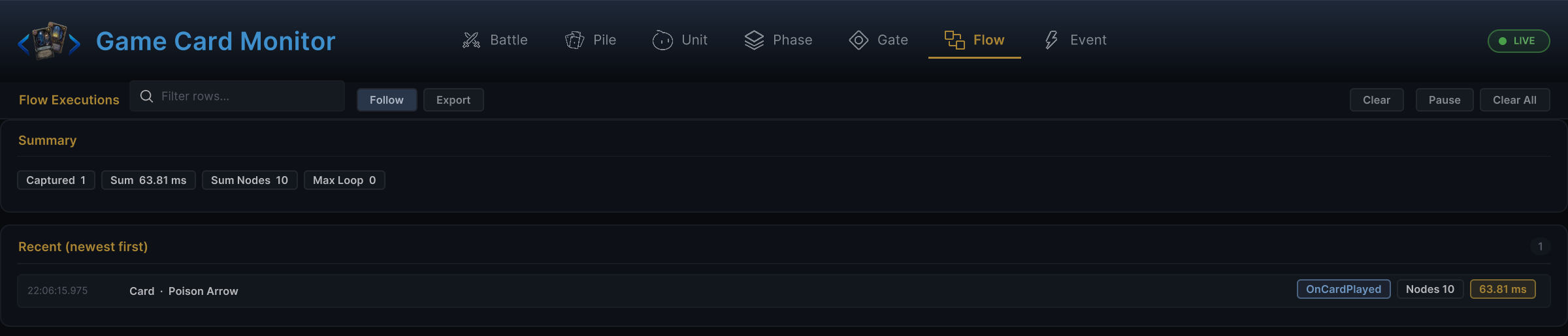
连接控制端口与数据端口,运行拥有该 Behavior 的卡牌、状态或敌人,随后打开 Monitor 的 Flow 标签页,新增记录应显示本次触发、节点总数与执行耗时
定位常见问题
| 现象 | 检查位置 | 修正方式 |
|---|---|---|
| Add Node 中没有节点 | 程序集、Class 与属性 | 放进运行时程序集,确认 Class 公开且非抽象,并保留 [Serializable] 与 [FlowNode] |
| 修改基类后无法编译 | 重写方法与端口结构 | 重新复制目标家族模板,不只替换基类名称 |
| 连线数值被忽略 | 标量字段读取 | 使用 ctx.PullInputOr(this, nameof(Field), Field) |
| 连线目标被忽略 | 单位或卡牌解析 | 使用与字段对应的 ResolveUnit(s) 或 ResolveCard(s) |
| 输出无法连接 | INodePorts.DeclarePorts() | 声明结果输出或控制分支,并使用正确 PortDataType |
| 下游读不到 Mutator 结果 | 声明名与存储名 | 用同一个常量连接 ResultOut 与 StoreResult |
| 状态变化没有触发事件或 Hook | Mutator 方法体 | 通过 ctx.Controller 修改战斗状态 |
| 多个敌人共享 Pattern 进度 | Pattern 状态位置 | 使用宿主敌人的 GetOrCreatePatternState(NodeId) |
| VFX 影响玩法结果 | VfxNode.Play | 把规则修改移到独立 Mutator,并让缺失 View 成为安全跳过 |
| 已保存 Behavior 的连接丢失 | Class、字段或端口改名 | 恢复旧名称,增加迁移,或发布新的节点类型 |