自定义端口
为自定义节点配置 FlowGraph 契约所需的输入、输出、下拉选项与控制分支
Demo 卡牌 Rapid Fire 使用的端口规则与自定义节点一致:Deal Damage 直接读取 Amount 字段,Target 由 All Opponents 经 Random Elements 接入,Loop 控制重复次数
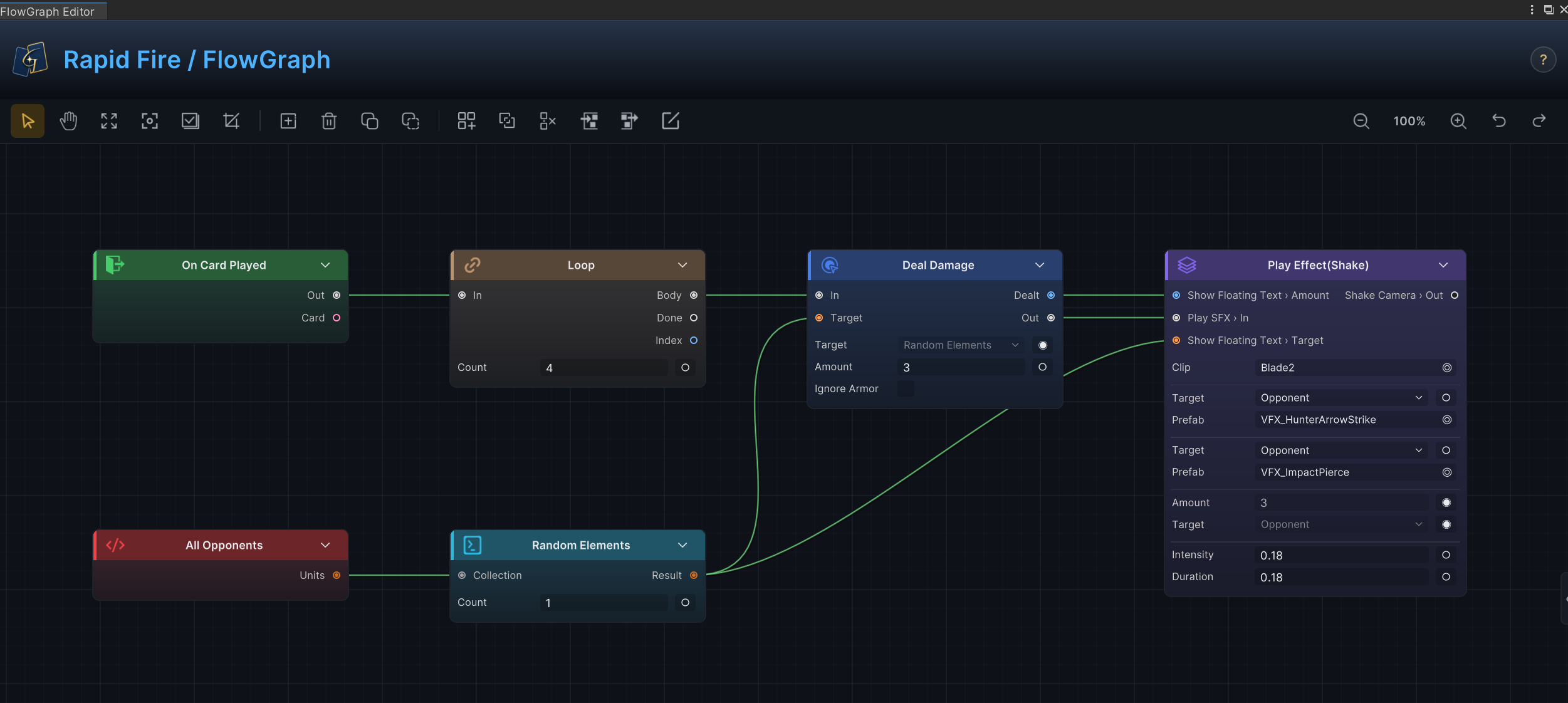
上图同时展示了固定字段、数据端口与控制端口,Amount 直接使用节点上保存的值,Target 读取上游选择结果,Loop 的控制分支决定节点重复执行的次数,自定义节点也沿用同一套端口规则
使用推断的标量输入
Public 标量字段无需显式声明即可成为输入端口
| 字段类型 | 端口行为 |
|---|---|
int | 数字输入,用 PullInputOr<int> 读取 |
float | 小数输入,用 PullInputOr<float> 读取 |
bool | 真/假输入,用 PullInputOr<bool> 读取 |
string | 文本输入,用 PullInputOr<string> 读取 |
public int Amount = 5;
public bool OnlyIfWounded = true;

public override void Execute(IExecutionContext ctx)
{
    int amount = ctx.PullInputOr(this, nameof(Amount), Amount);
    bool onlyIfWounded = ctx.PullInputOr(this, nameof(OnlyIfWounded), OnlyIfWounded);
}
字段值是节点上显示的默认值,当端口接入其他节点后,连接值将会覆盖字段值
将 Source 字段提升为目标端口
名为 <Name>Source 的 UnitSource 或 CardSource 字段会创建一个同名去掉后缀的数据输入:TargetSource 给出 Target,CardsSource 给出 Cards
public UnitSource TargetSource = UnitSource.Opponent;
public CardSource CardsSource = CardSource.HandPile;
通过上下文辅助方法读取后,同一份代码可以同时支持下拉值与端口连线,单位来源包括 Self、Opponent、AllUnits、ActivePlayer、AllAllies、AllOpponents、AllDeadAllies、Target,卡牌来源包括 ThisCard、HandPile、DrawPile、DiscardPile、ExhaustPile 与 AllPiles
foreach (var target in ctx.ResolveUnits(this, TargetSource, nameof(TargetSource)))
{
    if (target == null || target.IsDead) continue;
    ctx.Controller.DealDamage(target, 3, ctx.Source);
}

var cards = ctx.ResolveCards(this, CardsSource, nameof(CardsSource));
区分配置字段与端口
不是每个配置项都需要接线,枚举字段、资产引用、颜色和向量通常保留为节点配置行
public DamageStyle Style = DamageStyle.Direct;
public GameObject VfxPrefab;
模式或资产只需固定选择一次、不需要在运行时接收动态值时,请使用配置行完成
声明显式端口
节点需要字段无法推断的端口时,实现 INodePorts:
-
Result 输出
-
命名的非标量输入
-
命名的控制流分支
-
带下拉选项的字符串输出
-
需要自定义显示名的标量输入
using System;
using System.Collections.Generic;
using TinyGiants.GCS.Runtime;

[Serializable]
[FlowNode("Operator", "Add Values")]
public sealed class AddValuesNode : OperatorNode, INodePorts
{
    public int A;
    public int B;

    public IEnumerable<NodePort> DeclarePorts()
    {
        yield return NodePort.ResultOut("Result", PortDataType.Int);
    }

    public override object Evaluate(IEvaluationContext ctx, string outPort)
        => ctx.PullInputOr(this, nameof(A), A) + ctx.PullInputOr(this, nameof(B), B);
}
DeclarePorts() 位于项目自己的运行时程序集中,不需要引用 GCS Editor 程序集
NodePort 工厂方法
使用静态工厂方法构建端口,工厂方法会提供一致的方向、类型和默认值,避免手动填写 NodePort 字段时形成不完整契约
| Factory | 方向 | 适用场景 |
|---|---|---|
NodePort.In(name, dataType, label) | 输入 | 字段推断不出的命名数据输入,例如单位或卡牌引用 |
NodePort.Out(name, dataType, label, choices) | 输出 | 暴露一个值的普通数据输出 |
NodePort.ScalarIn(name, dataType, label) | 输入 | 覆盖字段自动推断出的端口,通常为了改显示名或类型 |
NodePort.ResultOut(name, dataType, label, choices) | 输出 | 用 ctx.StoreResult 发布、或从 Evaluate 返回的值 |
NodePort.ControlIn(name) | 输入 | 命名的控制流入口 |
NodePort.ControlOut(name) | 输出 | control 或 pattern 节点可以路由到的分支 |
名字撞上时,显式声明的端口将会覆盖自动推断的同名端口,ScalarIn 的全部意义就在这里:用字段名声明一个端口,就能改掉推断结果的显示名或数据类型。而端口名则会保存在图连接里,保持短且稳定
选择准确的数据类型
按端口需要接收的数据选择 PortDataType:
| 数据类型 | 常见用途 |
|---|---|
Int, Float, Bool, String | scalar 值与文本 |
UnitRef, UnitCollection, UnitRefOrCollection | 单个单位、单位列表,或两者皆可 |
CardRef, CardCollection, CardRefOrCollection | 单张卡牌、卡牌列表,或两者皆可 |
StatusRef, StatusCollection | 状态定义或状态集合 |
ValuePoint | Hook 或数值修改点 |
Vector2, Vector3 | 表现层位置或偏移 |
Any, AnyCollection | 窄类型反而误导时的高级适配器 |
None | 仅限控制流端口 |
卡牌类型、标签、稀有度和项目专属模式都属于固定选项,即使序列化值使用 String,也应提供 Choices Supplier,让编辑器显示可选列表
为字符串输出提供下拉选项
String 输出端口可以携带 choices supplier,连接到带值选择器的节点时,例如内置 Switch 的 case,选择器会列出提供的选项,而不是显示自由文本框,内置卡牌类型、稀有度和层级输出也使用该机制
using System.Linq;

public IEnumerable<NodePort> DeclarePorts()
{
    yield return NodePort.ResultOut(
        "CardType",
        PortDataType.String,
        choices: () => GCSApi.CardTypes().Select(t => t.Id).ToList());
}
supplier 在选择器每次打开时运行,列表始终反映项目的实时内容
控制分支
ControlNode 从 DecideNext 返回分支名,每个分支用 NodePort.ControlOut 声明,返回的名字必须严格对应
using System;
using System.Collections.Generic;
using TinyGiants.GCS.Runtime;

[Serializable]
[FlowNode("Control", "If Combo Ready")]
public sealed class IfComboReadyNode : ControlNode, INodePorts
{
    public int RequiredCombo = 3;

    public IEnumerable<NodePort> DeclarePorts()
    {
        yield return NodePort.ControlOut("Ready");
        yield return NodePort.ControlOut("Not Ready");
    }

    public override IEnumerable<string> DecideNext(IExecutionContext ctx)
    {
        int combo = ctx.GetVariable<int>("Combo", battleScope: true);
        yield return combo >= RequiredCombo ? "Ready" : "Not Ready";
    }
}
yield 一个名称时执行单个分支,返回多个名称时并行分发,不返回名称时终止当前路径,返回值无法匹配已声明的控制输出时,当前路径同样终止
声明 Result 输出
mutator 风格的节点先声明端口,再用 ctx.StoreResult(this, portName, value) 发布结果:
public IEnumerable<NodePort> DeclarePorts()
{
    yield return NodePort.ResultOut("Healed", PortDataType.Int);
}

public override void Execute(IExecutionContext ctx)
{
    int healed = 0;
    // heal targets...
    ctx.StoreResult(this, "Healed", healed);
}
OperatorNode、SourceNode、SelectorNode 则直接从 Evaluate 返回值,有多个输出时,按 outPort 分流:
public override object Evaluate(IEvaluationContext ctx, string outPort)
{
    return outPort == "MissingHp"
        ? ctx.Source.MaxHp - ctx.Source.CurrentHp
        : ctx.Source.CurrentHp;
}
端口创作检查清单
-
直接在节点上编辑的值使用字段
-
字段对应的标量输入使用
PullInputOr(this, nameof(Field), Field)读取 -
单位和卡牌选择使用
<Name>Source字段 -
输出使用
NodePort.ResultOut显式声明 -
已保存内容开始连接后保持端口名稳定
-
字符串值只允许从固定列表中选择时提供下拉选项
-
Any只用于确实需要多态数据的端口