Custom ports
Configure the inputs, outputs, dropdown choices, and control branches required by a custom node's FlowGraph contract
The Demo card Rapid Fire uses the same port rules as a custom node: Deal Damage reads the Amount field directly, Target is wired from All Opponents through Random Elements, and Loop controls the number of repetitions
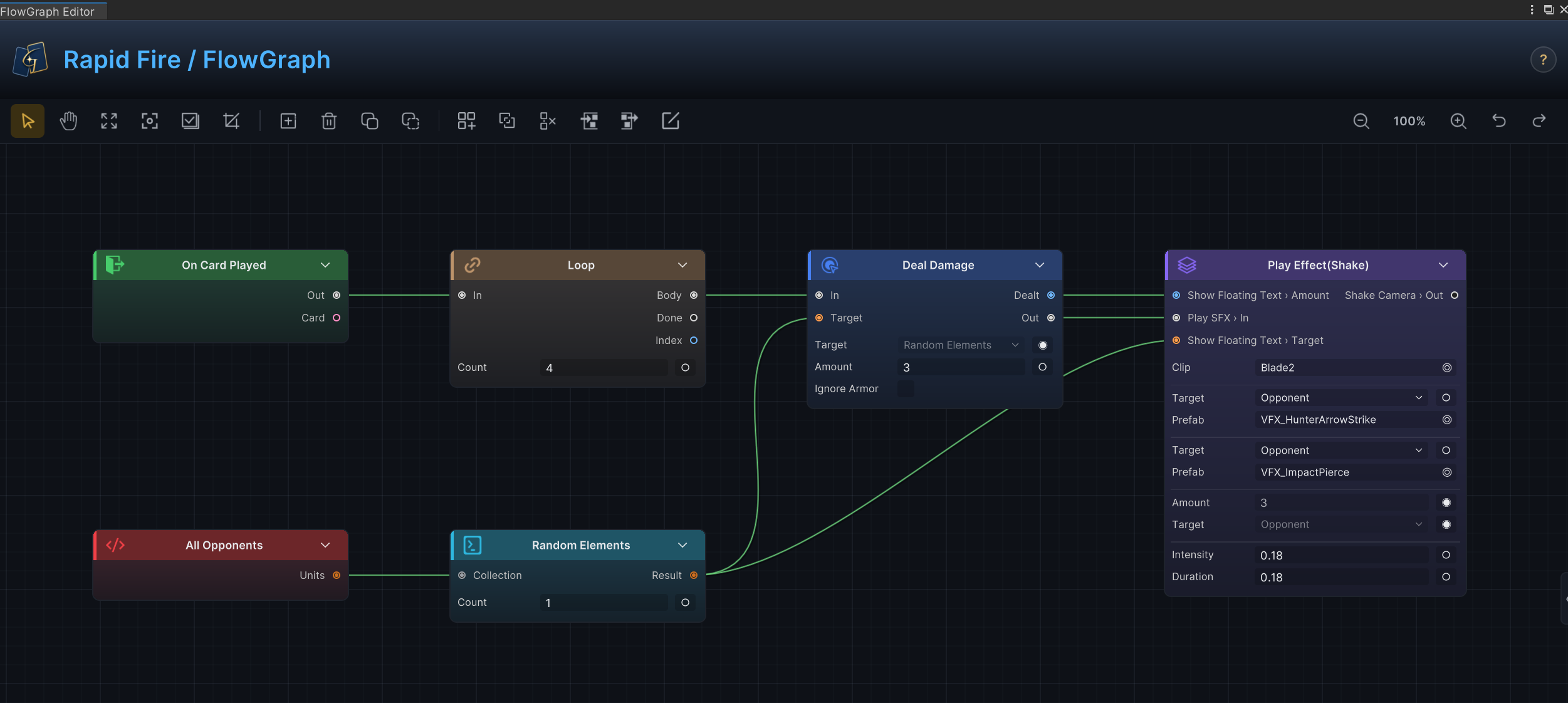
The image above shows fixed fields, data ports, and control ports together; Amount uses the value saved on the node, Target reads the upstream selection, and the Loop control branch determines how many times the node runs; custom nodes follow the same port rules
Use inferred scalar inputs
Public scalar fields can become input ports without an explicit declaration
| Field type | Port behavior |
|---|---|
int | Numeric input, read with PullInputOr<int> |
float | Decimal input, read with PullInputOr<float> |
bool | True or false input, read with PullInputOr<bool> |
string | Text input, read with PullInputOr<string> |
public int Amount = 5;
public bool OnlyIfWounded = true;

public override void Execute(IExecutionContext ctx)
{
    int amount = ctx.PullInputOr(this, nameof(Amount), Amount);
    bool onlyIfWounded = ctx.PullInputOr(this, nameof(OnlyIfWounded), OnlyIfWounded);
}
The field value is the default shown on the node; after another node is connected to the port, the connected value overrides the field value
Promote Source fields to target ports
A field named <Name>Source and typed as UnitSource or CardSource creates a data input with the suffix removed: TargetSource gives Target, and CardsSource gives Cards
public UnitSource TargetSource = UnitSource.Opponent;
public CardSource CardsSource = CardSource.HandPile;
Read them through the context helpers so the same code supports both dropdown values and port connections, unit sources include Self, Opponent, AllUnits, ActivePlayer, AllAllies, AllOpponents, AllDeadAllies, and Target, while card sources include ThisCard, HandPile, DrawPile, DiscardPile, ExhaustPile, and AllPiles
foreach (var target in ctx.ResolveUnits(this, TargetSource, nameof(TargetSource)))
{
    if (target == null || target.IsDead) continue;
    ctx.Controller.DealDamage(target, 3, ctx.Source);
}

var cards = ctx.ResolveCards(this, CardsSource, nameof(CardsSource));
Distinguish configuration fields from ports
Not every setting needs a connection; enum fields, asset references, colors, and vectors usually remain configuration rows on the node
public DamageStyle Style = DamageStyle.Direct;
public GameObject VfxPrefab;
Use a configuration row when a mode or asset is selected once and does not need a dynamic value at runtime
Declare explicit ports
Implement INodePorts when the node needs ports that fields cannot infer:
-
Result outputs
-
Named non-scalar inputs
-
Named control-flow branches
-
String outputs with dropdown choices
-
Scalar inputs that need a custom display name
using System;
using System.Collections.Generic;
using TinyGiants.GCS.Runtime;

[Serializable]
[FlowNode("Operator", "Add Values")]
public sealed class AddValuesNode : OperatorNode, INodePorts
{
    public int A;
    public int B;

    public IEnumerable<NodePort> DeclarePorts()
    {
        yield return NodePort.ResultOut("Result", PortDataType.Int);
    }

    public override object Evaluate(IEvaluationContext ctx, string outPort)
        => ctx.PullInputOr(this, nameof(A), A) + ctx.PullInputOr(this, nameof(B), B);
}
DeclarePorts() belongs in your project's runtime assembly and does not require a reference to the GCS Editor assembly
NodePort factory methods
Build ports with the static factory methods; they provide consistent directions, types, and defaults, avoiding the incomplete contracts that can result from filling in NodePort fields by hand
| Factory | Direction | Use it for |
|---|---|---|
NodePort.In(name, dataType, label) | Input | A named data input that fields cannot infer, such as a unit or card reference |
NodePort.Out(name, dataType, label, choices) | Output | A plain data output that exposes a value |
NodePort.ScalarIn(name, dataType, label) | Input | Overriding a field's inferred port, usually to change its display name or type |
NodePort.ResultOut(name, dataType, label, choices) | Output | A value published with ctx.StoreResult or returned from Evaluate |
NodePort.ControlIn(name) | Input | A named control-flow entry |
NodePort.ControlOut(name) | Output | A branch that a control or pattern node can route to |
When names collide, an explicitly declared port overrides the inferred port with the same name; this is the purpose of ScalarIn: declare a port with the field name to change the inferred display name or data type; port names are also saved in graph connections, so keep them short and stable
Choose the exact data type
Choose PortDataType according to the data the port must accept:
| Data type | Typical use |
|---|---|
Int, Float, Bool, String | Scalar values and text |
UnitRef, UnitCollection, UnitRefOrCollection | One unit, a unit list, or either |
CardRef, CardCollection, CardRefOrCollection | One card, a card list, or either |
StatusRef, StatusCollection | A status definition or status collection |
ValuePoint | A Hook or value-modification point |
Vector2, Vector3 | Presentation-layer positions or offsets |
Any, AnyCollection | Advanced adapters where a narrow type would be misleading |
None | Control-flow ports only |
Card types, tags, rarities, and project-specific modes are fixed options; even when the serialized value uses String, provide a Choices Supplier so the editor shows an option list
Provide dropdown choices for string outputs
A String output port can carry a choices supplier; when connected to a node with a value picker, such as a case on the built-in Switch, the picker lists the supplied options instead of showing a free-text field; built-in card type, rarity, and tier outputs use the same mechanism
using System.Linq;

public IEnumerable<NodePort> DeclarePorts()
{
    yield return NodePort.ResultOut(
        "CardType",
        PortDataType.String,
        choices: () => GCSApi.CardTypes().Select(t => t.Id).ToList());
}
The supplier runs whenever the picker opens, so the list always reflects the project's current content
Control branches
A ControlNode returns branch names from DecideNext; declare every branch with NodePort.ControlOut, and make each returned name match exactly
using System;
using System.Collections.Generic;
using TinyGiants.GCS.Runtime;

[Serializable]
[FlowNode("Control", "If Combo Ready")]
public sealed class IfComboReadyNode : ControlNode, INodePorts
{
    public int RequiredCombo = 3;

    public IEnumerable<NodePort> DeclarePorts()
    {
        yield return NodePort.ControlOut("Ready");
        yield return NodePort.ControlOut("Not Ready");
    }

    public override IEnumerable<string> DecideNext(IExecutionContext ctx)
    {
        int combo = ctx.GetVariable<int>("Combo", battleScope: true);
        yield return combo >= RequiredCombo ? "Ready" : "Not Ready";
    }
}
yield one name to run one branch, return several names to fan out in parallel, and return no names to end the current path; the path also ends when a returned value does not match a declared control output
Declare Result outputs
A mutator-style node declares the port first, then publishes its result with ctx.StoreResult(this, portName, value):
public IEnumerable<NodePort> DeclarePorts()
{
    yield return NodePort.ResultOut("Healed", PortDataType.Int);
}

public override void Execute(IExecutionContext ctx)
{
    int healed = 0;
    // heal targets...
    ctx.StoreResult(this, "Healed", healed);
}
OperatorNode, SourceNode, and SelectorNode return values directly from Evaluate; when there are multiple outputs, route by outPort:
public override object Evaluate(IEvaluationContext ctx, string outPort)
{
    return outPort == "MissingHp"
        ? ctx.Source.MaxHp - ctx.Source.CurrentHp
        : ctx.Source.CurrentHp;
}
Port authoring checklist
-
Use fields for values edited directly on the node
-
Read field-backed scalar inputs with
PullInputOr(this, nameof(Field), Field) -
Use
<Name>Sourcefields for unit and card selection -
Declare outputs explicitly with
NodePort.ResultOut -
Keep port names stable after saved content starts connecting to them
-
Provide dropdown choices when a string value must come from a fixed list
-
Use
Anyonly for ports that genuinely need polymorphic data