Execution context
Read connected values and targets inside a custom node, then publish results or change battle state through the correct context API
Distinguish read-only and writable contexts
A custom node receives the context that matches its family's runtime responsibility
| Context | Given to | Capabilities |
|---|---|---|
IEvaluationContext | OperatorNode, SourceNode, SelectorNode | Read battle state, connected inputs, actors, variables, event arguments, and upstream results |
IExecutionContext | MutatorNode, VfxNode, ControlNode, PatternNode | Everything above, plus battle changes, result publishing, Hook writes, cancellation, and variable writes |
Nodes that only calculate data use the read-only context; nodes that change the battle must commit every change through IExecutionContext.Controller
Read connected inputs
When a scalar field can be exposed as a port, read it with PullInputOr
public int Amount = 5;

public override void Execute(IExecutionContext ctx)
{
    int amount = ctx.PullInputOr(this, nameof(Amount), Amount);
}
When the port is connected, the context reads the connected value; when it is not connected, PullInputOr returns the node field value
default(T) must be a valid fallback before you use PullInput<T>(this, "PortName")
Resolve units and cards
Source fields work with context helpers to select units and cards
public UnitSource TargetSource = UnitSource.Opponent;
public CardSource CardsSource = CardSource.HandPile;

public override void Execute(IExecutionContext ctx)
{
    foreach (var target in ctx.ResolveUnits(this, TargetSource, nameof(TargetSource)))
    {
        if (target == null || target.IsDead) continue;
        ctx.Controller.DealDamage(target, 4, ctx.Source);
    }

    var cards = ctx.ResolveCards(this, CardsSource, nameof(CardsSource));
}
ResolveUnits and ResolveCards support two input modes: a dropdown value on the node, or a port that overrides the dropdown after it is exposed and connected, unit sources include Self, Opponent, AllUnits, ActivePlayer, AllAllies, AllOpponents, AllDeadAllies, and Target, card sources include ThisCard, HandPile, DrawPile, DiscardPile, ExhaustPile, and AllPiles
Use ResolveUnit or ResolveCard when you need only the first resolved result
A node can also consume a unit collection produced by another node without owning a UnitSource field; declare a unit input with NodePort.In("Units", PortDataType.UnitRefOrCollection), then read it with ctx.PullTargets(NodeId, "Units"), an IExecutionContext member; the result is empty when the port is not connected
Read the current actors
The context provides the following execution actors and current data
| Property | Meaning |
|---|---|
Battle | Read-only battle state: piles, units, energy, and turn counters |
Host | The unit that owns the running Behavior: the player unit that played the card, the unit carrying the status, or the enemy taking its turn |
Source | The unit that caused the effect: the card caster, or the latest successful status applier with the holder as fallback |
Target | The unit selected or affected by the current card, operation, or reaction |
Attacker | The actual attacking unit in damage and reaction contexts; status binding does not replace it with the recorded applier |
Card | The card instance currently being played when a card triggered the effect |
PlayedCard | The card that was just played in an "after card played" reaction context |
Status | The status definition currently resolving when a status triggered the effect |
IncomingStatus | The status about to be applied inside a status-application Hook |
Incoming | The value a modification Hook can change: the raw damage, healing, or armor number before it is committed |
Perform a null check on optional objects when a node can run from several entry types; a node that supports both Card and Status Behaviors cannot assume ctx.Card is always present
For UnitSource.Opponent with a player Host, target resolution uses a living non-player Target first, then a living Attacker, then the first living enemy. This keeps a submitted card target authoritative while allowing a player status reaction to resolve the unit that actually attacked
Change state through the Controller
ctx.Controller is the only gateway for changing battle state:
ctx.Controller.DealDamage(target, amount, ctx.Source);
ctx.Controller.GainHp(target, amount);

var burn = ctx.ResolveStatusId("Burn");
if (burn != null) ctx.Controller.ApplyStatus(target, burn, stacks, ctx.Source);
Damage, healing, armor, statuses, card movement, energy, and internal events are all committed through the Controller; do not write HP, statuses, piles, or card state directly on Model objects, because only supported mutation paths trigger Hooks, events, presentation, and diagnostic records
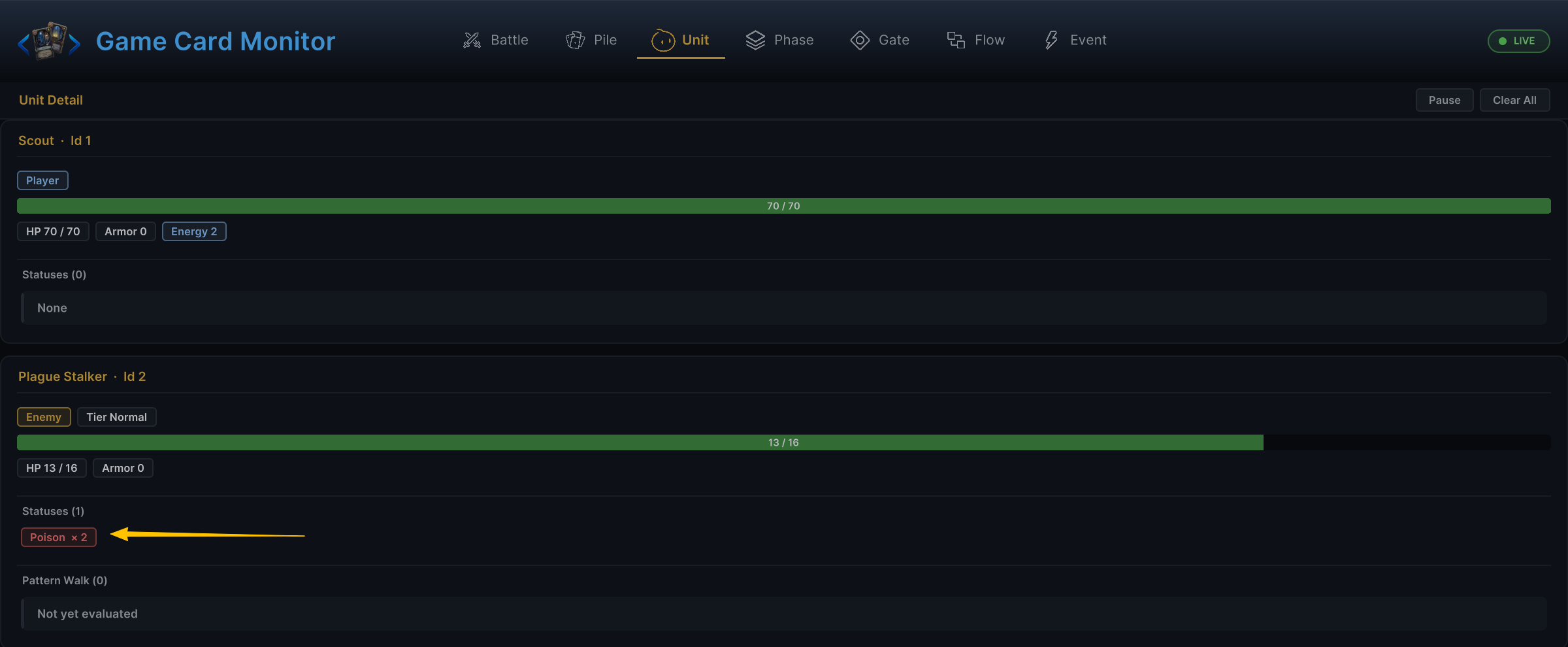
The image above shows how the Controller sends one state change to Hooks, events, presentation, and Monitor together; the Monitor Unit tab therefore shows Poison stacks applied through ctx.Controller.ApplyStatus, while writing a field directly would bypass those downstream results
Publish outputs
A mutator with a declared result output publishes its value with StoreResult:
public IEnumerable<NodePort> DeclarePorts()
{
    yield return NodePort.ResultOut("DamageDealt", PortDataType.Int);
}

public override void Execute(IExecutionContext ctx)
{
    int dealt = 0;
    // deal damage...
    ctx.StoreResult(this, "DamageDealt", dealt);
}
Downstream nodes normally read this value through a connection with PullInputOr; ctx.GetResult<T>(producerNodeId, outputPortName) is reserved for advanced cases that deliberately address a known producer node by id
Modify or cancel values in a Hook
A Behavior running from a Hook entry can adjust or cancel the incoming value
public override void Execute(IExecutionContext ctx)
{
    if (ctx.Incoming <= 0) return;
    ctx.WriteHookResult(ctx.Incoming + 2);
}
WriteHookResult(value) replaces the incoming value, and CancelHook() cancels the pending operation; GCS includes 18 Hook entries covering damage, HP, armor, energy, statuses, card cost, playability, draw count, and hand size, so they can express rules such as:
-
Increase damage dealt
-
Reduce damage taken
-
Change the next card's cost to 0
-
Prevent a specified status from being applied
-
Change the number of cards drawn each turn
Call Hook methods only in Behaviors started by the matching Hook entry; calling them on another path does not rewrite the current resolution
Hook evaluation must finish synchronously. A directly reachable Wait, Choice, or Delayed Trigger invalidates and skips that Hook path; if a nested Controller operation reaches one indirectly during Hook evaluation, runtime follows Out, Skipped, or Done without scheduling deferred work, so custom Hook logic must never depend on a later continuation
Variables
Variables let the same value continue across node paths or battle timing
ctx.SetVariable("Combo", battleScope: true, value: combo + 1);
int combo = ctx.GetVariable<int>("Combo", battleScope: true);
With battleScope: false, the variable is valid only during the current effect resolution; with battleScope: true, it remains available across cards and turns until the battle ends; reading an unset variable returns default(T)
Prefer a result output when the value should travel along a visible graph connection; use a variable when several distant parts of the graph need the same named state
Event arguments
A graph triggered by an On Internal Event entry can read arguments attached by the matching Raise Internal Event node:
object raw = ctx.GetEventArg("Amount");
int amount = raw is int value ? value : 0;
GetEventArg returns null outside an event response or when no argument with that name was sent; the argument name is a contract between the triggering graph and the responding graph, so keep it stable and descriptive
Definition lookups
The context can resolve project definitions from identifiers saved on the node, either a GUID or display name:
| Method | Use |
|---|---|
ResolveStatusId(string statusId) | Find a status definition |
ResolveCardId(string cardId) | Find a card definition |
ResolveEnemyUnitId(string unitId) | Find an enemy unit definition |
StatusStacksOf(unit, statusId) | Read a unit's stack count for a status |
HasStatusOf(unit, statusId) | Check whether a unit has at least one stack of the status |
Built-in selector and status nodes already cover ordinary authoring cases; use these helpers in a node only when the custom behavior itself needs a direct lookup
The complete Mutator pattern
Most custom mutators follow this shape, with Total declared in DeclarePorts through NodePort.ResultOut:
public override void Execute(IExecutionContext ctx)
{
    int amount = ctx.PullInputOr(this, nameof(Amount), Amount);
    if (amount <= 0) return;

    int total = 0;
    foreach (var target in ctx.ResolveUnits(this, TargetSource, nameof(TargetSource)))
    {
        if (target == null || target.IsDead) continue;
        ctx.Controller.GainHp(target, amount);
        total += amount;
    }

    ctx.StoreResult(this, "Total", total);
}
This pattern keeps custom nodes consistent and predictable by preserving all five behaviors:
- Connected inputs automatically override local fields
- Both target-resolution modes remain supported
- Invalid or dead units are filtered automatically
- Every state change goes through the Controller
- Calculated results reach the declared output ports