Node overview
Choose the right node family and open the exact reference entry for any of the 147 available nodes
Each node has its own collapsible entry with a real node screenshot, purpose and timing, every input and output, configurable parameters and defaults, dynamic-port rules, and runtime boundaries. Use the corresponding family manual for exact configuration
Node families
Node color identifies the family before the title, ports, and fields explain the node's specific role
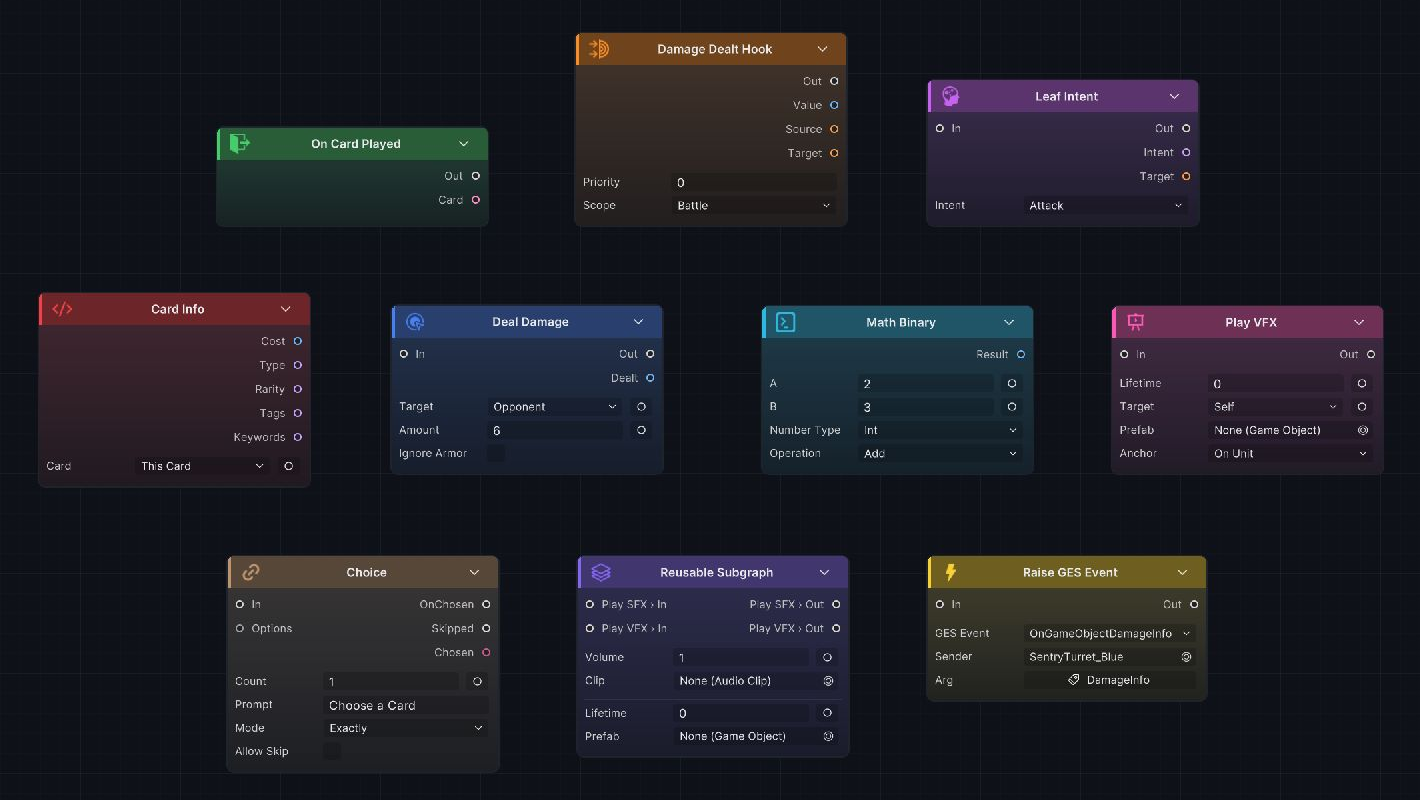
The canvas above places one representative from each core family in the same view, including Raise GES Event and a Group whose Volume, Clip, Lifetime, and Prefab fields remain editable from the parent graph. The table below gives the exact count and reference page for each family
| Family | Count | Complete manual | Use it for |
|---|---|---|---|
| Entry | 33 | Entry nodes | Start execution after a battle, turn, card, unit, status, energy, or event timing |
| Hook | 18 | Hook nodes | Intercept a value before GCS commits it, then replace or cancel it where supported |
| Flow | 10 | Flow nodes | Shape execution with branches, loops, sequences, choices, waits, switches, and gates |
| Action | 27 | Action nodes | Change battle state, including damage, HP, Armor, energy, cards, statuses, variables, turns, and units |
| Intent | 6 | Intent nodes | Build reusable enemy Intent patterns and previews |
| Get | 19 | Get nodes | Read battle context, units, cards, statuses, piles, variables, event arguments, and collections |
| Operator | 22 | Operator nodes | Calculate, compare, filter, sort, select, merge, and convert data |
| FX | 7 + 2 Demo | FX nodes | Request VFX, SFX, animation, floating text, unit movement, and camera feedback; the Demo assembly registers 2 additional status-presentation nodes |
| Event | 2 | Event nodes | Raise an internal GCS event or a GES event |
| Group | 1 | Group node | Place selected nodes in a collapsible visual block with Ctrl + G or Cmd + G; Group is not added from Add Node |
The table counts Add Node entries separately from the Group editing operation:
-
Core Add Node entries: 144
-
Core
Groupnode: 1 -
Core node total: 145
-
Demo FX extensions: 2
-
Total nodes with Demo: 147
Choose by the graph task
After deciding whether the graph needs to start, read, calculate, modify, or present a result, choose its node family by task
| Graph task | Family |
|---|---|
| Start behavior at a battle, turn, card, unit, status, energy, or event timing | Entry |
| Intercept a value before GCS commits it | Hook |
| Change battle state | Action |
| Read a live value or object | Get |
| Calculate, compare, or narrow data | Operator |
| Branch, repeat, wait, or sequence execution | Flow |
| Present the committed result | FX |
| Choose and preview an enemy Behavior | Intent |
| Notify another system | Event |
| Display several configured nodes as one block | Group |
A FlowGraph normally combines several families. A card may start at On Card Played, resolve targets with Get and Operator nodes, commit gameplay through Action nodes, then present the committed result with FX nodes
Core nodes and extensions share one menu
Custom nodes and Demo extensions use the same registry as core nodes. A registered node enters the category specified by [FlowNode(category, displayName)], so an extension can join an existing family without a separate authoring workflow
See custom nodes for extension rules. To match built-in naming, ports, defaults, and behavior, use the family manuals above