Get Nodes
Find and configure the nodes that read live units, cards, statuses, piles, variables, event arguments, and battle values
Node Usage
Active Team
Use Active Team when a branch or condition needs to know which side currently owns the turn
Input
- —: No input ports
Output
Team(String):Playerduring the player turn,Enemyduring the enemy turn, orUnknownwhen no battle is active
Parameters
- None
The result describes the active side, not the team of the graph owner or a selected target

Active Turn
Use Active Turn for turn-based scaling, first-turn rules, or conditions that run every few turns
Input
- —: No input ports
Output
Turn(Int): The battle's current turn number, or0outside battle
Parameters
- None
Turn is the battle counter; it is not a per-unit action count and does not tell you how many times a particular enemy has acted

Active Unit
Use Active Unit when a rule must follow the unit currently taking its turn rather than a fixed side or the graph owner
Input
- —: No input ports
Output
Unit(UnitRef): Active Player during the player turn, or the enemy currently executing its behavior during the enemy phase
Parameters
- None
During the enemy phase, GCS resolves the active unit in this exact order: a living enemy execution Host, a living enemy Source, a living enemy Attacker, then the first living enemy in the battle; the output is null when no matching unit is available

Self Unit
Use Self Unit for effects that must read or affect the unit that owns the current graph
Input
- —: No input ports
Output
Unit(UnitRef): The execution context's graph owner
Parameters
- None
Self Unit is tied to the graph host, not the active side; it returns null if the execution context has no unit host

Opponent Unit
Use Opponent Unit as a compact default target for simple player-versus-enemy behavior
Input
- —: No input ports
Output
Unit(UnitRef): The first living enemy when the host is the player; otherwise the player unit
Parameters
- None
This node does not read the card's chosen target; in encounters with several enemies, it always resolves the first living enemy for a player-owned graph; use an explicit target or collection workflow when target selection matters

Player Energy
Use Player Energy for affordability checks or effects that scale from the player's current energy
Input
- —: No input ports
Output
Current(Int): Shared party energy available to the execution Source, an enemy-owned graph falls back to Active PlayerPerTurn(Int):BaseEnergyfrom that player Source'sGamePlayerUnit, falls back to the same pool's current energy when the definition is unavailable
Parameters
- None
Reads player Source first, then player Host, then Active Player or the primary player, OwnerUnitId does not override the current action source
Both outputs return 0 outside battle, PerTurn reads the definition's base energy or current shared energy when no definition is available, it excludes hooks and run-level adjustments and does not represent final energy gained next turn
Unit collections and inspection

All Allies
Returns all living units on the current FlowGraph Host's team, player cards and statuses read the player roster, enemy Behavior and statuses read the enemy roster, no living allies returns an empty collection, use it for group buffs, healing, and filters
Output
Units(UnitCollection): Every living unit on the Host's team

All Opponents
Returns all living units on the current FlowGraph Host's opposing team for shared area attacks, filters, and Foreach rules
Output
Units(UnitCollection): Every living unit on the opposing team

All Units
Use All Units for board-wide rules that intentionally include both teams
Input
- —: No input ports
Output
Units(UnitCollection): A fresh list containing every living player member first, followed by all living enemies
Parameters
- None
The collection excludes dead players, use All Opponents to read the team opposing the current Host

Unit Info
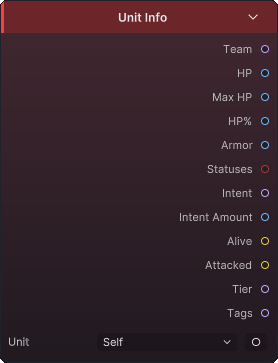
Use Unit Info to drive conditions, filters, intent logic, or presentation from one unit's live state
Input
Unit(UnitRef): Optional exposed input; overridesUnitSourcewhen connected
Output
Team(String): The unit'sPlayer,Enemy, orNeutralteam, orNonewhen no unit existsHP(Int): Current HPMaxHP(Int): Maximum HPHPPercent(Int): Current HP as an integer percentage from0to100Armor(Int): Current armorStatuses(StatusCollection): Status assets currently present on the unitIntent(String): Current enemy intent tag, orUnknownfor a non-enemyIntentAmount(Int): Current enemy intent value, or-1when no value appliesAlive(Bool): Enabled when the unit exists and is not deadAttacked(Bool): Whether the unit was attacked during the current turnTier(String): Enemy tier, or an empty string for other unitsTags(String): The unit definition's tags joined as comma-separated text
Parameters
UnitSource(Self):Self,Opponent,AllUnits,ActivePlayer,AllAllies,AllOpponents,AllDeadAllies,Target, Selects the unit whenUnitis not connected
Reads one unit, taking only the first item from collection sources such as AllOpponents and AllUnits, an empty source falls back to the current host
Without a source or host, HP and armor values return 0, IntentAmount returns -1, text and collection outputs use empty or unknown values, and Alive is off, Tags joins values in their original order with , and returns empty text when none exist
Unit Status Stacks
Use Unit Status Stacks when damage, healing, branching, or status consumption depends on one status's current stack count
Input
Unit(UnitRef): Optional exposed input; overridesUnitSourcewhen connected
Output
Stacks(Int): Current stacks of the selected status on the resolved unit
Parameters
UnitSource(Self):Self,Opponent,AllUnits,ActivePlayer,AllAllies,AllOpponents,AllDeadAllies,Target, Selects the unit whenUnitis not connectedStatus(None): AnyGameStatusasset; Selects the status to count
This is a single-unit lookup, so collection sources contribute only their first unit. Stacks is 0 when the unit or Status field is missing, or when the unit does not have that status

Status Info
Use Status Info inside a status graph, or connect a status explicitly when a rule needs its type, tags, or stacks on the graph owner
Input
Status(StatusRef): Optional status override
Output
Stacks(Int): Stacks of the resolved status on the graph hostType(String):BufforDebuff; empty when no status resolvesTags(String): The resolved status definition's tags joined as comma-separated text
Parameters
Status(None): AnyGameStatusasset; Fallback status when the input is not connected
Resolution order is connected Status, inline Status, then the execution context's current status. Stacks always checks the graph host, not an arbitrary target, and returns 0 without both a host and a resolved status; multiple tags are returned as one comma-and-space-separated string
Cards and piles

This Card
Use This Card when a card behavior needs the exact runtime card instance that owns the execution
Input
- —: No input ports
Output
Card(CardRef): The current card instance
Parameters
- None
The editor only allows this node in a card-owned graph; it returns null when execution has no current card instance

Card Info
Use Card Info for cost checks, card-type branches, rarity rules, and interactions based on tags or keywords
Input
Card(CardRef): Optional exposed input; overridesCardSourcewhen connected
Output
Cost(Int): Effective energy cost for a runtime instance, or the asset's base cost when only a definition is availableType(String): Card typeRarity(String): Card rarityTags(String): Card tags joined as comma-separated textKeywords(String): Card keywords joined as comma-separated text
Parameters
CardSource(ThisCard):ThisCard,HandPile,DrawPile,DiscardPile,ExhaustPile,AllPiles; Selects the card source whenCardis not connected
Card Info reads one card; pile-based sources therefore use the first resolved card; if no instance resolves, the current played card definition is the final fallback; missing cards produce 0 and empty strings, while multiple tags or keywords are returned as comma-and-space-separated text

Card Piles
Use Card Piles to feed live battle cards into Filter, Count, Take, Move Cards, or other collection nodes
Input
- —: No input ports
Output
Cards(CardCollection): The cards selected byPile
Parameters
Pile(Hand):Hand,Draw,Discard,Exhaust,Master,All; Chooses the runtime pile or combined source to read
Hand, Draw, Discard, and Exhaust return the live battle pile views. All creates a collection in hand, draw, discard, then exhaust order; it does not include Master. Master creates temporary instance-ID-0 cards from the current master deck and preserves each entry's upgraded state and cost delta; outside battle, every option returns an empty collection

Deck Cards
Use Deck Cards when the graph needs the contents of a particular GameDeck asset rather than the player's live battle piles
Input
- —: No input ports
Output
Cards(CardCollection): Temporary card instances built from the selected deck's entries
Parameters
Deck(None): AnyGameDeckasset; Selects the deck definition to read
Each deck entry contributes at least one instance: Copies values below 1 are treated as 1; the node creates fresh instance-ID-0 cards and does not read or modify live battle piles; a missing deck or entry list returns an empty collection

Cards Played This Turn
Use Cards Played This Turn for combo counts and rules that inspect the current turn's play history
Input
- —: No input ports
Output
Cards(CardCollection): Runtime card instances played this turn, in play order
Parameters
- None
The history resets with the turn and is not a whole-battle log; outside battle, the node returns an empty collection

Cards Drawn This Turn
Use Cards Drawn This Turn for draw-count bonuses and rules that inspect which cards entered the hand during the current turn
Input
- —: No input ports
Output
Cards(CardCollection): Runtime card instances drawn this turn, in draw order
Parameters
- None
This is draw history, not the current hand; cards can leave the hand and remain in this collection until the turn changes; outside battle, the node returns an empty collection
Variables and event data

Variable
Use Variable with Set Variable when a later node or another entry needs a named value instead of a direct wire
Input
- —: No input ports
Output
Result(Any): The named value converted to the selectedKind
Parameters
Name(Empty): Any matching variable name; Identifies the value written bySet VariableKind(Int):Int,Float,Bool,Unit,Card,Status; Selects the stored value type and the default returned when missingBattleScope(Off): Off, On; Off reads the current graph execution; on reads the battle-wide store shared by entries
The name and scope must match the writer; a missing value returns the selected type's default: 0, 0.0, off, or null; execution-scoped values do not survive into a separate entry; enable BattleScope only when that sharing is intentional

Event Arg
Use Event Arg in a graph started by an internal-event or GES-event entry to read one named value from that event payload
Input
- —: No input ports
Output
Result(Any): The event argument stored underArgName
Parameters
ArgName(Empty): A key supplied by the event; Selects which payload value to read
Argument names are exact; the result is null when the graph was not started by an event, the event did not include that key, or the name does not match
