Flow Nodes
Find and configure the nodes that branch, repeat, delay, group, and order execution
Node Usage
Sequence
Runs each step from top to bottom; use it when one trigger must start several independent branches in a fixed order, such as applying damage, updating a status, and then playing presentation effects
Inputs
In(Control): Starts the sequence
Outputs
Step0…StepN(Control): Runs once each, in numeric order; the number of ports followsOutputs
Parameters
Outputs(Integer):2; Number of ordered step ports; increasing or decreasing it rebuilds the visible outputs
Steps are started in numeric order; a fully synchronous path finishes before the next step starts, but a path that reaches Wait or Choice returns at that boundary, so later steps can start before the delayed or chosen branch continues; use Branch or Switch instead when only one of several paths should run
With Outputs set to 0 or less, the node has no step path to run

Branch
Chooses one of two control paths from a boolean value; a common connection is Condition.Result → Branch.Condition
Inputs
In(Control): Evaluates the branchCondition(Boolean):trueselectsTrue;falseor an unconnected input selectsFalse
Outputs
True(Control): Runs when the condition is trueFalse(Control): Runs when the condition is false
Parameters: none
Only one output runs per evaluation; if the false case should simply stop, it is valid to leave False unconnected

Switch
Routes execution by matching an integer or string against a list of cases; use it for named states such as card types, intent names, or turn modes with more than two outcomes
Inputs
In(Control): Evaluates the casesOn(Integer or String): Value compared withCase Values; its type followsKind
Outputs
Case 1…Case N(Control): One visible port per value, in the same order asCasesDefault(Control): Runs when no case matches; shown with the case outputs afterOnis connected
Parameters
Kind(internal) (Int/String):Intbefore inference; Set automatically from the data type connected toOn; it is not a separate editor selectorCases(Case Values) (Integer or String list): Empty untilOnis connected; the UI count includesDefault; each remaining row stores one case value and creates one visible case output
Matching is exact and case-sensitive for strings; cases are checked from top to bottom, so the first duplicate wins; an entry that cannot be parsed in Int mode is skipped
A null string input is treated as an empty string, so it can match an empty string case
In the editor, connect On before configuring cases or seeing their control outputs; the visible Cases count includes the final Default, so Cases = 3 creates two editable values and the visible outputs Case 1, Case 2, and Default

Gate
Lets execution continue only while a boolean condition is true; use it as a compact guard when you do not need a separate false branch
Inputs
In(Control): Tests the gateAllow(Boolean): Opens the gate when true; false stops this path
Outputs
Out(Control): Runs only whenAllowis true
Parameters: none
An unconnected Allow is false, so the graph stops at the node; use Branch if both outcomes need behavior

Loop
Runs the same body a fixed number of times; connect Index when the current pass number, starting at 0, is useful for scaling, selecting, or display
Inputs
In(Control): Starts the loopCount(Integer): Number ofBodyexecutions; falls back to the field value
Outputs
Body(Control): Runs once per passDone(Control): Runs after all passes, including when the count is zero or negativeIndex(Integer): Current pass index, starting at0
Parameters
Count(Integer):1; Inspector fallback when theCountinput is not connected
Each complete Body path finishes before the next pass begins; when the path reaches Wait or Choice, runtime restores that pass's Index, node results, and run-scoped variables, finishes its continuation, then starts the next pass. Done and the enclosing effect-wave completion are emitted once after every pass; prefer Foreach when a collection already provides the actual elements

Foreach
Runs once for every item in a shallow snapshot of a unit, card, or status collection; it preserves the captured order and exposes both the current item and its index starting at 0
Inputs
In(Control): Starts enumerationCollection(Unit, Card, or Status collection): Items to enumerate; its type followsKind
Outputs
Body(Control): Runs once for each itemDone(Control): Runs after the last item, or immediately for a null or empty collectionElement(Unit, Card, or Status reference): Current item; its type followsKindIndex(Integer): Current item index, starting at0
Parameters
Kind(internal) (Unit/Card/Status):Unitbefore inference; Set automatically from the collection connected toCollection; it is not edited directly
Connect Element to the action inside Body; connecting the whole collection there would repeat the same collection action for every pass
Null elements are still enumerated: Body runs for that captured position and Element is null
Adding, removing, or moving items inside Body does not change which items this pass visits because enumeration uses the shallow snapshot taken at entry; a Wait or Choice pauses the iterator and restores the same Element, Index, node results, and run-scoped variables before the next item begins. Done and the enclosing effect-wave completion are emitted once after the captured collection finishes

While
Repeats Body while a boolean condition remains true; use it only when Body changes the value that the condition reads
Inputs
In(Control): Starts condition checkingCondition(Boolean): Re-evaluated before every pass
Outputs
Body(Control): Runs while the condition is trueDone(Control): Runs when the condition becomes false
Parameters: none
While must eventually become falseWithout a Wait or Choice, a condition that never becomes false repeats synchronously until the runtime traversal guard aborts it; a deferred node serializes later passes but does not make an endless condition valid; use Loop, Foreach, or Delayed Trigger when the number of passes or future phase is known
When Body reaches Wait or Choice, runtime restores that pass's node results and run-scoped variables, finishes the continuation, then re-evaluates Condition; Done and the enclosing effect-wave completion are emitted once when the condition becomes false

Wait
Pauses the complete effect wave before continuing; use Seconds for a timed presentation beat, or Animation when another system releases a named animation gate
Inputs
In(Control): Starts the waitSeconds(Float): Shown inSecondsmode; overrides the Inspector duration when connectedAnimationId(String): Shown inAnimationmode; overrides the Inspector ID when connected
Outputs
Out(Control): Runs after the scheduled wait finishes, or immediately if no wait can be scheduled
Parameters
Mode(Seconds/Animation):Seconds; Chooses the visible input and wait mechanismSeconds(Float):0.5; Time delay used inSecondsmodeAnimation Id(String): Empty; Gate reason used inAnimationmode
Seconds at 0 or less continues immediately. Animation mode does not inspect an Animator clip or trigger automatically: the presentation layer must already have acquired the matching AnimationGate reason before the node runs; if that reason is not held, execution continues immediately; a held reason resumes when released or after the five-second safety timeout; an empty Animation Id uses Flow Wait as the reason
While a real wait is pending, sibling effect branches, status reactions, and phase continuations are serialized behind it; card play, CanPlayCard, and end-turn input stay locked until the deferred wave finishes. Runtime resumes from a snapshot containing the current context slots, node results, and run-scoped variables, while referenced units, cards, and statuses remain live objects

Delayed Trigger
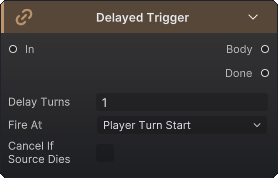
Schedules a connected body for a later battle phase, while the current graph continues through Done; use it for countdown effects that belong to a future turn rather than for a short visual pause
Inputs
In(Control): Attempts to register the delayed body
Outputs
Body(Control): Entry point saved for later execution; it does not run during the current passDone(Control): Continues immediately after scheduling
Parameters
Delay Turns(Integer):1; Number of selected phase boundaries to wait before firing, with zero or a negative value leavingBodyunregisteredFire At(Tick Phase) (PlayerTurnEnd/PlayerTurnStart/EnemyPhaseEnd):PlayerTurnStart; Phase boundary that advances and fires the trigger, with an item registered while that boundary is being processed beginning its countdown at the next matching boundaryCancel If Source Dies(Cancel On Source Death) (Boolean): Off; Rejects registration when the source is already dead and cancels the pending body if that source dies before firing
A delayed body is registered only when Body is connected and Delay Turns is greater than zero; with zero or a negative value, the node still follows Done and does not run Body immediately
Registration copies the current host, Source, Target, Attacker, card, status, event arguments, node results, and run variables into the deferred context; the snapshot fixes these slots and collection members while referenced units, cards, and statuses remain live objects, so later HP, stack, and instance-state changes remain visible; OnDelayedTriggerFired is published only after the complete future Body, including every nested Wait or Choice continuation, has finished; delayed items and callbacks from the old battle do not continue after battle end or replacement
Each queued PendingDelayedTrigger exposes a battle-local TriggerId and a CardDefinitionSnapshot captured from the associated card at registration; scheduled, fired, and cancelled event payloads expose the same value as TriggerId alongside SourceUnitId, TargetUnitId, TickPhase, and Card so concurrent countdowns can be tracked independently
Choice
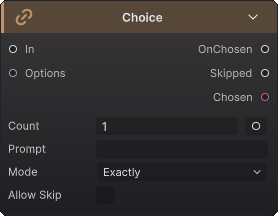
Opens the runtime choice presenter with a collection of units, cards, or statuses, then continues through the selected or skipped path; use it for decisions the player must make, not for random or automatic selection
Inputs
In(Control): Opens the choiceOptions(Unit, Card, or Status collection): Candidate list; null entries are omitted and the type followsKindCount(Integer): Optional exposed override for the maximum number of picks
Outputs
OnChosen(Control): Runs after the player confirms a valid selectionSkipped(Control): Runs when the player skips, or when no presenter or candidate is availableChosen(Unit, Card, or Status collection): Confirmed selection, with type followingKind
Parameters
Kind(internal) (Unit/Card/Status):Cardbefore inference; Set automatically from the collection connected toOptions; it is not edited directlyPrompt(String): Empty; Text shown by the choice presenterCount(Integer):1; Inline maximum used when the data input is not connectedMode(Exactly/UpTo):Exactly; Requires the capped count, or allows any count up to itAllow Skip(Boolean): Off; Allows confirming no selection in the presenter
The effective maximum reads the connected Count first, then clamps it to the available candidate count and never below one when candidates exist. UpTo with skipping disabled still requires at least one pick; if the presenter is missing or the candidate list is empty, GCS follows Skipped even when Allow Skip is off
An open choice pauses the complete effect wave and locks card play and end-turn input; queued sibling branches and status reactions resume in causal order after OnChosen or Skipped finishes