Intent Nodes
Find and configure the nodes that choose, repeat, branch, and preview an enemy's next Intent
Node Usage
Leaf Intent
Choose this leaf at the end of a Pattern to show the enemy's upcoming Intent. Connect Out to the Actions and FX the enemy should run on its turn.
Inputs
In(Control): Receives the selected pattern branch
Outputs
Out(Control): Starts the behavior executed on the enemy turnIntent(String): The configured intent name, such asAttack,Defend, orSpecialTarget(Unit reference): The target carried by the enemy planning context, normally the player unit
Parameters
Intent(Attack,Defend,Buff,Debuff,Heal,Special,Multi,Hidden):Attack; Icon/tag shown by the intent UI;Hiddensuppresses a normal telegraph
For Attack, Defend, and Heal, GCS scans the single Out chain for the first matching Deal Damage, Change Armor, or positive Change HP result and uses the resolved amount as the preview value; downstream nodes can use Intent for text comparisons and Target for the same unit selected during planning

Sequence Pattern
Cycles through intent branches in a fixed order, optionally repeating each branch for several enemy turns; use it for enemies whose plan should be learnable and deterministic
Inputs
In(Control): Enters the pattern during intent resolution
Outputs
Step0…StepN(Control): One branch perRepeat Countsitem, in list order
Parameters
Steps(Repeat Counts) (Integer list): Empty; the UI creates oneTurns nrow per step; each value is its consecutive-turn count and values below1behave as1
After the enemy turn call returns, the pattern advances its per-enemy state; for [1, 2], it uses Step0 once, Step1 twice, then loops back to Step0; a selected step still consumes its repeat count when it is unconnected or never reaches a leaf; an empty list creates no selectable branch

HP Threshold Pattern
Selects an intent branch from the enemy's current HP percentage; use it for phase changes and desperation moves
Inputs
In(Control): Enters the pattern during intent resolution
Outputs
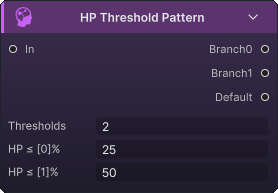
Branch0…BranchN(Control): One branch per threshold itemDefault(Control): Used when current HP is above every listed threshold
Parameters
Thresholds(Percentage list): Empty; Each branch matches when current HP% is less than or equal to its threshold
The node calculates enemy HP percentage using integer division, so 66.7% is evaluated as 66. It compares that result with the floating-point thresholds from top to bottom and uses the first match. Arrange the thresholds from lowest to highest. With [25, 50], HP at 25% or less uses Branch0, HP above 25% through 50% uses Branch1, and HP above 50% uses Default. Reversing the thresholds makes the 25% branch unreachable.
Weighted Random Pattern
Chooses one intent branch by relative weight each time the enemy plans; use it when behavior should vary while preserving the configured odds
Inputs
In(Control): Enters the random choice during intent resolution
Outputs
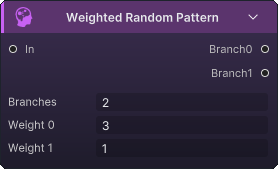
Branch0…BranchN(Control): One branch per weight item
Parameters
Branches(Weights) (Integer list): Empty; the UI creates oneWeight nrow per branch; each value is that branch's relative chance
Negative weights behave as zero; with [3, 1], the first branch has a 75% share and the second 25%; if every weight is zero or negative, Branch0 is selected; an empty list selects no branch
Once Per Battle
Chooses Body the first time this enemy reaches the node, then chooses Done for every later turn; use it for an opener or one-time phase action
Inputs
In(Control): Enters the per-battle check
Outputs
Body(Control): Selected once; connect it to the one-time intent pathDone(Control): Selected on later visits; connect it to the regular plan
Parameters: none
The fired state belongs to this node on this enemy; selecting Body marks it fired when the enemy turn call returns, even if Body is unconnected, never reaches a leaf, or reaches an asynchronous boundary whose continuation has not finished

Every N Turns
Chooses Body on a repeating interval and Done on the turns between; use it to insert a periodic heavy attack, buff, or defensive move into an enemy plan
Inputs
In(Control): Enters the interval check
Outputs
Body(Control): Selected on every Nth visitDone(Control): Selected on intervening visits
Parameters
Turn Interval(N) (Integer):1; Interval in enemy turns; values below1behave as1
The counter is kept per enemy and advances when the enemy turn call returns, then resets after the Body visit; with N = 3, the first two visits use Done, the third uses Body, and the cycle repeats; an unconnected branch or missing leaf still consumes that visit
