Custom UI integration
Subscribe to battle events, read current state through GCSApi, then submit plays, turns, choices, and rewards back to runtime
The diagram above shows the only two-way relationship custom UI needs to maintain with GCS. Runtime sends events when state changes, UI reads current state again after receiving them, and player actions return to the same battle through GCSApi. The interface does not keep a second authoritative copy of battle data
The snippets contain only the components that interact with GCS; place them in the project's presenter or MonoBehaviour, then add using System;, using System.Collections.Generic;, and using TinyGiants.GCS.Runtime; for the types the class uses
Integration checklist
-
Place and configure a
GameCardManager -
Start battles with
GCSApi.StartBattle -
Subscribe to runtime events in UI lifecycle methods
-
Refresh UI from
GCSApiafter each event -
Use
GCSApi.CanPlayCardandGCSApi.TryPlayCardfor card buttons -
Bind card rule text through
DescriptionTooltipTriggerwhen the UI uses TMP descriptions -
Use
GCSApi.EndPlayerTurnfor the end-turn button -
Use
GCSApi.ApplyRewardorGCSApi.SkipRewardfor reward screens -
Dispose every subscription
-
Keep Demo-specific View components replaceable
Subscription lifetime
Use a small disposable list per UI object
private readonly List<IDisposable> _subscriptions = new();

void OnEnable()
{
    _subscriptions.Add(GCSApi.OnBattleStarted(RefreshAll));
    _subscriptions.Add(GCSApi.OnEnergyChanged(_ => RefreshEnergy()));
    _subscriptions.Add(GCSApi.OnCardDrawn(_ => RefreshHand()));
    _subscriptions.Add(GCSApi.OnCardDiscarded(_ => RefreshHand()));
    _subscriptions.Add(GCSApi.OnCardExhausted(_ => RefreshHand()));
    _subscriptions.Add(GCSApi.OnUnitHpChanged(_ => RefreshUnits()));
    _subscriptions.Add(GCSApi.OnStatusChanged(_ => RefreshStatuses()));
}

void OnDisable()
{
    foreach (var subscription in _subscriptions)
    {
        subscription.Dispose();
    }
    _subscriptions.Clear();
}
Dispose each subscription when its GameObject is destroyed. Stale listeners accumulate across reloads and cause duplicate UI refreshes
Battle HUD
Refresh the high-level HUD fields from state:
| Widget | Read |
|---|---|
| Phase label | GCSApi.Phase |
| Turn label | GCSApi.TurnNumber |
| Energy | GCSApi.PlayerEnergy, GCSApi.MaxEnergy |
| End turn button | GCSApi.Phase == BattlePhase.PlayerPhase |
| Battle result overlay | OnBattleEnded and BattleEndedEventArgs.Won |
Read the phase from GCSApi.Phase and phase events. A graph can end the turn, grant an extra turn, open a choice, or finish the battle without a UI click
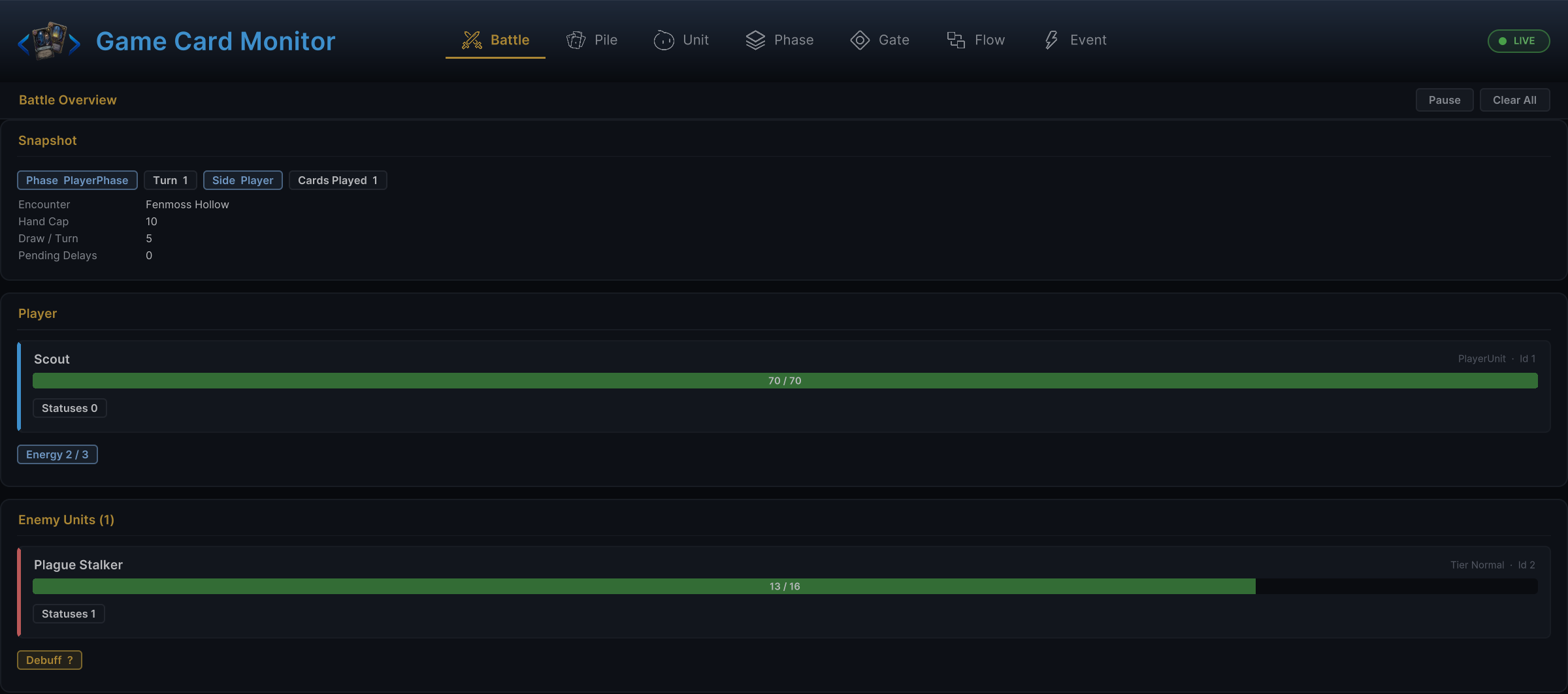
Open Game Card Monitor:
Tools > TinyGiants > GCS > Game Card Monitor
Check the Battle tab; if the Monitor shows the correct battle state but the HUD does not, inspect the HUD event subscriptions and refresh path
Hand UI
Rebuild the complete hand from GCSApi.Hand(), or update individual cards by instance ID. The method returns the live hand pile at call time, including cards drawn during the current turn
void RefreshHand()
{
    foreach (var card in GCSApi.Hand())
    {
        var active = GCSApi.GetActiveCard(card);
        var cost = GCSApi.GetEffectiveEnergyCost(card);
        var playable = GCSApi.CanPlayCard(card);
        RenderCard(card, active, cost, playable);
    }
}
Bind card descriptions and Tooltips
Add DescriptionTooltipTrigger to the GameObject displaying Description, leave Description Label empty when that object already has the TMP_Text, otherwise assign the text component from the other object, set Tooltip Anchor to the card's RectTransform to position the Tooltip from the full card face
Call Bind with the active GameCard and its CardInstance when binding the view, the component resolves Description Tokens and formatting tags
Valid @Name references hide the @ prefix and display their Tooltip on hover
[SerializeField] private DescriptionTooltipTrigger descriptionTooltip;

void BindCard(CardInstance instance)
{
    var activeCard = GCSApi.GetActiveCard(instance);
    descriptionTooltip.Bind(activeCard, instance);
}

void ReleaseCard()
{
    descriptionTooltip.Clear();
}
Call Clear() before pooling the view to remove its text and reference data and close the Tooltip
Include referenced GameStatus assets in Status Databases enabled on GameCardManager, the component resolves Status references from those databases and Keywords through CardTagRegistry
For Canvas UI, enable Raycast Target on the Description text, add an EventSystem to the scene, and add a GraphicRaycaster to the Canvas so the component receives pointer events
World-space cards can receive pointer events through Physics2DRaycaster and Collider2D, with custom input, call UpdatePointer with the pointer screen position and event camera
descriptionTooltip.UpdatePointer(pointerScreenPosition, eventCamera);
If custom input does not trigger OnPointerExit, call HideTooltip() when the pointer leaves the card
Without Tooltip Anchor, the component tries its own RectTransform, Collider2D, and pointer position in order, using the first available result
On a reward screen without a live CardInstance, pass only the GameCard definition
descriptionTooltip.Bind(card);
This call renders Description from the base card definition using the component's existing anchor and input settings
Once the view is bound, route its card click through the normal play checks:
void OnCardClicked(CardInstance card)
{
    var active = GCSApi.GetActiveCard(card);
    if (GCSApi.RequiresTarget(active))
    {
        OpenTargetPicker(card);
        return;
    }

    GCSApi.TryPlayCard(card);
}
When target selection completes:
void OnTargetSelected(CardInstance card, UnitState target)
{
    GCSApi.TryPlayCard(card, target);
}
Unit panels
Build unit panels from runtime units
| Panel value | Read |
|---|---|
| HP | GCSApi.Hp(unit), GCSApi.MaxHp(unit) |
| Armor | GCSApi.Armor(unit) |
| Alive/dead | GCSApi.IsAlive(unit) |
| HP percent | GCSApi.HpPercent(unit) |
| Statuses | GCSApi.StatusesOn(unit) |
| Enemy intents | GCSApi.PendingIntents(enemy) |
Unit panels can refresh in response to these events:
-
OnUnitHpChanged -
OnUnitDied -
OnUnitRevived -
OnPlayerUnitAdded -
OnUnitRemoved -
OnArmorGained -
OnArmorLost -
OnStatusChanged -
OnStatusTicked -
OnEnemyUnitIntentChanged -
OnEnemyPhaseChanged
Status controls
Status UI should read the full current map, not only the values in the event payload; use StatusChangedEventArgs.UnitId to locate which unit changed, then re-read everything on it
void RefreshStatusList(UnitState unit)
{
    foreach (var pair in GCSApi.StatusesOn(unit))
    {
        var status = pair.Key;
        var stacks = pair.Value;
        RenderStatus(status.Icon, status.DisplayName, stacks, status.ShowStackCount, status.IsDebuff);
    }
}
Enemy intents
Intent UI can show the current top intent or the full pending list
void RenderIntent(UnitState enemy)
{
    var tag = GCSApi.CurrentIntentTag(enemy);
    var value = GCSApi.CurrentIntentValue(enemy);
    var pending = GCSApi.PendingIntents(enemy);
    RenderIntentIcons(tag, value, pending);
}
Refresh when OnEnemyUnitIntentChanged fires and after enemy phase changes
Choice UI
When a Choice node asks the player to pick cards, units, or statuses, GCS raises OnEffectChoiceOffered
| Payload field | Use |
|---|---|
PromptText | Label for the choice panel |
Candidates | Options to render |
AllowSkip | Whether to show a skip button |
The choice panel must implement IChoicePresenter. When a Choice opens, runtime passes the prompt text, candidates, minPicks, maxPicks, onPicked, and onSkipped. The panel enables or disables confirmation according to the selection limits and returns the original candidate objects through the matching callback. Without an IChoicePresenter in the scene, or when the candidate list is empty, the Choice node resolves as skipped. After a pick, GCS stores the selected values and raises OnEffectChoiceSelected with every selected index and candidate; after an explicit or automatic skip, it raises OnEffectChoiceSkipped
Disable normal card buttons while GCSApi.IsWaitingForChoice is true
Reward UI
After a won battle, GCS may raise OnBattleRewardOffered
private void ShowReward(BattleRewardOfferedEventArgs args)
{
    foreach (var card in args.CardCandidates)
    {
        RenderRewardCard(card);
    }
}

public void PickReward(GameCard card)
{
    GCSApi.ApplyReward(RewardChoice.Card, card);
}

public void SkipReward()
{
    GCSApi.SkipReward();
}
RewardChoice also offers Energy and Cost; pass null as the card for those; applying or skipping resolves the reward step and raises OnBattleEnded; use GCSApi.IsWaitingForReward to decide whether the reward controls should be visible
Floating text and presentation
For custom floating text, subscribe to FloatingTextSystem.Requested; the handler receives a FloatingTextRequest
void OnEnable()
{
    FloatingTextSystem.Requested += ShowFloatingText;
}

void OnDisable()
{
    FloatingTextSystem.Requested -= ShowFloatingText;
}
The built-in UnitView registers itself by UnitId, allowing FlowGraph presentation nodes to locate the target view. Custom unit visuals bind their own View Model to the Unit ID in event Payloads. The Demo HandController, CardView, and reward UI classes serve only the sample scenes; production UI should bind to stable runtime events and IDs
Refresh strategy
| Strategy | Use when |
|---|---|
| Full rebuild | Hand, reward choices, and small status lists |
| Patch by ID | Unit panels, Intent controls, floating text targets |
| Debounced refresh | Large custom combat logs or analytics panels |
| Immediate animation plus refresh | Damage, heal, armor, and card movement |
Visible battle UI can usually refresh completely from GCSApi. Switch to partial or debounced updates only after profiling confirms a real bottleneck here
Common mistakes
| Mistake | Better approach |
|---|---|
| Keeping a local copy of hand cards and mutating it manually | Rebuild from GCSApi.Hand() after card events |
| Enabling card buttons based only on energy | Use GCSApi.CanPlayCard(card) |
| Forgetting to unsubscribe | Store and dispose the IDisposable handle |
| Treating an event Payload as complete state | Use the Payload to locate what changed, then read current state |
| Depending on Demo UI classes in production UI | Depend on GCSApi, events, and the project's own View classes |
| Blocking gameplay because a VFX or SFX asset is missing | Let gameplay resolve and skip the missing presentation |