Encounter authoring
Assemble a runnable battle from a player, ordered enemies, rewards, and Battle Rules, then verify the complete encounter
Squire defines the player character, Iron Resolve is its Starting Deck, and Strawman stores the enemy HP, Intent, and Behavior. Encounter mode combines those references in The Threshing Field. This GameEncounter stores the name, description, difficulty, banner, player, enemies in action order, reward deck, and Battle Rules, while the character, cards, and enemies retain their detailed settings in their original assets
Before editing, confirm that the current scene's GameCardManager enables at least one Encounter Database. Database configuration determines which encounters the Game Card Editor can list, create, and edit
Open the Game Card Editor
Tools > TinyGiants > GCS > Game Card Editor
Select Encounter at the top of the window, then find The Threshing Field in the list on the left
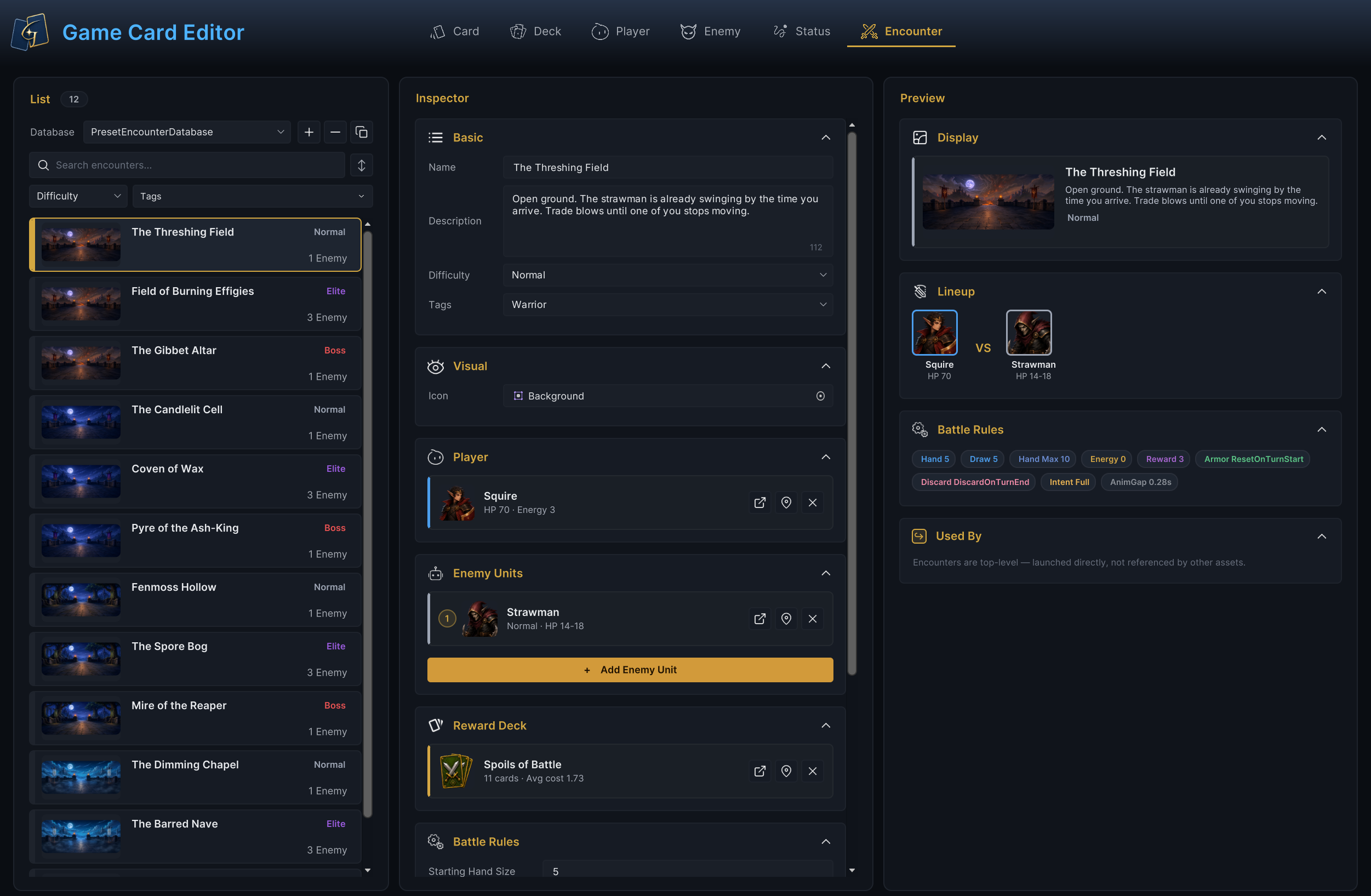
The image above shows the complete Encounter interface from asset selection through the pre-launch check. After List selects a GameEncounter, Inspector binds its combatants, rewards, and rules, while Preview and Used By show the configuration summary and content hierarchy. The four areas share the current selection, assembling separate content assets into one battle recipe that can be validated and started
Select the encounter to edit
Encounter mode reads only the Encounter Databases enabled on the current GameCardManager
List actions
| Action | How to use it and what happens |
|---|---|
| Select a database | Choose the Encounter Database to write to under Database. All subsequent creation and asset-management operations affect that database |
| Create | + creates an empty encounter in the current database |
| Duplicate | The duplicate button creates a copy based on the current encounter's structure |
| Delete | − deletes the current encounter |
| Search and filter | Search filters by encounter sub-asset name. Difficulty and Tags narrow the results further |
Each row shows a 16:9 battle image, name, difficulty, and number of enemy slots, making it possible to compare battle size and category within the database without opening the Inspector
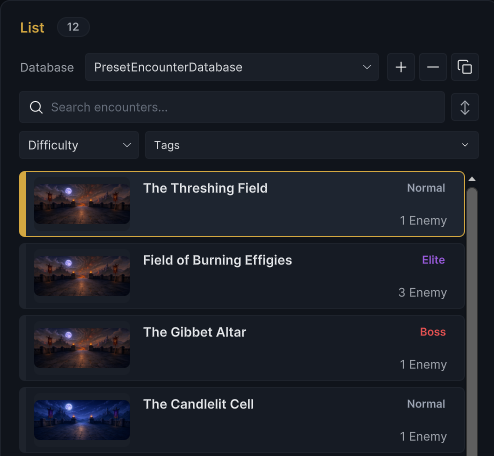
The Threshing Field is selected. Changing Name, Difficulty, Icon, or Enemy Units in the Inspector immediately refreshes the corresponding name, difficulty, image, or enemy count in the row
Configure identity and lineup
Basic
Basic establishes the battle's identity in the editor, encounter selection UI, and project flow
| Field | Configuration result |
|---|---|
| Name | Display name used by the Game Card Editor and project UI. A non-empty value also renames the sub-asset |
| Description | Player-facing description of the battle location, objective, or opponent |
| Difficulty | Built-in Normal, Elite, or Boss, or a project-specific label. It classifies and displays the encounter without scaling any battle values |
| Tags | Labels read by Game Card Editor filters and the project's progression, grouping, or selection logic |
Set Name to The Threshing Field, set Difficulty to Normal, then enter the scene description that players will see and add the Warrior Tag. The Basic identity appears immediately in List and Preview
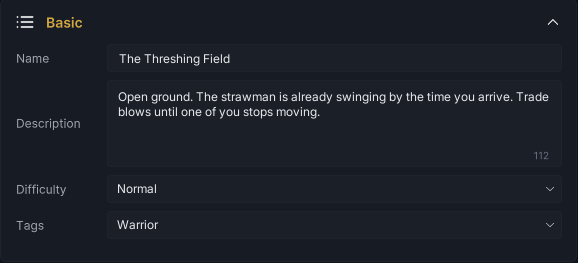
Basic establishes the battle's name, setting, and difficulty. Visual then assigns its battle banner
Visual
After choosing a Sprite under Icon, the Game Card Editor displays it as a 16:9 thumbnail in List and the Display preview. The project's encounter selection screen, loading screen, or background presentation can reuse the same reference

Configure one to three players in Player Units and opponents in Enemy Units, the battle creates its units from these lists
Player Units
Choose Squire in Player Units row 1 and check its portrait, name, HP 70, and Energy 3, the row maps to slot 0 and remains available through the legacy PlayerUnit entry
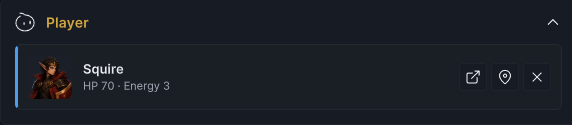
Use the select button to replace a character, the open button to enter Player mode, and × to remove a row, Add Player Unit adds members and dragging changes order, the three-player limit disables adding more members, a single-character Encounter keeps only row 1
Each player initializes from its own Max HP and Template with independent HP, armor, statuses, and hooks, Player Unit 1 supplies the shared Starting Deck and per-turn Base Energy
When the current Run's Master Deck is empty, GCS creates shared piles from Player Unit 1's Starting Deck without appending other members' decks, see player authoring and deck authoring for fields and deck sources
Edit the party directly in Player Units, Party Showcase contains three members
| Field | Runtime result |
|---|---|
| Player Units | Add, remove, or reorder up to three GamePlayerUnit rows, row 1 is primary and row order maps to slots 0–2 |
Row order maps to Battle Board slots 0, 1, and 2, death and revival retain member Unit IDs, and reinforcements do not change existing IDs
The party shares its player phase, Hand, piles, and energy, click a living Demo player to switch Active Player, who acts when no source is specified, see Player party for card Owner and Source
Enemy Units
After setting the party, add Strawman in Enemy Units and check slot 1, Normal Tier, and 14–18 HP
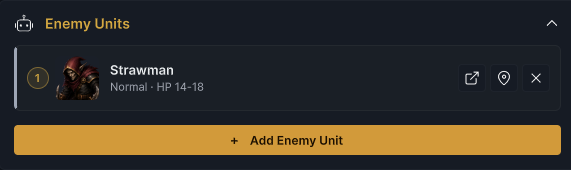
Each row above is an independent battle slot. Adding the same enemy twice creates two units at runtime. Drag rows to change slot order, use the select button to replace an enemy, the open button to switch to Enemy mode, or × to remove the slot. The runtime creates enemies in slot order, and the enemy phase executes their actions in that same order. When the battle starts, the actual HP of each Strawman instance is chosen randomly from 14–18
Keep the scene layout and unit Views mapped to the same slots so that visual order and action order do not diverge. Enemy authoring explains how HP range, Intent, and Behavior define the enemy in each slot
Configure rewards and battle rules
Once both sides are set, Reward Deck determines which card candidates can appear after victory, while Battle Rules set starting resources, turn draws, hand handling, Intent display, and reward count
Reward Deck
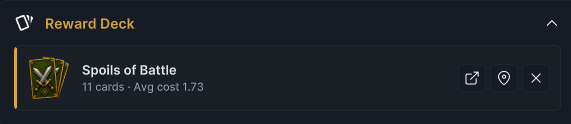
Choose Spoils of Battle under Reward Deck. The card shows the deck name, 11 cards, and an average cost of 1.73
-
To change the Reward Deck reference, use the select button to replace it, the open button to switch to Deck mode, or × to clear it
-
Each Reward Deck Entry contributes its
Copiesvalue as the draw weight for that card.Card Reward Countsets the number of candidates requested, and the runtime draws weighted entries without replacement -
The actual candidate count cannot exceed the number of valid entries. Both
CopiesandCard Reward Countare treated as1when their values are below1
A missing Reward Deck or one without valid entries produces no card candidates, but the victory flow still enters reward waiting. The project's reward UI must submit another reward or call GCSApi.SkipReward() before the victory flow can finish. See the battle loop for candidate generation and the four reward outcomes
Battle Rules
The reward pool controls which cards may appear after victory. Battle Rules stores the authored baselines for opening resources and hand size, turn-loop rules, Intent visibility, and a pacing value that the presentation layer can read
| Rule | Runtime result |
|---|---|
| Starting Hand Size | Number requested during battle initialization, with a minimum of 0. Innate cards are considered first, OnDrawCards can modify the requested count, and the final number entering the hand remains constrained by the hand limit |
| Draw Per Turn | Cards requested at each PlayerTurnStart from turn 2 onward, with a minimum of 0. The actual draw count still passes through OnDrawCards |
| Max Hand Size | Authored baseline for the hand limit, with a minimum of 1. OnHandSizeLimit resolves the final limit. Opening and turn-start draws send overflow to the discard pile, while other draw calls stop once the limit is reached |
| Starting Energy | Values above 0 become the base energy for each turn. 0 uses the player character's Base Energy instead. Run Energy Bonus is then added before the value passes through Energy Per Turn Hook |
| Card Reward Count | Card candidates requested at victory. When a valid Reward Deck exists, runtime treats values below 1 as 1 |
| Armor Decay | ResetOnTurnStart processes Armor reset at the start of the player turn and before each enemy acts. Persist keeps Armor. Armor Reset Hook can still modify or cancel the result |
| Hand Discard | At turn end, Ethereal cards first move to the Exhaust Pile. DiscardOnTurnEnd then keeps Retain cards and discards the rest, while Persist keeps the remaining hand |
| Enemy Intent Display | Hidden does not send OnEnemyUnitIntentChanged. IconOnly sends the label with value -1, while Full sends both label and value. GCSApi.PendingIntents still exposes the original Intent |
| Animation Gap | A presentation pacing value stored in seconds and shown in Preview. The project presentation layer can read it; the built-in state machine does not insert waits from it automatically |
The Threshing Field sets both Starting Hand Size and Draw Per Turn to 5, sets Max Hand Size to 10, and uses Full for Enemy Intent Display
Starting Energy is 0, so Squire Base Energy of 3 becomes the starting point for each turn's energy calculation
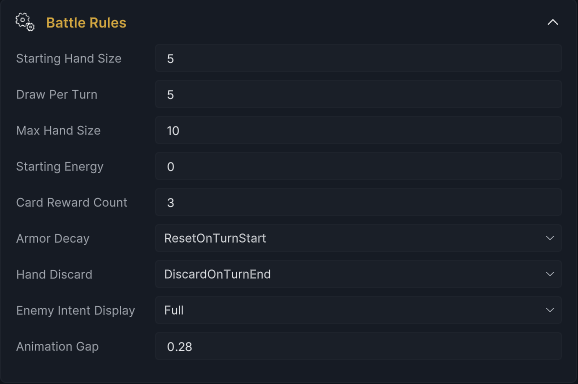
The state machine applies Starting Hand Size during initialization. It does not add Draw Per Turn again on turn 1; that rule begins at PlayerTurnStart on turn 2. See battle phases and execution order for the complete sequence
Inspect the encounter preview
After the Inspector is configured, Preview displays the current Encounter's identity, lineup, and rule summary so that its references and values can be checked before entering Play Mode
Display information
Display combines the 16:9 Icon, Name, Description, and Difficulty into a player-facing encounter card. First confirm that the image and text describe the current battle
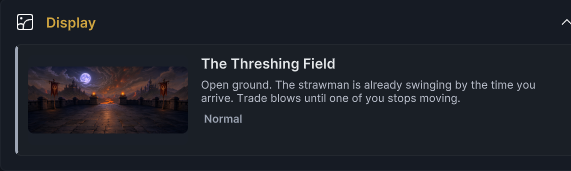
The banner, name, scene description, and Normal difficulty now agree. Continue to Lineup and confirm that the Player and Enemy Units belong in the same battle
Combat lineup
Lineup places the current Player and Enemy Units in slot order within one preview, exposing the complete battle lineup directly
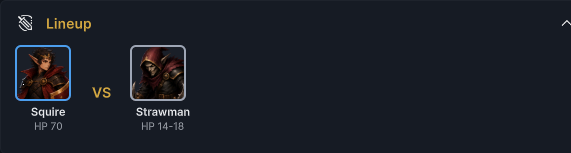
The lineup is Squire against Strawman. When the battle starts, runtime selects the enemy's actual HP from the range shown in this preview
After checking the Player reference and enemy slot count and order, check the rule summary in Battle Rules
Battle rules
Once the lineup is correct, Battle Rules in Preview condenses all nine rules into labels. When comparing encounters, these labels expose hand, draw, energy, reward, Armor, discard, Intent, and presentation values directly
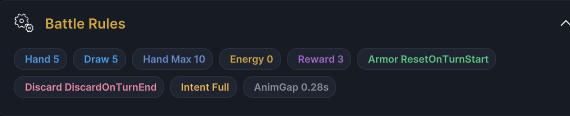
The labels and Inspector read the same BattleRules data. Any Inspector change appears in its matching label, allowing each summary value to be checked against its input
Reference status
An Encounter is top-level content started directly by an external entry point. It is not nested as a child configuration inside another authored asset, so Used By always reports that it has no parent content asset

For a GameEncounter, Used By only shows the fixed top-level message from the content model. It does not scan scene Bootstraps or project code. Configure the actual starting entry separately in the scene and project flow. A fixed battle scene can store an Encounter reference, while maps, quests, and level flows can choose any authored battle at runtime
Validate and start the encounter
Game Card Editor checks rosters, player slots, classification, and rewards during editing and saving, Errors identify invalid rosters and Warnings identify incomplete classification or rewards, validation does not block StartBattle
| Level | Condition | Required configuration |
|---|---|---|
| Error | Player Unit 1 is empty | Select a valid character under Player Units |
| Error | Player or Enemy Units exceeds three rows | Remove entries until the lineup contains at most three units |
| Error | A later Player Units row has no character | Select a valid Player Unit for that row |
| Error | Externally serialized player slots are invalid or duplicated | Reorder or resave Player Units so slots follow rows 1 to 3 |
| Error | Enemy Units contains no non-null enemy | Add at least one valid enemy slot |
| Warning | Reward Deck is empty | Select a valid reward deck when card candidates are required |
| Warning | Difficulty is empty | Choose a built-in difficulty or enter a project-specific label |
Validation does not check valid reward entries or the scene's Manager, start entry, and presentation layer, check reward and scene configuration after resolving the listed issues
See content authoring errors for common validation messages and fixes
After validation, a fixed battle scene can store the Encounter on GameCardEncounterBootstrap. A map, quest, or level flow can instead call GCSApi.StartBattle(encounter) after GCSApi.IsReady. Both entries require a usable GameCardManager in the scene
Starting The Threshing Field causes runtime to create units and piles from its player, enemy order, reward pool, and Battle Rules, draw the opening hand, resolve the first Intents, and enter the first player turn. The scene's board, unit Views, and hand UI then present that runtime state as an interactive battlefield
See starting a battle for the Bootstrap's Default Encounter, Auto Start On Play, and dynamic-entry lifecycle. See battle scenes for the responsibilities of the Manager, board, unit Views, hand UI, and Choice Presenter
In Play Mode, use Game Card Monitor to inspect Battle, Pile, Unit, and Phase. The active Encounter, player, enemy order, opening hand count, energy, Intent, and phase transitions should all match The Threshing Field
See GCSApi and battle control for the complete interface used by external systems to read or start an encounter