Starting a battle
Use Bootstrap for a fixed encounter or GCSApi.StartBattle for dynamic game flow, then verify both through the same battle lifecycle
Choose a fixed or dynamic entry point
- One encounter per scene
- Map or flow control
When the same battle should start every time you enter Play Mode, save the encounter in Default Encounter on GameCardEncounterBootstrap. This entry point works well for Demo scenes, isolated battle tests, and scenes loaded for one specific encounter.
When a map node, quest state, level branch, or match result selects the encounter dynamically, turn off automatic Bootstrap startup and call GCSApi.StartBattle(encounter) from the project flow.
Configure automatic Bootstrap startup
Select the Encounter to run in Default Encounter on GameCardEncounterBootstrap, then keep Auto Start On Play enabled. The top of the Inspector displays Ready — starts on Play.
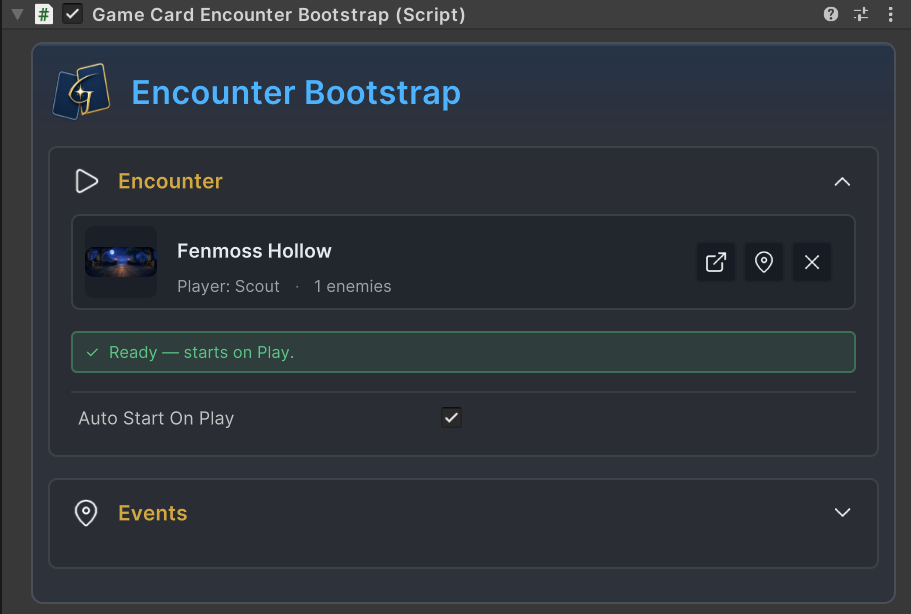
After you enter Play Mode, Bootstrap starts the battle through the direct reference in Default Encounter. Ready checks only Editor discovery and scene configuration. Startup does not require the Encounter Database to remain Active. The saved player, enemy, starting deck, and card references on the Encounter remain valid. See Databases and content discovery for how Active affects Game Card Editor, selectors, GCSApi queries, and some runtime ID resolution.
GameCardEncounterBootstrap must be on the same GameObject as GameCardManager. When you add Bootstrap, Unity adds a missing Manager automatically. Besides storing a fixed Encounter, Bootstrap can raise a UnityEvent or GES event after StartBattle returns.
| Field | Default | Purpose |
|---|---|---|
Default Encounter | Empty | Encounter passed to GameCardManager.StartBattle after entering Play Mode |
Auto Start On Play | Enabled | Starts Default Encounter during the component's Start stage |
Use GES Events | Disabled | When GES is installed, selects between UnityEvent and GES event lists for Bootstrap output |
On Bootstrap | Empty | Invoked after StartBattle returns when GES is not used |
On Bootstrap Events | Empty | Raised in list order after StartBattle returns when GES is used |
If Default Encounter is empty or no Manager is available, Bootstrap records a warning and does not create a battle. The outputs in the table belong only to the Bootstrap component, not the general battle lifecycle, so an encounter started directly from code does not raise them. See GES integration when a fixed entry point must connect to GES.
Start dynamically from the project flow
When a map or level flow selects the Encounter, keep GameCardManager in the scene but turn off Auto Start On Play. Store the current activeEncounter in the flow coordinator.
private GameEncounter activeEncounter;

public void StartEncounter(GameEncounter encounter)
{
    if (encounter == null || activeEncounter != null || !GCSApi.IsReady) return;

    activeEncounter = encounter;
    GCSApi.StartBattle(encounter);
}
GCSApi.IsReady only means that an available Manager exists in the scene. It does not mean that the previous battle has finished. Calling StartBattle again clears the current battle without first raising OnBattleEnded for it.
As long as activeEncounter is not null, the project flow should reject another startup. The reward wait after victory still belongs to the current battle. Clear activeEncounter and restore the map only after receiving OnBattleEnded.
Return to the project flow after battle
Bootstrap and GCSApi both pass a GameEncounter to the same Manager. The map, HUD, results screen, and save system only need to follow one shared lifecycle.
The diagram above shows that defeat enters OnBattleEnded directly, while victory waits for the reward to be selected or skipped. The reward UI must submit ApplyReward or SkipReward once while GCSApi.IsWaitingForReward is true. Otherwise, the victory flow never raises the final OnBattleEnded.
The project coordinator completes the handoff in this order:
- Subscribe to
OnBattleStarted,OnBattleEnded, and any required opening-hand events before callingStartBattle. - Record
activeEncounterat startup and switch from the map to the battle view. - After receiving
OnBattleEnded, save the result, clearactiveEncounter, and restore the map. - Dispose the
IDisposableevent handles when the object is disabled.
OnBattleStarted is raised during the StartBattle call, so subscribing afterward is too late. See Event guide and Custom UI integration for a complete coordinator, event arguments, and UI integration.
Initialize the Master Deck for a multi-battle Run
The Master Deck must persist between battles. When a new Run begins, clear the previous persistent state, create MasterDeckEntry records from the copy counts in the Starting Deck, then write them through GCSApi.SetMasterDeck.
When the Master Deck is empty, GCS uses the player's Starting Deck only as a temporary fallback for the current battle. It does not write that fallback back into the persistent deck. If the first battle reward adds only one card, the Master Deck contains only that record, and the next battle does not restore the complete Starting Deck.
The card GUID on every entry must resolve from the current Encounter's Starting Deck or Reward Deck. Entries that cannot be matched are skipped. See Card and pile lifecycle and GCSApi guide for initialization code and later additions, removals, upgrades, and cost changes.
GCSApi.ClearMasterDeck clears both the old Master Deck and the Run energy bonus, so call it only at the start of a new Run. Keep the Master Deck between later encounters so rewards, upgrades, removals, and cost changes continue into the next battle. The card resolution scope described above still applies.
Abort an unfinished battle
Normal battles complete the handoff through OnBattleEnded. When the player exits a battle before it ends, call GCSApi.DisposeBattle() to clear the current battle state. This API does not raise OnBattleEnded and does not clear the Master Deck or Run energy bonus. The project flow must restore the map, decide the result, handle the save, and clear activeEncounter itself.
Do not start another battle as a substitute for abort handling. Although StartBattle clears the old state machine, it does not raise the old battle's missing end event. Complete the project-side handoff before starting the next battle so the map and battle state stay synchronized.
Startup checklist
-
The scene contains exactly one enabled
GameCardManager, andGCSApi.IsReadyreturnstrue. -
A fixed scene has
Default Encounterassigned andAuto Start On Playenabled. -
A dynamic flow has
Auto Start On Playdisabled. Project code ownsactiveEncounterand callsGCSApi.StartBattle. -
Objects that need
OnBattleStartedor opening-handOnCardDrawnsubscribe before startup and dispose every subscription handle when disabled. -
A multi-battle Run initializes the Master Deck before the first battle. The
StartingDeckorRewardDeckon every Encounter can resolve each card in it. -
The victory path submits
GCSApi.ApplyRewardorGCSApi.SkipRewardonly once, disables the reward buttons after the first click, and then waits forOnBattleEnded. -
The abort path restores the map, records the result, and clears
activeEncounterexplicitly.
After connecting the startup entry point, lifecycle, and Run state, continue to Battle scene setup and assemble the Manager, battlefield, hand, HUD, and presentation objects into a runnable battle scene.