Card and pile lifecycle
Understand CardInstance creation, drawing, play, retention, discard, and exhaust, plus the boundary between the Run Master Deck and battle piles
When a card enters battle, its reusable GameCard definition becomes an independent CardInstance. Drawing, playing, and ending turns then move that instance among four battle piles. The Pile tab in Game Card Monitor shows the current location of every instance
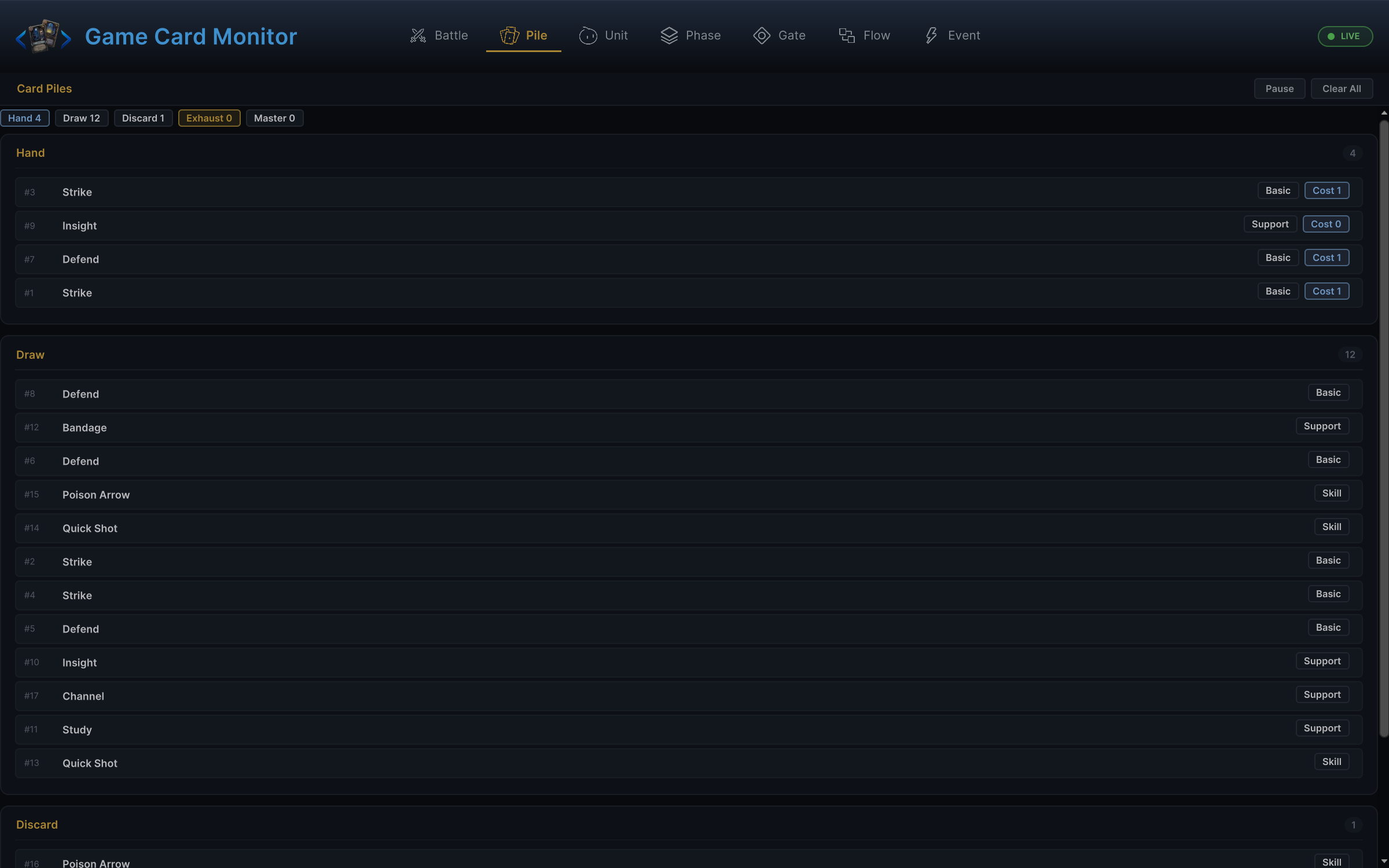
Hand, Draw, Discard, and Exhaust in the image above form the card cycle for the current battle. Master belongs to Run data retained between battles. Understanding those piles starts with the distinction between an authored definition and a battle instance
Card definitions and battle instances
GameCard is a reusable authored definition containing the name, description, base cost, classification, Target, art, and Behavior. CardInstance is one specific card in the current battle and adds an instance ID, upgrade state, and instance cost changes. Use GameCard for content browsing, database lookup, and deck configuration; use CardInstance for hand display, play, movement, and temporary changes
| Runtime result | API |
|---|---|
| Active base or upgraded card | GCSApi.GetActiveCard(instance) |
| Cost after Run modifiers, temporary rules, and Hooks | GCSApi.GetEffectiveEnergyCost(instance) |
| Current card-face description | GCSApi.FormatDescription(card, instance) |
The four battle piles
| Pile | Contents | Read with |
|---|---|---|
| Hand | Cards the player can currently interact with | GCSApi.Hand() |
| Draw | Cards waiting to be drawn | GCSApi.DrawPile() |
| Discard | Discarded cards that can be shuffled back into Draw | GCSApi.DiscardPile() |
| Exhaust | Cards removed from the regular cycle for this battle | GCSApi.ExhaustPile() |
The diagram above shows the default pile cycle. FlowGraphs and GCSApi can also create, move, or remove cards directly, but every change should still use a supported runtime entry
Hand(),DrawPile(),DiscardPile(), andExhaustPile()return empty lists when no battle is active, nevernullGCSApi.CurrentHandexposes the Manager's current hand and may benulloutside battle, so regular UI should preferHand()
Draw order and shuffling
The draw pile uses the end of its list as the top, meaning the last element is drawn next. When a new card is inserted into Draw, DrawPilePosition determines its position
| Position | Result |
|---|---|
Top | Drawn before the current pile contents |
Bottom | Drawn after the current pile contents |
Random | Inserted at a random position |
If Draw is empty during a draw operation, GCS shuffles Discard back into Draw and publishes OnDrawPileShuffled. When both piles are empty, the draw operation ends
Opening hand and turn draws
At battle start, GCS creates the draw pile from the Run Master Deck or the player's Starting Deck. After shuffling, it places Innate cards into the opening hand first, then fills the hand to BattleRules.StartingHandSize. From the second player turn onward, runtime clears DrawnThisTurn, publishes OnDrawPhase, executes draw-phase behaviors, and draws according to BattleRules.DrawPerTurn
Turn 1 does not repeat this process because the opening hand was generated during initialization
The hand limit comes from BattleRules.MaxHandSize and may be changed by Hand Size Hook. A full hand produces different results based on the source of the operation:
-
Opening-hand and automatic turn draws send overflow cards to Discard, publishing
OnCardDiscardedand running status plus cardOn DiscardBehaviors for each card -
GCSApi.DrawCardsand FlowGraphDraw Cardsstop drawing additional cards; for every actual draw, runtime publishesOnCardDrawn, completes player-status On Drawn branches in snapshot order, then completes the card's own branch before the next card proceeds -
Adding or moving a card to a full hand sends that card to Discard through the same discard event and Behavior lifecycle
Playing a card
After GCSApi.TryPlayCard(card, target) succeeds, runtime processes the card in this order:
- Confirm phase, hand membership, definition, cost, play Hooks, and the resolved target before committing anything
- Remove the instance from Hand, spend energy, publish
OnEnergySpentfor a positive cost, and add the instance toPlayedThisTurn - Publish
OnCardPlayed, execute the card's On Play Behavior, then execute matching player-status On Play branches - Register persistent Hooks created by the card after every deferred branch completes
- Preserve any pile destination authored by the On Play graph; otherwise run the exhaust event and lifecycle for an
Exhaustcard, or place a regular card in Discard without treating the default post-play destination as a discard lifecycle
Because runtime removes the card before On Play begins, hand queries, draws, and choices inside that Behavior see the post-play hand. Custom UI only needs to respond to card events and refresh its view; it should not delete the instance when the card is clicked
Processing the hand at turn end
The default HandDiscardRule.DiscardOnTurnEnd processes the remaining hand as follows
| Card state | Result |
|---|---|
| Regular card | Moves to Discard through the discard event and status plus card lifecycle |
Retain | Remains in Hand and publishes OnCardRetained |
Ethereal | Moves to Exhaust and publishes OnCardExhausted |
When the Encounter uses HandDiscardRule.Persist, regular cards also remain, but Ethereal cards still move to Exhaust. If a card's On Turn End Behavior moves that instance first, cleanup preserves the authored destination and never adds a duplicate to another pile
Creating and moving cards
| Task | API |
|---|---|
| Draw cards | GCSApi.DrawCards(count) |
| Add a card to the hand | GCSApi.AddCardToHand(card) |
| Move an existing instance | GCSApi.MoveCardToPile(instance, pile) |
| Shuffle | GCSApi.ShuffleDrawPile() |
PileScope.Master and PileScope.All mean different things as read scopes and movement targets
| Value | Reading | As a movement target |
|---|---|---|
Master | Converts the Run Master Deck to temporary instances for the query | Removes the card from all four battle piles without changing the Master Deck |
All | Combines all four battle piles without the Master Deck | Removes the card from all four battle piles |
Moving an existing instance into Discard or Exhaust publishes OnCardDiscarded or OnCardExhausted and completes matching status plus card Behaviors before the effect wave continues. Moving the same instance to its current pile again is a no-op, so a repeated destination does not duplicate events or lifecycle execution
Creating an instance directly in Discard or Exhaust with Add Cards establishes its initial location and does not count as a discard or exhaust lifecycle. The same distinction applies to post-play cleanup: normal and nested cards enter the default Discard destination without OnCardDiscarded, while explicit movement, overflow, and end-of-turn cleanup do run the discard lifecycle
Do not modify CardPile.Cards directly. Writing to the list bypasses pile rules, card events, and UI refreshes
Run Master Deck
The Run Master Deck persists between battles in the same Run. It records card GUIDs, upgrade states, and cost changes. At the start of a new battle, runtime creates new CardInstance objects and battle piles from it
| Task | API |
|---|---|
| Read or replace | GetMasterDeck(), SetMasterDeck() |
| Add or remove cards | AddCardToMasterDeck(), RemoveCardFromMasterDeck() |
| Upgrade a card | UpgradeCardInMasterDeck() |
| Clear before a new Run | ClearMasterDeck() |
Changing the Master Deck does not retroactively alter a battle that has already started. See starting a battle for multi-battle Run initialization
Refresh card UI from events
GCS publishes matching events when a card is drawn, played, discarded, exhausted, retained, added to hand, transformed, upgraded, or otherwise modified. Events determine when to animate or refresh the interface; read the current pile contents again through queries such as GCSApi.Hand()
See the event reference for complete event names and arguments, and custom UI integration for a hand UI example