Battle lifecycle
Follow the exact operation window and execution order from initialization through player turns, enemy actions, and the battle result
A battle begins in Initialize, where units and piles are created, continues through player and enemy turns, and ends in victory or defeat. The Phase tab in Game Card Monitor places the current phase and completed transitions in one runtime record
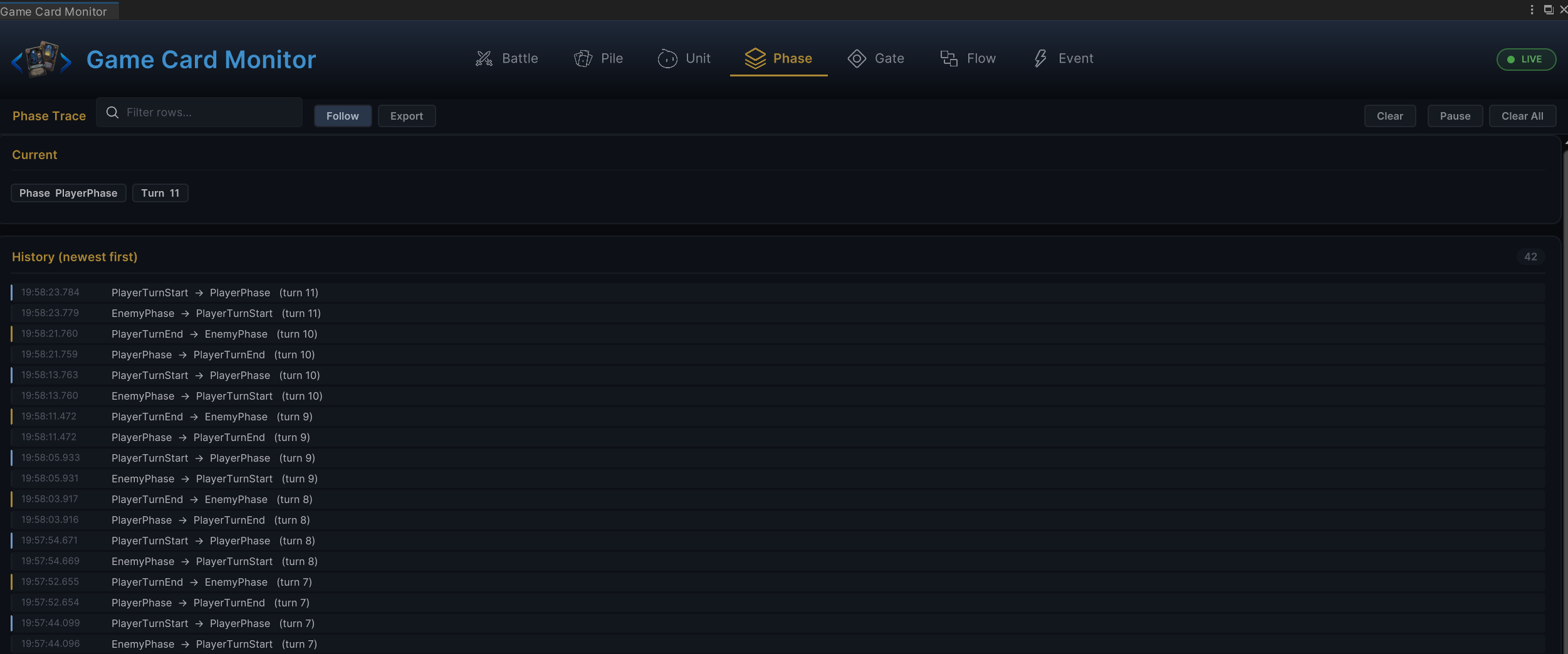
The Phase snapshot above identifies which operations are valid now, while History confirms whether the battle reached each phase as expected. Reading either record starts with the responsibility of each BattlePhase
Battle phases
GCSApi.Phase returns the current BattlePhase, or BattlePhase.None when no battle is active
| Phase | Runtime work | Player input |
|---|---|---|
None | No active battle | Cards cannot be played |
Initialize | Creates units, cards, piles, and initial state | Cards cannot be played |
PlayerTurnStart | Processes Armor, energy, draws, statuses, and delayed triggers | Cards cannot be played |
PlayerPhase | Waits for the player to play a card or end the turn | Cards can be played |
PlayerTurnEnd | Processes discards, turn-end statuses, decay, and delayed triggers | Cards cannot be played |
EnemyPhase | Resolves each living enemy's statuses and Behavior in order | Cards cannot be played |
BattleWon | Generates and waits for battle rewards | Only rewards can be handled |
BattleLost | Ends a lost battle | Cards cannot be played |
The diagram above shows the main battle loop. A player can play cards or end the turn only in PlayerPhase. Statuses, enemy behaviors, and delayed triggers may change the later path, but they do not move the player input window into another phase
Battle initialization
After GCSApi.StartBattle(encounter) is called, GCS completes the following work before the method returns:
- Clear any remaining state from the previous battle
- Create runtime player and enemy instances from the Encounter
- Create and shuffle the draw pile from the Run Master Deck or Starting Deck
- Place
Innatecards first, then draw the opening hand - Set
TurnNumberto1and publishOnBattleStarted - Resolve the first enemy Intents and execute battle-start status behaviors
- Enter
PlayerTurnStart, then open the firstPlayerPhase
OnBattleStarted is published synchronously during initialization. When its callback begins, the Phase is still Initialize and the first enemy Intents may not yet be resolved. UI that refreshes Intent should listen to OnEnemyUnitIntentChanged or read current state after StartBattle returns
A null Encounter does not start a battle. See starting a battle for scene entry options
Player turn start
PlayerTurnStart prepares player input in this order:
- Process player Armor according to
BattleRules.ArmorDecayRule - Calculate and refill energy for the turn
- Execute delayed triggers scheduled for
PlayerTurnStart - Clear the cards-played record for the turn
- Execute turn-start behaviors on player statuses and cards in hand
- From turn 2 onward, enter the draw step and draw according to the rules
- Publish
OnTurnStarted, then enterPlayerPhase
The opening hand has already been drawn during initialization, so turn 1 does not run the normal draw step again
Player action phase
GCSApi.TryPlayCard can succeed only in an unlocked PlayerPhase. Runtime confirms that the card is still in hand, has a valid definition, costs no more than the available energy, has a valid target for its target mode, and is permitted by play Hooks, Unplayable, and can-play Hooks
After a successful play, GCS resolves the target before commitment, removes the card from Hand, spends energy, records the play, publishes OnCardPlayed, runs card and status On Play Behaviors, and preserves any pile move authored by that wave before applying the default destination. A regular card enters Discard without a discard lifecycle, while an Exhaust card runs its exhaust event and Behaviors. If the Behavior requests the end of the turn, runtime enters PlayerTurnEnd only after every Wait or Choice continuation finishes
Custom UI should require both conditions:
bool canPlay =
    GCSApi.Phase == BattlePhase.PlayerPhase &&
    GCSApi.CanPlayCard(card);
When the player must choose one enemy, use GCSApi.RequiresTarget(GCSApi.GetActiveCard(card)) to open the target picker. Still check the return value from TryPlayCard after the target is submitted because battle state may have changed before confirmation
Player turn end
After GCSApi.EndPlayerTurn() is called during PlayerPhase, runtime closes the player turn in this order
- Publish
OnDiscardPhaseand execute matching status behaviors - Process the remaining hand according to Hand Rule
- Execute turn-end behaviors on player statuses
- Process status decay, active Hooks, temporary cost rules, and delayed triggers
- Publish
OnTurnEnded - Return to
PlayerTurnStartwhen an extra turn exists; otherwise enterEnemyPhase
Cards with Retain normally stay in hand, while cards with Ethereal enter the exhaust pile. A card moved by its On Turn End Behavior is skipped by default cleanup so the instance remains in exactly one pile. See card and pile lifecycle for the complete rules
Enemy phase
EnemyPhase processes each living enemy in Encounter order:
- Process that enemy's Armor and turn-start statuses
- Check control statuses such as skipped turns
- Execute the planned Intent Behavior
- Process turn-end statuses, status decay, and Hooks
- After all enemies finish, execute delayed triggers scheduled for enemy-phase end
- Plan the next Intents, increment the turn number, and return to
PlayerTurnStart
Enemy lunges, gaps between actions, and hit animations belong to presentation. They delay phase advancement only when Wait or Animation Gate is used explicitly
Intent presentation is also refreshed when a status or active Hook changes a value used by the current preview, and a newly summoned enemy receives its first Intent immediately; UI should treat OnEnemyUnitIntentChanged as a live refresh signal rather than a phase-end-only event
Choice and flow waits
A FlowGraph Choice or scheduled Wait pauses the complete effect wave, not only the edge after that node. Sibling branches, status reactions, enemy steps, and phase transitions are serialized behind the deferred continuation; the scene's IChoicePresenter displays candidates and submits a selection, while a missing Presenter or candidate list takes Skipped
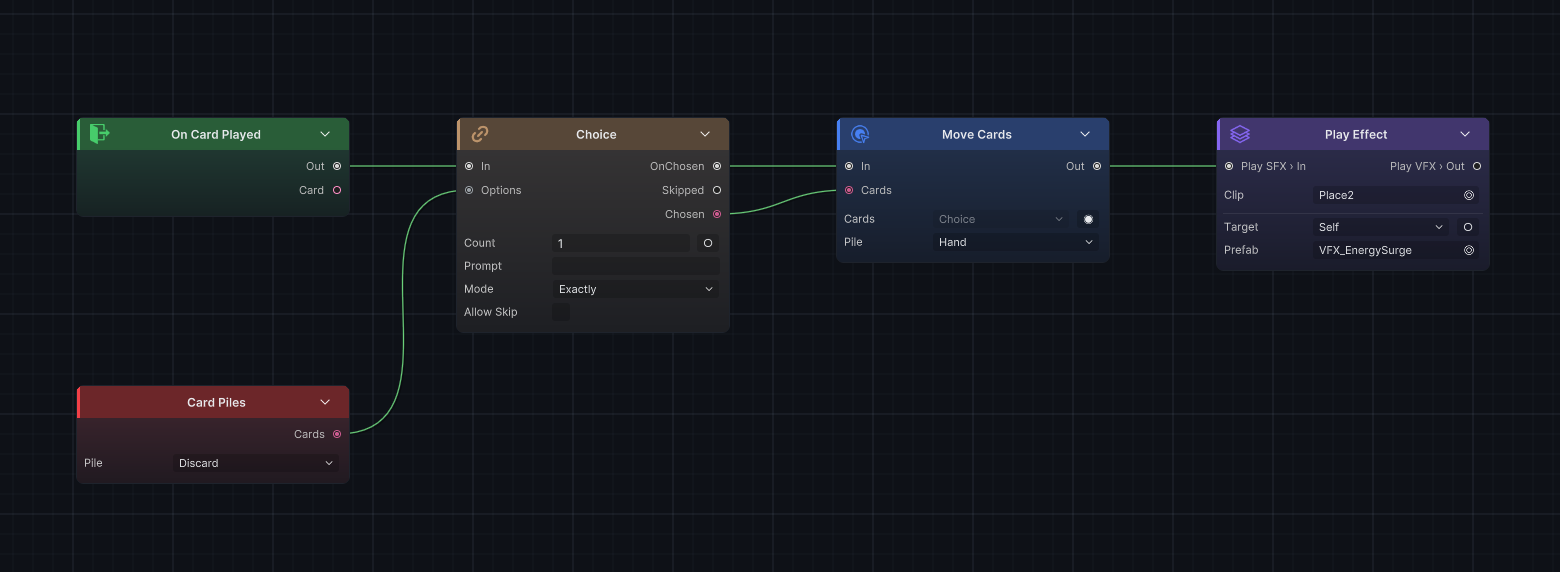
While a Choice is open, GCSApi.IsWaitingForChoice is true. Runtime also rejects CanPlayCard, TryPlayCard, and EndPlayerTurn during either a Choice or Wait, so custom UI should block the hand, end-turn button, and unrelated input until the complete deferred wave finishes
Wait and cross-turn Delayed continuations freeze the value slots captured when they suspend, including node results and run-scoped variables, but unit, card, status, and other object slots retain their object references; a resumed branch receives the same selected objects and observes their current live state. Nested Loop, Foreach, and While passes resume before the next pass begins; when one trigger matches several same-type Entry nodes, every matching Entry belongs to the same ordered batch. The deferred wave reports completion and allows phase progression only after that complete batch finishes
See Flow nodes for Wait parameters and runtime overview for how Animation Gate affects phase advancement
Battle result and rewards
- After victory, GCS waits for every battle-end status branch and its
WaitorChoicecontinuation, then generates reward candidates and publishesOnBattleRewardOffered.GCSApi.IsWaitingForRewardis thentrue; runtime publishes the finalOnBattleEndedonly afterApplyRewardorSkipRewardis called - After defeat, the reward flow is skipped. Runtime waits for every battle-end status branch and its deferred continuation, then publishes
OnBattleEndeddirectly withWon = false
Win and loss conditions remain provisional while a deferred branch is open. After the complete branch and matching Entry batch finish, GCS calculates the current battlefield state again immediately before committing BattleWon or BattleLost; Kill → Wait → Spawn and Death → Wait → Revive therefore finish without a terminal transition when the later action reverses the intermediate state
UI phase checks
| UI action | Recommended check |
|---|---|
| Show battle HUD | GCSApi.IsBattleActive |
| Enable a card | Phase == PlayerPhase and CanPlayCard(card) |
| Show the end-turn button | Phase == PlayerPhase and not waiting for a Choice |
| Show the choice UI | GCSApi.IsWaitingForChoice |
| Show the reward UI | GCSApi.IsWaitingForReward |
| Show the final result | OnBattleEnded payload |
Events report that a change has happened. Use GCSApi.Phase and live state to determine what the interface should show now