Status lifecycle
Follow the complete runtime path from the first applied stack through active removal or natural expiration, including behavior entries, Hooks, and events
Once a status enters a unit, it has an independent live stack count. Applying, changing, decaying, removing, or expiring it executes the matching Behavior and event. The Unit tab in Game Card Monitor shows the statuses each unit currently holds
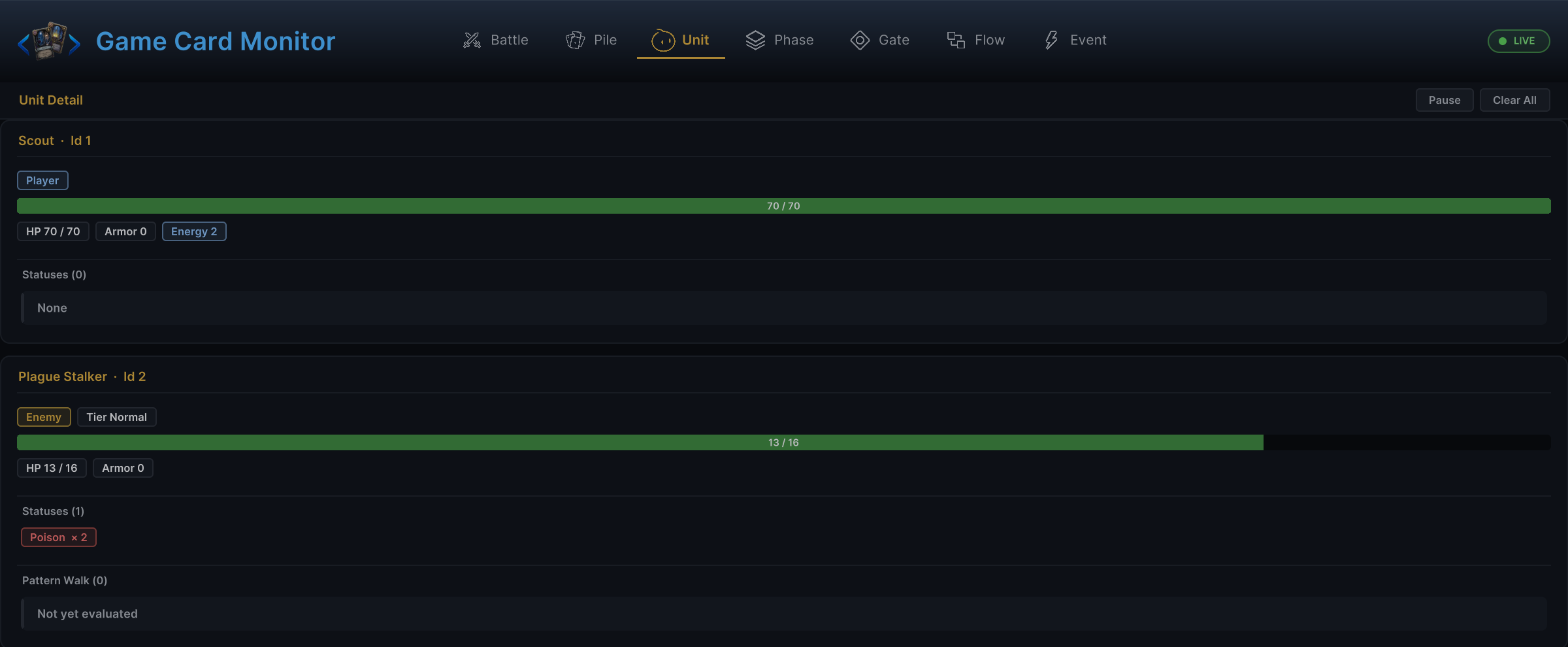
The snapshot above places player and enemy HP, Armor, and status stacks together. The status definition determines stacking and decay rules, while unit state records the current count and applier. They are separate data layers
Status definitions and live stacks
GameStatus is an authored definition containing the name, icon, stacking method, stack cap, decay rule, and Behavior. In battle, each UnitState separately records the statuses it holds, current stack counts, and known appliers
Changing a status on one unit does not affect another unit or write back to the GameStatus asset. See status authoring for field settings and the complete authoring flow
| Need | API |
|---|---|
| Read the current count | GCSApi.GetStatusStacks(unit, status) |
| Check for at least N stacks | GCSApi.HasStatus(unit, status, minStacks) |
| Read the latest successful applier | GCSApi.GetStatusApplier(unit, status) |
| Read every status on a unit | GCSApi.StatusesOn(unit) |
When the unit is null or holds no statuses, these methods return 0, false, null, or an empty map. Callers do not need to create placeholder collections
Applying a status
Use GCSApi.ApplyStatus(target, status, stacks, source) or the FlowGraph Change Status node to apply a positive count. Runtime processes it in this order:
- Validate the target, status, and incoming count
- Let the source unit's
OnInflictStatusHook modify or cancel the count - Let the target unit's
OnReceiveStatusHook modify or cancel it again - Merge it with the current count using
Additive,Max, orReplace - Cap the final count when
MaxStacks > 0;0and negative values are unlimited, though0produces an editor warning - Only when the stored count actually changes, save the result and latest applier, then publish
OnStatusChangedandOnStatusInflicted - Run the source-side
On Status Inflicted, the applied status's runtimeOnAppliedbranch exposed asOn Status Received, and the holder'sOn Status Stacks Changedbranches
A capped or Max application that leaves the stored count unchanged completes without either public transition event or any of those application Entries
When source is null, runtime records the holder as the applier. Every later successful application that changes the stored count replaces this record with its source or holder; a capped or Max no-op, ModifyStatusStacks, and RemoveStatus do not replace it
Changing, removing, and retriggering
| Task | Recommended entry |
|---|---|
| Add stacks | ApplyStatus() or a positive Delta on Change Status |
| Remove a specific number of stacks | RemoveStatus() or a negative Delta on Change Status |
| Change the count to an exact value | ModifyStatusStacks() or Set mode on Change Status |
| Run the status behavior again without changing stacks | Reapply Status or RetriggerStatus on the Controller |
- Set from no status to a positive count runs the complete application pipeline, including Hooks, stack rules, applier tracking, events, and
OnApplied; Set on an existing status changes the count exactly without another application pipeline orOnApplied - Reducing a count to
0explicitly enters the Removed lifecycle. NaturalPerTurndecay to0enters Expired, allowing separate presentation and rules
Lifecycle entries and Hooks
A status Behavior has two entry types
| Type | Execution timing | Typical use |
|---|---|---|
| Lifecycle Entry | After a change has occurred | Status applied, turn start, turn end, or status removed |
| Hook | Before a value is committed | Modify damage, cost, draw count, Armor, or status stacks |
- A lifecycle Entry continues through regular Action nodes. A Hook must submit its modified value through
Write Hook - Without a write, runtime keeps the original value
- Status Hooks and active card Hooks share one priority order, with smaller
Priorityvalues resolving first - A card Hook with
Scope = Turnsexpires at a future player-turn start;Turns = 1remains active through the entire intervening enemy phase, so effects such as Aegis protect that enemy turn before expiring - Hook control must remain synchronous; direct or nested
Wait,Choice, andDelayed Triggerpaths cannot supply a deferred Hook result
See Entry nodes and Hook nodes for the available status entries and Hooks
Inside a Status Behavior, Host is the unit carrying the status, Source is the latest successful applier or the holder fallback, and Attacker remains the actual attacker supplied by a damage or reaction context. These roles stay separate so a holder can react to the current attacker without losing the status's recorded source
Turn timing and automatic decay
The diagram above shows the default lifecycle of a PerTurn status. Player statuses decay at the end of the player turn. Enemy statuses decay after that enemy completes its action and turn-end behaviors
| Timing | Status work that may run |
|---|---|
| Battle Start | Battle-start behavior |
| Player Turn Start | Turn-start behavior on player statuses |
| Draw / Discard | Draw-phase or discard-phase behavior |
| Player Turn End | Turn-end behavior, Tick, and decay on player statuses |
| Enemy Turn | Turn start, action, turn end, Tick, and decay for the active enemy |
| Battle End | Battle-end behavior on all units |
See battle lifecycle for the exact phase order
When several statuses on one holder receive the same timing, GCS uses a captured status order; if one branch opens Wait or Choice, the later status branches wait until it completes, and the timing finishes only once after the captured sequence drains
Status change events
| Event | Use case |
|---|---|
OnStatusChanged | Rebuild the status list after a stack change |
OnStatusTicked | Present an HP or stack change caused by one status resolution |
OnStatusInflicted | Respond to an application that actually changed the stored stack count |
OnStatusExpired | Present natural expiration |
OnStatusRemoved | Present cleansing or active removal |
OnStatusChangedis the main refresh signal for status UI. Transition events suit animation, audio, statistics, or other one-time handling and should not replace a current-state query- When a status deals damage, both the public damage event and the matching damage Entries report the HP actually lost after Hooks, armor, and the target's remaining-HP bound
Refreshing status UI
After receiving OnStatusChanged, a status Widget should read the unit's complete status map again through GCSApi.StatusesOn(unit), then update the interface from Icon, DisplayName, IsDebuff, ShowStackCount, and the current count
Do not change only one value in a local cache. A single FlowGraph can modify multiple statuses, while the event arguments identify only the change that triggered the notification
See custom UI integration for a complete UI example and event reference for event arguments
Common mistakes
| Mistake | Correct approach |
|---|---|
Edit UnitState.Statuses directly | Use the status API, Controller, or a FlowGraph node |
| Use a lifecycle Entry to modify a value that has not been committed | Use the matching Hook |
Expect Set on an existing status to repeat OnApplied | Use a positive Delta or ApplyStatus for another application |
| Treat Removed and Expired as the same event | Handle active removal and natural expiration separately |
| Maintain a local status list using only event arguments | Read StatusesOn(unit) again after the event |