Get Nodes
Get nodes read battle state without changing it. The 19 built-ins supply units, cards, statuses, numbers, and collections to every data port in a graph.
For graph authors wiring up targets, conditions, and scaling values.Get nodes answer questions: who is acting, what does the target look like, which cards are in a pile, what did an event carry. They never change the battle themselves. Their outputs plug into the data ports of Action, Operator, and Flow nodes.
The demo card Rapid Fire shows the division of labor. All Enemies is the Get node: it hands the full enemy list to Random Elements, which picks the one target that Deal Damage hits on each pass of the loop.
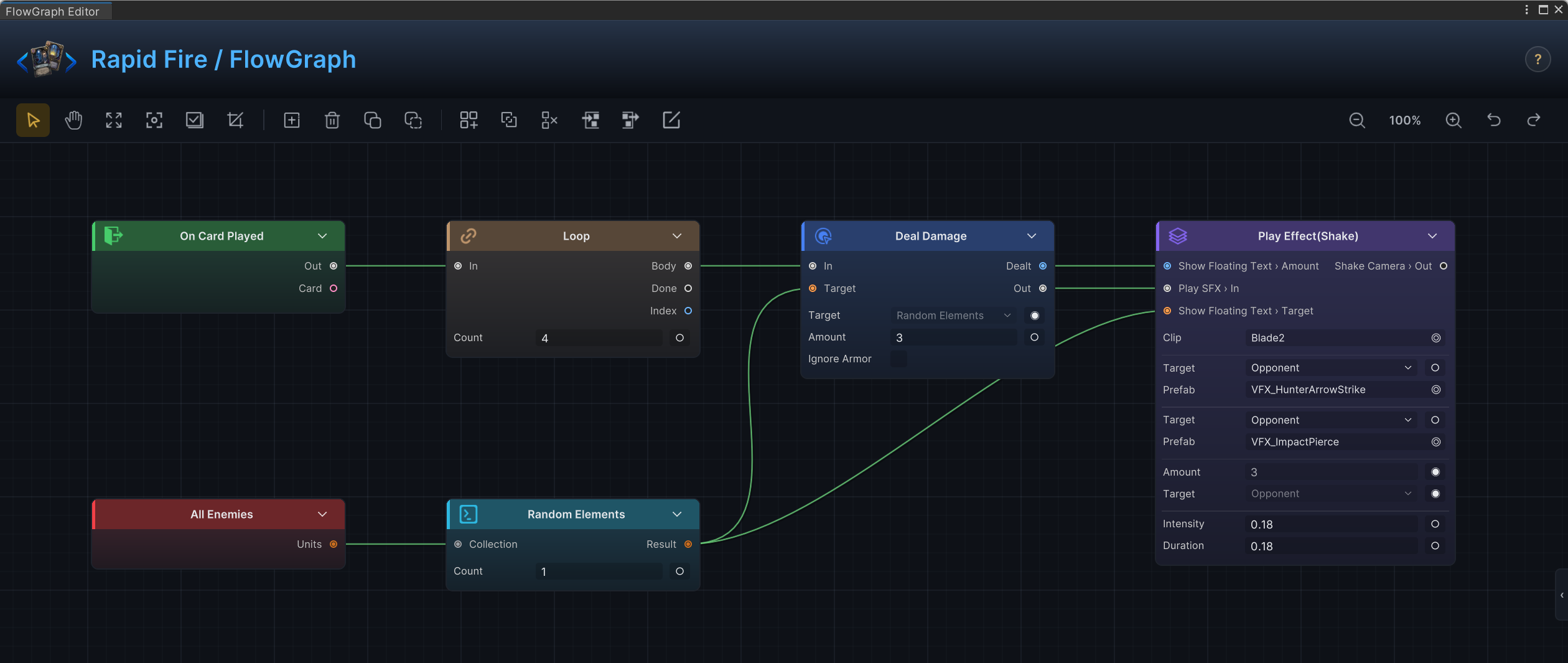
These nodes live under Get in the Add Node menu. The extension base classes SourceNode and SelectorNode only matter when you write custom nodes in C#.
Current battle context
| Node | Purpose | Inputs and settings | Outputs | Use with | Avoid when |
|---|---|---|---|---|---|
| Active Team | Read the team currently acting. | None. | Team. | Switch, Condition, team-specific rules. | You need a unit reference; use Active Unit. |
| Active Unit | Read the unit currently acting. | None. | Unit. | Unit Info, Deal Damage, Play VFX. | You specifically need the graph's owner; use Self Unit. |
| Active Turn | Read the current battle turn number. | None. | Turn. | Condition, Every N Turns, scaling effects. | You need per-unit turn counters. |
| Self Unit | Read the unit that owns the graph. | None. | Unit. | Self buffs, self damage, status logic. | The acting unit may differ from the owner; use Active Unit. |
| Opponent Unit | Read the opposing unit in a simple one-opponent context. | None. | Unit. | Basic attack cards, enemy actions. | Multiple enemies or targeting rules matter; use selectors or the card's target. |
| Player Energy | Read current and per-turn energy. | None. | Current, PerTurn. | Cost checks, energy-scaling cards. | You need to change energy; use Change Energy. |
Unit and status inspection
| Node | Purpose | Inputs and settings | Outputs | Use with | Avoid when |
|---|---|---|---|---|---|
| Unit Info | Read visible facts about a unit. | Unit, UnitSource. | Team, HP, MaxHP, HPPercent, Armor, Statuses, Intent, IntentAmount, Alive, Attacked, Tier, Tags. | Condition, Filter, Branch, enemy phase rules. | You need to change the unit; use Action nodes. |
| Unit Status Stacks | Read the stack count of one status on a unit. | Unit, UnitSource, Status. | Stacks. | Condition, status consume recipes, hook graphs. | You need every status on the unit; use Unit Info.Statuses. |
| Status Info | Read facts about a status. | Status. | Stacks, Type, Tags. | Filter, Condition, status UI logic. | You need to add or remove stacks; use Change Status. |
The demo status Poison leans on this section for its whole identity: its per-turn damage equals its own stack count, wired as Status Info.Stacks into Deal Damage.Amount. Stack the status higher and the tick grows, with no extra logic anywhere.
Card inspection
| Node | Purpose | Inputs and settings | Outputs | Use with | Avoid when |
|---|---|---|---|---|---|
| This Card | Read the card the graph is running for. | None. | Card. | Card Info, Replay Card, self-transform cards. | The graph is not owned or triggered by a card. |
| Card Info | Read visible facts about a card. | Card, CardSource. | Cost, Type, Rarity, Tags, Keywords. | Condition, Filter, Card Cost Hook, card synergies. | You need to move, upgrade, or remove the card. |
| Card Piles | Read cards from a runtime pile. | Pile. | Cards. | Filter, Take, Move Cards, Upgrade Cards. | You want the deck definition outside battle; use Deck Cards. |
| Deck Cards | Read cards from a deck asset. | Deck. | Cards. | Setup rules, deck analysis, reward logic. | You want the current runtime draw pile or hand. |
| Cards Played This Turn | Read the cards played this turn. | None. | Cards. | Combo counts, card-type synergies. | You need the whole battle's history. |
| Cards Drawn This Turn | Read the cards drawn this turn. | None. | Cards. | Draw synergies, draw count bonuses. | You need the current hand contents. |
Variables and event data
| Node | Purpose | Inputs and settings | Outputs | Use with | Avoid when |
|---|---|---|---|---|---|
| Variable | Read a named variable. | Name, Kind, BattleScope. | Result. | Set Variable, Branch, scaling effects. | The previous node already produced the value; wire it directly. |
| Event Arg | Read a named argument from an internal or GES event. | ArgName. | Result. | On Internal Event, On GES Event, event-driven graphs. | The graph was not started by an event entry. |
Collections
| Node | Purpose | Inputs and settings | Outputs | Use with | Avoid when |
|---|---|---|---|---|---|
| All Enemies | Read every living enemy unit. | None. | Units. | AoE cards, Filter, Foreach. | Friendly units should be included; use All Units. |
| All Units | Read every unit on the field. | None. | Units. | Global effects, full-board filters. | Only one team should be affected. |
Collection shaping nodes such as Filter, Take, Random Elements, Sort, and Pick Element live on the operators page, because they transform values rather than read a specific battle source.
Choosing a source
Match the question the design is asking to the node that answers it directly:
| Design question | Source |
|---|---|
| "Is this card's type Attack?" | This Card → Card Info.Type |
| "Is the target below 50 percent HP?" | Target unit → Unit Info.HPPercent → Condition |
| "Which enemies have Burn?" | All Enemies → Filter by status |
| "Does the player have enough energy?" | Player Energy.Current → Condition |
| "Has this fired before this battle?" | Variable with BattleScope on |
| "What did that event send me?" | Event Arg |
Simple graphs use direct sources and nothing else. Add selector and operator nodes only when the source needs narrowing, sorting, randomizing, counting, or conversion.
Common mistakes
| Mistake | Better approach |
|---|---|
Using Active Unit when the card should hit its selected target. | Use the card's target, or the target output of the entry. |
Reading Card Piles when the design means deck-building data. | Use Deck Cards on the deck asset. |
Starting from All Units and trying to undo friendly hits afterward. | Start from All Enemies, or filter by team first. |
| Storing every source value in a variable. | Wire source outputs directly unless the value is reused across entries. |
Reading Event Arg in a graph no event started. | Pass the value through a normal data wire, or start from On Internal Event. |