FX and Presentation Nodes
Seven FX nodes turn gameplay results into things players can see and hear: VFX, sound, animation, floating text, unit motion, and camera shake.
For graph authors adding feedback to a card, status, or enemy behavior that already works.FX nodes request feedback from the battle presentation layer. They make a gameplay result visible; they never own the result itself. If deleting every FX node from a graph would change the battle's numbers, some gameplay logic is hiding in the wrong place.
This is what the player sees when Poison Arrow resolves: the enemy drops to 13/16, a Poison stack icon appears under its health bar, and the energy counter reads 2/3. The damage number, the impact effect, and the poison cloud all came from FX nodes reading the Action nodes' results.
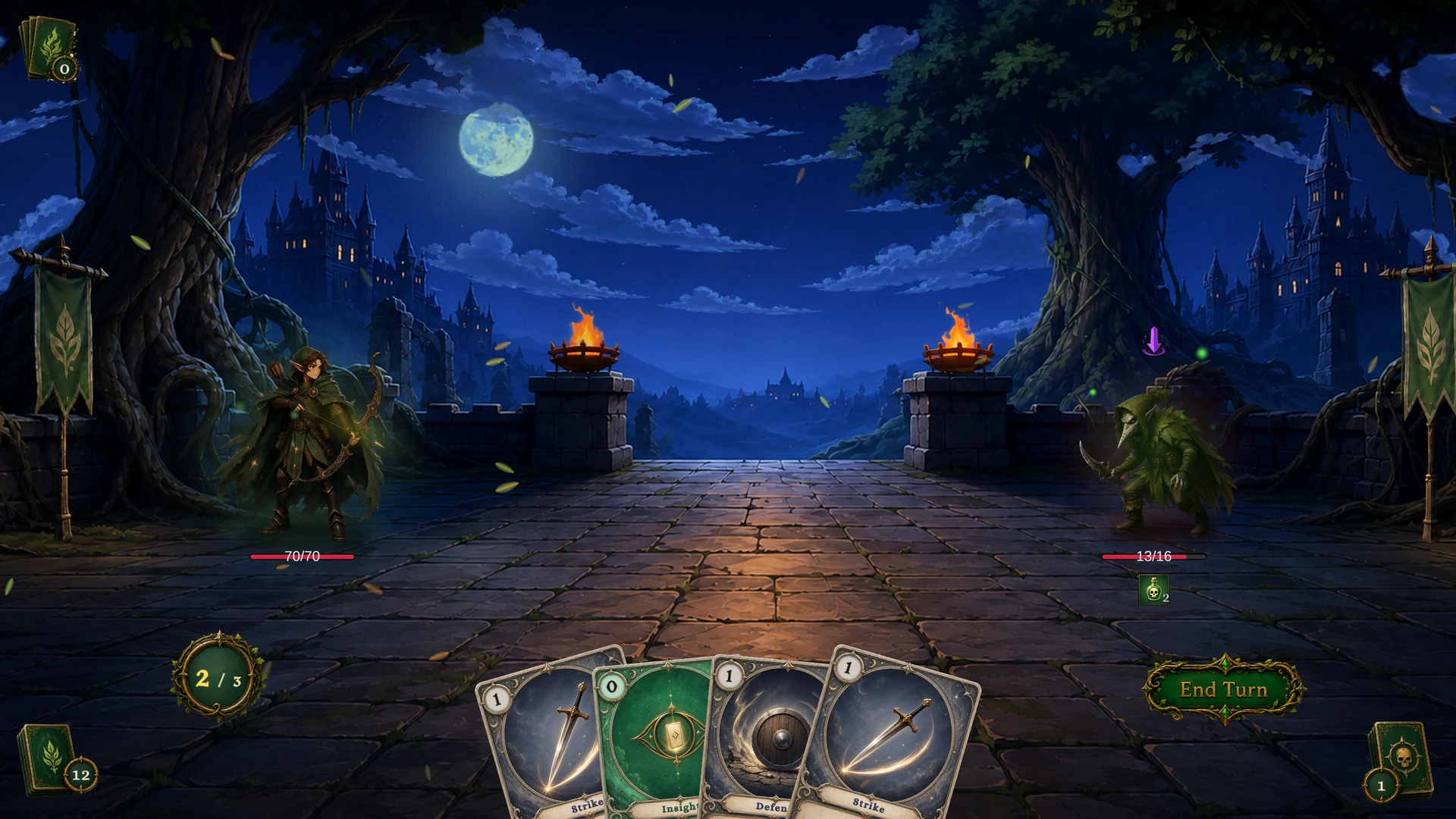
These nodes live under FX in the Add Node menu. The group covers visuals, audio, animation, floating text, unit motion, and camera feedback.
The seven FX nodes
| Node | Purpose | Inputs and settings | Outputs | Use with | Avoid when |
|---|---|---|---|---|---|
| Play VFX | Spawn a VFX prefab on a unit or at a world position. | Target, TargetSource, Anchor OnUnit or AtPosition, Position, Prefab, Lifetime. | None. | Deal Damage, Change Status, Spawn Unit. | The feedback is a sound or a color flash. |
| Play Animation | Trigger a unit animation. | Target, TargetSource, Trigger. | None. | Enemy attacks, card play impact beats. | The animation is not routed through unit presentation. |
| Play SFX | Play a one-shot audio clip. | Clip, Volume. | None. | Card draw and play, hits, statuses, victory and defeat feedback. | A music or ambience system should own the sound. |
| Flash Unit | Flash a unit with a color. | Target, TargetSource, Color, Duration. | None. | Hit reactions, buffs, debuffs, selection feedback. | A particle or animation would communicate more. |
| Slide Unit | Slide a unit's visual to a position with easing. | Target, TargetSource, To, Duration, Ease. | None. | Attack lunges, knockback, dodge beats. | You want permanent repositioning or a layout change. |
| Show Floating Text | Display damage, heal, armor, block, or custom text over a unit. | Target, TargetSource, Kind, Content, Amount, Text, Color, UseCustomColor, IncludeSign, ScaleMultiplier, DurationMultiplier, Offset. | None. | Action result outputs such as Dealt and Changed. | The number is internal and players should not see it. |
| Shake Camera | Shake the battle camera. | Intensity, Duration. | None. | Big hits, boss moves, AoE attacks. | Small frequent effects would turn the battle into noise. |
Gameplay first, feedback second
The reliable pattern has three steps: run the Action node, read its result output, then show presentation based on that result. Armor, hooks, and prevention effects can all change a number between "configured" and "committed", and only the result output carries the committed value.
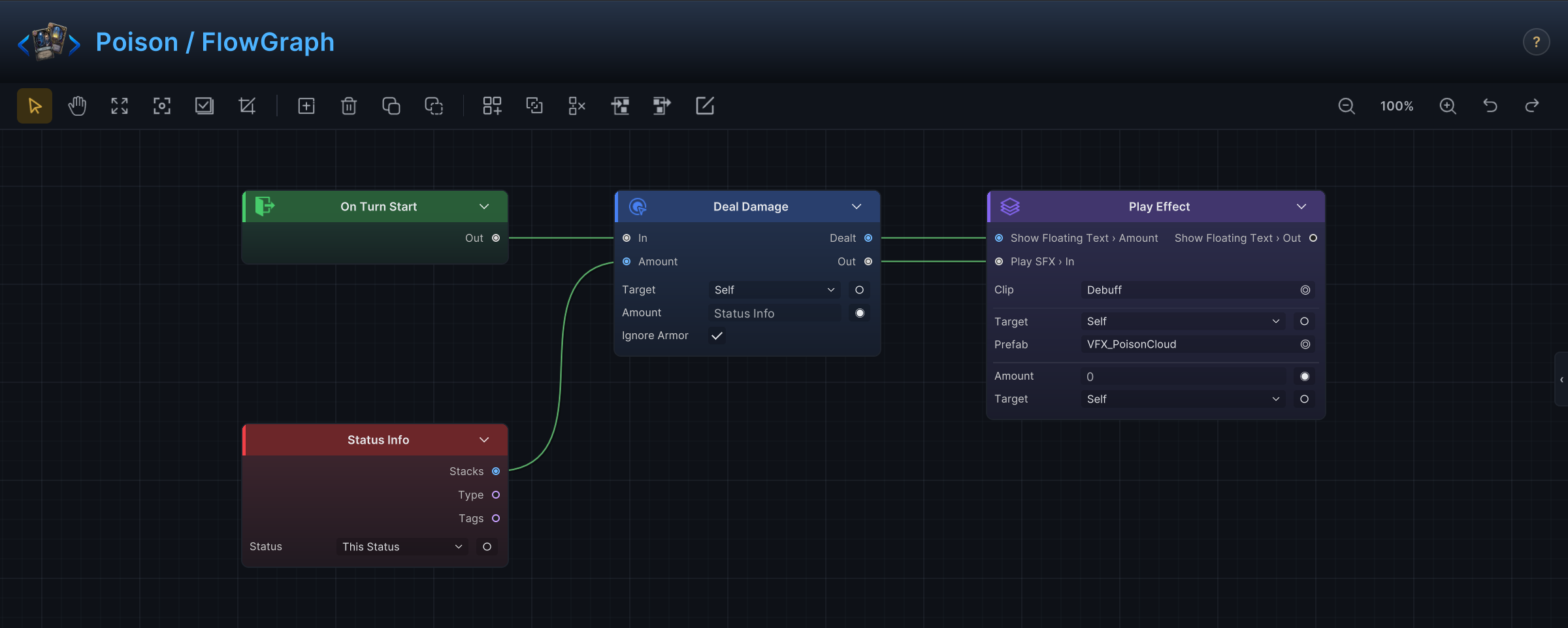
The demo status Poison is the wiring at its cleanest. Deal Damage commits the tick, its Dealt output feeds the floating text amount, and the same effect block plays the poison cloud prefab and a debuff clip:
| Gameplay result | Presentation |
|---|---|
Deal Damage.Dealt | Show Floating Text with Kind Damage, then Play VFX. |
Change HP.Changed, positive | Show Floating Text with Kind Heal. |
Change Armor.Changed, positive | Show Floating Text with Kind Armor. |
Change Status.Changed | Play VFX with a status-specific prefab. |
Spawn Unit.Spawned | Play VFX anchored on the spawned unit. |
Anchoring VFX
Anchor decides where an effect lives. Use OnUnit when the effect belongs to a body: hit sparks, heal bursts, debuff clouds. Use AtPosition for board-level effects: ground markers, screen-wide blasts, a warning at a spawn point before the unit exists.
When the graph targets a collection, decide whether one shared effect reads clearly enough. If every target needs its own effect, wrap the FX node in a Foreach so each element gets one.
Floating text content
Show Floating Text displays either a number or a label, controlled by Content. Amount is for damage, healing, armor, block, and stack changes. Text is for short labels such as Miss, Immune, Stunned, or Draw.
IncludeSign prefixes the amount with its sign. Keep it on for heals and armor gains where "+5" reads faster than "5"; turn it off for labels and values where a sign would confuse.
Audio notes
Play SFX is the graph-level request for one-shot sounds: card draw, card play, impact, death, status application, UI confirmation, battle stingers. Looping music and ambience belong to a scene-level audio system, not to behavior graphs.
A missing clip never blocks gameplay. The state change still runs, so you can author and test graphs before the audio pass and drop clips in later without touching the graph.
Graphs request, assets deliver
An FX node stores a request plus asset references: which prefab, which clip, which trigger. The visual and audio quality lives entirely in those assets. You can swap a placeholder prefab for a polished one, retune a clip, or restyle floating text without opening a single graph, as long as the timing stays the same.
Common mistakes
| Mistake | Better approach |
|---|---|
| Playing VFX before the action has run. | Run the Action node first, then feed its result output into presentation. |
| Showing the configured damage amount. | Show Deal Damage.Dealt. |
| One VFX for a collection when each target needs feedback. | Use Foreach and play the VFX per element. |
| Camera shake on every small hit. | Reserve Shake Camera for high-impact moments. |
| Gameplay rules encoded in presentation timing. | Keep state changes in Action and Hook nodes; use Wait only for pacing. |