Create a Card, Status, and Enemy
Build the first connected content loop: a card that deals damage and applies a custom status to an enemy you author yourself.
For developers who finished the single-asset quick starts and want to see how separate GCS assets reference each other.This page ties the individual quick starts into one loop: a status, a card that applies it, an enemy to test against, and the encounter that connects them. The exact numbers do not matter. What matters is seeing how the assets reference each other, because every real content pipeline repeats this same chain.
If any single asset type is still unfamiliar, do its focused page first: Card Quick Start, Status Quick Start, Enemy Quick Start, or Encounter Quick Start.
Build target
| Asset | Example name | Purpose |
|---|---|---|
| Status | Scorched | A stackable debuff. |
| Card | Kindle Strike | A 1-cost attack that deals damage and applies Scorched. |
| Enemy | Training Effigy | A predictable target for testing the card and status. |
| Encounter | Scorched Trial | The battle that puts them all on one board. |
The reference chain looks like this. Only the card's graph knows about the status; everything else meets inside the encounter:
Use any names you like. Keep the first version plain so its behavior is easy to verify.
Create the status
Open the Workbench (Tools/TinyGiants/GCS/Game Card Editor) and switch to Status mode.
| Field | Example |
|---|---|
| Name | Scorched |
| Description | Takes extra damage from burn effects. |
| Type | Debuff |
| Icon | Any temporary icon. |
| Stack Rule | Additive |
| Max Stacks | 9 |
| Decay Rule | Never |
| Show Stack Count | Enabled |
Stack Rule decides what happens when the status lands on a unit that already has it: Additive adds the new stacks to the existing count, Max keeps whichever count is higher, Replace overwrites. Decay Rule Never means stacks stay until something removes them; PerTurn would shed one stack each turn, like the demo Poison. Max Stacks caps the total when positive; -1 means no cap, and 0 is invalid (validation flags it).
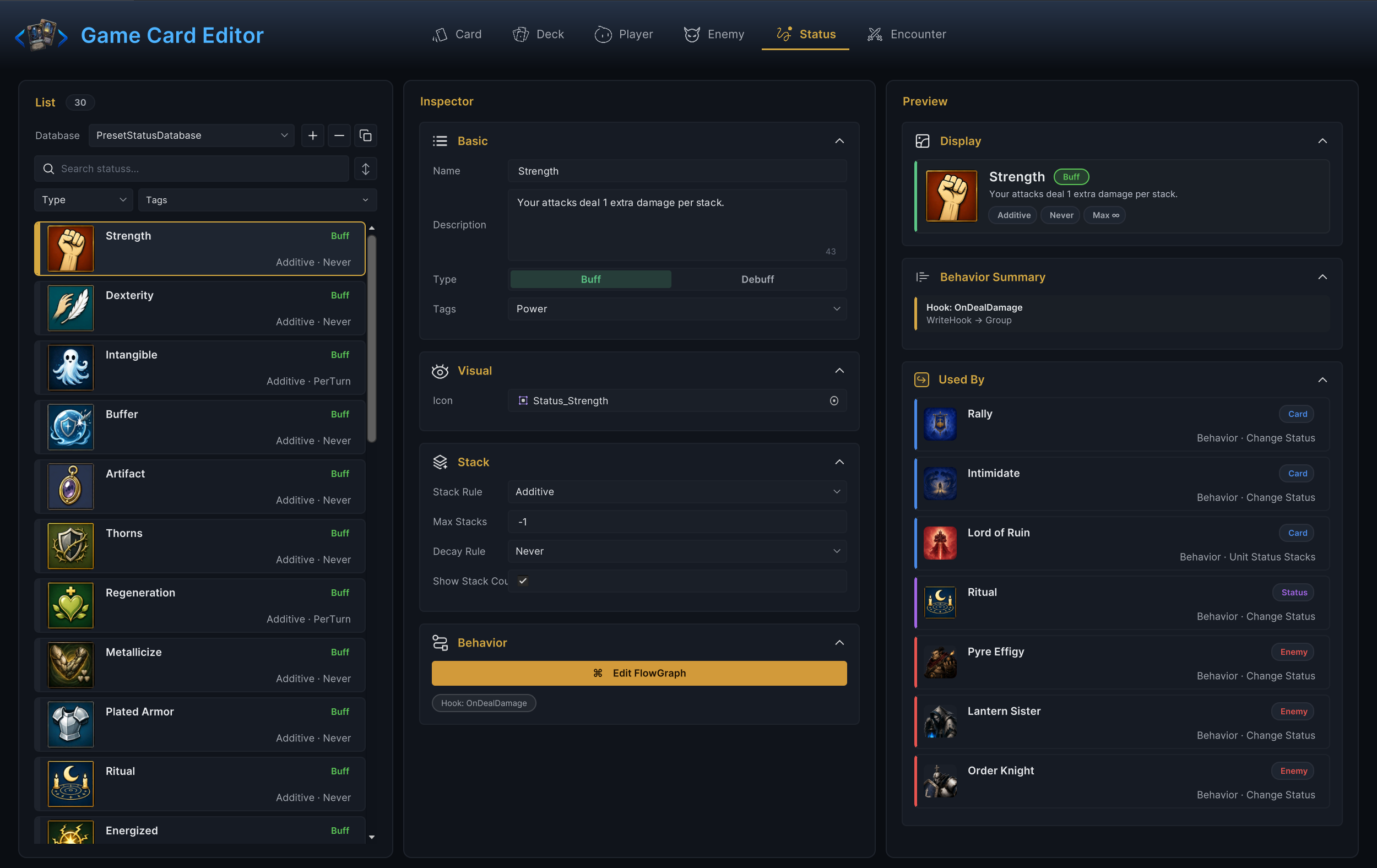
Skip the status's own Behavior graph for now. The first milestone is proving the card can apply the status at all; visible status behavior comes after that.
You should see Scorched in the status list with a red Debuff chip and Additive · Never under its name.
Create the card
Switch to Card mode and create the attack.
| Field | Example |
|---|---|
| Name | Kindle Strike |
| Description | Deal 6 damage. Apply 1 Scorched. |
| Cost | 1 |
| Type | An existing type from the dropdown, such as Skill. |
| Rarity | Common |
| Tags | Only if your project already uses class or element tags. |
Open Edit FlowGraph on the card and build one linear path:
- An On Card Played entry.
- A Deal Damage action:
Targetstays onOpponent,Amountset to6. - A Change Status action: switch
Targetfrom its defaultSelftoOpponent, pickScorchedin theStatusdropdown, leaveModeonDelta, setAmountto1.
Change Status targets Self out of the box, which on a card means the player. Leave it untouched and your debuff lands on your own unit. Switching it to Opponent is the one edit this graph cannot do without.
The demo card Poison Arrow is this exact shape. It deals 3 damage, then applies 2 Poison, with two collapsed Play Effect groups between the actions for sound and visuals you can ignore for now:
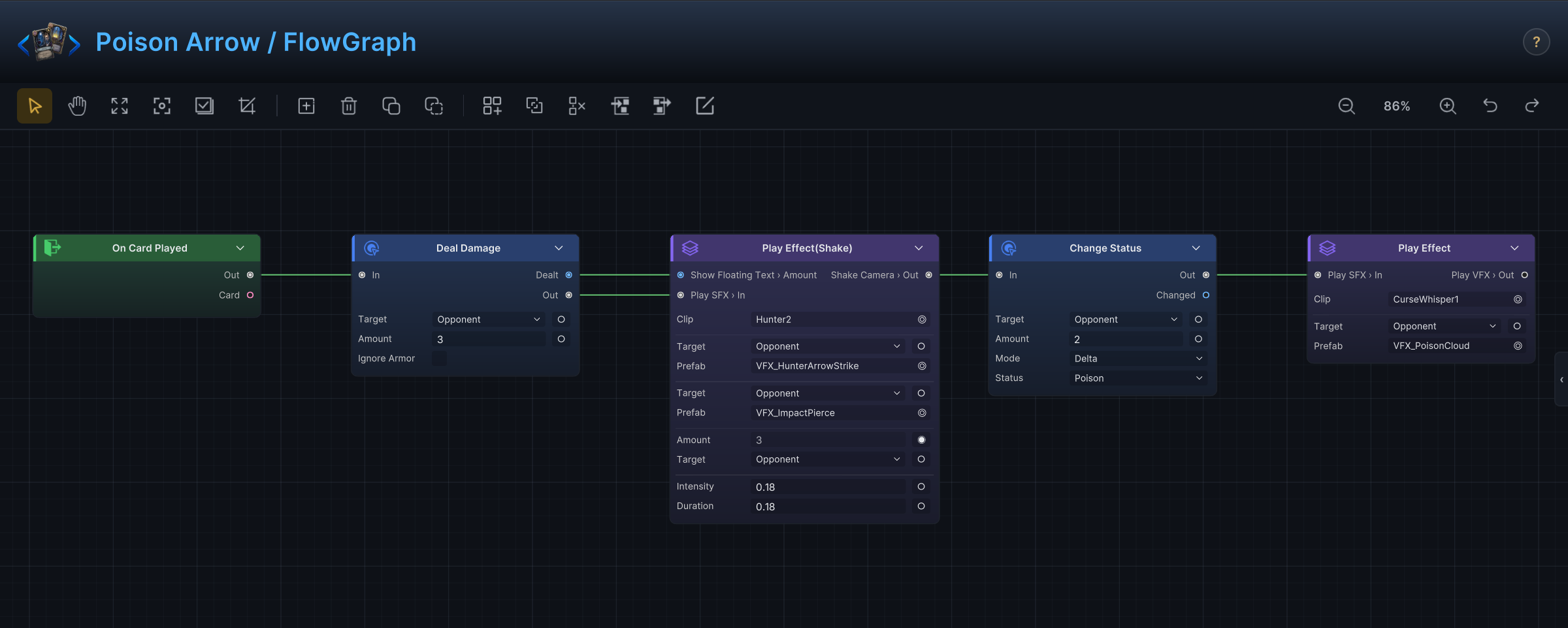
Keep your graph linear. Branches, loops, and hooks are much easier to add once the baseline card provably works.
Back in the Workbench, you should see an OnCardPlayed chip under the Edit FlowGraph button, proof the graph has a live entry.
Put the card in a deck
Switch to Deck mode. Create a small test deck or duplicate a starter deck, then add Kindle Strike with at least one copy.
A small deck pays off here: the fewer cards it holds, the sooner your new card shows up in hand. In a large deck you may wait several turns for a single draw.
You should see the deck's card list count your entry, and the list row update its cards · copies summary.
Create or reuse a player unit
Switch to Player mode. Reusing a working demo player is fine; if you create a new one, set:
| Field | What to provide |
|---|---|
| Name | A readable player name. |
| Base HP | Enough to survive several enemy turns. |
| Base Energy | 3 is a comfortable default. |
| Template | A demo player prefab or temporary placeholder. |
| Deck | Pick your test deck as the Starting Deck in the Deck foldout. |
Starting Deck is the link that breaks most often. If the player unit points at a different deck, your card never appears, no matter how correct everything else is.
You should see the Deck foldout show your test deck as a picker card with its card count and average cost.
Create the enemy
Switch to Enemy mode and build a plain target:
| Field | Example |
|---|---|
| Name | Training Effigy |
| Tier | Normal |
| HP Min / HP Max | 18 to 24 |
| Template | A demo enemy prefab or placeholder. |
Give its Behavior graph one predictable intent, a Leaf Intent followed by a small Deal Damage. A boring enemy keeps your attention on the card and status you are actually testing. Enemy Quick Start walks through this graph in detail.
Create the encounter
Switch to Encounter mode and wire everything together:
| Field | Example |
|---|---|
| Name | Scorched Trial |
| Difficulty | Normal |
| Player | The player unit using the test deck. |
| Enemy Units | Training Effigy |
| Reward Deck | Any valid reward deck, or a copied demo one. |
| Battle Rules | Keep the defaults unless you are testing rule changes. |
The encounter is the asset the runtime starts. Card, status, enemy, deck, and player all become testable the moment this one asset references them.
You should see the Preview's Lineup panel show your player facing Training Effigy with its rolled HP range.
Test in Play Mode
Make sure the encounter sits inside an active encounter database, then either set it as the Default Encounter on GameCardEncounterBootstrap, or start it from code with GCSApi.StartBattle(encounter).
Enter Play Mode and verify:
- The battle starts with your player and
Training Effigy. Kindle Strikeshows up in hand.- Playing it spends 1 energy. It plays without a target prompt; the graph's
Opponenttarget resolves to the only enemy on the board. - The enemy loses 6 HP.
Scorchedappears on the enemy with 1 stack, and climbs to 2 on the second play.- Ending the turn still runs the enemy's action.
Troubleshooting
| Symptom | Most likely cause |
|---|---|
| The card never appears | The player unit uses a different starting deck, or the card was never added to the deck. |
| The card appears but cannot be played | Energy is too low, it is not the player phase, or a hook blocks playability. |
| The status lands on your own unit | The Change Status node's Target was left at its Self default. |
| The status does not appear at all | The Change Status node points at the wrong status, or the status database is not active. |
| The encounter is not listed | It is not inside an active encounter database. |