Action Nodes
Change cards, units, statuses, energy, turns, variables, and other battle state.
Action nodes run on the control path and submit gameplay changes through GCS. Connect `In`, configure or expose the required data inputs, then continue from `Out`.Action nodes run on the control path and submit gameplay changes through GCS. Connect In, configure or expose the required data inputs, then continue from Out.
Node Usage
Add Cards
Purpose and resolution. Creates new card instances from the configured card definition or from card instance definitions supplied through Cards. It does not move the supplied instances. Draw, Discard, and Exhaust use their matching piles; Hand obeys the hand limit and overflows to discard. In the current runtime, selecting Master or All also follows the default branch and adds to Hand.
Connect and use. Connect In, choose a card in the inline Cards picker, then select Pile. Expose Cards only when another node should provide one card or a card collection; exposing it disables the inline card picker. Use Added to process the newly created instances.
Inputs
In(Control):Required control input;Starts card creationCards(CardRefOrCollection):Appears only after theCardssocket is exposed; otherwiseCardIdis used;Supplies card definitions through one or more runtime card instances
Outputs
Added(CardCollection):Newly created card instances, excluding any creation that returnednullOut(Control):Continues after all requested cards are created
Parameters
CardId(Text/ card picker):None;Card-definition id used whenCardsis not exposed or connectedPile(Option):Hand;Hand,Draw,Discard,Exhaust,Master,All;Destination selector;MasterandAllcurrently fall back toHandPosition(Option):Top;Top,Bottom,Random; shown only forDraw;Insertion position in the draw pile

Cancel Hook
Purpose and resolution. Marks the active hook evaluation as cancelled. It is meaningful only in a graph entered through a Hook node; a normal event or card entry has no active hook to cancel.
Connect and use. Place it on the branch that should prevent the intercepted operation, such as a failed card-play condition. Connect Out only when later nodes still need to run after the cancellation flag is written.
Inputs
In(Control):Required control input;Cancels the active hook when reached
Data inputs: None.
Outputs
Out(Control):Continues after the hook is marked cancelled
Result data ports: None.
Parameters
- None:This node has no configurable parameters

Change Armor
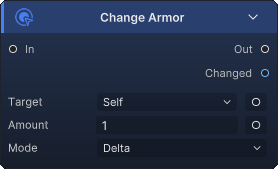
Purpose and resolution. Adds, removes, or sets armor on every resolved target. Delta with a positive value gains armor, a negative value loses armor, and zero does nothing. Set writes an exact armor value. Changed is the signed sum of actual armor differences across all targets.
Connect and use. Keep Target inline when Target Source is enough, or expose it to accept a unit or collection. Expose Amount when another node should calculate the value. Feed Changed to armor floating text or later math.
Inputs
In(Control):Required control input;Starts the armor changeTarget(UnitRefOrCollection):Hidden until exposed; falls back toTargetSource;Unit or units whose armor changesAmount(Int):Hidden until exposed; inline fallback1;Delta or exact armor value, according toMode
Outputs
Changed(Int):Signed total armor change committed across all targetsOut(Control):Continues after all targets are processed
Parameters
TargetSource(Option):Self;Self,Opponent,AllEnemies,AllUnits;Inline target selection used whileTargetis not exposedMode(Option):Delta;Delta,Set;Adds/subtracts the amount or writes an exact valueAmount(Number):1;Inline value used while theAmountport is not exposed
Change Energy
Purpose and resolution. Changes the player's current energy. Delta gains energy for positive values and loses energy for negative values; zero does nothing. Set writes an exact value. Changed reports the signed difference between player energy before and after the operation.
Connect and use. Connect the control path and configure an inline amount, or expose Amount for a calculated value. This node always affects player energy and has no target input.
Inputs
In(Control):Required control input;Starts the energy changeAmount(Int):Hidden until exposed; inline fallback1;Delta or exact energy value, according toMode
Outputs
Changed(Int):Signed energy change actually committedOut(Control):Continues after energy is updated
Parameters
Mode(Option):Delta;Delta,Set;Adds/subtracts the amount or writes exact player energyAmount(Number):1;Inline value used while theAmountport is not exposed

Change HP
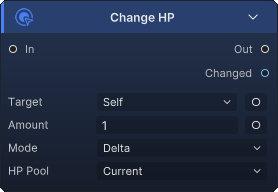
Purpose and resolution. Directly changes current or maximum HP without using the attack-damage pipeline. For current HP, positive Delta heals and negative Delta removes HP; Set writes an exact value. For maximum HP, the node modifies max HP by the configured delta or by the difference needed to reach the set value. Changed is the signed total actual difference.
Connect and use. Use this node for healing, self-loss, and max-HP changes. Use Deal Damage instead when armor, damage hooks, and attacker semantics should apply. Expose Target or Amount only when upstream data should override the inline selectors.
Inputs
In(Control):Required control input;Starts the HP changeTarget(UnitRefOrCollection):Hidden until exposed; falls back toTargetSource;Unit or units whose HP changesAmount(Int):Hidden until exposed; inline fallback1;Delta or exact HP value, according toMode
Outputs
Changed(Int):Signed total current-HP or max-HP change across all targetsOut(Control):Continues after every target is processed
Parameters
TargetSource(Option):Self;Self,Opponent,AllEnemies,AllUnits;Inline target selection used whileTargetis not exposedAffect(Option):Current;Current,Max;Selects current HP or maximum HPMode(Option):Delta;Delta,Set;Adds/subtracts the amount or writes an exact valueAmount(Number):1;Inline value used while theAmountport is not exposed
Change Status
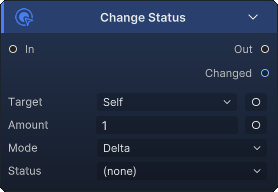
Purpose and resolution. Resolves the configured status and changes its stacks on every target. Positive Delta applies stacks through the status pipeline, negative Delta removes stacks, and zero does nothing. Set applies the difference required to reach the exact stack count. Changed is the signed total stack difference after status rules and caps.
Connect and use. Pick the status in Status, choose the target source, and set the amount. Expose Target for a unit collection or Amount for a calculated stack count. The status itself is a parameter, not a data input port on this node.
Inputs
In(Control):Required control input;Starts the status-stack changeTarget(UnitRefOrCollection):Hidden until exposed; falls back toTargetSource;Unit or units receiving the stack changeAmount(Int):Hidden until exposed; inline fallback1;Stack delta or exact stack count, according toMode
Outputs
Changed(Int):Signed total stack change actually committedOut(Control):Continues after all targets are processed
Parameters
TargetSource(Option):Self;Self,Opponent,AllEnemies,AllUnits;Inline target selection used whileTargetis not exposedStatus(Text/ status picker):None;Status id/name to resolve; an unresolved status makes the node do nothingMode(Option):Delta;Delta,Set;Adds/removes stacks or writes an exact stack countAmount(Number):1;Inline value used while theAmountport is not exposed
Deal Damage
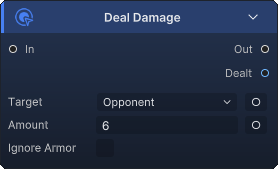
Purpose and resolution. Deals attack damage through the battle damage pipeline to every resolved target. Values at or below zero do nothing. Armor and modifiers apply unless Ignore Armor is enabled. Dealt sums the HP actually removed from all targets, not the configured amount.
Connect and use. Choose Opponent for a normal targeted attack, or expose Target to receive one unit or a collection. Expose Amount for calculated damage. Connect Dealt to damage floating text so the display matches the committed result.
Inputs
In(Control):Required control input;Starts damage resolutionTarget(UnitRefOrCollection):Hidden until exposed; falls back toTargetSource;Unit or units that take damageAmount(Int):Hidden until exposed; inline fallback6;Damage requested for each target
Outputs
Dealt(Int):Total HP removed after armor and modifiers across all targetsOut(Control):Continues after every target is resolved
Parameters
TargetSource(Option):Opponent;Self,Opponent,AllEnemies,AllUnits;Inline target selection used whileTargetis not exposedAmount(Number):6;Inline damage used while theAmountport is not exposedIgnoreArmor(Bool):Off;Bypasses armor when enabled
Despawn Unit
Purpose and resolution. Removes resolved targets only when they are EnemyUnitState instances. Player units and other UnitState implementations are ignored. The controller removes the enemy from the active enemy list and completes its removal lifecycle without routing through Kill Unit damage resolution.
Connect and use. Use it to clear summoned or temporary enemies. Choose an inline target source or expose Target for a unit or collection. If the supplied collection contains the player, that entry is skipped.
Inputs
In(Control):Required control input;Starts enemy removalTarget(UnitRefOrCollection):Hidden until exposed; falls back toTargetSource;Candidate units; only enemy-state entries are removed
Outputs
Out(Control):Continues after all candidate targets are checked
Result data ports: None.
Parameters
TargetSource(Option):Opponent;Self,Opponent,AllEnemies,AllUnits;Inline candidate selection used whileTargetis not exposed

Draw Cards
Purpose and resolution. Draws from the draw pile into the player's hand. Count draws up to the requested number; ToHandLimit asks the controller to keep drawing until the hand limit or available cards stop it. Drawn contains only instances newly present in hand after this operation.
Connect and use. Use Count for a fixed draw and expose its data port when the number is calculated. Selecting ToHandLimit removes the Count port from the node entirely. Feed Drawn into collection nodes when the newly drawn cards need more processing.
Inputs
In(Control):Required control input;Starts drawingCount(Int):Available only whenMode = Count; hidden until exposed; inline fallback1;Number of cards requested; values at or below zero draw none
Outputs
Drawn(CardCollection):Cards actually added to hand by this operationOut(Control):Continues after drawing finishes
Parameters
Mode(Option):Count;Count,ToHandLimit;Uses a fixed count or fills toward the current hand limitCount(Number):1; used only forCount;Inline draw count while the port is not exposed

End Turn
Purpose and resolution. Requests the end of the player's turn by setting EndPlayerTurnRequested. It does not immediately change phase in the middle of the current node chain. The battle state machine consumes the request after the active card resolution and then enters player-turn end.
Connect and use. Put it after every gameplay effect that must resolve before the turn closes. Nodes connected through Out still run as part of the current graph, so do not treat this node as an execution stop.
Inputs
In(Control):Required control input;Sets the player-turn-end request
Data inputs: None.
Outputs
Out(Control):Continues the current graph after the request is recorded
Result data ports: None.
Parameters
- None:This node has no configurable parameters

Extra Turn
Purpose and resolution. Grants an extra turn only to the player by setting ExtraTurnPending. At player-turn end, the state machine consumes that flag and returns to PlayerTurnStart instead of entering the enemy phase. It does not grant an enemy another action.
Connect and use. Trigger it during player-side effects that should schedule another complete player turn. The current turn still reaches its normal end before the extra turn begins.
Inputs
In(Control):Required control input;Schedules one extra player turn
Data inputs: None.
Outputs
Out(Control):Continues after the extra-turn flag is set
Result data ports: None.
Parameters
- None:This node has no configurable parameters

Kill Unit
Purpose and resolution. Kills every resolved non-null unit through the controller and attributes the kill to the current source. Unlike Despawn Unit, it accepts player and enemy unit states and uses normal kill/death handling.
Connect and use. Choose the target source for a fixed execute effect or expose Target for a selected unit or collection. Use this node when death handling is part of the design.
Inputs
In(Control):Required control input;Starts kill resolutionTarget(UnitRefOrCollection):Hidden until exposed; falls back toTargetSource;Unit or units to kill
Outputs
Out(Control):Continues after all targets are processed
Result data ports: None.
Parameters
TargetSource(Option):Opponent;Self,Opponent,AllEnemies,AllUnits;Inline target selection used whileTargetis not exposed

Modify Card Cost
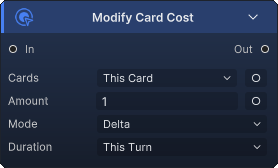
Purpose and resolution. Adds a cost rule to every resolved card. Delta raises or lowers the cost; Set forces the rule's value. ThisTurn and ForNTurns create expiring rules, while WholeBattle creates a permanent battle rule. ForNTurns clamps Turns to at least one.
Connect and use. Select a card source or expose Cards for an upstream collection. Expose Amount for calculated cost changes. Use a cost Hook instead when the value must be recalculated dynamically for every playability check.
Inputs
In(Control):Required control input;Starts creation of cost rulesCards(CardCollection):Hidden until exposed; falls back toCardsSource;Card instances receiving the ruleAmount(Int):Hidden until exposed; inline fallback1;Delta or exact cost, according toMode
Outputs
Out(Control):Continues after all cost rules are added
Result data ports: None.
Parameters
CardsSource(Option):ThisCard;ThisCard,HandPile,DrawPile,DiscardPile,ExhaustPile,AllPiles;Inline card collection used whileCardsis not exposedMode(Option):Delta;Delta,Set;Adjusts the existing cost or supplies an exact cost ruleAmount(Number):1;Inline rule value used whileAmountis not exposedDuration(Option):ThisTurn;ThisTurn,ForNTurns,WholeBattle;Lifetime of the cost ruleTurns(Number):1; shown only forForNTurns;Requested turn count, clamped to at least one at runtime
Move Cards
Purpose and resolution. Removes every selected instance from hand, draw, discard, and exhaust, then places it in the selected battle pile. A full Hand destination overflows to discard. In the current runtime, Master and All are removal destinations: the cards are removed from all battle piles while the run-level master deck remains unchanged.
Connect and use. Choose Cards Source or expose Cards for an upstream collection, then select the destination. Although Position appears when Pile = Draw, Move Cards currently does not read it; moving to draw uses the controller's normal draw-pile insertion behavior.
Inputs
In(Control):Required control input;Starts card movementCards(CardCollection):Hidden until exposed; falls back toCardsSource;Existing card instances to relocate
Outputs
Out(Control):Continues after all selected instances are moved or removed
Result data ports: None.
Parameters
CardsSource(Option):ThisCard;ThisCard,HandPile,DrawPile,DiscardPile,ExhaustPile,AllPiles;Inline cards used whileCardsis not exposedPile(Option):Discard;Hand,Draw,Discard,Exhaust,Master,All;Destination;MasterandAllremove cards from the current battle pilesPosition(Option):Top;Top,Bottom,Random; shown only forDraw;Currently displayed but not used byMove Cardsruntime execution

Play Card
Purpose and resolution. Executes another card immediately as a nested effect. A missing card or a card without a Behavior graph makes the node do nothing. This is not the normal player playability path: it does not check OnCardPlayable, does not verify phase or hand membership, and does not spend Energy. The card is removed from every battle pile, placed temporarily in hand, counted as played, broadcasts OnCardPlayed, runs its OnPlay graph, then goes to discard or to exhaust and runs OnExhaust when it has the Exhaust keyword.
Connect and use. Select a source card or expose Card, then choose or expose one target. Play Card resolves a single card and a single unit; collection-style source choices use their first resolved item. Use Replay Card when only OnPlay should run without events, counters, or pile movement.
Inputs
In(Control):Required control input;Starts immediate nested playCard(CardRef):Hidden until exposed; falls back toCardSource;Card instance to execute; collection sources resolve their first cardTarget(UnitRef):Hidden until exposed; falls back toTargetSource;Single target inherited by the nested card context
Outputs
Out(Control):Continues after the nested card finishes resolving
Result data ports: None.
Parameters
CardSource(Option):ThisCard;ThisCard,HandPile,DrawPile,DiscardPile,ExhaustPile,AllPiles;Inline card source used whileCardis not exposedTargetSource(Option):Self;Self,Opponent,AllEnemies,AllUnits;Inline target source used whileTargetis not exposed; a singular target is selected

Reapply Status
Purpose and resolution. Retriggers a status on the current host without changing its stack count. A connected Status is used first; otherwise the current execution-context status is used. If no status resolves, the node does nothing.
Connect and use. Use it inside status lifecycle behavior when the existing status effect should fire again immediately. Connect a StatusRef when retriggering a different status; leave the port unconnected to use the current status.
Inputs
In(Control):Required control input;Starts status retriggeringStatus(StatusRef):Always visible; falls back to the current context status;Status to retrigger onHost, orSourcewhen no host exists
Outputs
Out(Control):Continues after the retrigger request
Result data ports: None.
Parameters
- None:This node has no configurable parameters

Remove Cards
Purpose and resolution. Removes every selected card instance from all four battle piles by moving it to the Master destination. In current pile semantics, this takes the instance out of the battle but does not delete or edit the run-level master deck.
Connect and use. Choose an inline Cards Source or expose Cards for a filtered collection. Use Move Cards with Discard or Exhaust when the cards should remain in a visible battle pile.
Inputs
In(Control):Required control input;Starts removalCards(CardCollection):Hidden until exposed; falls back toCardsSource;Existing card instances to remove from the battle piles
Outputs
Out(Control):Continues after all selected instances are removed
Result data ports: None.
Parameters
CardsSource(Option):ThisCard;ThisCard,HandPile,DrawPile,DiscardPile,ExhaustPile,AllPiles;Inline cards used whileCardsis not exposed

Remove Statuses
Purpose and resolution. Fully removes each non-null status supplied through Statuses from every resolved target, regardless of current stack count. An empty or missing status collection makes the node do nothing.
Connect and use. Build or filter a StatusCollection and connect it to the always-visible Statuses port. Choose Target Source for a fixed cleanse target or expose Target for an upstream unit collection.
Inputs
In(Control):Required control input;Starts status removalStatuses(StatusCollection):Always visible; no fallback;Specific statuses to clear completelyTarget(UnitRefOrCollection):Hidden until exposed; falls back toTargetSource;Unit or units cleansed
Outputs
Out(Control):Continues after all target/status pairs are processed
Result data ports: None.
Parameters
TargetSource(Option):Self;Self,Opponent,AllEnemies,AllUnits;Inline target selection used whileTargetis not exposed

Replay Card
Purpose and resolution. Re-runs only the resolved card's OnPlay behavior in the inherited context. A missing card or a card without a Behavior graph makes the node do nothing. It does not broadcast OnCardPlayed, increment play counters, check playability, spend Energy, move the card, or trigger discard/exhaust handling.
Connect and use. Use it for echo or double-cast effects. Choose a card source or expose Card; if neither resolves a card, the current context card is used as a final fallback. Collection sources resolve their first card.
Inputs
In(Control):Required control input;Starts the repeatedOnPlaygraphCard(CardRef):Hidden until exposed; falls back toCardSource, then the current context card;Card instance whoseOnPlaygraph runs again
Outputs
Out(Control):Continues after the repeated behavior finishes
Result data ports: None.
Parameters
CardSource(Option):ThisCard;ThisCard,HandPile,DrawPile,DiscardPile,ExhaustPile,AllPiles;Inline card source used whileCardis not exposed

Revive Unit
Purpose and resolution. Requests revival of every resolved non-null target at HPPercent / 100 of maximum HP. The controller decides whether a target is eligible for revival and applies the resulting HP state.
Connect and use. Select the dead unit through Target Source or expose Target for an explicit unit or collection. Configure HP Percent as a whole-number percentage such as 50 for half health.
Inputs
In(Control):Required control input;Starts revival requestsTarget(UnitRefOrCollection):Hidden until exposed; falls back toTargetSource;Unit or units to revive
Outputs
Out(Control):Continues after all targets are processed
Result data ports: None.
Parameters
TargetSource(Option):Self;Self,Opponent,AllEnemies,AllUnits;Inline target selection used whileTargetis not exposedHPPercent(Number):50;Percentage of max HP passed to the revival controller

Set Variable
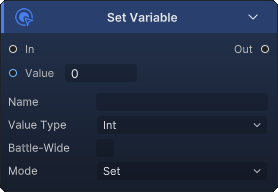
Purpose and resolution. Stores a named Int, Float, Bool, Unit, Card, or Status value in the current effect scope or battle scope. Numeric kinds support Increase, Decrease, and Set; all reference and Bool kinds always overwrite the stored value.
Connect and use. Set Name and Kind, then connect or enter Value. The Value port is always present and changes type with Kind. Use the same name, kind, and scope on a Variable Get node. Unit, Card, and Status kinds require a connected reference because they have no literal backing field.
Inputs
In(Control):Required control input;Starts the variable writeValue(Int,Float,Bool,UnitRef,CardRef, orStatusRef):Type followsKind; defaults are0,0,Off, ornullfor references;Value to set, add, or subtract underName
Outputs
Out(Control):Continues after the variable is written
Result data ports: None.
Parameters
Name(Text):None;Exact variable key used for later reads and writesKind(Option):Int;Int,Float,Bool,Unit,Card,Status;Stored type and live type of theValueportMode(Option):Set;Increase,Decrease,Set; shown forIntandFloat;Numeric update operation; ignored for other kindsBattleScope(Bool):Off;Offstores in the current effect scope;Onstores for the battleValue(Number):0; used forInt;Inline integer backing valueFloatValue(Number):0; used forFloat;Inline floating-point backing valueBoolValue(Bool):Off; used forBool;Inline boolean backing value
Shuffle Draw Pile
Purpose and resolution. Randomizes the current draw pile in place, broadcasts OnDrawPileShuffled, and dispatches matching shuffle behavior on cards in the resulting draw pile.
Connect and use. Place it after effects that add or return cards to draw when their order should no longer be predictable. It operates on the battle's draw pile and needs no collection input.
Inputs
In(Control):Required control input;Starts the draw-pile shuffle
Data inputs: None.
Outputs
Out(Control):Continues after shuffling and shuffle triggers finish
Result data ports: None.
Parameters
- None:This node has no configurable parameters

Skip Next Turn
Purpose and resolution. Increments SkipNextTurns on every resolved target. Reaching the unit's next turn consumes one pending skip, so repeated executions can stack multiple skipped turns.
Connect and use. Choose a fixed target source for a stun-style effect or expose Target for a selected unit or collection. This schedules future skips; it does not immediately end the current turn.
Inputs
In(Control):Required control input;Adds one pending skipped turnTarget(UnitRefOrCollection):Hidden until exposed; falls back toTargetSource;Unit or units whose skip counter increases
Outputs
Out(Control):Continues after all counters are incremented
Result data ports: None.
Parameters
TargetSource(Option):Opponent;Self,Opponent,AllEnemies,AllUnits;Inline target selection used whileTargetis not exposed

Spawn Unit
Purpose and resolution. Resolves a GameEnemyUnit definition and summons a new EnemyUnitState. It cannot create a player unit. When MaxOnField is above zero, alive enemies with the same source definition are counted and spawning is skipped once the cap is reached. Spawned contains the new enemy or null when no spawn occurred.
Connect and use. Pick the enemy definition in Unit and optionally set a live-copy cap. Connect Spawned to later unit effects when the summoned enemy needs immediate setup.
Inputs
In(Control):Required control input;Starts enemy-unit spawning
Data inputs: None; Unit is configured as a parameter.
Outputs
Spawned(UnitRef):Newly created enemy state, ornullwhen resolution or the cap blocks spawningOut(Control):Continues after the spawn attempt
Parameters
Unit(Text/ enemy picker):None;GameEnemyUnitid to resolve and summonMaxOnField(Number):0;Maximum alive copies of the same enemy definition;0means unlimited

Transform Card
Purpose and resolution. Replaces the active definition of one resolved card instance with NewCard. Both the source instance and destination definition must resolve; otherwise the node does nothing.
Connect and use. Select a card source or expose Card, then choose the destination definition in New Card. Collection sources resolve their first card, so use iteration when transforming several cards.
Inputs
In(Control):Required control input;Starts card transformationCard(CardRef):Hidden until exposed; falls back toCardSource;Single card instance to transform
Outputs
Out(Control):Continues after the transform attempt
Result data ports: None.
Parameters
CardSource(Option):ThisCard;ThisCard,HandPile,DrawPile,DiscardPile,ExhaustPile,AllPiles;Inline source used whileCardis not exposedNewCard(Text/ card picker):None;Card-definition id that replaces the selected instance's active card

Upgrade Cards
Purpose and resolution. Calls the battle upgrade operation for every resolved card instance. Cards without a valid upgraded variant remain unchanged according to the controller's upgrade rules.
Connect and use. Choose an inline card source or expose Cards for a filtered collection. Use a single-card collection when upgrading only one selected instance.
Inputs
In(Control):Required control input;Starts card upgradesCards(CardCollection):Hidden until exposed; falls back toCardsSource;Existing card instances to upgrade
Outputs
Out(Control):Continues after every selected card is processed
Result data ports: None.
Parameters
CardsSource(Option):ThisCard;ThisCard,HandPile,DrawPile,DiscardPile,ExhaustPile,AllPiles;Inline cards used whileCardsis not exposed

Write Hook
Purpose and resolution. Writes a replacement value back to the active hook result. Int writes the integer directly; Bool writes 1 for true and 0 for false. It does not mutate HP, energy, or another battle field by itself, and it has no useful target when the graph was not entered through a Hook.
Connect and use. Place it inside a Hook graph after any calculation that should replace the intercepted value. Select Kind first so the always-visible Value port has the correct type, then connect or enter the value.
Inputs
In(Control):Required control input;Starts the hook-result writeValue(IntorBool):Type followsKind; inline fallback0orOff;Replacement hook value
Outputs
Out(Control):Continues after the hook result is written
Result data ports: None.
Parameters
Kind(Option):Int;Int,Bool;Type of theValueport and written resultValue(Number):0; used forInt;Inline integer hook resultBoolValue(Bool):Off; used forBool;Inline boolean result encoded as1or0
