FX Nodes
Present resolved gameplay with animation, audio, VFX, floating text, motion, and camera feedback.
FX nodes request presentation after gameplay changes are committed. This page contains the 7 reusable core FX nodes plus the 2 status presentation nodes registered by the Demo assembly.FX nodes request presentation after gameplay changes are committed. This page contains the 7 reusable core FX nodes plus the 2 status presentation nodes registered by the Demo assembly.
Node Usage
Flash Unit
Use Flash Unit for a short hit, heal, buff, or debuff color response on one unit.
Input
In(Flow):Starts the nodeDuration(Float):Optional override for the flash durationTarget(UnitRef):Optional exposed target override
Output
Out(Flow):Continues after the flash request
Parameters
TargetSource(Self):Self,Opponent,AllEnemies,AllUnits;Selects the unit whenTargetis not connectedColor(WhiteRGBA(1, 1, 1, 1)):Any color;Sets the flash colorDuration(0.3):Seconds;Sets the inline duration used when the port is not connected
The node resolves one unit and asks UnitPresentationSystem to flash its view. A missing unit or presentation view produces no flash. Collection sources use only their first unit.

Play Animation
Use Play Animation to send a trigger such as Hit, Attack, or Death to one unit's presentation animator.
Input
In(Flow):Starts the nodeTarget(UnitRef):Optional exposed target override
Output
Out(Flow):Continues after the trigger request
Parameters
TargetSource(Self):Self,Opponent,AllEnemies,AllUnits;Selects the unit whenTargetis not connectedTrigger(Hit):Any animator trigger name;Selects the trigger sent to the unit presentation
An empty Trigger, unresolved unit, missing view, or animator without the matching trigger results in no visible animation. The node resolves only one unit and does not wait for the animation to finish before continuing through Out.

Play SFX
Use Play SFX for a one-shot card, impact, status, or UI sound that belongs to this graph execution.
Input
In(Flow):Starts the nodeVolume(Float):Optional override for playback volume
Output
Out(Flow):Continues immediately after playback starts
Parameters
Clip(None):AnyAudioClip;Selects the one-shot soundVolume(1):Numeric value;Sets the inline volume used when the port is not connected
A missing clip produces no sound. Runtime volume is clamped to 0–1, playback is 2D, and each play receives a slight random pitch from 0.97 to 1.03. GCS maintains a pool of up to 12 persistent AudioSource objects and reuses them in round-robin order after the pool is full. This node is not a music or ambience player and does not wait for the clip to finish.

Play VFX
Use Play VFX to spawn a prefab on one unit or at a fixed world position.
Input
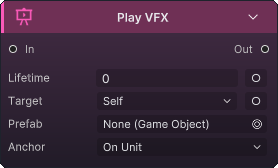
In(Flow):Starts the nodeLifetime(Float):Optional exposed lifetime override in the editorTarget(UnitRef):Available whenAnchorisOnUnit; overridesTargetSource
Output
Out(Flow):Continues immediately after the prefab is spawned
Parameters
TargetSource(Self):Self,Opponent,AllEnemies,AllUnits;Selects one unit whenAnchorisOnUnitandTargetis not connectedAnchor(OnUnit):OnUnit,AtPosition;Chooses between a resolved unit position and the inline world positionPosition((0, 0, 0)):World-spaceVector3;Spawn point used only byAtPositionPrefab(None):AnyGameObjectprefab;Selects the effect to instantiateLifetime(0):Seconds;Positive values set an exact lifetime;0or less enables automatic lifetime detection
OnUnit resolves one unit and falls back to world origin when its presentation position cannot be found. AtPosition hides the target input and always uses Position. A missing prefab produces no object.
Automatic lifetime uses the longest non-looping particle duration plus maximum start lifetime, or the longest non-looping animator clip, then adds 0.1 seconds. When neither is found, the object is destroyed after 2 seconds; looping particles and clips do not extend that lifetime. The result is cached per prefab.
Lifetime port boundaryThe current runtime reads the inline Lifetime field directly. Exposing and wiring the generated Lifetime input does not override it yet, so set this value on the node until that runtime behavior changes.
Shake Camera
Use Shake Camera for high-impact hits, boss actions, or large area effects where camera feedback improves readability.
Input
In(Flow):Starts the nodeIntensity(Float):Optional override for shake distanceDuration(Float):Optional override for shake time
Output
Out(Flow):Continues immediately after the shake starts
Parameters
Intensity(0.3):World-space distance;Sets the inline shake strengthDuration(0.3):Seconds;Sets the inline shake duration
The node requires Camera.main. Intensity or duration at 0 or below produces no shake. Starting another shake on the same camera stops the previous tween, restores the recorded home position, and begins the new decaying jitter; the camera is restored again when the tween completes.

Show Floating Text
Use Show Floating Text to show committed damage, healing, armor, block, or a short custom label over one or more units.
Input
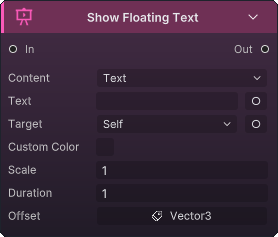
In(Flow):Starts the nodeTarget(UnitRefOrCollection):Optional exposed target override; supports one unit or a collectionAmount(Int):Available whenContentisAmount; overrides the inline numberText(String):Available whenContentisText; overrides the inline label
Output
Out(Flow):Continues after all text requests are submitted
Parameters
TargetSource(Self):Self,Opponent,AllEnemies,AllUnits;Selects targets whenTargetis not connectedKind(Custom):Damage,Heal,Armor,Block,Custom;Selects the semantic text styleContent(Text):Amount,Text;Chooses which content field and data port are activeAmount(0):Integer;Number shown inAmountmodeText(Empty):Any short label;Label shown inTextmodeColor(WhiteRGBA(1, 1, 1, 1)):Any color;Custom text colorUseCustomColor(Off):Off, On;On usesColor; off lets the floating-text style select its colorIncludeSign(On):Off, On;Adds the numeric sign when amount content is shownScaleMultiplier(1):Multiplier;Scales the configured text sizeDurationMultiplier(1):Multiplier;Scales the configured display durationOffset((0, 0, 0)):LocalVector3offset;Moves the text relative to the unit presentation
Unlike the other core target-based FX nodes, this node iterates every resolved unit. Null members are skipped. If Content is Amount, the resolved amount is 0, and Text is not empty, runtime falls back to text content. Connect committed outputs such as Deal Damage.Dealt instead of repeating a configured amount that hooks or armor may change.
Slide Unit
Use Slide Unit for a presentation-only lunge, recoil, dodge, or knockback on one unit.
Input
In(Flow):Starts the nodeTarget(UnitRef):Optional exposed target overrideTo(Vector3):Required destination in world spaceDuration(Float):Optional override for slide time
Output
Out(Flow):Continues immediately after the slide starts
Parameters
TargetSource(Self):Self,Opponent,AllEnemies,AllUnits;Selects one unit whenTargetis not connectedDuration(0.3):Seconds;Sets the inline duration used when the port is not connectedEase(Linear):Linear,InSine,OutSine,InOutSine,OutCubic,InCubic,OutBack,InBack,OutBounce,OutElastic;Selects the motion curve
To has no inline fallback. If it is not connected, runtime receives (0, 0, 0). The node resolves one unit, moves its presentation rather than battle state, and does not wait for the tween to finish before continuing.
Demo extension FX nodes
These two nodes are examples from the GCS Demo assembly, not core runtime nodes. They combine several presentation operations for the Demo's status assets and depend on Demo-side UnitView, BattleAudio, and projectile components.

Status Apply FX
Use Status Apply FX in a Demo status-application graph when one reusable node should present either an aura application or a travelling projectile.
Input
In(Flow):Starts the nodeTarget(UnitRefOrCollection):Optional exposed target override; runtime resolves only the first unitApplyVolume(Float):Optional aura sound-volume overrideFlightTime(Float):Optional projectile travel-time overrideArcHeight(Float):Optional projectile arc-height overrideThrowVolume(Float):Optional launch sound-volume overrideImpactVolume(Float):Optional impact sound-volume overrideHitHeight(Float):Optional target impact-height overrideDropHeight(Float):Optional fallback spawn-height overrideRepeatCooldown(Float):Optional repeat-suppression override
Output
Out(Flow):Continues after the aura is requested or the projectile is launched
Parameters
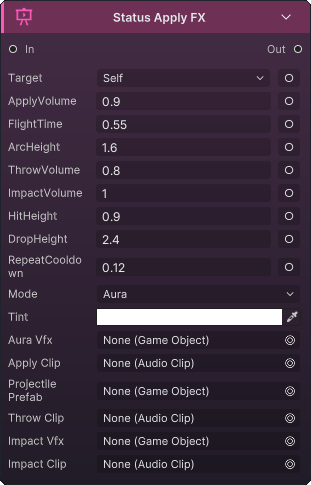
TargetSource(Self):Always;Selects one target whenTargetis not connectedMode(Aura):Always;ChoosesAuraorProjectilebehaviorTint(WhiteRGBA(1, 1, 1, 1)):Always;Sets the0.22-second flash color applied to the target viewAuraVfx(None):Aura, or projectile fallback;Prefab spawned at the impact pointApplyClip(None):Aura, or projectile fallback;Sound played with the aura applicationApplyVolume(0.9):Aura, or projectile fallback;Volume forApplyClipProjectilePrefab(None):Projectile;Prefab launched toward the target; a missing prefab falls back toAurabehaviorFlightTime(0.55):Projectile;Travel time in seconds when a separate attacker view existsArcHeight(1.6):Projectile;Arc height when a separate attacker view existsThrowClip(None):Projectile;Sound played at launchThrowVolume(0.8):Projectile;Volume forThrowClipImpactVfx(None):Projectile;Prefab spawned when the projectile landsImpactClip(None):Projectile;Sound played when the projectile landsImpactVolume(1):Projectile;Volume forImpactClipHitHeight(0.9):Always;Vertical offset above the target origin for the impact pointDropHeight(2.4):Projectilewithout a separate attacker view;Height above the target used as the fallback projectile originRepeatCooldown(0.12):Always;Minimum seconds before the same status can replay on the same target;0or less disables suppression
The node requires a resolved target and registered UnitView. In projectile mode, a different ctx.Attacker with a view becomes the origin. Without one, the projectile drops from above the target, uses 65% of FlightTime, and forces the arc to 0.15. The landing callback follows the target's live view when possible, then flashes it and plays the impact VFX and sound.
Repeat suppression is keyed by target plus incoming or current status; when no status exists, the node ID is used. Out does not wait for projectile impact. Sounds require BattleAudio.Instance. Spawned VFX use the longest non-looping particle duration plus start lifetime and 0.1 seconds, with a 2-second fallback; looping systems do not extend the lifetime.
Status Expire FX
Use Status Expire FX in a Demo status-expiration graph to play one particle effect and sound at the affected unit.
Input
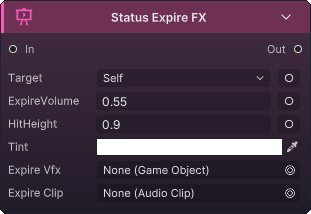
In(Flow):Starts the nodeTarget(UnitRefOrCollection):Optional exposed target override; runtime resolves only the first unitExpireVolume(Float):Optional expiration sound-volume overrideHitHeight(Float):Optional effect-height override
Output
Out(Flow):Continues immediately after presentation is requested
Parameters
TargetSource(Self):Self,Opponent,AllEnemies,AllUnits;Selects one target whenTargetis not connectedTint(WhiteRGBA(1, 1, 1, 1)):Any color;Multiplies simple particle start colors and replaces gradient or random start-color modesExpireVfx(None):AnyGameObjectprefab;Effect spawned at the targetExpireClip(None):AnyAudioClip;Sound played when the status expiresExpireVolume(0.55):Numeric value;Volume forExpireClipHitHeight(0.9):World-space units;Vertical offset above the target origin
The node requires a resolved target and registered UnitView. Missing VFX and audio assets are skipped independently, and audio also requires BattleAudio.Instance. The spawned VFX lifetime uses the longest non-looping particle duration plus start lifetime and 0.1 seconds, with a 2-second fallback; looping systems do not extend it.