Project Structure
GCS keeps package code, demo content, preset databases, samples, and user-created content in separate places. Learn the map before you duplicate assets or build your own game content.
For orientation after import, and for deciding where a new card, deck, enemy, status, encounter, background, VFX, or audio asset should live.GCS is imported under Assets/TinyGiants/GameCardSystem/. Treat that root as package-owned. Read it freely, duplicate demo assets when useful, but keep production content in the custom data root so a package update never overwrites your work.
Assets/
├── 📁 TinyGiants/
│   ├── 📁 GameCardSystem/                         # Package root
│   │   ├── 🛡️ Runtime/                            # Runtime engine, data model, battle state machine, GCS.API.cs
│   │   ├── 🛡️ Editor/                             # Dashboard, Workbench, Monitor, FlowGraph editor, inspectors
│   │   ├── 📁 Demo/                               # Shipped playable reference content
│   │   │   ├── 📁 Content/                        # Demo assets organized by owner
│   │   │   │   ├── 📁 Art/                        # Shared UI, fonts, materials, shaders, shared VFX/audio
│   │   │   │   ├── 📁 Cards/                      # Card-family art, base assets, card prefabs
│   │   │   │   ├── 📁 Decks/                      # Deck art and deck-owned assets
│   │   │   │   ├── 📁 Encounters/                 # Class backgrounds and encounter UI art
│   │   │   │   ├── 📁 Intents/                    # Intent icons and intent UI prefabs
│   │   │   │   ├── 📁 Statuses/                   # Status icons and status UI prefabs
│   │   │   │   └── 📁 Units/                      # Player/enemy artwork and prefabs
│   │   │   ├── 📁 Databases/                      # Six Preset*Database assets
│   │   │   ├── 📁 Scenes/                         # 12 playable battle scenes
│   │   │   ├── 📁 Scripts/                        # Demo presentation layer: board, hand, HUD, popups, audio
│   │   │   └── 📁 Editor/                         # Demo-only editor helpers
│   │   ├── 🔌 Integrations/GES/                    # Optional GameEventSystem bridge
│   │   ├── 📘 Docs/                               # Offline docs index
│   │   ├── 📋 Samples~/CustomNodes/                # Copyable custom-node samples and template
│   │   ├── 📄 Changelog.md
│   │   ├── 📄 LICENSE.txt
│   │   └── 📄 Readme.txt
│   └── 📁 Shared/                                 # TinyGiants shared runtime/editor utilities
└── 💾 TinyGiantsData/GameCardSystem/              # Your project-owned GCS content
    ├── 📁 CardDatabases/
    ├── 📁 DeckDatabases/
    ├── 📁 StatusDatabases/
    ├── 📁 EncounterDatabases/
    ├── 📁 PlayerUnits/
    └── 📁 EnemyUnits/
Runtime/ and Editor/ are implementation folders. Content authoring happens in the Workbench and in project-owned data folders, not by editing package source.
Demo Content Layout
Demo/Content/ is organized by the object that owns the asset, not by asset type. There is no top-level Prefabs/ or Audio/ dump for object-specific assets. A card's artwork lives with that card family; an enemy prefab lives with that enemy family.
| Folder | Contains |
|---|---|
Cards/<Type>/ | Card artwork, card base assets, and card-family assets by card type. |
Decks/ | Deck cover art and deck-owned presentation assets. |
Units/Player/<Class>/ | Player artwork and prefabs by class. |
Units/Enemy/<Class>/ | Enemy artwork and prefabs by class. |
Statuses/ | Status icons, plus status widget prefabs. |
Intents/ | Intent icons, plus intent widget prefabs. |
Encounters/<Class>/ | Per-class encounter backgrounds and encounter-specific UI art. |
Art/ | Only cross-object shared assets: UI sprites, fonts, materials, shaders, shared combat VFX, and shared audio. |
The rule of thumb: an asset with one owner goes into that owner's folder; only genuinely shared assets go into Art/. Use the same rule for custom content.
Databases and Scenes
Demo/Databases/ holds the six preset databases registered by Initialize System:
PresetCardDatabase        PresetDeckDatabase       PresetEncounterDatabase
PresetEnemyUnitDatabase   PresetPlayerUnitDatabase PresetStatusDatabase
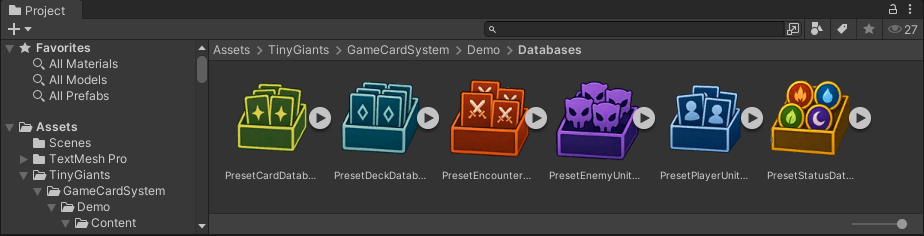
A database is an active content library. An asset can exist on disk and still be invisible to battle if it is not registered in an active database. If a card, status, enemy, or encounter does not appear in a picker, check database membership first.
Demo/Scenes/ contains 12 battle scenes as <Class>/<n>-<Name>.unity, three per class in rising difficulty: normal, elite, and boss. Hunter/1-Fenmoss Hollow.unity is the canonical first scene used by the quick start.
Samples~
Samples~/CustomNodes/ contains custom-node reference material: HealIfBelowHalfNode.cs, AddValuesNode.cs, and FlowNodeTemplate.cs.
The trailing ~ makes Unity ignore the folder, so samples do not compile into your project and do not appear in the Project window. Copy a sample into your own runtime assembly, rename it, then edit the copy. See Custom Nodes and Sample Walkthroughs.
Your Content Root
Your production content belongs under:
Assets/TinyGiantsData/GameCardSystem/
This is the folder opened by Quick Access > Custom Data. The editor tracks the actual location, so the root can be moved elsewhere under Assets/ if your project has its own folder conventions. Keeping content here separates your work from package-owned demo content.
When a demo card, enemy, status, or encounter is close to what you want, duplicate it into your own database and edit the copy. Editing demo assets in place removes your known-good reference and can be overwritten by package updates.