Cross-Scene Events: The Persistence Problem Nobody Talks About

Your AudioManager plays background music. It subscribes to OnLevelStart to change tracks when the player enters a new area. You put the AudioManager on a DontDestroyOnLoad object so it persists across scene loads. Everything works during development because you're always testing in the same scene.
Then someone loads Level 2 from Level 1 for the first time. The music stops changing. The AudioManager is still alive — DontDestroyOnLoad did its job — but the event subscription didn't survive the transition. Or worse: the OLD subscription is still there, pointing at the destroyed Level 1 version of the event raiser, and the next time something tries to invoke it you get a MissingReferenceException in the middle of gameplay.
This is the persistence problem, and every Unity project with more than one scene hits it eventually.
The Fundamental Tension
Unity's scene system and event systems are built on fundamentally different assumptions about object lifetime.
Scenes are transient. Load a scene, use it, unload it. Objects in the scene live and die with it. This is clean, predictable, and matches how players experience games — move to a new area, leave the old one behind.
Events need persistence. A global analytics system needs to hear damage events from every scene. A save system needs to respond to checkpoint events regardless of which level the player is in. An achievement tracker needs to accumulate data across the entire play session.
These two models are at odds. And Unity doesn't give you good tools to reconcile them.
Static Events: The Ghost Subscription Problem
The first thing most developers try is static events:
public static class GameEvents
{
    public static event Action OnLevelStart;
    public static event Action<int> OnPlayerDamaged;
    public static event Action OnPlayerDied;
}
Static events persist across scene loads because they live on the class, not on any object. Problem solved, right?
Not quite. Static events persist, but the objects that subscribe to them don't. When a scene unloads, every MonoBehaviour in that scene gets destroyed. If one of those MonoBehaviours subscribed to a static event and didn't unsubscribe in OnDisable or OnDestroy, you now have a ghost subscription — a delegate pointing at a destroyed object.
Next time the event fires:
MissingReferenceException: The object of type 'EnemySpawner'
has been destroyed but you are still trying to access it.
The fix seems obvious: always unsubscribe in OnDisable. But OnDisable has its own problems during scene transitions (more on that in a minute). And even if you're disciplined about it, one missed unsubscription in one script creates a bug that only manifests during scene transitions — the hardest kind to reproduce and the easiest to miss in testing.
Static events also create a different architectural problem: everything is global. There's no concept of "this event belongs to this scene" or "this event is only relevant in this context." Every system in the entire project can see and subscribe to every event. That's fine for truly global events like OnApplicationPause, but it's a mess for scene-specific events like OnDoorOpened or OnPuzzleSolved.
Instance Events: Die With Their Scene
The opposite approach — instance events on MonoBehaviours:
public class LevelManager : MonoBehaviour
{
    public event Action OnLevelStart;
    public event Action OnLevelComplete;
}
These are clean and scoped. Only objects with a reference to the LevelManager can subscribe. When the scene unloads, the LevelManager is destroyed, and all subscriptions go with it. No ghost references.
But now cross-scene communication is impossible. Your AudioManager (living in DontDestroyOnLoad land) needs a reference to the LevelManager in the current scene. How does it get that reference? FindObjectOfType after every scene load? A static registry? A service locator? Each solution adds complexity and coupling — exactly what events were supposed to eliminate.
And when the scene unloads, your AudioManager is holding a reference to a destroyed LevelManager. Hope you null-checked that.
The DontDestroyOnLoad Band-Aid
"Just put the event system on a DontDestroyOnLoad object."
This is the most common advice, and it sort of works. You create a persistent EventManager that holds all your events, mark it DontDestroyOnLoad, and everything subscribes to it.
But here's what people don't tell you about DontDestroyOnLoad:
Problem 1: OnDisable fires during scene transitions for non-DDOL objects. When Unity unloads a scene, every MonoBehaviour in that scene receives OnDisable and OnDestroy. If your listeners unsubscribe in OnDisable (as they should), they unsubscribe DURING the scene transition. Your event system is momentarily empty of listeners. If anything fires an event during this window, nobody hears it.
Problem 2: Execution order during transitions is not guaranteed. When the new scene loads, OnEnable fires on all the new MonoBehaviours. But in what order? If EnemySpawner.OnEnable fires before LevelManager.OnEnable, and the spawner needs to subscribe to an event that the LevelManager hasn't initialized yet, you get a null reference. On your machine it works (Unity happened to initialize them in the right order). On the QA tester's machine it doesn't.
Problem 3: Duplicate DDOL objects. If your persistent EventManager is in a scene that gets loaded twice (common in testing when you hit Play from different start scenes), you get two EventManagers. Now you have two copies of every event. Half your listeners subscribe to one copy, half to the other. Nothing works and everything looks correct in the Inspector.
The Bootstrap Scene Pattern
Some teams address the duplicate problem with a "bootstrap" scene. The game always loads a bootstrap scene first, which creates all persistent managers, then loads the actual gameplay scene additively.
This works, but it adds real complexity:
- You can't hit Play from any scene anymore. You always have to start from the bootstrap scene, or write editor tooling that auto-loads the bootstrap before your test scene.
- Loading order becomes critical. The bootstrap must finish initializing before any gameplay scene accesses its systems. This usually means a loading screen, even for fast loads.
- Scene management gets complicated. You're now managing additive scene loading, which means managing which scenes are loaded, which are being loaded, and which are being unloaded — all simultaneously.
It works. Plenty of shipped games use this pattern. But it's infrastructure that exists solely to work around the persistence problem. It's plumbing, not gameplay.
Multi-Scene Editing Makes It Worse
Unity's additive scene loading is powerful for large worlds — load the village scene, the terrain scene, and the UI scene simultaneously. But it multiplies the persistence problem.
Which scene owns which event? If OnShopOpened is in the village scene and OnInventoryChanged is in the player scene, what happens when the village unloads? OnShopOpened disappears, but objects in the still-loaded player scene might still be listening to it. They're now subscribed to nothing, and they don't know it.
Unloading a scene is supposed to be clean. With cross-scene event references, it's anything but.
The Lifecycle Problem
Let's trace exactly what happens during a scene transition when using events:
SceneManager.LoadScene("Level2")is called- Unity begins unloading the current scene
OnDisablefires on all MonoBehaviours in the current scene (listeners unsubscribe)OnDestroyfires on all MonoBehaviours in the current scene- Current scene is fully unloaded
- New scene begins loading
Awakefires on all MonoBehaviours in the new sceneOnEnablefires on all MonoBehaviours in the new scene (listeners re-subscribe)Startfires on all MonoBehaviours in the new scene
The problem is in the gap between steps 3 and 8. For a brief period, your event system has zero scene-based listeners. Any DDOL object that fires an event during this window is shouting into the void.
And within step 8, the order is not deterministic across different machines or Unity versions. System A might need to subscribe to an event that System B initializes. If B's OnEnable runs after A's, you get a race condition that manifests as a heisenbug.
Real examples of systems that need cross-scene persistence:
- AudioManager — must hear
OnLevelStart,OnBossFight,OnVictoryfrom any scene - AnalyticsManager — must track events from every scene in the session
- SaveSystem — must respond to
OnCheckpointReachedregardless of scene - AchievementTracker — must accumulate progress data across all scenes
All of these are systems that MUST hear events from ANY scene. The persistence problem isn't academic — it's blocking real features in real games.
How GES Solves This
GES addresses the persistence problem at the architectural level, not with workarounds.
ScriptableObject Events Live Outside Scenes
This is the key insight. In GES, events are ScriptableObject assets that live in your project's Assets folder — not in any scene. They're project-level resources, not scene-level objects.
public class AudioManager : MonoBehaviour
{
    [GameEventDropdown, SerializeField]
    private SingleGameEvent onLevelStart;

    [GameEventDropdown, SerializeField]
    private SingleGameEvent onBossFight;
}
When Level 1 unloads and Level 2 loads, the onLevelStart event asset doesn't go anywhere. It's not owned by either scene. It exists at the project level, independent of scene lifecycle. Your AudioManager (DDOL) keeps its reference to the same event asset. The new scene's LevelManager gets a reference to the same event asset. Communication just works.
No static events. No event manager singleton. No bootstrap scene. The ScriptableObject architecture makes cross-scene communication a natural consequence of how events are stored, not a special feature you have to opt into.
Behavior Window: Automatic Lifecycle Management
GES's Behavior Window handles subscription lifecycle visually. When you bind a listener through the Behavior Window, it auto-subscribes in OnEnable and auto-unsubscribes in OnDisable. No manual subscription code. No chance of forgetting to unsubscribe.
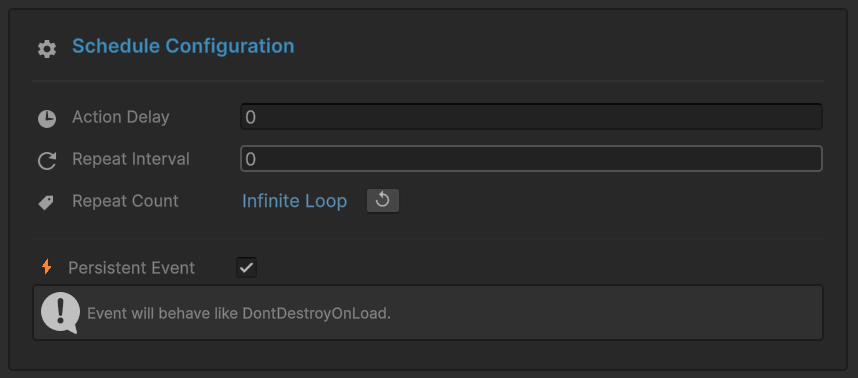
This means scene transitions just work:
- Old scene unloads —
OnDisablefires — Behavior Window auto-unsubscribes old listeners - New scene loads —
OnEnablefires — Behavior Window auto-subscribes new listeners - The event asset was never destroyed, so subscriptions connect to the same event seamlessly
No gap. No race condition. No ghost references.
Persistent Listeners: Explicit Cross-Scene Survival
For systems that genuinely need to persist across scene loads — your AudioManager, your AnalyticsManager — GES provides persistent listeners.
In code, use AddPersistentListener:
public class AudioManager : MonoBehaviour
{
    [GameEventDropdown, SerializeField]
    private SingleGameEvent onLevelStart;

    private void OnEnable()
    {
        onLevelStart.AddPersistentListener(HandleLevelStart);
    }

    private void OnDestroy()
    {
        onLevelStart.RemovePersistentListener(HandleLevelStart);
    }

    private void HandleLevelStart(string levelName)
    {
        // Change music based on level
    }
}
Persistent listeners are stored in a separate layer from regular listeners. They survive scene transitions because:
- The event is a ScriptableObject (lives outside scenes)
- The listener is on a DDOL object (survives transitions)
- The persistent registration explicitly tells the event system "keep this across loads"
In the Behavior Window, there's a Persistent checkbox — the visual equivalent of AddPersistentListener. Check the box, and that binding survives scene transitions without any code.
What Happens During Scene Transitions (Step by Step)
Here's the same transition trace from earlier, but with GES:
SceneManager.LoadScene("Level2")is called- Unity begins unloading Level 1
OnDisablefires on Level 1 MonoBehaviours — Behavior Window auto-unsubscribes their listenersOnDestroyfires on Level 1 MonoBehaviours- Level 1 is fully unloaded
- Event assets are untouched — they're ScriptableObjects, not scene objects
- Persistent listeners are untouched — they're registered to DDOL objects
- Level 2 begins loading
OnEnablefires on Level 2 MonoBehaviours — Behavior Window auto-subscribes their listenersStartfires on Level 2 MonoBehaviours
The critical difference: between steps 5 and 9, the event system is NOT empty. Persistent listeners are still active. If a DDOL system fires an event during loading, persistent listeners hear it. Scene-specific listeners are gone (correctly), but global systems never lose their connection.
Scene Setup for Persistence
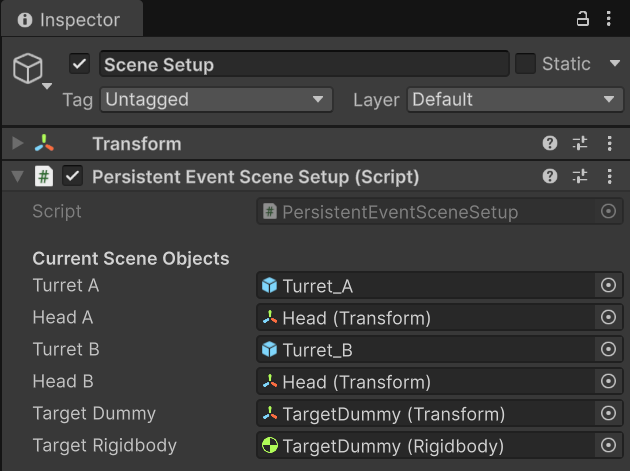
The scene setup is straightforward: your persistent managers live on DDOL objects with persistent listener bindings. Scene-specific objects use regular Behavior Window bindings. The event assets sit in a shared database accessible from any scene.

Multi-Database Dynamic Loading
For large projects with many scenes, GES supports multiple event databases. You can organize events by context:
- Core database — global events loaded at startup (
OnApplicationPause,OnSaveRequested,OnAchievementUnlocked) - Combat database — loaded when combat scenes are active (
OnDamageDealt,OnEnemyDefeated) - UI database — loaded with UI scenes (
OnMenuOpened,OnSettingsChanged)
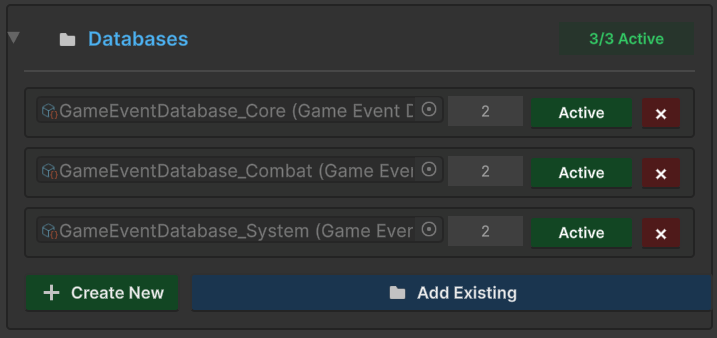
Load scene-specific databases alongside their scenes. Unload them when the scene unloads. The core database stays loaded always. Events in unloaded databases become inactive — they won't fire, and attempting to raise them is a no-op rather than an error.
This gives you the scoping that static events lack ("this event only exists when this scene is loaded") without the fragility of instance events ("this event dies when this object dies").
The Anti-Pattern to Watch For
One mistake to avoid: forgetting to remove persistent listeners in OnDestroy.
// BAD - persistent listener leaks if this object is destroyed
private void OnEnable()
{
    onLevelStart.AddPersistentListener(HandleLevelStart);
}

// GOOD - clean up in OnDestroy for DDOL objects
private void OnDestroy()
{
    onLevelStart.RemovePersistentListener(HandleLevelStart);
}
Regular listeners unsubscribe in OnDisable. Persistent listeners should unsubscribe in OnDestroy — because the whole point of a persistent listener is that it SURVIVES OnDisable during scene transitions. If you put the removal in OnDisable, it defeats the purpose.
GES's Runtime Monitor (the Warnings tab specifically) will flag persistent listeners registered to objects that aren't DontDestroyOnLoad. That's almost always a bug — you're telling the event system "keep this listener across scene loads" but the object itself won't survive the load.
The Bigger Picture
Cross-scene persistence isn't just a technical problem — it's an architectural decision that affects how your entire project is structured. The wrong choice cascades into singletons, service locators, bootstrap scenes, loading order dependencies, and defensive null checks scattered across every script.
GES's approach — ScriptableObject events with explicit persistence control — means you don't have to choose between "everything is global" and "nothing crosses scene boundaries." Events exist at the project level. Listeners choose their own persistence based on their needs. The lifecycle is automatic for common cases and explicit for special ones.
Your AudioManager subscribes once with a persistent listener and hears events from every scene for the entire session. Your EnemySpawner subscribes through the Behavior Window, automatically disconnects when the scene unloads, and automatically reconnects in the next scene. Both patterns coexist on the same event. No special configuration. No bootstrap scenes. No race conditions.
🚀 Global Developer Service Matrix
🇨🇳 China Developer Community
- 🛒 Unity China Asset Store
- 🎥 Bilibili Video Tutorials
- 📘 Technical Documentation
- 💬 QQ Group (1071507578)
🌐 Global Developer Community
📧 Support & Collaboration