Time-Based Events in Unity: Why Coroutines Are the Wrong Tool for Delays, Repeats, and Cancellation

You need to delay an explosion by 2 seconds after a grenade lands. Simple enough. You write a coroutine. IEnumerator DelayedExplosion(), yield return new WaitForSeconds(2f), call the explosion logic. Maybe 10 lines if you're tidy. You feel good about it.
Then your designer says "the player should be able to defuse the bomb." Okay, now you need to store the Coroutine reference so you can call StopCoroutine(). But wait — what if the player defuses it before the coroutine starts? You need a null check. What if the game object gets destroyed mid-wait? Another null check. What if the player defuses it at the exact frame the coroutine completes? Race condition. Your 10 lines are now 25, and you haven't even handled the "show defused message vs. show explosion" branching yet.
This is the story of every time-based event in Unity. The first implementation is clean. The second requirement doubles the code. The third makes you question your career choices.
The Coroutine Tax on Simple Delays
Let's be honest about what a "simple delay" actually looks like in production Unity code. Not the tutorial version — the version that ships.
public class BombController : MonoBehaviour
{
    [SerializeField] private float fuseTime = 2f;

    private Coroutine _explosionCoroutine;
    private bool _isArmed;
    private bool _isExploded;

    public void ArmBomb()
    {
        if (_isArmed) return;
        _isArmed = true;
        _explosionCoroutine = StartCoroutine(DelayedExplosion());
    }

    public void Defuse()
    {
        if (!_isArmed || _isExploded) return;

        if (_explosionCoroutine != null)
        {
            StopCoroutine(_explosionCoroutine);
            _explosionCoroutine = null;
        }

        _isArmed = false;
        ShowDefuseMessage(); // how do you know to call this?
    }

    private IEnumerator DelayedExplosion()
    {
        yield return new WaitForSeconds(fuseTime);
        _isExploded = true;
        _explosionCoroutine = null;
        DoExplosion();
        // What about "on completed" logic?
        // Just... put it here? Hope nothing else needs to know?
    }

    private void OnDestroy()
    {
        if (_explosionCoroutine != null)
            StopCoroutine(_explosionCoroutine);
    }
}
That's around 40 lines for "wait 2 seconds, then explode, with cancellation." And we haven't even started on the interesting part.
Now Add Repeating: The Poison Damage Problem
Your game has a poison effect. 10 damage per tick, once per second, for 5 ticks. Another coroutine.
private Coroutine _poisonCoroutine;
private int _poisonTicksRemaining;

public void ApplyPoison(int damage, float interval, int ticks)
{
    if (_poisonCoroutine != null)
        StopCoroutine(_poisonCoroutine);

    _poisonCoroutine = StartCoroutine(PoisonRoutine(damage, interval, ticks));
}

private IEnumerator PoisonRoutine(int damage, float interval, int ticks)
{
    _poisonTicksRemaining = ticks;

    for (int i = 0; i < ticks; i++)
    {
        yield return new WaitForSeconds(interval);
        ApplyDamage(damage);
        _poisonTicksRemaining--;
        // How do you notify the UI about remaining ticks?
        // Pass a callback? Store a reference? Fire an event?
    }

    _poisonCoroutine = null;
    // Poison expired naturally. How do you distinguish this
    // from "poison was cured" in the cleanup logic?
}

public void CurePoison()
{
    if (_poisonCoroutine != null)
    {
        StopCoroutine(_poisonCoroutine);
        _poisonCoroutine = null;
        _poisonTicksRemaining = 0;
        // Play cure effect? How does the UI know to update?
    }
}
Notice the pattern. Every time-based behavior needs:
- A
Coroutinefield to track the handle - A
StopCoroutine()call with null checking - Manual state tracking (
_poisonTicksRemaining) - No built-in way to distinguish "completed naturally" from "was cancelled"
- No built-in way to notify other systems about progress
And this is just ONE poison effect. What if multiple poisons can stack? Now you need a List<Coroutine>. What if each poison has different tick rates? Different durations? Different cancellation conditions?
The Lifecycle Callback Gap
Here's what JavaScript developers take for granted:
const timer = setTimeout(() => explode(), 2000);
clearTimeout(timer); // clean cancellation
And what C# async developers take for granted:
var cts = new CancellationTokenSource();
await Task.Delay(2000, cts.Token);
cts.Cancel(); // clean cancellation with proper exception handling
Both of these paradigms have clear lifecycle semantics. You know when something starts, when it completes, and when it's cancelled. You can attach callbacks to each state transition.
Unity coroutines have none of this. A coroutine is a black box. It's running or it's not. There's no OnCompleted callback. There's no OnCancelled callback. There's no OnStep callback for repeating operations. You have to build all of that yourself, every single time, with manual state tracking and cross-referenced boolean flags.
The result? Your MonoBehaviour starts looking like this:
private Coroutine _explosionCoroutine;
private Coroutine _poisonCoroutine;
private Coroutine _shieldRegenCoroutine;
private Coroutine _buffTimerCoroutine;
private Coroutine _respawnCoroutine;
private bool _isExploding;
private bool _isPoisoned;
private bool _isRegenerating;
private bool _isBuffed;
private bool _isRespawning;
private int _poisonTicksLeft;
private float _buffTimeLeft;
Ten time-based behaviors equals ten coroutine fields, ten boolean flags, and probably ten methods that look almost identical: start the coroutine, store the reference, null-check before stopping, reset the flag. Your component is 60% timer management boilerplate.
The Fragility Problem
Coroutines are tied to the MonoBehaviour that started them. If that game object is destroyed — pooling, scene transitions, manual Destroy calls — every coroutine on it silently dies. No notification. No cleanup callback. No warning.
This means:
- An explosion coroutine on a pooled grenade object? Silently cancelled when the object returns to the pool.
- A buff timer on a player object? Gone when you load a new scene.
- A repeating radar ping? Dead the moment the radar station prefab is recycled.
You can use DontDestroyOnLoad for the object, but that introduces its own problems. You can start coroutines on a persistent singleton, but then you lose the natural lifecycle binding. Every solution has tradeoffs that require more code to manage.
What If Scheduling Was Just... an API?
This is where GES takes a fundamentally different approach. Instead of wrapping timer logic in coroutines that you manage manually, GES treats scheduling as a first-class API on events themselves.
Immediate: Raise()
The simplest case — fire an event right now, no delay.
[GameEventDropdown, SerializeField] private SingleGameEvent onBombExplode;

// Fire immediately
onBombExplode.Raise();
Every listener fires synchronously in the same frame. No coroutines involved.
For typed events:
[GameEventDropdown, SerializeField] private Int32GameEvent onDamageDealt;

onDamageDealt.Raise(42);
For sender events:
[GameEventDropdown, SerializeField] private Int32SenderGameEvent onDamageFromSource;

onDamageFromSource.Raise(this, 42);
Delayed: RaiseDelayed()
Schedule an event to fire after a delay. One line. You get back a handle.
ScheduleHandle handle = onBombExplode.RaiseDelayed(2f);
That's it. Two seconds from now, onBombExplode fires. The handle is your ticket to managing everything about this scheduled execution — cancellation, lifecycle callbacks, status checking.
For typed events, the argument is captured at call time:
ScheduleHandle handle = onDamageDealt.RaiseDelayed(50, 1.5f);
The value 50 is locked in when you call RaiseDelayed(). If the variable you passed changes before the delay expires, the original value is still used. No surprises.
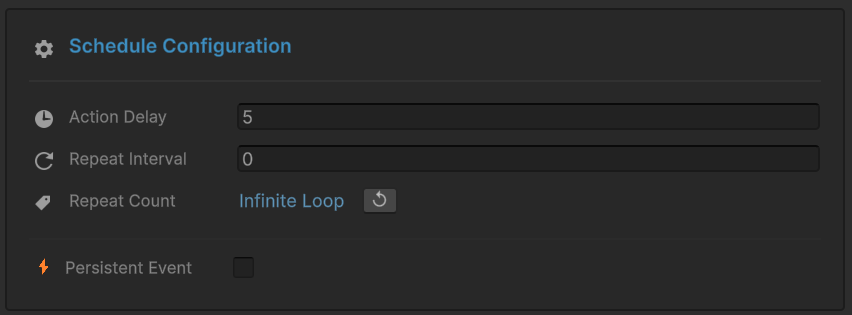
Repeating: RaiseRepeating()
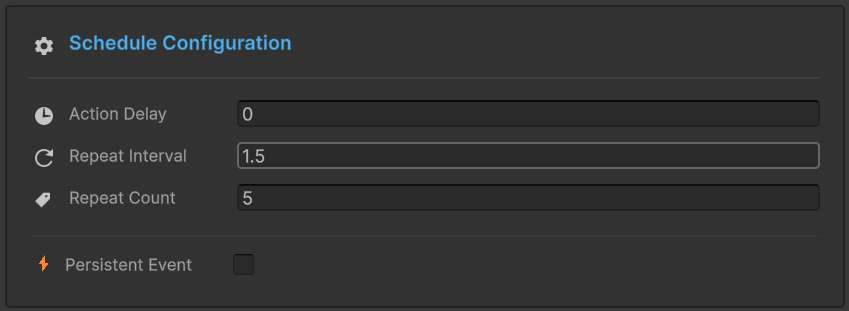
Fire an event on a regular interval, either a fixed number of times or forever.
// Poison: 10 damage every 1 second, 5 ticks total
ScheduleHandle handle = onPoisonTick.RaiseRepeating(10, interval: 1f, count: 5);
The count is total executions, not repeats. count: 5 means the event fires 5 times.
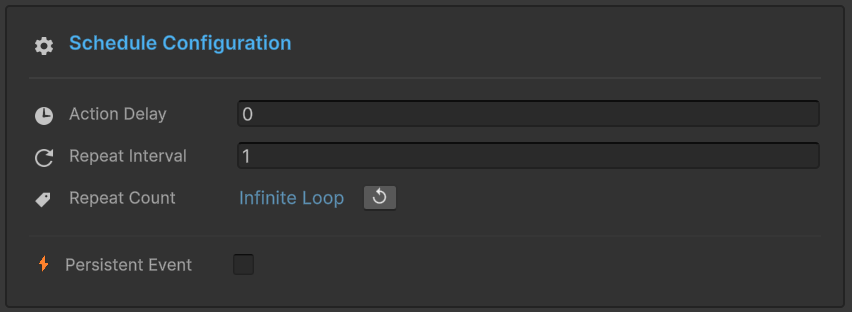
For infinite repetition — heartbeats, radar pings, ambient effects:
// Radar scan: every 2 seconds, forever
ScheduleHandle handle = onRadarPing.RaiseRepeating(interval: 2f, count: -1);
Pass count: -1 and it runs until you cancel it.
The ScheduleHandle: What Coroutines Should Have Been
The ScheduleHandle returned by RaiseDelayed() and RaiseRepeating() is where the real power lives. It has three lifecycle callbacks that solve the exact problems coroutines leave you to handle manually.
OnStep: After Each Tick
ScheduleHandle handle = onPoisonTick.RaiseRepeating(10, interval: 1f, count: 5);

handle.OnStep((remainingCount) =>
{
    Debug.Log($"Poison tick! {remainingCount} ticks remaining");
    UpdatePoisonStackUI(remainingCount);
});
OnStep fires after each individual execution. The remainingCount tells you how many are left. For infinite loops, it's always -1. For delayed events (single execution), it fires once with remainingCount of 0.
No manual counter tracking. No _poisonTicksRemaining field. The handle knows.
OnCompleted: Natural Completion
handle.OnCompleted(() =>
{
    Debug.Log("All poison ticks finished");
    RemovePoisonVisualEffect();
    ShowPoisonExpiredMessage();
});
Fires when all planned executions finish. Only fires for finite schedules — infinite loops never complete naturally. For RaiseDelayed(), this fires after the single delayed execution.
This is the clean way to chain behavior after a delay. No nested coroutines. No callback spaghetti.
OnCancelled: Manual Cancellation
handle.OnCancelled(() =>
{
    Debug.Log("Poison was cured early!");
    PlayCureParticleEffect();
    ShowPoisonCuredMessage();
});
Fires when you manually cancel the schedule. Does NOT fire on natural completion. The two callbacks are mutually exclusive.
This distinction is exactly what was impossible with coroutines. If poison runs out naturally, show an "expired" message. If it's cured, play a cure animation. With coroutines, you'd need a boolean flag to track which case you're in. With handles, the API tells you.
Chaining: The Fluent Pattern
All three callbacks return the handle, so you can chain them:
ScheduleHandle handle = onCountdown.RaiseRepeating(interval: 1f, count: 10)
    .OnStep((remaining) => UpdateCountdownUI(remaining))
    .OnCompleted(() => TriggerLaunch())
    .OnCancelled(() => AbortLaunch());
Compare that to a coroutine with a loop, a counter, a boolean flag for "was cancelled vs. completed," and separate methods for each cleanup path. This is a fundamentally different level of expressiveness.
Cancellation: Three Ways, All Clean
Direct Handle Cancellation
handle.Cancel();
Works on any active handle.
Through the Event: CancelDelayed()
onBombExplode.CancelDelayed(handle);
Functionally equivalent to handle.Cancel(), but reads more clearly when managing multiple handles — you're emphasizing which event you're operating on.
Through the Event: CancelRepeating()
onRadarPing.CancelRepeating(handle);
Same pattern for repeating schedules.
Safe Cancellation
Always check IsActive before cancelling if there's any possibility the handle already completed:
private void StopAllSchedules()
{
    if (_explosionHandle.IsActive)
        _explosionHandle.Cancel();

    if (_poisonHandle.IsActive)
        _poisonHandle.Cancel();

    if (_radarHandle.IsActive)
        _radarHandle.Cancel();
}
Cancelling an inactive handle is a no-op (no exceptions), but checking IsActive makes intent clear.
Inspector Integration: Visual Scheduling
Here's something designers love: the scheduling API and the Inspector's Behavior Window work together. You can configure delay and repeat settings visually without touching code.
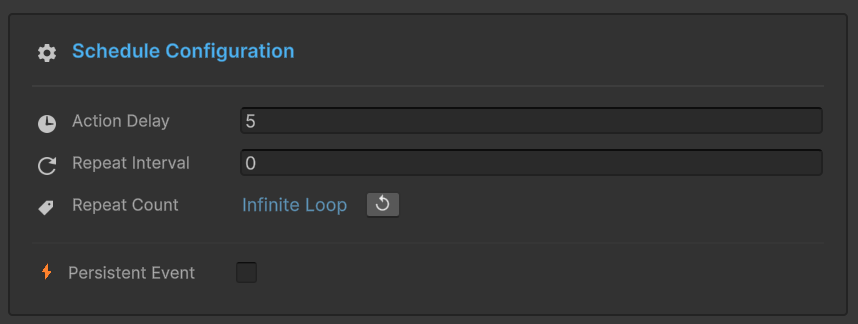
The Behavior component exposes:
- Delay: seconds before the first raise
- Repeat Count: number of repetitions (0 = once, -1 = infinite)
- Repeat Interval: seconds between repeats
These map directly to RaiseDelayed() and RaiseRepeating() under the hood. A designer configures a 2-second delay with 3 repeats at 1-second intervals — that's equivalent to RaiseDelayed(2f) followed by RaiseRepeating(interval: 1f, count: 3) in code.
Designers tune timing without code. Programmers override or extend the same timing in scripts. Both paths produce the same ScheduleHandle management. No fighting over who owns the timing logic.
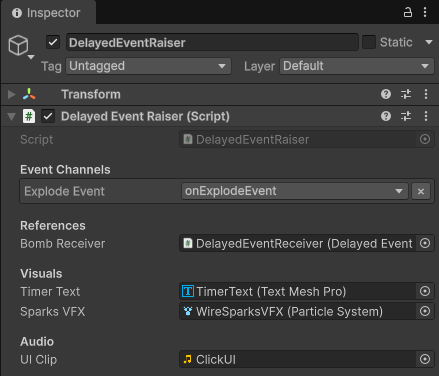
The Full Comparison: Bomb Defusal
Let's put it all together. The bomb scenario from the intro — but this time with GES scheduling.
The Coroutine Version (What You'd Write Today)
public class BombCoroutine : MonoBehaviour
{
    [SerializeField] private float fuseTime = 30f;
    [SerializeField] private float tickInterval = 1f;

    private Coroutine _explosionCoroutine;
    private Coroutine _countdownCoroutine;
    private bool _isArmed;
    private bool _hasExploded;
    private int _ticksRemaining;

    public void ArmBomb()
    {
        if (_isArmed) return;
        _isArmed = true;
        _hasExploded = false;
        _ticksRemaining = Mathf.FloorToInt(fuseTime / tickInterval);

        _explosionCoroutine = StartCoroutine(ExplosionRoutine());
        _countdownCoroutine = StartCoroutine(CountdownRoutine());
    }

    private IEnumerator ExplosionRoutine()
    {
        yield return new WaitForSeconds(fuseTime);
        _hasExploded = true;
        _explosionCoroutine = null;
        // Notify explosion... but how? Direct reference? UnityEvent?
        Debug.Log("BOOM!");
    }

    private IEnumerator CountdownRoutine()
    {
        while (_ticksRemaining > 0)
        {
            yield return new WaitForSeconds(tickInterval);
            _ticksRemaining--;
            // Notify UI... but how?
            Debug.Log($"Tick... {_ticksRemaining}");
        }
        _countdownCoroutine = null;
    }

    public void AttemptDefusal()
    {
        if (!_isArmed || _hasExploded) return;

        _isArmed = false;

        if (_explosionCoroutine != null)
        {
            StopCoroutine(_explosionCoroutine);
            _explosionCoroutine = null;
        }
        if (_countdownCoroutine != null)
        {
            StopCoroutine(_countdownCoroutine);
            _countdownCoroutine = null;
        }

        // Was it defused or did it explode? Check _hasExploded.
        // What about notifying other systems? Manual calls.
        Debug.Log("Defused!");
    }

    private void OnDestroy()
    {
        if (_explosionCoroutine != null)
            StopCoroutine(_explosionCoroutine);
        if (_countdownCoroutine != null)
            StopCoroutine(_countdownCoroutine);
    }
}
That's ~50 lines. Two coroutine fields, two boolean flags, manual notification (the // but how? comments), no lifecycle callbacks, and the UI has to either poll _ticksRemaining or get a direct reference to this component.
The GES Version
public class BombController : MonoBehaviour
{
    [Header("Events")]
    [GameEventDropdown, SerializeField] private SingleGameEvent onBombExplode;
    [GameEventDropdown, SerializeField] private Int32GameEvent onCountdownTick;
    [GameEventDropdown, SerializeField] private SingleGameEvent onBombDefused;
    [GameEventDropdown, SerializeField] private SingleGameEvent onBombArmed;

    [Header("Settings")]
    [SerializeField] private float fuseTime = 30f;
    [SerializeField] private float tickInterval = 1f;

    private ScheduleHandle _explosionHandle;
    private ScheduleHandle _countdownHandle;
    private bool _isArmed;

    public void ArmBomb()
    {
        if (_isArmed) return;
        _isArmed = true;

        onBombArmed.Raise();

        int totalTicks = Mathf.FloorToInt(fuseTime / tickInterval);

        _explosionHandle = onBombExplode.RaiseDelayed(fuseTime)
            .OnCompleted(() => Debug.Log("BOOM! Bomb exploded."));

        _countdownHandle = onCountdownTick.RaiseRepeating(
            totalTicks, interval: tickInterval, count: totalTicks)
            .OnStep((remaining) => Debug.Log($"Tick... {remaining} seconds left"));
    }

    public void AttemptDefusal(float progress)
    {
        if (!_isArmed) return;
        if (progress < 1f) return;

        _isArmed = false;

        if (_explosionHandle.IsActive) _explosionHandle.Cancel();
        if (_countdownHandle.IsActive) _countdownHandle.Cancel();

        _explosionHandle.OnCancelled(() => Debug.Log("Explosion cancelled!"));

        onBombDefused.Raise();
    }

    private void OnDisable()
    {
        if (_explosionHandle.IsActive) _explosionHandle.Cancel();
        if (_countdownHandle.IsActive) _countdownHandle.Cancel();
    }
}
And the UI side, completely decoupled — no reference to BombController at all:
public class BombUI : MonoBehaviour
{
    [GameEventDropdown, SerializeField] private Int32GameEvent onCountdownTick;
    [GameEventDropdown, SerializeField] private SingleGameEvent onBombDefused;
    [GameEventDropdown, SerializeField] private SingleGameEvent onBombExplode;
    [SerializeField] private TextMeshProUGUI countdownText;
    [SerializeField] private GameObject bombPanel;

    private void OnEnable()
    {
        onCountdownTick.AddListener(UpdateCountdown);
        onBombDefused.AddListener(ShowDefusedMessage);
        onBombExplode.AddListener(ShowExplosionScreen);
    }

    private void OnDisable()
    {
        onCountdownTick.RemoveListener(UpdateCountdown);
        onBombDefused.RemoveListener(ShowDefusedMessage);
        onBombExplode.RemoveListener(ShowExplosionScreen);
    }

    private void UpdateCountdown(int secondsRemaining)
    {
        bombPanel.SetActive(true);
        countdownText.text = $"{secondsRemaining}";
        if (secondsRemaining <= 5)
            countdownText.color = Color.red;
    }

    private void ShowDefusedMessage()
    {
        countdownText.text = "DEFUSED";
        countdownText.color = Color.green;
    }

    private void ShowExplosionScreen()
    {
        bombPanel.SetActive(false);
    }
}
The BombController doesn't know the UI exists. The BombUI doesn't know the bomb's internal state. They communicate through events with scheduling. The bomb schedules its own explosion and countdown. The UI listens and reacts. Defusal cancels the schedules, and the lifecycle callbacks handle the branching. No coroutines. No Update() loops. No cross-references.
Practical Patterns
Poison Damage Over Time
public class PoisonEffect : MonoBehaviour
{
    [GameEventDropdown, SerializeField] private Int32GameEvent onPoisonDamage;

    private ScheduleHandle _poisonHandle;

    public void ApplyPoison(int damagePerTick, float interval, int ticks)
    {
        if (_poisonHandle.IsActive)
            onPoisonDamage.CancelRepeating(_poisonHandle);

        _poisonHandle = onPoisonDamage.RaiseRepeating(
            damagePerTick, interval: interval, count: ticks)
            .OnStep((remaining) => UpdatePoisonUI(remaining))
            .OnCompleted(() => ShowPoisonExpired())
            .OnCancelled(() => ShowPoisonCured());
    }

    public void CurePoison()
    {
        if (_poisonHandle.IsActive)
            onPoisonDamage.CancelRepeating(_poisonHandle);
    }

    private void OnDisable()
    {
        if (_poisonHandle.IsActive)
            onPoisonDamage.CancelRepeating(_poisonHandle);
    }
}
Radar / Heartbeat System
public class RadarSystem : MonoBehaviour
{
    [GameEventDropdown, SerializeField] private SingleGameEvent onRadarPing;

    private ScheduleHandle _scanHandle;

    private void OnEnable()
    {
        _scanHandle = onRadarPing.RaiseRepeating(interval: 2f, count: -1)
            .OnStep((_) => Debug.Log("Radar ping sent"));
    }

    private void OnDisable()
    {
        if (_scanHandle.IsActive)
            onRadarPing.CancelRepeating(_scanHandle);
    }
}
That's the entire radar system. Seven lines of actual logic. No coroutines, no Update loops, no manual timer tracking. Start on enable, stop on disable.
When to Use What
Use Raise() for immediate notifications: player died, button clicked, item collected. No timing involved.
Use RaiseDelayed() for one-shot timed events: explosion after fuse, dialogue after cutscene, respawn after death timer. Anything that happens once after a wait.
Use RaiseRepeating() with finite count for damage-over-time, channeled abilities, countdowns, multi-step sequences. Anything that pulses a fixed number of times.
Use RaiseRepeating() with count: -1 for heartbeat systems, polling loops, ambient effects, radar pings. Anything that runs until explicitly stopped.
Always store the handle if there's any chance you'll need to cancel. In practice, you almost always want it.
Always clean up in OnDisable(). If your MonoBehaviour is destroyed while a schedule is active, cancel it. GES won't crash if you don't, but orphaned schedules are a code smell.
Quick Reference
| Method | Returns | Description |
|---|---|---|
Raise() | void | Immediate execution |
Raise(arg) | void | Immediate with argument |
Raise(sender, args) | void | Immediate with sender + args |
RaiseDelayed(delay) | ScheduleHandle | Delayed void event |
RaiseDelayed(arg, delay) | ScheduleHandle | Delayed typed event |
RaiseDelayed(sender, args, delay) | ScheduleHandle | Delayed sender event |
RaiseRepeating(interval, count) | ScheduleHandle | Repeating void event |
RaiseRepeating(arg, interval, count) | ScheduleHandle | Repeating typed event |
handle.OnStep(callback) | ScheduleHandle | After each execution |
handle.OnCompleted(callback) | ScheduleHandle | After natural completion |
handle.OnCancelled(callback) | ScheduleHandle | After manual cancellation |
handle.Cancel() | void | Cancel the schedule |
handle.IsActive | bool | Check if still running |
The scheduling API collapses what used to be coroutine management boilerplate into declarative, handle-managed event timing. The pattern is always the same: raise, capture handle, attach callbacks, cancel when done. Once you internalize it, you'll genuinely wonder why you ever wrote IEnumerator for a simple delay.
🚀 Global Developer Service Matrix
🇨🇳 China Developer Community
- 🛒 Unity China Asset Store
- 🎥 Bilibili Video Tutorials
- 📘 Technical Documentation
- 💬 QQ Group (1071507578)
🌐 Global Developer Community
📧 Support & Collaboration