When Visual Editors Aren't Enough: Building Event Flows at Runtime for Procedural and Dynamic Systems

Your procedural dungeon generator just created a room with three pressure plates and a spike trap. The next room has a lever puzzle connected to a locked door. The room after that is a boss arena where environmental hazards activate based on the boss's health phase. None of these event relationships existed at edit time. The dungeon layout was determined by a seed that the player entered 30 seconds ago.
How do you wire up the events?
With a traditional approach, you write an enormous switch statement. For each room type, manually subscribe and unsubscribe event handlers. For each AI difficulty, manually chain different attack patterns. For each mod-created content piece, manually parse a config file and translate it into event connections. The "manual" part is the problem — you're reimplementing event wiring logic every time the topology changes at runtime.
Visual node editors are fantastic for flows you know at design time. But they fundamentally can't handle flows that don't exist until the game is running. And increasingly, the most interesting game systems are exactly the ones where the event graph is dynamic.
The Procedural Content Problem
Let's make this concrete. You're building a roguelike. Each run generates 15-25 rooms from a pool of room templates. Each template defines what interactive objects are in the room — pressure plates, levers, doors, traps, treasure chests, enemy spawners. But the connections between these objects depend on the specific layout the generator produces.
Room Template A has a pressure plate and a spike trap. In one run, the pressure plate triggers the spikes with a 1-second delay. In another run (different difficulty), the same template triggers spikes immediately with no delay but adds a warning sound 0.5 seconds before. The template is the same; the event wiring is different.
How do teams typically handle this?
The If-Else Approach
public void WireRoom(Room room, DifficultySettings difficulty)
{
    if (room.HasPressurePlate && room.HasSpikeTrap)
    {
        if (difficulty.level == Difficulty.Easy)
        {
            room.pressurePlate.onActivated += () =>
            {
                PlayWarningSound();
                StartCoroutine(DelayedSpikes(room.spikeTrap, 1.5f));
            };
        }
        else if (difficulty.level == Difficulty.Hard)
        {
            room.pressurePlate.onActivated += () =>
            {
                room.spikeTrap.Activate();
            };
        }
    }

    if (room.HasLever && room.HasDoor)
    {
        room.lever.onPulled += () => room.door.Open();

        if (difficulty.level == Difficulty.Hard)
        {
            room.lever.onPulled += () =>
            {
                StartCoroutine(ResetLever(room.lever, 5f));
            };
        }
    }

    // ... 200 more lines for other combinations
}
This works for small games. For a roguelike with 30 room templates and 4 difficulty levels, you're looking at hundreds of lines of conditional wiring code. Every new room template means updating this method. Every new interactive object type means updating it again. And the lambda subscriptions? You can never cleanly unsubscribe them when the room is destroyed. Memory leaks are baked in.
The Data-Driven Approach (Better, Still Painful)
Some teams move to a data-driven model — JSON or ScriptableObject configs that define connections:
{
    "room_type": "trap_room",
    "connections": [
        {
            "source": "pressure_plate",
            "target": "spike_trap",
            "delay": 1.0,
            "condition": "player_in_range"
        }
    ]
}
This is architecturally cleaner, but now you need a custom parser, a custom connection manager, custom condition evaluation, and custom lifecycle management. You're building a mini event system on top of your event system. And it still doesn't integrate with whatever visual editor you're using for the static parts of your game.
The Ideal
What you actually want is the same power as your visual event editor — triggers, chains, conditions, delays, argument passing — but accessible from code. Build flows programmatically, mix them with visual flows, tear them down when done. Same pipeline, same execution guarantees, different interface.
The AI Behavior Problem
Procedural levels aren't the only use case. AI behavior is fundamentally dynamic.
Easy mode enemies: telegraph attack for 2 seconds, strike, wait 3 seconds, repeat. The event chain is simple and predictable.
Hard mode enemies: 0.5-second telegraphs, attacks chain into combos, combo finishers trigger environmental hazards, and the exact combo sequence depends on the player's position and remaining health. The event chain is complex and varies per encounter.
Boss fights are even worse. Phase 1: simple attack patterns. Phase 2: new attacks unlock, old patterns get faster. Phase 3: desperation moves that chain into area-of-effect hazards. Each phase transition rewires the entire attack event graph.
You could hard-code each phase in separate methods, but the connections between events — "when attack lands, trigger screen shake after 0.2s, then trigger area damage after 1s if health is below 30%" — are exactly the kind of thing an event flow system should handle. The problem is that the flow topology changes at runtime.
The Mod Support Problem
This one is increasingly relevant. If your game supports mods, players need to define event relationships for their custom content. A modder creates a new trap type. They need to wire it to existing game events — maybe "when player enters trigger zone, play custom animation, then deal damage after animation completes."
They can't use your visual editor (it's a development tool, not a player tool). They need a code or config interface that gives them the same capabilities. If your event system's features are locked behind a GUI, modders are locked out.
GES's Programmatic Flow API
Every single feature available in the GES visual Node Editor has a corresponding code API. Full parity. The visual editor is a GUI wrapper around the same methods you can call directly. This means anything you learn in the visual editor translates 1:1 to code, and vice versa.
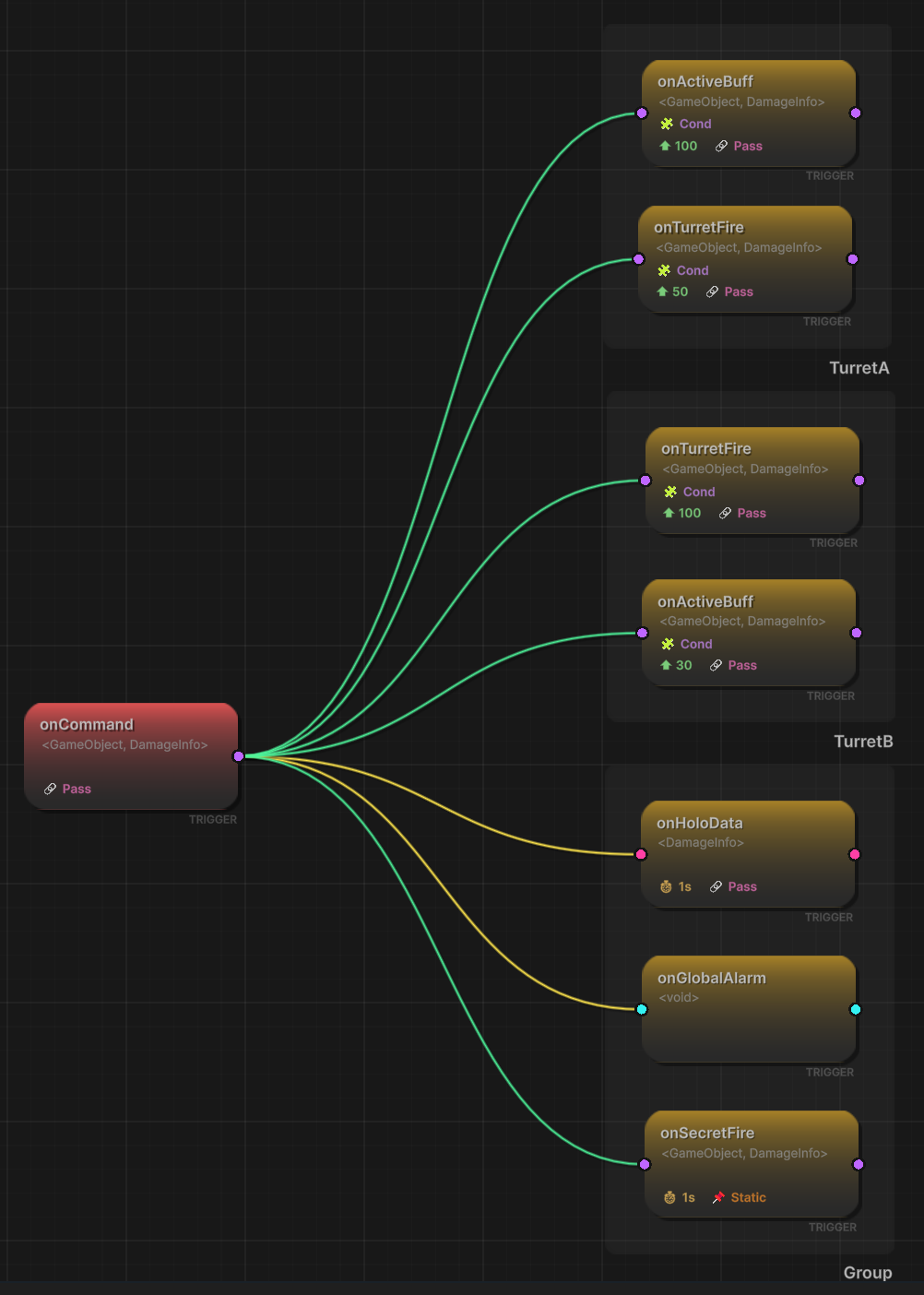
Building Triggers: Parallel Fan-Out
A trigger event is: when Event A fires, Event B also fires (simultaneously). Here's the full API:
[GameEventDropdown, SerializeField] private SingleGameEvent onDoorOpened;
[GameEventDropdown, SerializeField] private SingleGameEvent onLightsOn;
[GameEventDropdown, SerializeField] private SingleGameEvent onAlarmDisabled;

private void SetupRoom()
{
    // When door opens, lights and alarm react simultaneously
    TriggerHandle h1 = onDoorOpened.AddTriggerEvent(targetEvent: onLightsOn);
    TriggerHandle h2 = onDoorOpened.AddTriggerEvent(targetEvent: onAlarmDisabled);
}
The full signature gives you every option the visual editor has:
TriggerHandle handle = sourceEvent.AddTriggerEvent(
    targetEvent: targetEvent,
    delay: 0f,                          // seconds before target fires
    condition: () => isNightTime,       // predicate gate
    passArgument: true,                 // forward source args to target
    argumentTransformer: null,          // transform args between types
    priority: 0                         // ordering among triggers
);
delay — Time to wait after the source fires before the target fires. Zero means same frame.
// Door opens, lights flicker on 0.5s later
onDoorOpened.AddTriggerEvent(
    targetEvent: onLightsOn,
    delay: 0.5f
);
condition — Predicate evaluated at raise time, not setup time. Pass null for unconditional.
// Only trigger lights if it's nighttime
onDoorOpened.AddTriggerEvent(
    targetEvent: onLightsOn,
    condition: () => TimeOfDayManager.IsNight
);
passArgument — Forward the source event's data to the target. Type compatibility matters.
// Source raises with damage amount, target receives the same
onPlayerHit.AddTriggerEvent(
    targetEvent: onDamageNumberSpawn,
    passArgument: true
);
argumentTransformer — When source and target have different types, or you need to modify the value.
// Source sends int damage, target expects float for UI scaling
onPlayerHit.AddTriggerEvent(
    targetEvent: onDamageScale,
    passArgument: true,
    argumentTransformer: (object arg) => (float)(int)arg / 100f
);
The returned TriggerHandle is your reference for later cleanup:
// Store the handle
TriggerHandle handle = sourceEvent.AddTriggerEvent(targetEvent: targetEvent);

// Later: remove this specific connection
sourceEvent.RemoveTriggerEvent(handle);
Building Chains: Sequential Blocking Execution
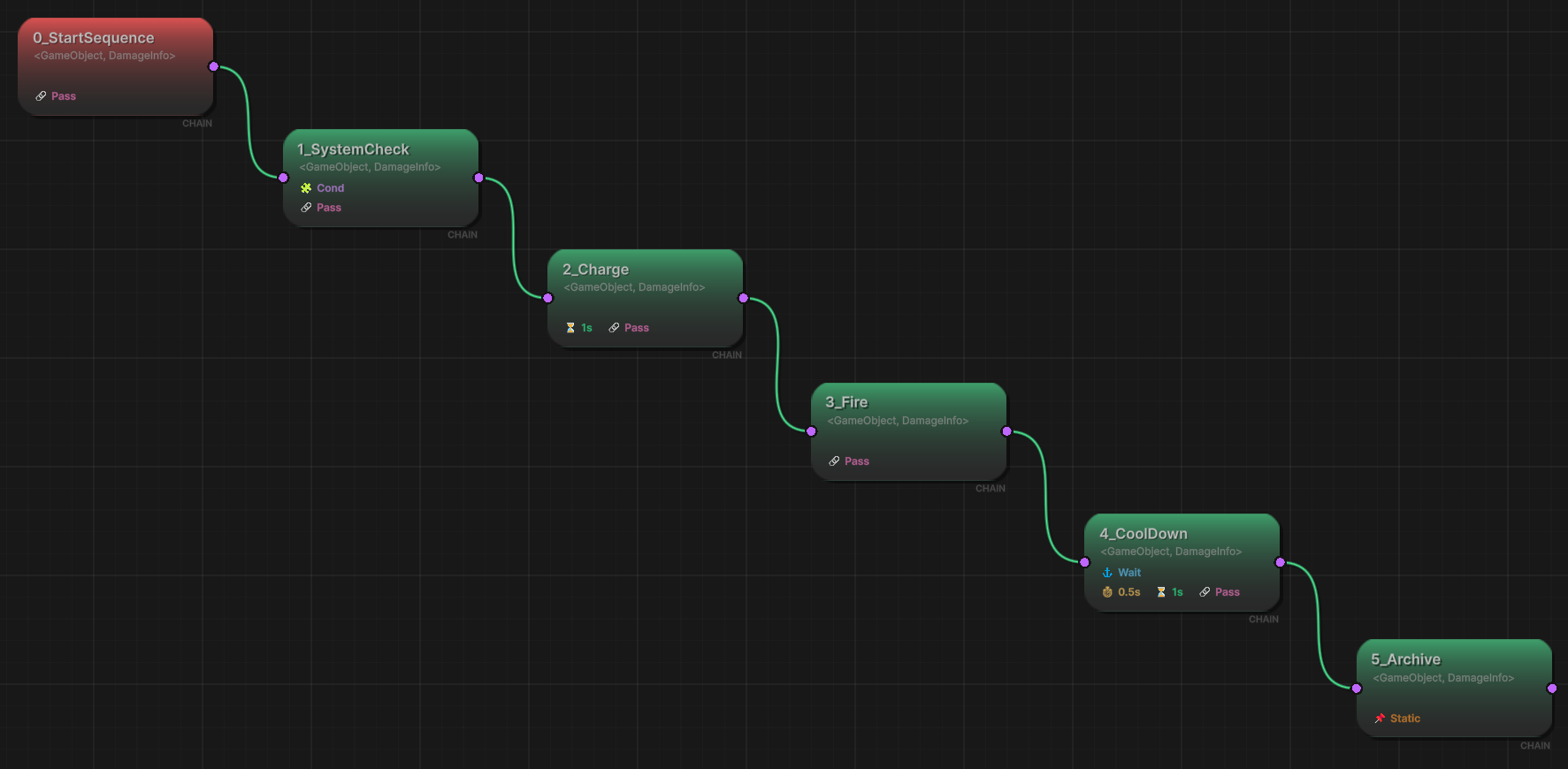
A chain event is: Event A fires, then after a delay, Event B fires, then after Event B's listeners complete, Event C fires. Sequential, ordered, with timing control.
ChainHandle handle = sourceEvent.AddChainEvent(
    targetEvent: targetEvent,
    delay: 1f,                    // gap before this step fires
    duration: 2f,                 // how long this step is "active"
    condition: null,              // predicate gate
    passArgument: true,           // forward args
    argumentTransformer: null,    // transform args
    waitForCompletion: false      // block until listeners finish?
);
The chain-specific parameters:
delay — The gap between the source firing and this chain step executing.
duration — How long this step is considered "active." Affects overall flow timing when multiple chains are connected in sequence.
waitForCompletion — When true, the chain system waits for all listeners on the target event to finish before proceeding to subsequent steps. This is the "blocking" part.
// Boss sequence: play animation (wait for it), then spawn enemies
onBossPhaseStart.AddChainEvent(
    targetEvent: onPlayBossAnimation,
    delay: 0f,
    duration: 3f,
    waitForCompletion: true
);

onPlayBossAnimation.AddChainEvent(
    targetEvent: onSpawnAdds,
    delay: 0.5f,
    duration: 0f,
    waitForCompletion: false
);
Mixing Visual and Programmatic Flows
This is where the architecture really pays off. You design your base flow graph visually — the static, known-at-design-time connections. Then you layer dynamic connections on top at runtime. They all execute through the same pipeline.
public class DifficultyFlowManager : MonoBehaviour
{
    [Header("Base Events (connected visually in editor)")]
    [GameEventDropdown, SerializeField] private SingleGameEvent onEnemySpawned;
    [GameEventDropdown, SerializeField] private SingleGameEvent onEnemyAttackWindup;
    [GameEventDropdown, SerializeField] private SingleGameEvent onEnemyAttackStrike;

    [Header("Hard Mode Events")]
    [GameEventDropdown, SerializeField] private SingleGameEvent onComboFollowUp;
    [GameEventDropdown, SerializeField] private SingleGameEvent onEnvironmentHazard;

    private List<TriggerHandle> _hardModeHandles = new List<TriggerHandle>();

    public void EnableHardMode()
    {
        _hardModeHandles.Add(onEnemyAttackStrike.AddTriggerEvent(
            targetEvent: onComboFollowUp,
            delay: 0.3f,
            condition: () => Random.value > 0.5f
        ));

        _hardModeHandles.Add(onComboFollowUp.AddTriggerEvent(
            targetEvent: onEnvironmentHazard,
            delay: 0.1f
        ));
    }

    public void DisableHardMode()
    {
        foreach (var handle in _hardModeHandles)
            handle.Source.RemoveTriggerEvent(handle);
        _hardModeHandles.Clear();
    }
}
The visual editor connections are always there — they're baked into the asset. The programmatic connections layer on top and can be added or removed without affecting the visual graph. "Designed behavior" and "dynamic behavior" stay cleanly separated.
Handle-Based Cleanup Patterns
When you build complex dynamic flows, you accumulate handles. Managing them cleanly is essential to avoid leaked connections. Here are the patterns that work in production.
Pattern 1: List Collection
For a set of connections that are added and removed as a unit:
private List<TriggerHandle> _triggerHandles = new List<TriggerHandle>();
private List<ChainHandle> _chainHandles = new List<ChainHandle>();

private void BuildFlow()
{
    _triggerHandles.Add(eventA.AddTriggerEvent(targetEvent: eventB));
    _triggerHandles.Add(eventA.AddTriggerEvent(targetEvent: eventC));
    _chainHandles.Add(eventB.AddChainEvent(targetEvent: eventD, delay: 1f));
}

private void TearDownFlow()
{
    foreach (var h in _triggerHandles)
        h.Source.RemoveTriggerEvent(h);
    foreach (var h in _chainHandles)
        h.Source.RemoveChainEvent(h);

    _triggerHandles.Clear();
    _chainHandles.Clear();
}
Pattern 2: Flow Context Object
For complex flows that need structured lifecycle management:
public class EventFlowContext : System.IDisposable
{
    private List<TriggerHandle> _triggers = new List<TriggerHandle>();
    private List<ChainHandle> _chains = new List<ChainHandle>();

    public void AddTrigger(TriggerHandle handle) => _triggers.Add(handle);
    public void AddChain(ChainHandle handle) => _chains.Add(handle);

    public void Dispose()
    {
        foreach (var h in _triggers)
            h.Source.RemoveTriggerEvent(h);
        foreach (var h in _chains)
            h.Source.RemoveChainEvent(h);
        _triggers.Clear();
        _chains.Clear();
    }
}
private EventFlowContext _currentPhaseFlow;

private void SetupBossPhase(int phase)
{
    _currentPhaseFlow?.Dispose();
    _currentPhaseFlow = new EventFlowContext();

    switch (phase)
    {
        case 1:
            _currentPhaseFlow.AddTrigger(onBossAttack.AddTriggerEvent(
                targetEvent: onShieldPulse, delay: 0.5f));
            break;
        case 2:
            _currentPhaseFlow.AddTrigger(onBossAttack.AddTriggerEvent(
                targetEvent: onRageSwipe,
                condition: () => bossHealth < 0.5f));
            _currentPhaseFlow.AddChain(onRageSwipe.AddChainEvent(
                targetEvent: onSummonAdds, delay: 2f));
            break;
        case 3:
            _currentPhaseFlow.AddTrigger(onBossAttack.AddTriggerEvent(
                targetEvent: onDesperationBlast));
            _currentPhaseFlow.AddTrigger(onDesperationBlast.AddTriggerEvent(
                targetEvent: onScreenFlash));
            _currentPhaseFlow.AddChain(onDesperationBlast.AddChainEvent(
                targetEvent: onAreaDamage, delay: 1f, waitForCompletion: true));
            break;
    }
}

private void OnDestroy()
{
    _currentPhaseFlow?.Dispose();
}
Each boss phase transition disposes the previous flow and builds a new one. No leaked connections. No stale event wiring from Phase 1 hanging around during Phase 3.
Complete Example: Procedural Dungeon Event Wiring
Let's build the roguelike dungeon system from the introduction. Each room type gets its own event wiring, determined entirely at runtime.
public class DungeonRoom
{
    public RoomType Type;
    public SingleGameEvent OnPlayerEntered;
    public SingleGameEvent OnPlayerExited;
    public SingleGameEvent OnRoomCleared;
    public Int32GameEvent OnDamageInRoom;
    public List<SingleGameEvent> RoomSpecificEvents;
}

public class DungeonEventWiring : MonoBehaviour
{
    [Header("Shared Events")]
    [GameEventDropdown, SerializeField] private SingleGameEvent onDungeonStarted;
    [GameEventDropdown, SerializeField] private SingleGameEvent onPlayerDied;
    [GameEventDropdown, SerializeField] private Int32GameEvent onPlayerDamaged;
    [GameEventDropdown, SerializeField] private SingleGameEvent onBossDefeated;

    [Header("Effect Events")]
    [GameEventDropdown, SerializeField] private SingleGameEvent onPlayTrapSound;
    [GameEventDropdown, SerializeField] private SingleGameEvent onSpawnTreasureParticles;
    [GameEventDropdown, SerializeField] private SingleGameEvent onStartBossMusic;
    [GameEventDropdown, SerializeField] private SingleGameEvent onStopBossMusic;
    [GameEventDropdown, SerializeField] private SingleGameEvent onScreenShake;

    private Dictionary<DungeonRoom, EventFlowContext> _roomFlows
        = new Dictionary<DungeonRoom, EventFlowContext>();

    public void WireRoom(DungeonRoom room)
    {
        var flow = new EventFlowContext();

        switch (room.Type)
        {
            case RoomType.Trap:
                WireTrapRoom(room, flow);
                break;
            case RoomType.Treasure:
                WireTreasureRoom(room, flow);
                break;
            case RoomType.Boss:
                WireBossRoom(room, flow);
                break;
            case RoomType.Safe:
                break;
        }

        _roomFlows[room] = flow;
    }

    private void WireTrapRoom(DungeonRoom room, EventFlowContext flow)
    {
        // Player enters -> traps fire after 1 second (if room not cleared)
        flow.AddTrigger(room.OnPlayerEntered.AddTriggerEvent(
            targetEvent: room.OnDamageInRoom,
            delay: 1f,
            condition: () => !room.OnRoomCleared.HasFired()
        ));

        // Room damage -> screen shake + trap sound
        flow.AddTrigger(room.OnDamageInRoom.AddTriggerEvent(
            targetEvent: onScreenShake
        ));
        flow.AddTrigger(room.OnDamageInRoom.AddTriggerEvent(
            targetEvent: onPlayTrapSound,
            delay: 0.1f
        ));

        // Forward room damage to player damage system
        flow.AddTrigger(room.OnDamageInRoom.AddTriggerEvent(
            targetEvent: onPlayerDamaged,
            passArgument: true
        ));
    }

    private void WireTreasureRoom(DungeonRoom room, EventFlowContext flow)
    {
        // Player enters -> sparkle particles
        flow.AddTrigger(room.OnPlayerEntered.AddTriggerEvent(
            targetEvent: onSpawnTreasureParticles
        ));

        // Chain: enter -> wait 2s -> room cleared
        flow.AddChain(room.OnPlayerEntered.AddChainEvent(
            targetEvent: room.OnRoomCleared,
            delay: 2f
        ));
    }

    private void WireBossRoom(DungeonRoom room, EventFlowContext flow)
    {
        // Enter -> boss music
        flow.AddTrigger(room.OnPlayerEntered.AddTriggerEvent(
            targetEvent: onStartBossMusic
        ));

        // Boss defeated -> chain: stop music -> shake -> room cleared
        flow.AddChain(onBossDefeated.AddChainEvent(
            targetEvent: onStopBossMusic,
            delay: 0.5f,
            waitForCompletion: true
        ));
        flow.AddChain(onStopBossMusic.AddChainEvent(
            targetEvent: onScreenShake,
            delay: 0.2f
        ));
        flow.AddChain(onScreenShake.AddChainEvent(
            targetEvent: room.OnRoomCleared,
            delay: 1f
        ));

        // Safety net: exiting boss room stops music
        flow.AddTrigger(room.OnPlayerExited.AddTriggerEvent(
            targetEvent: onStopBossMusic
        ));
    }

    public void UnwireRoom(DungeonRoom room)
    {
        if (_roomFlows.TryGetValue(room, out var flow))
        {
            flow.Dispose();
            _roomFlows.Remove(room);
        }
    }

    public void UnwireAllRooms()
    {
        foreach (var flow in _roomFlows.Values)
            flow.Dispose();
        _roomFlows.Clear();
    }

    private void OnDestroy()
    {
        UnwireAllRooms();
    }
}
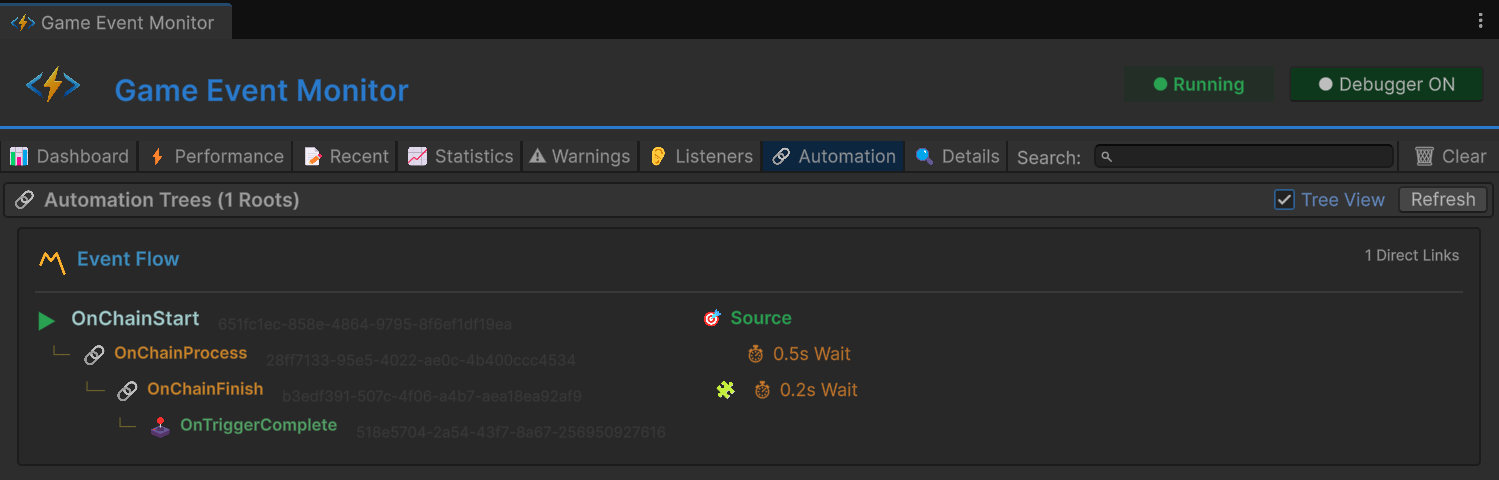
Look at what this gives you. The procedural generator creates rooms and calls WireRoom(). Each room gets exactly the event connections it needs. When a room is unloaded or the run ends, UnwireRoom() or UnwireAllRooms() cleans up everything. No leaked delegates, no orphaned connections, no manual tracking of which lambdas were subscribed where.
And the room-specific events (OnPlayerEntered, OnDamageInRoom) coexist with the global shared events (onPlayerDamaged, onScreenShake). Local scope and global scope, wired together dynamically, managed through the same handle-based cleanup pattern.
Keep Your Conditions Lean
One important caveat when building dynamic flows with conditions. The condition predicate runs every time the source event fires, not just at setup time. For high-frequency events, the cost of the predicate matters.
// GOOD: simple field comparison, near-zero cost
condition: () => isAlive && currentPhase == BossPhase.Rage

// BAD: allocation inside predicate, runs every event firing
condition: () => GetAllEnemies().Where(e => e.IsAlive).Count() > 5

// BETTER: cache the result, check the cache
condition: () => aliveEnemyCount > 5
For procedural dungeon wiring, this is rarely a problem — room events don't fire 60 times per second. But if you're building dynamic flows for physics or movement events, keep those predicates to simple field reads.
When to Go Visual vs. Programmatic
Visual editor when:
- The flow is known at design time
- Designers need to read and modify it
- You want quick iteration without recompilation
- Connections are stable across builds
Programmatic API when:
- The flow depends on runtime state
- Procedural generation determines the graph
- AI systems compose behavior dynamically
- You need tight integration with other code systems
- The flow is temporary — created and destroyed during gameplay
Mix both when:
- You have a stable base (visual) with dynamic extensions (code)
- Some connections are designer-facing, others programmer-facing
- You want visual clarity for static parts, code flexibility for dynamic parts
The programmatic API isn't a replacement for the visual editor. It's the other half of the same system. Together, they cover the full spectrum from "designer drags a wire in the editor" to "the AI director rewires the entire attack graph at runtime based on player skill analysis."
Same pipeline. Same execution guarantees. Same handle-based lifecycle. Just a different way to build the graph.
🚀 Global Developer Service Matrix
🇨🇳 China Developer Community
- 🛒 Unity China Asset Store
- 🎥 Bilibili Video Tutorials
- 📘 Technical Documentation
- 💬 QQ Group (1071507578)
🌐 Global Developer Community
📧 Support & Collaboration