Goodbye Invisible Spaghetti: Why Your Unity Event System Is Killing Your Project

You renamed a method. Just one method — OnPlayerDied became OnPlayerDefeated because your game designer asked you to soften the language. You hit Play. Nothing happens. No compile error. No warning. Ten scene objects that were wired up through the Inspector with UnityEvents just... stopped working. Silently. And you won't find out until QA reports it three days later, or worse, your players do.
If this sounds familiar, congratulations — you've met invisible spaghetti code. It's the kind of technical debt that doesn't show up in your IDE, doesn't trigger compiler warnings, and doesn't appear in any dependency graph. It just sits there, waiting to break at the worst possible moment.
This isn't a skill issue. It's an architectural one. And it's way more common than most Unity developers want to admit.
The Three Deadly Problems Nobody Talks About
After years of building Unity projects — I've identified three recurring problems that plague virtually every event-driven Unity project. They're not bugs in the traditional sense. They're structural failures that compound over time.
Problem 1: Invisible Dependencies (Who Is Actually Listening?)
Here's a scenario. You have a GameManager that fires an event when the player levels up. Somewhere in your project, the UI listens to update the level display. The audio system listens to play a fanfare. The achievement system listens to check for milestones. The analytics system listens to log the event.
Now tell me: without searching through every script in your project, which systems are subscribed to that event right now?
You can't. Not without a deep search. And that's the problem.
With traditional C# events or delegates, the subscription happens in code scattered across dozens of files. There's no single place you can look to see the full picture. The connections are invisible — they exist only at runtime, in memory, as delegate chains that vanish the moment you stop playing.
// GameManager.cs
public static event Action OnPlayerLevelUp;

// Somewhere in LevelUI.cs
GameManager.OnPlayerLevelUp += UpdateLevelDisplay;

// Somewhere in AudioManager.cs
GameManager.OnPlayerLevelUp += PlayLevelUpFanfare;

// Somewhere in AchievementTracker.cs
GameManager.OnPlayerLevelUp += CheckLevelMilestones;

// Somewhere in AnalyticsService.cs
GameManager.OnPlayerLevelUp += LogLevelUpEvent;
Four different files. Four different subscription points. Zero visibility from any single location. Now multiply this by 50 events across a real project.
Problem 2: Runtime Breakage on Rename
This one is insidious. UnityEvents serialize method names as strings. Let me say that again: strings. When you rename a method that's bound through the Inspector, Unity doesn't know. The serialized data still points to the old name. No compile error. No warning. Just silence at runtime.
// Before: works fine
public void OnPlayerDied() { /* ... */ }

// After: renamed for clarity
public void OnPlayerDefeated() { /* ... */ }
// Every Inspector binding to "OnPlayerDied" is now broken.
// Zero compiler warnings. Zero runtime errors. Just... nothing happens.
String-based event systems have the same problem but worse — at least UnityEvents show you which GameObject has the binding if you click through every object in the scene.
// String-based event system
EventBus.Subscribe("player_died", HandlePlayerDeath);
EventBus.Publish("player_died"); // Works

// Someone "fixes" the naming convention
EventBus.Subscribe("PlayerDied", HandlePlayerDeath);
EventBus.Publish("player_died"); // Still uses old string. Silent failure.
Problem 3: Cross-Scene Event Hell
Unity's scene system and event systems are fundamentally at odds. Static events persist across scene loads — which means you get ghost subscriptions from destroyed objects. Instance-based events die with their scene — which means you can't communicate across scenes.
// Static event approach: ghost subscription problem
public class EnemySpawner : MonoBehaviour
{
    void OnEnable()
    {
        GameManager.OnWaveStart += SpawnWave;
    }

    // If you forget OnDisable, or the object is destroyed
    // without OnDisable firing, you get a null reference
    // on the NEXT scene load when the event fires
    void OnDisable()
    {
        GameManager.OnWaveStart -= SpawnWave;
    }
}
The classic "fix" is to unsubscribe in OnDisable or OnDestroy. But all it takes is one missed unsubscription, one edge case where the object is destroyed without the normal lifecycle, and you've got a MissingReferenceException or a memory leak that only shows up after 20 minutes of gameplay.
The Traditional Approaches (And Why They All Fall Short)
Let's be honest about the tools most Unity developers reach for.
Plain C# Events / Delegates
Pros: Type-safe, fast, familiar to C# developers. Fatal flaw: Zero visibility. No Inspector integration. Subscriptions are scattered across the codebase. No way to see who's listening without grep-ing your entire project.
UnityEvents
Pros: Inspector-visible bindings. Designers can wire things up without code. Fatal flaw: String-based method serialization. Rename a method and everything breaks silently. Performance overhead from reflection on every invocation. No way to see all listeners for an event across all scenes.
Singleton Event Managers
Pros: Single point of access. Easy to understand. Fatal flaw: Tight coupling to the singleton. Hard to test. Load order issues. Everything depends on one God object that becomes a maintenance nightmare.
// The singleton pattern that starts simple and grows into a monster
public class EventManager : MonoBehaviour
{
    public static EventManager Instance;

    // Month 1: just a few events
    public event Action OnPlayerDied;
    public event Action<int> OnScoreChanged;

    // Month 6: the file is 800 lines long
    public event Action<Enemy, Vector3, float> OnEnemyDamaged;
    public event Action<string, int, bool, ItemData> OnInventoryChanged;
    // ... 40 more events ...
}
String-Based Event Buses
Pros: Fully decoupled. Easy to add new events. Fatal flaw: No type safety. Typos cause silent failures. No autocomplete. No refactoring support. You're basically back to writing JavaScript.
None of these solutions address all three problems simultaneously. They each fix one thing while making another worse.
The ScriptableObject Event Pattern: Events as Assets
Here's where things get interesting. What if an event wasn't a line of code, but a thing — an asset that lives in your project, has an identity, and can be referenced by any object in any scene?
That's the core insight behind the Game Event System (GES). Events are ScriptableObject assets. They exist as .asset files in your project. You create them, name them, organize them into folders, and reference them through the Inspector.
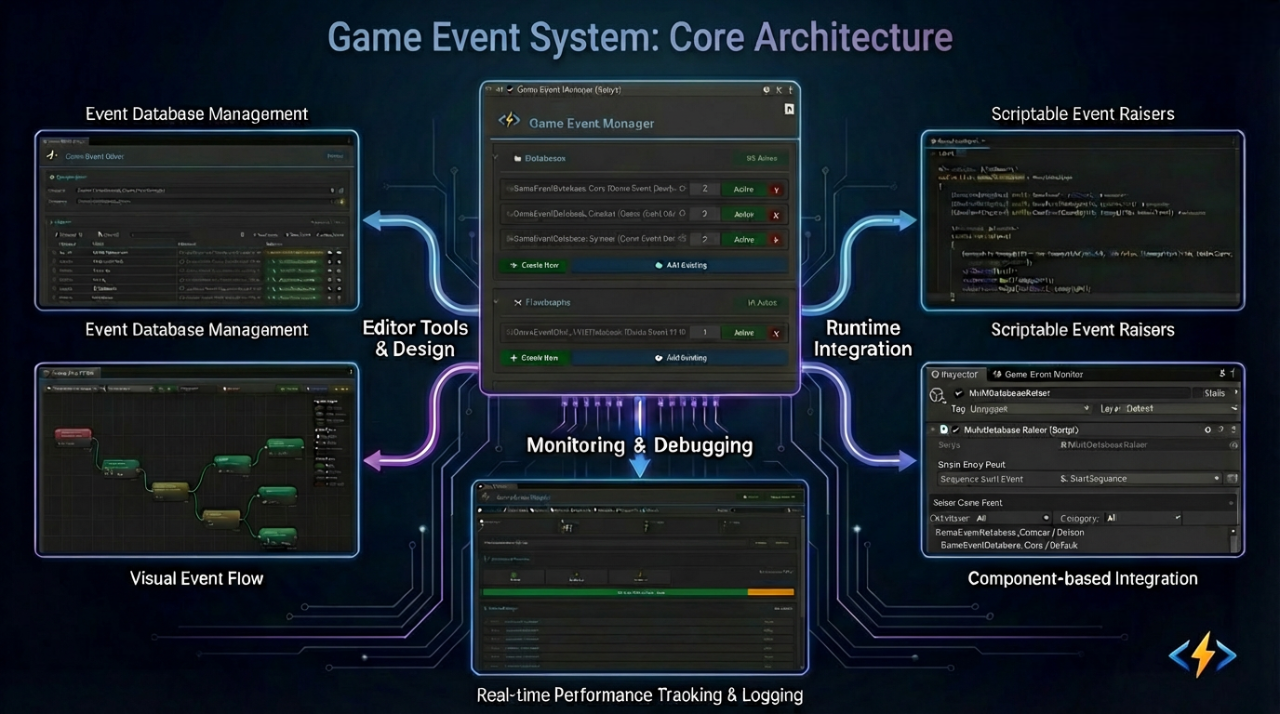
This changes everything about how event communication works:
Sender → references an Event Asset → Receiver references the same Event Asset
The sender doesn't know about the receiver. The receiver doesn't know about the sender. They both just know about the event. That's genuine decoupling — not the "decoupled via a singleton that everything depends on" kind, but actual architectural separation.
// Sender: raises the event. Doesn't know or care who's listening.
public class PlayerHealth : MonoBehaviour
{
    [GameEventDropdown, SerializeField] private GameEvent onPlayerDefeated; // Drag the asset in

    public void TakeDamage(float damage)
    {
        currentHealth -= damage;
        if (currentHealth <= 0f)
        {
            onPlayerDefeated.Raise(); // That's it. Done.
        }
    }
}
On the receiver side, you don't need to write any code. You only need to configure the Action in the Behavior Window.
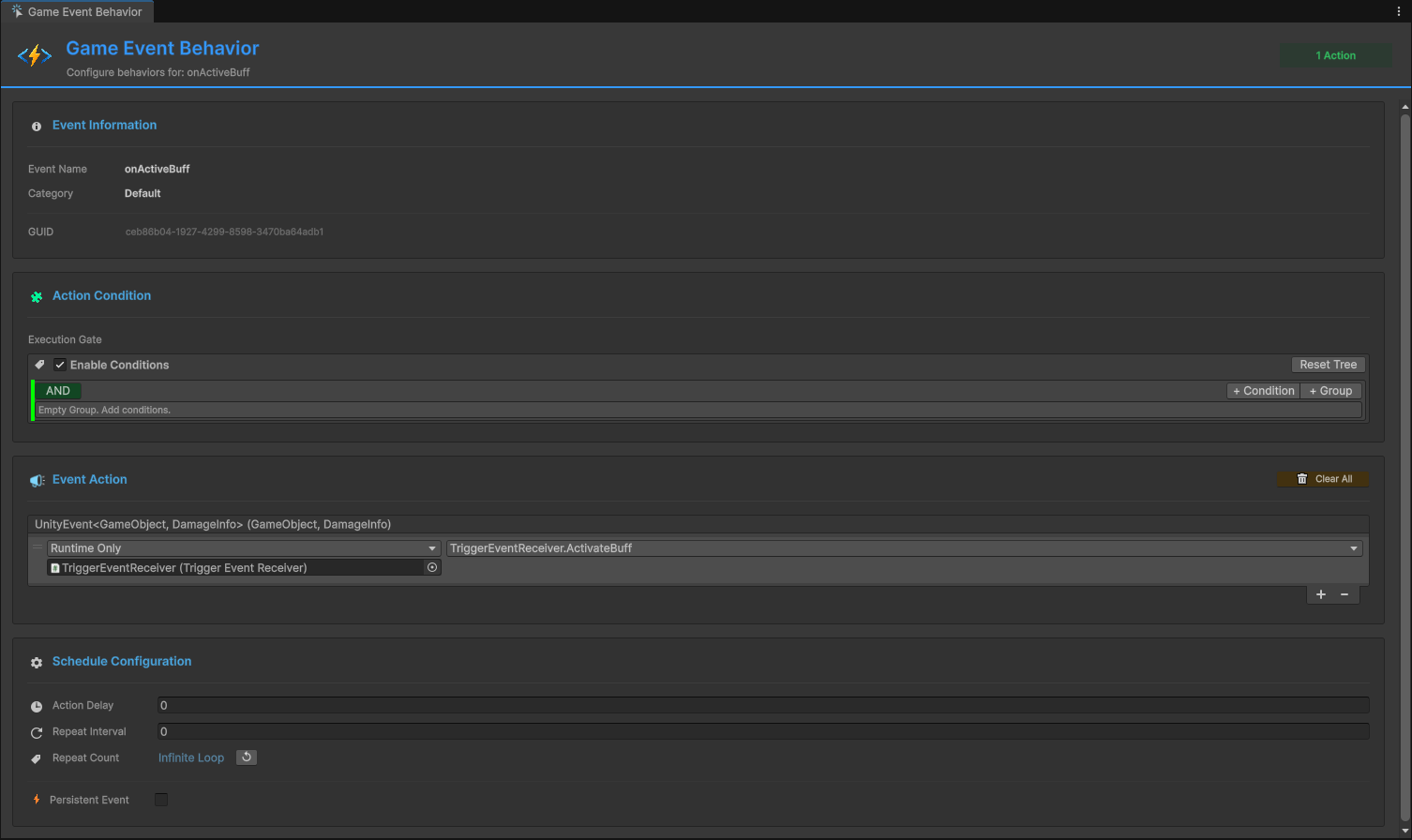
The Power of Visual Binding
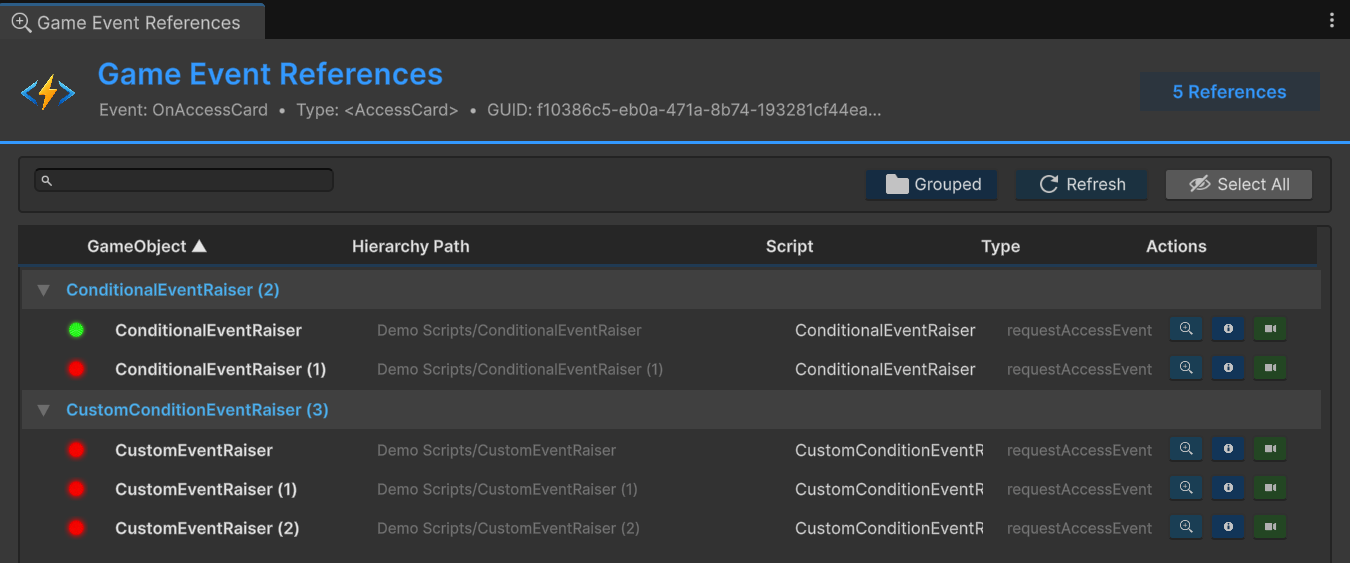
With GES, you can see everything. Click on an event asset, and the Inspector shows you every object that references it — both senders and receivers. Open the Event Editor window, and you get a bird's-eye view of your entire event architecture.
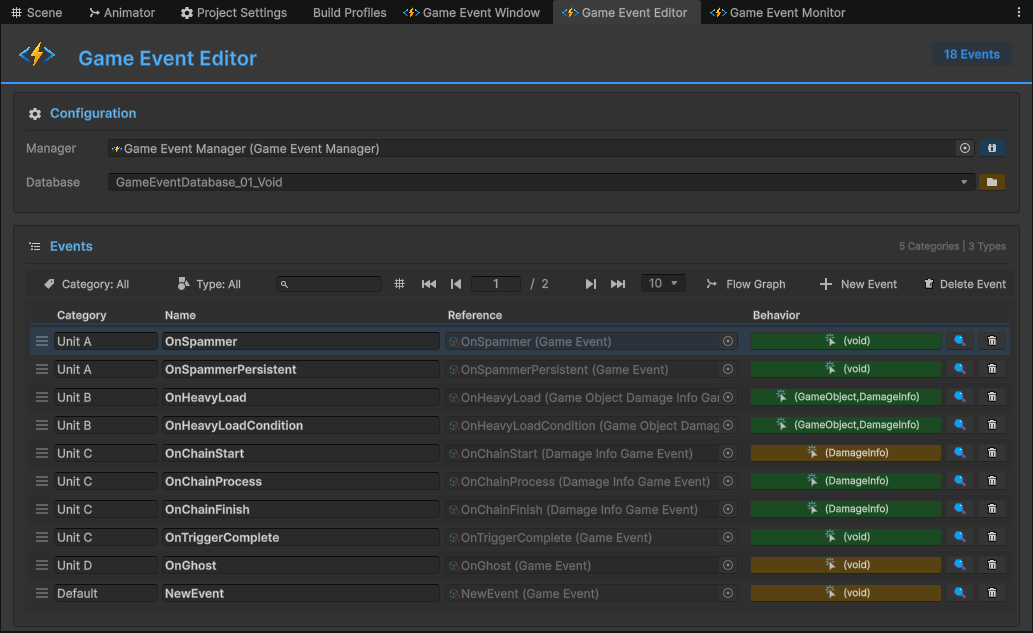
This isn't just convenience. It's a fundamental change in how you debug and maintain event-driven code. When something goes wrong, you don't grep through files. You click on the event asset and see exactly who's involved.
How GUID Protection Actually Works
Here's where GES solves the rename problem permanently. Every event asset has a GUID — a unique identifier assigned by Unity when the asset is created. When a component references an event, it's not referencing by name or path. It's referencing by GUID.
What does this mean in practice?
- Rename the event asset? References survive. The GUID doesn't change.
- Move the asset to a different folder? References survive. Same GUID.
- Rename a field on a listener? Doesn't matter — the binding is to the asset, not to a string.
- Refactor your entire project structure? As long as the
.assetfiles exist, every reference is intact.
This is the same mechanism Unity uses for all asset references (prefabs, materials, textures), applied to your event architecture. It's not a custom hack — it's leveraging Unity's own serialization system the way it was designed to work.
Compare this to the traditional approach:
// Traditional: rename "OnPlayerDied" to "OnPlayerDefeated" and everything breaks
UnityEvent onPlayerDied; // String-serialized method bindings are now invalid

// GES: rename the asset from "PlayerDied" to "PlayerDefeated"
// Result: every reference updates automatically. Nothing breaks. Ever.
The Decoupled Architecture in Practice
Let's walk through a real-world example. You're building an RPG. The player defeats a boss. Here's what needs to happen:
- Play a victory fanfare
- Show a "Boss Defeated!" UI popup
- Unlock the next area
- Award an achievement
- Log an analytics event
- Save the game
Traditional approach: the BossEnemy script has direct references to (or event subscriptions from) six different systems. Change any one of them, and you might break the boss fight.
GES approach: the BossEnemy script has one reference — to a BossDefeated event asset. It raises that event when the boss dies. The six systems each independently listen to that same event asset. The boss doesn't know about any of them.
// BossEnemy.cs — knows about NOTHING except its own event
public class BossEnemy : MonoBehaviour
{
    [GameEventDropdown, SerializeField] private GameEvent onBossDefeated;

    private void Die()
    {
        // Play death animation, etc.
        onBossDefeated.Raise();
    }
}
The audio system, UI system, progression system, achievement system, analytics system, and save system — all their responses are configured as Event Actions in the BossDefeated event's Behavior Window. You configure what happens visually: drag the target object, select the method. No code coupling. No invisible dependencies. No chance of a rename breaking something silently.
Want to add a seventh response — say, spawning a loot drop? Open the Behavior Window for BossDefeated, add a new Event Action, and point it at the loot spawner's spawn method. Done. You didn't touch a single line of existing code.
Want to remove the analytics logging? Delete that Event Action from the Behavior Window. No other system is affected.
This is what genuine decoupling looks like. Not "decoupled through an intermediary that everything depends on," but truly independent systems that communicate through shared, visible, GUID-protected event assets.
The Cross-Scene Problem: Solved
Remember the ghost subscription problem? ScriptableObject events handle this elegantly because ScriptableObjects live outside of scenes. They're project-level assets.
Event listeners subscribe when enabled and unsubscribe when disabled. This happens automatically through Unity's OnEnable/OnDisable lifecycle — the Behavior Window bindings handle this for you. When a scene unloads, all its GameObjects are destroyed, OnDisable fires, and they cleanly unsubscribe. No ghost references. No memory leaks. No MissingReferenceException.
And because the event asset itself persists across scene loads, you get free cross-scene communication. An event raised in the gameplay scene can trigger a response in the UI scene. An event from the loading screen can initialize systems in the main menu. It just works, because the event asset is the intermediary — not a scene-bound object.
// This works across scenes automatically.
// The event asset exists at the project level.
// Listeners subscribe/unsubscribe via OnEnable/OnDisable.
// No special setup. No DontDestroyOnLoad hacks. No singletons.
Making the Switch
If you're staring at a project full of invisible spaghetti — scattered += subscriptions, string-based events, fragile UnityEvent bindings — the prospect of refactoring might feel daunting. But here's the thing: you don't have to do it all at once.
Start with one system. Pick the most painful event interaction in your project — the one that breaks most often, the one you're afraid to refactor. Replace just that with a GES event asset. See how it feels. See how much easier debugging becomes when you can click on an event and see everything connected to it.
Then do another. And another. Gradually, the invisible spaghetti untangles itself. Your architecture becomes visible. Your event flow becomes a graph you can actually see and reason about, not a web of hidden delegate chains spread across 50 files.
Key Takeaways
- Invisible dependencies are the real enemy. It's not about having events — it's about being able to see and manage them.
- String-based serialization is a ticking time bomb. GUID-based references eliminate an entire category of runtime failures.
- Cross-scene communication shouldn't require hacks. ScriptableObject events solve this by existing outside the scene hierarchy.
- Decoupling means neither side knows about the other. If your "decoupled" system requires both sides to reference a shared singleton, it's not actually decoupled.
- Visual debugging changes how you think about architecture. When you can see your event flow, you design better systems.
The invisible spaghetti doesn't have to be invisible. And it doesn't have to be spaghetti.
🚀 Global Developer Service Matrix
🇨🇳 China Developer Community
- 🛒 Unity China Asset Store
- 🎥 Bilibili Video Tutorials
- 📘 Technical Documentation
- 💬 QQ Group (1071507578)
🌐 Global Developer Community
📧 Support & Collaboration